You build with Vue, or you are choosing against it, and you want to know what else holds up in production. Most lists answering this question rank tools that do not even solve the same problem, with bundle numbers no two sources agree on.
A Vue alternative is any library or framework that can own the user interface where Vue would have: rendering components, tracking state, and updating the DOM when state changes. Some candidates below replace Vue one-for-one; others replace the architecture around it.
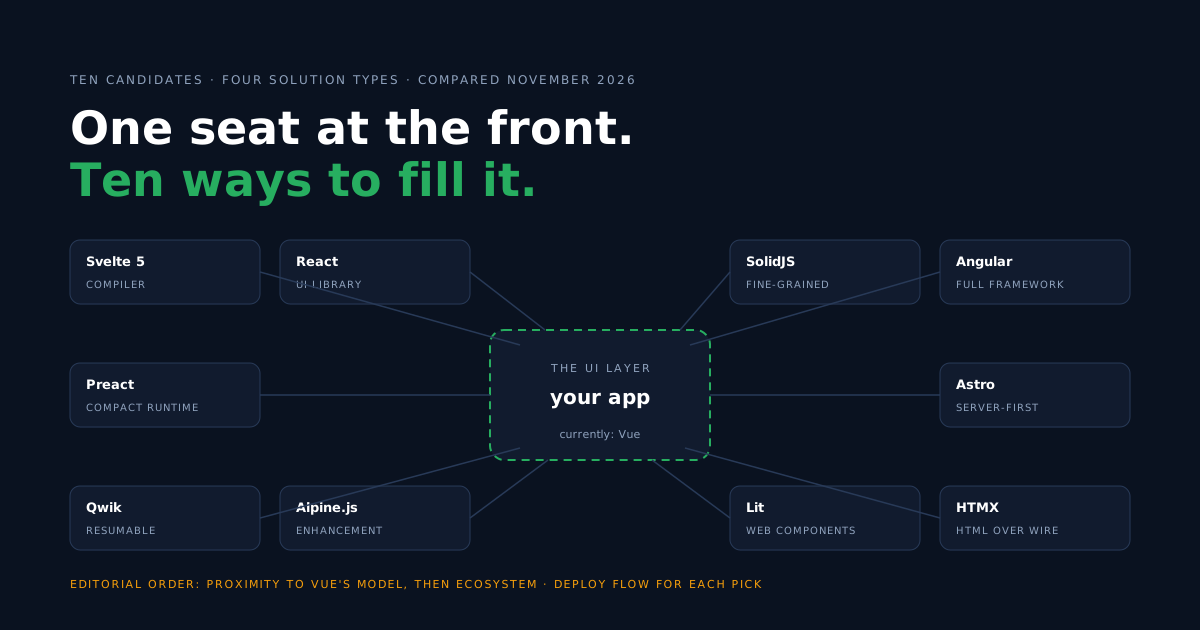
This guide compares ten of them. The order is editorial — how close each stays to Vue’s authoring model, then ecosystem weight — not a benchmark result. The only figure we quote is one we read ourselves from the npm registry on November 6, 2026, and each profile says how that framework reaches production.
Comparison table: the 10 Vue alternatives at a glance
The short answer in one table: who competes for Vue’s exact seat, who changes the architecture around it, and the one condition under which each pick beats staying on Vue.
| Framework | Solution type | JavaScript delivery | Best for | When it makes sense to replace Vue |
|---|---|---|---|---|
| Svelte 5 | Compiler + UI framework | Compiled components, no virtual DOM runtime | Teams who want Vue-like authoring, compiler-driven | You prefer compiled components over a runtime framework |
| React | UI library | Virtual DOM runtime + JSX | Hiring at scale, broadest library coverage | People and ecosystem outweigh syntax preferences |
| SolidJS | UI library (fine-grained) | Compiled reactive primitives, JSX, no virtual DOM | Reactivity purists, performance-sensitive UI | You want Vue-grade reactivity with JSX and less abstraction |
| Angular | Full framework | Full framework runtime, AOT-compiled | Large organizations standardizing one stack | You need one sanctioned way to do everything, org-wide |
| Preact | UI library (compact) | Small virtual DOM runtime, React-compatible API | Widgets, embeds, size-budgeted apps | You need the React API under a strict size budget |
| Astro | Server-first site framework | Zero JS by default, islands opt in — can render Vue components | Content sites with interactive islands | Most pages are content; note Astro can keep your Vue components |
| Qwik | Resumable framework | Serialized app state; JS prefetched, executed on interaction | Large apps where first-load time is critical | Slow start-up on low-end devices is your top complaint |
| Alpine.js | Enhancement layer | One small script tag, directives on server HTML | Sprinkling behavior onto server-rendered pages | The app is mostly server HTML and Vue is overkill |
| Lit | Web-components library | Small runtime over platform custom elements | Design systems shared across frameworks | Your components must outlive any one framework choice |
| HTMX | HTML-over-the-wire | Attribute-driven fragment requests, server renders | Server-rendered apps that want interactivity without a SPA | The server team owns the UI and JSON APIs feel like overhead |
Solution type is the column to read first. Svelte, React, SolidJS, Angular and Preact compete for Vue’s exact seat. Astro, Qwik, Alpine.js, Lit and HTMX change the architecture around that seat — comparing their bundle sizes to Vue’s would be comparing different jobs.
Why do teams look beyond Vue?
Five practical reasons come up, and two popular ones do not survive contact with Vue’s own docs.
- Hiring. In many markets React candidates are easier to source than Vue candidates — npm downloads do not measure this; check your own market. For some companies this single constraint decides.
- Bundle budget. A client-rendered Vue app ships the framework runtime. Compiled (Svelte, Solid), server-first (Astro, HTMX) and enhancement (Alpine) approaches can ship less for the same screen — measure yours before deciding on this reason.
- An ecosystem already chosen. A React design system, React Native, or an Angular-standardized enterprise makes the framework decision for you.
- Web-components strategy. Components that must work inside any host app point to Lit, not to any single-framework library.
- Server-first conviction. Teams that render HTML on the server and want to stay there reach for HTMX or Astro rather than a client framework.
Two reasons to be skeptical of. “Vue can’t do SSR” is false — server-side rendering is a documented, supported Vue workflow, and Nuxt productizes it. And “we need Astro, so we drop Vue” skips a fact: Astro renders Vue components inside its islands.
The 10 best Vue alternatives
Ranked by proximity to Vue’s authoring model first, ecosystem weight second. Every profile says what changes for a Vue team and when not to switch — because a migration that doesn’t pay is a bug in the plan, not in the framework.
1. Svelte 5
In every Vue vs Svelte comparison, the first impression is how alike they look: single-file components, scoped styles, template-first syntax. The difference is underneath — Svelte’s compiler turns components into direct DOM updates, so there is no virtual DOM runtime to ship or reconcile.
- Best for: teams who like how Vue feels and prefer compiler-driven components. If shipped size is the deciding factor, measure the same screen in both — the result depends on your app and dependencies.
- Main trade-off: a smaller ecosystem than Vue’s (and in most markets a smaller candidate pool), and Svelte 5’s runes made older tutorials and answers partially stale.
- Coming from Vue: SFC habits transfer almost directly;
$stateand$derivedrunes replacerefandcomputed; SvelteKit replaces Nuxt. - When not to switch: if Nuxt, Pinia and your component library already cover you, the authoring gain is marginal next to the migration cost.
- Deploy: SvelteKit’s Node adapter builds a server app that runs as a container — step-by-step deploy guide · starter repo.
2. React
React is the default alternative for reasons that have little to do with syntax: in many hiring markets the deepest candidate pool, the broadest library coverage, and meta-frameworks (Next.js among them) that settle most architecture questions for you.
- Best for: companies where hiring volume or an existing React ecosystem decides.
- Main trade-off: more explicit state management idioms; you assemble conventions Vue ships built in.
- Coming from Vue: templates and SFCs give way to JSX, and migrating from Vue to React means trading a reactive graph for explicit re-renders —
computedvalues becomeuseMemocaches (or React Compiler output), which is a different model, not an equivalent. Vue’s router and store are official packages too, but React leaves more of those choices open. - When not to switch: for performance — the architectures are close cousins, and a rewrite rarely buys render speed.
- Deploy: three tested paths (GitHub, upload, Docker) in the React deploy guide · starter repo; server-rendered React is the Next.js SSR guide.
3. SolidJS
Solid reads like React but reacts like Vue. Components run once; fine-grained signals update exactly the DOM nodes that depend on them. Vue developers recognize the reactivity instantly — signals are ref without the virtual DOM behind it.
- Best for: teams that want Vue-grade reactivity with JSX and minimal abstraction.
- Main trade-off: the smallest ecosystem of the top five; expect fewer ready-made components and, in most markets, longer hiring searches.
- Coming from Vue:
createSignalfeels likeref,createMemolikecomputed— but components not re-running means.map()and&&give way to<For>and<Show>. - When not to switch: when the team leans on a large component-library ecosystem; you will be writing more yourself.
- Deploy: a Vite build served by nginx — step-by-step deploy guide · starter repo.
4. Angular
Is Angular good for enterprise teams in 2026? That is its exact pitch: a sanctioned default for most decisions — forms, routing, dependency injection, testing — on a published long-term-support schedule.
- Best for: large organizations standardizing a single stack across many teams.
- Main trade-off: the steepest learning curve here, and the most framework between you and the DOM.
- Coming from Vue: the component model translates; the mental shift is accepting the framework’s decisions instead of making your own.
- When not to switch: small teams and small apps — Angular’s structure earns its cost at organizational scale, not under it.
- Deploy: for a client-rendered app,
ng buildemits static files for nginx — step-by-step deploy guide · starter repo.
5. Preact
Preact implements the React API in a runtime a fraction of the size, with a compat layer that lets most React libraries run unchanged. It is the pragmatic answer when the API is decided but the byte budget is not.
- Best for: embedded widgets, micro-frontends, and apps with a strict size budget.
- Main trade-off: you inherit React’s idioms without React’s full ecosystem guarantees; edge cases in compat exist.
- Coming from Vue: same move as React, smaller payload; you still give up SFCs and templates.
- When not to switch: when bundle size is not actually your constraint — measured, not assumed.
- Deploy: Vite build, nginx, container — step-by-step deploy guide · starter repo.
6. Astro
Astro inverts the default: pages are server-rendered HTML, and JavaScript loads only for the islands you mark interactive. The twist for this list: those islands can be Vue components — Astro is as much a way to keep Vue as to leave it.
- Best for: content-heavy sites — docs, marketing, blogs — with a few interactive regions.
- Main trade-off: it is a site architecture, not an app framework; a dashboard full of state is the wrong fit.
- Coming from Vue: potentially nothing changes inside components —
.vuefiles keep working inside islands via the official integration. - When not to switch: highly interactive apps where most of the page is an island anyway.
- Deploy: static output or SSR via the Node adapter — step-by-step deploy guide · starter repo with both modes.
7. Qwik
Qwik targets one number: time until a just-loaded page responds. It serializes application state into the HTML and resumes the server’s work instead of re-executing it — JavaScript may be prefetched ahead of time, and application code is deferred until needed (the framework loader itself runs earlier).
- Best for: large, conversion-sensitive apps whose main problem is slow first load on low-end devices.
- Main trade-off: the youngest model here — smallest community, and resumability changes how you reason about loading.
- Coming from Vue: component authoring feels JSX-familiar; the lifecycle mental model is genuinely new.
- When not to switch: if your first-load numbers are already fine, resumability solves a problem you do not have.
- Deploy: Qwik City’s Node adapter builds a server app — step-by-step deploy guide · starter repo.
8. Alpine.js
Alpine puts Vue-flavored directives — x-data, x-on, x-show — directly on server-rendered HTML, from one small script tag, no build step. It is the closest syntax relative of Vue on this list, aimed at a different job.
- Best for: dropdowns, modals and toggles on pages a server already renders.
- Main trade-off: it is deliberately light on structure for complex apps — global state exists (
Alpine.store()), but components, routing and data layers are yours to bring. - Coming from Vue: the directives read like Vue templates; components, routing and data layers are what you leave behind — global state itself exists via
Alpine.store(). - When not to switch: a real application UI — many screens, shared client state, offline needs. Alpine gives you less structure to grow into, by design.
- Deploy: it is a script tag on your HTML — our static site in a container guide applies directly to an Alpine page.
9. Lit
Lit builds on the platform’s own component model: custom elements with a small templating runtime on top. A Lit component works inside a Vue app, a React app, or no framework at all — which is exactly its argument.
- Best for: design systems and components that must outlive framework churn.
- Main trade-off: application concerns — routing, state, data — are yours to assemble around it.
- Coming from Vue: reactive properties and templates feel familiar; the app-framework conveniences are gone.
- When not to switch: building one product app, fast — an app framework carries more of that weight.
- Deploy: a Vite build behind nginx — step-by-step deploy guide · starter repo.
10. HTMX
HTMX removes the client framework instead of replacing it. Attributes on HTML elements issue requests; the server answers with HTML fragments that swap into the page. The UI logic lives where your team may already be: on the server.
- Best for: server-rendered apps (any backend language) that want modern interactivity without a SPA.
- Main trade-off: client-only state and offline behavior are outside the model; complex widgets still need some client code.
- Coming from Vue: the biggest shift on this list — components and client state give way to endpoints returning HTML.
- When not to switch: rich client state (editors, dashboards, collaborative UIs) — the round trip becomes the bottleneck.
- Deploy: the container runs your server in any language — step-by-step deploy guide · Node reference implementation.
How to choose: constraint → pick
- Team loves Vue’s authoring, wants less shipped JS → Svelte.
- Hiring market or an existing React ecosystem decides → React (Preact under a strict size budget).
- Fine-grained reactivity with JSX → SolidJS.
- One stack, many teams, long support windows → Angular.
- Content site, islands of interactivity → Astro — possibly keeping your Vue components.
- First-load time on slow devices is the complaint → Qwik.
- Server renders the pages; you want sprinkles → Alpine.js or HTMX.
- Components must survive framework churn → Lit.
And the option every list should state: staying on Vue. SSR is supported, Vite is first-class, Nuxt answers the architecture questions. If Vue meets requirements and the team is fluent, a migration’s cost lands now and its benefit may never arrive.
When your app needs a backend
A static site or a local tool may need no backend at all. The moment your app needs authentication, shared data, file storage or server-side logic, those needs are framework-independent — all ten candidates speak HTTP.
That is the split Back4app serves: a Backend-as-a-Service provides auth, data and APIs as a managed service, and Containers run whatever server process you bring — an SSR app, an HTMX server, an API of your own.
Deploying each alternative in a container
The examples in this guide deploy as static assets or as server applications — the runtime depends on the framework and its adapter (HTMX, notably, works with a server in any language). The flow on Back4app Containers is the same:
- Push the app with a Dockerfile to a GitHub repository.
- Create a Containers app and connect the repository.
- Set the port and a health-check path.
- Push, then trigger the deploy from the dashboard (paid plans can turn on auto-deploy so every push deploys itself); the app gets a managed HTTPS URL.
Deploy guides in this series: every framework above links its own step-by-step tutorial, plus static sites and Alpine.js, Node servers and Next.js SSR.
Each of those nine guides also shows the same deploy run from an AI assistant through the Back4app MCP server — the assistant uploads the folder and follows the deployment, while the build stays the one the guide describes.
Every framework in this list has a public starter repo with a production Dockerfile under templates-back4app, each with its measurements committed in docs/evidence.
What’s next?
Pick two finalists and prototype one real screen from your app in each — a list with filters, a form with validation. The constraint that decides will surface in an afternoon. When the screen works, two paths forward:
- Deploy the frontend or server app → Back4app Containers take any of the ten from repository to HTTPS URL. The free plan is enough to test (its URL lives 60 minutes from the app’s creation), paid plans host.
- Add authentication and shared data → a managed backend serves any of the ten over REST and GraphQL.