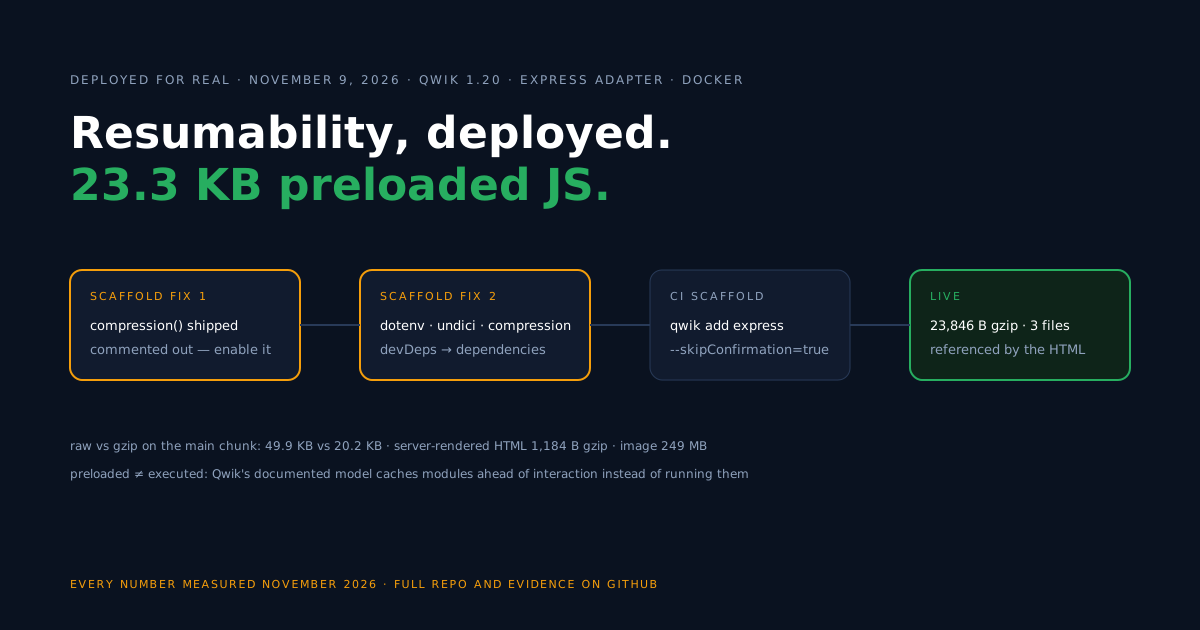
Qwik’s core bet is resumability: the server renders the page and serializes its state into the HTML, so the browser continues from that state instead of re-executing the application on load.
JavaScript is prefetched ahead of interaction rather than run at startup — that is the documented model (modules prefetching), and it only exists in production if the server deploy works.
So this guide deploys the minimal Qwik City app to a public URL with the Express adapter. The road there included two scaffold defaults that quietly sabotage production containers; both fixes live in the companion repo (Qwik and Qwik City 1.20.3, Express 4.22.0).
Check your starting point
A quick triage, since Qwik projects differ mainly in whether the server adapter exists yet.
| Your Qwik project | State | Entry point here |
|---|---|---|
Fresh npm create qwik@latest | no server adapter | start at the scaffold section |
Adapter already added (src/entry.express.tsx exists) | check the two scaffold defaults | jump to the fixes |
| Fixes applied, builds green | ready to containerize | the Dockerfile onward |
Also worth absorbing early: our testing ran on the free plan, where a deployed URL is disposable by design — it expires 60 minutes after the app is created, and a redeploy inside that window did not push the deadline back. Everything in this guide fits inside that window; permanence is the paid plans’ feature.
Scaffold the app and add the Express adapter
Two CLI quirks surfaced before any code was written, both relevant if your setup runs in CI or any non-interactive shell.
First, the template name: npm create qwik@latest offers no “basic” option — the choices are empty (the standard starter with routing, which we used), playground, e2e-library and library. The non-interactive scaffold we ran:
npm create qwik@latest empty ./qwik-container-starter -- --installDepsSecond, the adapter: npm run qwik add express wants a TTY and dies without one (ERR_TTY_INIT_FAILED). The escape hatch is a flag the docs don’t mention — we pulled it out of the CLI source:
npx qwik add express --skipConfirmation=trueThat writes src/entry.express.tsx, the adapters/express/ Vite config, and the build scripts. From here, npm run build produces both halves: client assets in dist/ and the server in server/entry.express.js.
Fix 1: enable compression
Open the generated src/entry.express.tsx and you’ll find the compression middleware present but disabled — shipped as a commented-out line. The repo turns it on:
// src/entry.express.tsx (scaffold ships this line commented out)
app.use(compression());
The cost of leaving it off is not subtle: in our measurements the app’s main chunk crossed the wire at 49.9 KB raw where gzip delivers the same file at 20.2 KB. On the live deploy the document arrived with Content-Encoding: gzip — true only because of this one uncommented line.
Fix 2: move runtime packages to dependencies
The built server/entry.express.js imports express, dotenv/config and undici when it starts. The scaffold classifies express correctly, but registers dotenv, undici and compression under devDependencies — which a production image never installs. Run npm ci --omit=dev in the runtime stage, start the container, and it dies reaching for packages that aren’t there.
The repo’s package.json relocates all three to dependencies, where the runtime install can see them:
"dependencies": {
  "express": "4.22.0",
  "dotenv": "^16.3.2",
  "undici": "^7.16.0",
  "compression": "^1.7.4"
}
After editing package.json, run npm install so package-lock.json reflects the new classification, and commit both files — the Dockerfile’s npm ci installs strictly from the lockfile, so a stale one re-creates the crash you just fixed.
Build the Docker image
With both fixes in, the Dockerfile is a standard two-stage affair — full install to build, production-only install to run, then dist/ and server/ copied across.
# ---- Build stage ----
FROM node:22-alpine AS build
WORKDIR /app
COPY package.json package-lock.json ./
RUN npm ci
COPY . .
RUN npm run build

# ---- Runtime stage ----
FROM node:22-alpine
WORKDIR /app
ENV NODE_ENV=production PORT=8080

# The built Express entry (server/entry.express.js) imports express,
# dotenv and undici at runtime, so install production deps only.
COPY package.json package-lock.json ./
RUN npm ci --omit=dev && npm cache clean --force

COPY --from=build /app/dist ./dist
COPY --from=build /app/server ./server

EXPOSE 8080
HEALTHCHECK --interval=30s --timeout=3s --start-period=5s \
  CMD wget -qO /dev/null http://127.0.0.1:8080/ || exit 1
USER node
CMD ["node", "server/entry.express"]
Note what’s absent: no HOST variable. The Express server listens on PORT (default 3000) and binds all interfaces out of the box, so the only env var the container needs is the port. Build and check locally with docker build -t my-qwik-app . and docker run -p 8091:8080 my-qwik-app.
Deploy on Back4app
The platform leg of the trip is short; the screenshots below come from this series’ shared deploy flow, where the screens are identical.
- Start a New Web Deployment and hand it the GitHub repository.
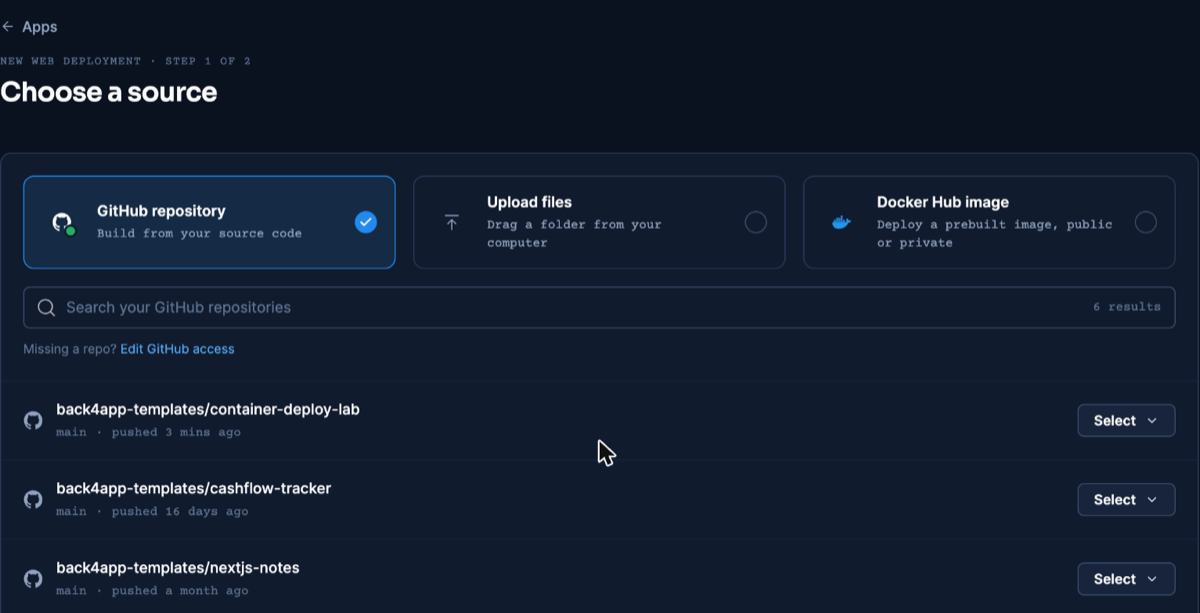
Repository selection — dashboard as of November 2026.
- Dockerfile is auto-detected as the build method; the Port field is not auto-filled from it. Type 8080 — we set it at app creation, since the platform ignores the Dockerfile’s
EXPOSE, a trip-up first documented (with its error message) in the React deploy guide.
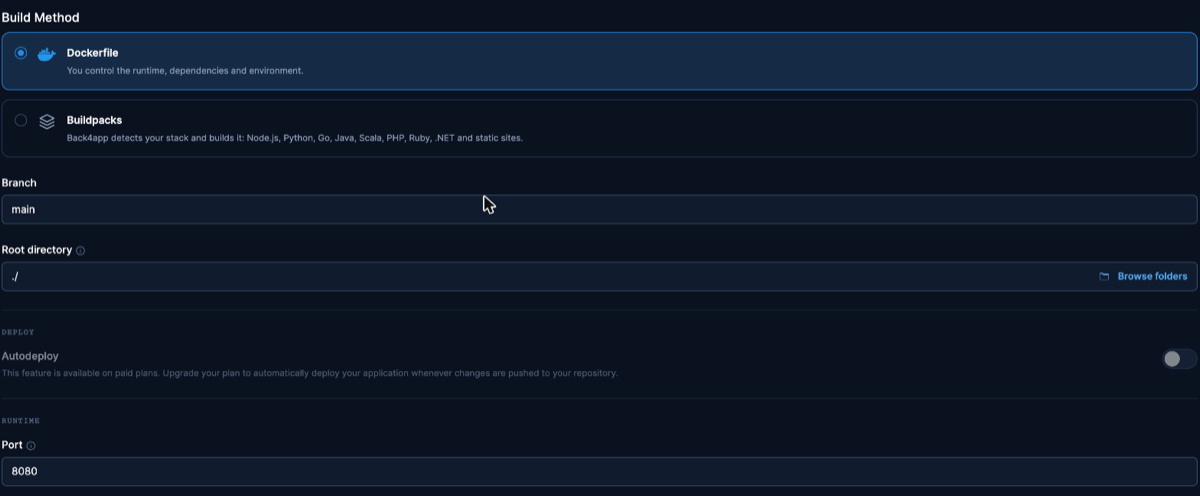
The Port field — the one setting worth double-checking. Dashboard as of November 2026.
- Create the app and wait for the first build to come up on its public HTTPS URL; our creation-to-serving time is in the measurements table.
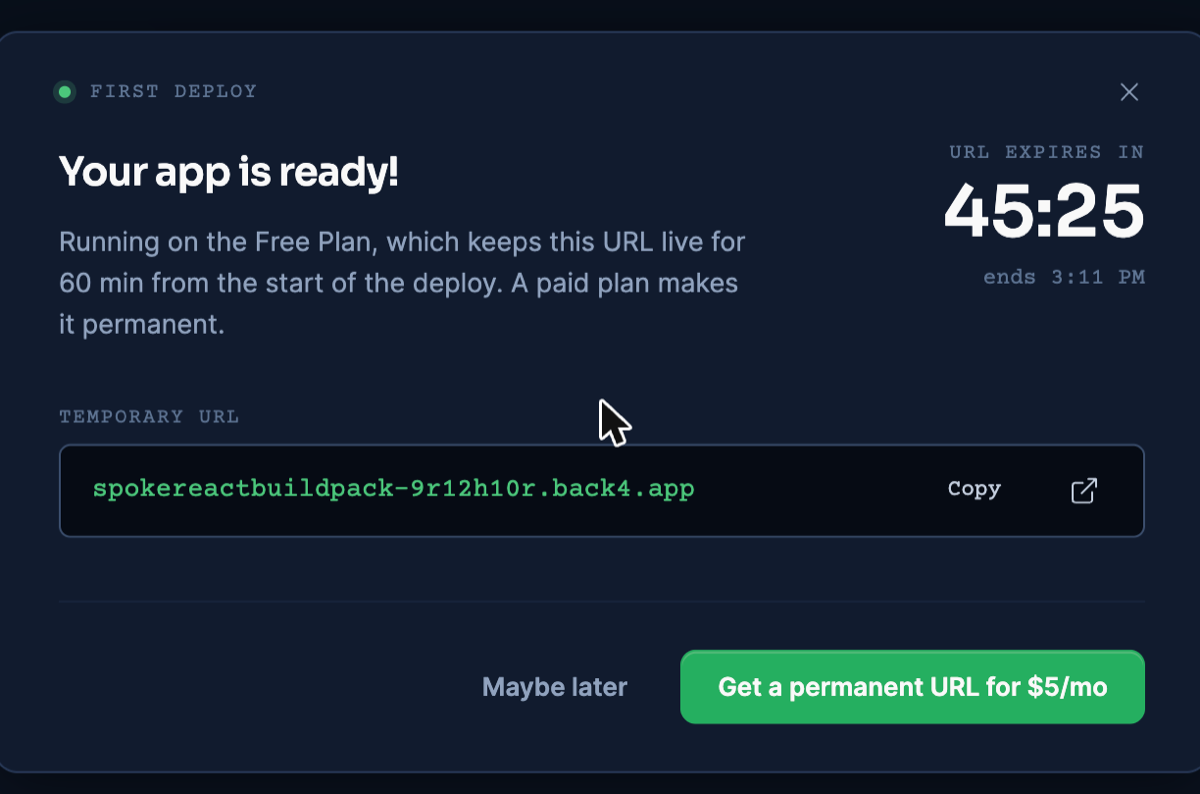
Free-plan URL, 60-minute lifetime shown on its countdown. Dashboard as of November 2026.
Verify the live deployment
What a curl-based check can and cannot establish is worth being exact about, so here is both halves of it, read off the live URL on November 9, 2026.
What we observed: the HTML came back server-rendered (the <h1> content present in the document itself), the responses carried Content-Encoding: gzip, and the document referenced a small set of preloaded script files whose combined transfer matched the local container byte for byte — exact figures in the measurements table.
What the observation does not include: whether those files executed. HTTP responses cannot show that. The claim that preloaded modules wait for interaction instead of running on load comes from Qwik’s documented architecture — the prefetching model caches modules ahead of need, while the page boots from its serialized state.
Nor does the model mean no code ever runs before you click: Qwik’s loader runs, and applications can schedule their own client-side work with tasks. The honest summary: our bytes are measured; the execution behavior is Qwik’s documented design.
Let an AI assistant run the deploy (MCP)
With Back4app’s remote MCP server connected, an assistant can upload this folder and deploy it without the dashboard. The Dockerfile above still does the building; MCP is the remote control. Per-client setup: official MCP page.
Which tools the assistant calls, and in what order, is in the MCP deploy guide.
Our run on November 10, 2026 (Claude, custom connector, signed in) used create_upload, the npx @back4app/cli upload command it hands back, and create_web_app with port 8080. The app got builder: DOCKERFILE and took about 238 seconds to reach READY — the longest of the series.
The build log explains the wait: npm ci for 551 packages took 109 seconds and the build 55. On the public URL the rendered heading was in the HTML and the page referenced the same three JavaScript files (23,846 B).
One log line will mislead an assistant that reads build logs literally. Qwik’s “Unable to load native binding … Falling back to wasm build.” is tagged ERROR in a build that succeeds. Treat the deployment status as the verdict, not the log level.
Ids, timings and the log excerpt: MCP evidence file.
Update the deployed app
Once the app exists, a release is: push the commit, open App actions, click Deploy the latest commit — the rebuild takes over the existing URL, which we confirmed on this platform. Paid plans can replace the click with deploy-on-push.
Re-creating the app also picks up the branch tip, but at the price of a fresh URL, so treat it as the option of last resort. The full update-flow verification, including a caveat about changed branch settings, lives in the React article.
Measurements
The live deploy ran the starter at commit 29f6574; local figures are from November 6, 2026, live figures from November 9, 2026. Transfer sizes are kept apart from on-disk sizes. Raw data and method: the repo’s evidence files.
| What | Value | Where |
|---|---|---|
| JS referenced/preloaded by the served HTML (transfer) | 23,846 B gzip across 3 files | live URL |
| HTML document on / (transfer) | 1,184 B gzip, server-rendered | live URL |
| App creation → serving | ~3 min | deploy timeline |
| TTFB on / (3 illustrative requests) | 1.806 s · 1.710 s · 1.612 s | live URL |
| Main chunk, raw vs gzip (transfer) | 49.9 KB vs 20.2 KB | local |
| npm ci / npm run build | 2.9 s / 6.3–6.9 s (client + SSR + type-check + lint) | local |
| docker build (no cache) | 56.5–56.7 s | local |
| Image size (on disk) | 249 MB | local |
| Build output (on disk) | 188 KB (dist/) + 148 KB (server/) | local |
Troubleshooting
ERR_TTY_INIT_FAILED from qwik add — the adapter installer needs a terminal you don’t have (CI, scripts, agents). Run npx qwik add express --skipConfirmation=true instead; undocumented but present in Qwik 1.20.3’s CLI.
Container boots, then crashes importing dotenv/config or undici — those packages (plus compression) sat in devDependencies, so your npm ci --omit=dev never installed them. Move them to dependencies, run npm install to refresh package-lock.json, commit both, rebuild.
Assets transfer at roughly double their expected size — app.use(compression()) is still commented out in src/entry.express.tsx. Uncomment it; confirm with a response header showing Content-Encoding: gzip.
Deploy fails at launch with Please mention a port in settings to expose — the Port field defaulted to auto and ignored EXPOSE. Set 8080 under Build & deploy and redeploy.
Limitations of this setup
The flow’s real edges, separate from anything Qwik promises.
- Free-plan mechanics: the URL expires 60 minutes after the app’s creation and each release takes a manual dashboard action; paid plans lift both.
- Execution behavior is architectural, not measured: our HTTP evidence covers bytes and rendering; that prefetched modules stay unexecuted until needed is Qwik’s documented design, and apps can still run client-side tasks they schedule themselves.
- A scaffold you must patch: until the upstream defaults change, every fresh
qwik add expressproject re-needs the two fixes above — they are per-project, not per-machine. - Minimal-app numbers: the measurements describe the empty starter; routes, components and libraries you add will move every figure.
Auth, data and APIs are the next step, not a gap in the flow: your Express entry can grow server routes for them, or a managed backend can take them over REST and GraphQL while the container stays a renderer.
What’s next?
Apply the two fixes to your own scaffold — or skip them by starting from the companion repo — and put your app on a public HTTPS URL (Containers docs).