You run a small company and the cash book is a spreadsheet. It works until two people edit it, until someone wants a running balance per day, or until you need a report that a formula cannot give you. The next step is a web app — and the moment you say “web app” you are also saying login, a database, validation and hosting.
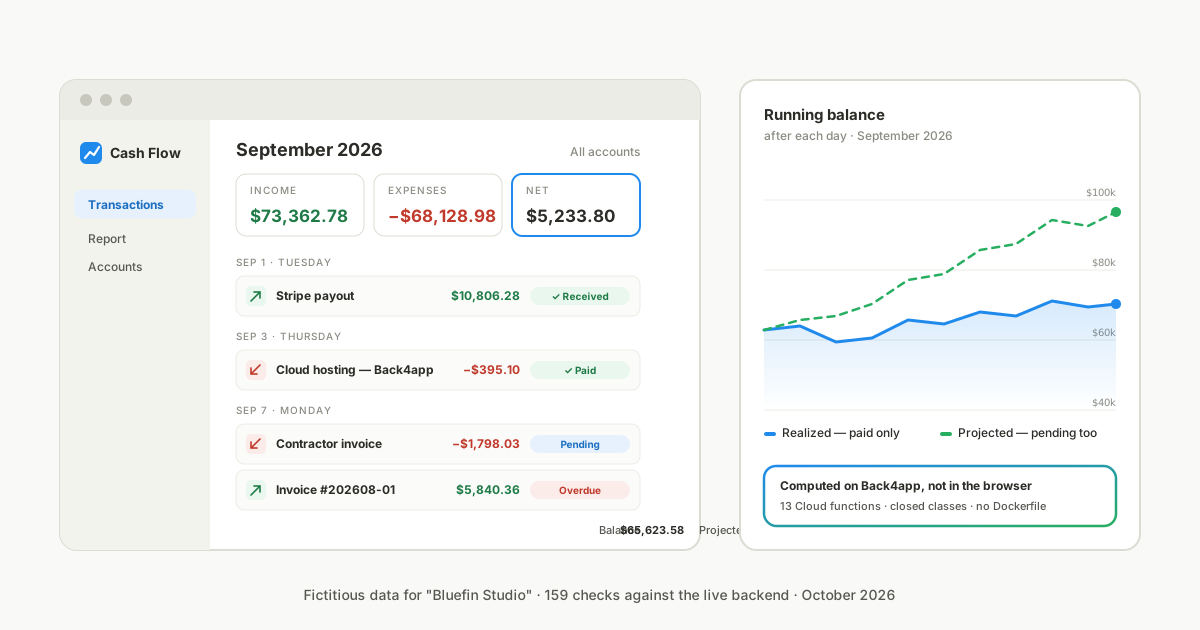
We rebuilt one of our own: a cash flow tracker with three screens — transactions by month with a running balance after each day, income and expenses by category, accounts — on a Back4app backend and a Back4app container.
The browser side is plain JavaScript. The server side is 13 Cloud functions behind three classes nobody else can read. The web app deploys from GitHub with the Node.js Buildpack, so there is no Dockerfile in the story.
Try it, deploy it, read it: the live demo is at cashflowtracker-yg1lw573.b4a.run — sign in with demo / bluefin-demo-2026, read only, fictitious data. The full repo is at github.com/back4app-templates/cashflow-tracker.
Building it with an AI agent? Point it at AGENTS.md and docs/api.md in the repo: the manual steps, what to hand back to a human, and the exact contract of every function.
Everything below was executed on October 8–9, 2026. The numbers are from those runs, and the logs are in the repo under docs/evidence/.
What does the cash flow tracker do?
It keeps one organization’s cash book: accounts with an opening balance, categories, and transactions that are income, expense or a transfer between two accounts. Each transaction has a due date, an accrual date and, once settled, a payment date. That is the whole model — three classes.
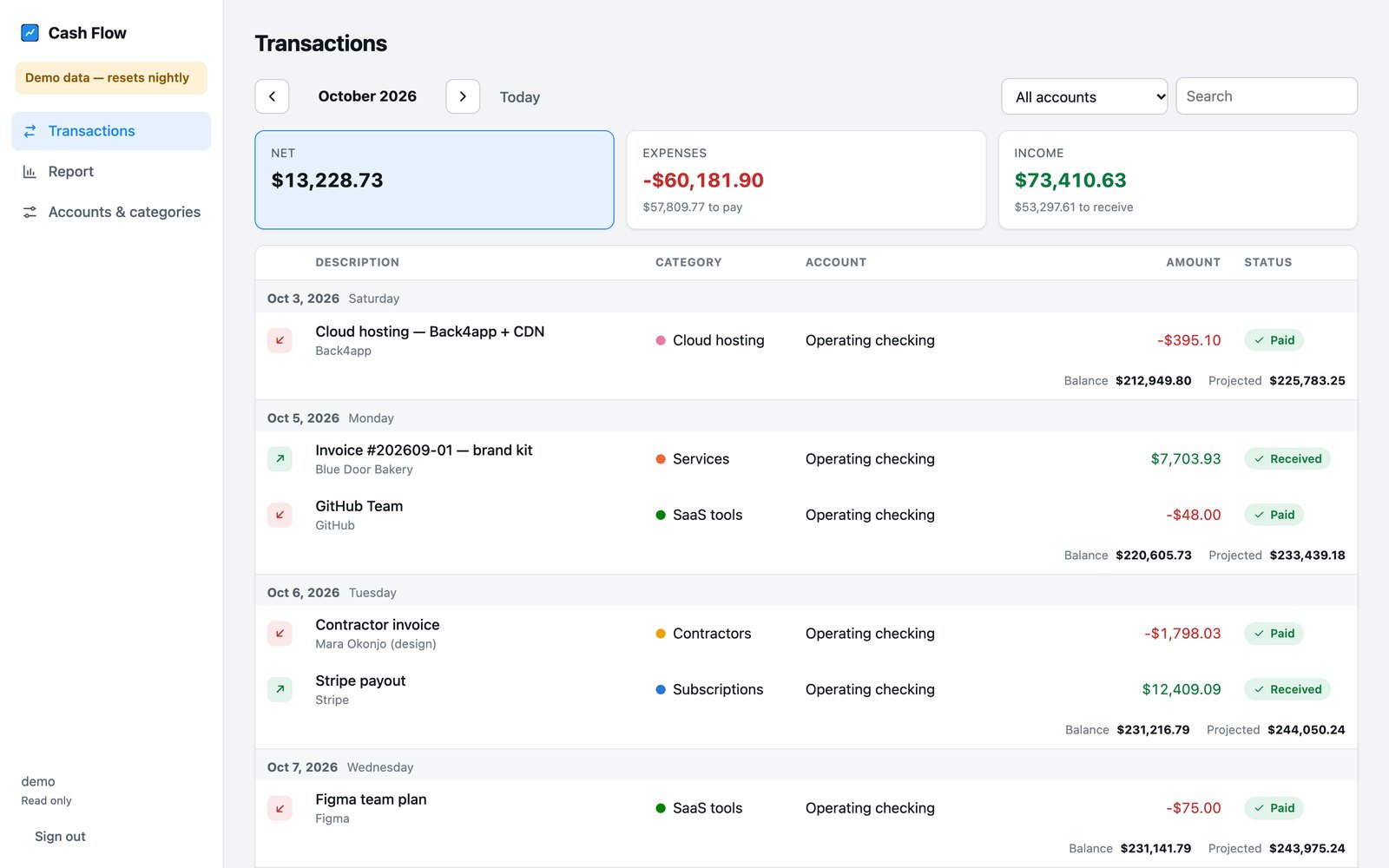
The Transactions screen shows one month at a time. Cards at the top give net, expenses and income with what is still to pay or to receive. Rows are grouped by day, and after each day the screen prints the running balance twice: realized (paid rows only) and projected (everything, pending included).
A status pill — Paid, Pending, Overdue — toggles payment with one click. Search and an account filter narrow the list.
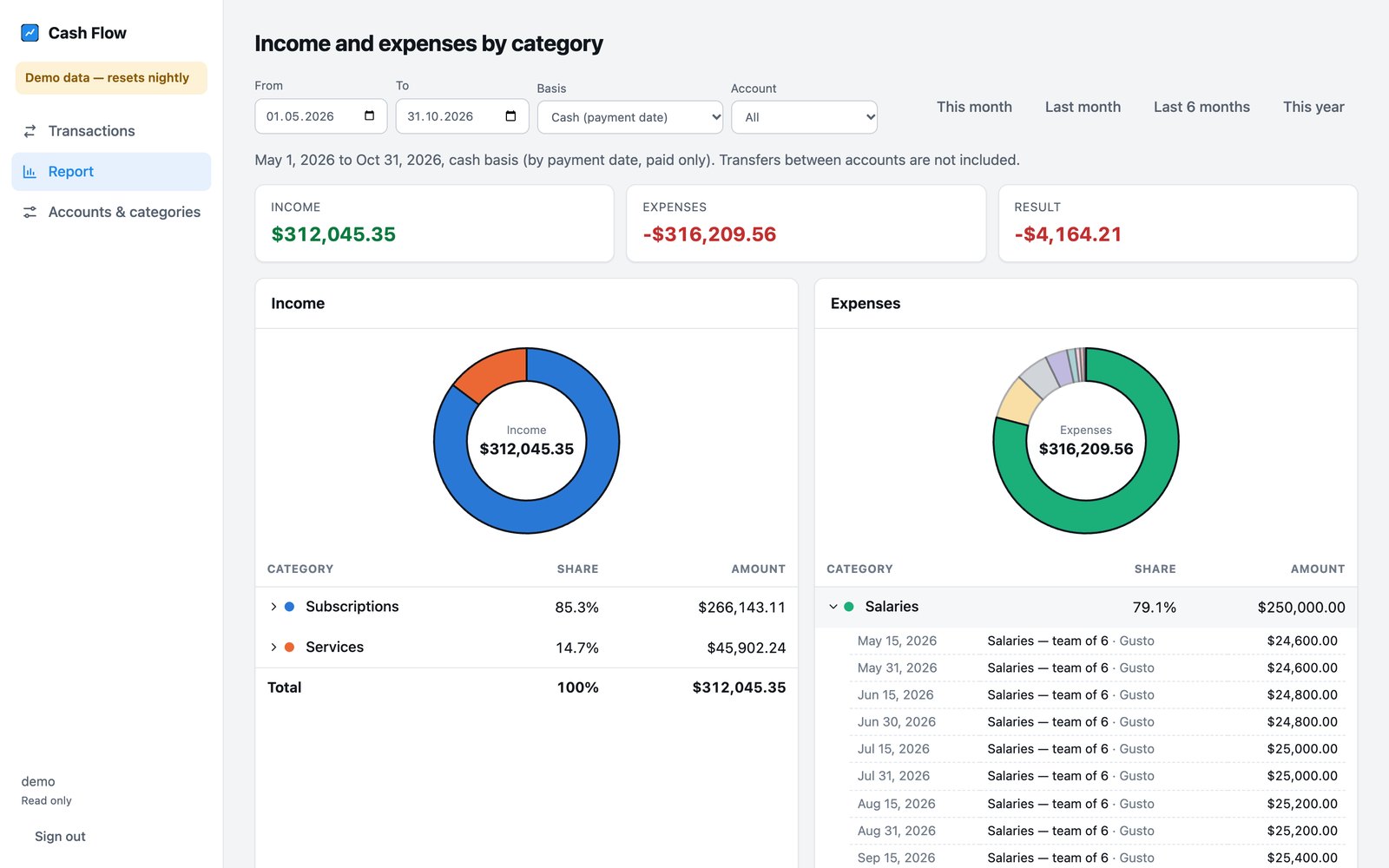
The Report screen groups income and expenses by category over any range up to 24 months, on a cash basis (by payment date, paid only) or an accrual basis (by accrual date, pending included), with a donut chart and expandable rows. Accounts & categories is the CRUD screen with the current balance of each account.
What it is not: multi-tenant SaaS, bank sync, an audit trail, or double-entry accounting. The last section says when to reach for those instead.
Who does what: browser, backend, container
The browser renders and formats; the backend decides; the container serves. Here is the split, because it is the design decision the rest of the post hangs on.
| Layer | Does | Does not |
|---|---|---|
Browser (public/, vanilla JS, no bundler) | Renders 3 screens and sign-in; calls Cloud functions through the Parse JS SDK; hides controls the role cannot use | Touch any class directly; decide anything on its own |
Backend (Back4app, cloud/main.js) | Users, sessions, roles; all validation in beforeSave/beforeDelete hooks; balances and reports with aggregate pipelines; a nightly snapshot job | Expose classes to clients: their class-level permissions allow nobody |
Container (server.js, 40 lines of Express) | Serves the static app, serves /config.js built from environment variables, answers /healthz with the running version | Hold the master key; run business logic |
Back4app supplies the managed database, user and session infrastructure, the runtime for Cloud Code, hosting and TLS. You still write the 13 endpoints, their authorization, validation and logic, and the client’s sign-in flow — the setup script and the dashboard steps below are the whole list.
Why a 40-line container instead of static hosting? Three concrete reasons. The public keys come from environment variables, so a reader deploys their own copy by setting four values and never editing code. /healthz returns the running version, which is how you tell a new deploy from a healthy old one. And it is the path that needs no Dockerfile.
If none of those matter to you, Web Deployment serves the same files for less.
Deploy it: the quick path
Prerequisites: a Back4app account (free), Node.js 22 or newer on your machine, Git, and a GitHub account for the container deploy.
-
Create the backend. Dashboard → New App → Build your Backend → name it → Create. It is ready in under ten seconds.
-
Copy the keys. App Settings → Security & Keys. Copy
.env.exampleto.envand fillAPP_ID,JS_KEY,REST_KEYandMASTER_KEY(click Show key for the last one). -
Set up the backend from your terminal. Nothing to click: classes, closed permissions, roles, the first users and the config are created by one idempotent script.
npm install
npm run setup -- --demo --reference-date 2026-09-30
Expected output, verbatim from our run:
schema Account: created
schema Category: created
schema Transaction: created
schema Snapshot: created
schema _User: updated (1 new field(s))
schema _Role: updated (0 new field(s))
role finance: created (d5a0JwFETo)
role viewer: created (M7t0oAO8G8)
user finance: created (sizFAZuX6S); password saved to .credentials.local.json
user demo: created (UWj2a8VtZo); password saved to .credentials.local.json
config: orgTimezone=America/New_York demo=true referenceDate=2026-09-30
Drop --demo --reference-date for a real ledger: demo controls the banner and the nightly reseed, referenceDate freezes “today” so the test suite is reproducible.
- Deploy the Cloud Code. Cloud Code in the dashboard → Upload → Upload Files →
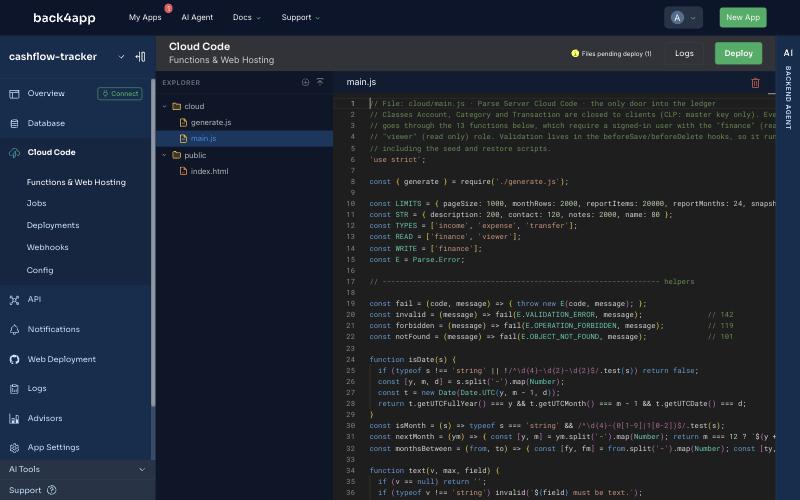
cloud/main.jsandcloud/generate.js→ wait for the badge Files pending deploy (2) → Deploy. Then prove it with a request, not with the dialog — the reason is in the findings section:
curl -s -X POST https://parseapi.back4app.com/functions/base \
  -H "X-Parse-Application-Id: $APP_ID" -H "X-Parse-REST-API-Key: $REST_KEY" \
  -H "Content-Type: application/json" -d '{}'
{"code":209,"error":"Sign in to use the ledger."}A 209 is the right answer: the function exists and refuses an anonymous caller. {"code":141,"error":"Invalid function: \"base\""} means nothing was deployed.
- Load data and verify.
npm run seed -- --reference-date 2026-09-30loads the fictitious six months (144 rows, 4.6 s in our run; every row passes the same hooks the app uses).npm run check -- --reference-date 2026-09-30recomputes everything from the dataset and compares:
  PASS  setPaid uses today (2026-09-30), not the due date (2026-05-20)
  PASS  transfer USD → EUR → 142
  PASS  delete an account in use → 119
  PASS  report over 24 months → 142 LIMIT_EXCEEDED
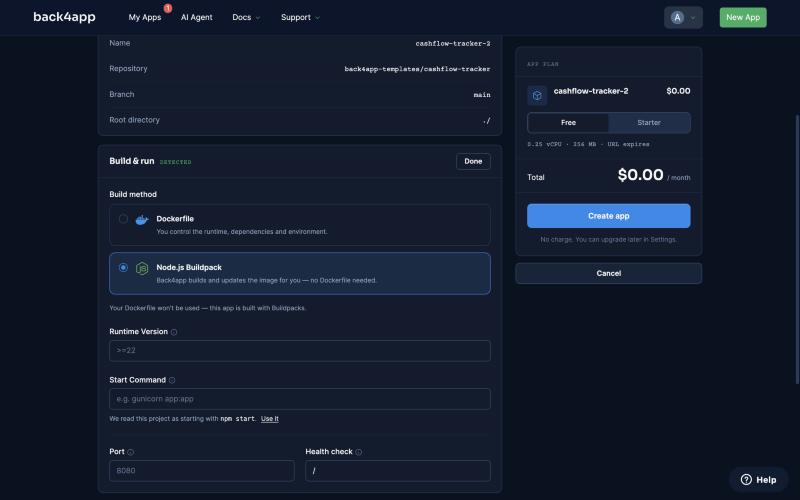
159 passed, 0 failed- Deploy the web app. Push the repo to GitHub. Containers → Deploy a web app → pick the repository → Build & run → Edit → Node.js Buildpack → runtime
22, start commandnode server.js(the form reads it frompackage.jsonand offers Use it), port8080, health check/healthz→ Deploy settings → Edit → Paste .env with four lines:
APP_ID=…
JS_KEY=…
SERVER_URL=https://parseapi.back4app.com
DEMO=false
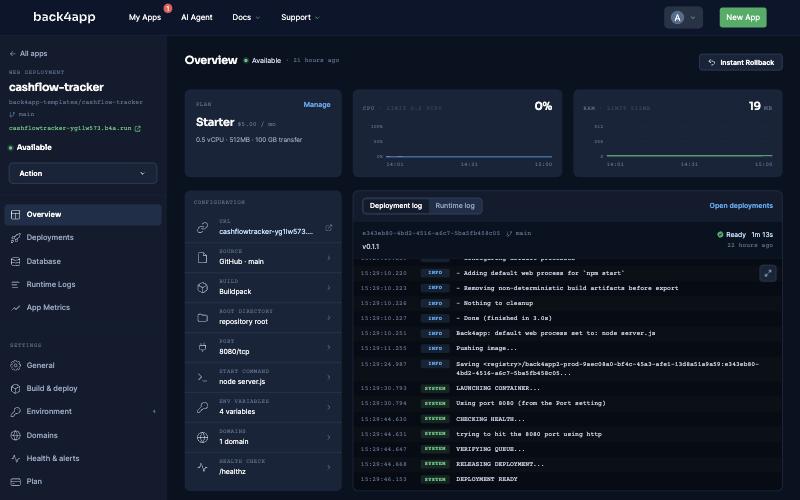
Create the app. curl https://<your-app>.b4a.run/healthz returns {"ok":true,"version":"0.1.1",…} when it is up. Sign in with the finance user from .credentials.local.json.
Why route every request through Cloud functions instead of the classes?
Because this is one organization’s shared ledger, not a pile of rows that each user owns. The standard BaaS pattern — client SDK plus a per-object ACL — is the fastest way to iterate a consumer app where every user sees only their own data.
A cash book is the opposite shape: a handful of people share every row, every rule must hold regardless of which client wrote it, and the public JavaScript key is in the page source.
So the three classes get class-level permissions that allow nothing — not public, not authenticated — and only the master key, which only Cloud Code holds, can read or write them. The setup script sets that through the schema API:
// File: scripts/setup.mjs (excerpt) · Node 22
const MASTER_ONLY = { find: {}, count: {}, get: {}, create: {}, update: {}, delete: {}, addField: {}, protectedFields: {} };
// … for each of Account, Category, Transaction, Snapshot:
await rest(env, 'POST', '/schemas', { className, fields, indexes, classLevelPermissions: MASTER_ONLY }, { master: true });
Every function then does the same two things first: require a signed-in user, and require a role. finance can read and write; viewer can only call base, listMonth and report.
// File: cloud/main.js (excerpt) · Parse Server 7.5.2
async function requireRole(request, roles) {
  if (!request.user) fail(E.INVALID_SESSION_TOKEN, 'Sign in to use the ledger.');          // 209
  const q = new Parse.Query(Parse.Role);
  q.containedIn('name', roles);
  q.equalTo('users', request.user);
  const role = await q.first({ useMasterKey: true });
  if (!role) forbidden(`This action needs the ${roles.join(' or ')} role.`);                // 119
  return role.get('name');
}
Identities are protected the same way. Public sign-up is refused by a beforeSave on _User unless the master key creates the account. Regular users may change their own password and e-mail; a locked account — the shared demo sign-in is one — may not change anything about itself, so a visitor cannot hijack the demo for the next visitor. _Role is master-key only.
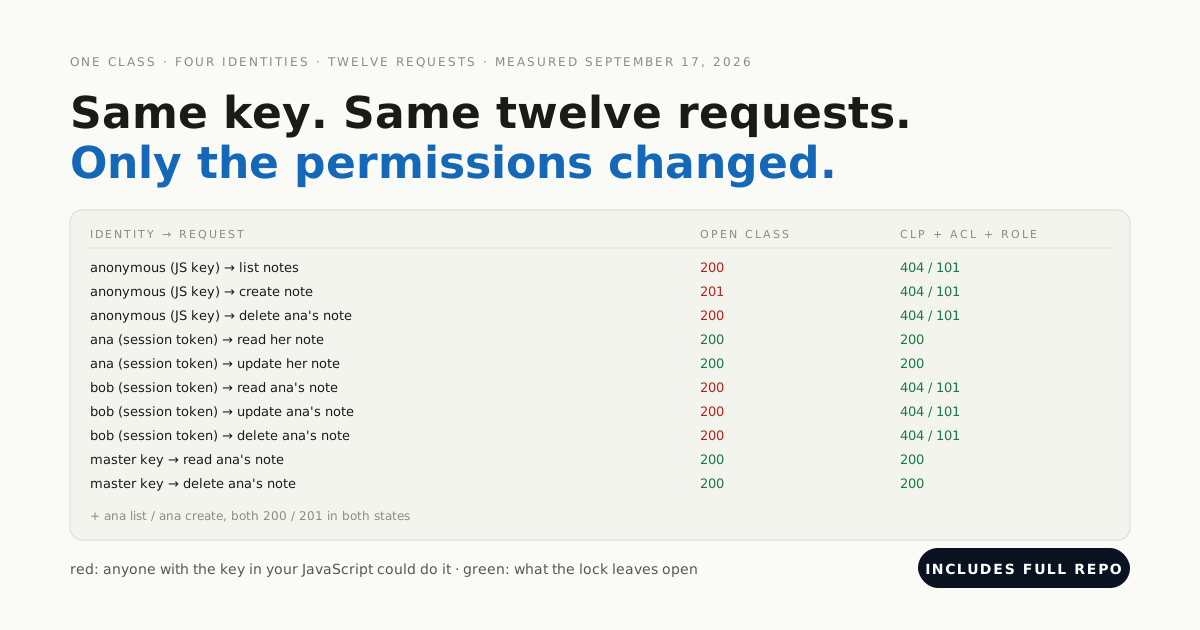
The repo’s npm run check:permissions is the proof: four callers (anonymous, signed-in without a role, viewer, finance) against all 13 functions, direct class reads and writes with the JavaScript key, role edits, identity edits, self-deletion and sign-up. Eighty-two checks; the three rows that matter most:
  PASS  anonymous base               → 209  (expected 209)
  PASS  viewer    createTransaction  → 119  (expected 119)
  PASS  viewer    GET /classes/Transaction → 119 (expected 119)
  PASS  locked user changes own password → 119 (expected 119)
  PASS  public sign-up → 119 (expected 119)
82 passed, 0 failed
A leaked JavaScript key is the normal state of a web app. Design so that it reveals nothing.
This is the pattern from our post on locking down a backend the frontend talks to, applied to a complete application. Where it costs you: every new screen needs a function, and the client SDK’s convenience methods are off the table. For an internal tool with a stable set of operations, that is the right trade.
How does the backend compute running balances without SQL?
Two decisions do the work: dates are strings, and one aggregate pipeline sums everything.
Dates are YYYY-MM-DD strings, not Date objects. A business date has no time and no timezone; as strings they compare lexicographically, so “September” is date >= '2026-09-01' AND date < '2026-10-01', one indexed range query.
The field date does not come from the client: a beforeSave hook sets it to paidDate ?? dueDate on every write. That is the NoSQL pattern of pre-computing a read-heavy value at write time — and, plainly, also because a Parse query has no COALESCE. If you adapt this and switch to native dates, rewrite the hook and the pipeline together.
// File: cloud/main.js (excerpt) · Parse Server 7.5.2
Parse.Cloud.beforeSave('Transaction', async (request) => {
  const o = request.object;
  // … type, amount, dates, pointers and currency are validated above this line …
  o.set('date', paidDate || dueDate);   // the month list is one indexed range query
  o.set('accountId', account.id);       // plain ids mirror the pointers so the pipeline can group on them
  o.set('toAccountId', toAccountId);
  o.set('categoryId', categoryId);
});
One pipeline, one fold. “Balance before this month” is the opening balance plus the signed effect of every transaction before the first day. A $match selects the rows and a $group sums amounts by type, account and destination account.
A ten-line fold then turns the groups into a signed number — for all accounts, where transfers net to zero, or for one account, where a transfer is −amount on the source and +amount on the destination.
// File: cloud/main.js (excerpt) · Parse Server 7.5.2
async function groupedEffects(match) {
  const pipeline = [
    { $match: match },
    { $group: { _id: { type: '$type', accountId: '$accountId', toAccountId: '$toAccountId' }, total: { $sum: '$amount' } } },
  ];
  const rows = await new Parse.Query(Transaction).aggregate(pipeline, { useMasterKey: true });
  return rows.map((r) => ({ ...(r.objectId || r._id || {}), total: r.total || 0 }));
}
const PAID = { paidDate: { $gte: '0' } };   // null sorts below strings in MongoDB, so $lt alone would match pending rows
That last line is the kind of thing you only learn by running it: in MongoDB’s comparison order null sorts below every string, so paidDate: { $lt: '2026-09-01' } would happily count the pending rows as paid. Requiring a string-typed value fixes it.
Money is integer cents everywhere; the browser formats with Intl.NumberFormat('en-US', { style: 'currency', currency: 'USD' }) and nowhere else.
Results are complete or they are an error. Totals always come from the pipeline over the full dataset. Lists are paginated server-side to completion, and a request that would exceed 2,000 rows for a month or 20,000 report items returns 142 LIMIT_EXCEEDED with the count instead of a truncated page.
We tested it with a generated 3,744-row dataset: the month list refused (3,627 rows), and the report totals were still exact.
Which rules did we decide instead of inherit?
The old tool was the spec, but not the authority. Each rule is one sentence in the code, one sentence here, and one assertion in check.mjs.
- Opening balance counts before every transaction and has no date; changing it rewrites every balance, and the screen says so.
- A transfer is −amount on the source and +amount on the destination, so it nets to zero across all accounts; transfers never appear in income or expense reports.
- Realized balance at day D = opening + paid transactions with
paidDate ≤ D. Projected = opening + every transaction withdate ≤ D. - Accrual reports include pending rows; cash reports include only paid ones.
- Mark as paid records today in the organization’s timezone, editable — not
min(dueDate, today), which the old tool used and which can record a payment before it happened. - Overdue = pending and
dueDate < today, where “today” is computed on the server fromConfig.orgTimezone, never sent by the client.
What the hooks do not guarantee, stated plainly: they are validation, not database constraints. npm run check:concurrency fires ten parallel creates with the same name — one got through, nine were refused, which is timing, not a guarantee. It then races a delete against ten creates that reference the record: the creates won, the delete was refused, the ledger stayed consistent.
It also submits the same transaction twice at once: both are stored, because there is no idempotency key. A unique index from the dashboard’s index manager closes the first case; the others are the price of no transactions, and the article would be lying if it hid them.
What did the deploy without a Dockerfile look like?
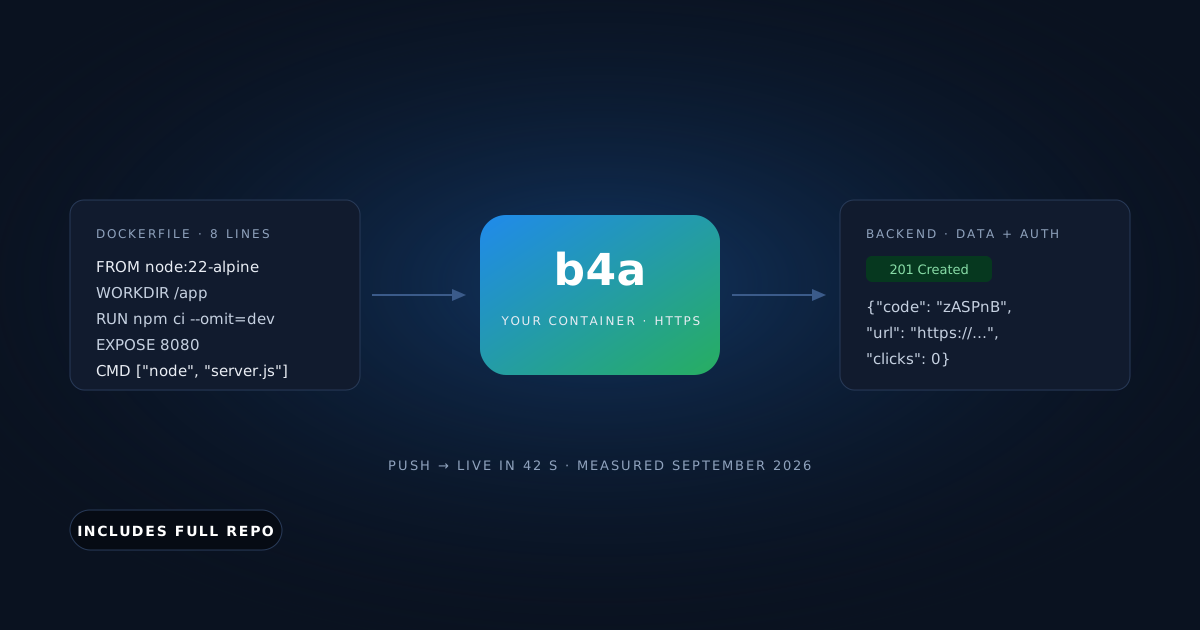
The repo has a Dockerfile, and it was not used. On the Configure app step, Build & run offered two build methods: Dockerfile — you control the runtime, dependencies and environment and Node.js Buildpack — Back4app builds and updates the image for you — no Dockerfile needed.
Picking the second showed a runtime version field already hinting >=22 from package.json’s engines, and the line We read this project as starting with node server.js — Use it.
The deployment log, from the platform, start to finish:
14:34:40.830  PREPARING DEPLOYMENT...
14:34:41.180  Build Method: Buildpacks — detecting your app stack
14:34:43.109  Back4app: using Node 22, pinned in your app's settings.
14:34:51.893  - Detected Node.js version range: `22`
14:34:51.902  - Resolved Node.js version: `22.23.2`
14:34:54.344  - Running `npm ci`
14:34:55.600  added 68 packages, and audited 69 packages in 1s
14:34:56.242  - Adding default web process for `npm start`
14:34:56.263  Back4app: default web process set to: node server.js
14:34:57.574  Pushing image...
14:35:19.249  LAUNCHING CONTAINER...
14:35:37.917  CHECKING HEALTH...
14:35:39.603 DEPLOYMENT READYHow we measured: wall clock from the Create app click (local clock) to the DEPLOYMENT READY line in the platform’s own log, one run, free plan. The health check line says trying to hit the 8080 port using http — it is a port check, so do not read /healthz as something the platform parses; it is for you.
How fast is it, and what does it cost?
From a laptop in Brazil to the backend in USA East, signed in as the viewer, 100 sequential calls each after 10 warm-ups, October 9, 2026:
| Function | p50 | p95 | min / max |
|---|---|---|---|
listMonth (one month, ~30 rows, two aggregates) | 439 ms | 514 ms | 420 / 541 ms |
report (six months, cash basis) | 442 ms | 542 ms | 424 / 602 ms |
Every observation is in docs/evidence/latency-2026-10-09.csv. The spread between the two functions is small because both are dominated by the round trip, not by the work.
Cost, as of October 2026. The container: free for a 60-minute URL, or Starter at US$5 a month. The backend: the free plan includes 25,000 requests a month, 250 MB of database and 1 GB of files — our demo runs on it, and the dashboard marks a free app that passes the quota as Usage Exceeded.
The next backend plan, MVP, is US$15 per app for 500,000 requests, with extra requests billed at US$5 per 100,000 (pricing page). This template adds no rate limiting: it bounds the cost of one request, through the 24-month and 2,000-row caps, not how many requests someone sends.
What we observed while building
The first Cloud Code deploy ships nothing. On a backend created minutes earlier, the editor’s Deploy reported Success on deploying your changes! while Logs → System printed Warning: main.js not found, and /functions/base answered Invalid function for the next three minutes. It happened on both backends we created for this post (October 9, 2026).
A second deploy clicked while the Files pending deploy badge was absent also shipped nothing. What worked, twice: reload the Cloud Code page, open each file and make it dirty again so the badge reappears, then Deploy — the function answered two seconds later. Treat the dialog as a UI event and the request as the proof.
A repository created after the GitHub App was installed did not appear in the Containers source list — not after a push, not after switching the installation to All repositories. It appeared the moment GitHub redirected back to Containers with setup_action=update (“Importing repositories…”).
That redirect happens when you change the repository selection on GitHub’s installation page and save. If your new repo is missing from the list, that round trip is the fix.
$lt on a nullable string field counts the nulls. Described above; the $gte: '0' guard is the fix and the test suite is what caught it.
“Today” came back as 10/09/2026. Cloud Code computed the organization’s date with Intl.DateTimeFormat('en-CA', …).format(), a common shortcut that yields YYYY-MM-DD on a full-ICU Node — and it does, on a laptop. The Cloud Code runtime formatted it MM/DD/YYYY, which would have broken every overdue check and the payment default.
A frozen test date had hidden it; removing that date for the live demo exposed it within a minute. The fix builds the string from formatToParts and refuses to run if the result is not a calendar date.
Which errors will you see, and what do they mean?
{"code":141,"error":"Invalid function: \"base\""} — Cloud Code is not deployed, or the deploy shipped nothing. Reload the Cloud Code page, make the files pending again, deploy, and call the function.
{"code":209,"error":"Sign in to use the ledger."} — no session token on the request. From the browser this means the session expired; the app signs you out and shows the sign-in screen.
{"code":119,"error":"This action needs the finance role."} — the user exists but is a viewer or has no role. Add the role with npm run users -- add <username> finance or move the user with the dashboard’s role editor.
{"code":142,"error":"LIMIT_EXCEEDED: Month 2026-09 matches 3627 rows; the limit is 2000. Narrow the range."} — the request would exceed a cap. Filter by account or shorten the report range; totals are still exact.
Missing env vars: APP_ID, JS_KEY in the container log — the environment variables were not set on the Containers app; the server exits on purpose rather than serve a page that cannot sign in.
When is this the wrong answer?
- You want accounting, not a cash book. No double-entry, no audit trail, no bank sync, no multi-currency in the UI. QuickBooks or Xero win the moment an accountant is involved.
- Each user owns their own rows. Then the standard pattern — client SDK with per-object ACLs — is faster to build and needs no function per screen.
- Cross-record invariants must hold under concurrent writes. The hooks will not give you that. Use a database with transactions, or serialize writes through a queue.
- A static page is enough. If you do not need env-var configuration and a versioned health endpoint, Web Deployment serves the same files without a container.
- You already have a Dockerfile you trust. The buildpack is for not owning one; it is not better than a Dockerfile you have tuned.
What’s next?
The pattern generalizes past finance: closed classes, functions as the only door, write-time pre-computation for the hot query, and a host that builds from package.json. Any internal tool with a stable set of operations fits it, and the permission matrix script in the repo is reusable as it stands.
Clone the repo, run the quick path, and point AGENTS.md at your agent if you would rather watch than type. Then replace the fictitious Bluefin Studio with your own accounts — the opening balances are the only numbers you have to bring.