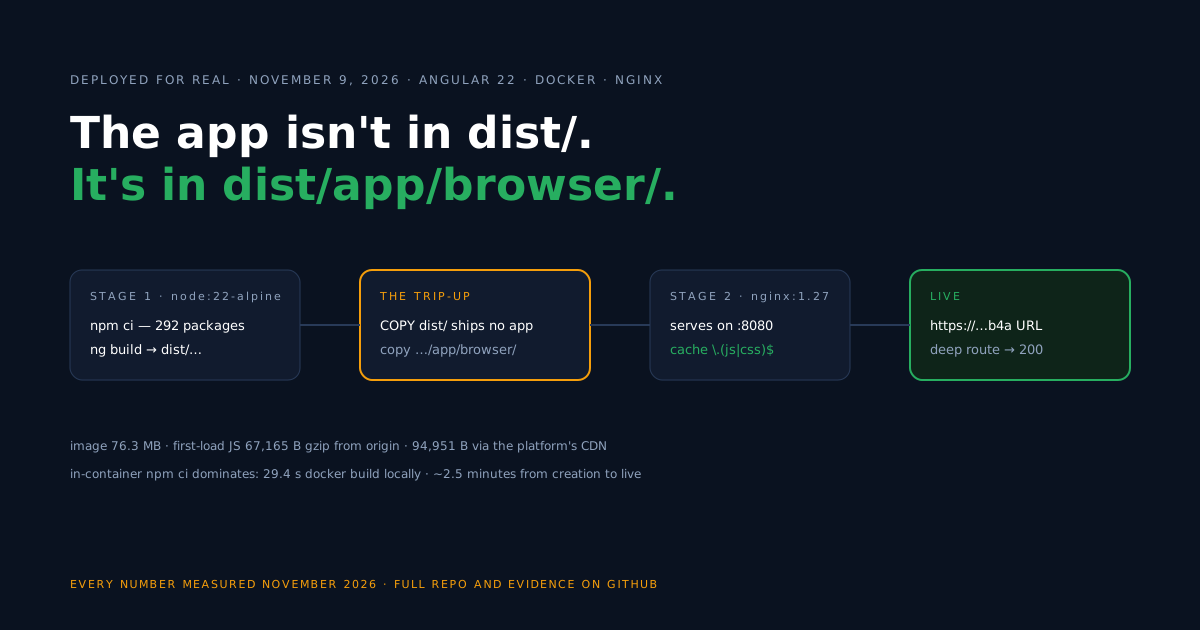
Most “Dockerize your SPA” recipes end with COPY dist/ /usr/share/nginx/html — and on Angular, that line ships no application. Since the application builder became the default, ng build writes the servable files to dist/<project-name>/browser/, two levels deeper than the generic recipe expects.
This guide builds a client-rendered Angular 22 app (no SSR) into a two-stage Docker image and takes it to a public HTTPS URL on Back4app Containers. We ran everything ourselves and recorded it; the dates, commits, and numbers are collected in the measurements section, and the finished code lives in the companion repo.
Bringing your own Angular app? Verify two things
Before any Docker work, pin down what your project actually produces, because the two facts below decide whether this guide’s files work unchanged.
First: your output path. Run npm run build and look inside dist/ — the folder is named after your project (ours is angular-container-starter), and the web root is its browser/ subfolder. The Dockerfile below hardcodes that path, so substitute your project’s name.
Second: your rendering mode. This flow covers client-rendered Angular. If your project builds with SSR enabled, the output includes a server artifact, and the official Angular SSR guide is the right reference for building it — a static nginx container is the wrong vessel.
Scaffold the app and commit the lockfile
Starting from zero instead, this is the exact scaffold the companion repo was built from — every flag matters for a non-interactive, client-rendered result.
npx -y @angular/cli@latest new angular-container-starter --defaults --skip-git --style=css --ssr=falseThat produced Angular 22 (@angular/core ^22.2.0, CLI ^22.2.6, TypeScript ~6.0.2); Angular 22 defaults to vitest with jsdom for unit tests.
One prerequisite before Docker enters the picture: the build stage runs npm ci, which requires a committed package-lock.json. In our lab run there was no lockfile in place before we ran npm install once and committed the file it wrote.
Note that ng new normally installs dependencies itself, so check your own project first — if a lockfile is already committed, this step is done.
Locate the build output
Run the build once and read the tree it leaves behind, because this layout is the whole reason Angular needs its own Dockerfile.
dist/
└── angular-container-starter/
    ├── 3rdpartylicenses.txt      ← outside the web root (see note below)
    └── browser/                  ← the web root
        ├── index.html
        └── main-3LAEQCWG.js      ← content-hashed, at the root
Two properties of this tree drive everything below. The hashed main-*.js sits at the root — not under /assets/ the way Vite arranges it — so caching has to key on the file extension. And index.html references that script with a relative src, leaning on <base href="/">: browsers resolve it fine, but any tooling that concatenates URLs out of the HTML must add the leading slash itself.
About 3rdpartylicenses.txt: it sits above browser/, so this Dockerfile simply doesn’t copy it into the web root. That is a statement about file locations, not about obligations — the licenses it aggregates may require you to preserve and distribute their notices, so decide deliberately how your project ships them (serving the file publicly is one valid way).
Build the Docker image
Node builds in the first stage, nginx serves in the second, and the COPY --from line carries the project-named path we just examined.
# Build stage
FROM node:22-alpine AS build
WORKDIR /app
COPY package.json package-lock.json ./
RUN npm ci
COPY . .
RUN npm run build

# Serve stage
FROM nginx:1.27-alpine
COPY nginx.conf /etc/nginx/conf.d/default.conf
COPY --from=build /app/dist/angular-container-starter/browser /usr/share/nginx/html
EXPOSE 8080
Nothing from the build stage ships except that browser/ folder, so the final image is essentially the nginx base plus your static files — the exact size is in the measurements section.
Configure nginx
Here is the serving config, with the one Angular-specific decision in the middle of it.
server {
    listen 8080;
    server_name _;
    root /usr/share/nginx/html;
    index index.html;

    gzip on;
    gzip_proxied any;
    gzip_vary on;
    gzip_comp_level 6;
    gzip_min_length 1024;
    gzip_types text/css application/javascript application/json image/svg+xml text/plain;

    # Angular emits content-hashed .js/.css at the root — cache them forever
    location ~* \.(?:js|css)$ {
        add_header Cache-Control "public, max-age=31536000, immutable";
        try_files $uri =404;
    }

    # SPA refresh fix: unknown paths fall back to index.html
    location / {
        try_files $uri $uri/ /index.html;
    }
}
The regex location is the line to not copy blindly from a Vite guide: a location /assets/ block would match nothing here, and Angular’s immutable files would ship with no cache header. We verified the hashed files come back with Cache-Control: public, max-age=31536000, immutable from the running container.
One condition makes the rule safe, and you should check it holds for your app: immutable plus a one-year max-age is only correct for files whose name changes with their content. In this build, every .js and .css the app serves is content-hashed by Angular, so the extension match and “hashed files only” coincide.
The rule breaks the moment you serve an unhashed .js or .css — say, a file you drop into public/ — because browsers will cache the stale version for a year. Either keep such files out, or scope the rule to the hashed names.
Deploy on Back4app
A plan note first, so it informs your choice rather than surprising you: on the free plan, the public URL lives for 60 minutes from the app’s creation, and redeploying within that hour did not restart the count in our tests. That window fit our entire verification pass; hosting needs a paid plan, where the URL is permanent.
- Push the repo — app,
Dockerfile,nginx.conf, lockfile — to GitHub, then start a New Web Deployment from that repository.
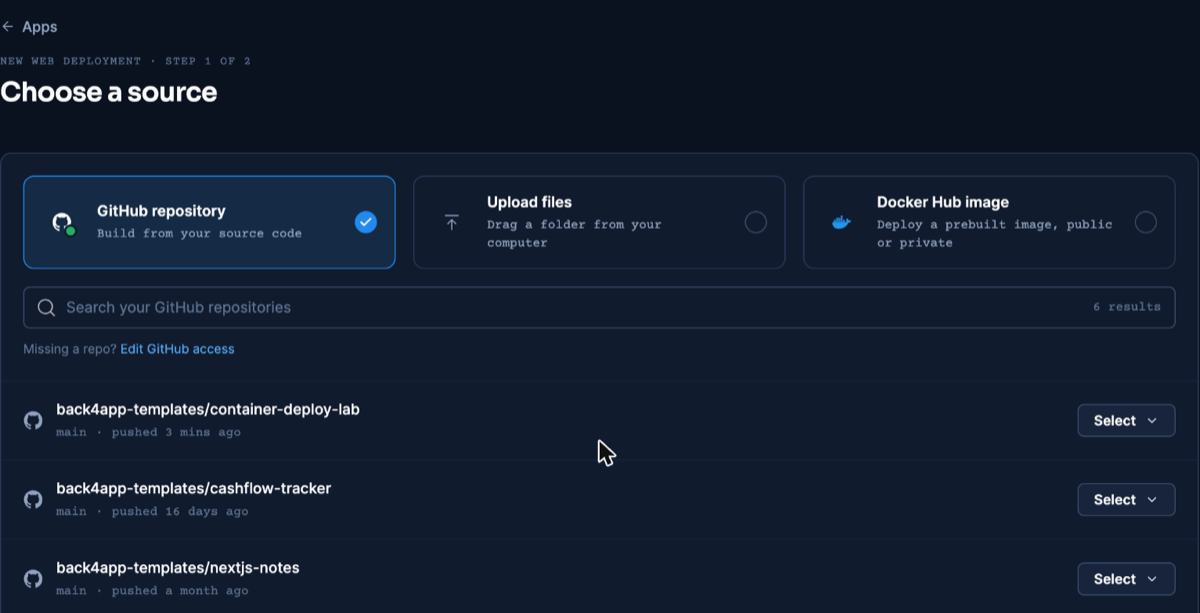
The source screen is identical across this series; screenshot from our React deploy. Dashboard as of November 2026.
- The platform detects the Dockerfile as the build method. Then type 8080 into the Port field yourself: leaving it on auto is the known trip-up of this flow — the setting ignores
EXPOSE, and the React guide documents the exact failure we hit when we left it unset.
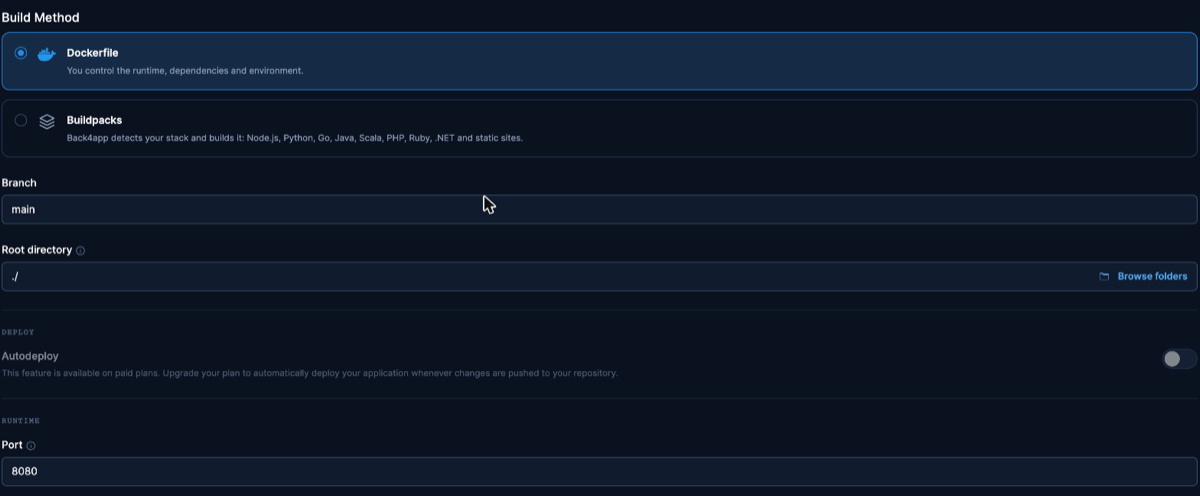
Same settings screen for every Dockerfile deploy in this series; screenshot from the React article. Dashboard as of November 2026.
- Create the app and let the build run — on Angular, the dependency install is the long pole, and our app took a couple of minutes from creation to a serving URL (timed precisely in the measurements section).
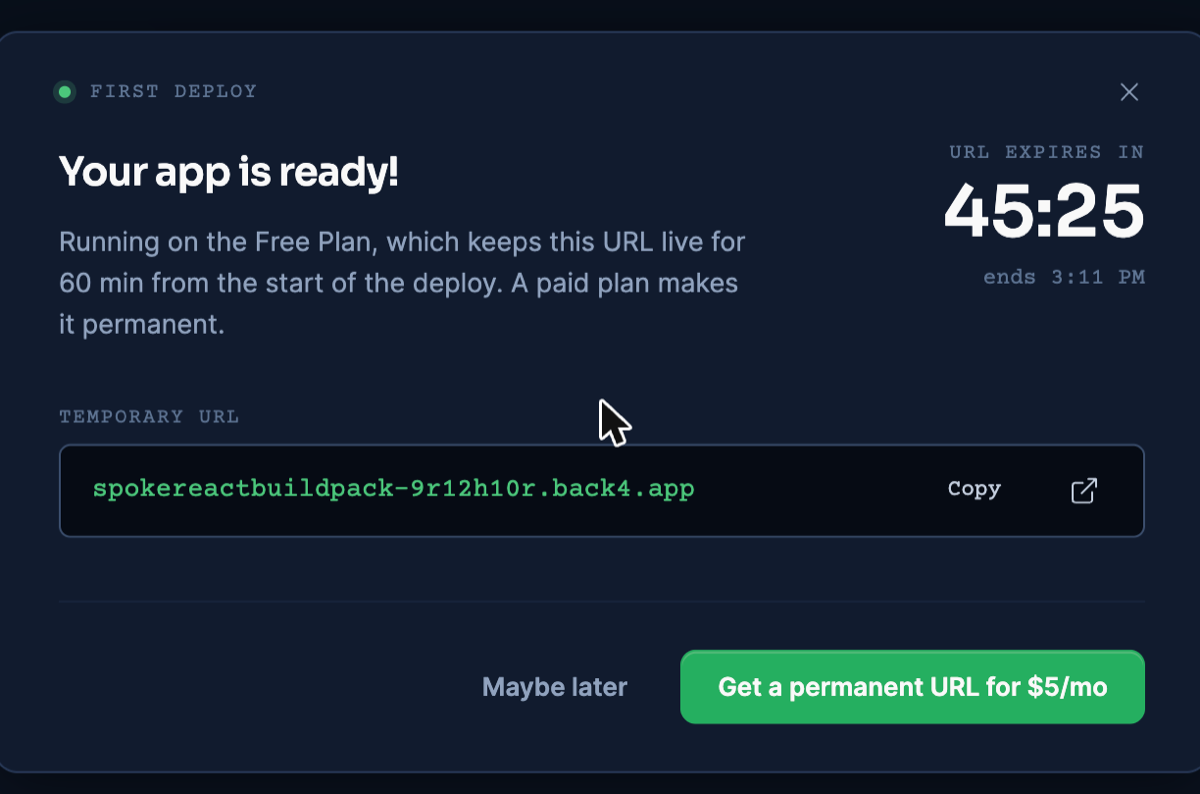
The free-plan URL dialog, reused from the React deploy where the step is identical. Dashboard as of November 2026.
- Prove it with requests, not the dashboard: the home page should answer with gzipped HTML, and a deep path such as
/some/deep/routeshould return 200 — on our live URL it did, which is thetry_filesfallback working with the<base href>intact.
Deploy from an AI assistant with MCP
Back4app’s remote MCP server lets an AI assistant carry out the steps above from your editor. It is an interface, not another build method: the Dockerfile in this guide still builds the image. Client setup is on the official MCP page.
For the full MCP flow rather than this summary, read deploying a web app with MCP and an AI assistant.
In our run on November 10, 2026 (Claude, custom connector, signed in), the assistant called create_upload, ran the returned npx @back4app/cli upload command in the project folder, and called create_web_app with port 8080. The app was created with builder: DOCKERFILE and reported READY about 42 seconds after creation.
On the public URL, / returned 200 from the nginx image and an unknown deep path returned 200 through the fallback, as in the dashboard deploy.
The dist/<project>/browser/ path matters here exactly as before: the assistant uploads your folder as it is, so a Dockerfile that copies the wrong directory fails the same way through MCP. Ids and timings: MCP evidence file.
What we measured
Local numbers were taken on November 6, 2026; the live deploy on November 9, 2026 ran the repo at commit 6b179ff (the deployed lab commit and full method are recorded in the repo’s evidence files).
File sizes on disk and observed network transfers are different kinds of facts, so they get separate tables.
Build and sizes on disk (local, November 6, 2026):
| What | Value |
|---|---|
| npm ci (292 packages, warm npm cache) | 3.96 s |
| npm run build | 1.63 s wall (bundle generation 0.841 s) |
| dist/ on disk | 256 KB |
| docker build, base images already present | 29.37 s — mostly the npm ci step |
| Docker image | 76.3 MB (arm64; essentially the nginx base) |
| First-load JS, raw file size | 217.11 KB (one file) |
Observed transfers and timing:
| What | Value | Where |
|---|---|---|
| First-load JS from our nginx, gzip level 6 | 67,165 B | local container, November 6, 2026 |
| Same file at nginx’s default gzip level 1 | 79,029 B | local container |
| First-load JS on the public URL | 94,951 B before gzip_proxied any; · 67,165 B after | live URL, November 9 and 10, 2026 |
| HTML document, gzipped | 437 B | both |
| App creation → URL serving | ~2.5 minutes (13:06:4x → 13:09:06 UTC) | live deploy |
| TTFB on / (3 illustrative requests) | 0.953 s · 1.134 s · 1.113 s | live URL |
Two notes on reading the tables. The 29.37 s build was a first build of this image with base layers present and no reused application layers; Docker can reuse the dependency layer on rebuilds when the package files are unchanged, which we did not time.
And the 67,165 B vs 94,951 B gap had a cause we confirmed on November 10, 2026. Requests arrive through a CDN with a Via header, and nginx leaves proxied requests uncompressed unless gzip_proxied says otherwise. With gzip_proxied any; added — it is in the config above — the public URL transferred 67,165 B, the origin figure exactly.
Update the deployed app
The update flow is two moves: push the commit, then click App actions → Deploy the latest commit in the dashboard. The rebuilt app serves on the same public URL — we exercised this on the platform during the November 9, 2026 test run, and the React guide documents the full end-to-end validation with its caveats.
Paid plans auto-deploy on push, removing the click. Deleting and re-creating the app also “works” but assigns a fresh URL, so keep it off the update path.
Troubleshooting
Blank page, 403, or a stray file where the app should be — the image copied dist/ or dist/<project>/ instead of dist/<project>/browser/. Fix the COPY --from path; this is the Angular-specific mistake.
The npm ci command can only install with an existing package-lock.json — no lockfile is committed. One local npm install, commit the result, push.
Please mention a port in settings to expose — the Port field was left on auto, which never reads EXPOSE. Enter 8080 under Build & deploy.
Deep routes 404 but / works — the fallback location is missing or your nginx.conf is not the file the image actually copies. With the config above, our live deep route returned 200.
Hashed files served without cache headers — a location /assets/ rule pasted from a Vite guide matches nothing in Angular’s root-level layout. Use the extension regex shown above, and mind its hashed-files-only condition.
Limitations of this flow
Know what this setup does not do, so its boundaries are a decision rather than a discovery.
- It serves static files only. Angular SSR builds a server artifact that this nginx container cannot run — the Angular SSR guide covers that build, and deploying it means a Node runtime container.
- The cache rule depends on hashing. Serve an unhashed
.jsor.cssand the one-yearimmutableheader turns against you, as covered in the nginx section. - The free plan is for validation. The 60-minute URL and the small instance are fine for proving the pipeline; hosting real traffic means a paid plan.
- Auth, data, and APIs live elsewhere. That is a next step, not a flaw: add a managed backend or your own API service behind the static app when the features call for it.
What’s next?
Swap your project’s name into the COPY --from path, push, and claim your HTTPS URL on the free plan — the companion repo is the working reference, and the Containers docs cover the dashboard details.
When the app later needs sign-in, storage, or shared data, one option is a managed backend reached over REST or GraphQL — an addition to this deploy, not a redo of it.