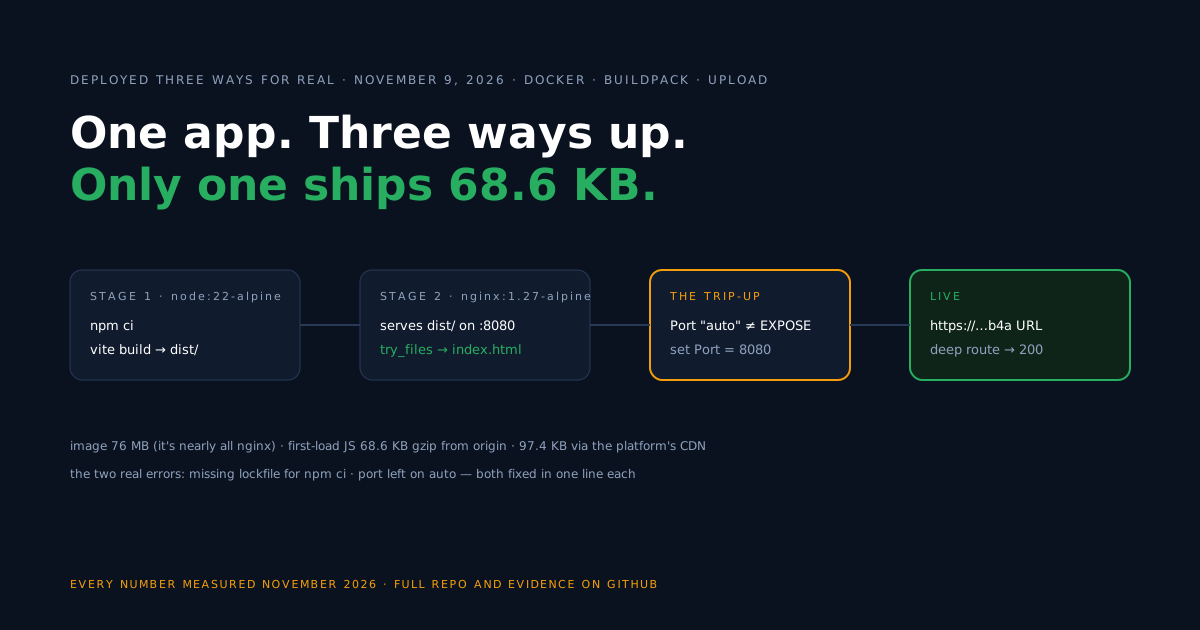
To deploy a React app built with Vite, create a production build and publish the generated dist/ folder to a hosting service, configure a fallback to index.html for client-side routes, and test the app on its public HTTPS URL. This guide shows three ways to do exactly that — and we executed all three on November 9, 2026.
The scope: a client-rendered React SPA built with Vite. Server-rendered React is a different shape — that flow is the Next.js SSR container guide. Everything below, including every error, comes from our own deploys; the finished code is in the companion repo.
Already have a React app? Start here
Identify two things: your build command and its output folder. Then jump to the path that fits.
| Your project | Build output | Your path |
|---|---|---|
| Vite (this guide’s example) | dist/ | any of the three below |
| Create React App (legacy) | build/ | same three paths — swap the folder name |
| Framework app using server rendering | a server process | the SSR container guide instead |
| Framework app using static export | a folder (e.g. out/) | the three paths below, with that folder |
Starting fresh instead? npm create vite@latest my-app -- --template react, then cd my-app and npm install — and commit the package-lock.json it generates; you will need it on the Docker path.
One free-plan fact to know before you pick any path: the public URL lives 60 minutes from the app’s creation, and a redeploy does not extend it — plenty to test everything here, not enough to host. Paid plans make it permanent.
Path 1 — GitHub + buildpack: no Dockerfile at all
The fastest path we tested, and the only one that hit zero errors.
- Push the app to a GitHub repository and connect it as a New Web Deployment.
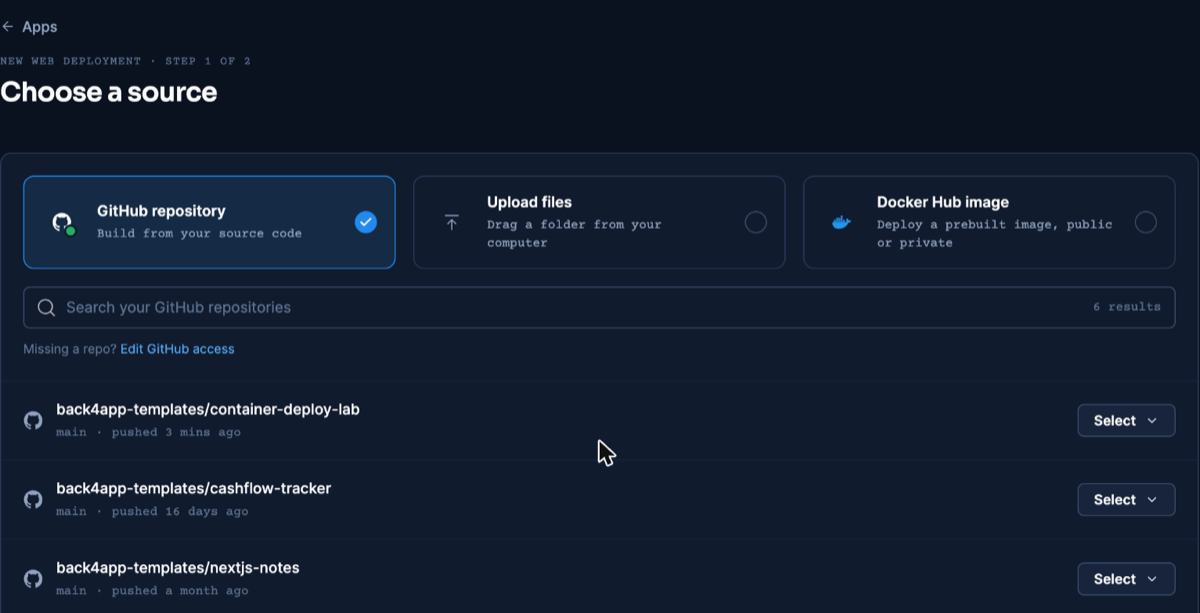
The three sources on the New Web Deployment screen — dashboard as of November 2026.
- In Build & run, pick Buildpacks. The platform detected our Vite app on sight: “This looks like a static site — we’ll serve the built files for you.”
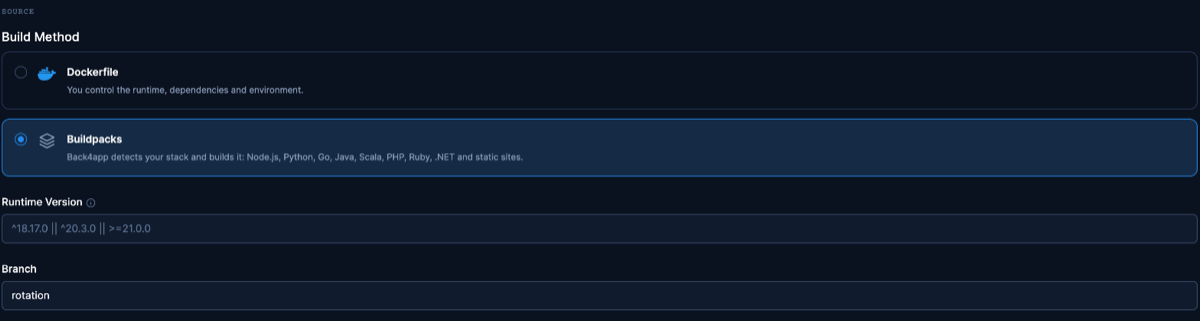
The same repo, built without its Dockerfile. Dashboard as of November 2026.
- Create the app. Ours built and came up with no further configuration; the deep-route fallback worked out of the box (a request to an unknown path returned 200 with the app).
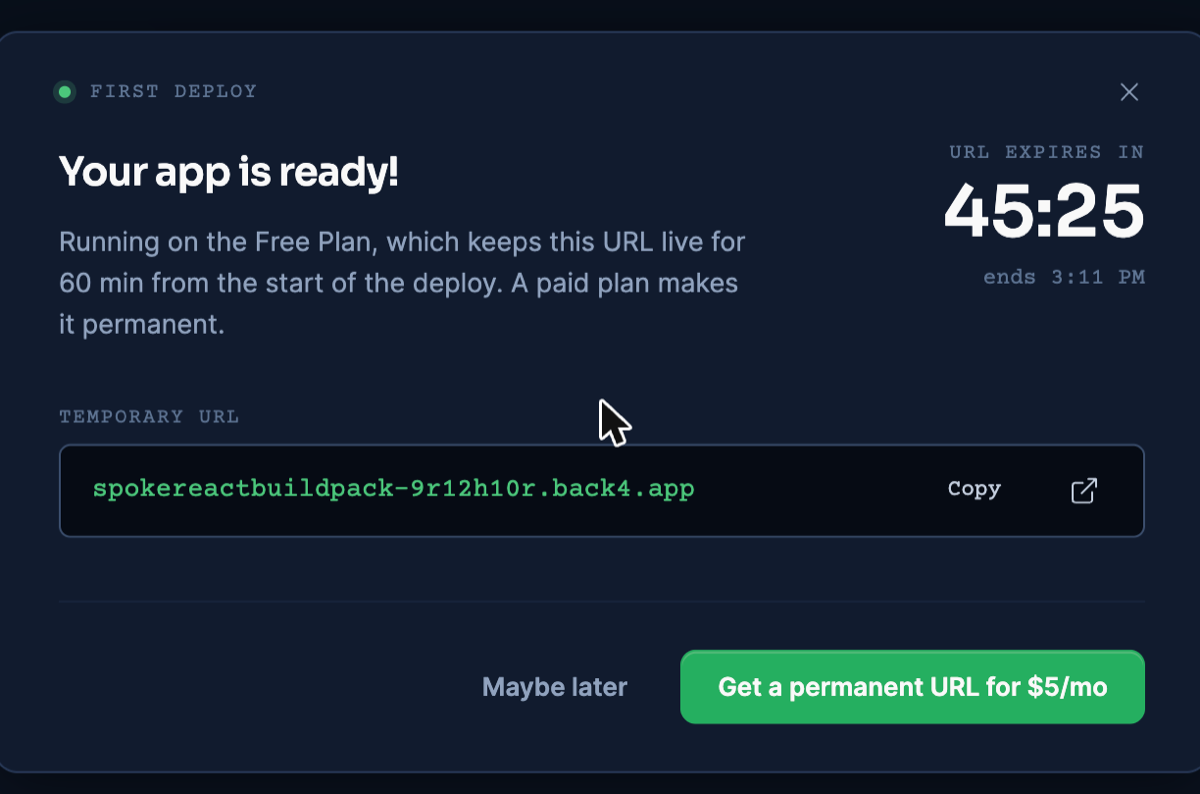
What “live” looks like on the free plan: a real HTTPS URL and its countdown. Dashboard as of November 2026.
One measured note for later: on this path the bundle arrived uncompressed (details in the measurements section). For testing and small tools that rarely matters; before production traffic it is worth a look.
Path 2 — Upload: a folder becomes a site, no git
-
Build locally:
npm run build— for this path, first addbuild: { assetsDir: "" }tovite.config.js, so every file sits at the build root. -
New Web Deployment → Upload files and hand it the build. The flat build is the procedure we validated end to end — with no folder tree, nothing can get lost in transit. The UI also accepts dragging the
dist/folder itself, designed to keep the tree; we did not exercise that variant with our tooling. -
Name the app, create, done — the platform detected a static buildpack and served it.
Why the flat build: in our first automated run the files arrived without their tree, index.html pointed at /assets/…, and the page loaded while the app didn’t. With the flat build, home, deep route and assets all answered 200 on the public URL.
Serving characteristics matched Path 1: fallback present, bundle uncompressed. Updating means re-uploading — which is also this path’s whole appeal: no git, no pipeline.
If you later move a flat build to the Docker path, remove assetsDir: "" (or adapt the nginx cache rule): the long-cache location /assets/ block matches nothing when every file sits at the root.
Path 3 — Docker + nginx: you own the server
Pick this when you want caching, compression and fallback rules in your hands. It is the path where our measured transfer was smallest — and it hit two real errors on the way, both worth knowing (the upload path had its own, covered above).
The Dockerfile
# Build stage
FROM node:22-alpine AS build
WORKDIR /app
COPY package.json package-lock.json ./
RUN npm ci
COPY . .
RUN npm run build

# Serve stage
FROM nginx:1.27-alpine
COPY nginx.conf /etc/nginx/conf.d/default.conf
COPY --from=build /app/dist /usr/share/nginx/html
EXPOSE 8080
Save the two blocks below as Dockerfile and nginx.conf in the repository root. Node builds, nginx serves, nothing from the build stage ships — in this measured example the image is 76.3 MB, nearly all of it nginx:alpine; heavy assets or extra served files move that number.
The nginx config is where the control pays:
server {
    listen 8080;
    root /usr/share/nginx/html;
    index index.html;

    gzip on;
    gzip_proxied any;
    gzip_comp_level 6;
    gzip_types text/css application/javascript application/json image/svg+xml text/plain;

    # Vite writes content-hashed files to /assets/ — cache them forever
    location /assets/ {
        add_header Cache-Control "public, max-age=31536000, immutable";
        try_files $uri =404;
    }

    # SPA refresh fix: unknown paths fall back to index.html
    location / {
        try_files $uri $uri/ /index.html;
    }
}Deploying it
-
Connect the repo, keep Dockerfile as the build method.
-
Set Port to 8080 in Build & deploy. Our first deploy left it on “auto” and failed at launch with
Please mention a port in settings to expose— the setting does not adopt the Dockerfile’sEXPOSE.
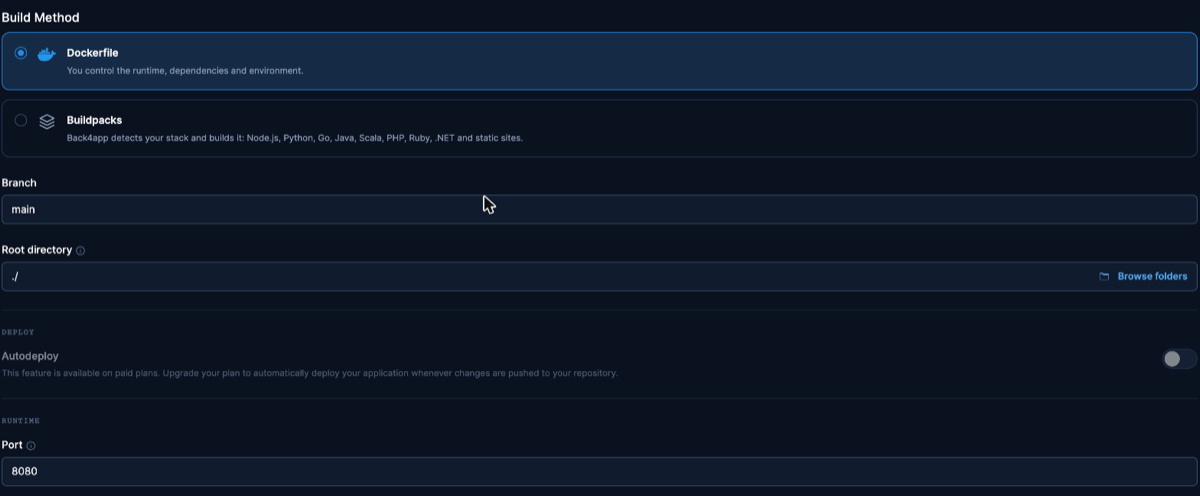
The Port field under Build & deploy — the step our first deploy actually failed on. Dashboard as of November 2026.
- Deploy. After the port fix, our redeploy went from trigger to serving the new version in about 25 seconds — verified by a version stamp in the build, not by the dashboard status.
Proving the routes render
A 200 on a deep link proves the fallback; it does not prove the right screen rendered. So we added React Router with two real routes to the companion repo, deployed it, and opened /about directly in a browser:
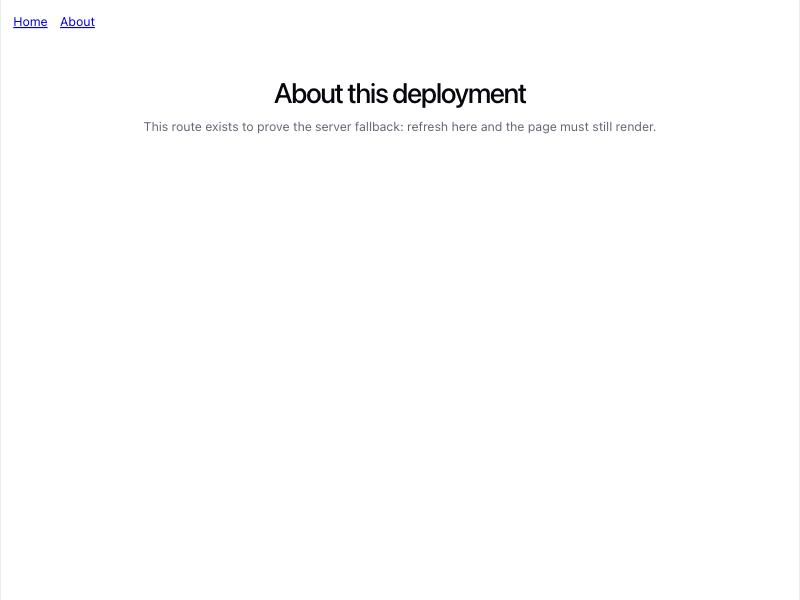
Direct load of /about on the live URL: the route’s actual screen, not a blank page. November 9, 2026.
Environment variables, executed
Set a public value in .env.production:
VITE_API_URL=https://api.example.com/v1Read it in code like any Vite env value:
const apiUrl = import.meta.env.VITE_API_URL ?? "(not set)"Rebuild, and the value is in the artifact — we grepped the built bundle and found the literal string inside dist/assets/index-*.js, and the page renders it. Two consequences, both demonstrated rather than asserted:
- Changing a
VITE_value means rebuilding (and on the GitHub paths, redeploying) — the running container cannot inject it. - Any value compiled into the client bundle is readable by whoever downloads it. Secrets never go in
VITE_variables; keys belong behind an API the browser calls. (A secret used only by a build-time process does not automatically enter the bundle — the exposure is about what the client code references.)
Automate the deploy with an AI assistant (MCP)
MCP is not a fourth way to build the app: it is the interface an AI assistant uses to run the deploy for you. The build is still one of the paths above — in our test, the Dockerfile from Path 3.
Connect the Back4app remote server (https://mcp.back4app.com/mcp, OAuth sign-in) to your assistant; the official setup page covers each client. We tested with Claude Code in the Claude desktop app, which reads the folder and runs the upload command; the server was a custom connector, signed in to a Back4app account.
The whole flow, with every tool call and the failures we hit, is in the MCP deploy walkthrough.
Then ask, from the project folder: “Deploy this folder to Back4app through the MCP server, port 8080, and give me the URL when it is ready.” In our run on November 10, 2026 the assistant did three things:
-
Called
create_uploadand ran the command it returned,npx @back4app/cli upload, which packed the folder: 30 files, 400 KB, in 11 seconds. -
Called
create_web_appwith port 8080. The app was created withbuilder: DOCKERFILE— the folder’s Dockerfile was picked up without being asked. -
Followed
get_deploymentuntil it answered READY, about 43 seconds after creation.
On the public URL, / and the /about route both returned 200, served by the same nginx image as Path 3. In a browser check on a repeat deploy, the counter answered clicks and the About link rendered its route without a reload.
Updating works the same way and keeps the URL. We published a second version to the same app — create_upload with the app’s id, then deploy_web_app — and the new version stamp was being served 30 seconds later, on the same address.
Five things to know before relying on it:
.envfiles stay behind. The upload left.env.productionout (“as they may hold secrets”), and the deployed page showed the API endpoint as “(not set)”. SettingVITE_API_URLon the app was not enough: it worked once the Dockerfile’s build stage declaredARG VITE_API_URLandENV VITE_API_URL=$VITE_API_URLbefore the build.- Name the port. Created without one, this image failed at launch with the same
Please mention a port in settings to exposeas the dashboard. - The buildpack behaved differently here. With
builder: BUILDPACKthrough MCP, this starter built and then failed for lack of a start process; Path 1 in the dashboard had served it as a static site the day before. - Settings changes ask first.
update_web_appand rollback return a summary and wait for your confirmation; reading logs and deploying new code do not. - The Free-plan clock is the same. The URL lives 60 minutes from the app’s creation, and a redeploy does not extend it.
The docs also describe a way to try this without a permanent account; we did not test it.
Tool calls, ids and timings are in the repo’s MCP evidence file and its follow-up.
Updating the app after it is live
The supported flow on the GitHub paths, validated end to end on November 9, 2026: push the commit, then App actions → Deploy the latest commit. Our test push was built and serving on the same public URL shortly after — we confirmed the new file’s content from the live site, not just the dashboard status. On paid plans, auto-deploy on push removes even that click.
Two honest footnotes from the same day of testing:
- Earlier, on an app whose branch setting had been changed after creation, the same action twice rebuilt a stale commit. If that happens, check the branch in Build & deploy and re-save it.
- Re-creating the app always reads the branch tip fresh — but it issues a new URL, so treat it as a last resort, not an update flow.
On the upload path, updating is re-uploading the new build.
What we measured
Three kinds of numbers, kept separate — full method and raw output in the repo’s evidence files.
One versioning note: the size and timing rows were measured on the original scaffold, before React Router and the env-var demo entered the repo. The router version was deployed separately to verify rendering; its numbers are not mixed in below.
| What | Value | Where |
|---|---|---|
Public URL, Docker path, before gzip_proxied any; | 97.4 KB (Content-Encoding: gzip) | live URL, November 9, 2026 |
Public URL, Docker path, after gzip_proxied any; (current starter bundle) | 115.9 KB → 81.9 KB, nginx’s level-6 output | live URL, November 10, 2026 |
| Public URL, buildpack and upload paths: same bundle | 222 KB, no Content-Encoding | live URLs, same date |
| Local container, Docker path: same bundle at gzip level 6 | 68.6 KB | local measurement |
| Docker image | 76.3 MB (arm64; nearly all nginx:alpine) | local |
| Platform build, Docker path | image built and pushed in ~12 s; redeploy → serving ~25 s | deploy log + version stamp |
| TTFB on / (3 illustrative requests each) | Docker 0.99–1.12 s · buildpack 0.97–1.00 s · upload 0.92–1.05 s | live URLs |
Why did the public Docker URL transfer 97.4 KB when our nginx compresses that bundle to 68.6 KB? Requests reach the container through a CDN and carry a Via header, and nginx does not compress proxied requests unless told to: gzip_proxied is off by default. Our nginx was answering uncompressed, and the CDN compressed the response its own way.
On November 10, 2026 we added gzip_proxied any; and redeployed. The public transfer of the starter’s current bundle fell from 115.9 KB to 81.9 KB — what nginx produces for that file at level 6. The config above includes the line.
Against the no-Docker paths the direction of the result is unchanged: they served the bundle uncompressed (222 KB), while the Docker path delivers the compression you configure — once nginx is told to apply it to proxied requests.
Common errors
Please mention a port in settings to expose — Docker path: the Port setting is on “auto” and did not read your Dockerfile’s EXPOSE. Set it explicitly in Build & deploy and redeploy.
The npm ci command can only install with an existing package-lock.json — the Vite scaffold created no lockfile. Run npm install locally once, commit package-lock.json, push.
404 when refreshing a route — on the Docker path, the try_files fallback is missing or your nginx.conf is not the file the image copies. On the managed paths the fallback shipped by default in our tests.
Page loads but the app doesn’t (upload path) — the folder tree got lost in the upload and /assets/… is 404. Upload the folder itself, or flatten the build with assetsDir: "".
When is this the wrong answer?
- Server-side rendering — per-request HTML is a different artifact; use the Next.js SSR container guide.
- What you actually need is auth, data and APIs — those can live in a managed backend (the React app stays a static container) or in a server of your own; both are legitimate next steps rather than part of this deploy.
- Still choosing the framework — the Top 10 Vue Alternatives guide maps the field this repo is one entry of.
What’s next?
Publish yours: pick the path that matches where your app lives today — repo, folder or Dockerfile — and take it to an HTTPS URL on the free plan (Containers docs, or start from the companion repo).
When the app needs login, shared data or file storage, that is the optional next step, not a prerequisite: a managed backend serves auth, data and APIs over REST and GraphQL to the app you just deployed.