You asked an AI tool for a notes app with AI summaries, and it gave you one. It runs. You open it on localhost, it saves notes, it looks finished.
Then you deploy it, and the platform says the container is Up — and nothing answers. No stack trace, no crash log, no clue. Just a healthy-looking container and a request that times out.
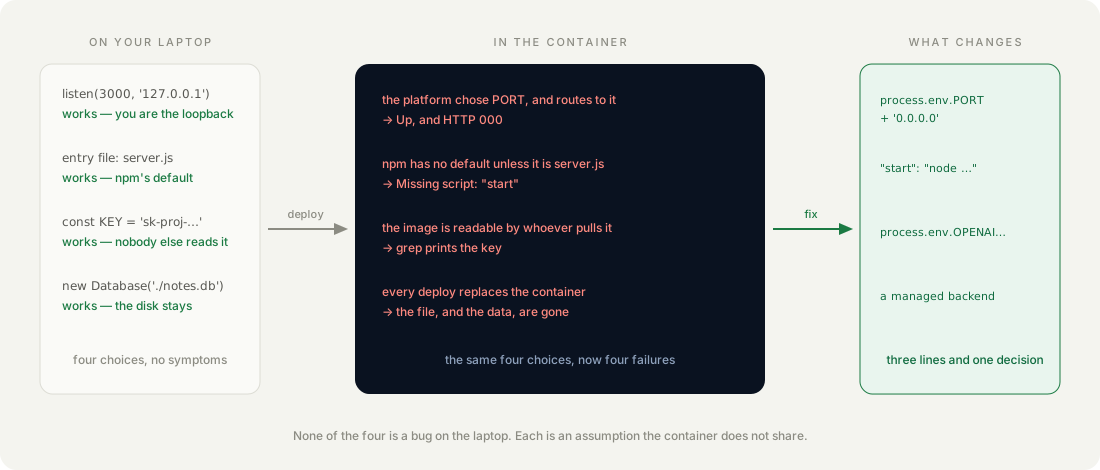
This guide takes that exact app, reproduces all four of the faults that put it there, and shows the real output of each. Three are one line. The fourth is the only one that needs you to decide something.
Why does a healthy container answer nothing?
Because “running” and “reachable” are different claims, and the platform can only check the first. A container whose process has not exited is Up, whatever that process is doing.
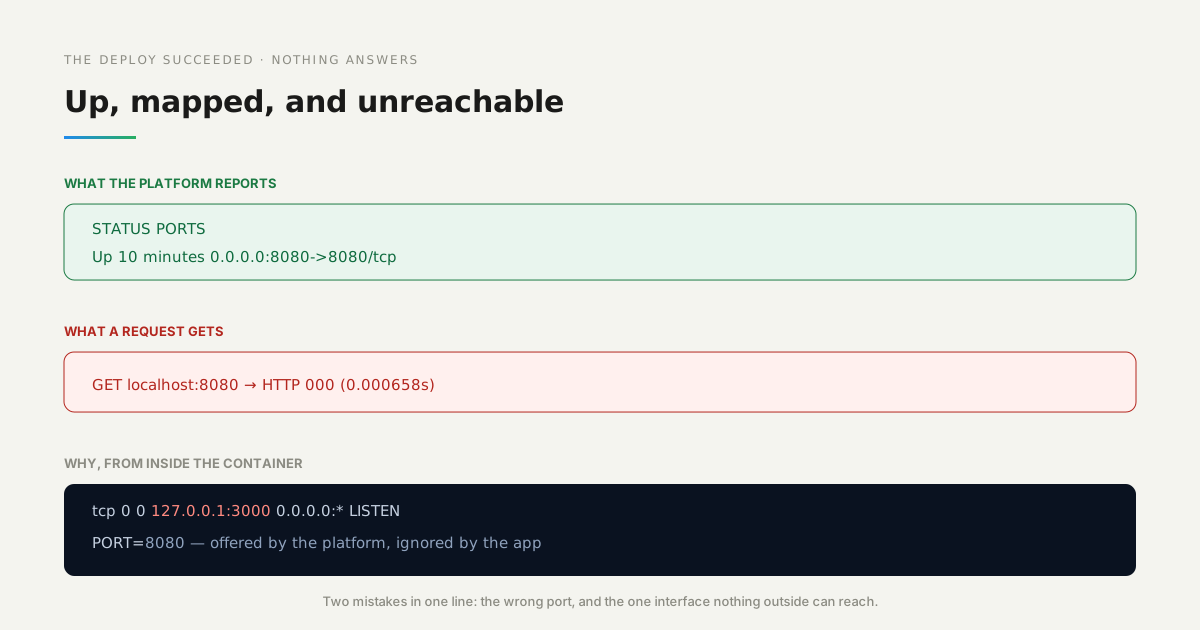
Here is the state the deployed app was actually in. The container looks correct from the outside — it is running, and the port is mapped:
STATUS            PORTS
Up 10 minutes     0.0.0.0:8080->8080/tcp
And every request to it fails:
GET localhost:8080 → HTTP 000 (0.000658s)000 is not a status the app returned. It is curl reporting that nothing accepted the connection at all. Looking inside the container explains why:
netstat -tln | grep LISTEN
tcp   0   0   127.0.0.1:3000   0.0.0.0:*   LISTEN

printenv PORT
8080
The platform offered port 8080 and the app ignored it, listening on 3000. Worse, it bound 127.0.0.1 — the loopback interface — so even a request arriving on port 3000 from outside the container would find nothing. Two mistakes live in that one line, and the second is the one people miss.
How we measured: the container was built from the unmodified app, run with PORT=8080 and the port published, and probed from the host with curl; the listening socket was read from inside the container with netstat.
On your laptop you are the loopback. In a container, you are the only thing that is not.
How do you make the app listen where the platform is looking?
Read the port from the environment and bind every interface. One line replaces the two mistakes:
// Stack: Node 22 + Express 5 | File: server.js
const PORT = process.env.PORT || 3000;
app.listen(PORT, '0.0.0.0', () => console.log(`listening on 0.0.0.0:${PORT}`));
The || 3000 keeps local development working exactly as before, so this is not a change you have to remember to undo. 0.0.0.0 means “every interface this container has”, which is what makes it reachable from outside itself.
With that one line changed, the same container answers:
GET /          → HTTP 200
GET /healthz   → HTTP 200
listening on   0.0.0.0:8080
Does a missing start script really break the deploy?
Sometimes — and which times is the surprising part. npm ships a default start script, and whether you benefit from it depends on what your entry file is called.
This package.json has no start script at all:
{
  "scripts": { "dev": "node server.js" }
}
Run npm start against it twice, changing only the filename:
entry = server.js   →   the app starts
entry = app.js      →   npm error Missing script: "start"
npm substitutes node server.js when a file of that name exists, and nothing otherwise. So the same missing script is harmless in one project and fatal in the next, decided by a naming choice the AI tool made for you.
How we measured: two directories with the identical package.json, differing only in whether the entry file was server.js or app.js, each run with npm start in a clean node:22-alpine container.
{
  "scripts": {
    "dev": "node server.js",
    "start": "node server.js"
  }
}
What happens to a key you pasted into the code?
It ships. A key in a source file is in the image, and anyone who can pull the image can read it without starting anything:
docker run --rm notes-app grep -n "sk-proj" server.js
11:const OPENAI_API_KEY = 'sk-proj-REDACTED-this-was-pasted-into-the-file';
No running app, no network request, no access to your account — just the image and one command. It is also in your git history from the first commit, which outlives any later deletion of the line.
The fix is the line the AI tool should have written in the first place, plus setting the value where the platform keeps environment variables:
const OPENAI_API_KEY = process.env.OPENAI_API_KEY;After that change the same grep returns nothing, while the running app still reports the key as configured — it is present at runtime and absent from the artifact.
How we measured: grep -c "sk-" against the image’s own copy of server.js returned 0, and the app’s own / response reported keyConfigured: true with the value supplied as an environment variable.
Why did the notes disappear, and why not on restart?
Because a deploy does not restart your container — it replaces it. This is the fault that costs people the most time, because the obvious test passes.
The app wrote its notes to a file inside the container. Three runs of the same check, with one note saved:
| What happened | Notes left |
|---|---|
docker restart | 1 — survives |
| Container replaced from the same image | 0 — gone |
| Container replaced, with a volume mounted | 1 — survives |
A restart keeps the container’s own writable layer, so the file is still there and the storage looks persistent. Replacement discards that layer. Platforms replace the container on every deploy, every scale event and every host migration, which means the data was never safe — the restart test simply never asked the right question.
How we measured: one note posted through the app, then the container restarted, then removed and recreated from the same image, then the pair repeated with a named volume mounted at the app directory.
Where should the data actually live?
Outside the container, in something whose job is to still be there tomorrow. A volume is the smaller answer and it works, but it ties the data to one host and leaves backups, migrations and concurrent access to you.
The version in the companion repo sends its notes to a managed backend instead, so the container holds no state at all:
// Stack: Node 22 | File: server.js
const PARSE = 'https://parseapi.back4app.com';
const parseHeaders = {
  'X-Parse-Application-Id': process.env.PARSE_APP_ID,
  'X-Parse-REST-API-Key': process.env.PARSE_REST_KEY,
  'Content-Type': 'application/json',
};
Then the same destructive test that lost everything before:
note posted            →  1 note
container replaced     →  1 note
The container became disposable, which is what you wanted from it all along. Note that the credentials arrive the same way the API key now does — the two fixes are the same habit applied twice.
Which errors tell you which fault you have?
They barely do, which is why this guide leads with the symptoms instead. The four faults produce almost no diagnostic output, and that is their defining feature.
| What you see | Which fault |
|---|---|
Container Up, requests return HTTP 000 or time out | wrong port, or bound to 127.0.0.1 |
npm error Missing script: "start" in the deploy log | no start script, entry file not server.js |
| Nothing at all — it works | the key is in the image, and will be until someone finds it |
| Data correct after a restart, empty after a deploy | state in the container filesystem |
Only the second announces itself. The first looks like a network problem, the third looks like success, and the fourth looks like a restart bug. If your deploy log is empty and your app is unreachable, start with the listening address before you suspect the platform.
When is a container the wrong place for this app?
When the thing you are deploying does not contain a server at all. A single-page app with nothing behind it is a pile of static files, and wrapping it in Node to serve them buys you a process to supervise and nothing else — serve the files directly instead.
It is also the wrong shape when the work is a schedule rather than a request. A nightly report does not need something listening on a port; it needs something that runs and exits, and a container held open by a web server is a poor fit for that.
And if your app genuinely needs a writable local disk — an image converter working on large temporary files, say — a container is fine, but plan for the disk to be empty on every start. That is a constraint to design around, not a bug to fix later.
What would you add to the deploy-failure lab next?
A health check endpoint that fails honestly. /healthz in the repo returns { "ok": true } unconditionally, which is the same optimism the platform showed when it called the broken container Up — pointing it at the backend the app depends on would make it mean something.
After that, a build-time check. Three of these four faults are visible in the source before anything is deployed: a hardcoded port, a missing start script, a string beginning sk-. A short script in CI that refuses the build would catch them earlier than any deploy log.