Astro is two deployment stories wearing one framework. Leave the config alone and astro build writes plain HTML — host it anywhere, no Node in sight. Change the output mode and the same repo builds a Node process that renders on request. This guide containerizes both from one repository: the SSR variant we deployed and measured live, and the static variant with its own Dockerfile.
The SSR path is the one backed by our live evidence; the code for both modes is in the companion repo (astro 7.4.7, @astrojs/node 11.1.11).
Choose static or SSR first
Answer this before writing a Dockerfile, because the static answer makes half of this guide unnecessary.
| Your Astro site | Build output | Deployment shape |
|---|---|---|
| Content pages, maybe interactive islands | static dist/ of HTML | the nginx variant below (or any static container) |
| Pages that must render per request (auth, personalization, live data) | a Node server in dist/server/ (with an adapter, prerendered pages can coexist with it — the folder alone does not prove every page renders per request) | the SSR container, this guide’s main path |
| Mostly static with a few server routes | a hybrid | the SSR container, with routes controlling their own prerendering |
For everyone continuing, one economics note up front — the free plan we tested on gives an app a URL that expires 60 minutes after its creation; a redeploy inside that hour did not reset it. Fine for proving the pipeline; a paid plan is the hosting answer.
Configure the output mode
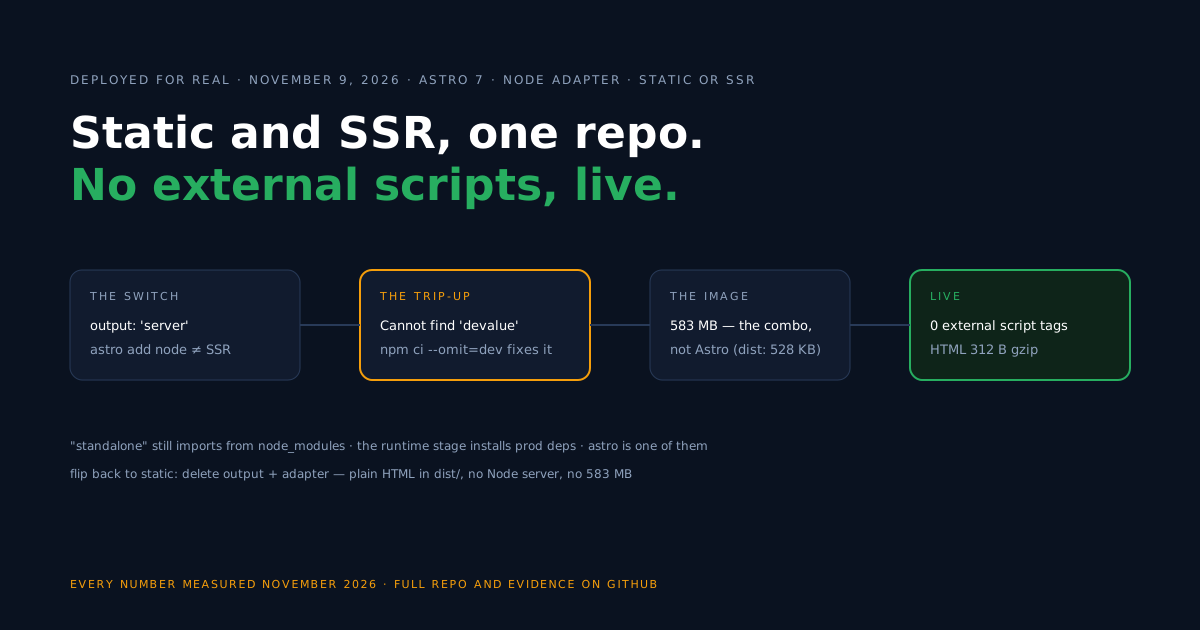
Here is the trap we hit first: npx astro add node -y edits astro.config.mjs for you, installs the adapter, and looks done — but output stays at its default, which is static. The build keeps prerendering everything, and your shiny Node server boots up to serve files any static host could have served.
The modes, per Astro’s configuration reference: the default prerenders every page at build time, and output: 'server' flips that default so pages render per request.
The split is also controllable per route — a page can opt out of its mode’s default with a prerender export, which is how hybrid sites keep most pages static (on-demand rendering guide). Our starter wants always-on SSR, so it sets the mode explicitly:
// astro.config.mjs
import { defineConfig } from 'astro/config';
import node from '@astrojs/node';

// This starter ships in SSR mode ("server" + the Node standalone adapter), so
// `astro build` produces a Node server in dist/server/entry.mjs that you can
// run in a container (it honors the HOST and PORT env vars).
//
// Astro's default is a fully static build: to go back to it, remove the
// `output` and `adapter` lines below — `astro build` then emits plain HTML
// into dist/ that any static file server (or nginx) can host.
export default defineConfig({
  output: 'server',
  adapter: node({
    mode: 'standalone'
  })
});
With that in place, npm run build writes dist/, including dist/server/entry.mjs — the production server, started with node ./dist/server/entry.mjs and configured through the HOST and PORT environment variables.
Build the Docker image (SSR)
Our first runtime image copied dist/ and package.json into a clean node:22-alpine, on the reasonable theory that a mode named standalone stands alone. The container exited immediately:
ERR_MODULE_NOT_FOUND: Cannot find package 'devalue'The built server keeps some of its imports external and expects to find them in node_modules. So the runtime stage must install production dependencies, and the Dockerfile that actually works looks like this:
# ---- Build stage ----
FROM node:22-alpine AS build
WORKDIR /app
COPY package.json package-lock.json ./
RUN npm ci
COPY . .
RUN npm run build

# ---- Runtime stage ----
FROM node:22-alpine
WORKDIR /app
ENV NODE_ENV=production HOST=0.0.0.0 PORT=8080

# Pitfall: @astrojs/node "standalone" mode is NOT fully self-contained —
# the built server still imports packages (e.g. devalue) from node_modules,
# so production dependencies must be installed in the runtime image.
COPY package.json package-lock.json ./
RUN npm ci --omit=dev && npm cache clean --force

COPY --from=build /app/dist ./dist

EXPOSE 8080
HEALTHCHECK --interval=30s --timeout=3s --start-period=5s \
  CMD wget -qO /dev/null http://127.0.0.1:8080/ || exit 1
USER node
CMD ["node", "./dist/server/entry.mjs"]
Understand the image size
Build that image and the number jumps out: 583 MB in our measurement, where comparable Node-server starters we measured the same week — same node:22-alpine base — landed around 240 MB.
What the image contains is three layers of weight: the Node base image, the installed production node_modules, and the build output (a small dist/; exact size in the measurements table).
The difference against those comparable starters comes from the middle layer: astro itself sits in dependencies here, and the devalue crash above forces npm ci --omit=dev into the runtime stage — so “install production deps” means “install the framework.” The size is this combination’s price, not an Astro constant, and not a split we can itemize beyond what the comparison shows.
Two honest levers exist. A fully static build needs no node_modules at runtime at all — the nginx variant below sidesteps the entire question.
And in SSR, only what the built server imports at runtime has to live in dependencies; auditing that list is reasoning we did not measure, so treat it as a direction, not a promised number. Prerendering some pages, by itself, does not remove any packages from the image.
Build the static variant (deployed live on November 9, 2026 (nginx served the build at its public URL with status 200))
The same repo serves the static story: remove output and adapter from astro.config.mjs, and astro build emits plain HTML into dist/. A container for that build needs no Node at runtime — nginx serves the folder:
# ---- Build stage ----
FROM node:22-alpine AS build
WORKDIR /app
COPY package.json package-lock.json ./
RUN npm ci
COPY . .
RUN npm run build

# ---- Serve stage ----
FROM nginx:1.27-alpine
COPY nginx.conf /etc/nginx/conf.d/default.conf
COPY --from=build /app/dist /usr/share/nginx/html
EXPOSE 8080
# nginx.conf
server {
listen 8080;
root /usr/share/nginx/html;
index index.html;
}To be explicit about evidence: we deployed and measured the SSR variant; this static container was not part of the live test. Validate it locally the same way you would any container — docker build -t astro-static ., docker run -p 8080:8080 astro-static, then confirm curl http://localhost:8080/ returns your page.
The platform steps below apply to it unchanged, since the port and source settings are the same.
Deploy on Back4app
The platform flow is short, and two of its screens are identical to every container deploy in this series.
- New Web Deployment → select the GitHub repository.
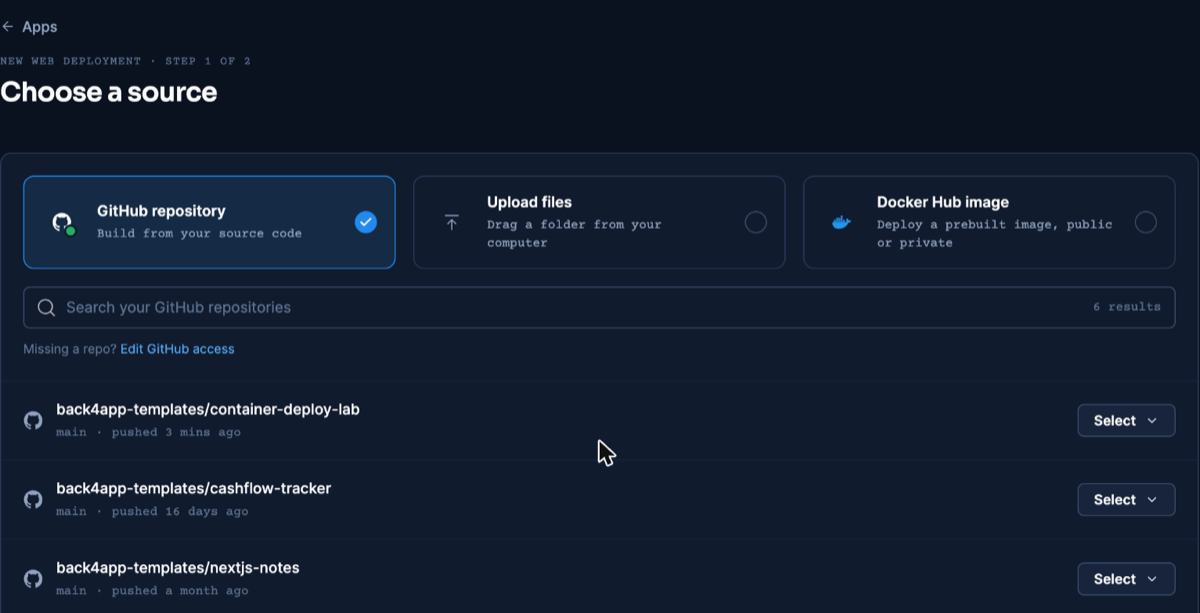
Source selection, shared across this series’ deploys — dashboard as of November 2026.
- The Dockerfile is detected. One field is on you: Port. Enter 8080 — our deploys set it at creation, because the platform does not inherit the Dockerfile’s
EXPOSE, and the React guide shows the exact failure that omission causes.
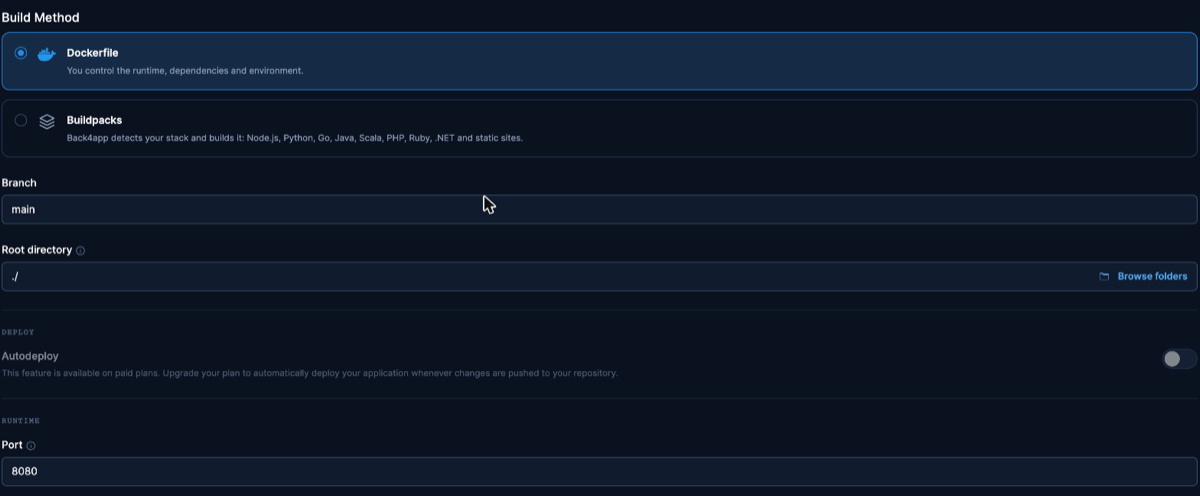
Port 8080, typed in, not assumed. Dashboard as of November 2026.
- Create the app and wait for the first deploy; ours was dominated by the runtime-stage install, as expected from the local builds.
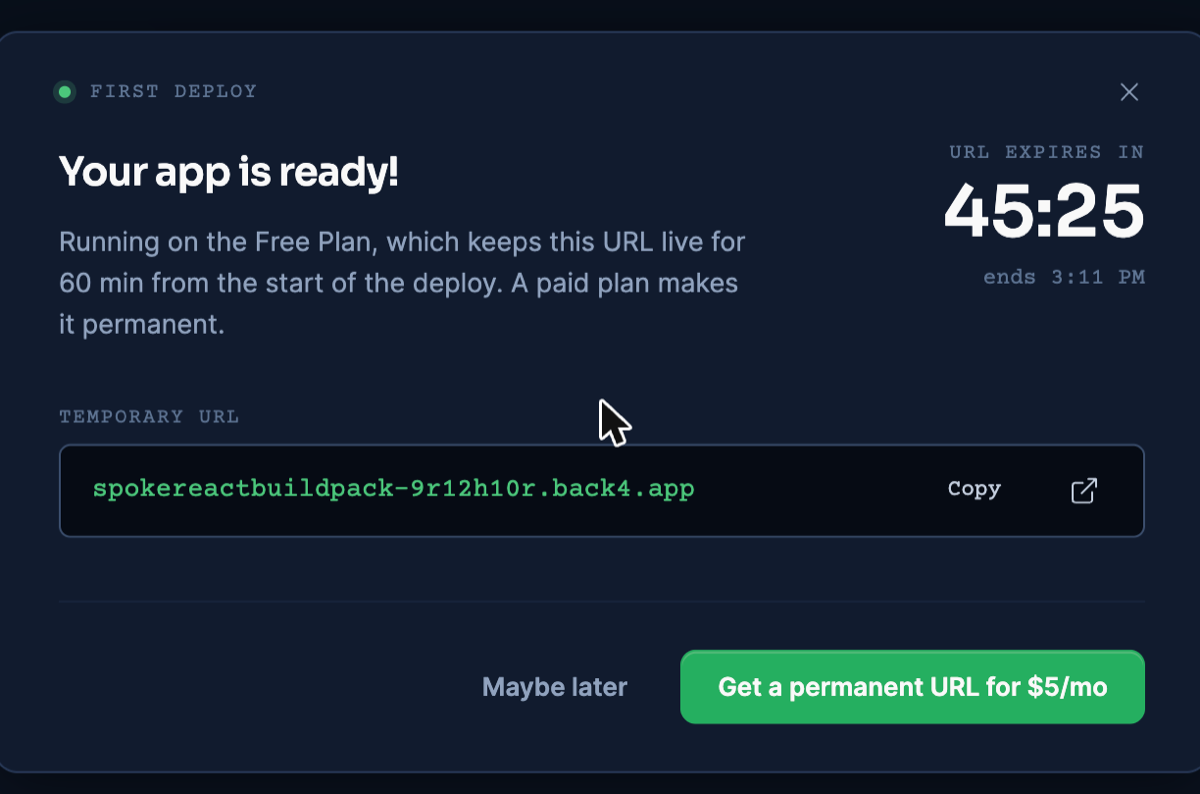
The free-plan URL and its 60-minute countdown. Dashboard as of November 2026.
Verify the live deployment
Astro’s pitch makes two checkable promises, so on November 9, 2026 we read both off the live URL’s raw response.
Rendered content: the HTML document arrived carrying the page’s content, <h1> included — the server handed over a finished page, not an empty shell.
One precision our test cannot add: a minimal page renders identically whether it was built at deploy time or per request, so distinguishing build-time from per-request rendering would need a per-request value (a timestamp, a request echo) in the page, which this template does not include.
Minimal JavaScript: the served HTML contained zero external <script> tags. We did not separately audit inline scripts, so the verified claim is exactly that — no external scripts — rather than “no JavaScript of any kind.” Islands you add will bring exactly the scripts they need.
Run the SSR deploy from an AI assistant (MCP)
Back4app’s remote MCP server lets an AI assistant perform the SSR deploy for you. It changes who clicks, not how the site is built: the Dockerfile above still produces the image. Connection steps per client are on the official MCP page.
Our guide to deploying with MCP and an AI assistant covers connection, authorization and diagnosis in full.
We ran it on November 10, 2026 with Claude (custom connector, signed in) against the SSR branch of the starter: create_upload, the npx @back4app/cli upload command it returns, then create_web_app with port 8080. The app was created with builder: DOCKERFILE and was READY about 120 seconds later.
The public page returned the rendered heading and referenced no JavaScript files, matching the dashboard deploy.
One timing detail an assistant should handle: the URL started answering 200 about five seconds before get_deployment reported READY, and returned 404 before that. Wait for the status, not for the first 200.
The static variant was not deployed through MCP in this test. Ids and timings: MCP evidence file.
Update the deployed app
A release is a push plus one dashboard action: App actions → Deploy the latest commit rebuilds onto the same URL, which we confirmed on this platform. On paid plans a push can deploy itself; on the free plan the click is part of the routine.
Re-creating the app re-reads the branch too, but issues a new URL — a fallback, not a workflow. The deep-dive on this flow, including a caveat about changed branch settings, is in the React article.
Measurements
The live deploy ran the starter at commit 8f75e8d (SSR mode); local figures are from November 6, 2026, live figures from November 9, 2026.
Transfer sizes are separated from on-disk sizes, and the static variant appears in none of these rows — it was not measured. Method and raw output: the repo’s evidence files.
| What | Value | Where |
|---|---|---|
| External script tags in served HTML | 0 | live URL |
| HTML document on / (transfer) | 312 B gzip | live URL |
| App creation → serving | ~2.5 min (runtime-stage npm ci dominated) | deploy timeline |
| TTFB on / (3 illustrative requests) | 1.375 s · 1.174 s · 1.204 s | live URL |
| npm ci / npm run build (SSR mode) | 1.1 s / 3.9–4.5 s | local |
| docker build (no cache) | 57.8 s | local |
| Image size (on disk) | 583 MB (explained above) | local |
Build output dist/ (on disk) | 528 KB | local |
Troubleshooting
Boot crash: ERR_MODULE_NOT_FOUND: Cannot find package 'devalue' — the runtime image lacks production dependencies. Add COPY package.json package-lock.json ./ and RUN npm ci --omit=dev to the runtime stage; standalone mode does not exempt you.
The server runs but every page is prerendered — output is still at its static default because astro add node never changed it. Set output: 'server' in astro.config.mjs and rebuild; the difference is visible in whether dist/server/ exists.
Launch rejected with Please mention a port in settings to expose — the Port field was left on auto, which ignores the Dockerfile’s EXPOSE. Set 8080 under Build & deploy and redeploy.
Limitations of this setup
What this flow does not give you, stated plainly.
- Free-plan mechanics: a URL that lasts 60 minutes from the app’s creation and a manual action per release; permanence and push-triggered deploys live on paid plans.
- Image weight is structural here: as long as the standalone server needs the framework installed at runtime, the SSR image stays heavy; the real escape hatch is the static mode, not a Dockerfile trick we can point to.
- Static variant is platform-validated: we published its Dockerfile and local checks, but our live evidence covers the SSR container only.
- Rendering granularity: this starter is all-SSR; per-route prerendering is documented Astro behavior we did not exercise, so follow the official guides when you mix modes.
Auth, storage and APIs are a next step rather than a limitation: SSR routes can implement them server-side, or a managed backend can carry them over REST and GraphQL — in which case your Astro build might get to stay static after all.
What’s next?
Decide your output mode and take the matching Dockerfile — both are above, and the companion repo ships ready for the SSR one with the static flip documented inline (Containers docs).