Open your app in a browser, open the developer tools, and look at the network tab. Two headers go out with every request to your backend: an App ID and a key. Anyone reading your page has both. That is not a leak. It is how a frontend that talks to a managed backend is supposed to work.
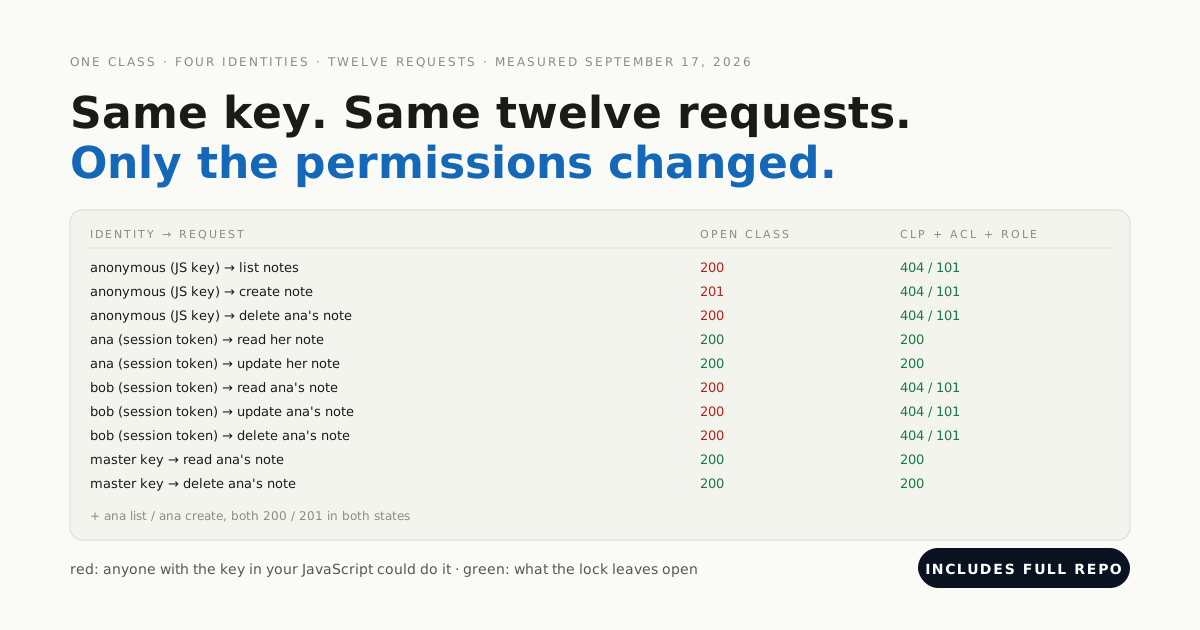
What those two headers can do is the whole question. On a class with default permissions the answer is: everything. List every row, change any row, delete all of them. We measured it, twelve requests from four identities, and then closed the class with four locks and measured again after each one.
The four locks are class-level permissions, a per-row ACL stamped by a backend hook, a role checked inside a Cloud Function, and a master key that never leaves the server. Everything below was measured on September 17, 2026, on a Back4app backend, including the 22 minutes when lock 1 was only partly closed.
Get the working code: the companion repo is at github.com/templates-back4app/lockdown-lab — probe.sh, seed.sh, lockdown.sh, cloud/main.js and migrate-acl.sh. Run the probe before and after each lock and you get the tables in this post for your own backend.
What can anyone with your JavaScript key do right now?
We made a Note class the way most apps do: the first client write created it. Then we seeded two users, ana and bob, and a moderator role containing bob, and ran twelve requests from four identities. Anonymous means the App ID and JavaScript key alone. The master key is what a server would hold.
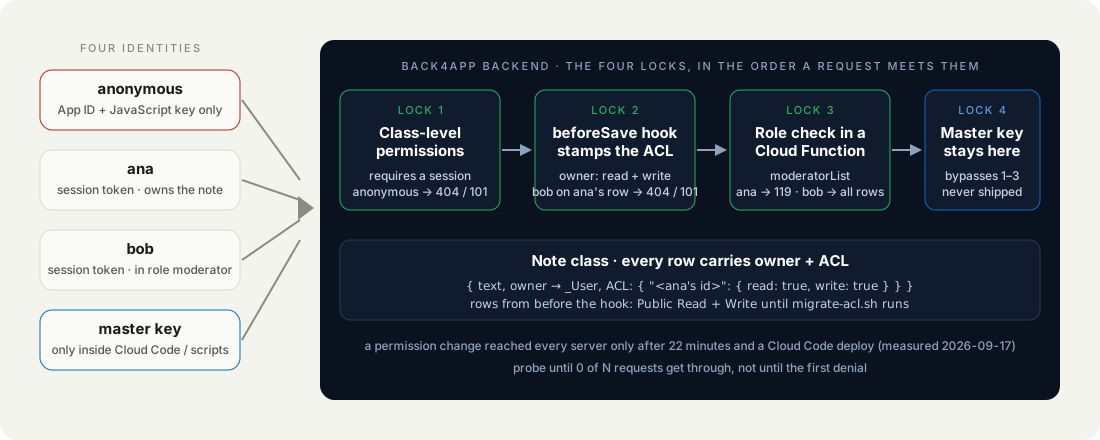
This is state 0, the class as it was born, at 15:08 UTC:
| Identity → request | HTTP / code |
|---|---|
| anonymous (JS key) → list notes | 200 |
| anonymous (JS key) → create note | 201 |
| anonymous (JS key) → delete ana’s note | 200 |
| ana (session token) → list, read, update, create | 200 / 200 / 200 / 201 |
| bob (session token) → read ana’s note | 200 |
| bob (session token) → update ana’s note | 200 |
| bob (session token) → delete ana’s note | 200 |
| master key → read, delete ana’s note | 200 / 200 |
Every row green. The third line is the one to sit with: someone who has never logged in, holding only what your page hands out, deleted another user’s data and got a 200 for it. Nothing was misconfigured. This is the default.
How we measured: probe.sh, twelve curl requests from four identities against fresh rows, destructive requests last, run at least once per state (three times for the open class) on September 17, 2026. The propagation table comes from a sampler of ten anonymous list requests every 30 seconds; the answering server is the x-backend-server header.
Why is the key in your frontend not the problem?
Because it was never a secret. The JavaScript key, the Client key and the REST key are client keys: they say which app is calling so the backend can find your data and apply your rules. They are meant to be in an APK, in a page, in a curl command. Rotating them buys nothing if the rules are open.
The master key is the opposite. It bypasses every permission in this post. It belongs in Cloud Code, in a server’s environment variables, or in a script on your machine, and in no client of any kind. The repo’s .env holds it for the probes and is git-ignored for that reason.
The key says which app is calling. The permissions say what it may do. Only one of those is your job.
So the work is not hiding the key. The work is telling the backend, per class and per row, what each identity may do. That happens in three places: the class’s permissions, each row’s ACL, and code that runs on the backend.
How do class-level permissions turn anonymous requests away?
Class-level permissions (CLP) are the door to the class. For each operation (find, get, create, update, delete, add field) they say who may knock: everyone, only authenticated users, specific users and roles, or nobody. Lock 1 is authenticated users only on every operation, which turns the anonymous rows red and leaves everything else alone.
The dashboard sets it under Database → the class’s menu → Security → Class Level Permission: uncheck Public, check Authenticated for Read and Write. We did the same thing from the terminal through the schema API, because a script is repeatable and a screenshot is not:
# Stack: bash + curl (schema API, master key) | File: lockdown.sh
CLP='{"find":{"requiresAuthentication":true},"get":{"requiresAuthentication":true},"create":{"requiresAuthentication":true},"update":{"requiresAuthentication":true},"delete":{"requiresAuthentication":true},"addField":{}}'
curl -s -H "X-Parse-Application-Id: $APP_ID" -H "X-Parse-Master-Key: $MASTER_KEY" -H "Content-Type: application/json" \
  -X PUT "https://parseapi.back4app.com/schemas/Note" -d "{\"classLevelPermissions\":$CLP}"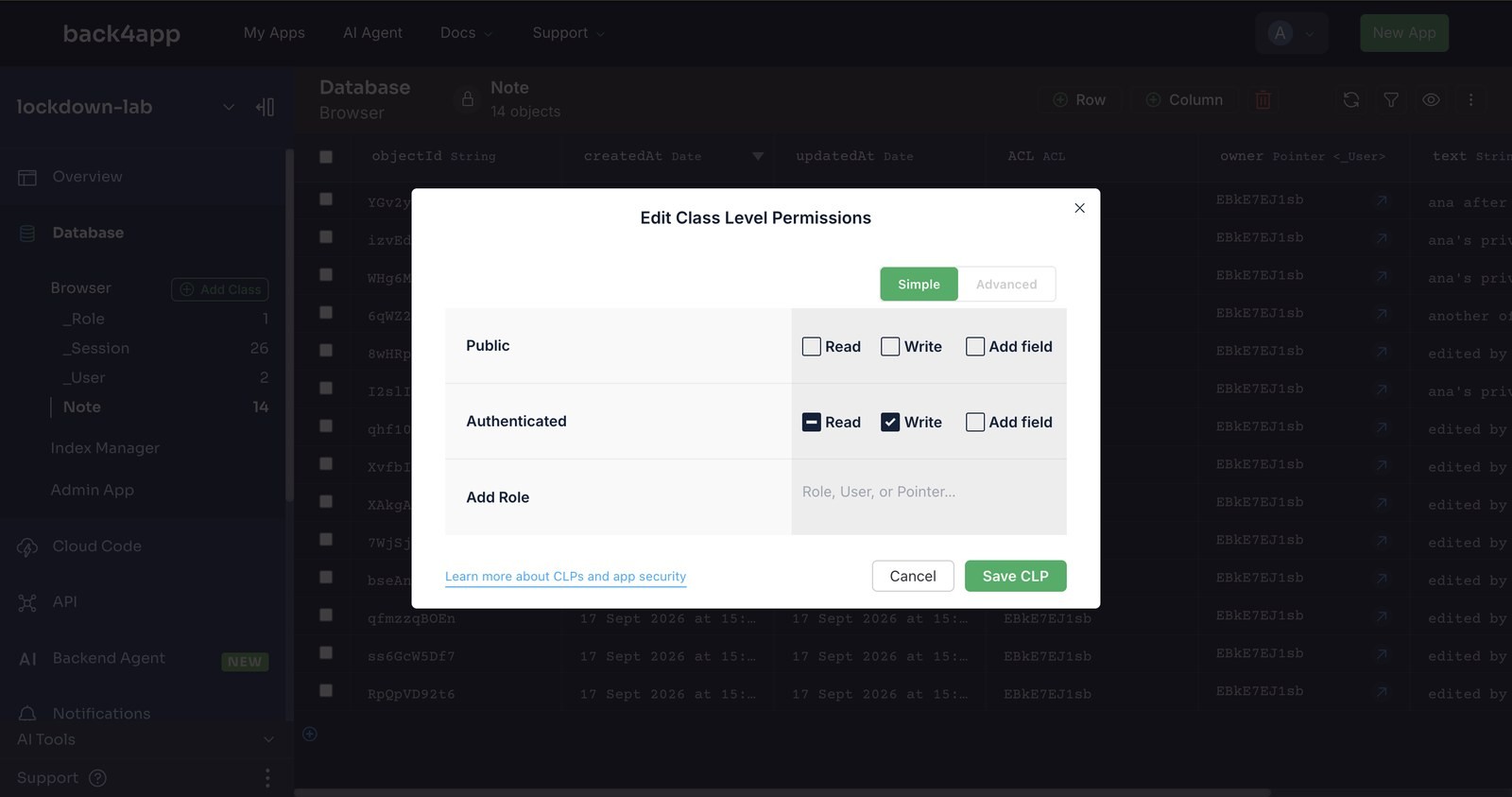
With the CLP in place, an anonymous create was refused immediately: 404, code 101, Permission denied, user needs to be authenticated. An anonymous count got a different pair, 400 / 119. Two codes for “not allowed”, depending on the operation; branch on both.
How long does a permission change take to reach every server?
Longer than one request, and that was the surprise of the day. We changed the CLP at 15:08:40 UTC and probed at 15:10: anonymous create was refused, anonymous list was still answered. Twenty list requests in a row gave 14 × 200 and 6 × 404, from the same key, in the same second. GET /schemas/Note showed the new permissions the whole time. The request path did not.
We left a sampler running: ten anonymous list requests every 30 seconds. Between 15:14 and 15:30 the number allowed swung between 10 of 10 and 0 of 10 and back. The x-backend-server response header explained it: every 200 came from one server, shared752, while the denials carried no such header. The app runs on several instances, and one of them kept the old rule.
Restart App on the Overview page at 15:25 reported restarted successfully and changed nothing: 0 of 10 at 15:28, then 8 of 10 again. What ended it were two Cloud Code deploys at about 15:30, of a file that had not changed. The next sample read 2 of 10, and every sample after 15:31:26 read 0 of 10, for the rest of the afternoon.
| Time (UTC) | Anonymous list requests allowed, of 10 |
|---|---|
| 15:14 – 15:16 | 10, 10, 10, 10 |
| 15:16 – 15:30 | 6, 9, 8, 8, 7, 6, 10, 10, 10, 10, 7, 6, 8, 7, 10, 8, 9, 6, 5, 4, 0, 8, 8, 7, 9 |
| 15:30:53 (after the deploys) | 2 |
| 15:31 onwards | 0, 0, 0, … (24 samples, until we stopped at 15:44) |
How does a backend hook give every row an owner-only ACL?
Lock 1 keeps strangers out. It does nothing about bob, who is logged in and can still read, edit and delete ana’s note. That is lock 2, the ACL: a per-row list of who may read and who may write. The classic mistake is to have the client set it; the client can forget, and a curl command will. So the backend sets it, before the row exists:
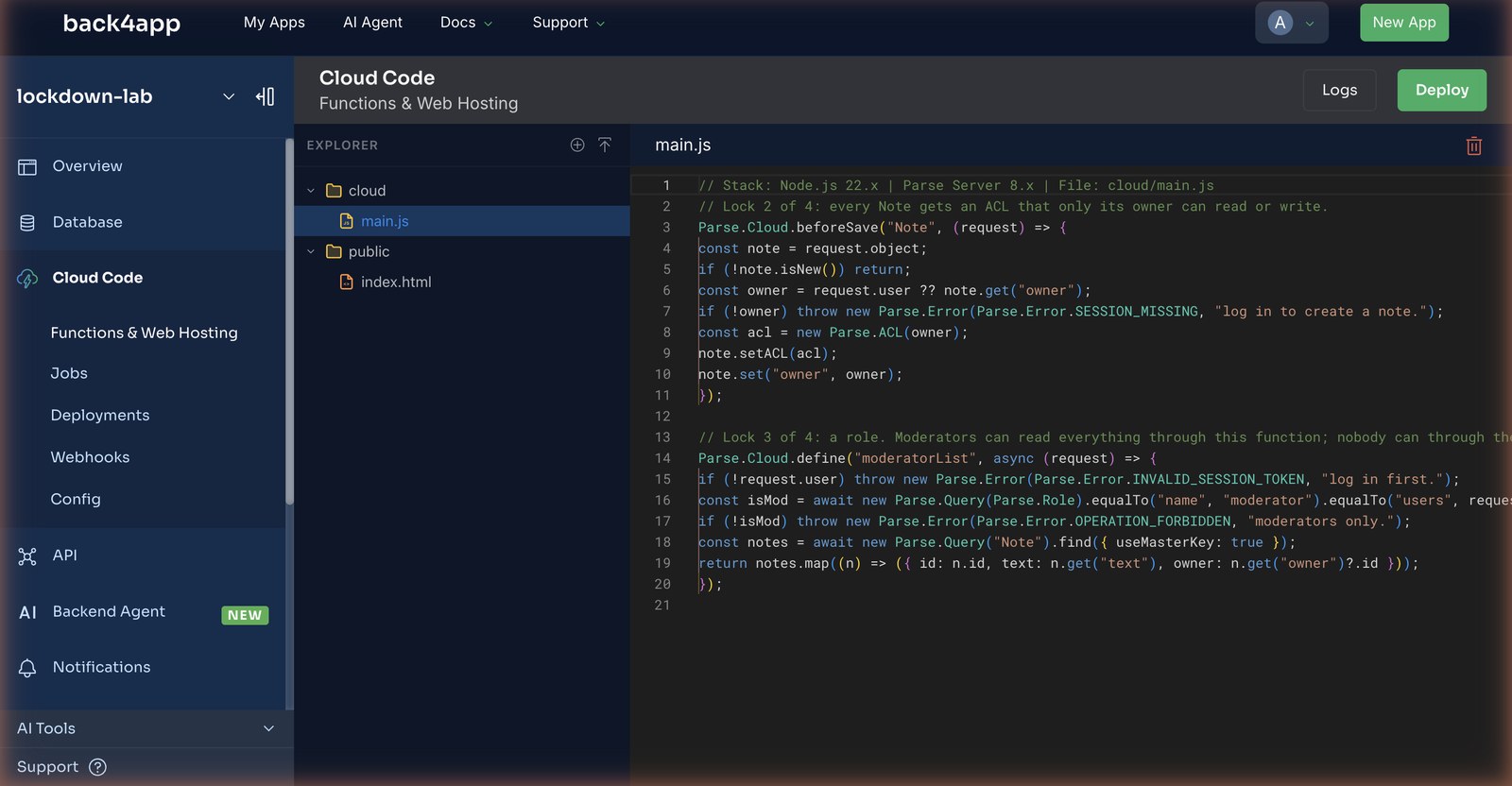
// Stack: Node.js 22.x | Parse Server 8.x | File: cloud/main.js
// Lock 2 of 4: every Note gets an ACL that only its owner can read or write. The client cannot forget to set it,
// because the client never sets it — the backend does, before the row exists.
Parse.Cloud.beforeSave("Note", (request) => {
  const note = request.object;
  if (!note.isNew()) return;                                   // ACL is decided once, at creation
  const owner = request.user ?? note.get("owner");             // request.user = whoever holds the session token
  if (!owner) throw new Parse.Error(Parse.Error.SESSION_MISSING, "log in to create a note.");
  const acl = new Parse.ACL(owner);                            // owner: read + write; everyone else: nothing
  note.setACL(acl);
  note.set("owner", owner);
});
request.user is whoever sent the session token, resolved by the backend; the client cannot claim to be someone else. new Parse.ACL(owner) grants read and write to that user and nothing to anyone, including the public. The owner pointer is set in the same breath, so a query can filter on it and the moderator function can show who wrote what.
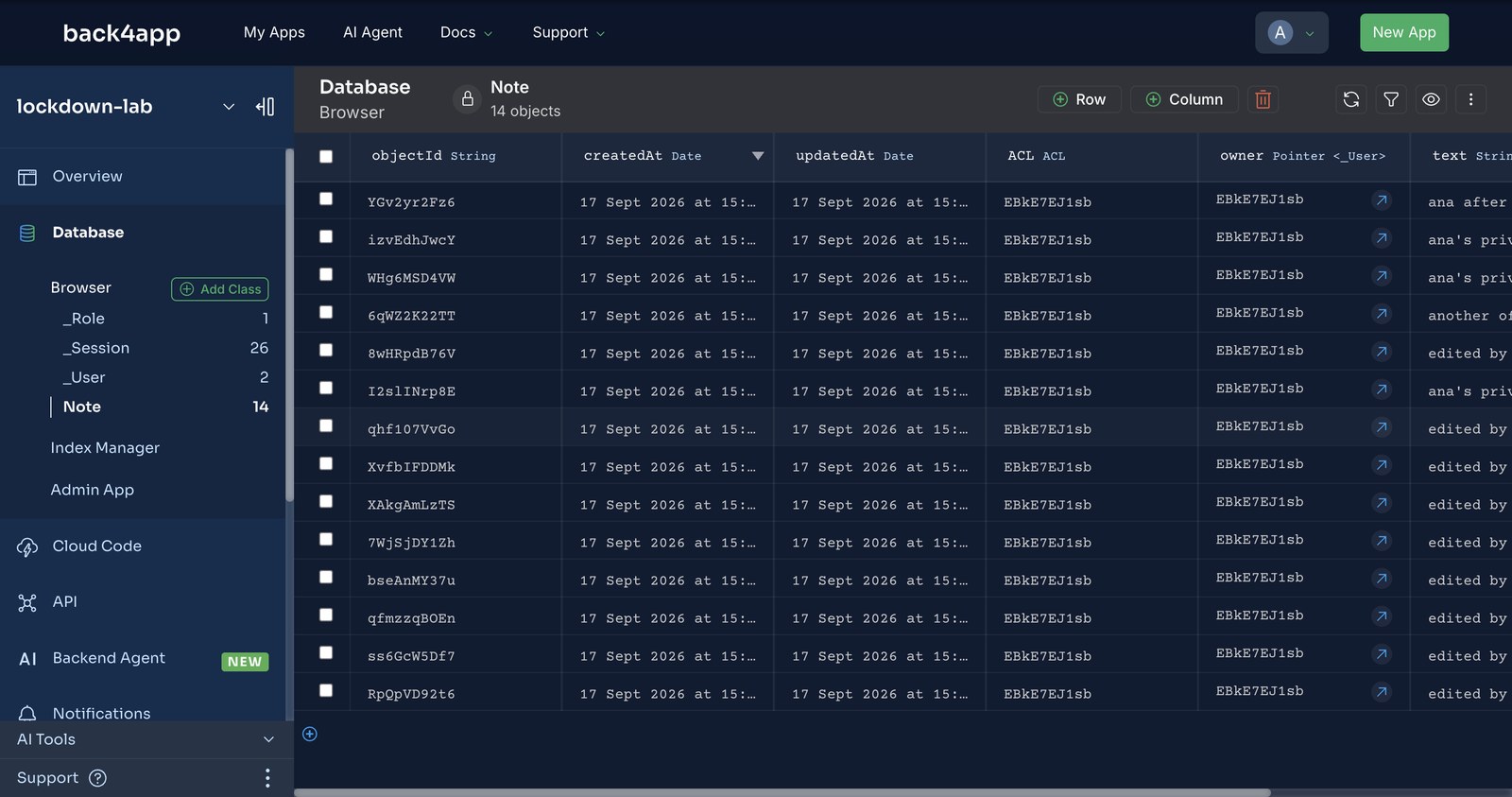
After the deploy, every note ana creates carries ACL: { "<ana's id>": { read: true, write: true } }, which the Database Browser shows as her object id in the ACL column. The rows did not come from a form we wrote; they were written by the probes, and the hook did the rest.
What does bob see when he asks for ana’s note?
Nothing, and not a refusal. With the ACL in place, bob reading ana’s note by id got 404 / 101 Object not found. The same status and code a made-up id gets. Updating and deleting it: the same. The ACL does not say you may not; it makes the row invisible, and a list request simply omits it.
That is the behaviour you want from a security feature and the behaviour that confuses a developer at 2 a.m. If your logs show 101 on a row you can see in the dashboard, check the ACL before you check the id.
| Identity → request | Open class | CLP + ACL + role |
|---|---|---|
| anonymous → list, create, delete | 200 / 201 / 200 | 404 / 101 on all three |
| ana → read, update her note | 200 / 200 | 200 / 200 |
| ana → list, create | 200 / 201 | 200 / 201 |
| bob → read, update, delete ana’s note | 200 / 200 / 200 | 404 / 101 on all three |
| master key → read, delete ana’s note | 200 / 200 | 200 / 200 |
A note on the one thing we saw and could not reproduce. In the first probe run, seconds after seed.sh created the users, ana’s writes returned 209 Invalid session token while her reads returned 200. A minute later three consecutive runs had no 209s. Treat a 209 right after signup as a reason to re-run, not as a rule.
How does a role let moderators read everything without opening the class?
Lock 3. A moderator needs to see every note, and the wrong way to give them that is to loosen the CLP or add the role to every row’s ACL. The right way is a Cloud Function that checks the role and does the read on the backend, with the master key, and hands back exactly what a moderator should see:
// Stack: Node.js 22.x | Parse Server 8.x | File: cloud/main.js (continued)
// Lock 3 of 4: a role. Moderators can read everything through this function; nobody can through the class.
Parse.Cloud.define("moderatorList", async (request) => {
  if (!request.user) throw new Parse.Error(Parse.Error.INVALID_SESSION_TOKEN, "log in first.");
  const isMod = await new Parse.Query(Parse.Role).equalTo("name", "moderator").equalTo("users", request.user).first({ useMasterKey: true });
  if (!isMod) throw new Parse.Error(Parse.Error.OPERATION_FORBIDDEN, "moderators only.");
  const notes = await new Parse.Query("Note").find({ useMasterKey: true });   // lock 4: the master key stays here
  return notes.map((n) => ({ id: n.id, text: n.get("text"), owner: n.get("owner")?.id }));
});
Measured: ana calling moderatorList got 119 moderators only.; bob, who is in the role, got the full list, owners included. The class itself stayed as locked as before. The role was created by seed.sh with the master key, because creating a role is itself a privileged write; the _Role class in the dashboard shows one row, moderator, with bob in its users relation.
The useMasterKey: true on the two queries is lock 4 in one line: the master key is used, inside the backend, by code you deployed, for a query you chose. No client ever holds it, and a moderator who leaves the role loses the list on their next call.
Which permissions does a new class get by default?
All of them, for everyone. We proved it a second time on purpose: we created a Draft class the lazy way, by writing to it from an anonymous request, and opened the Database Browser. Three rows, and every ACL reads Public Read + Write. The CLP was the same: public everything, addField included.
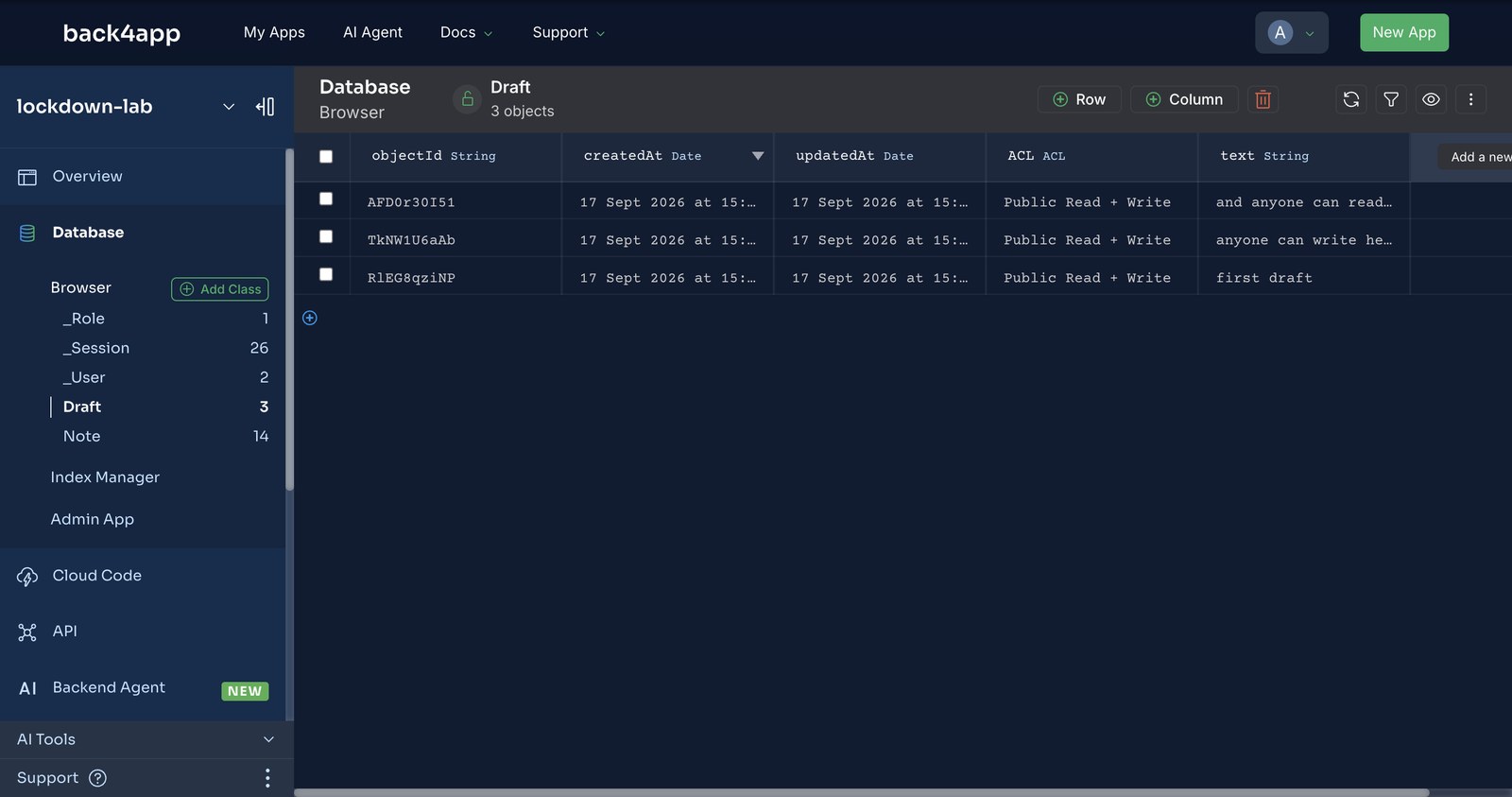
Nothing in the dashboard warns you. The class simply appears, open, next to the one you locked an hour ago. If the class exists so that clients can create rows, the order is: create the class and its CLP first (the dashboard’s Add Class or the schema API), deploy the hook, then let the first client write happen.
What happens to the rows created before the lock?
They keep the ACL they were born with. A beforeSave hook runs on saves after it is deployed, and the fourteen notes our probes created while the class was open still said Public Read + Write. Anyone with the key could still read those, lock or no lock. The repo’s migrate-acl.sh walks the class once with the master key:
# Stack: bash + curl (master key) | File: migrate-acl.sh (core loop)
# rows with an owner → owner-only ACL; ownerless rows (anonymous drive-bys) → deleted
if [ "$action" = fix ]; then
  curl -s -o /dev/null "${MK[@]}" -X PUT "$BASE/classes/Note/$id" -d "{\"ACL\":{\"$owner\":{\"read\":true,\"write\":true}}}"
else
  curl -s -o /dev/null "${MK[@]}" -X DELETE "$BASE/classes/Note/$id"
fi
It fixed every owned row, deleted the ownerless ones (the drive-by notes anonymous probes had created) and reported 14 remaining rows, all with an owner. Run it once, after the hook is live and proven, and keep it in the repo: the next class you lock will need it too.
What does the twelve-request table look like after all four locks?
This is state 2, measured at 15:33 UTC, after the CLP had settled and the hook and role were live:
identity → request                              HTTP / Parse code
anonymous (JS key)  → list notes           404 / 101
anonymous (JS key)  → create note          404 / 101
ana (session token) → list notes           200
ana (session token) → read her note        200
ana (session token) → update her note      200
ana (session token) → create note          201
bob (session token) → read ana's note      404 / 101
bob (session token) → update ana's note    404 / 101
master key          → read ana's note      200
anonymous (JS key)  → delete ana's note    404 / 101
bob (session token) → delete ana's note    404 / 101
master key          → delete ana's note    200
Same key in the page, same twelve requests. Six of them now fail, and every one of the six is a request your app should never have been able to make. The four that pass for ana are her own rows. The two that pass for the master key run from a machine you control.
probe.sh prints this table in one run. Keep it next to the class. When a new feature needs a new permission, the diff between two runs is the review.
When is a backend with client keys the wrong design?
When one identity must never be able to read a row even by accident, and the rule is too complex to state as a CLP plus an ACL: multi-tenant data with cross-tenant joins, or rows whose visibility depends on a calculation.
Then the client should not query the class at all. It should call a Cloud Function that runs the query with the master key and returns a shaped result, which is what moderatorList already does for one case.
The other case is a secret the backend must hold on the client’s behalf: a payment provider key, a third-party token. Those go in Cloud Code’s environment or a container, never in a class the client can reach, however locked.
For a class of rows that belong to users, the four locks are enough, and the whole of them is one PUT to the schema, 20 lines of Cloud Code and one migration.
What would you add to the lockdown lab next?
- A shared note. Add a
sharedWithrelation and extend the hook to grant read to those users. The probe gains a row: carol reads a note shared with her → 200. - A CLP per role. Give the
moderatorrole write on the class through the CLP’s Add Role field and see which of bob’s rows turn green. Then decide whether you like that better than the function. - The same probe on
_User. By default a logged-in user can read other users’ rows. Lock_Userwith Enforce private users under Advanced Options (paid) or a CLP, and probe it. - A deploy-time check. Run
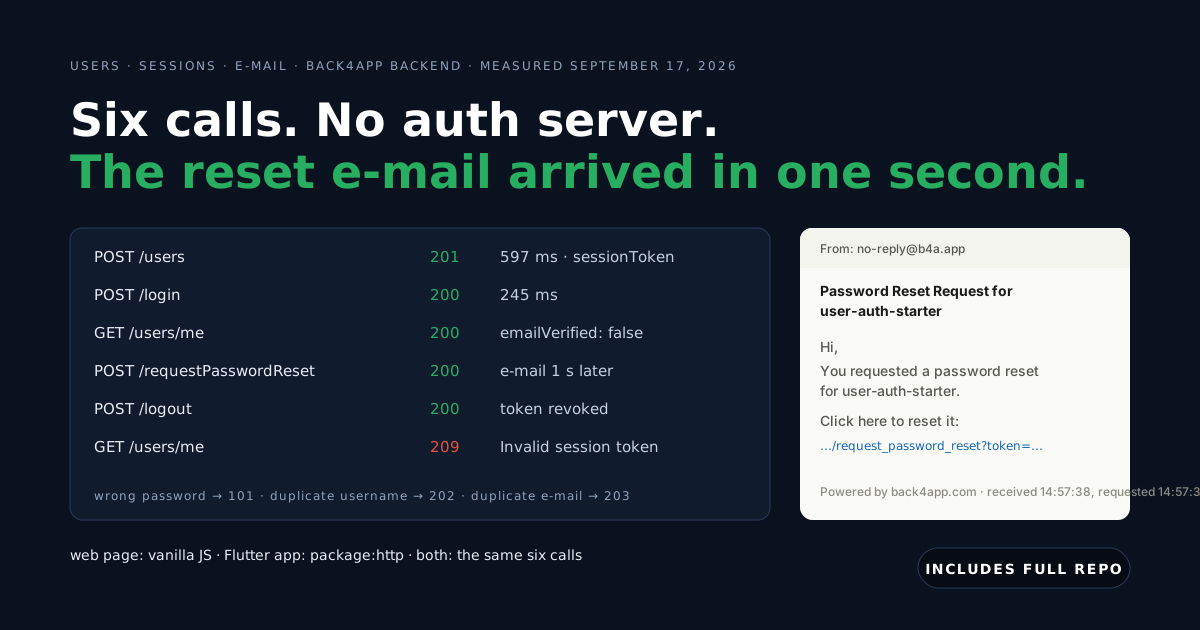
probe.shfrom CI against a staging backend and fail the build if any line that should be red turns green. - Users first. If the app does not have accounts yet, that is the previous post: How to Add Authentication to a Web or Flutter App Without Writing an Auth Server.