Every app with accounts needs the same five things: a way to sign up, a way to log in, a way to stay logged in, a way to log out, and a way back in when the password is gone. None of them is your product. All of them are where a mistake costs you the most.
The usual answer is an auth server: a process you write and run that hashes passwords, mints tokens, sends e-mails and rotates secrets. This post is about not writing it. A managed backend already has a users class with hashing, sessions, e-mail and a hosted reset page. Your app talks to it over REST, from a browser or from a phone.
We built it twice on the same backend: a plain HTML page with 91 lines of JavaScript, and a Flutter app with 58 lines of Dart for the API. Both make the same six calls. Everything below was measured on September 17, 2026, on Back4app, including the one e-mail that did not arrive.
Get the working code: the companion repo is at github.com/templates-back4app/user-auth-starter — web/, flutter/, cloud/main.js, and auth-check.sh, which walks the whole flow from curl and prints the status codes and timings you will see below.
What does an auth server actually have to get right?
More than it looks. Here is the list a hand-written one has to cover before it is safe to ship, and where each item lands when a managed backend does it.
| The auth server’s job | Why you cannot skip it | Who does it here |
|---|---|---|
| Hash passwords, never store them | One leaked table is every account | Backend: the password column shows (hidden) even to you |
| Mint a token per login and check it per request | Cookies and JWTs are where most bugs live | Backend: _Session class, X-Parse-Session-Token header |
| Revoke a token on logout | “Logged out” must mean it | Backend: POST /logout |
| Reject duplicates and bad input | Two accounts, one e-mail | Backend: codes 202 / 203, plus your hook |
| Send the reset e-mail with a one-time link | The link is a credential | Backend: [email protected], hosted page |
| Verify the e-mail address | Or anyone can sign up as you | Backend, after a card is validated |
| Lock out brute force | Password guessing at network speed | Dashboard setting (paid) or your hook |
Nothing in that table runs on your machine. What does run on your machine is a form and six fetch calls.
The app never sees a password hash, a token secret or a mail server. It sees JSON.
Which six REST calls replace the auth server?
The same six from the web page, from Flutter and from curl. Every call sends two headers that identify the app: X-Parse-Application-Id and a client key (X-Parse-JavaScript-Key on the web, X-Parse-Client-Key in Flutter). A third header, X-Parse-Revocable-Session: 1, asks for tokens that POST /logout can revoke.
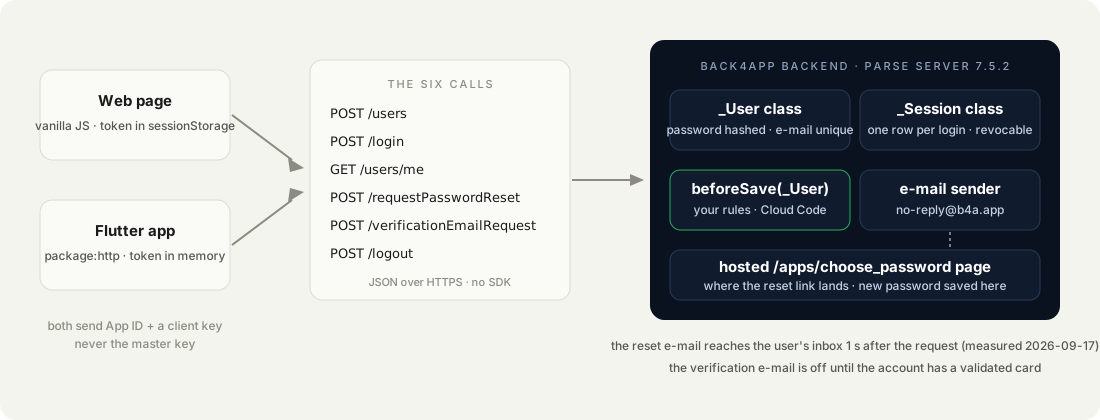
| Call | What it does | Measured (curl, then browser) |
|---|---|---|
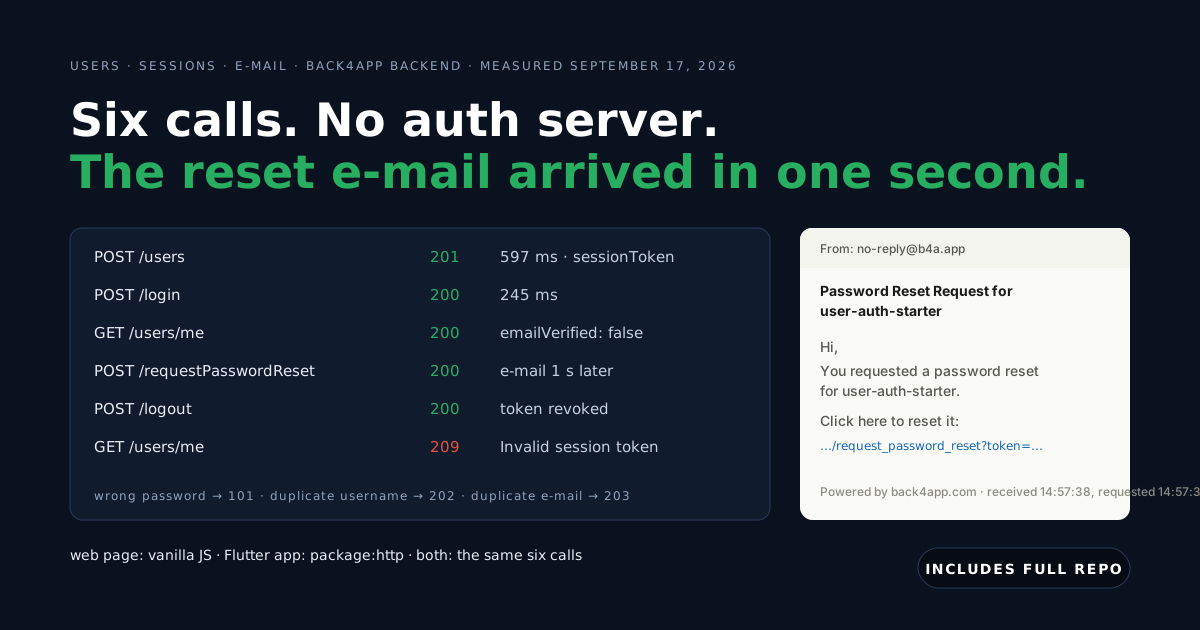
POST /users | Creates the account, returns sessionToken | 201 · 856 ms · 597 ms |
POST /login | Checks the password, returns a new sessionToken | 200 · 544 ms · 245 ms |
GET /users/me | Validates the token, returns the user | 200 · 861 ms |
POST /requestPasswordReset | Sends the reset e-mail | 200 {} · e-mail 1 s later |
POST /verificationEmailRequest | Sends the verification e-mail (when enabled) | 200 {} · no e-mail on a free account |
POST /logout | Revokes the calling token | 200 · next GET /users/me → 209 |
The first curl numbers include the backend waking up and the TLS handshake from a terminal. The browser numbers are what a user feels on the second request.
How we measured: performance.now() around each fetch in the web page, and the timings auth-check.sh prints for curl, one run each on September 17, 2026, from a laptop to the USA East backend. The curl numbers include the TLS handshake; the browser numbers are a second request on a warm connection. The e-mail time is the inbox’s received time minus the request time.
How does the web page sign up, log in and log out?
One HTML file with three forms and a logged-in panel, and one script. The script keeps a single piece of state, the session token, in sessionStorage: gone when the tab closes, unreadable from another origin. Here is the part that matters, the api helper and the signup handler:
// Stack: vanilla JavaScript (browser) | File: web/app.js
const BASE = window.BACKEND_URL ?? "https://parseapi.back4app.com";
const HEADERS = {
  "X-Parse-Application-Id": window.APP_ID,
  "X-Parse-JavaScript-Key": window.JS_KEY,      // a client key: it identifies the app, not the user
  "X-Parse-Revocable-Session": "1",
  "Content-Type": "application/json",
};

const session = {
  get: () => sessionStorage.getItem("sessionToken"),
  set: (t) => sessionStorage.setItem("sessionToken", t),
  clear: () => sessionStorage.removeItem("sessionToken"),
};

async function api(method, path, body, token) {
  const headers = { ...HEADERS };
  if (token) headers["X-Parse-Session-Token"] = token;
  const r = await fetch(BASE + path, { method, headers, body: body ? JSON.stringify(body) : undefined });
  const data = r.status === 204 ? {} : await r.json();
  if (!r.ok) throw Object.assign(new Error(data.error ?? r.statusText), { code: data.code, status: r.status });
  return data;
}

$("#signup").addEventListener("submit", async (e) => {
  e.preventDefault();
  try {
    const t0 = performance.now();
    const u = await api("POST", "/users", fields(e.target));       // 201 {objectId, createdAt, sessionToken}
    session.set(u.sessionToken);
    status(`signed up in ${Math.round(performance.now() - t0)} ms — check your inbox for the verification e-mail`, "ok");
    e.target.reset(); showMe();
  } catch (err) { status(`${err.code} ${err.message}`, "err"); }
});
Login is the same handler against /login. Logout calls /logout with the token and then clears it, in that order: the server forgets the token, then the tab does. showMe() runs on every page load and calls GET /users/me with whatever token is stored, so a revoked or expired token is detected on the next visit, not silently trusted.
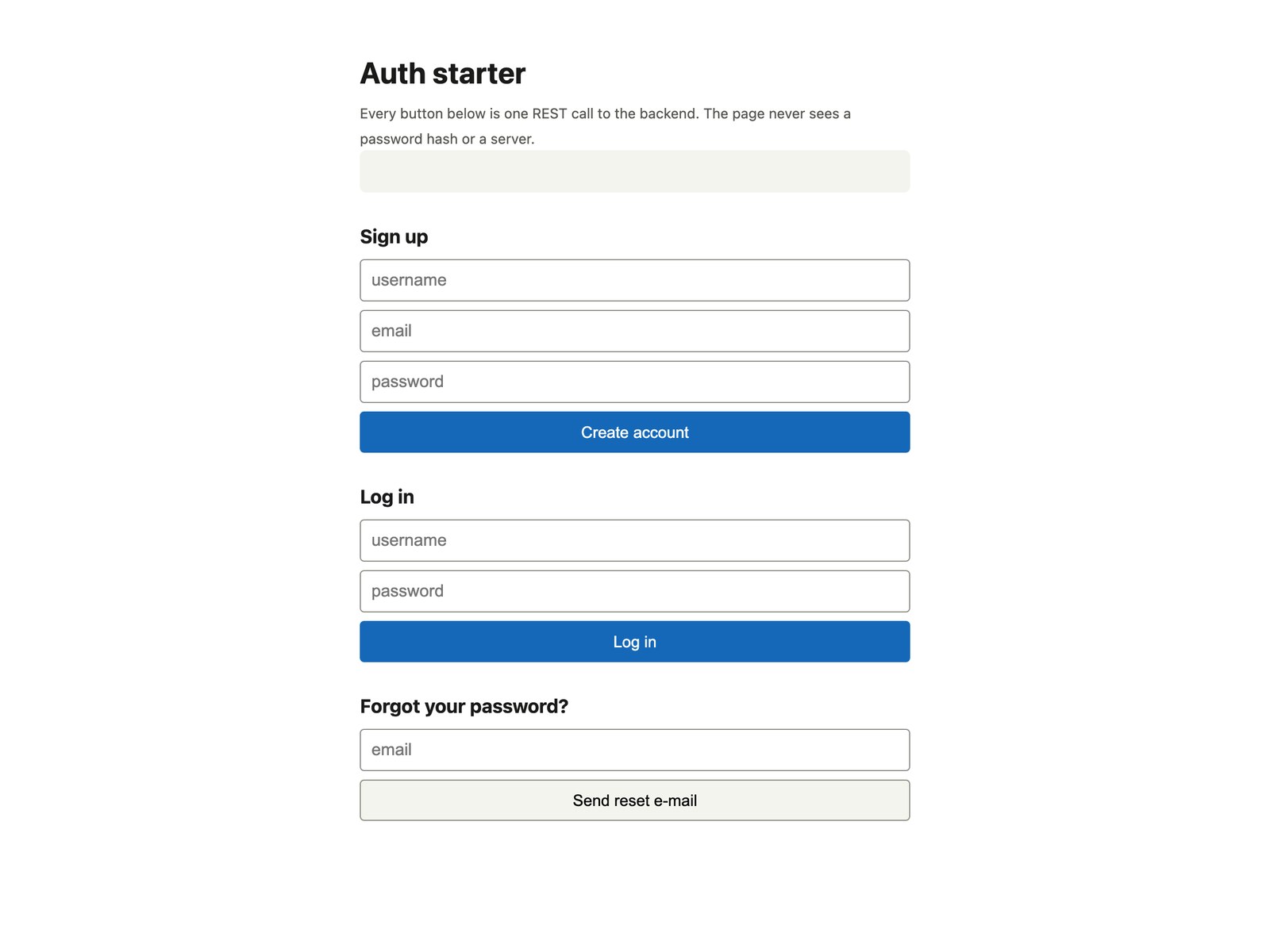
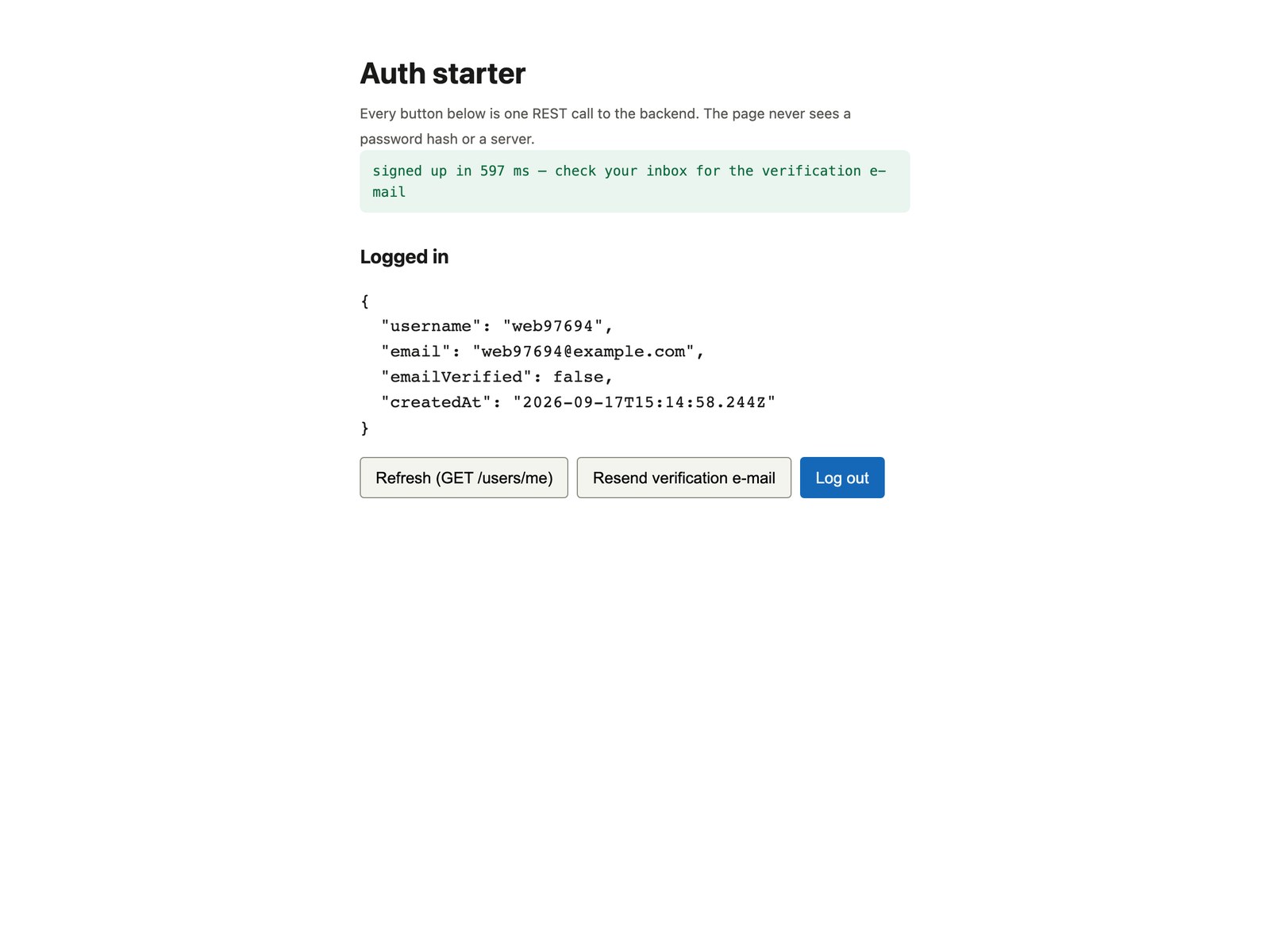
We filled in the signup form. The status bar reported signed up in 597 ms, and the panel below it is the answer to GET /users/me: username, e-mail, emailVerified: false and a createdAt of 15:14:58 UTC.
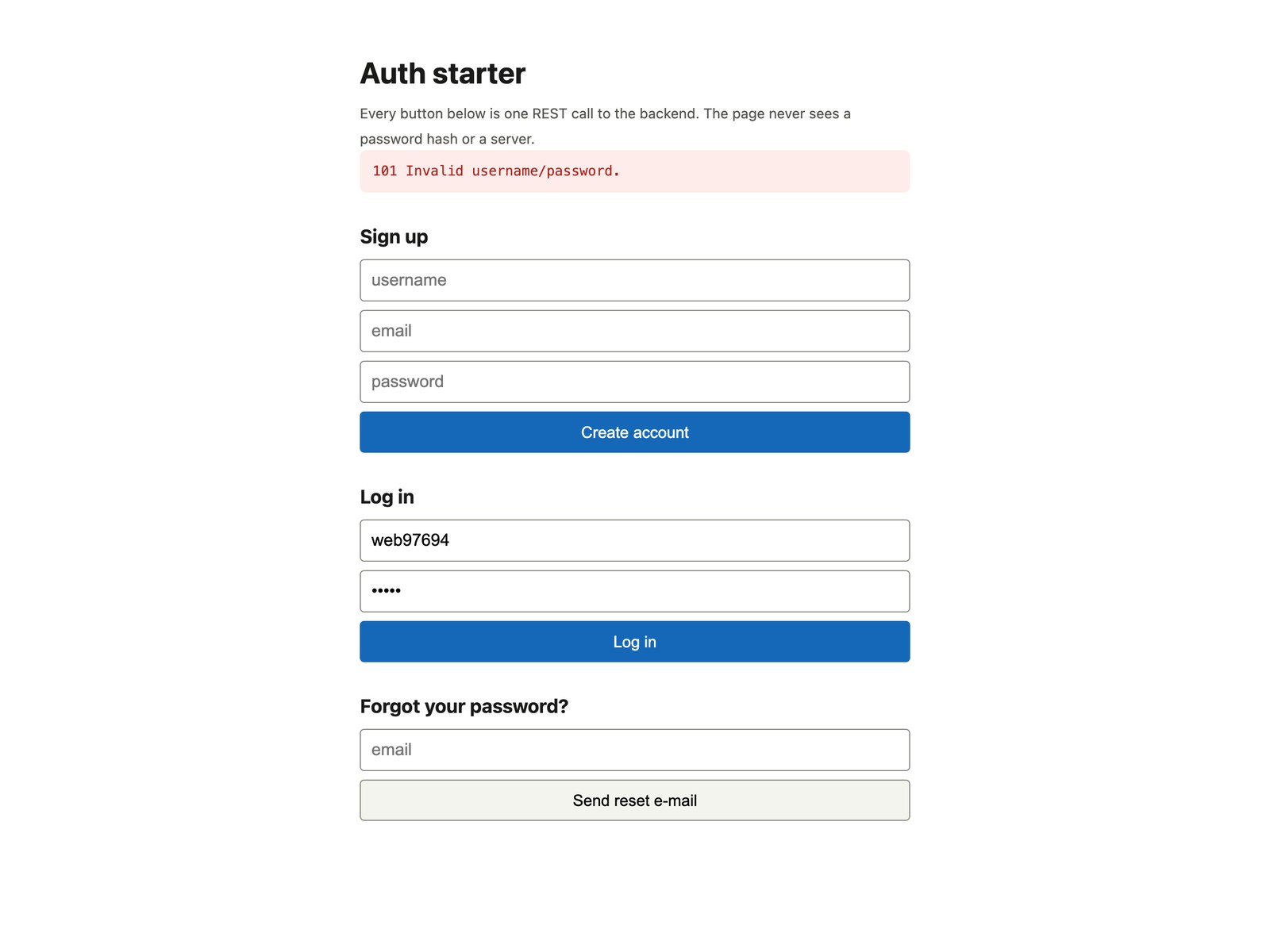
Then we logged out and tried the same username with a wrong password. The backend answers 101 Invalid username/password. for a wrong password and for an unknown username alike, which is the right behaviour: the login form must not tell an attacker which half was wrong.
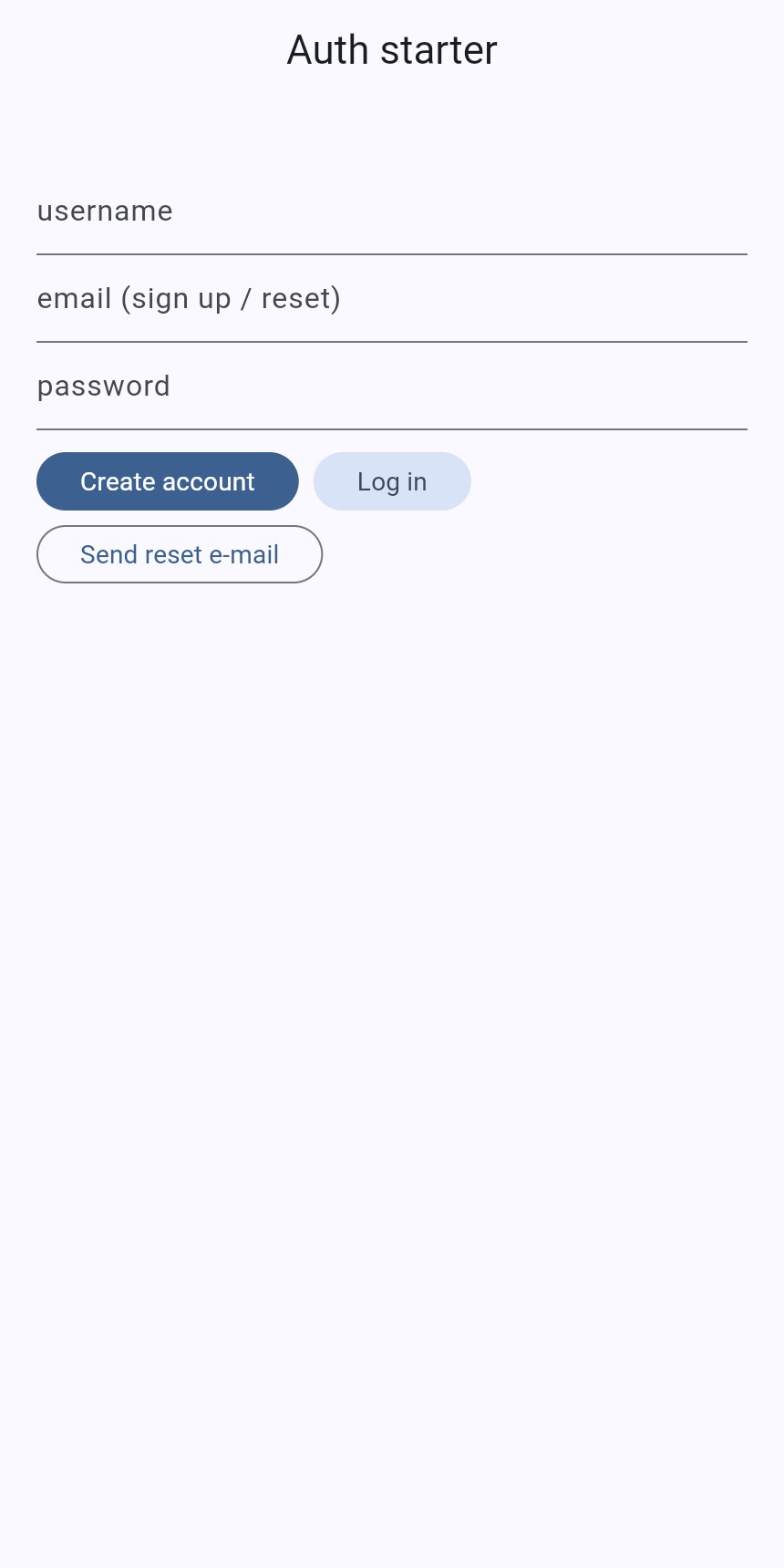
How does the same flow look in Flutter?
Identical, in Dart, with package:http and no SDK. The whole API class is 58 lines. The _call method is the api helper from the web page; the six methods below it are the six calls:
// Stack: Flutter 3.x / Dart 3.x, package:http | File: lib/auth_api.dart
class AuthApi {
  static const _base = backendUrl;
  static const _headers = {
    'X-Parse-Application-Id': appId,
    'X-Parse-Client-Key': clientKey,      // a client key: identifies the app, not the user
    'X-Parse-Revocable-Session': '1',
    'Content-Type': 'application/json',
  };
  String? sessionToken;                   // kept in memory; persist it with flutter_secure_storage in a real app

  Future<Map<String, dynamic>> _call(String method, String path, {Map<String, dynamic>? body}) async {
    final headers = {..._headers, if (sessionToken != null) 'X-Parse-Session-Token': sessionToken!};
    final uri = Uri.parse('$_base$path');
    final r = switch (method) {
      'GET' => await http.get(uri, headers: headers),
      'POST' => await http.post(uri, headers: headers, body: jsonEncode(body ?? {})),
      _ => throw ArgumentError(method),
    };
    final data = r.body.isEmpty ? <String, dynamic>{} : jsonDecode(r.body) as Map<String, dynamic>;
    if (r.statusCode >= 400) throw AuthError(r.statusCode, data['code'] as int?, data['error']?.toString() ?? r.reasonPhrase ?? '');
    return data;
  }

  Future<Map<String, dynamic>> signUp(String username, String email, String password) async {
    final u = await _call('POST', '/users', body: {'username': username, 'email': email, 'password': password});
    sessionToken = u['sessionToken'] as String;
    return u;
  }

  Future<Map<String, dynamic>> logIn(String username, String password) async {
    final u = await _call('POST', '/login', body: {'username': username, 'password': password});
    sessionToken = u['sessionToken'] as String;
    return u;
  }

  Future<Map<String, dynamic>> me() => _call('GET', '/users/me');
  Future<void> requestPasswordReset(String email) => _call('POST', '/requestPasswordReset', body: {'email': email});
  Future<void> requestVerificationEmail(String email) => _call('POST', '/verificationEmailRequest', body: {'email': email});

  Future<void> logOut() async {
    try { await _call('POST', '/logout'); } finally { sessionToken = null; }   // revoked server-side, then forgotten
  }
}
The repo’s test/auth_api_test.dart is not a unit test with mocks. It signs up a fresh user against the real backend, checks the session, logs out, logs back in and asserts that a wrong password throws an AuthError with code 101. flutter test passed on September 17, 2026, which is the only proof that counts.
One difference to be honest about: the web page keeps the token in sessionStorage; the Flutter class keeps it in memory. On a phone you want it to survive a restart, and the place for that is the platform keychain (flutter_secure_storage), not shared preferences.
What arrives when a user asks for a password reset?
An e-mail, one second later. We requested a reset for the user ana at 14:57:37 UTC through POST /requestPasswordReset and the message reached the inbox at 14:57:38, from [email protected], with the subject Password Reset Request for user-auth-starter. The body is plain text with one link.
The link points at the backend, which redirects (302) to a hosted page under /apps/choose_password: a title with your app’s name, the username, two password fields and a Change Password button. The token is in a hidden field. You did not write this page, and on the free plan you cannot restyle it, but it works.
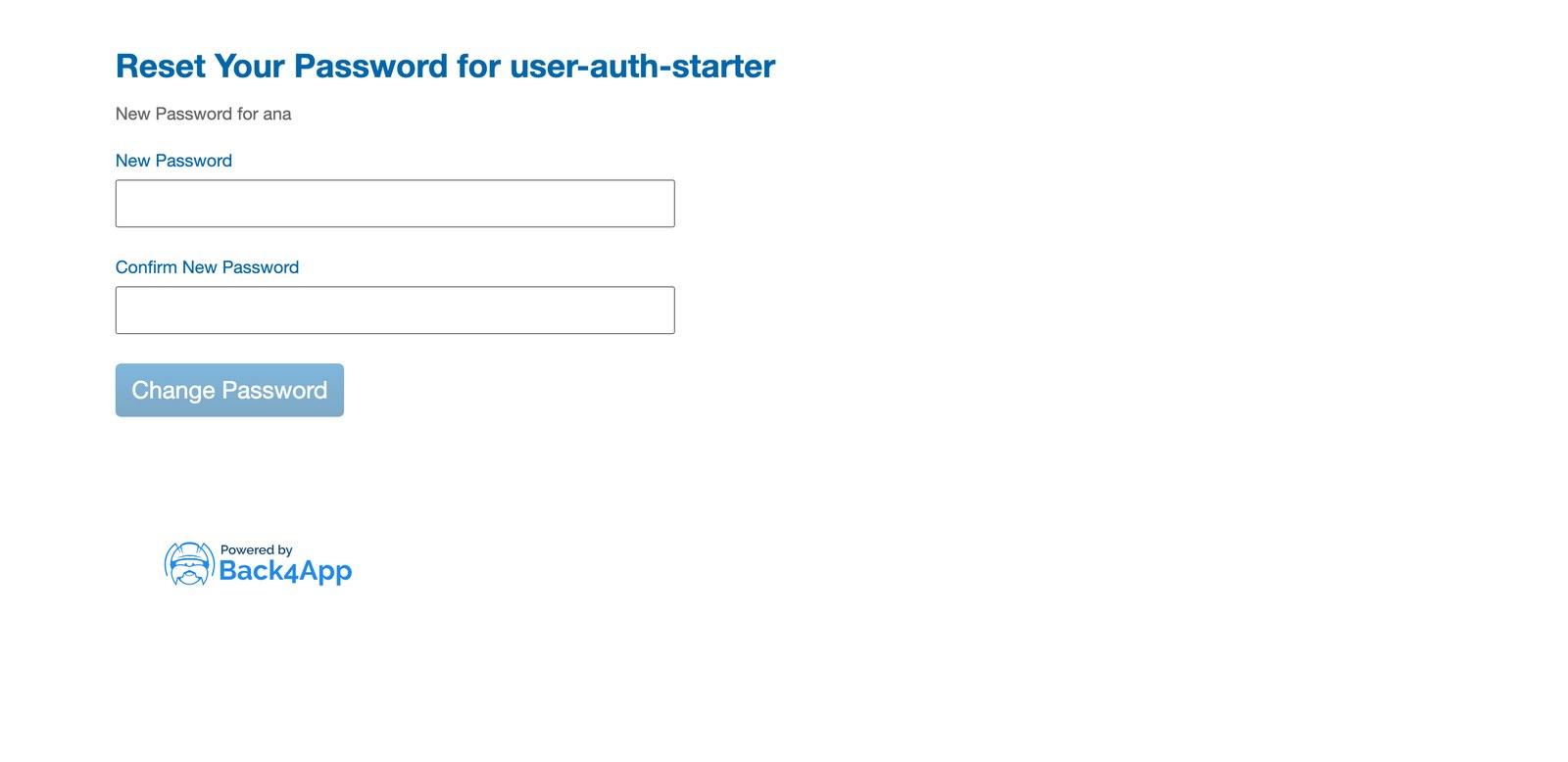
Two details worth copying into your own form. POST /requestPasswordReset returns 200 {} whether or not the e-mail exists, so your UI should say if that address has an account, a reset e-mail is on its way, exactly like the repo does. And the reset link logs nobody in: after changing the password the user goes back to your login form, with sessions untouched.
Why did no verification e-mail arrive?
Because verification is off, and the API does not say so. We signed up with a real disposable inbox, then called POST /verificationEmailRequest with that address. The answer was 200 {}. Nothing arrived, then or later. The reset e-mail to the same inbox took one second, so delivery was not the problem.
The switch is in the dashboard under Notifications → Email → Verification, and on a free account it is behind a second gate: a banner reading Validate your card — In order to enable this feature, you must validate your card. Both toggles below it, Enable Verification and Prevent login with unverified email, are greyed out until that is done. No charge is stated on the page.
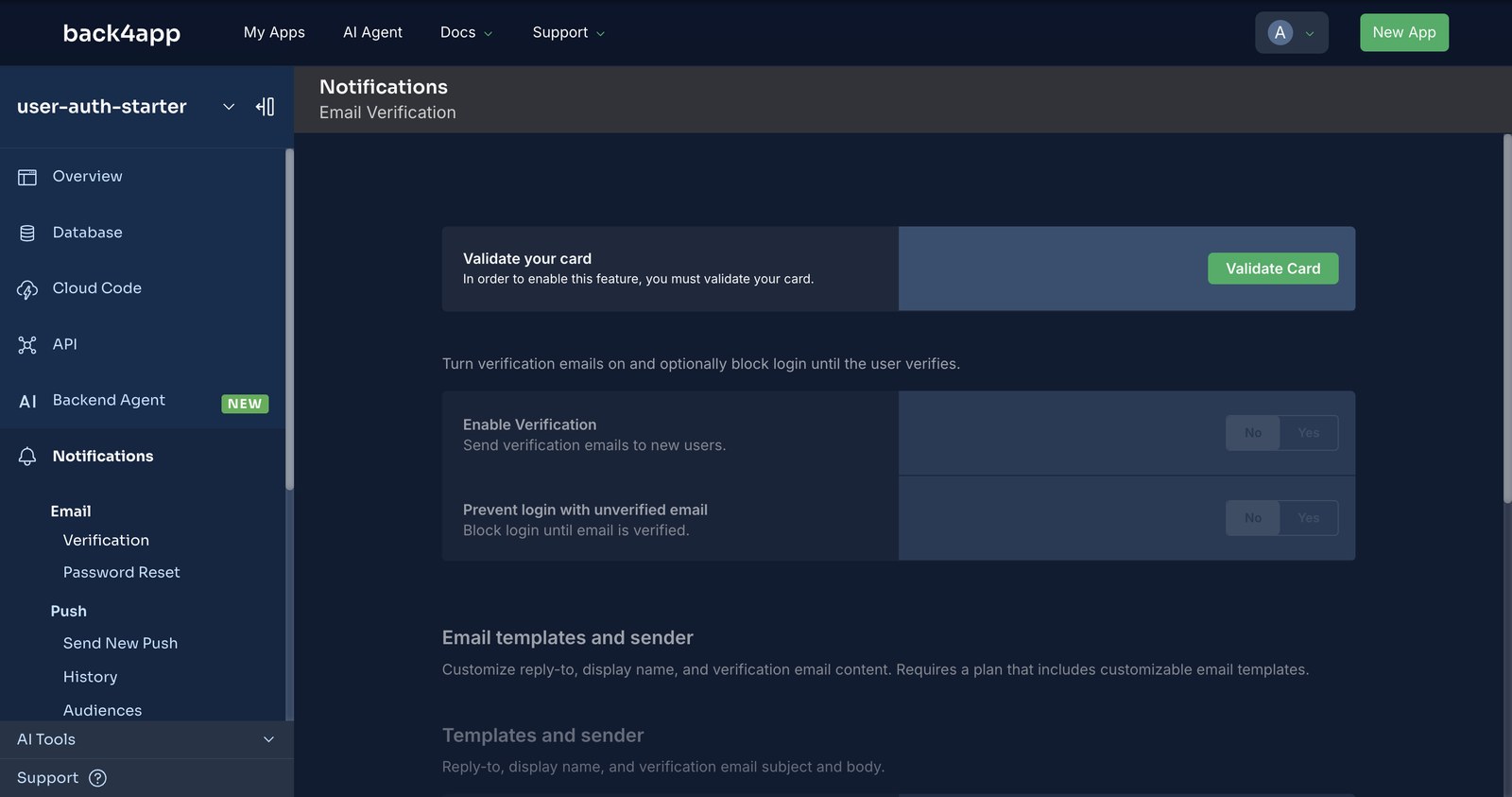
So the honest state of a fresh free backend is: password reset works, verification does not, and emailVerified stays false on every user. The repo’s signup message says check your inbox for the verification e-mail; change that line if you ship before validating the card.
Once verification is on, the same POST /verificationEmailRequest call resends the e-mail and GET /users/me flips emailVerified to true after the click.
Where do password rules go when the settings page is read-only?
Into a hook. The dashboard has a full Password Policy section under App Settings → Advanced Options: reset token validity, a validator regular expression, a custom error message, do not allow username in password, maximum password age, password history, and an Account Lockout section with threshold and duration.
On the free plan every field is disabled behind a banner: Please upgrade your plan to change custom parse options.
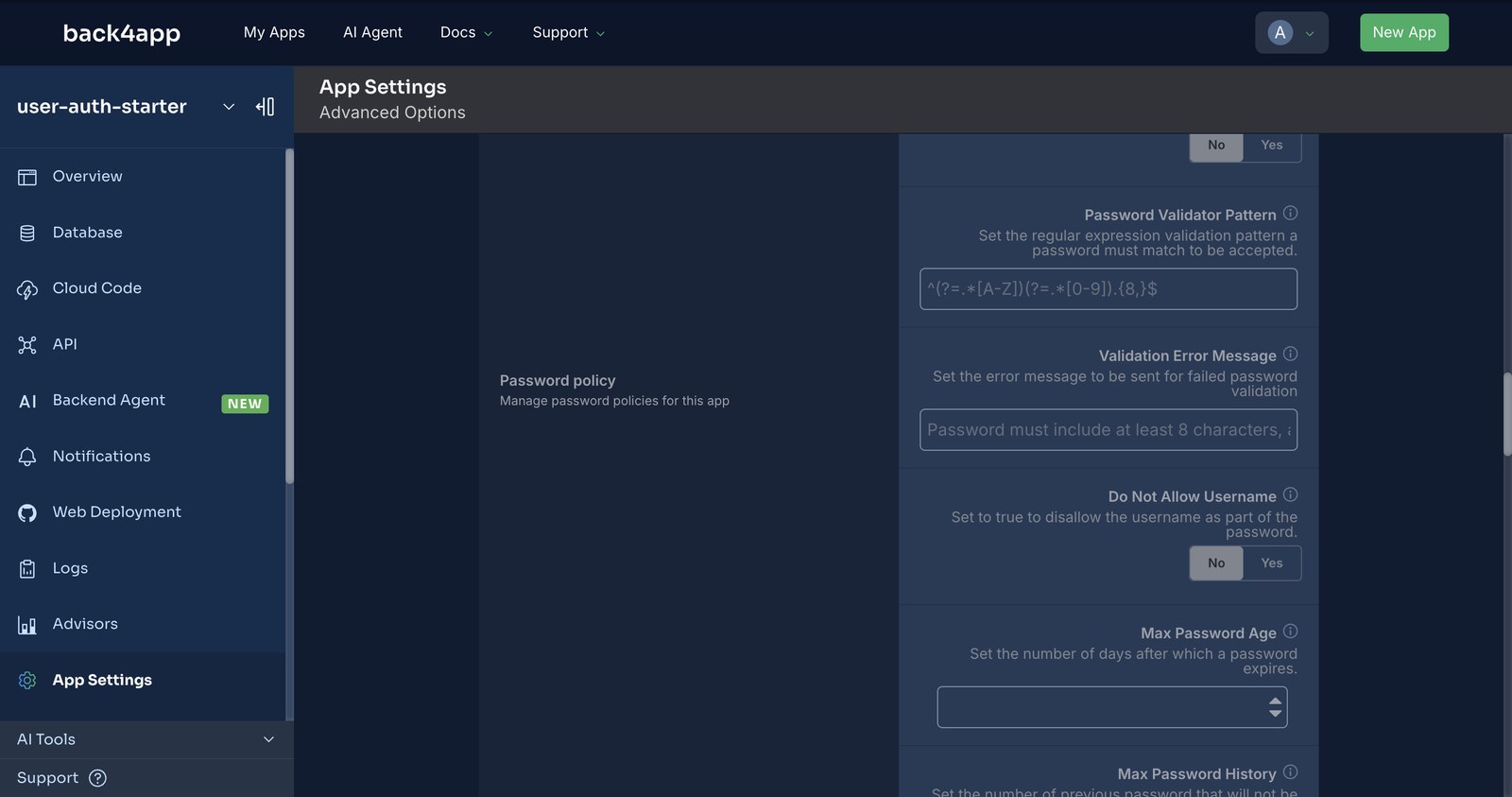
That leaves Cloud Code, which runs on every plan. A beforeSave on the _User class runs for every signup and every profile update, whichever client sent it, so a rule written once holds for the web page, the Flutter app and a curl command alike.
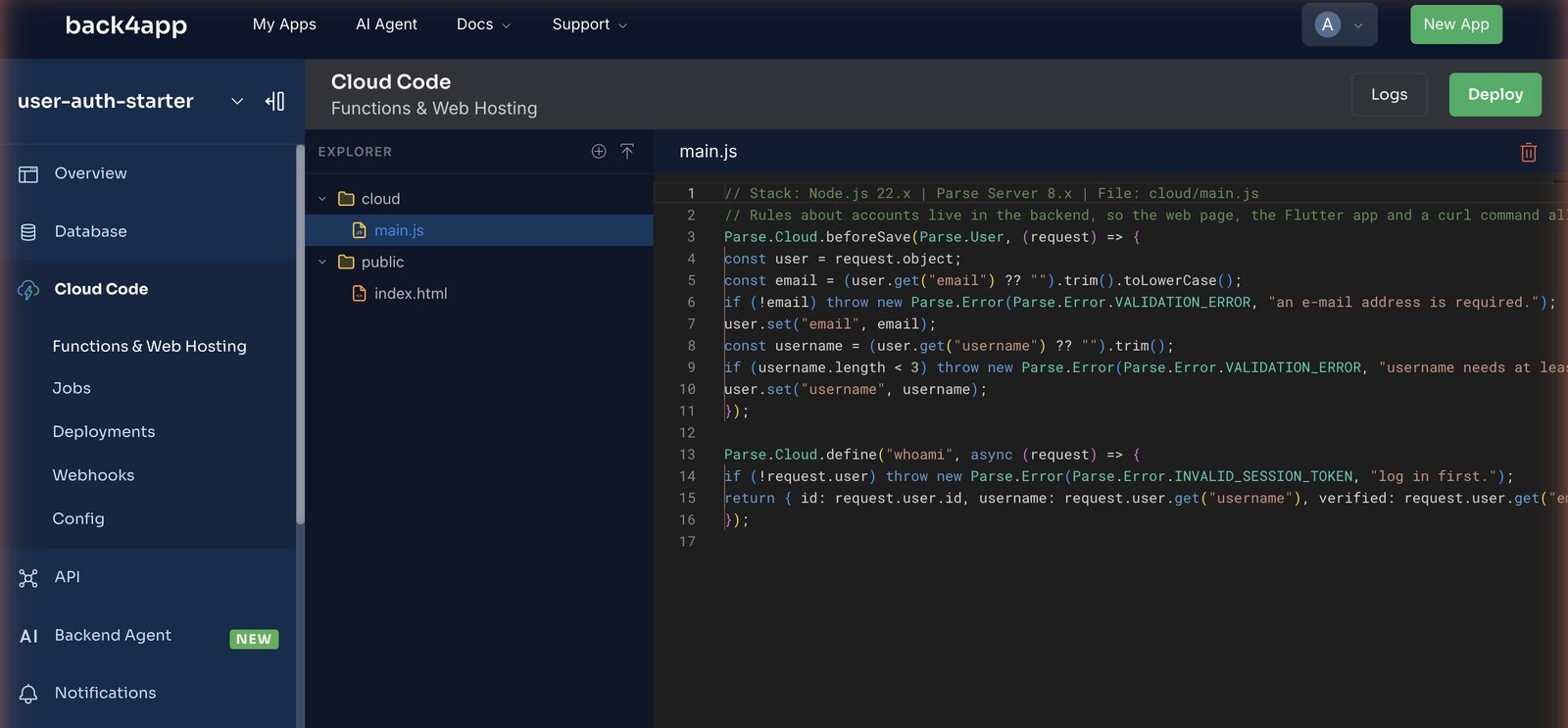
Ours requires an e-mail, lower-cases it, and rejects usernames shorter than three characters. A second function, whoami, shows how a Cloud Function sees the caller:
// Stack: Node.js 22.x | Parse Server 8.x | File: cloud/main.js
// Rules about accounts live in the backend, so the web page, the Flutter app and a curl command all obey them.
Parse.Cloud.beforeSave(Parse.User, (request) => {
  const user = request.object;
  const email = (user.get("email") ?? "").trim().toLowerCase();
  if (!email) throw new Parse.Error(Parse.Error.VALIDATION_ERROR, "an e-mail address is required.");
  user.set("email", email);
  const username = (user.get("username") ?? "").trim();
  if (username.length < 3) throw new Parse.Error(Parse.Error.VALIDATION_ERROR, "username needs at least 3 characters.");
  user.set("username", username);
});

Parse.Cloud.define("whoami", async (request) => {
  if (!request.user) throw new Parse.Error(Parse.Error.INVALID_SESSION_TOKEN, "log in first.");
  return { id: request.user.id, username: request.user.get("username"), verified: request.user.get("emailVerified") === true };
});
A password-length or complexity rule goes in the same hook: request.object.get("password") is readable in beforeSave on a new user, before it is hashed, and never afterwards. A lockout counter is a few more lines with a failedLogins field, reset in an afterLogin trigger.
What does the backend show after the signups?
Three screens, and every row on them was written by the web page, the Flutter test or auth-check.sh. We defined no schema by hand.
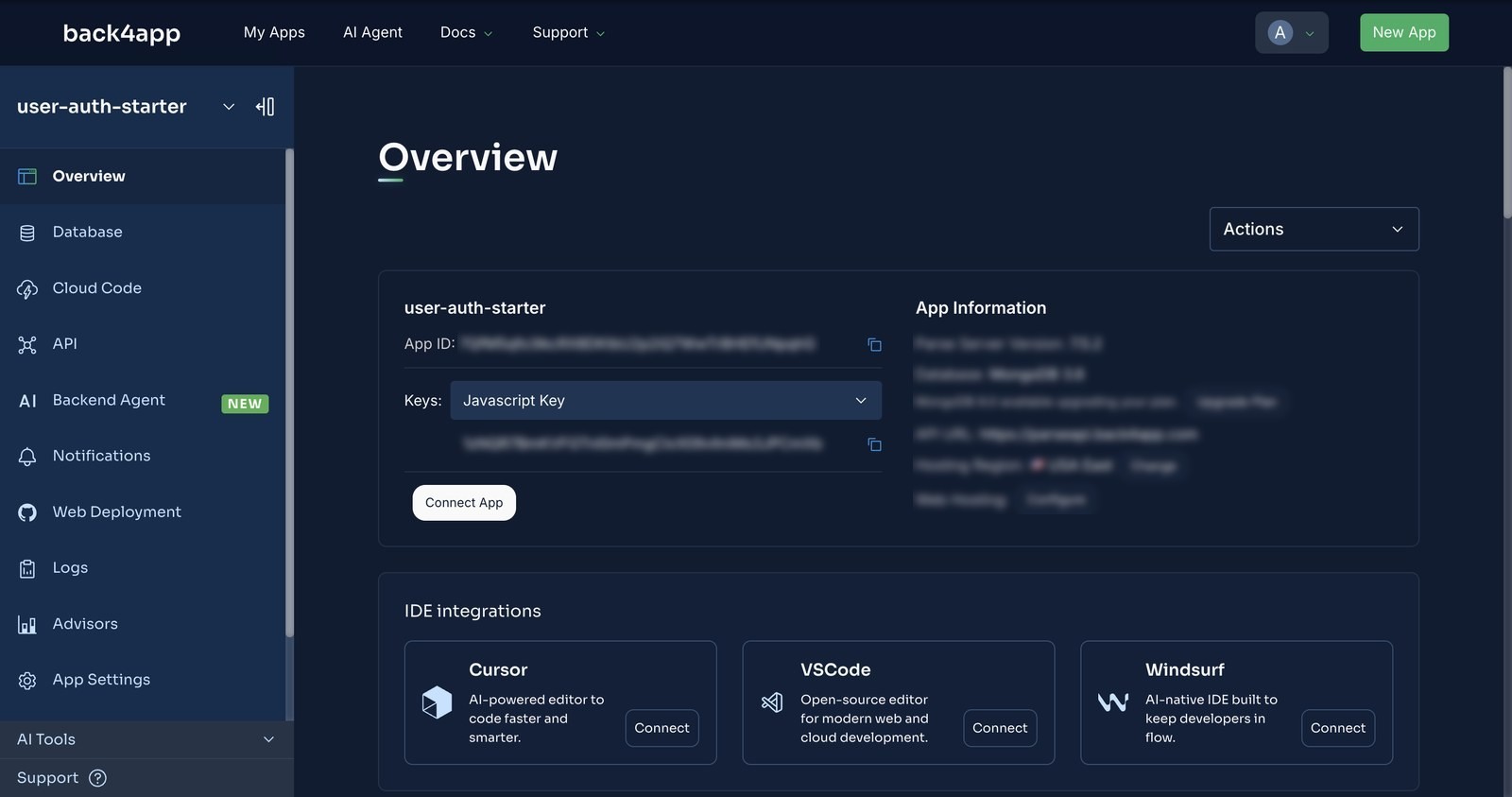
Overview: where the keys come from. The App ID and, under the Keys dropdown, the JavaScript key for the web page and the Client key for Flutter. These are client keys: they say which app is calling, not who. Shipping them in a page is expected. The Master key in the same dropdown is the one that must never leave a server.
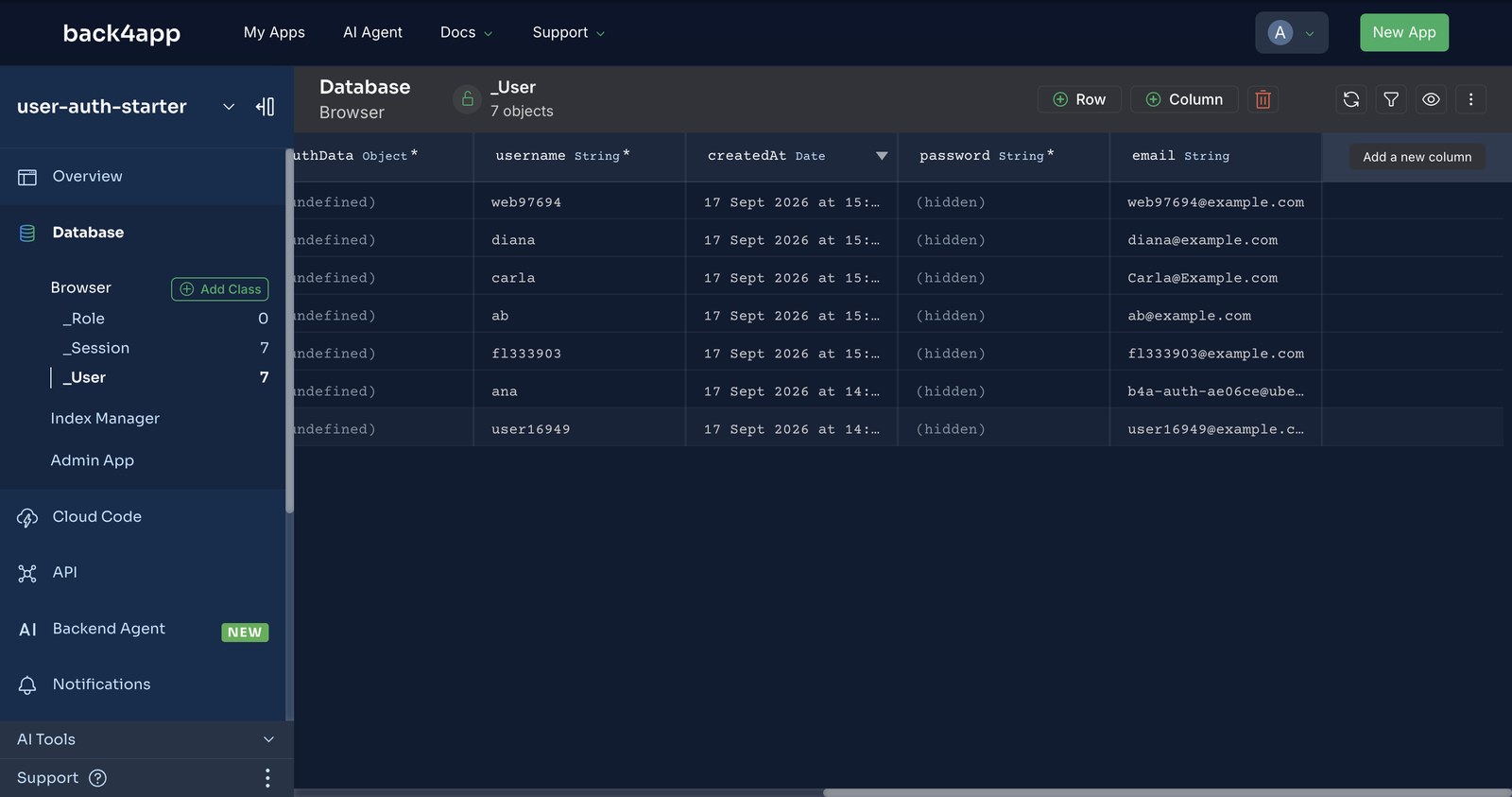
Database: the _User class. Seven rows after our tests: web97694 from the web page, fl333903 from the Flutter test, user16949 from curl, ana with the disposable inbox that received the reset e-mail, ab and carla from our hook checks, and diana. The password column reads (hidden) for every one of them, to us as well; emailVerified is undefined because verification is off.
The _Session class next to it had one row per login we made, each with its token, its user and an expiresAt one year out, which is the default session length shown, read-only, under Advanced Options. Logging out deletes the row for that token and no other. That is the finding from the next section.
Which error codes will your login form see?
The backend answers with an HTTP status and a numeric code in the body. The form should branch on the code; the status is mostly 400 or 404 and tells you less. These are the ones we hit on September 17, 2026:
| What you did | HTTP | code | error |
|---|---|---|---|
| Wrong password, or unknown username | 404 | 101 | Invalid username/password. |
| Signup with a username that exists | 400 | 202 | Account already exists for this username. |
| Signup with an e-mail that exists | 400 | 203 | Account already exists for this email address. |
| Any call with a revoked or made-up token | 400 | 209 | Invalid session token |
Signup the hook rejected (ab) | 400 | 142 | username needs at least 3 characters. |
whoami without a token | 400 | 209 | log in first. |
And the one we did not expect. The curl script signs up (token A), logs in (token B), logs out with B, then tries GET /users/me with both. B gets 209. A still gets 200. Logout revokes the calling session, not the user. If “log out everywhere” is a feature you need, a Cloud Function with the master key can delete every _Session row for the user; the client key cannot.
When should you still write your own auth server?
When the identity is not yours to keep. If your users already exist in a corporate directory, the job is federation (SAML, OIDC), and a users class is the wrong shape. If you need the password policy, lockout and custom e-mail pages today, they cost a paid plan here, and it is fair to price that against a week of your own code.
If you need social login, the backend has it under App Settings → Social Auth, but that is a separate post. And if you have a compliance rule that says password hashes must sit in a database you administer, none of this applies.
For everything else, the six calls above are the auth server, and the part you own is 17 lines of rules.
What would you add to the auth starter next?
- A real token store on mobile. Swap the in-memory
sessionTokenforflutter_secure_storageand callme()on app start, so a revoked session is caught before the first screen renders. - Lockout in the hook. Count failed logins in an
afterLogin/beforeLoginpair and refuse after five in ten minutes; on the free plan that is the only place it can live. - Log out everywhere. A Cloud Function that deletes every
_Sessionrow forrequest.userwith the master key. Twelve lines. - Verification, once the card is validated. Turn on Prevent login with unverified email, watch
POST /loginstart refusing unverified users, and handle that error code in the form. - Lock down what the users can reach. A logged-in user is still just a session token. Which rows it may read and write is the next post: Your Frontend Talks Straight to the Database. Here Is How to Lock It Down.