Deploying an HTMX app is a category error if you go looking for the frontend deploy — there isn’t one. The page carries one script, and every piece of interactivity is your server answering requests with fragments of HTML. Ship the server and you have shipped the application.
Our reference implementation keeps that purity: Node with Express 5, no build step at all — a property of this example, not of HTMX in general, since an HTMX server in any language can have whatever pipeline it likes.
We deployed it live on the free plan; the whole thing is in the companion repo: one server.js, a public/ folder, a Dockerfile.
If your server isn’t Node
Since HTMX puts all logic server-side, “an HTMX app” means “a server” — and yours may not be this one.
| Your situation | What transfers | What differs |
|---|---|---|
| Node/Express server (or starting fresh) | everything below, verbatim | nothing |
| HTMX server in another language | the vendoring idea, the compression lesson, every platform step | your Dockerfile builds your runtime; the port rule and deploy clicks are identical |
| No server yet, evaluating HTMX | the repo as a working minimal example | — |
The platform never asks what language is inside the container; our evidence just happens to be the Node implementation.
Price of admission for the tests ahead: zero, on the free plan — with the caveat that the URL self-destructs 60 minutes after the app is created, whether or not you redeploy in between. Treat it as a proving ground; paid plans are where a URL becomes an address.
Write the Express server
The server below renders the page, serves the assets, answers htmx’s fragment requests and handles the form. This excerpt is the real file minus only comments and the /healthz route shown later:
// server.js
import compression from "compression";
import express from "express";
import { fileURLToPath } from "node:url";
import path from "node:path";

const __dirname = path.dirname(fileURLToPath(import.meta.url));

const app = express();
const HOST = process.env.HOST ?? "0.0.0.0";
const PORT = Number(process.env.PORT ?? 3000);

// Gzip responses (htmx.min.js goes from ~51 KB to ~17 KB over the wire).
app.use(compression());

// Parse classic HTML form bodies (htmx sends forms as application/x-www-form-urlencoded).
app.use(express.urlencoded({ extended: false }));

// Static assets, including the vendored htmx build at /vendor/htmx.min.js.
app.use(express.static(path.join(__dirname, "public")));

// A fragment endpoint: htmx fetches this and swaps the HTML into the page.
app.get("/fragment", (_req, res) => {
  const now = new Date().toISOString();
  res.send(/* html */ `
    <div class="card">
      <strong>Fragment rendered on the server</strong>
      <p>Server time: <code>${now}</code></p>
    </div>
  `);
});

// A form endpoint: htmx POSTs the form and swaps the response in place.
app.post("/greet", (req, res) => {
  const name = String(req.body?.name ?? "").trim();
  if (!name) {
    // htmx does not swap 4xx/5xx error responses by default, so a 422
    // fragment would never be displayed (https://htmx.org/docs/#response-handling).
    // Keep the status 200 and let the markup carry the error state — or keep a
    // 4xx status and opt htmx in to swapping it via the htmx-config meta tag.
    res.send(`<p class="error">Please tell me your name.</p>`);
    return;
  }
  const safe = name.replace(/[&<>"']/g, (c) => `&#${c.charCodeAt(0)};`);
  res.send(`<p class="ok">Hello, <strong>${safe}</strong> — rendered by Express, swapped by htmx.</p>`);
});

app.listen(PORT, HOST);
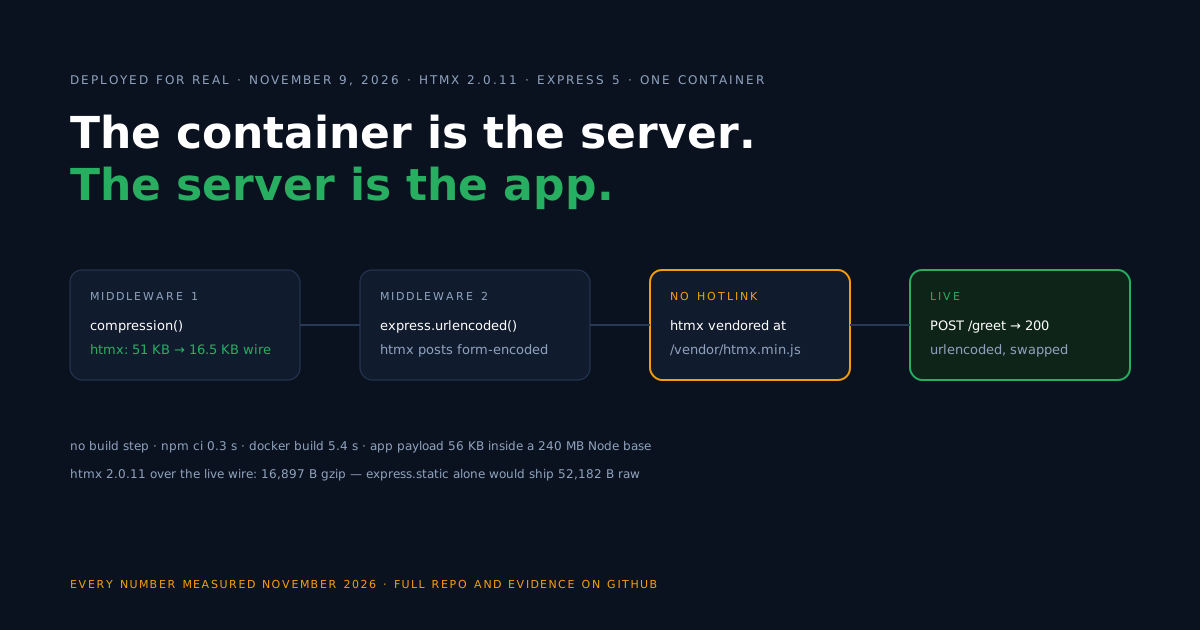
The two middleware lines at the top are the production story of this whole article. express.static ships files exactly as they sit on disk — no compression, ever — so compression() is what keeps the htmx script (and everything else) small over the wire.
The second line exists because htmx submits forms the way HTML always has, as application/x-www-form-urlencoded. An app that only registered express.json() will stare at empty bodies.
Wire the page with hx-attributes
The server is only half the contract; the page declares which element triggers which request and where the response lands. The repo’s public/index.html, trimmed to its two interactions:
<script src="/vendor/htmx.min.js" defer></script>

<!-- 1. Load a fragment -->
<button hx-get="/fragment" hx-target="#fragment-slot" hx-swap="innerHTML">
  Fetch server fragment
</button>
<div id="fragment-slot"></div>

<!-- 2. Submit a form -->
<form hx-post="/greet" hx-target="#greet-result" hx-swap="innerHTML">
  <label>
    Your name:
    <input type="text" name="name" placeholder="Ada" />
  </label>
  <button type="submit">Say hello</button>
</form>
<div id="greet-result"></div>
Reading it as htmx does: hx-get/hx-post name the endpoint, hx-target names the element that receives the response, and hx-swap="innerHTML" says to replace that element’s contents with the returned fragment. No JSON is parsed and no client template exists — the server’s HTML is the interface.
Vendor the htmx script
The page loads htmx from /vendor/htmx.min.js — our own server, never a third-party script host. The vendoring recipe: install [email protected] as an exact-pinned devDependency, copy node_modules/htmx.org/dist/htmx.min.js into public/vendor/, and commit the copy.
Why bother? The version is pinned by content, not by a registry’s mood; the deploy has no runtime reliance on anyone else’s uptime; and the file flows through your own compression() middleware — which is where its small transfer size comes from.
Build the Docker image
There is no compile step in this example, so the “build” stage exists only to install production dependencies in a clean layer; the runtime stage assembles the final image from them plus the three things the app is.
# ---- Build stage (installs production deps only; there is no compile step) ----
FROM node:22-alpine AS build
WORKDIR /app
COPY package.json package-lock.json ./
RUN npm ci --omit=dev && npm cache clean --force

# ---- Runtime stage ----
FROM node:22-alpine
WORKDIR /app
ENV NODE_ENV=production HOST=0.0.0.0 PORT=8080

COPY --from=build /app/node_modules ./node_modules
COPY package.json server.js ./
COPY public ./public

EXPOSE 8080
HEALTHCHECK --interval=30s --timeout=3s --start-period=5s \
  CMD wget -qO /dev/null http://127.0.0.1:8080/ || exit 1
USER node
CMD ["node", "server.js"]
On health checks, note the two layers doing different jobs: the Dockerfile’s HEALTHCHECK polls / — the page itself — while the server separately exposes GET /healthz returning {"ok":true}, a JSON endpoint you can point a platform-level health check at if you configure one. The repo ships exactly this split.
Build and run it locally with docker build -t my-htmx-app . and docker run -p 8080:8080 my-htmx-app, then click through both interactions at http://localhost:8080.
Deploy on Back4app
From a pushed GitHub repo to a URL is three decisions, two of which the platform makes for you.
- New Web Deployment, source: your GitHub repository.
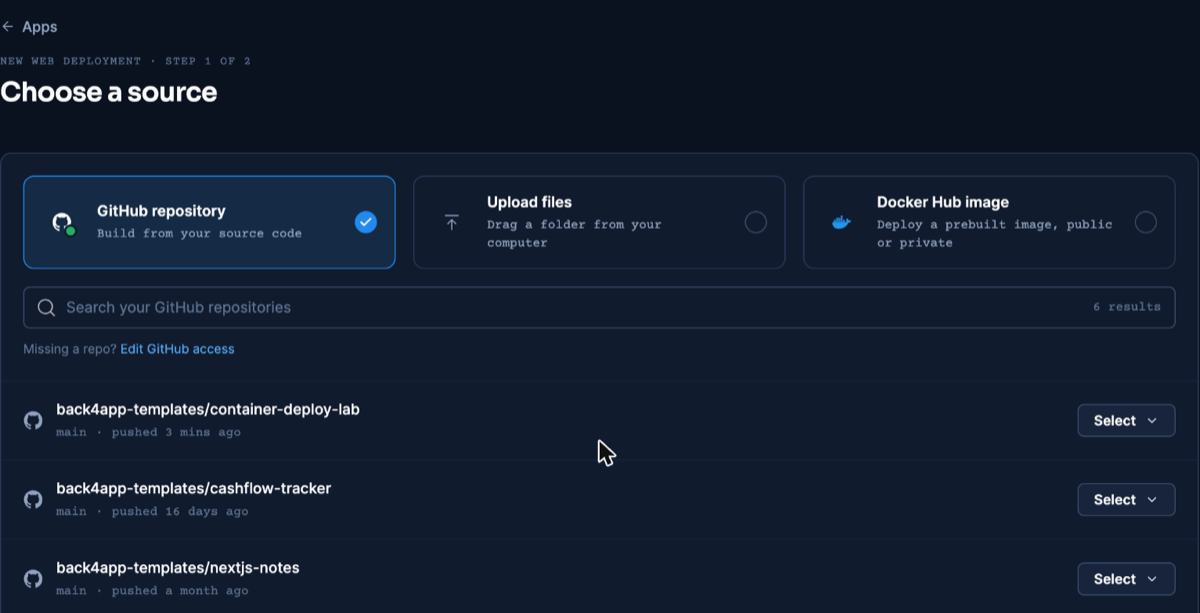
Picking the repo — dashboard as of November 2026.
- Build method: Dockerfile, detected automatically. Port: 8080, entered by hand — our app had it set at creation because the platform does not adopt the Dockerfile’s
EXPOSE, a failure mode documented with its exact error in the React deploy guide.
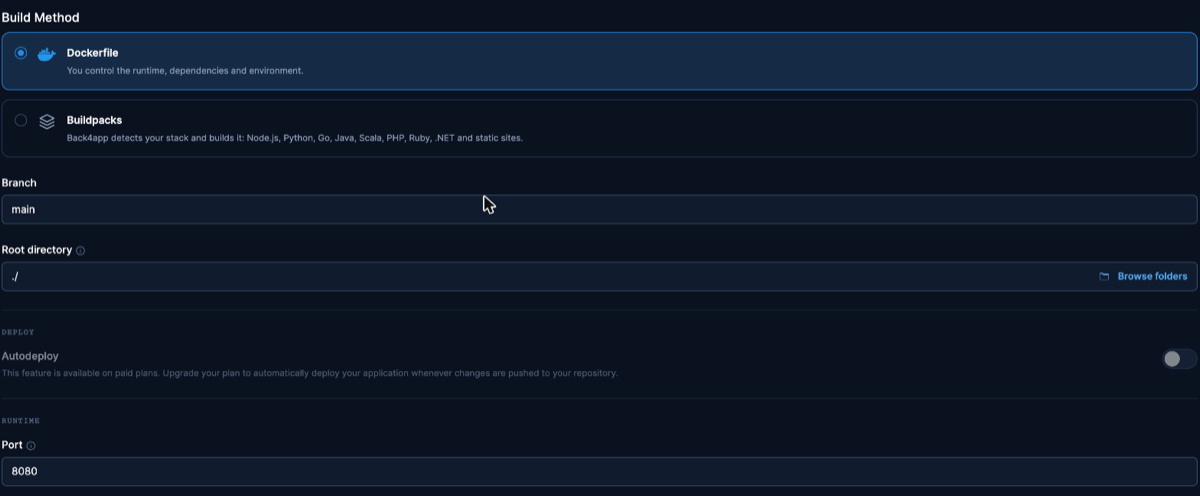
Where the port gets set. Dashboard as of November 2026.
- Create the app; with nothing to compile, the build is quick, and the URL goes live.
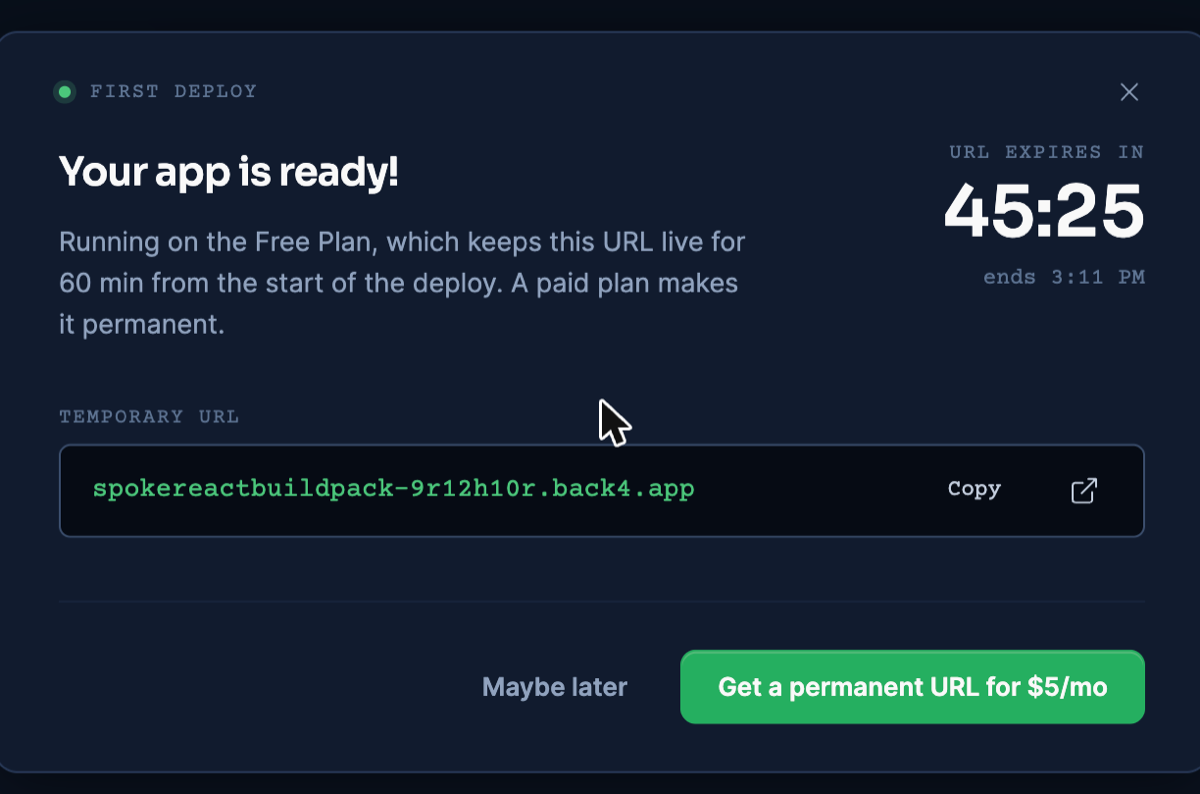
The free-plan URL dialog with its 60-minute countdown. Dashboard as of November 2026.
Verify the live deployment
A static page loading proves little for an HTMX app — the product is the request/response loop — so on November 9, 2026 we requested the endpoints themselves on the live URL, and it’s worth being precise about what that shows.
GET /fragment answered 200, and POST /greet with a urlencoded form body answered 200 — the endpoints serve, and the urlencoded middleware is demonstrably in the request path. What a status code cannot show is the swap: we did not drive a browser, so the DOM-update half of the cycle rests on htmx’s documented behavior for 2xx responses, not on this test.
The asset economics held in production too: the vendored htmx file transferred at its compressed size on the public URL, matching the local container byte for byte — raw-versus-gzip figures in the measurements table.
Deploy through an AI assistant with MCP
An assistant connected to Back4app’s remote MCP server can ship this server from the editor. MCP is the interface the assistant uses; how the app is built remains a separate choice. Setup per client: official MCP page.
The step-by-step version of that flow, tested across nine frameworks, is in the MCP deploy guide.
On November 10, 2026 (Claude, custom connector, signed in) we ran it both ways:
- With the Dockerfile (the default when the folder has one):
create_upload, thenpx @back4app/cli uploadcommand,create_web_appwith port 8080. READY about 34 seconds after creation. - With the buildpack (
builder: BUILDPACK, no start command, no port): READY in about 56 seconds. The tool’s answer suggestednode server.jsand port 8080, and the build log shows it adding a web process fornpm start.
Both apps passed the same three requests on their public URLs: GET /fragment returned the fragment, POST /greet with a name returned the greeting markup, and an empty name returned “Please tell me your name.” with status 200.
These are endpoint checks made with an HTTP client. The DOM swap in a browser was verified on the dashboard-deployed version, not again here. Ids and response bodies: MCP evidence file.
Update the deployed app
A release is a push plus one dashboard click — App actions → Deploy the latest commit — and the existing URL serves the new build; we confirmed that loop on this platform. Paid plans automate the click with deploy-on-push.
Re-creating the app re-reads the branch too, but at the price of a fresh URL, so it stays a fallback. The complete update-flow test, including one caveat about changed branch settings, is written up in the React article.
Measurements
The live deploy ran the starter at commit a84294b — which, note, predates the 422-to-200 change described above.
Local figures are from November 6, 2026, live figures from November 9, 2026; transfer sizes are separated from on-disk sizes. Method and raw logs: the repo’s evidence files.
| What | Value | Where |
|---|---|---|
| Form endpoint: POST /greet (urlencoded) | 200 | live URL |
| Fragment endpoint: GET /fragment | 200 | live URL |
| Vendored htmx (transfer) | 16,897 B gzip | live URL |
| TTFB on / (3 illustrative requests) | 0.967 s · 0.968 s · 0.975 s | live URL |
| htmx.min.js 2.0.11, raw vs gzip (transfer) | 52,182 B vs 16,897 B | local |
| npm ci | 0.3 s | local |
| docker build (no cache) | 5.4 s | local |
| Image size (on disk) | 240 MB | local |
App payload public/ incl. htmx (on disk) | 56 KB | local |
Troubleshooting
Form fields arrive as undefined — the body parser doesn’t match the content type: htmx posts application/x-www-form-urlencoded, which express.json() ignores. Register app.use(express.urlencoded({ extended: false })).
The server responds but nothing appears on the page — check the response status: htmx does not swap 4xx/5xx error responses by default, so a 4xx error fragment is dropped silently. Return the fragment with status 200, or configure responseHandling via the htmx-config meta tag (docs).
htmx (or any asset) transfers at full raw size — express.static never compresses by itself. Add app.use(compression()) above the static middleware.
The deploy dies at launch with Please mention a port in settings to expose — the platform’s Port field was never set and EXPOSE doesn’t count. Enter 8080 under Build & deploy and redeploy.
Works with docker run, unreachable when deployed — check what interface the server binds; this starter defaults HOST to 0.0.0.0 so the container’s port mapping can reach it.
Limitations of this setup
The edges of what this flow — and this verification — gives you.
- Free-plan mechanics: a URL that lasts 60 minutes from the app’s creation and a manual click per release; paid plans keep the URL and deploy on push.
- Status codes, not pixels: our live check proves the endpoints and middleware, not the browser-side swap — that half rests on htmx’s documented response handling, and the error branch in the current repo postdates the live test entirely.
- Simplicity is this example’s, not the pattern’s: a real HTMX server accumulates sessions, templates and data access like any server app; “no build step” describes this starter, not a law of hypermedia.
- One process, no horizontal story: this is a single container serving everything; caching layers and scale-out are not addressed here.
Auth and persistence are the natural next step rather than a wrong turn: your Express routes can own them outright, or a managed backend can supply them over REST and GraphQL while your fragments stay thin.
What’s next?
Swap our /greet for your first real route — the deploy flow stays a push and a click — or clone the companion repo and have the skeleton live on the free plan today (Containers docs).