A SolidJS app built with Vite deploys as a folder of static files behind a web server — nothing more is required of production. The real risk in a Solid deploy is not configuration but identification: shipping the wrong artifact, because the Solid ecosystem produces more than one kind.
This guide containerizes the static case — a SolidJS app from the official Vite template — and spells out how to recognize when your project is instead a SolidStart build whose output needs a different flow.
Everything here was executed by us, with the dates, commit, and numbers collected in the measurements section and the code in the companion repo.
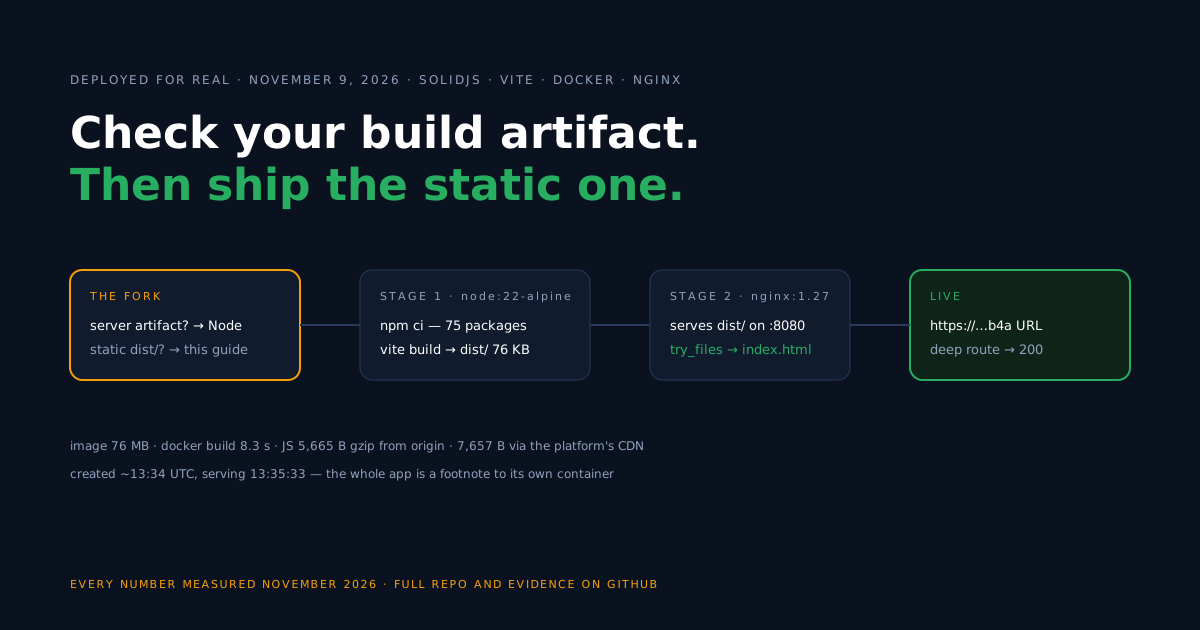
First decision: which artifact does your build produce?
The deploy flow forks on this question, so answer it before anything else in this guide applies to you.
A project created from the Vite solid template builds with vite build into a dist/ folder of static files. The server’s only jobs are to hand them out and to route unknown paths back to index.html. That is this guide.
A SolidStart project is configurable: depending on its settings it can render on the server, render on the client, or prerender pages — the SolidStart configuration reference defines the options. What matters for deployment is the output.
A configuration that emits a server needs a Node runtime container with a start command — structurally the flow of the Next.js SSR container guide, shown there on different tooling. A configuration whose output is purely static files can live behind a static server.
So the test is concrete: run your build and look at what lands in the output folder. Static assets only — HTML, JS, CSS — and the rest of this guide applies as-is. A server entry point, and you need the Node-container flow instead.
Create the project and the lockfile
For a clean starting point, this is the template the companion repo came from.
npm create vite@latest solidjs-container-starter -- --template solidOur run produced solid-js ^1.9.18 with vite ^8.3.6 and vite-plugin-solid ^2.11.15.
Keep the first npm install around in git form: commit the package-lock.json it creates. The Docker build below uses npm ci, which errors out on a lockfile-less project — in our lab, the fresh scaffold needed exactly this one-time step before its first image build.
Build the Docker image
Both files go in the repository root, and together they are the entire deployment story of a static Solid app.
# Build stage
FROM node:22-alpine AS build
WORKDIR /app
COPY package.json package-lock.json ./
RUN npm ci
COPY . .
RUN npm run build

# Serve stage
FROM nginx:1.27-alpine
COPY nginx.conf /etc/nginx/conf.d/default.conf
COPY --from=build /app/dist /usr/share/nginx/html
EXPOSE 8080
Here Vite’s conventions make the generic recipe simply correct: output at dist/, hashed files under dist/assets/. The nginx config leans on both.
server {
    listen 8080;
    server_name _;
    root /usr/share/nginx/html;
    index index.html;

    gzip on;
    gzip_proxied any;
    gzip_vary on;
    gzip_comp_level 6;
    gzip_min_length 1024;
    gzip_types text/css application/javascript application/json image/svg+xml text/plain;

    # Vite writes content-hashed files to /assets/ — cache them forever
    location /assets/ {
        add_header Cache-Control "public, max-age=31536000, immutable";
        try_files $uri =404;
    }

    # SPA refresh fix: unknown paths fall back to index.html
    location / {
        try_files $uri $uri/ /index.html;
    }
}
The long-cache rule is scoped to /assets/, where Vite puts only content-hashed files — which is what makes immutable plus a year safe here. The fallback exists for client-side routing: the starter itself ships no router, so for now it means every unknown path returns the app shell.
Deploy on Back4app
One fact about the free plan belongs ahead of the plan picker: a free app’s public URL self-expires 60 minutes after the app is created. Our whole verification fit inside one window; actual hosting wants a paid plan with its permanent URL.
- Push the project — including
Dockerfile,nginx.conf, and the lockfile — to GitHub, then create a New Web Deployment from the repository.
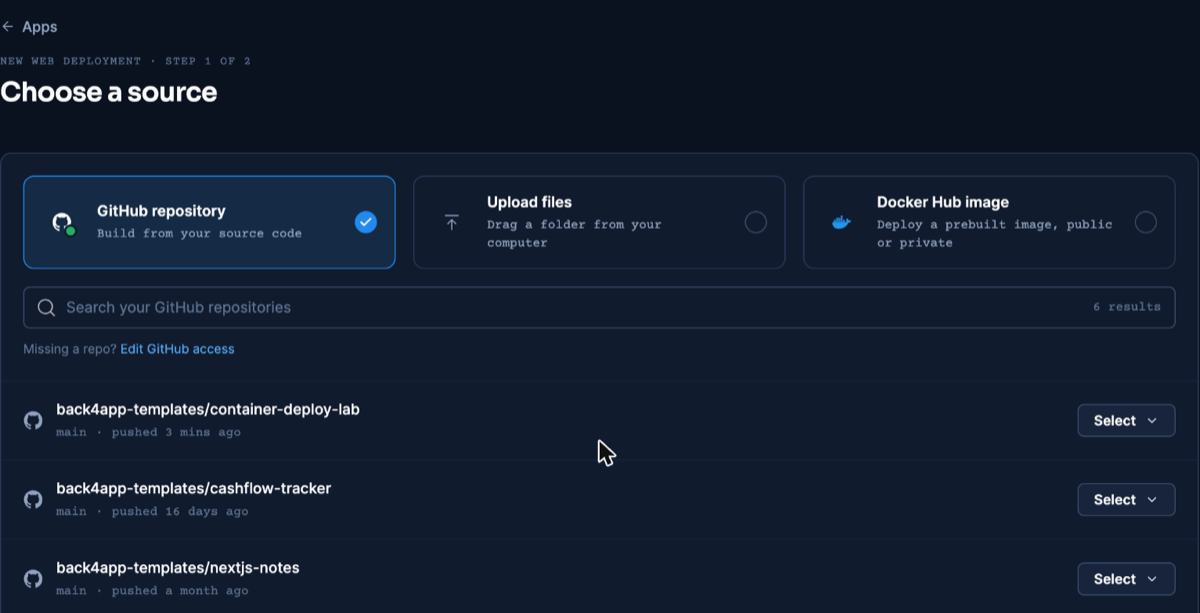
This screen is framework-agnostic — screenshot from our React deploy, dashboard as of November 2026.
- The Dockerfile is detected automatically; the Port field is not. Set it to 8080 by hand — auto mode disregards the Dockerfile’s
EXPOSE, a trip-up first documented (with the exact error) in the React guide.
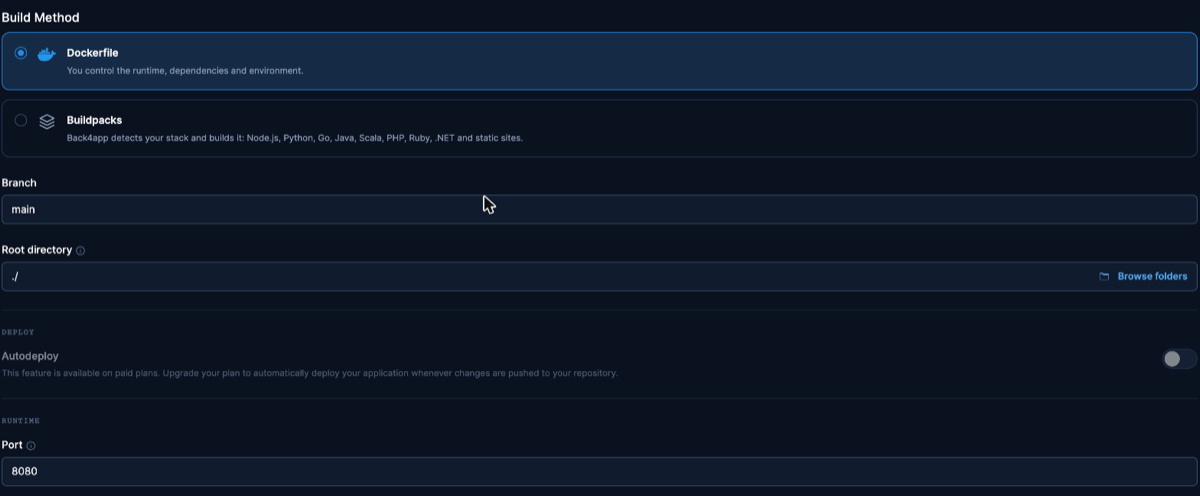
Identical settings step across the series — screenshot from the React article, dashboard as of November 2026.
- Create the app. With a dependency tree this small, the platform build is brief — creation-to-serving time is in the measurements section.
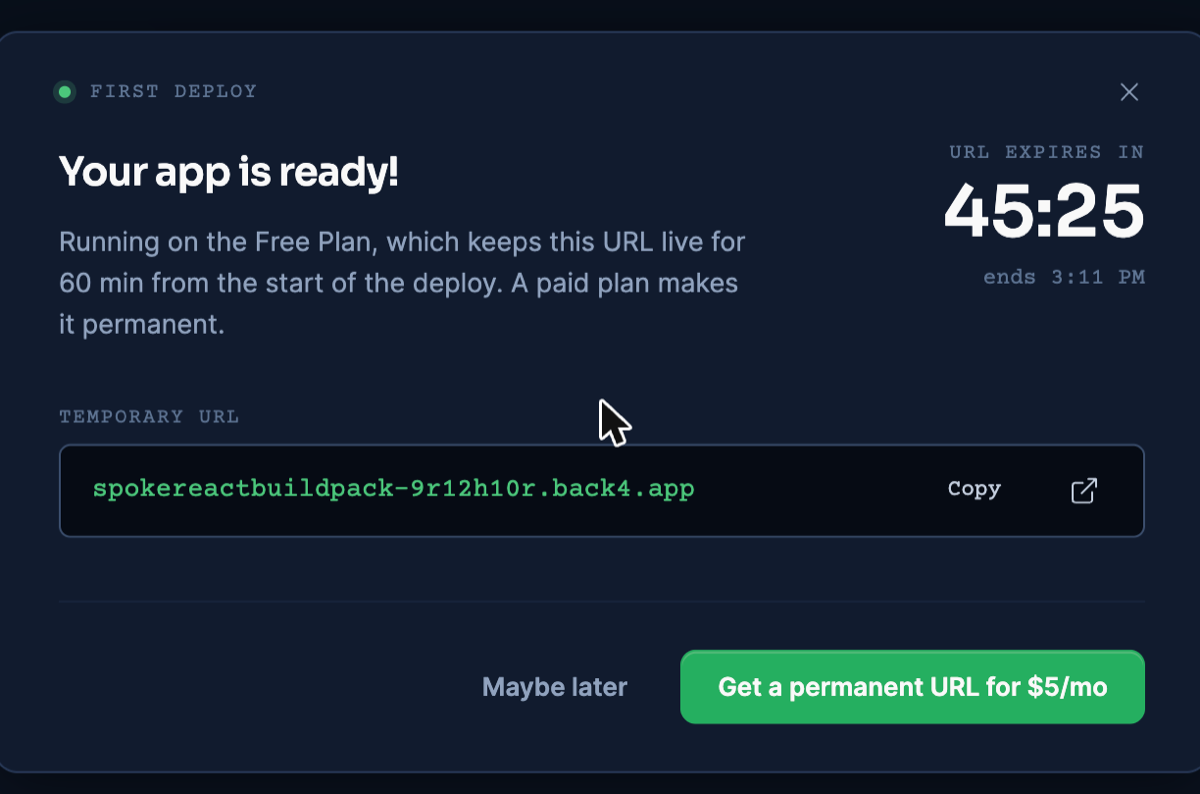
The free-plan URL dialog, shared across the series — from the React deploy, dashboard as of November 2026.
- Then interrogate the URL: request a deep path like
/some/deep/routeand expect 200 with the app shell. On our live deploy it answered exactly that — which validates thetry_filesfallback; the starter has no routes of its own, so routing behavior on top of the fallback is something your app adds.
Deploy and update from an AI assistant (MCP)
An assistant connected to Back4app’s remote MCP server can run this deploy, and later updates, from the editor. MCP is the interface; the image still comes from the Dockerfile above. Setup per client: official MCP page.
How the assistant connects, uploads and verifies is laid out in the MCP deploy walkthrough.
First deploy, November 10, 2026 (Claude, custom connector, signed in): create_upload, the npx @back4app/cli upload command it returns, create_web_app with port 8080. builder: DOCKERFILE, READY about 18 seconds after creation; / and an unknown deep path both answered 200.
We then used this app for the update test of the series. With one new file in the folder, the upload sent only that file; deploy_web_app returned a new deployment that was READY in about 21 seconds.
What we observed during and after the switch: the URL stayed the same, / answered 200 on every poll (one request every five seconds), and the new file was served. The Free-plan expiry time did not move — a redeploy does not extend the 60 minutes.
Ids and the polling record: MCP evidence file.
What we measured
Local figures are from November 6, 2026; the live deploy on November 9, 2026 ran the repo at commit 6c731b5 (deployed lab commit and commands in the repo’s evidence files). On-disk sizes and observed transfers are kept apart.
The build and what it put on disk (local, November 6, 2026):
| What | Value |
|---|---|
| npm ci (75 packages, warm npm cache) | 1.43 s |
| npm run build | 2.47 s wall (Vite: built in 503 ms) |
| dist/ on disk | 76 KB |
| docker build, base images already present | 8.31 s |
| Docker image | 76 MB (arm64; nearly all the nginx base) |
| First-load JS, raw file size | 15.03 KB (one file) |
Observed transfers and timing:
| What | Value | Where |
|---|---|---|
| First-load JS from our nginx, gzip level 6 | 5,665 B | local container, November 6, 2026 |
| Same file at nginx’s default gzip level 1 | 6,183 B | local container |
| First-load JS on the public URL | 7,657 B before gzip_proxied any; · 5,665 B after | live URL, November 9 and 10, 2026 |
| HTML document, gzipped | 475 B | local container |
| Creation → serving | ~90 s (≈13:34 → 13:35:33 UTC) | live deploy |
| TTFB on / (3 illustrative requests) | 1.099 s · 0.990 s · 0.988 s | live URL |
The public figure first ran above the origin’s because nginx skips compression for requests that arrive through a proxy: the platform’s CDN adds a Via header, and gzip_proxied is off by default. We confirmed it on November 10, 2026 — with gzip_proxied any; in the config, the public transfer dropped to 5,665 B, matching the origin.
Update the deployed app
Updates take a push and one dashboard action: App actions → Deploy the latest commit rebuilds the new commit onto the existing URL. We exercised that on this platform during the November 9, 2026 run; the React article carries the fully instrumented version of the test, including two caveats about branch settings.
Auto-deploy on push comes with paid plans. Re-creating the app from scratch mints a new URL — an update anti-pattern.
Troubleshooting
You containerized a server build as static files — pages blank, or the build produced no servable dist/. Rerun the artifact check from the first section: a build that emits a server entry point needs a Node runtime container.
The npm ci command can only install with an existing package-lock.json — no lockfile is committed. npm install once locally, commit, push.
Please mention a port in settings to expose — Port was left on auto. Type 8080 into Build & deploy.
Routes break on refresh — the fallback location block is absent, or the image is not actually copying your nginx.conf. Our deployed config returned the app shell with a 200 on a deep path.
Limitations of this flow
This setup is deliberately minimal, and its edges are worth knowing in advance.
- nginx serves files; it runs nothing. Server-side rendering, API routes, or any per-request logic mean a server artifact and a Node container — see the SolidStart configuration reference for which configurations produce one.
- The fallback is not routing. Deep paths return the app shell; making them mean something requires a client router in your app.
- Free-plan URLs are temporary. The 60-minute lifetime makes the free plan a verification tool, not a host.
- No backend is included. When the app needs accounts, persistence, or an API, add one as a next step — a managed backend is one option, your own API container is another.
What’s next?
Confirm your build’s artifact, drop in the two files, and take the companion repo’s flow to a free HTTPS URL — the Containers docs fill in any dashboard gaps.
If the app’s next feature is sign-in or shared data, one path is a managed backend reached over REST or GraphQL; the static deploy you just finished stays exactly as it is.