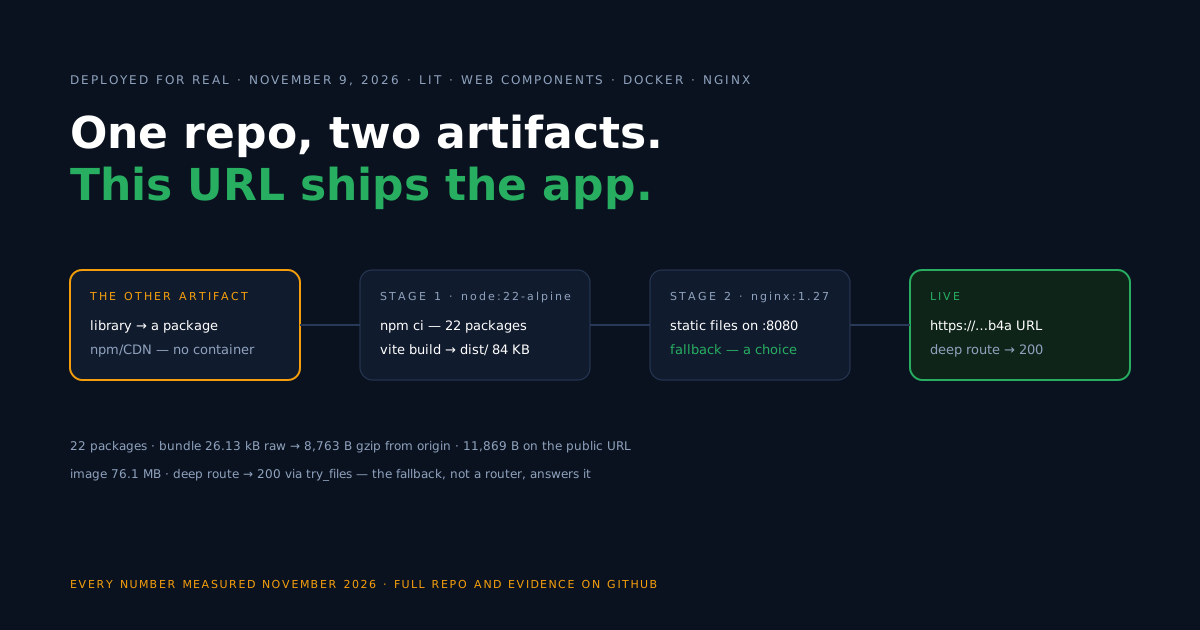
Ask “how do I deploy Lit?” and you have really asked two questions, because Lit code leaves a repository in two distinct shapes. Shape one is an application: an index.html that loads your components, built by Vite into files a web server hosts at a URL.
Shape two is a component library: code packaged for other projects to consume, distributed through npm, a CDN, or hosting you control — it does not require a visitor-facing application of its own.
This guide publishes the first shape. We built the Vite lit template into a two-stage Docker image and put it on a live Back4app Containers URL; dates, commit, and figures all live in the measurements section, and the companion repo holds the working code.
The library flow gets its own pointers below, mostly so you can recognize which of the two artifacts you actually need to ship.
Which artifact are you shipping?
Sort your project into one of these two rows before touching Docker, because only one row leads through this guide.
| Signals in your repo | Artifact | Flow |
|---|---|---|
An index.html, pages people will visit, vite build | Application | this guide: Docker image → container → URL |
Components meant for other codebases, a package.json built for consumers | Library | distribute as a package — npm, CDN, hosted modules, or a private channel; no web server of yours |
The useful question is which artifact this repository should produce, and some repos honestly produce both — a design system with a demo site runs both flows side by side: distribute the package, deploy the demo. The companion repo is a pure application: the Vite template’s demo page rendering its my-element component.
Scaffolding the application
For the application flow from zero, this is the template behind the companion repo.
npm create vite@latest lit-container-starter -- --template litThe dependency list it produced is almost ascetic: lit ^3.3.3 and vite ^8.3.6, resolving to a couple dozen packages — a fraction of what any virtual-DOM framework in this series pulled.
As with the other Vite scaffolds we deployed, the lockfile was on us: our fresh project had none, and the image’s npm ci step will not improvise one. A single local npm install, commit package-lock.json, done.
Build the Docker image
Build and serve stay in separate stages — Node compiles, nginx ships — and the runtime container never sees a Node binary.
# Build stage
FROM node:22-alpine AS build
WORKDIR /app
COPY package.json package-lock.json ./
RUN npm ci
COPY . .
RUN npm run build

# Serve stage
FROM nginx:1.27-alpine
COPY nginx.conf /etc/nginx/conf.d/default.conf
COPY --from=build /app/dist /usr/share/nginx/html
EXPOSE 8080
The nginx config is the repo’s as-is: compression, a long-cache rule for Vite’s hashed /assets/ files, and a fallback to index.html. No exotic headers — web components need nothing special from a server, and this guide claims nothing beyond what these lines set.
server {
    listen 8080;
    server_name _;
    root /usr/share/nginx/html;
    index index.html;

    gzip on;
    gzip_proxied any;
    gzip_vary on;
    gzip_comp_level 6;
    gzip_min_length 1024;
    gzip_types text/css application/javascript application/json image/svg+xml text/plain;

    # Vite writes content-hashed files to /assets/ — cache them forever
    location /assets/ {
        add_header Cache-Control "public, max-age=31536000, immutable";
        try_files $uri =404;
    }

    # SPA refresh fix: unknown paths fall back to index.html
    location / {
        try_files $uri $uri/ /index.html;
    }
}
The fallback deserves a conscious decision rather than a copy-paste. Lit includes no router, so with this config every unknown path returns the application shell — /anything serves the component demo. That is the right trade if you plan to add a client-side router, which is why the repo keeps it.
If this page will stay routerless, answering 404 on nonexistent paths is arguably more correct: replace the last block’s rule with try_files $uri $uri/ =404; and only real files resolve.
We also verified the /assets/* files arrive from the running container with the immutable cache header the config promises — safe here because Vite content-hashes everything in that folder.
Deploy on Back4app
Plan context first, so the choice is informed: a free-plan app answers on a public URL that retires itself 60 minutes after the app’s creation, and a redeploy in that hour did not delay it — our verification needed far less, but hosting for real means a paid plan and its permanent URL.
- Get the repo onto GitHub with
Dockerfile,nginx.conf, and the lockfile included, then start a New Web Deployment from it.
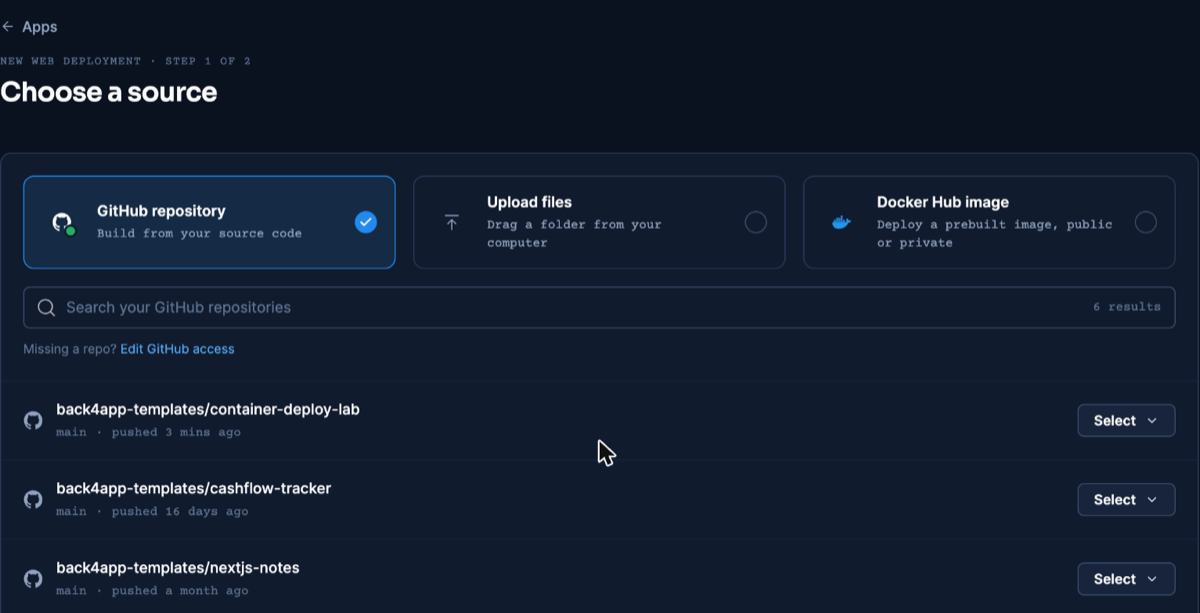
One source screen serves every framework in this series — screenshot from our React deploy, dashboard as of November 2026.
- Let it detect the Dockerfile, then do the one thing detection skips: write 8080 into the Port field. Auto never adopts
EXPOSE— the trip-up every deploy in this series routes around, documented with its error text in the React article.
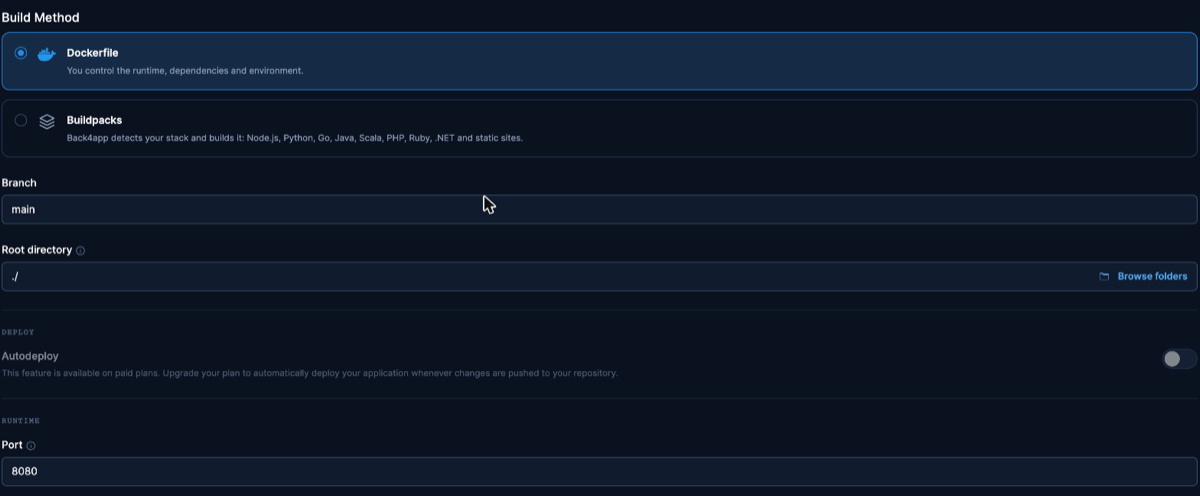
The identical settings step, captured during the React deploy. Dashboard as of November 2026.
- Hit Create and let the short build run (so few packages leave it little to do) — our run’s exact READY time is recorded with the measurements.
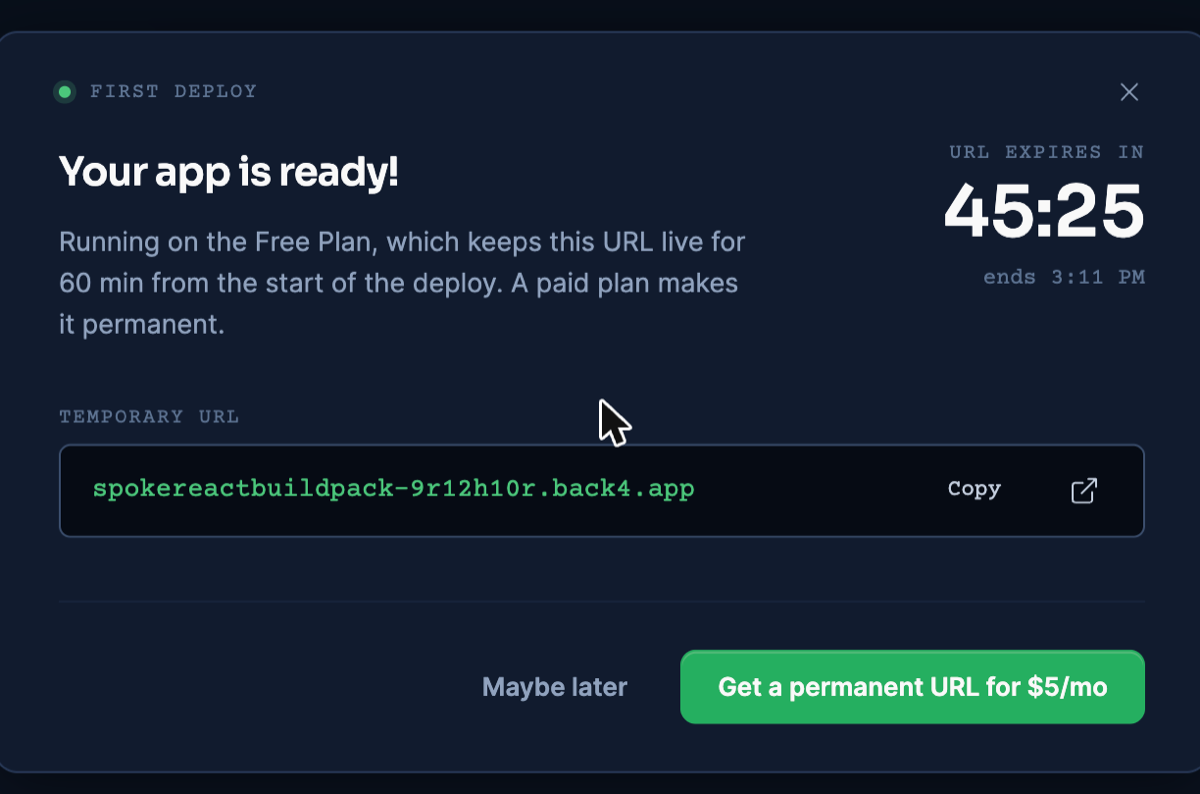
Free-plan URL dialog, reused from the React deploy. Dashboard as of November 2026.
- Open the URL and check the component page loads; then curl a deep path — ours returned 200 serving the application shell, which is the configured fallback answering, not a route rendering — and fetch the script with gzip accepted to check the transfer.
Deploy from an AI assistant with MCP
An assistant connected to Back4app’s remote MCP server can run this deploy from the editor. It is the interface for the deploy, not a different way of building: the Dockerfile above still makes the image. Setup per client: official MCP page.
The MCP deploy guide walks through the same flow from connection to update.
In our run on November 10, 2026 (Claude, custom connector, signed in): create_upload, the npx @back4app/cli upload command it returns, then create_web_app with port 8080. builder: DOCKERFILE, READY about 23 seconds after creation, / returning 200 and the fallback returning the application shell on an unknown path.
We used this starter for two extra checks:
- A wrong port does not fail the deploy. Created with port 3000 while nginx listens on 8080, the app still went READY: the platform reported
portDetected(expected 3000, listening 8080), switched to 8080 and saved it for future deploys. - Settings changes wait for you. A call to
update_web_appadding an environment variable returnedCONFIRMATION_REQUIREDwith a summary and changed nothing. The change only runs after the person approves it.
Exact fields returned in both checks: MCP evidence file.
What we measured
Local figures are from November 6, 2026; the live deploy on November 9, 2026 ran the repo at commit 0477a27 (deployed lab commit and commands are in the repo’s evidence files).
Sizes on disk and observed transfers are listed separately.
On-disk sizes and build times (local, November 6, 2026):
| What | Value |
|---|---|
| npm ci (22 packages — the series’ smallest tree) | 1.46 s |
| npm run build | 2.28 s wall (Vite: built in 479 ms) |
| dist/ on disk | 84 KB |
| docker build, base images already present | 8.01 s |
| Docker image | 76.1 MB (arm64; the base image is the image) |
| First-load JS, raw file size | 26.13 KB (one file) |
Observed transfers and timing:
| What | Value | Where |
|---|---|---|
| First-load JS from our nginx, gzip level 6 | 8,763 B | local container, November 6, 2026 |
| Same file at nginx’s default gzip level 1 | 9,759 B | local container |
| First-load JS on the public URL | 11,869 B before gzip_proxied any; · 8,763 B after | live URL, November 9 and 10, 2026 |
| HTML document, gzipped | 507 B | local container |
| Platform build READY | 13:41:25 UTC | live deploy, November 9, 2026 |
| TTFB on / (3 illustrative requests) | 0.957 s · 0.949 s · 1.435 s | live URL |
The gap between the two public figures is one nginx directive. Requests relayed by the platform’s CDN are not compressed by nginx unless gzip_proxied allows it; after adding gzip_proxied any; on November 10, 2026, the live URL transferred 8,763 B, the same as the origin.
Update the deployed app
Once live, a component edit reaches users with a push and one click of App actions → Deploy the latest commit, after which the same URL serves the new build. We ran that during the November 9, 2026 session; the fully instrumented update test, caveats included, is in the React article.
Paid plans deploy pushes automatically. Rebuilding the app from scratch hands out a different URL, so never treat it as an update.
Troubleshooting
You deployed when you meant to distribute (or vice versa) — a visitor-facing app helps no package consumer, and a packaged component serves no visitor. Re-check the artifact table at the top; design systems legitimately need both flows.
The npm ci command can only install with an existing package-lock.json — no lockfile is committed. One npm install, one commit, resolved.
Please mention a port in settings to expose — the Port field is still on auto and ignored your EXPOSE 8080. Set it explicitly in Build & deploy.
Every URL shows the same page — that is the configured fallback serving the application shell, as the nginx section explains. Keep it if a client router is coming; switch to the =404 variant if not.
Components render unstyled or not at all — confirm the page loads the built /assets/*.js (view source on the live URL) rather than a dev-server path left in index.html.
Limitations of this flow
These are the real edges of the setup, worth deciding about rather than discovering.
- It publishes the application artifact only. Distributing components to other codebases is the package flow — npm, CDN, hosted modules, or private channels — and no part of this container setup performs it.
- The fallback is a stance, not a law. Shell-on-every-path suits a future client router; a permanently routerless page may serve users better with 404s, as shown in the nginx section.
- Static files only. Server-side rendering or per-request logic means a server artifact and a Node runtime container.
- Free-plan URLs are short-lived. Sixty minutes per app makes the free plan a proving ground, not a host.
- Accounts and data are a next step. When components need shared state behind them, options include a managed backend over REST or GraphQL, or an API service you run — the static deploy stays untouched either way.
What’s next?
Decide your artifact, and if it is the application, the companion repo plus the Containers docs take it to a free HTTPS URL in one sitting.
And when those components need sign-in or shared data behind them, wiring in a managed backend is one clean option — with the deploy you just finished unchanged.