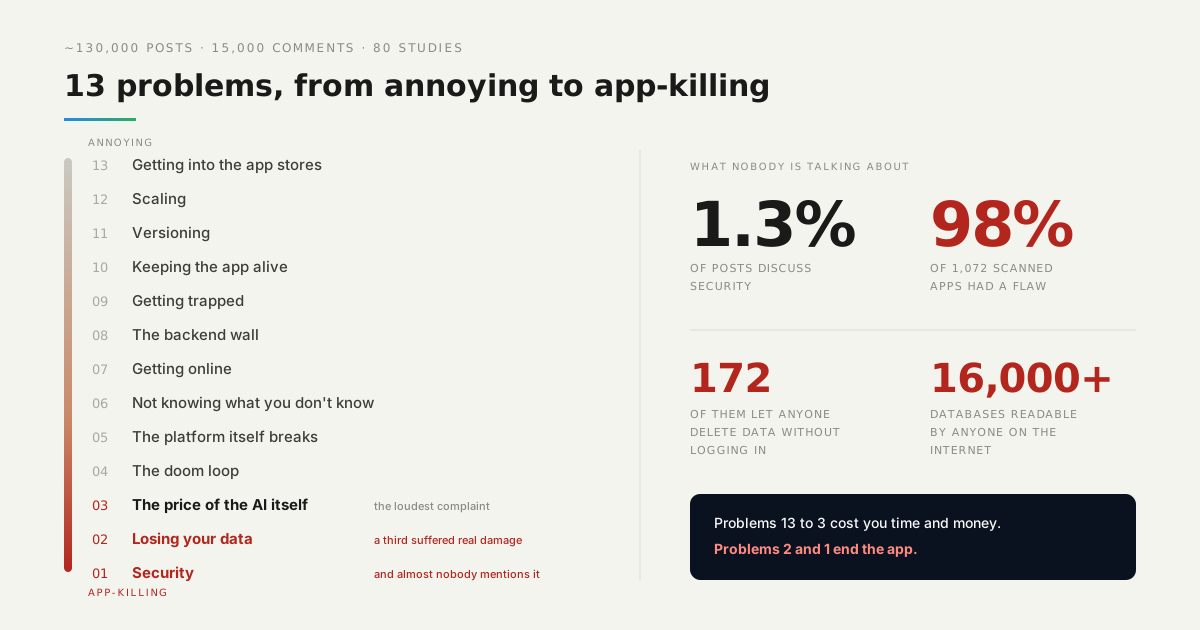
We read almost 130,000 posts from vibe coders on Reddit, plus 15,000 video comments and 80 industry studies. One finding stood out, and it is not a comfortable one.
The problems people complain about most are not the problems that hurt them most. Only 1.3% of posts talk about security. Yet when researchers scanned over a thousand AI-built apps, 98% had a security flaw.
So here is the countdown: thirteen problems, from annoying to app-killing, with what to do about each. Wherever a managed backend removes the problem, we say how. Where it cannot, we say that too.
Watch it instead
The same countdown, narrated, with the figures behind each position.

13. Getting into the app stores
Google Play wants twelve testers before you can publish. Apple rejects thin web wrappers outright. Getting rejected is frustrating and it costs weeks.
This is where a web app shines: nobody has to approve it. You publish it and you are done, covering PCs, Macs, Android and iOS in one go.
If you do want a native app, you do not have to choose. A backend with SDKs and REST and GraphQL APIs serves a web build and a native build from the same data, so the store is a distribution decision rather than a rebuild.
12. Scaling
This is a good problem, because it means you have users. The typical stories are less encouraging: a database at 100% CPU with nobody online, or real-time features lagging at eighty concurrent users.
Almost always the cause is a query shape rather than a traffic volume — an unindexed field, or a read that runs once per row instead of once per page.
What you do not want is for growth to mean a rewrite. On a managed backend the database servers and the infrastructure are operated for you, so when you grow you change plans, not architecture.
11. Versioning
Most people building with AI do not version their code until they lose something. Then rolling back is archaeology: there is no last-good state to return to, only a folder that used to work.
The habit is the fix, and the habit is cheap. Commit before each prompt, not after each feature, so every AI edit sits in its own diff you can read and reverse.
Platforms that version each deploy automatically give you the same safety net for what is actually running. Something broke? Roll back to the last working deploy, and look at the diff afterwards.
10. Keeping the app alive
Spaghetti code, packages that went out of date six months ago, and apps that go down without anyone noticing until a user mentions it.
The third one is the real problem. An app nobody is watching is an app whose outages last as long as it takes someone to complain.
Server updates, database patches and infrastructure maintenance are the kind of work that is invisible when it happens and expensive when it does not. Hand them to a platform, and keep dashboard logs where you can actually read them when something breaks.
9. Getting trapped
Your backend lives inside the builder. You cannot export it, pricing has surprises in it, and one curious user hitting a language model endpoint can drain your account in an afternoon.
Three questions tell you whether you are trapped. Can you download your whole codebase? Do you know your bill in advance? Can a third-party API key you configured be spent by someone who is not you?
An open-source stack answers the first, predictable pricing answers the second, and keeping provider keys server-side answers the third.
8. The backend wall
The front end looks finished. Then you need a login, a database, payments and webhooks — and everything stops. This is the most common moment a project dies, because it is where “almost done” turns out to mean “not started”.
A managed backend is exactly this wall, pre-climbed: a database, user sign-up and login, file storage, and REST and GraphQL APIs generated for you.
Payment webhooks belong in a server-side cloud function, not in the browser. A webhook handler in front-end code is a handler anyone can call with any payload they like.
7. Getting online
It works in preview and breaks in production. Missing environment variables, a 404 on refresh, a custom domain that will not connect, a login that redirects to localhost.
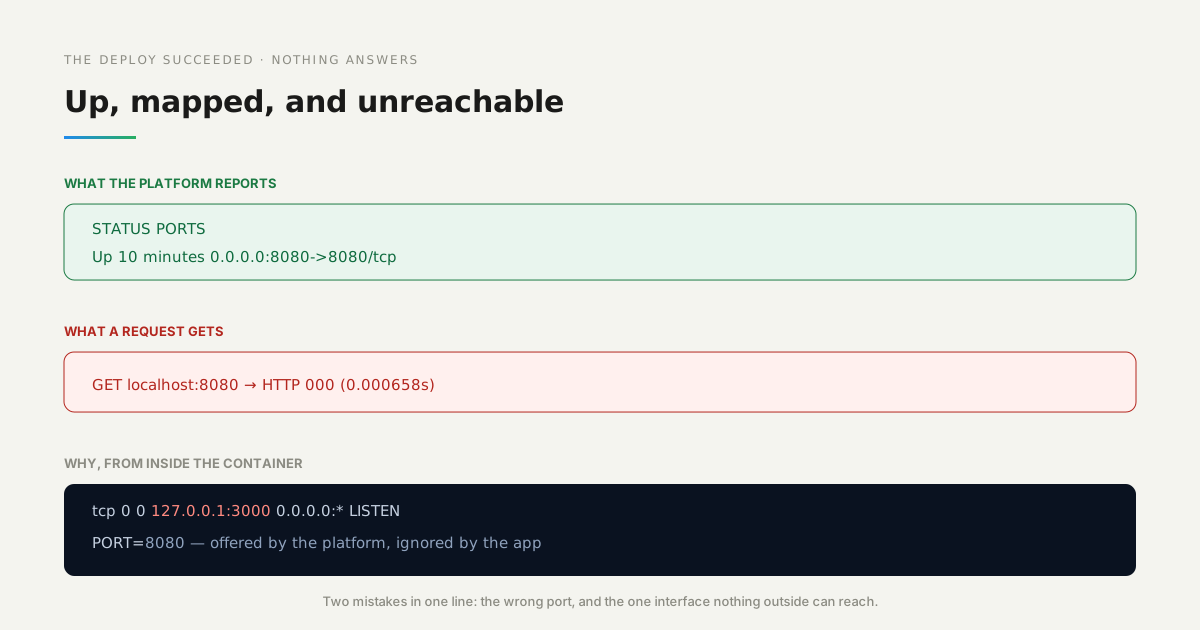
We built one of these on purpose to see what it looks like from outside. A container reporting Up with its port published returned HTTP 000 to every single request.
Inside it, the app was listening on 127.0.0.1:3000 while the platform had passed PORT=8080 — the wrong port, and the one interface nothing outside the container can reach. Neither is a bug on a laptop, where you are the loopback.
How we measured: the container was built from an unmodified AI-generated app, run with PORT=8080 and the port published, then probed from the host with curl, with the listening socket read from inside using netstat. The full run is in the deployment post.
6. Not knowing what you don’t know
For non-developers this is the number one problem — nearly half of everything they struggle with. You cannot search for the name of a thing you have never heard of, and the AI will not volunteer that your app has no concept of permissions.
The defence is a system you can open and inspect rather than a black box. When an agent builds the screens, the data model, the permissions and the server functions, you want to be able to look at each one afterwards and ask what it did.
That is the difference between a tool that generated something and a tool that generated something you can audit. Everything in this countdown below number six is a thing you did not know to ask about.
Nobody writes a post about the vulnerability they do not know they shipped.
5. The platform itself breaks
Outages, frozen modes, disabled accounts, support that never answers. If your app lives inside the builder, the builder’s bad day is your app’s bad day.
The structural fix is to separate the place where you build from the place where your app runs. Your data and your backend sit on infrastructure meant for production; the development environment is just where you work.
Then an outage in the tool you build with is an inconvenience for you and invisible to your users.
4. The doom loop
You fix something, the AI breaks two others, and bugs you killed last week come back. Nobody has solved this, and no platform can stop a model from looping.
What we hit most often was not an error but silence. In one build, the generated integration code called an API that had been removed two major versions earlier — and the failure was swallowed by a catch block, so the feature simply did nothing.
Two things make the loop survivable. Versioning you can step back through, so a bad round is a revert rather than an excavation. And not paying twice: if you ask an agent to fix something it broke, that fix should be on the platform, not on your credits.
3. The price of the AI itself
This is the problem people complain about the most, out of all thirteen. Credits vanish, limits are hit in days, and you end up paying the AI to fix the bugs the AI created.
Most of that spend is not on your product. It goes on prompting a model to wire up a database, authentication and a server — the parts that are identical in every application ever built.
When the infrastructure is already there, those prompts do not happen. The agent spends its tokens on your interface and your logic, which is the only part that is actually yours.
2. Losing your data
AI agents have deleted production databases. In one documented case a single comment wiped everything in nine seconds, and the backups were on the same drive, so they went too.
It is not rare. About a third of people in the study suffered real damage from it — the highest rate of anything on this list.
| What happened | Data left |
|---|---|
| Container restarted | survives |
| Container replaced from the same image | gone |
| Container replaced, with a volume | survives |
We measured the quieter version of the same problem. A deploy does not restart your application, it replaces it — and replacement discards the container’s writable layer. The obvious test passes, which is what makes it costly.
How we measured: one record written through the running app, then the container restarted, then removed and recreated from the same image, then the pair repeated with a named volume mounted.
Two habits cover both versions. Backups stored apart from the app, so the thing that destroys your data cannot reach them. And separate apps for testing and production, so the agent never holds the keys to real user data.
1. Security
It is number one because it is invisible. Only 1.3% of vibe coders talk about it, but 98% of the 1,072 scanned AI-built apps had at least one flaw — and 172 of them let anyone delete data without even logging in.
Researchers found over 16,000 databases readable by anyone on the internet.
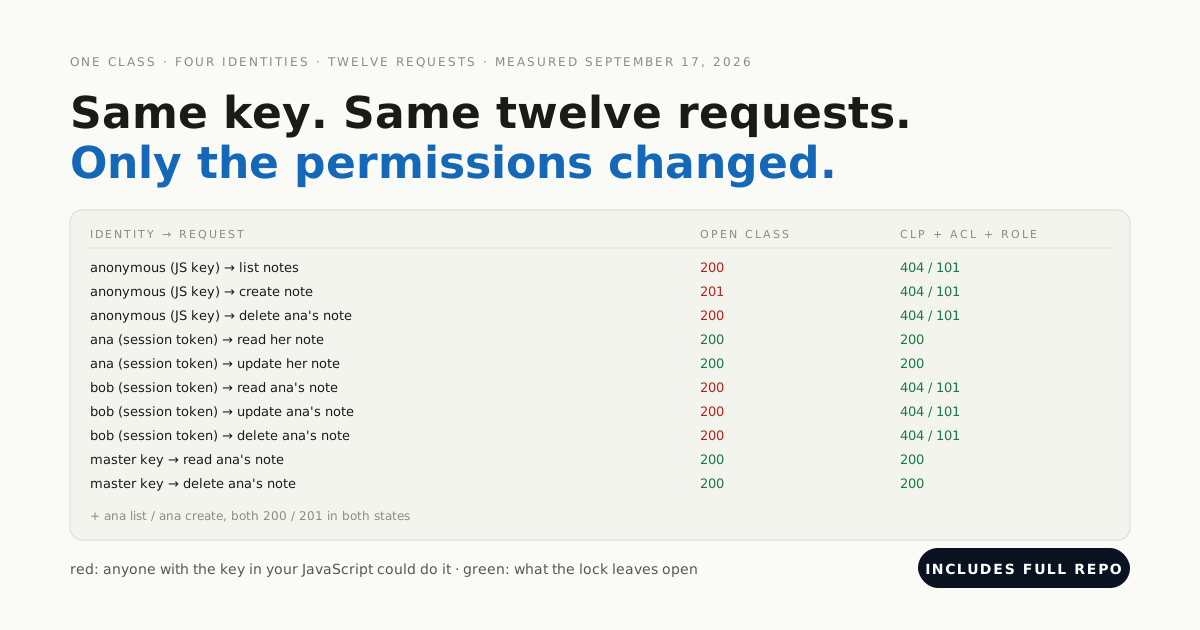
The usual cases are always the same three: API keys sitting in the browser, database permissions left open, and an AI that “fixes” a permission error by handing out admin access.
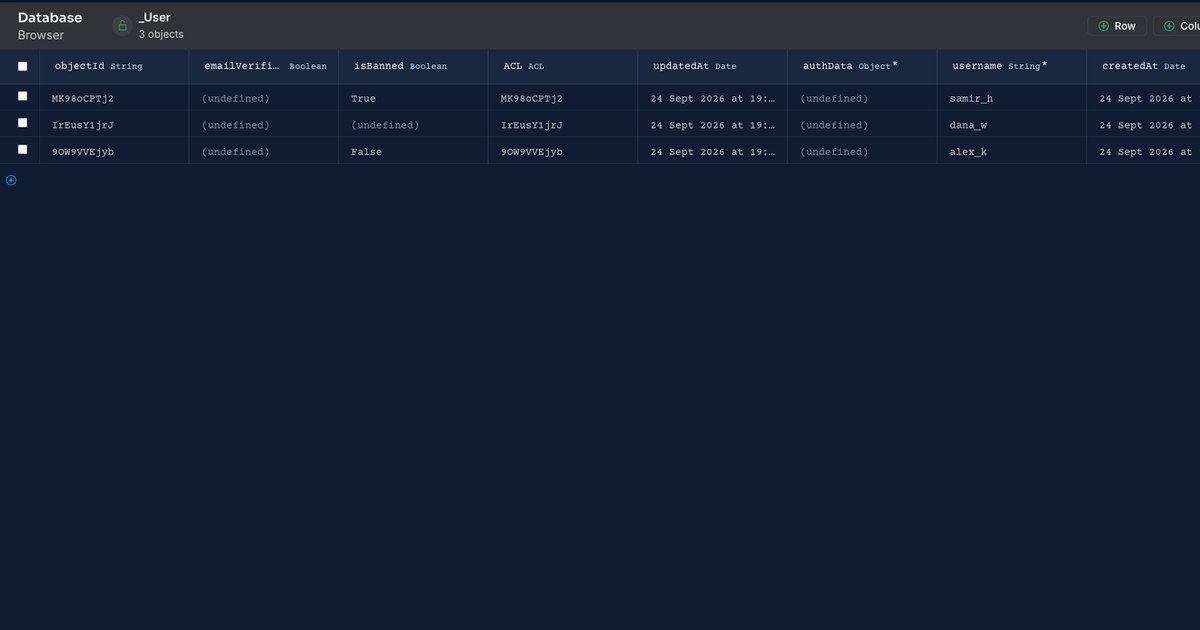
We saw the shape of it in our own build of a ban system. Blocking the login took one trigger — but the banned account kept a working session, and could clear its own banned flag, because nothing in the framework had an opinion about either.
How we measured: requests made with the application id and REST key only, never the master key, because the master key bypasses the rules a test is supposed to exercise. The run is in the ban post.
The fix is that permissions are enforced on the server. Access control lists decide who can read and write each individual record, and secret keys and paid API calls live in cloud code, never in the browser.
The two-minute test you can do today
Create a second account in your own app. Try to see the first account’s data.
If you can, so can anyone.
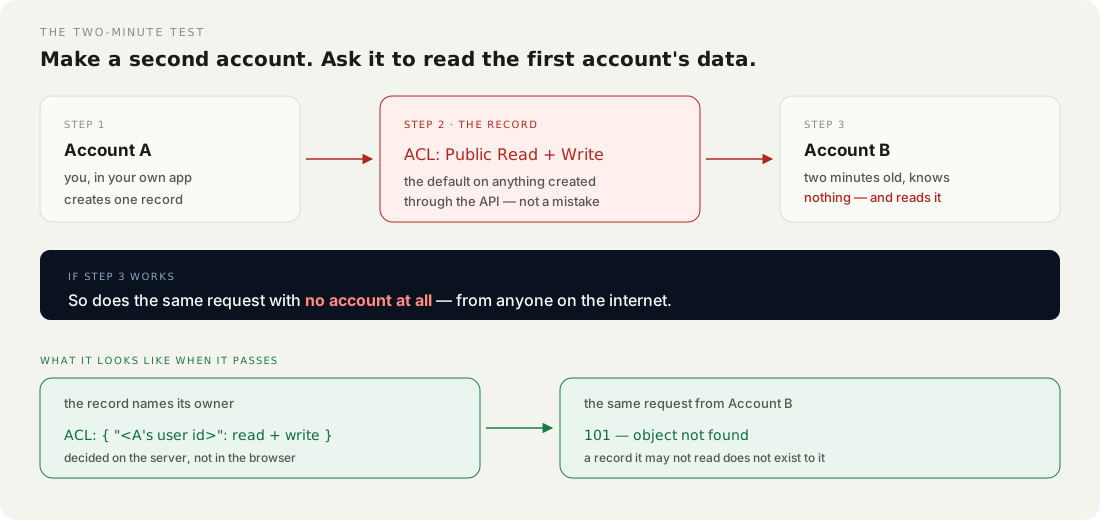
That is the whole test, it takes two minutes, and it catches the single flaw that tops every study of AI-generated code. Then do the same with the browser’s network tab open and look at what the requests carry — an API key visible there is a key anyone can copy.
Which of these actually ends your app?
Problems 13 through 3 slow you down and cost you money. They announce themselves, they frustrate you, and that frustration does its job — you fix them because they are in your way.
Problems 2 and 1 can end the app, and neither announces anything. Data is gone before you know it was at risk; a missing permission check produces no error, no slow page and no failed deploy. It produces an application that works perfectly, for everyone, including people who should not be able to reach it.
The good news is that they are also the two easiest to prevent, and only if you set things up right from day one. Backups somewhere other than the app. Testing separate from production. Permissions decided on the server, and checked by a second account before anybody else makes one.