Someone is abusing your app and you need them gone. Not warned, not rate-limited — gone, today, without deleting their account or waiting for a deploy.
The usual answer is a flag on the user record and a check when they log in, and it is the right shape. It is also, on its own, about half of a ban: the person you just banned is very likely still signed in on their phone, and nothing you have done affects that.
This guide builds the flag and the login check, then tests the two things that decide whether the ban is real — what happens to a session that already exists, and whether the banned user can simply switch the flag back. Both were measured on 24 September 2026, with client keys, the way a real device would.
Where does the ban live?
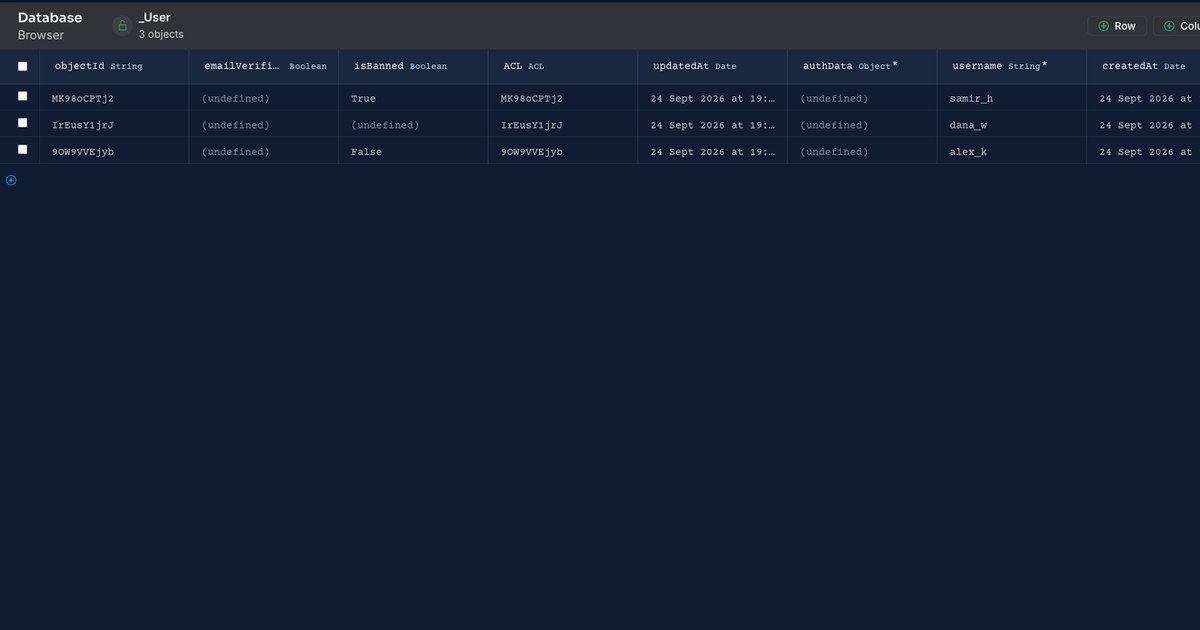
On the user record, as a boolean. Open the _User class in the Database browser, add a column named isBanned of type Boolean, and leave the default as false so new accounts start allowed.
That is the whole data model. No separate bans table, no join — the flag travels with the account, so every check that has the user has the answer.
How do you block the login?
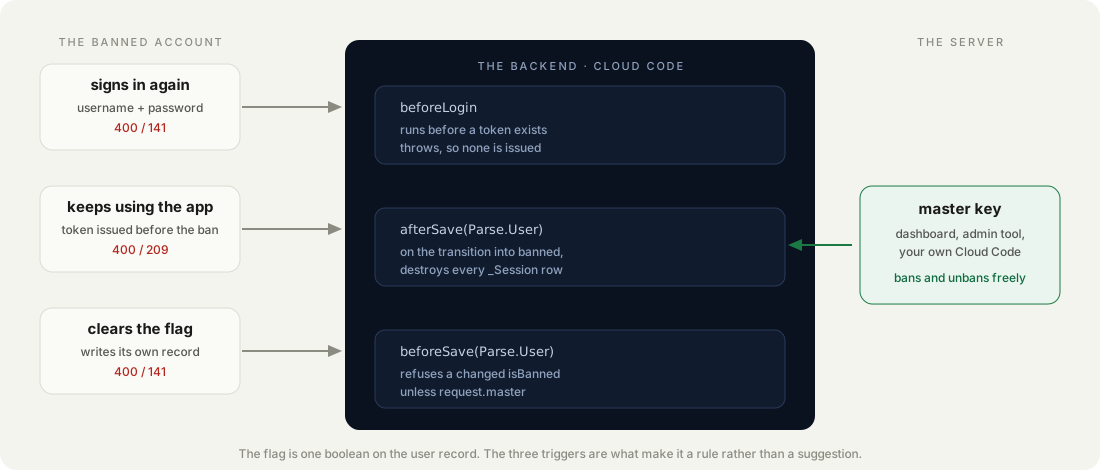
With a beforeLogin trigger, which runs before a session token is issued. That timing is the point: a banned account never receives one, so there is nothing to revoke.
Parse.Cloud.beforeLogin(async (request) => {
  if (request.object.get('isBanned')) {
    throw new Error('This user has been banned');
  }
});
Deploy that and the flag starts working immediately. A login for a flagged account comes back refused, with the message from the trigger:
{ "code": 141, "error": "This user has been banned" }This has to live in Cloud Code rather than your app. A check in your own code runs on a device the user controls, and anyone can call the REST API directly with the same application and client keys. The trigger runs on the server whatever the client is.
Does blocking the login actually remove the user?
No — and the gap is the reason this guide continues. A ban that only runs at login does nothing to the people already inside.
Here is the test. Sign in as the user and keep the session token. Then set isBanned to true from the server and use that token again:
GET /users/me   with the token issued before the ban
→ 200   still valid, as alex_k
The banned account is still authenticated, still reading and writing, until it happens to log out. On a mobile app, where sessions are long-lived by design, that could be weeks.
How we measured: a session token was taken by logging in before the ban, the flag was then set from the server, and the same token was replayed against /users/me with the application id and REST key only — no master key, because the master key bypasses triggers and would prove nothing.
Blocking the door does nothing about the people already in the room.
It gets worse. Parse lets a signed-in user write to their own record — that is how “change my display name” works — and isBanned is a field on that record like any other. With the same pre-ban session:
PUT /users/<id>   { "isBanned": false }
→ 200   updated

GET /login        same credentials
→ 200   OK
The banned user unbanned themselves. Not through a flaw in Parse, but because the flag was left as ordinary user-writable data.
How do you make the ban stick?
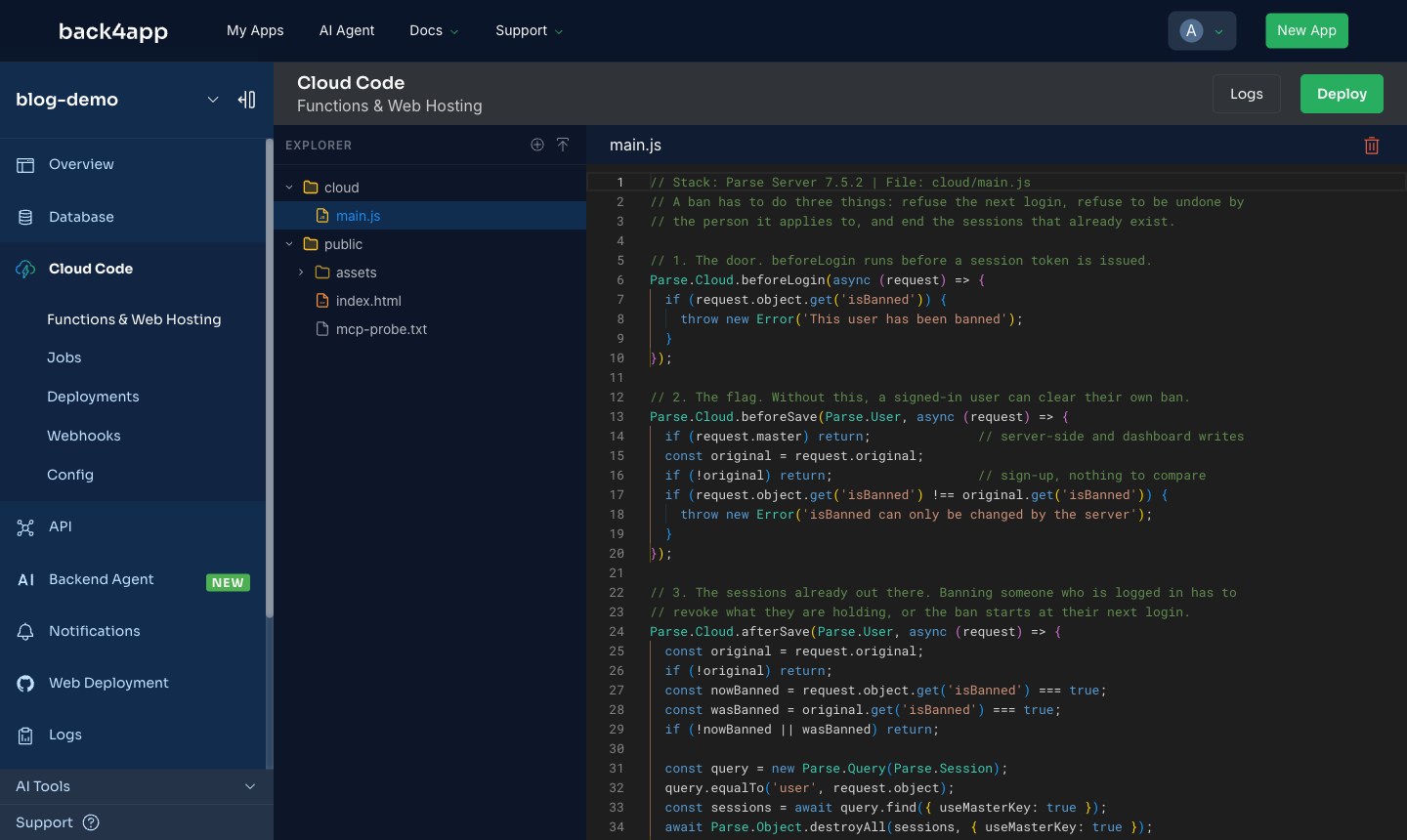
Three triggers instead of one. The login check stays; two more close what it leaves open.
// 1. The door. beforeLogin runs before a session token is issued.
Parse.Cloud.beforeLogin(async (request) => {
  if (request.object.get('isBanned')) {
    throw new Error('This user has been banned');
  }
});

// 2. The flag. Without this, a signed-in user can clear their own ban.
Parse.Cloud.beforeSave(Parse.User, async (request) => {
  if (request.master) return;              // server-side and dashboard writes
  const original = request.original;
  if (!original) return;                   // sign-up, nothing to compare
  if (request.object.get('isBanned') !== original.get('isBanned')) {
    throw new Error('isBanned can only be changed by the server');
  }
});

// 3. The sessions already out there.
Parse.Cloud.afterSave(Parse.User, async (request) => {
  const original = request.original;
  if (!original) return;
  const nowBanned = request.object.get('isBanned') === true;
  const wasBanned = original.get('isBanned') === true;
  if (!nowBanned || wasBanned) return;

  const query = new Parse.Query(Parse.Session);
  query.equalTo('user', request.object);
  const sessions = await query.find({ useMasterKey: true });
  await Parse.Object.destroyAll(sessions, { useMasterKey: true });
});
Trigger 2 compares the incoming value with request.original and refuses only when the field actually changes, so ordinary profile updates still work. request.master lets the server and the dashboard through — otherwise you could not ban anyone.
Trigger 3 fires only on the transition into banned, not on every save of a banned user, which keeps it from re-querying sessions on unrelated writes.
Do the three triggers close both holes?
Yes, on both counts, and the same tests say so. With all three deployed, a fresh session was taken before banning — the strongest case for an attacker.
| Test | One trigger | Three triggers |
|---|---|---|
| Login while banned | 400, code 141 | 400, code 141 |
Pre-ban session, GET /users/me | 200 — still valid | 400, code 209 — invalid session token |
Client changing isBanned | 200 — written | 400 — refused |
Code 209 is Parse’s invalid-session-token error: the token the client is holding no longer exists, so the app sees a logged-out user and sends them to the sign-in screen, where trigger 1 turns them away.
How we measured: each row is one request per version of the Cloud Code — the video’s single trigger, then the three — run against the same account on the same backend on 24 September 2026, always with client keys.
How do you unban someone?
Set the flag back to false from anywhere the master key applies — the dashboard, a Cloud Code function, your admin tool. Trigger 2 lets it through because request.master is true; trigger 3 ignores it because it only acts on the transition into banned.
The user’s old sessions stay destroyed, which is correct: unbanning restores the right to sign in, not the sessions that were cancelled. They log in again and get a new one.
If you want bans that expire, store a date instead of a boolean and compare it in beforeLogin. The rest of the structure is unchanged, and the same two holes need the same two triggers.
Which errors will you see, and what do their bodies say?
Three, and all of them arrive as HTTP 400 with a Parse code in the body. The code is what your client should branch on; the message is yours, thrown by the trigger.
{ "code": 141, "error": "This user has been banned" }
{ "code": 141, "error": "isBanned can only be changed by the server" }
{ "code": 209, "error": "Invalid session token" }
Code 141 is the generic “a Cloud Code function failed” error, so both of your own rejections share it — the message is the only thing that tells them apart. If you need the client to react differently to each, throw a structured message and parse it, rather than matching on English text you may want to translate later.
Code 209 is the one your app already knows: it is what Parse returns for any dead session. Most clients treat it as “signed out” and send the user to the login screen, where the first trigger meets them with the ban message. That is the sequence a banned user actually experiences.
How we measured: each line above is the verbatim response body from a request made with the application id and REST key only, captured on 24 September 2026.
When is a ban flag the wrong tool?
When the person, not the account, is the problem. The flag lives on one user record, so someone who signs up again with a new e-mail walks straight back in — and nothing in this guide slows that down. If you are dealing with determined abuse rather than a rule-breaker you can name, you need signals that outlive an account, and that is a different and much harder design.
It is also the wrong shape for anything temporary. A boolean has no end date, so a seven-day suspension becomes a diary entry and somebody’s job to remember. Store a timestamp instead and compare it in beforeLogin; the two other triggers stay exactly as they are.
And it is too blunt when the problem is one feature. If someone is abusing comments, banning the account takes away everything else they do legitimately. A per-feature flag checked in the Cloud Code that owns that feature keeps the punishment the size of the offence.
What would you add to the ban system next?
Record who banned whom and why. A boolean tells you nothing in three months, and moderation decisions get appealed — a bannedAt, bannedBy and banReason on the same record cost nothing and answer the question later.
Consider what a banned session should see at the moment it dies. The client gets code 209 and, if your app treats that as “signed out”, the user simply lands on the login screen with no explanation. Catching that code and showing the ban message is a kinder ending than a silent logout.
And check the class-level permissions on _User while you are here. The triggers protect the one field; they do not stop a user reading other people’s records if the permissions allow it.