The search that leads here is usually “android expense tracker app source code”, and what it finds is either a ten-year-old project that no longer builds or a tutorial whose “offline support” is a sentence. This post is a complete, current app with its backend, and the offline part is the point: the rules are written down, unit-tested, and then run on an emulator one scenario at a time.
Everything below was done on October 23, 2026: the build on a Mac with a fresh Android Studio, the emulator run against a local Parse Server, and the backend side against the live Back4app platform. The numbers come from those runs and the logs are in the repository.
Download it, run it, read it: the source is at github.com/templates-back4app/android-expense-tracker, MIT, and the release APK installs on Android 8.0 or newer and points at a demo backend. Tap Continue as guest.
What you get, screen by screen
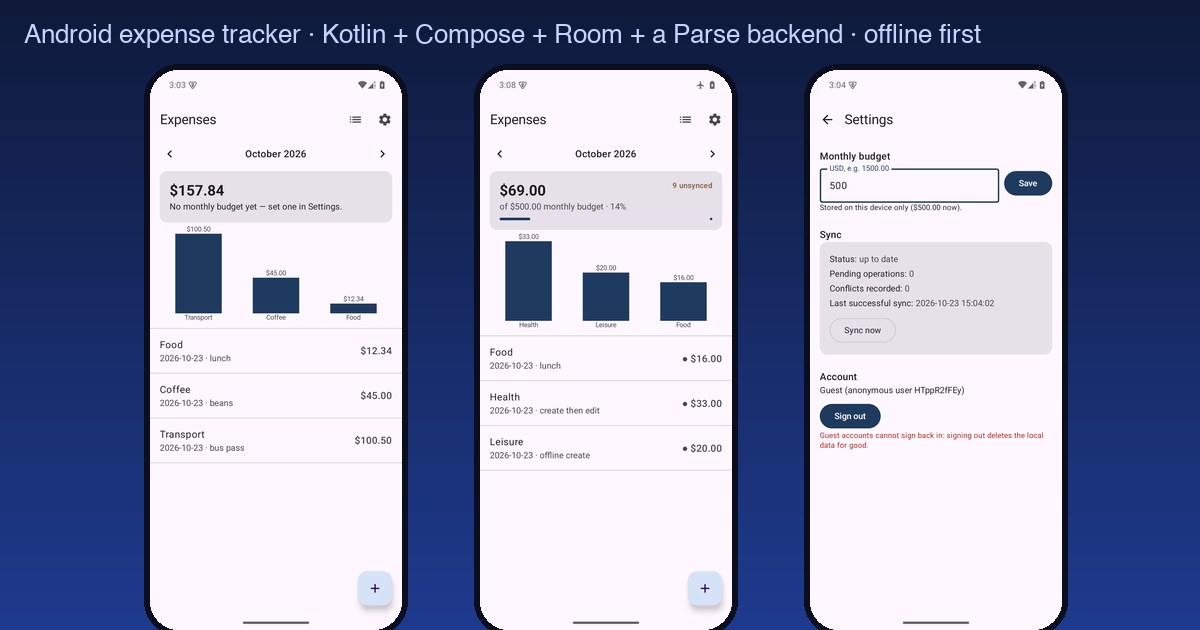
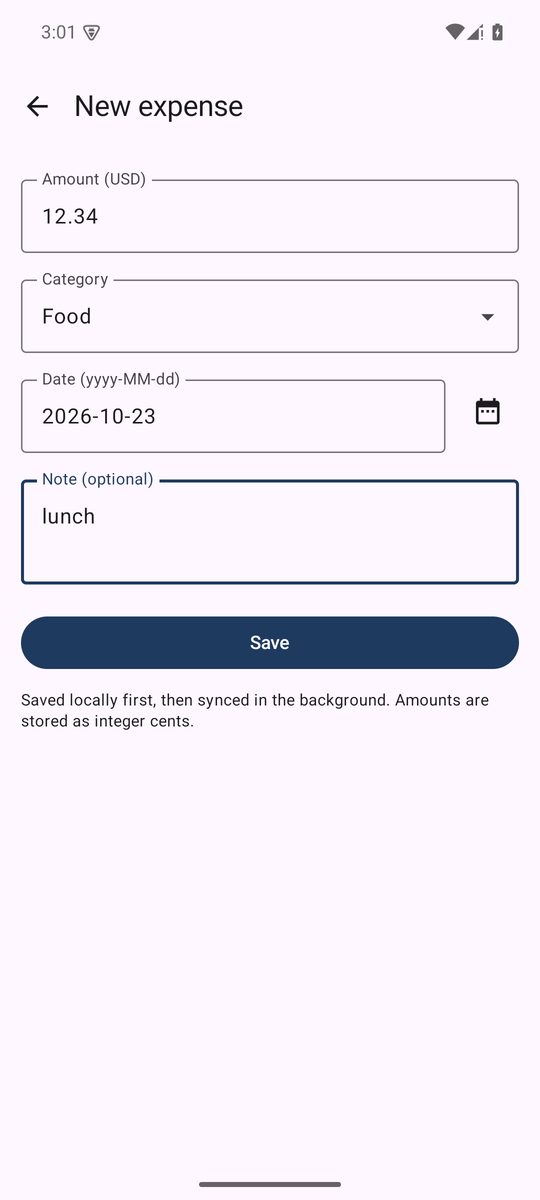
Five screens, and nothing on them that the sync story does not need. Login offers e-mail and password or Continue as guest, which creates an anonymous Parse user. Entries shows one month at a time, the total, the budget bar once a budget exists, a bar chart of category totals drawn with Compose Canvas, and the rows.
The entry form takes an amount typed as 12.34, a category, a date and a note. Categories and Settings do what their names say.
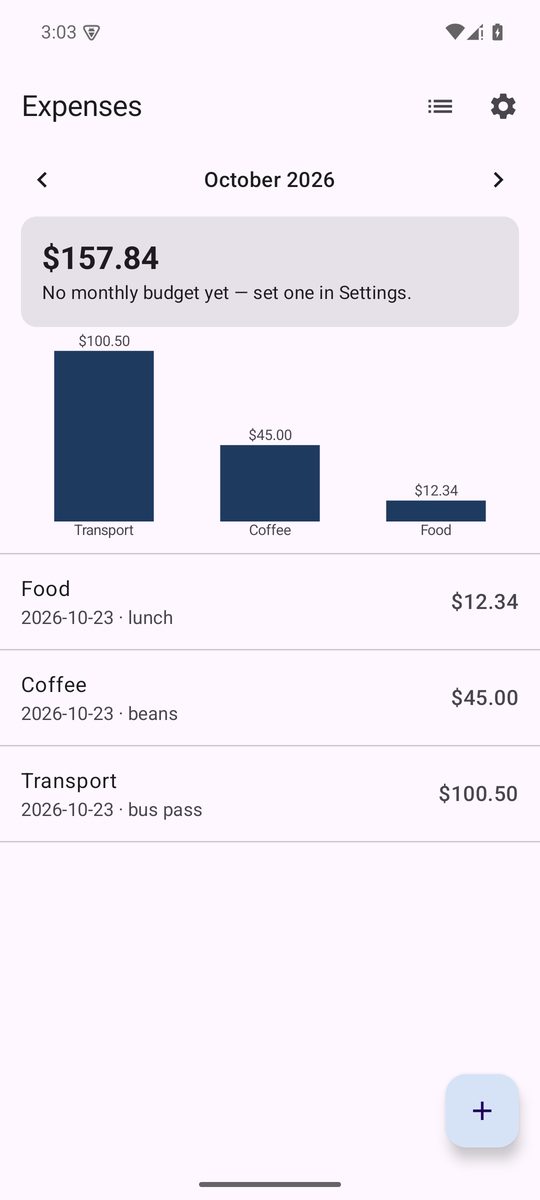
Money is integer cents in USD. 12.34 becomes 1234, percentages round half up, and a unit test holds the worked example. A decimal comma is not a thousands separator: the first test run caught 12,34 being read as 1234 dollars, and the parser now accepts commas only in groups of three.
The budget and the categories are stored on the device and not synced. That is a scope decision, stated in the README, not an oversight: the sync machinery is for the entries, and keeping it to one class keeps the rules readable.
The stack, and the version window that builds today
Kotlin 2.4, Jetpack Compose with the 2026.01 BOM and Material 3, Room 2.8, WorkManager 2.11, Navigation Compose, the Parse Android SDK 4.4 from JitPack, and on the server Cloud Code for Parse Server 7 on Node 19. Build tooling: Android Gradle Plugin 8.13.2 on Gradle 9.5.1, compileSdk 35, minSdk 26.
Those two build numbers were not a free choice. The machine had a fresh Android Studio 2026.2, which bundles JDK 25 and nothing else. Gradle 8.14 refuses to start on JDK 25, and its only message is the bare string 25.0.3. Gradle 9.8, the newest, fails at configuration because AGP 8.x used an internal Gradle API that 9.6 removed. The window that works is JDK 25, Gradle 9.1 to 9.5, AGP 8.x.
The library versions were checked the same way, by reading each AAR’s metadata: core-ktx 1.17 and activity-compose 1.11 require compileSdk 36, so the template pins the last versions that accept 35. The build diary lists every one, with the download sizes.
| What | Measured on the build machine |
|---|---|
| Minimal SDK for a command-line build (platform 35, build-tools, platform-tools, cmdline-tools) | 526 MB on disk |
| With the emulator and one Android 15 arm64 system image | 5,660 MB on disk, 7 min 29 s of downloads |
| Debug APK | 14,325,116 bytes |
| Release APK, R8 minified and resource-shrunk | 2,083,111 bytes |
| JVM test suite | 29 tests, about 4 s on a warm daemon |
The offline sync, as a specification
The app never waits for the network. Every write is one Room transaction that updates the entries table and appends an operation to the ops table, the outbox. A network-constrained WorkManager job drains the outbox oldest first and then pulls. Six rules make that safe, and each one is a line in a pure Kotlin object with a unit test.
-
Entries have a client-made identity. The key is a UUID generated on the phone, so an expense exists and can be edited before the server has heard of it.
-
Every operation has an idempotency key. Its own UUID, kept across retries. The server inserts it into an
AppliedOpclass that has a unique index before it touches the entry; a second arrival fails to insert and is answered with the current state andduplicate opId. -
Order matters per entry, not globally. If one operation fails, only later operations of the same entry wait.
-
Last arrival wins, per field. An update carries the changed fields and the version the phone last saw. The server applies it regardless and bumps the version. If the base version was stale, it still applies it, because “last” means server arrival order, and records a
Conflictrow with the fields that arrived. -
Deletions are tombstones. A delete sets
deletedAt, bumps the version, and the row stays so other devices learn of it. A tombstone beats any later edit. Tombstones are purged after 90 days by a job; a device offline longer than that does a full pull. -
Chained offline operations are rebased. Create, edit, edit of one entry while offline queues three operations built on top of each other; when one completes with server version V, the still-queued ones of that entry are rebased to V. Without this rule every chain produced a false conflict, which is how the rule was found.
Rule 4 is the one to read twice. A phone that reconnects tomorrow with an older offline edit will overwrite today’s edit for the fields it changed. That is deliberate, it is what “last arrival wins” means, and the alternative, rejecting stale edits, is a one-line change in the Cloud function that the repository points at.
Conflicts are recorded, not resolved. For a template, that is the honest default: the evidence is kept, and the policy is yours to write.
The server half is one Cloud function, syncOp, for create, update and delete, and one, listEntries, for the pull. Clients cannot write the three classes directly: the class-level permissions refuse it, and a beforeSave hook refuses it again for any request that does not carry the master key.
Fourteen offline scenarios, one outcome each
The emulator run drove the app with adb only, no instrumented tests, against a local Parse Server with PostgreSQL so that every request could be read in the server log and every row in psql. “Offline” was airplane mode; zero requests reached the server while it was on. The full matrix is in the repository; these are the cells that matter.
| Scenario | What happened on the final build |
|---|---|
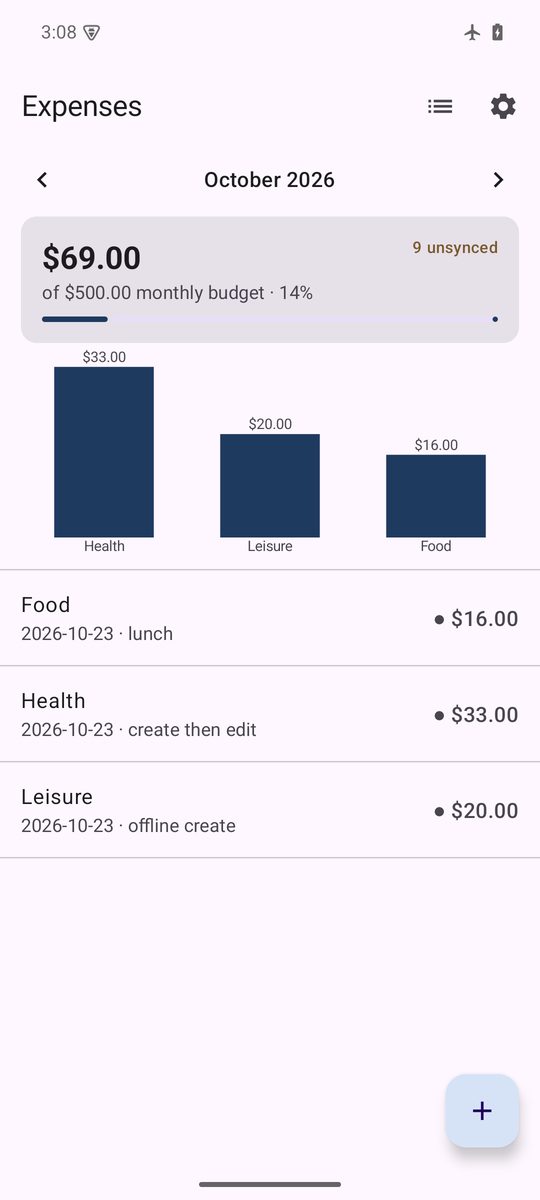
| Create, edit and delete while offline, one entry each | each saved instantly, counter 1 unsynced to 9 unsynced, rows marked; after reconnecting, create version 1, update version 2, delete a tombstone |
| Create then edit the same entry offline | both queued; server: create version 1, update version 2, no conflict (the unfixed build recorded a false one) |
| Edit then delete the same entry offline | the queued edit is dropped, only the delete is sent; tombstone version 2 |
| Kill the app with 9 queued operations, relaunch offline | 9 unsynced still shown; the outbox is in Room, not in memory |
| Reconnect with 9 queued operations | 9 syncOp calls in 130 ms, oldest first, 12 distinct ids in AppliedOp, every operation applied once, counter at 0 in 2 s |
| A second device edits an entry online, the phone taps Sync now | the row shows the other device’s note after the pull |
| Both devices edit the same entry, the phone offline | the phone’s edit arrives last and wins; a Conflict row records base 4 against server 5 with the sent fields; Settings lists it |
| Server unreachable for 60 s with the network up | the worker logged the failure, backed off 30 s, resent the same id; one AppliedOp row, no duplicate |
| Emulator rebooted with everything synced | Room data, categories, budget and the Parse session all present |
What only running it found
Twenty-eight unit tests passed and the contract check passed before the app was ever launched. The emulator found five bugs in twenty-five minutes, all fixed on the same day:
- Every sync pulled three times. The server log showed one
syncOpfollowed by threelistEntries. Areturn@repeatinsiderepeat(3)ends the iteration, not the loop. - False conflicts for chained offline edits. Rule 6 above did not exist. The first fix rebased the rows in Room but not the list the engine held in memory, and the conflicts kept coming; the second fix rebased both.
- Settings said “syncing…” while offline. WorkManager reports
ENQUEUEDfor “constraints not met” too. OnlyRUNNINGmeans syncing. - The category picker was invisible to accessibility. A transparent clickable box with no semantics: TalkBack and
uiautomatorsaw neither label nor value. - The Cloud Code loaded as an ES module locally. The root
package.jsonsays"type": "module"for the scripts, sorequirewas undefined insidecloud/main.jsand the setup guard fell back to its default without a word. Apackage.jsonin thecloudfolder makes it CommonJS, which is what Back4app runs anyway.
Security, with the keys from the APK
An APK can be unzipped by anyone, so the question is what its two keys allow. The Application ID and the Client key identify the app, and the tests in scripts/check-sync.mjs send what a hostile client would send with exactly those keys, against the live backend:
| Attempt | Answer from the live backend |
|---|---|
| any Cloud function without a session | 209 “Sign in to sync.” |
POST /classes/Entry with a session | 119 “Permission denied for action create on class Entry.” |
PUT or DELETE on an Entry row with a session | 119 |
GET /classes/AppliedOp with a session | 119 “Permission denied for action find on class AppliedOp.” |
GET /classes/Entry with a session | 200, and only the caller’s own rows |
| the same operation id sent twice in sequence | second answers applied: false, reason: duplicate opId, one row |
| the same operation id sent twice in parallel | one applied: true, one duplicate opId, one row |
The master key is not in the app, not in the scripts, and not needed on your machine: schema and permissions are created by a Cloud function that runs with the master key inside the backend, guarded by a SETUP_ENABLED switch that the README tells you to turn off before real users arrive.
Deploying your own backend
-
Create a Back4app app and copy the Application ID, Client key and REST key. Put the first two in
local.propertiesfor the app and the first and third in.envfor the scripts. Leave the master key where it is. -
Cloud Code. In the dashboard’s Cloud Code page select the
cloudfolder, uploadcloud/config.js, pastecloud/main.jsinto the editor, confirm the badge Files pending deploy (2) and Deploy. A fresh backend’s first deploy can report success and ship nothing; the proof isnode scripts/setup.mjsprinting Status now: LIVE. -
Schema.
node scripts/setup.mjscallssetupSchemawith the REST key: three classes, their fields and class-level permissions, in one call, idempotent. -
The unique index on
AppliedOp.opId, after the first synced row, as above. -
The contract check.
node scripts/check-sync.mjscreates a throw-away user, runs the 19 checks and deletes what it made, with the REST key alone. -
Close the setup door. Set
SETUP_ENABLED: falseincloud/config.js, upload and Deploy again. -
Run the app. Press Run in Android Studio, or
./gradlew assembleDebugfrom the command line withJAVA_HOMEpointing at Android Studio’s bundled JDK.
No Back4app account yet? scripts/dev-server.mjs starts the same Cloud Code on a local parse-server with PostgreSQL, and the debug build allows plain HTTP to the emulator’s host address only. That is how the offline matrix was produced.
Measurements, and what they are worth
Five numbers, each with the label it deserves. One of them is worth less than it looks, and the table says which.
| Measurement | Value | Label |
|---|---|---|
Emulator cold boot to sys.boot_completed | 18 s | measured, one run |
| App cold start, Pixel 6 profile, Android 15 arm64, debug build, 10 runs | p50 932 ms, min 872, max 1,021 | measured, exploratory |
| Drain of 9 queued operations after reconnecting | 130 ms server-side, counter at 0 in 2 s | measured, one run |
| Contract check against the live backend | 19 of 19, after the increment fix | measured |
| Release APK on the emulator against the live backend | guest sign-in, one expense, sync up to date, row in the dashboard | measured, one run |
| SDK download for emulator and system image | 7 min 29 s, 2.2 GB | measured, one run |
The cold start is a number to compare against itself after a change, not a device figure: it is a debug build on an emulator running on an M-series Mac. The brief for this post asked for a named mid-range phone, and that run has not happened.
When not to use this
If you need receipts, multiple currencies, shared budgets or bank import, this is a starting point, not an app. If you need the sync to resolve conflicts rather than record them, write the policy first; the repository shows where it goes.
If your app must work without any backend, the Parse Local Datastore is a different design with different trade-offs, and this template deliberately does not use it.
And note what was not verified: the app on a physical device, the offline scenarios against the live backend rather than the local server, session expiry on the worker path, and the 90-day purge, which is unit-tested as a rule and not yet observed. When those runs happen, this paragraph gets replaced by their results.
The repository
github.com/templates-back4app/android-expense-tracker, MIT. app/ is the Android project, cloud/ the two functions and the hooks, scripts/ the setup, the contract check and the local server.
docs/notes/build-diary.md records every download, version decision and bug with timestamps, and docs/evidence/ holds the build logs, the emulator run, the offline matrix, the screenshots, the live-backend logs and the APK checksum.