You have a Flutter app that works with fake data. It needs three real things before anyone else can use it: accounts, a place to keep each user’s data where other users cannot see it, and a way to reach the phone when the app is closed. None of them is a screen. All of them are a backend.
A managed backend gives a Flutter app all three over plain HTTPS: a users class with sessions, classes you define with per-row permissions, and an Installation class that a push service reads from. Your app talks to it with package:http, two headers and a session token, without an SDK and without managing a server.
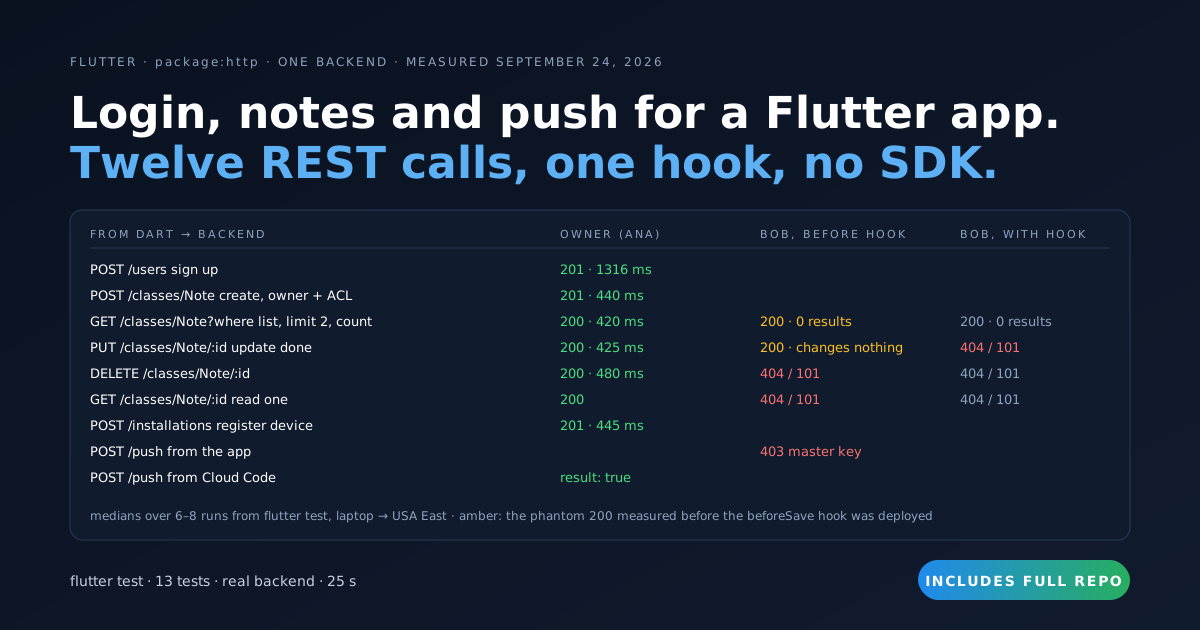
We built the data and push halves on top of the auth starter from the previous post, ran them from flutter test against a live Back4app backend on September 24, 2026, and measured every call. Twelve REST calls and one backend hook. One of the calls lies, and the hook is what makes it stop.
Get the working code: the companion repo is at github.com/templates-back4app/flutter-backend-starter — lib/notes_api.dart, lib/push_api.dart, lib/main.dart, cloud/main.js, scripts/create-note-class.sh and two tests that run the whole flow against your own backend and print the timing table you will see below.
What does a Flutter app need from a backend before it can ship?
Accounts, data that belongs to a user, and a channel back to the device. Everything else is a nice-to-have. Here is what each one requires and where it lands when the backend is managed:
| The app needs | What that requires | Who does it here |
|---|---|---|
| Sign up, log in, stay logged in | Password hashing, session tokens, revocation, reset e-mail | Backend: _User, _Session, POST /users, POST /login |
| Data the user owns | A class, an owner on every row, a rule that other users cannot read it | Backend: Note class, ACL, class-level permission, beforeSave hook |
| Lists that scale | Filters, ordering, paging, a total count | Backend: where, order, limit, skip, count=1 on GET /classes/Note |
| Push notifications | A device token store, a sender that holds the credentials | Backend: _Installation class, Parse.Push.send in Cloud Code, FCM/APNs |
| Rules the app cannot skip | Code that runs on every write, whoever sent it | Backend: Cloud Code, deployed from the dashboard |
The app’s side of all of this is one HTTP helper and three small classes. The accounts half is the previous post, How to Add Authentication to a Web or Flutter App Without Writing an Auth Server; lib/auth_api.dart here is the same four calls, unchanged in shape. This post is the other two halves.
Every call goes through one method. It adds the two headers that identify the app, the session token once there is one, and an installation id so the backend knows which device made a change:
// Stack: Flutter 3.x / Dart 3.x, package:http | File: lib/backend.dart
class Backend {
  String? sessionToken;   // in memory; persist it with flutter_secure_storage in a real app
  String? installationId; // sent as X-Parse-Installation-Id so Cloud Code knows which device made a change

  static const _headers = {
    'X-Parse-Application-Id': appId,
    'X-Parse-Client-Key': clientKey,   // a client key: identifies the app, not the user
    'X-Parse-Revocable-Session': '1',
    'Content-Type': 'application/json',
  };

  Future<Map<String, dynamic>> call(String method, String path,
      {Map<String, dynamic>? body, Map<String, String>? query}) async {
    final headers = {
      ..._headers,
      if (sessionToken != null) 'X-Parse-Session-Token': sessionToken!,
      if (installationId != null) 'X-Parse-Installation-Id': installationId!,
    };
    final uri = Uri.parse('$backendUrl$path').replace(queryParameters: query);
    final r = switch (method) {
      'GET' => await _http.get(uri, headers: headers),
      'POST' => await _http.post(uri, headers: headers, body: jsonEncode(body ?? {})),
      'PUT' => await _http.put(uri, headers: headers, body: jsonEncode(body ?? {})),
      'DELETE' => await _http.delete(uri, headers: headers),
      _ => throw ArgumentError(method),
    };
    final data = r.body.isEmpty ? <String, dynamic>{} : jsonDecode(r.body) as Map<String, dynamic>;
    if (r.statusCode >= 400) {
      throw BackendError(r.statusCode, data['code'] as int?, data['error']?.toString() ?? r.reasonPhrase ?? '');
    }
    return data;
  }
}
BackendError carries the HTTP status and the numeric code from the body. The screen branches on the code: a 209 means the token was revoked and the form comes back; a 101 means the row is not yours or not there.
How do you keep every note private to the user who wrote it?
With three settings on the backend and none in the app: the class only answers requests that carry a session token, every row carries an ACL that names its owner and nobody else, and a beforeSave hook sets that owner and that ACL from the session, whatever the client sent. The app sets them too, as a courtesy to itself; the hook is what makes them true.
The class, created locked. The lazy way to create a class is to write to it: the first POST /classes/Note creates the class, open to everyone. We did it the other way, from the terminal with the master key, before any client had a chance:
# Stack: bash + curl (schema API, master key) | File: scripts/create-note-class.sh
CLP='{"find":{"requiresAuthentication":true},"get":{"requiresAuthentication":true},"count":{"requiresAuthentication":true},
      "create":{"requiresAuthentication":true},"update":{"requiresAuthentication":true},"delete":{"requiresAuthentication":true},
      "addField":{}}'
FIELDS='{"title":{"type":"String"},"body":{"type":"String"},"done":{"type":"Boolean"},
         "owner":{"type":"Pointer","targetClass":"_User"}}'
curl -s -w "\nHTTP %{http_code}\n" -H "X-Parse-Application-Id: $APP_ID" -H "X-Parse-Master-Key: $MASTER_KEY" \
  -H "Content-Type: application/json" -X POST "$BASE/schemas/Note" \
  -d "{\"className\":\"Note\",\"fields\":$FIELDS,\"classLevelPermissions\":$CLP}"
The backend answered HTTP 200 with the schema echoed back at 13:04:16 UTC, and five anonymous list requests in the next seconds all got 404 with {"code":101,"error":"Permission denied, user needs to be authenticated."}. addField: {} means no client can add a column by sending an unknown field.
The row, owned by the app’s hand. NotesApi.create sends the owner pointer and an ACL that grants read and write to that one user:
// Stack: Flutter 3.x / Dart 3.x, package:http | File: lib/notes_api.dart
Map<String, dynamic> get _ownerPointer => {'__type': 'Pointer', 'className': '_User', 'objectId': userId};

/// POST /classes/Note — owner pointer + owner-only ACL set here AND by the hook.
Future<Note> create(String title, {String body = ''}) async {
  final r = await backend.call('POST', '/classes/Note', body: {
    'title': title,
    'body': body,
    'done': false,
    'owner': _ownerPointer,
    'ACL': {userId: {'read': true, 'write': true}},   // nobody else, not even the public, can read this row
  });
  return Note(id: r['objectId'] as String, title: title, body: body, done: false,
      createdAt: DateTime.parse(r['createdAt'] as String), updatedAt: DateTime.parse(r['createdAt'] as String));
}
The backend answers 201 {"objectId":"fTnbKHLE7C","createdAt":"2026-09-24T13:08:45.130Z"}. Reading the row back with the master key shows the ACL stored exactly as sent: "ACL":{"9MqGQbn5kM":{"read":true,"write":true}}.
The row, owned by the backend’s hand. Anything the app can set, a curl command can leave out. So the same two fields are set again in a beforeSave hook, from request.user, which the backend resolves from the session token and which the client cannot fake:
// Stack: Node.js 22.x | Parse Server 7.x | File: cloud/main.js
Parse.Cloud.beforeSave("Note", (request) => {
  const note = request.object;
  if (!request.user) throw new Parse.Error(Parse.Error.SESSION_MISSING, "log in to save a note.");
  const title = (note.get("title") ?? "").trim();
  if (!title) throw new Parse.Error(Parse.Error.VALIDATION_ERROR, "a note needs a title.");
  note.set("title", title);
  if (note.isNew()) {
    note.set("owner", request.user);                 // request.user is resolved from the session token, never from the body
    note.setACL(new Parse.ACL(request.user));        // owner: read + write; everyone else, including the public: nothing
    if (note.get("done") === undefined) note.set("done", false);
  } else if (note.dirty("owner")) {
    throw new Parse.Error(Parse.Error.OPERATION_FORBIDDEN, "a note cannot change owner.");
  }
});
We ran the tests before the deploy (13:07 UTC) and again after it (Cloud Code → main.js → Deploy; tests re-run at 14:13 UTC). With the hook live a bare POST /classes/Note {"title":"hook only"} came back 201 with "ACL", "owner" and "done": false that the client never sent.
An empty title got 400 / 142 a note needs a title. What the hook changed for another user is two sections down.
How do you read, page and filter notes from Dart?
With one GET /classes/Note and four query parameters: where (a JSON object), order, limit and skip, plus count=1 to get the total alongside the page. The Dart side builds the where from the filters the screen offers and decodes the page into a small NotePage that knows whether there is more:
// Stack: Flutter 3.x / Dart 3.x, package:http | File: lib/notes_api.dart (continued)
class NotePage {
  NotePage(this.items, this.total, this.skip);
  final List<Note> items;
  final int total;       // from count=1: total rows the query matches, not just this page
  final int skip;
  bool get hasMore => skip + items.length < total;
}

/// GET /classes/Note?where=…&order=-createdAt&limit=…&skip=…&count=1
/// [done] filters on the boolean; [titleStartsWith] is a case-insensitive prefix match.
Future<NotePage> list({int limit = 20, int skip = 0, bool? done, String? titleStartsWith}) async {
  final where = <String, dynamic>{
    'owner': _ownerPointer,                         // explicit even though the ACL already hides other users' rows
    if (done != null) 'done': done,
    if (titleStartsWith != null && titleStartsWith.isNotEmpty)
      'title': {'\$regex': '^${RegExp.escape(titleStartsWith)}', '\$options': 'i'},
  };
  final r = await backend.call('GET', '/classes/Note', query: {
    'where': jsonEncode(where),
    'order': '-createdAt',
    'limit': '$limit',
    'skip': '$skip',
    'count': '1',
  });
  final items = (r['results'] as List).cast<Map<String, dynamic>>().map(Note.fromJson).toList();
  return NotePage(items, r['count'] as int, skip);
}

/// PUT /classes/Note/:id — only the fields you pass change.
Future<DateTime> update(String id, {String? title, String? body, bool? done}) async {
  final r = await backend.call('PUT', '/classes/Note/$id', body: {
    if (title != null) 'title': title,
    if (body != null) 'body': body,
    if (done != null) 'done': done,
  });
  return DateTime.parse(r['updatedAt'] as String);
}

/// DELETE /classes/Note/:id
Future<void> delete(String id) => backend.call('DELETE', '/classes/Note/$id');
The test creates three notes, Groceries, Call the bank and Grout the bathroom, then asks for limit=2: two items back, count: 3, hasMore true. skip=2 returns the third and hasMore false. A where with title: {$regex: "^gr", $options: "i"} returns the two that start with gr. After update(done: true) on the first, where: {done: true} returns exactly that one.
The owner condition in where is redundant with the ACL: the backend already drops rows the session may not read. It stays there for the day a note gets a sharedWith list and the query has to say whose notes it means.
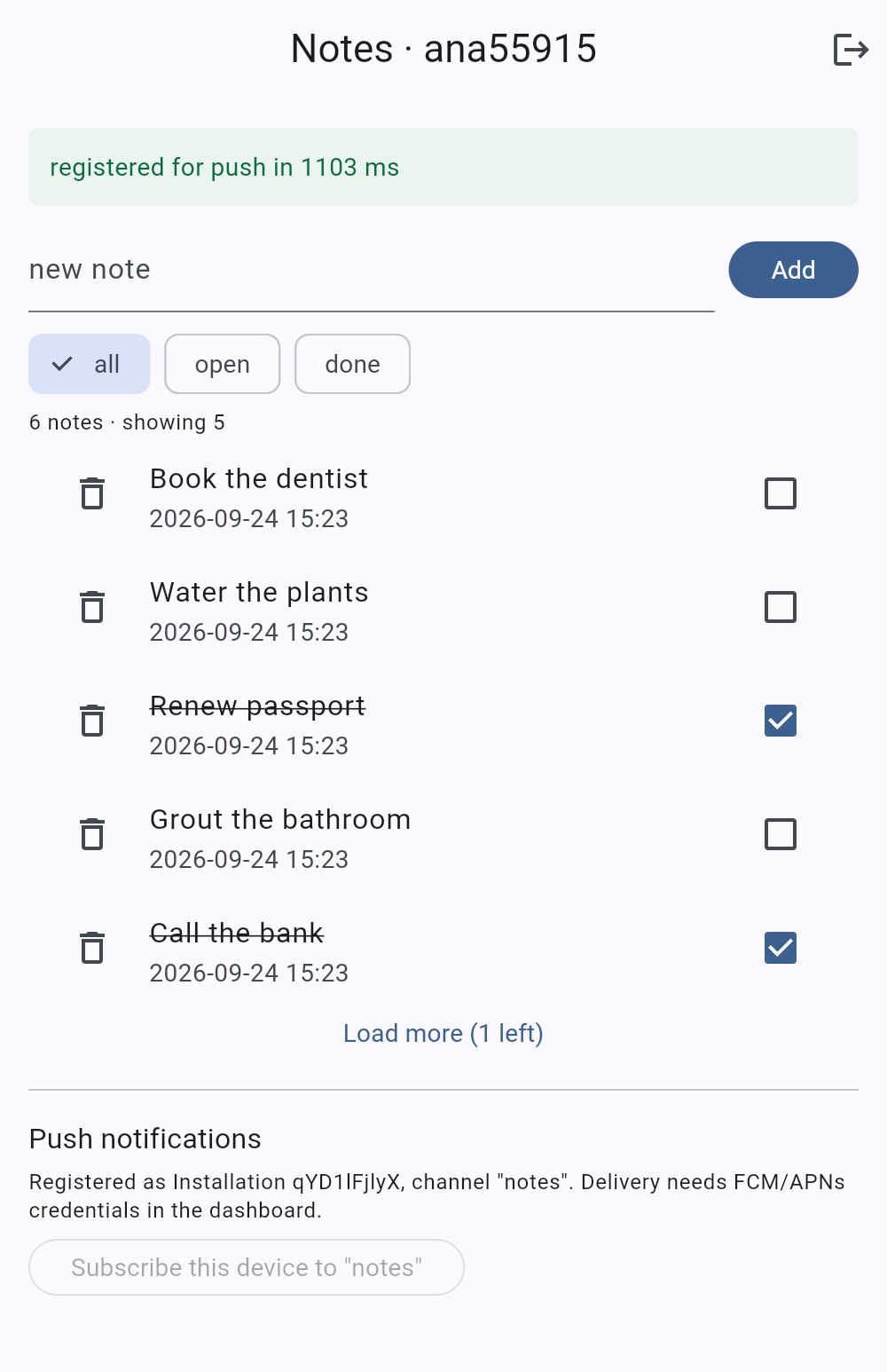
The screen is the plain version of all this: a text field and Add, three filter chips, a checkbox per note, Load more while hasMore is true, and a delete icon. Every tap is one call and a reload of the current page, and the status bar times the pair.
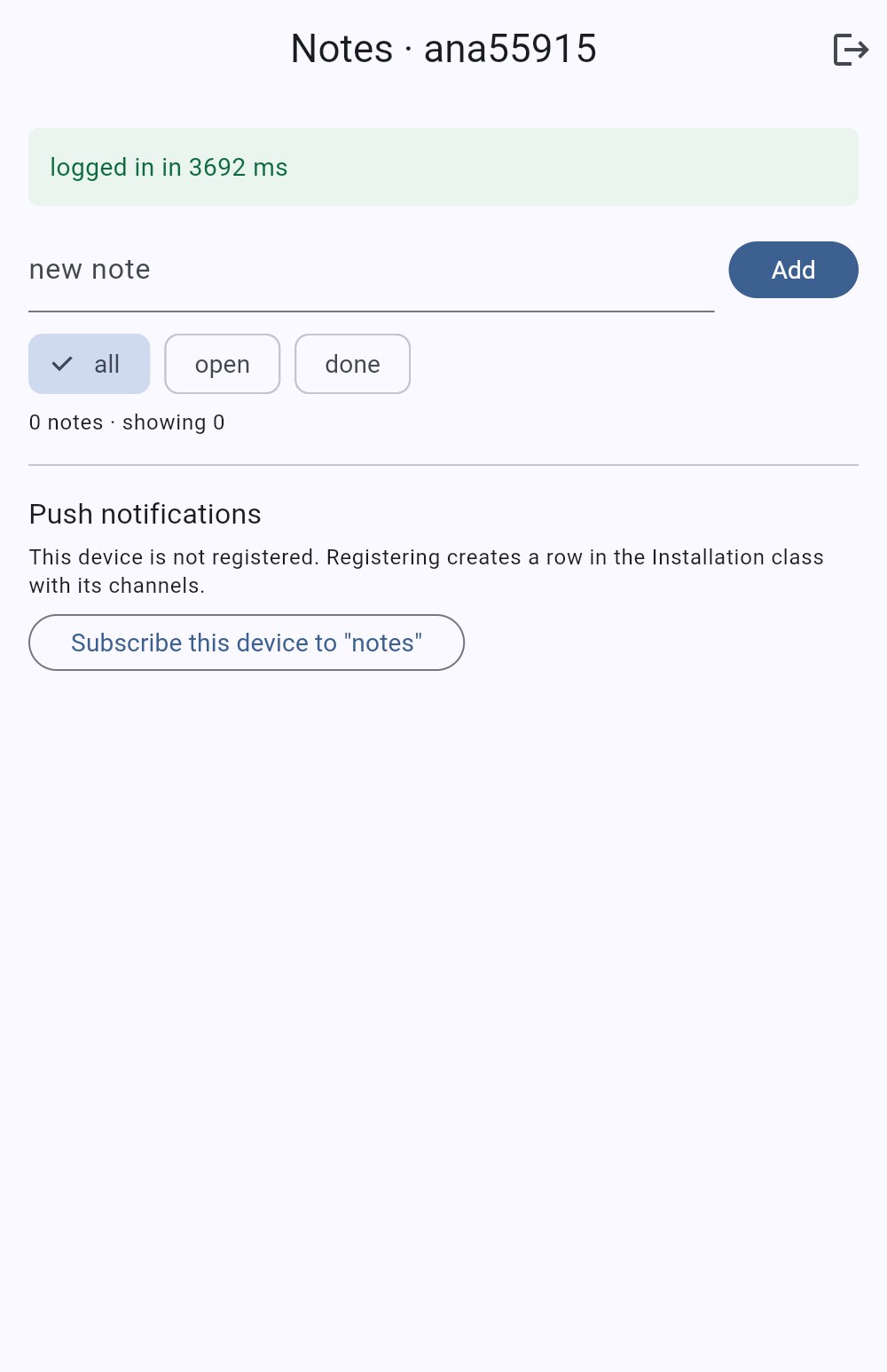
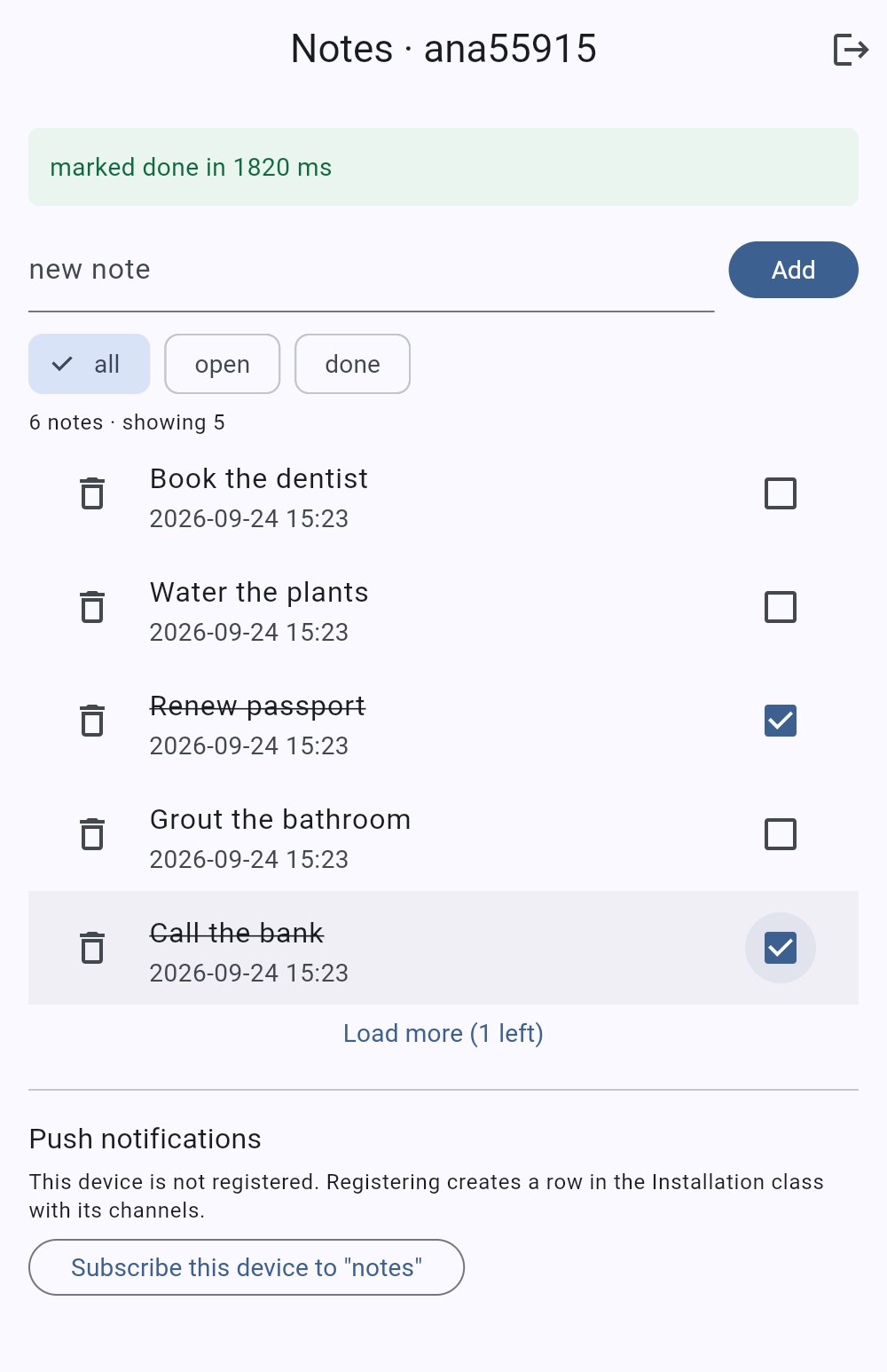
We drove the web build in a headless browser: six notes added one by one, two ticked done. The list shows five and Load more (1 left), because pageSize is 5 and count came back 6. The ticked rows are struck through; the status bar reads marked done in 1820 ms, which is the PUT plus the reload of the page.
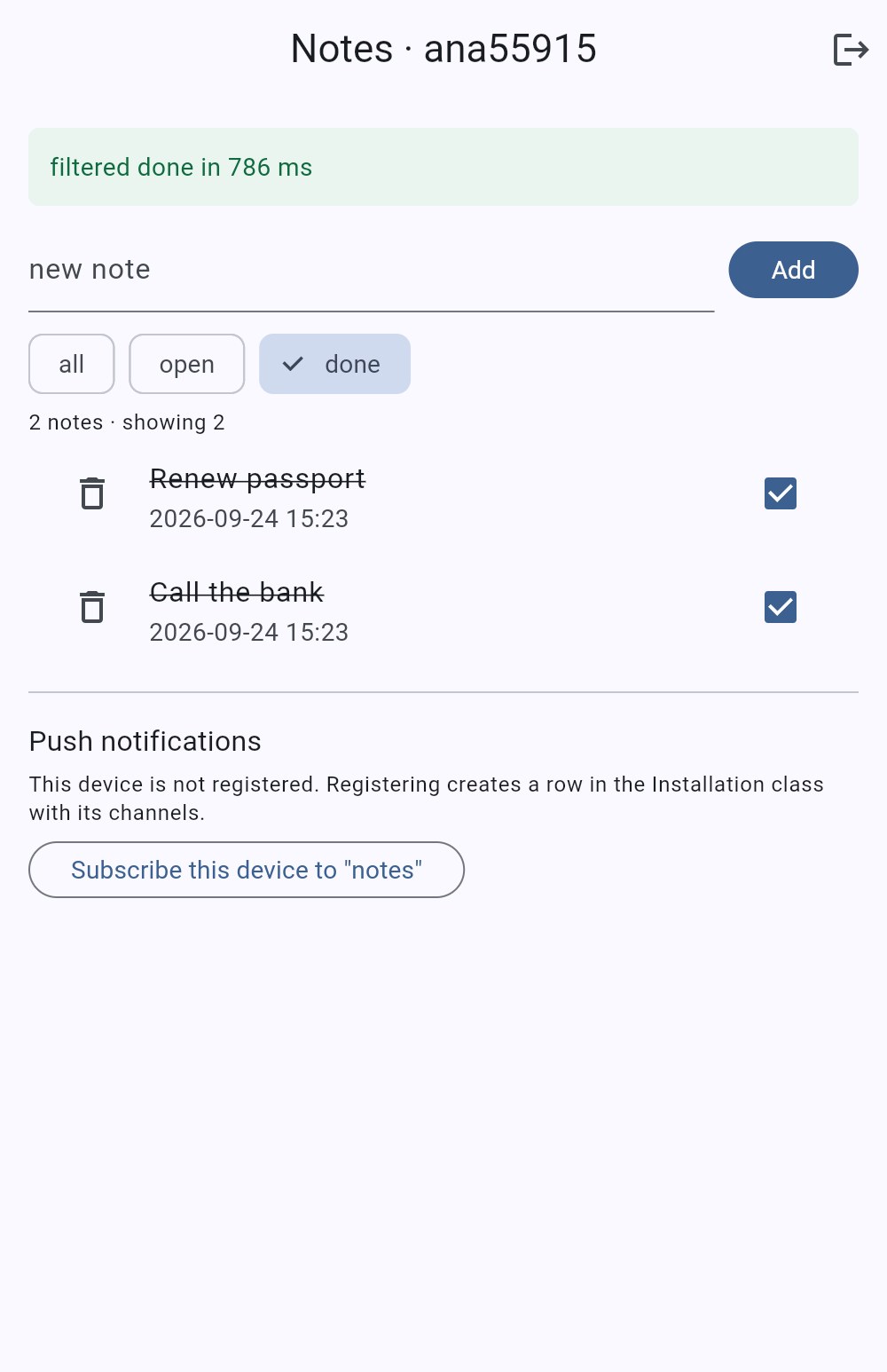
The done chip sends where: {"owner": …, "done": true} and gets the two ticked notes back with count: 2, in 786 ms from the browser for the single list call.
How fast are the calls from a Flutter test against the live backend?
About 440 ms for a create, 420 ms for a paged list, 425 ms for an update and 480 ms for a delete, as medians, from a laptop to the USA East backend on September 24, 2026, with the beforeSave and afterSave hooks deployed. Before the hooks the same calls read 410, 423, 406 and 407 ms. The signup that starts the test took 1316 ms on the cold connection.
How we measured: a Stopwatch around each Backend.call inside test/notes_api_test.dart, started before http.post and stopped when the decoded body was returned, free plan, one signup, three creates in the flow plus five timing rounds of create, list, update and delete, run four times on September 24, 2026; the table is the last run, at 14:13 UTC with the hooks live.
| Call | Runs | Min | Median | Max |
|---|---|---|---|---|
POST /users (signup) | 1 | 1316 ms | 1316 ms | 1316 ms |
POST /classes/Note (create, hook + afterSave push) | 8 | 404 ms | 440 ms | 476 ms |
GET /classes/Note (list, limit 2, count=1) | 6 | 400 ms | 420 ms | 422 ms |
PUT /classes/Note/:id (update) | 6 | 409 ms | 425 ms | 447 ms |
DELETE /classes/Note/:id | 6 | 409 ms | 480 ms | 1048 ms |
POST /installations (register device) | 1 | 445 ms | 445 ms | 445 ms |
The three runs before the hooks put create, list and update at 410 to 428, 423 to 425 and 406 to 447 ms. The hooks cost the create about 30 ms at the median, which is the beforeSave plus an afterSave that queues a push; one delete in the last run took 1048 ms, the only outlier of the day.
Same code from the browser: signed up in 3684 ms for the first request of a fresh page load (TLS handshake, a _User insert and a session), then 786 ms for a filtered list and 1103 ms for the push registration.
Twelve calls, one HTTP helper, and every one of them lands in the same 400 ms band. The backend is not where a Flutter app’s latency budget goes.
The test’s last block is the table itself, printed by flutter test. Run it against your own backend and you get your own numbers; the code and the assertions are the same.
00:11 +6: latency: create / list / update / delete over 5 more runs
| Call | Runs | Min | Median | Max |
| POST /classes/Note (create) | 8 | 404 ms | 440 ms | 476 ms |
| GET /classes/Note (list, limit 2) | 6 | 400 ms | 420 ms | 422 ms |
| PUT /classes/Note (update) | 6 | 409 ms | 425 ms | 447 ms |
| DELETE /classes/Note | 6 | 409 ms | 480 ms | 1048 ms |
00:23 +13: All tests passed!
What does another user see when they ask for your note?
A 404 with code 101, Object not found, for a read, an update and a delete: the same answer a made-up id gets. A list scoped to their own session returns count: 0. That is the state with the hook deployed. Before it, the update answered 200 with a fresh updatedAt and changed nothing at all, and that phantom is the finding of this post.
The test signs up a second user, bob, and points him at ana’s note by its real object id. We ran it before and after the deploy, on the same backend, the same day:
| bob → ana’s note | Before the hook (13:07 UTC, 2026-09-24) | With the hook (14:13 UTC, 2026-09-24) |
|---|---|---|
GET /classes/Note/:id | 404 / 101 Object not found. | 404 / 101 Object not found. |
GET /classes/Note?where={owner: ana} | 200, count: 0 | 200, count: 0 |
DELETE /classes/Note/:id | 404 / 101 Object not found. | 404 / 101 Object not found. |
PUT /classes/Note/:id {"title":"hacked"} | 200 {"updatedAt":"…13:08:48.601Z"}, row unchanged | 404 / 101 Object not found. |
PUT /classes/Note/xxxxxxxxxx (made-up id) | 200 {"updatedAt":"…"} | 404 / 101 Object not found. |
ana, PUT on her own note | 200, row changed | 200, row changed |
We read the row with the master key after bob’s PUT: title still ana’s note, updatedAt still the creation time, ACL untouched. Nothing happened, and the app was told something did. The ACL did its job as a filter; the update matched zero rows and the backend reported the empty match as success.
Why the hook changes the answer: to give a beforeSave trigger the original object, the backend fetches the row first, through the caller’s permissions. For bob the fetch finds nothing, and the request stops with 101 before any write. Without a trigger there is no fetch, just an update with an ACL-filtered query, and an update that touches nothing is not an error.
Before our own deploy we checked the hypothesis on the backend from the previous post, where the same hook has been live since September 17: logged in as its ana and bob, bob’s PUT got 404 / 101 there at 13:12 UTC.
An hour later, with the hook on this backend, the test’s assertion flipped from expect a DateTime to expect 404 / 101 and the suite went green again. If that line ever fails with a DateTime, the hook is not deployed.
How do push notifications reach a Flutter app, and what did we set up?
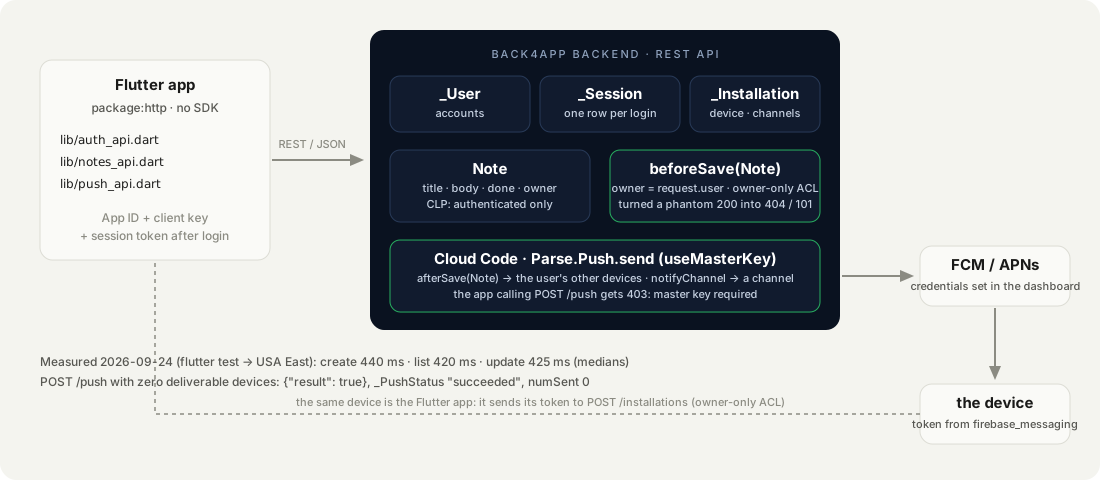
In three hops: the app gets a device token from FCM (Android) or APNs (iOS) and stores it in the backend’s Installation class; Cloud Code, holding the master key, tells the backend to send; the backend hands the message and the tokens to FCM or APNs, which deliver to the device. The app never sends a push and never holds the push credentials.
What we ran on September 24, 2026: the registration call from Dart against the live backend, the outsider probes on the row it created, and POST /push with the master key from the terminal.
What we did not run: FCM credentials in the dashboard, a real device, an actual delivery. Those are the standard setup, listed for the editor at the end of this section. No delivery time in this post was observed.
Registration. One POST /installations with an installation id your app generates once, the device type, the token, the channels, a pointer to the user, and, as of this run, an ACL:
// Stack: Flutter 3.x / Dart 3.x, package:http | File: lib/push_api.dart
Future<Map<String, dynamic>> register({
  required String installationId,
  required String deviceType,        // 'android' | 'ios' | 'web'
  String? deviceToken,
  List<String> channels = const [],
  String? userId,
}) =>
    backend.call('POST', '/installations', body: {
      'installationId': installationId,
      'deviceType': deviceType,
      if (deviceToken != null) 'deviceToken': deviceToken,
      'channels': channels,
      if (userId != null) 'user': {'__type': 'Pointer', 'className': '_User', 'objectId': userId},
      // Measured 2026-09-24: without an ACL, anyone holding the row's objectId can GET it (token included) and
      // PUT its channels with the client key. With this ACL an outsider gets 404 / 101 and a phantom 200 that changes nothing.
      if (userId != null) 'ACL': {userId: {'read': true, 'write': true}},
    });
The backend answered 201 {objectId: rOAjx1e8Vk, createdAt: 2026-09-24T13:12:36.603Z} in 484 ms for a synthetic Android token on channel notes. PUT /installations/:id {"channels":["notes","digest"]} returned 200 {updatedAt: …}, and GET /installations/:id from the same session returned the full row: installationId, deviceType, deviceToken, channels, user, ACL.
The screen’s Subscribe this device to “notes” button makes the same call with deviceType: 'web' and no token, which is all a browser can offer without a messaging library. It registered in 1103 ms, and the master key confirms the row: qYD1lFjlyX, deviceType: web, channels: ["notes"], the user pointer and the owner-only ACL.
The ACL is not optional. Our first registration had none, and the _Installation class’s default permissions let any request read and update a row by object id. An anonymous GET /installations/w648kNfuoh with the client key returned the whole row including the token; another user’s PUT set its channels to ["hijacked"] and the master key confirmed it stuck.
Only find was refused (400 / 119). With the ACL, an anonymous or other-user GET is 404 / 101 and the PUT becomes the same phantom 200 as on notes: nothing changes.
Sending. Sending is a master-key operation and lives in Cloud Code. Two shapes: a push to the user’s other devices when a note is created, and a push to a channel that a logged-in user can trigger:
// Stack: Node.js 22.x | Parse Server 7.x | File: cloud/main.js (continued)
Parse.Cloud.afterSave("Note", async (request) => {
  const note = request.object;
  if (!request.user || note.existed()) return;              // only on create: existed() is true for an update
  const others = new Parse.Query(Parse.Installation)
    .equalTo("user", request.user)
    .notEqualTo("installationId", request.installationId);   // the device that made the note already knows
  await Parse.Push.send(
    { where: others, data: { title: "New note", alert: note.get("title"), noteId: note.id } },
    { useMasterKey: true }
  );
});

Parse.Cloud.define("notifyChannel", async (request) => {
  if (!request.user) throw new Parse.Error(Parse.Error.INVALID_SESSION_TOKEN, "log in first.");
  const { channel, message } = request.params;
  if (!/^[a-zA-Z][a-zA-Z0-9_-]{0,40}$/.test(channel ?? "")) throw new Parse.Error(Parse.Error.VALIDATION_ERROR, "bad channel name.");
  const text = String(message ?? "").slice(0, 140);
  if (!text) throw new Parse.Error(Parse.Error.VALIDATION_ERROR, "message is empty.");
  await Parse.Push.send({ channels: [channel], data: { title: `#${channel}`, alert: text } }, { useMasterKey: true });
  return { channel, sent: true };   // "sent" means accepted by the backend; delivery is FCM/APNs' job and shows in _PushStatus
});
request.installationId is the X-Parse-Installation-Id header the app sends; that is why Backend has the field. Both functions are deployed; every create in the 14:13 UTC test run went through the afterSave, which is the roughly 30 ms it added to the create median.
_PushStatus now holds one row per note created, {"title":"New note","alert":"timing 4",…} aimed at that user’s installations, succeeded, numSent: 0. The pipeline runs up to the point where a real device token is needed. The app calling POST /push itself gets HTTP 403 with {"error":"unauthorized: master key is required"}, measured from the test; no numeric code, just the status.
What the backend says before FCM is configured. We sent POST /push to channel notes with the master key from the terminal, twice: once with no installations at all, once with the synthetic Android device subscribed. Both times the answer was 200 {"result":true}.
The _PushStatus row a few seconds later read status: "succeeded", numSent: 0, numFailed: null. Succeeded means the backend accepted the job. Nothing was delivered, and nothing said so.
What still needs the dashboard: the FCM service-account credentials under the app’s push settings, firebase_messaging in the app with its token passed to register, a test push to channel notes from the push console or through notifyChannel, and the delivery time from the push log to the notification on the device.
Which errors did the Flutter build and the backend throw, and what fixed them?
Seven, from the tests, the browser and the terminal, on September 24, 2026. Two of them return 200.
RangeError: max must be in range 0 < max ≤ 2^32, was 0 in the browser console, grey screen, before the first frame. The screen generated an installation id with Random().nextInt(1 << 32); on the web target dart2js uses JavaScript’s 32-bit shift, so 1 << 32 is 0. flutter analyze and flutter test on the host, where integers are 64-bit, are silent about it. Fix: a bound below 2^31, nextInt(1 << 30).
400 / 135 at least one ID field (deviceToken, installationId) must be specified in this operation on POST /installations with only a deviceType. The backend needs something to identify the device before it has a token; generate a UUID once per install and keep it.
403 {"error":"unauthorized: master key is required"} on POST /push from the app. No Parse code in the body. Sending is Cloud Code’s job; the app calls a function or saves a row and lets a trigger send.
400 / 119 Clients aren't allowed to perform the find operation on the installation collection. on GET /installations with the client key. Listing devices is master-key only; reading one by id is not, unless the row has an ACL. Give it one.
404 / 101 Permission denied, user needs to be authenticated. on any Note request without a session token, seconds after the class was created with requiresAuthentication. Correct, and immediate on a new class. The same code with the message Object not found. is what a logged-in user gets for a row that is not theirs.
200 {"updatedAt":"…"} on PUT /classes/Note/:id for a note the session may not write, and for an id that does not exist, on the class before its beforeSave hook was deployed. Not an error, and that is the problem. After the deploy the same call is 404 / 101; until a hook is live on a class, read after write.
400 / 142 a note needs a title. on POST /classes/Note {"title":" "} once the hook is live. The rule runs on the backend for every client; the screen shows the message as it is.
And one that returned nothing at all: a stale main.dart.js. After the RangeError fix, flutter build web succeeded and the browser ran the old bundle from the service worker cache, error and all. Reload with the cache disabled, or bump the version, before believing a web build did not change.
When does a Flutter app need a full SDK or offline-first storage instead?
When the app has to work without a network, or when the data model is too relational for rows with an owner. Both are real, and package:http against a REST API does not solve either.
- Offline-first. If notes must be editable on a plane and merge later, the store of record is on the device, with a sync engine that handles conflicts; a local database with a sync layer is the right category, and the backend becomes the sync target rather than the source of every list. This post’s app shows a spinner while the network is away and nothing else.
- Live queries and object caching. An SDK gives you a live subscription to a query, local object caching and pinning, and typed models. If your screen must update the moment another device writes, a WebSocket subscription is what you want, and the SDK does it in a few lines; over REST you poll.
- Heavy relations. Many-to-many joins across several classes with per-row rules that depend on the join are better behind Cloud Functions that run with the master key and return a shaped result;
lockdown-lab’smoderatorListis that pattern. - Files and media. Uploading photos is a separate endpoint (
POST /files/:name) and, on a phone, a background job; not covered here.
For accounts, a user’s own rows, paging and a push registration, the twelve calls in this post are the whole client, and the part you own is the 30-line hook.
What would you build on the Flutter notes app next?
- Keep the hook guarded. The test’s
bobupdate expects404 / 101; on a backend wherecloud/main.jsis not deployed it fails with aDateTimeinstead, on purpose. Run it in CI against staging and you will know when someone redeploys without the hook. - A real token. Add
firebase_messaging, passFirebaseMessaging.instance.getToken()asdeviceTokenwithdeviceType: 'android'or'ios', and callregisterafter login. Then send to channelnotesand readnumSent. - A persisted session and installation id. Both live in memory here; on a phone they go in the keychain with
flutter_secure_storage, andme()runs on app start so a revoked token is caught before the first screen. - Shared notes. A
sharedWitharray on the row, an extra ACL entry per user in the hook, and awherethat uses$oronownerandsharedWith. Theownercondition that looked redundant above is where that starts. - Lock the other classes the same way.
_Installationneeded an ACL;_Userby default lets a logged-in user read other users. The full set of locks, with the probe that proves each one, is Your Frontend Talks Straight to the Database. Here Is How to Lock It Down.