A Gantt chart is very good at showing you the plan and very bad at answering questions about it. The bars are the point, and the bars are also why you end up tracing dependencies with a finger on a screen.
The question you actually have on a Monday is narrower: what slipped, and what is now stuck behind it. A spreadsheet can show you the first with conditional formatting. The second it makes you work out by eye.
This guide moves a twelve-row activity schedule into a database and asks it both. The import took 502 ms; the four queries a tracker needs came back in under half a second each.
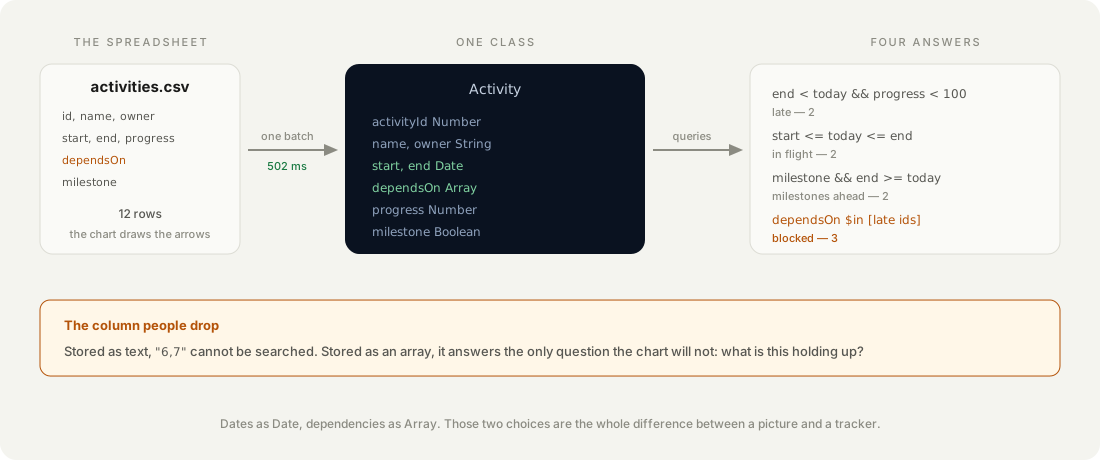
What does a schedule look like once it is rows?
Eight columns, and only two of them are interesting. A Gantt row is an activity with a start, an end and a percentage; what makes it a schedule rather than a list is the column that says what it waits for.
id  name                   owner           start       end         progress  dependsOn  milestone
5   Import pipeline        Tomas Vidal     2026-09-22  2026-10-03  80                4  false
6   Permissions and roles  Nadia Okonkwo   2026-09-28  2026-10-07  45                4  false
9   Beta with two teams    Nadia Okonkwo   2026-10-12  2026-10-24   0              6,7  true
dependsOn is the column people leave out when they move a spreadsheet into a tool, because the chart draws the arrows for them. Lose it and you keep the picture and throw away the only thing that answers “so what?”.
Which column types actually matter?
Two: the dates must be dates, and the dependencies must be an array. Everything else can be whatever is convenient.
// Stack: Node 22 | File: import-and-query.mjs
{
  activityId: { type: 'Number' },
  name:       { type: 'String' },
  owner:      { type: 'String' },
  start:      { type: 'Date' },      // not String
  end:        { type: 'Date' },      // not String
  progress:   { type: 'Number' },
  dependsOn:  { type: 'Array' },     // not a comma-separated String
  milestone:  { type: 'Boolean' },
}
Dates as text look fine until you compare them. 2026-10-9 and 2026-10-09 are different strings, sort differently, and neither one compares correctly against a real date — so “what is late” silently returns the wrong rows rather than failing.
Dependencies as text have the same shape of problem. "6,7" cannot be searched for membership; as an array it can, and that is the whole second half of this post.
How we measured: the class was created with one POST /schemas/Activity and returned HTTP 200 in 3.1 seconds, reporting back the eight fields plus the four Parse adds.
How do you get twelve rows in at once?
One batch request, not twelve round trips. The batch endpoint takes a list of operations and runs them server-side:
await fetch(`${PARSE}/batch`, {
  method: 'POST', headers: asServer,
  body: JSON.stringify({
    requests: rows.map((body) => ({ method: 'POST', path: '/classes/Activity', body })),
  }),
});
That imported all twelve in 502 ms. Twelve separate requests from the same machine would have cost twelve round trips; this costs one.
How we measured: one POST /batch carrying twelve create operations, timed around the single call, returning twelve success objects.
What is late, and what does that block?
Two queries, and the second is the one a spreadsheet cannot do for you. Late is a straightforward intersection — the end date has passed and the work is not finished:
{ "end": { "$lt": { "__type": "Date", "iso": "2026-10-09T00:00:00.000Z" } },
  "progress": { "$lt": 100 } }
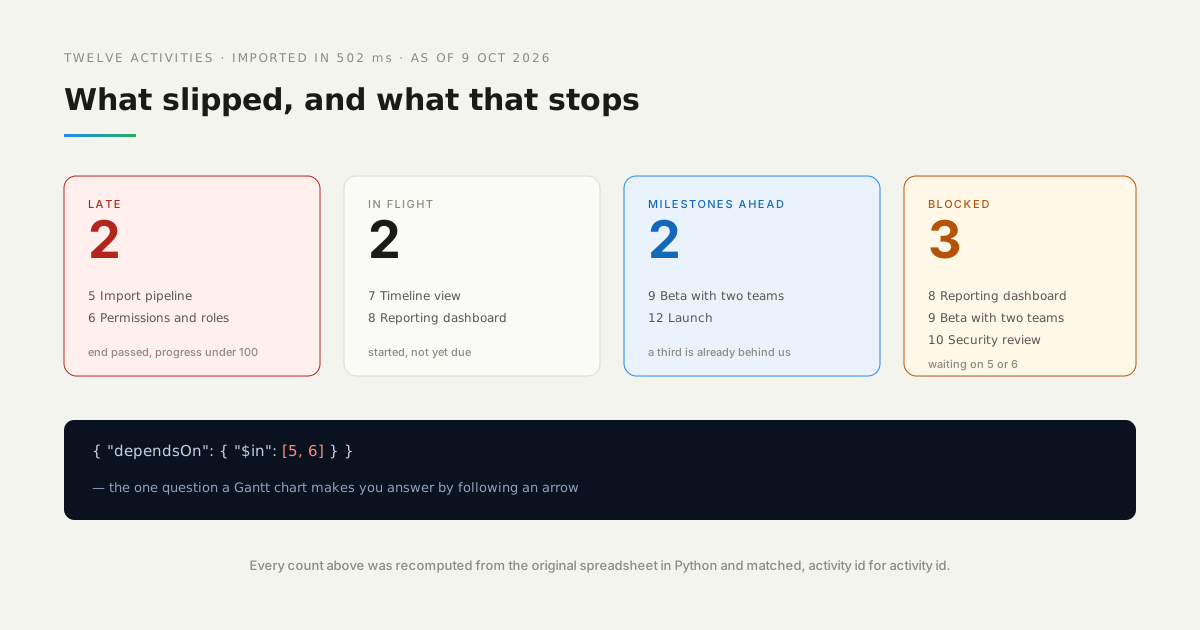
As of 9 October that returned two activities: the import pipeline at 80% and permissions at 45%. Four other activities had end dates in the past and were correctly left out, because they were finished.
Then the question the chart makes you trace by hand. Take the ids of the late activities and ask which rows depend on any of them:
{ "dependsOn": { "$in": [5, 6] } }Three activities came back — the reporting dashboard, the beta and the security review. Two slipped tasks are holding up three more, and nobody had to follow an arrow to find out.
The chart shows you the dependency. The array lets you ask it a question.
What else does a tracker need to answer?
Two more queries, both one line, and together with the first two they cover the Monday meeting:
| Question | The query | As of 9 Oct |
|---|---|---|
| What is late? | end < today and progress < 100 | 2 — 466 ms |
| What is running now? | start <= today <= end | 2 — 278 ms |
| Which milestones are left? | milestone = true and end >= today | 2 — 168 ms |
| What is blocked? | dependsOn $in [late ids] | 3 — 170 ms |
How we measured: each query timed individually against the imported class, warm, from a laptop to the USA East region. The first is slower because it is the first — the connection is cold.
Are those answers right?
They are, and that is worth checking rather than assuming. The same four questions were recomputed from the original CSV in Python, with no database involved:
                  from the database      from the spreadsheet
late              2  [5, 6]              2  [5, 6]
in flight         2  [7, 8]              2  [7, 8]
milestones ahead  2  [9, 12]             2  [9, 12]
blocked           3  [8, 9, 10]          3  [8, 9, 10]
Identical, including the exact activity ids. The interesting row is the third: an architecture sign-off milestone on 16 September is correctly absent from both, because it is behind us — a query that counted all milestones would have said three, and been useless.
How we measured: verify.py in the companion repository reads activities.csv and applies the same four rules in plain Python; the database numbers come from the run above.
Which errors will you hit importing a schedule?
Three, and the first one is the one that costs an afternoon.
| What you see | What it means |
|---|---|
{"code":107,"error":"cannot route POST /parse/classes/Activity"} | the batch path carries a /parse prefix it should not |
Dates import, but $lt returns everything or nothing | the column is a String; recreate it as Date and re-import |
dependsOn queries return nothing with $in | the column is a String like "6,7", not an array |
None of the three is a validation error, which is what makes them slow to find: the import succeeds, the data looks right in the browser, and only the queries behave oddly. If a date comparison returns a number you cannot explain, check the column type before you check the query.
When is a spreadsheet still the better tool?
While the plan is still changing shape. Dragging a bar is faster than a migration, and a schedule that is being argued over does not benefit from a schema — the looseness is the feature.
It is also fine to stay in the sheet when nobody else reads it. The case for moving is multiple people asking different questions of the same plan at once; for one person with one view, the chart is already the answer.
And if what you need is the picture rather than the questions, keep the chart. Nothing here draws a Gantt — it answers queries about one. A tracker that cannot show the bars will lose to a spreadsheet that can, however good its data model is.
What would you add to the schedule tracker next?
A baseline pair of dates beside the live ones. Every row here has one start and one end, which means the schedule can slip without leaving a trace of what it was promised to be — and “are we late?” is a different question from “did this ever have a chance?”.
After that, the dependency chain rather than one hop. The blocked query finds what waits directly on a late task; it does not follow the chain to the launch date three steps downstream. That is a Cloud Code function walking dependsOn recursively, and it is the point where the tracker starts telling you something the spreadsheet never could.