Someone opens the app and taps the button. Before a map appears, before a price shows up, the system has to answer one question: of all the drivers out there, which one is closest to this person right now?
You do not have to work that out yourself. Store each location in the right kind of field and the database will sort everyone by distance for you, nearest first. What is new is that you no longer have to set it up by hand either — an AI assistant connected to your account can create the tables, fill them and ask the question.
This guide does exactly that, then does the part most write-ups skip: it checks the answer by working the distances out separately and comparing. Measured on 23 September 2026 — three tables in 516 ms, 15 records in 729 ms.
Watch it instead
The original walkthrough builds the same three classes and asks the same nearest-driver question, entirely in conversation.

What does the model need to look like?
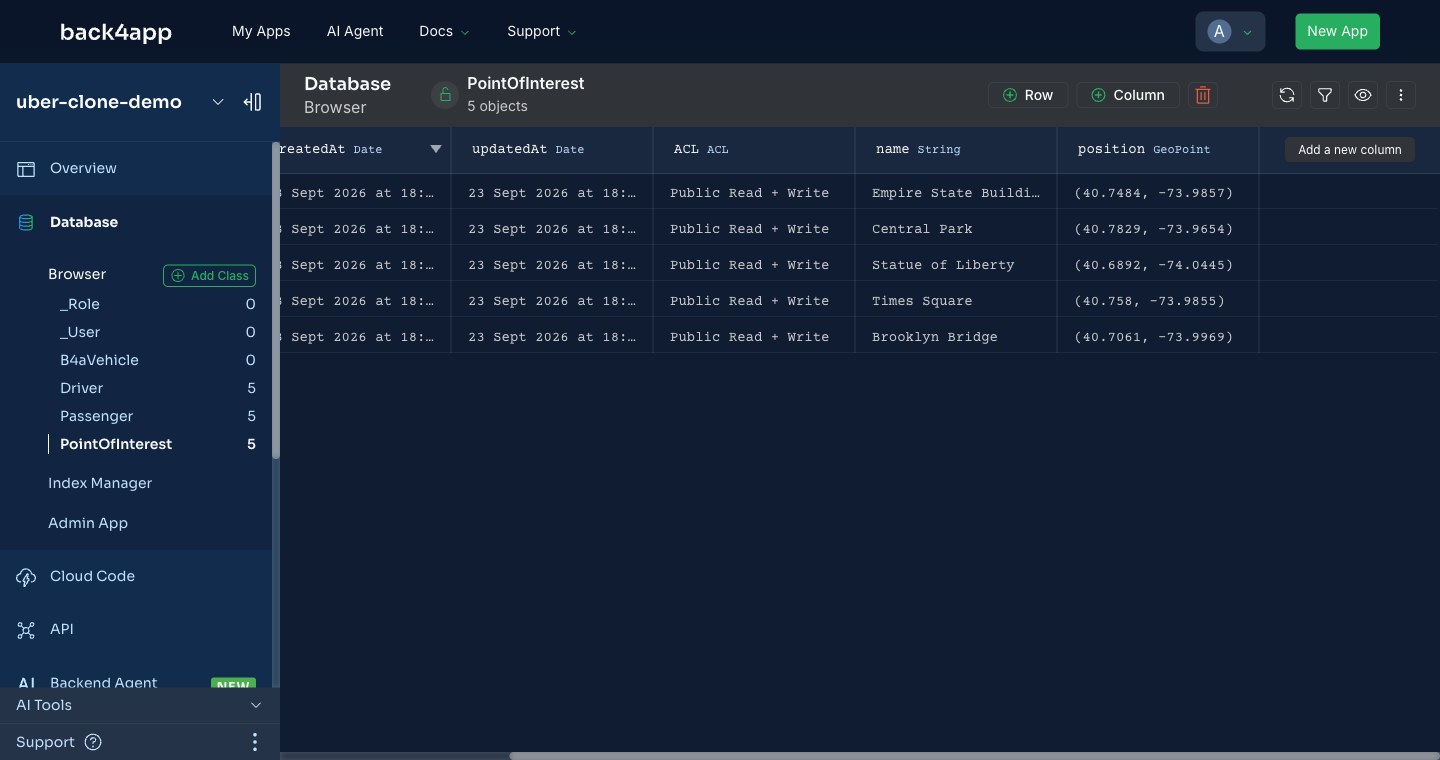
Three classes and one field type. Drivers, passengers and points of interest each need a name and a position, and the position has to be a GeoPoint rather than a pair of numbers.
That choice is the whole guide in one decision. A GeoPoint stores latitude and longitude as a single value, and it is the only thing Parse’s geospatial operators will read. Store the two numbers separately and the data is still there, but $nearSphere and its relatives stop being available to you.
| Class | Fields |
|---|---|
Driver | name (String), position (GeoPoint) |
Passenger | name (String), position (GeoPoint) |
PointOfInterest | name (String), position (GeoPoint) |
How do you connect the AI client?
Through an MCP server, which exposes your Back4app account to the assistant as a set of tools. Create an account key under Account Settings → Account Keys, then point your editor at the server — the package is fetched on demand.
{
  "mcpServers": {
    "back4app": {
      "command": "npx",
      "args": ["-y", "@back4app/mcp-server-back4app@latest",
               "--account-key", "YOUR_ACCOUNT_KEY"]
    }
  }
}
Two of its tools carry this guide: create_parse_app makes the app, and call_parse_server_rest_api does everything else — defining schemas, inserting records and running queries, in batches.
How do you build the classes and the data?
Describe them. The app was created first, then the three schemas, then the records — each step an instruction rather than a file.
Create an app called uber-clone-demo. In it, create Driver, Passenger and PointOfInterest classes, each with a name string and a position GeoPoint. Then add five of each, using real New York coordinates for the points of interest.
Creating the app took 3.4 seconds. The three schemas came back together in 516 ms, each reporting the fields it had defined. The 15 records went in as one batch in 729 ms, all fifteen returning HTTP 201.
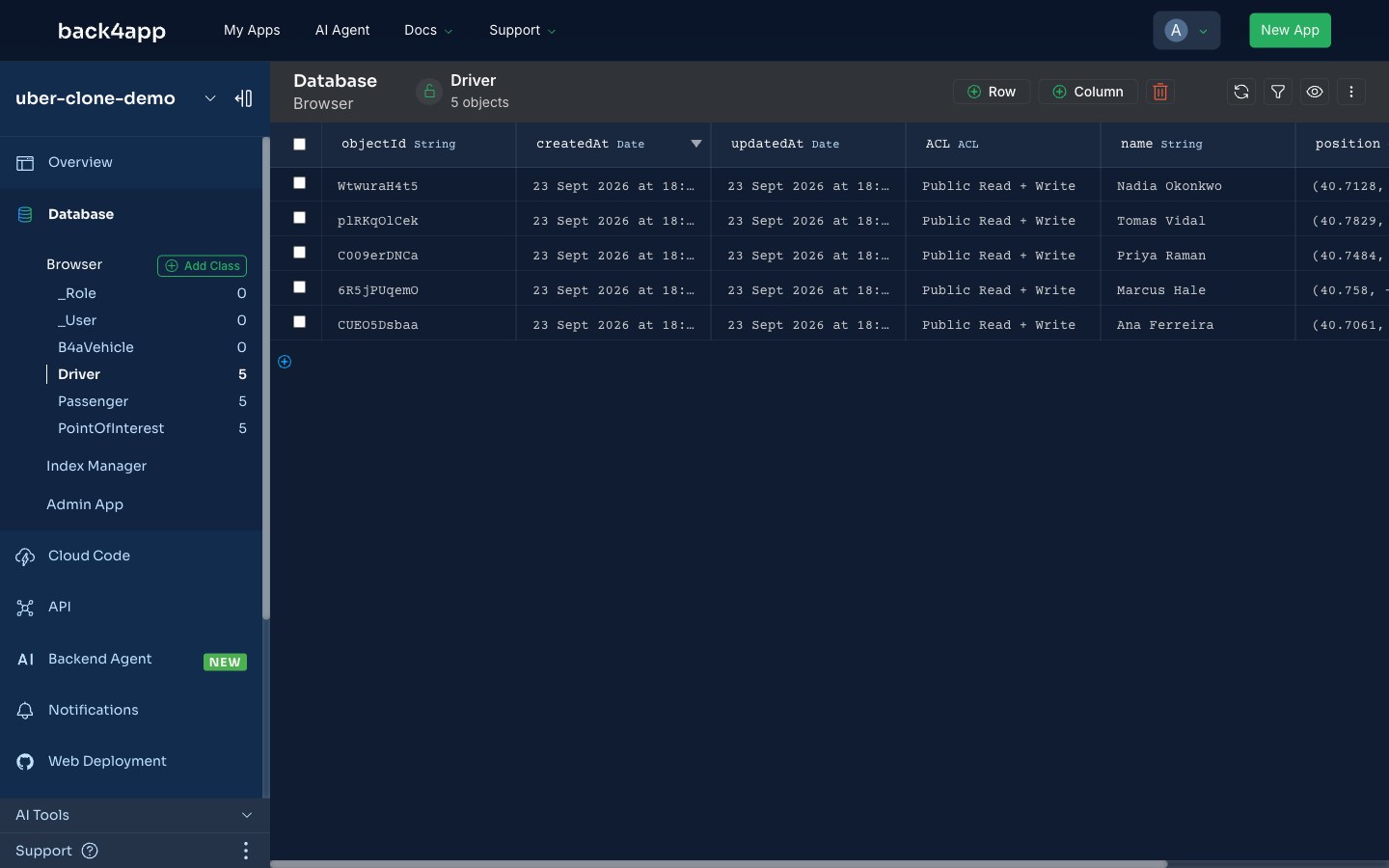
For the landmarks, real coordinates matter — the distances later are only meaningful if the Statue of Liberty is where the Statue of Liberty is.
How do you find the nearest driver?
With $nearSphere, which sorts by distance for you. Read the passenger’s position, then query Driver with that point — Parse returns the rows already ordered nearest-first, so there is no sorting step and no distance maths in your code.
{
  "position": {
    "$nearSphere": {
      "__type": "GeoPoint",
      "latitude": 40.7291,
      "longitude": -73.9965
    }
  }
}
For the passenger standing at 40.7291, −73.9965, that returned Nadia Okonkwo, then Priya Raman, then Ana Ferreira. The ordering is not obvious by eye: Ana Ferreira is almost identical in longitude to the passenger, which makes her look like the closest until you account for latitude.
Is the database’s answer actually right?
Do not take its word for it. The ordering was recomputed from the same coordinates with a plain haversine formula, outside the database, and compared.
1. Nadia Okonkwo    1.231 mi   (1.981 km)
2. Priya Raman      1.448 mi   (2.331 km)
3. Ana Ferreira     1.589 mi   (2.558 km)
4. Marcus Hale      2.078 mi   (3.344 km)
5. Tomas Vidal      4.058 mi   (6.531 km)
Same order, including the non-obvious swap. But matching the order is a weak test — a sort can be right while the distances are wrong. So the magnitudes were tested too, by adding $maxDistanceInMiles and walking the radius across the computed gaps.
| Radius asked for | Drivers returned | Expected from the table |
|---|---|---|
| 1.2 mi | 0 | nearest is 1.231 — none should qualify |
| 1.3 mi | 1 | Nadia only |
| 1.5 mi | 2 | Nadia, Priya |
| 1.6 mi | 3 | + Ana |
| 2.1 mi | 4 | + Marcus |
Every boundary fell exactly where the independent calculation said it would. Parse is not approximating here, and the numbers are safe to price a trip with.
How do you price the ride?
Ask for the distance between two stored points and multiply. With the positions already in the database, the fare is one query and one multiplication.
The trip from that passenger to the Statue of Liberty measures 3.731 miles, so at a dollar a mile it prices at $3.73. That is straight-line distance, which is the right number for a demo and the wrong number for a real fare — road distance is longer, and any production pricing needs a routing service rather than a great-circle formula.
The database will happily tell you how far apart two points are. It will not tell you that nobody can drive across the Hudson in a straight line.
What has to change before this is real?
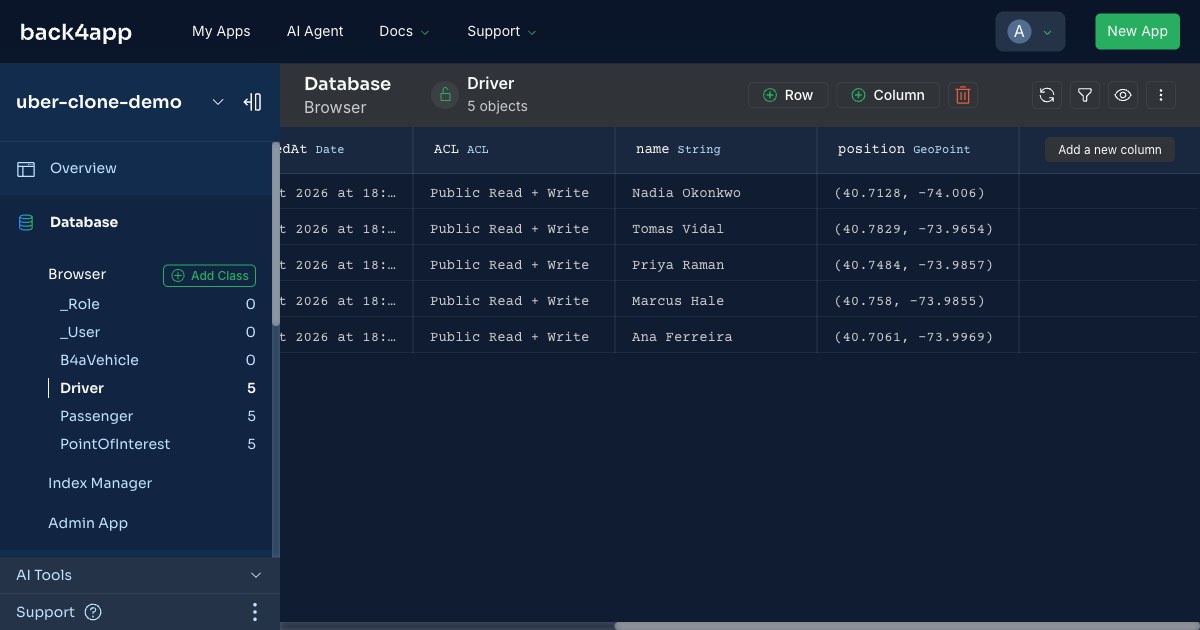
The permissions, first. Open the Database browser and every record created in this run shows an ACL of Public Read + Write — anyone with the client key can read or overwrite any of it. That is the Parse default rather than anything the AI client decided, and on a class holding people’s live positions it is exactly the wrong default.
Driver positions also need to move. Everything here is a static snapshot; a working system updates a driver’s GeoPoint continuously and queries against the current value, which changes the write volume by orders of magnitude and makes an index on the position field non-optional.
None of that changes the model, which is the point worth taking away. Three classes, one GeoPoint field each, and a query operator that does the geometry — the shape is right from the first prompt, and what remains is the work of making it safe and keeping it current.