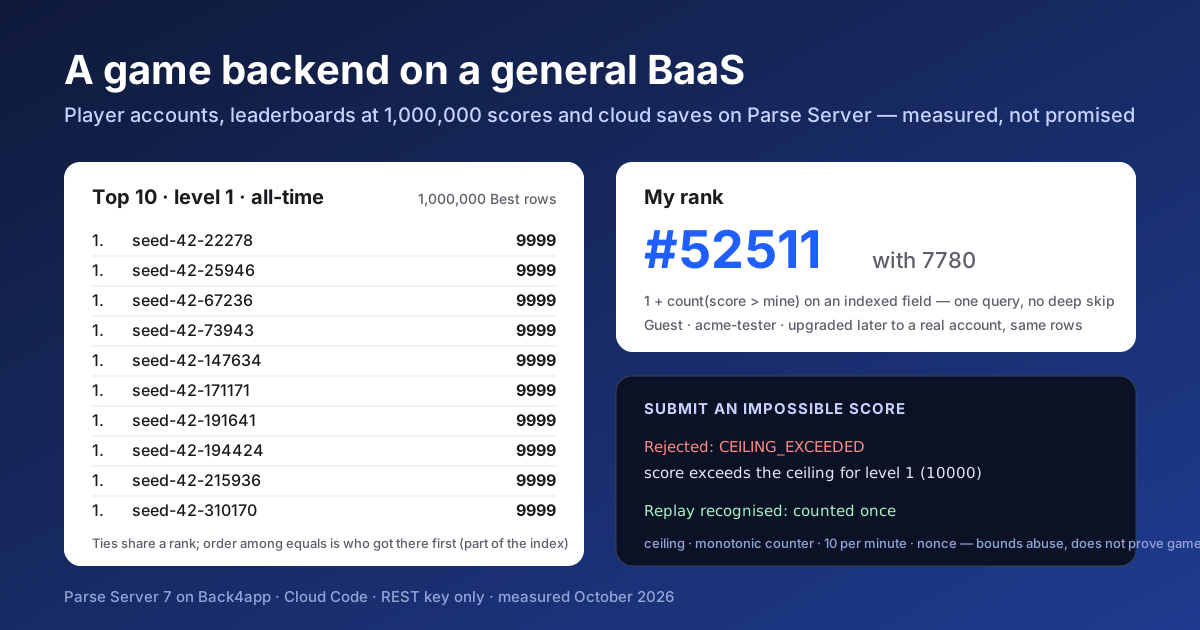
An indie developer’s backend question is rarely “which engine”. It is whether a general backend-as-a-service can hold player accounts, a leaderboard that stays fast as the score table grows, and cloud saves with a version check, without a server to run.
This post builds exactly that on Parse Server at Back4app, then fills the leaderboard with a million scores and times it from the outside.
The feasibility run was on October 20, 2026, and the build, the seed and the measurements below on October 23, against the live platform. The numbers come from those runs; the files behind them are in the repository.
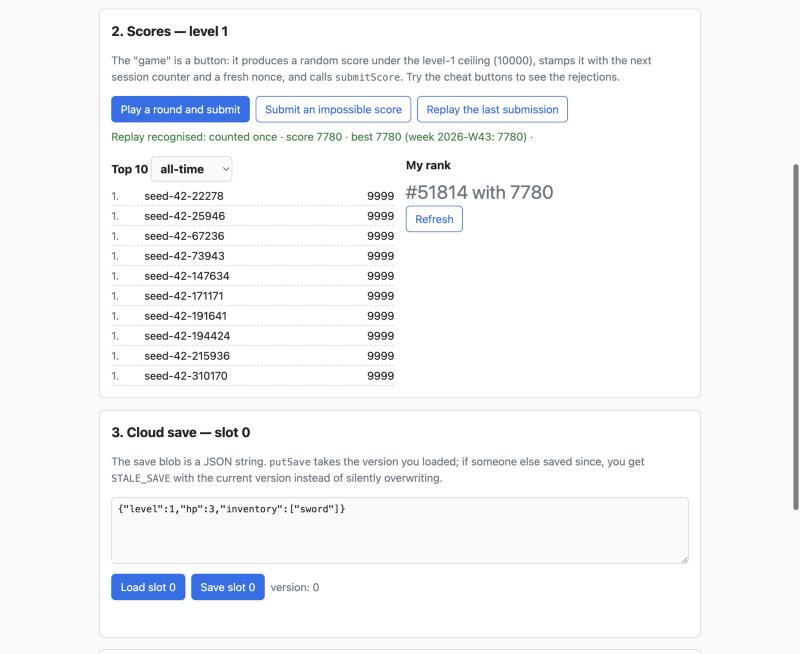
Try it, deploy it, read it: the demo client runs at gamebackendstarter-nqa56pyp.b4a.run: play as a guest, submit a score, try the two cheat buttons, see your rank among a million. The repository is github.com/templates-back4app/game-backend-starter, MIT.
What the backend holds, and who can touch it
Five classes, each with one reason to exist, and a rule for who writes it: nobody but Cloud Code. The client signs in, calls functions, and reads the leaderboard class directly because it is public.
| Class | One row per | Who reads | Who writes |
|---|---|---|---|
Player | user | owner only | Cloud Code |
Score | accepted submission, append-only | owner only | Cloud Code |
Best | player and level | everyone | Cloud Code |
Save | player and slot (0 to 2) | owner only | Cloud Code |
RejectedScore | rejected submission | master key only | Cloud Code |
| Function | Signed in | Does |
|---|---|---|
ensurePlayer | yes | creates the profile on first call, updates display name and country later |
submitScore | yes | validates, logs rejections, appends a Score, upserts Best |
leaderboard | no | top-N from Best, all-time or weekly, ranks with ties shared |
myRank | yes | 1 + count of Best rows with a greater score |
putSave | yes | optimistic write; answers STALE_SAVE with the current version when behind |
getSave | yes | version and blob; version 0 and no blob for an empty slot |
Writes are refused twice. The class-level permissions deny every client write, and a beforeSave hook on each class refuses any request that does not carry the master key, so a permission widened by mistake changes nothing. The live tests send those writes with the keys a client holds; all answered code 119.
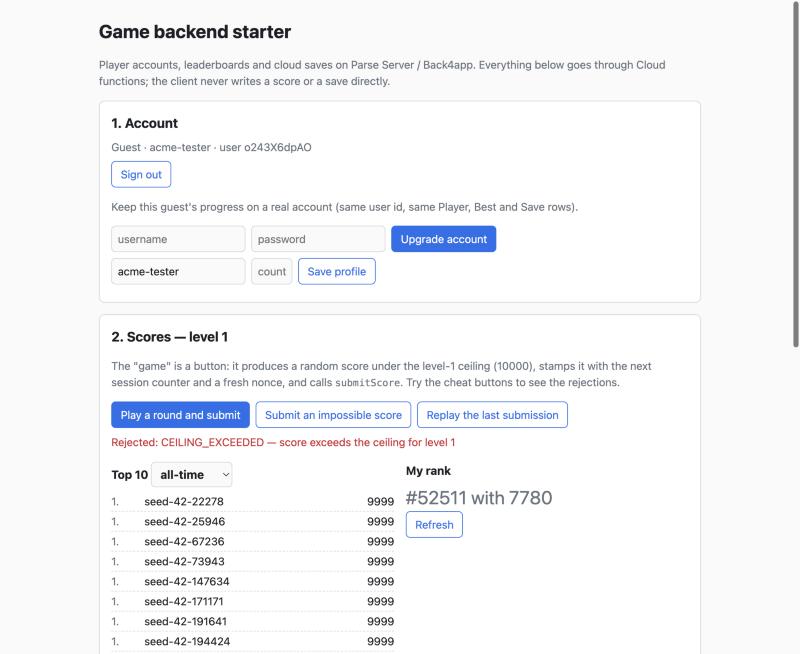
The main path in five calls
Before the tables, the path a game client takes, with the Parse JS SDK. Each line is one request; everything else in this post is what happens around them.
await Parse.AnonymousUtils.logIn();                       // 1. a guest account, no form
await Parse.Cloud.run('ensurePlayer', { displayName: 'acme-tester' });

const r = await Parse.Cloud.run('submitScore', {          // 2. a score, bounded by the server
  level: 1, score: 7780, sessionCounter: 1, clientNonce: crypto.randomUUID(),
});                                                       //    → { accepted, best, weekScore, replay }

const top = await Parse.Cloud.run('leaderboard', { level: 1, limit: 10 });   // 3. public, no session needed
const me  = await Parse.Cloud.run('myRank', { level: 1 });                   // 4. 1 + count(score > mine)

const slot = await Parse.Cloud.run('getSave', { slot: 0 });                  // 5. { version: 0, blob: null } when empty
await Parse.Cloud.run('putSave', { slot: 0, baseVersion: slot.version, blob: JSON.stringify(state) });
// a stale baseVersion answers STALE_SAVE with the current version instead of overwriting
Errors come back as a Parse error whose message is a JSON envelope with a code such as CEILING_EXCEEDED or STALE_SAVE; a ten-line helper in the client unwraps it.
Players: anonymous first, upgraded later
A player starts as an anonymous Parse user, created by the first call with a random id the client keeps. That is enough to submit scores and save games. When the player wants to keep the progress, the client sets a username and password on the same user; the Player, Best and Save rows point at the same id and stay attached. A test does exactly that and checks all three.
One SDK detail decides whether this works: the JS SDK’s signUp() on an anonymous user sends authData.anonymous = null with the credentials, which is what turns the guest into an account rather than creating a second one.
The raw REST test sends the same body, and the social login post covers what happens to sessions and linked methods from there.
Score submission: what it protects against, precisely
The server never saw the gameplay, so it cannot know that 7,780 points were earned. What submitScore can do is make the obvious abuses expensive or impossible, and say which ones:
| Check | Rejects | Logged as |
|---|---|---|
| per-level ceiling, default 10,000 × level | impossible scores | CEILING_EXCEEDED |
| a session counter that must increase per player, consumed even by rejected submissions | replays and out-of-order sessions | COUNTER_NOT_MONOTONIC |
| ten submissions per 60 s per player, accepted or rejected | floods | RATE_LIMITED |
| a client nonce per submission | a retried request counts once and gets the original answer | not a rejection |
| sign-in required, writes only through the function | direct inserts, forged rows | Parse 119 |
This bounds abuse. It does not make scores server-authoritative, because the server never saw the game. A client that lies plausibly still gets on the board.
Real validation needs a replay the server can re-run or a deterministic simulation, and that is a different article. What this one gives you is a RejectedScore row for every refusal, so at least you can see who is probing. The rate limit is per player, not per device or IP: a cheater with many anonymous accounts has many budgets, and the README says what to pair it with.
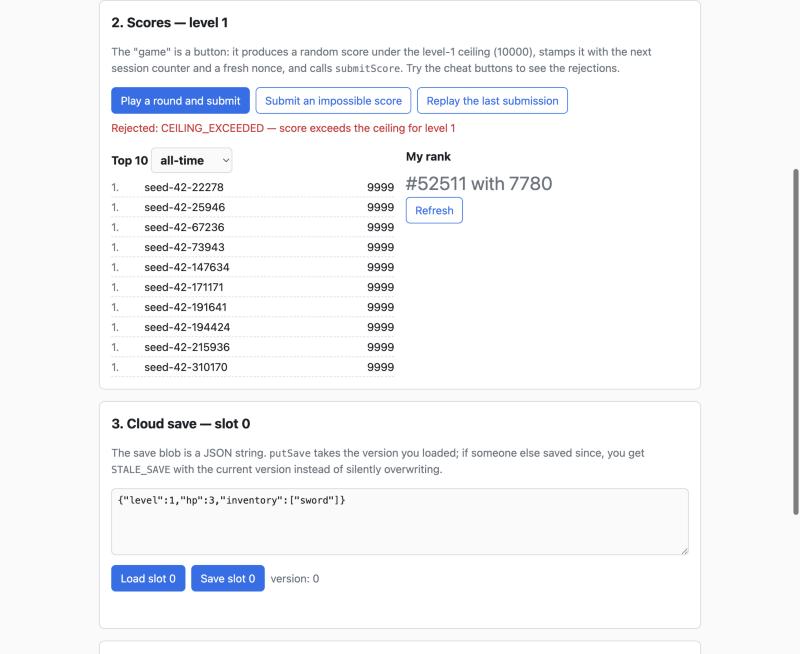
Leaderboards: one row per player and level, two numbers per row
Score is history and is never scanned for a board. Best holds one row per player and level with the all-time best, the ISO week of the latest submission and the best within that week. Every accepted submission upserts it. A top-N is one indexed query on Best; a rank is one indexed count.
Three decisions follow, and each has a test:
- Weekly boards reset without a job. The weekly board filters on the current week key; a row nobody touched this week does not match. Last week’s board survives only for players who did not play since, because there is no history table. If you need archives, that table is the one addition.
- Ties share a rank. Rank is 1 + the number of strictly greater scores, in both functions, checked against a brute-force ranking of 500 seeded rows. Display order among equals is by the
Bestrow’screatedAt, which is when the player first entered that level’s board, not when they reached their current score. The precise version is abestAttimestamp written whenever the score improves, indexed in place ofcreatedAt; the template keeps the simpler rule and says so. - Rank is a count, never a skip. The feasibility run on October 20 measured
skip=500000on the sorted board at 2.77 s, and a sort with a tie-break on an unindexed field failed outright with HTTP 500, MongoDB’s in-memory sort limit. Every field a board filters or sorts by is in an index, and the section on the million rows below says what it took to make that true.
A million scores, seeded with the REST key
Seeding a million rows needs the master key, unless the work happens inside Cloud Code. A seedBest function, guarded by a SETUP_ENABLED switch, takes 50 rows per call and inserts them with master rights; the script sends 20,000 such calls through a token bucket at 16 requests per second, because the Free plan’s throttle refuses faster clients.
That throttle is the first thing to know about load on this platform: it comes back as HTTP 400 with Parse code 155, not as 429, so a retry policy keyed on 429 never sees it. The seeder inspects the body and backs off.
In this run the million rows took 2,864 s, 47.7 minutes, for exactly 20,000 requests with zero failed calls. 150 rows were skipped by their seed key after a throttled request was retried, which is the dedup path doing its job.
Seeded rows have no _User behind them, deliberately: creating a million users from a client key is neither possible nor desirable. The leaderboard marks them seeded: true, and a real player’s rank counts them like anyone else.
Latency at 1,000,000 rows, measured three times
npm run bench signs in as a guest, submits the one score the seed assigned to that player, then runs 20 warm-ups and 100 timed calls per operation from one machine outside the US. The first run was bad, and the two fixes it forced are the most useful thing in this post.
| Operation, level 1, 1,000,000 rows, p50 / p95 round trip | Run 1: schema indexes only | Run 2: plus the _created_at indexes | Run 3: plus the count hint |
|---|---|---|---|
| top-100 all-time | 4,560 / 5,237 ms | 428 / 520 ms | 468 / 518 ms |
| top-100 this week | 4,617 / 5,322 ms | 426 / 516 ms | 426 / 510 ms |
| my rank all-time, player at rank 545,293 | 2,446 / 3,043 ms | 2,355 / 2,984 ms | 2,365 / 2,685 ms |
| my rank this week, same player | 2,456 / 3,068 ms | 2,359 / 2,764 ms | 2,363 / 2,592 ms |
The three runs are 52 minutes apart, 100 timed calls each after 20 warm-ups, zero errors; the CSVs are named by run in docs/evidence/.
The route between that client and the platform was not constant that afternoon: identical calls answered in about 0.4 s in one ten-minute window and about 1.3 s in the next. The absolute values belong to the day.
The differences between the columns, four seconds on the top-100 and none on the rank, are an order of magnitude larger than that drift, which is the only reason to read anything into them.
One more caveat sits next to these numbers. A million rows is a data-volume test: one client, one call at a time, after warm-ups. It says what a query costs at that table size. It says nothing about many players submitting at once, and the 500-player burst in the plan has not been run yet.
Fix one: the index key names. Parse.Schema creates MongoDB indexes with the field names you pass, untranslated. An index on createdAt indexes a key no document has, because MongoDB stores that column as _created_at.
So the schema’s {level, score, createdAt} index served order by score but not the tie-break order by score, createdAt, which fell back to sorting a million rows in memory: 6.6 s for the raw query against 1.3 s without the tie-break.
The dashboard’s Index Manager does translate the name. Two indexes created there, on _created_at, took about three minutes to build on a million rows and brought the top-100 from 4.56 s to 428 ms, round trip included.
Fix two was only half a fix. myRank is count where level = 1 and score > mine. Raw against the REST API, the MongoDB 3.6 planner ran that count in about 3 s whether 298 rows or 300,000 matched, and a hint on the schema’s index brought it back to an index range: 1.2 s round trip at 298 matches.
The function now passes that hint; the PostgreSQL adapter ignores it, so the local tests do not change.
But the third column shows the hint did not move the function’s number for a player at rank 545,293, and a fourth measurement says why. Four throw-away players at four positions, ten timed calls each, in the same minute the top-100 took about 1.3 s:
| Player’s score and rank | myRank p50 |
|---|---|
| 9,998, rank 36 | 1,205 ms |
| 9,000, rank 34,671 | 1,313 ms |
| 5,000, rank 206,194 | 2,032 ms |
| 100, rank 783,956 | 4,124 ms |
The count is linear in the number of rows above the player, about 3.7 µs per row on this engine. For the top of the board that is free; for the bottom of a million-row board it is four seconds. The design consequence is in the next section.
Why the planner matters here is visible in MongoDB’s own explain, which Parse Server returns for a find through the REST API. For level = 1 and score > 9990 without a hint, the winning plan scans the weekly index with the week unbounded and filters score after fetching each document: 1,000,013 keys examined, 1,000,013 documents examined, 299 returned, 2,508 ms.
With hint=best_alltime the index bounds are on score itself. The plans are in docs/evidence/; a count cannot be explained through the REST API, so the count figures above remain measurements without a plan.
What to do about a linear rank count
Show exact rank where it is cheap and approximate it where it is not. The top of the board is the cheap part: a player at rank 36 pays nothing beyond the round trip. For everyone else, three options cost less than a four-second count, and the repository points at where each one goes.
- Cache it. Store the rank on the
Bestrow when a score is accepted and refresh it on a schedule; the count runs once per player per interval instead of once per screen. - Bucket it. Keep a small table of score thresholds per percentile, rebuilt by a job, and answer “top 12%” from it in one indexed lookup.
- Estimate it. Keep a small table of score thresholds (every 1% of the board, rebuilt by a job), find the bucket the player’s score falls in with one lookup, and count exactly only inside that bucket’s window. Bucket start plus window count is a global rank with a bounded error, labelled “about”, which is what most games show anyway. A window count alone, without the bucket, is not a rank.
None of these is in the template, on purpose: the count as written is correct, and the measurement above tells you when it stops being affordable.
Cloud saves, versioned
A save is a JSON string of at most 500 KB in one of three slots. putSave takes the version the client loaded; if the server’s version is higher, it answers STALE_SAVE with the current version, and nothing is overwritten. getSave returns version 0 and no blob for an empty slot.
The round trip, the stale rejection, the slot and size validation and the owner-only read are each a test, locally and live.
Errors carry a code the client can act on. Parse errors are a number and a string, so the string is a JSON envelope: {"code":"STALE_SAVE","currentVersion":3} inside a Parse 142, or UNAUTHENTICATED inside a 209 so SDK clients drop a dead session. A small helper in the client and in the scripts unwraps it.
Security tests, with the client’s keys
A client holds the Application ID and a client key, both public by design. The tests send what a hostile client would send with exactly those, and the live backend answered:
| Attempt, with the Application ID and a client key | Answer from the live backend |
|---|---|
| any player function without a session | 400, code 209, UNAUTHENTICATED |
leaderboard without a session | 200, it is public |
POST /classes/Score with a session | 119 |
PUT /classes/Best on your own row | 119 |
read another player’s Save or Player | not found; own rows readable, counters protected |
GET /classes/RejectedScore with a session | 119 |
POST /classes/Cheat, a class that does not exist | 201 on the Free plan |
The last row is a platform setting, not an app bug, and it is worth its own paragraph.
What building it found
- The first Cloud Code deploy of a fresh backend shipped
config.jsbut not the editedmain.js. The editor’s unsaved buffer is not part of a deploy; a second edit and Deploy shipped it. The proof is a request:setupSchemaanswered 141 until then, then the full schema report. config.jsonly uploads with the folder selected. The dashboard’s upload lands in the selected explorer node; with nothing selected the file is silently dropped.- Index directions survive on MongoDB and not on the local PostgreSQL adapter, which keeps column order and drops the
-1. Harmless on PostgreSQL, where a btree is read both ways. The key names are the real trap, above: nothing in the local run could have shown it, because the PostgreSQL adapter maps the column and the MongoDB one does not. - Master-key sign-ups still create sessions. A seed that creates users with the master key also creates one
_Sessionrow each. The REST-key seed avoids the question by creating no users at all. - The first call after an idle period takes about 4.5 s. Cloud Code on the Free plan cold-starts; the same
leaderboardcall answered in 1.1 s on the next request. Warm-ups are part of the bench for that reason. - A plan change redeploys the container, and an upload-sourced app cannot redeploy itself. The demo client was created with Containers’ Upload files source; upgrading it to Starter triggered a redeploy that failed with This deployment has no uploaded code while the old container kept serving. Action → Redeploy latest code rebuilt it from the code the Source Code page still held.
- Cloud Code runs on Node 19.9. Nothing here needs newer syntax, and the
cloudfolder is CommonJS by apackage.jsonof its own, because the root package is ESM for the scripts.
What it would cost, as a request estimate
This is an estimate derived from measured usage and sourced prices, not a bill. One demo session as the client plays it makes about 11 requests: sign-in, ensurePlayer, a leaderboard, a rank, five submissions, a save load and a save write. At 1,000 such sessions a day that is roughly 330,000 requests a month.
Back4app’s pricing page, read on October 23, 2026, lists the Free plan at 25K requests a month, MVP at US$15 per app per month billed annually (US$25 billed monthly) with 500K requests and US$5 per extra 100K, and Pay as you go at US$80 billed annually (US$100 monthly) with 5M requests and US$2 per extra 100K.
Storage is the other limit, and on the Free plan it is the first one a seeded leaderboard hits. After the million Best rows, the dashboard’s Plan Usage page read 329 MB of database storage against the 250 MB included: about 260 MB of documents plus 66 MB of indexes, roughly 330 bytes per row all in. The seed also spent 20,000 of the 25K monthly requests.
The MVP plan’s 1 GB holds about three million such rows. Score, which keeps one row per accepted submission, and RejectedScore grow on top of that and are the tables to watch.
Deploying it
-
Backend. Create an app in the Back4app dashboard and copy the Application ID, JavaScript key and REST key into
.env. The master key stays in the dashboard; nothing here needs it. -
Cloud Code. In the Cloud Code page select the
cloudfolder, uploadcloud/config.js, pastecloud/main.jsinto the editor, confirm Files pending deploy (2), Deploy, and verify with a request as above. -
Schema.
npm run setupcallssetupSchemawith the REST key: five classes, fields, permissions and indexes in one call. It refuses a bare re-run onceBesthas rows, unless you ask. -
Indexes. Database → Index Manager →
Best: addbest_alltime_ca(level asc, score desc, createdAt asc) andbest_weekly_ca(level asc, week asc, weekScore desc, createdAt asc). The Fields column must show_created_at; the schema-created ones withcreatedAtstay, the counts use them. -
Tests, seed, bench.
TEST_SERVER_URL=https://parseapi.back4app.com npm teston a staging app, thennpm run seed -- --n 1000000 --levels 1andnpm run bench -- --level 1 --label back4appif you want your region’s numbers. -
Close the setup door.
SETUP_ENABLED: falseincloud/config.js, upload, Deploy, and confirm thatsetupSchemaanswers 119. While it is true, anyone with the Application ID can seed rows and read or delete any row. -
Web client. Containers → Deploy a web app from the repository, Node.js Buildpack, port 8080, health check
/healthz, and three variables:APP_ID,JS_KEY,SERVER_URL.
When not to do it this way
If your game needs the server to decide the outcome, run the simulation, or match players in real time, you need a game server, and this backend becomes its database and account store rather than the thing players talk to. If “one person, one account” must hold across devices and reinstalls, anonymous-first needs an upgrade prompt early, because a guest who uninstalls is gone.
And note what this post did not run: 500 simulated players submitting within a ten-second window, and save round trips at 50 KB and 500 KB, both in the plan and both still ahead. When those runs happen, this paragraph gets replaced by their results.
The repository
github.com/templates-back4app/game-backend-starter, MIT. cloud/main.js holds the six functions, the setup helpers and the hooks; cloud/config.js the tunables and the schema; scripts/ setup, seed and bench; public/ the demo client.
test/ has 19 tests that run locally against parse-server with PostgreSQL and, with one variable, against the live backend.
docs/notes/build-diary.md records the decisions and the live run, and docs/evidence/ the bench CSVs and the seed log behind every number here.