Every provider’s docs page ends at the same place: one button, one user, done. The questions start the next week. A guest who played for an hour wants to keep their progress, so they sign in with Google. Someone signs up with a password and later clicks the Google button with the same e-mail. A phone is lost and its session has to die.
This post is the week after the docs page. One account, several ways in, on a Parse backend hosted at Back4app, with no auth server of our own: the browser talks to the backend, the backend talks to Google. Everything was run on October 20 and 23, 2026, against the live platform, and the codes and texts below are quoted from its answers.
Try it, deploy it, read it: the demo runs at socialloginstarter-6om29ktc.b4a.run with a real Google button, guest sign-in and e-mail/password. Accounts you create there may be wiped at any time.
The repository is github.com/templates-back4app/social-login-starter, MIT.
What “linking” means on a Parse backend
A Parse user has one row in _User, and that row can carry several credentials at once: a username and password, and an authData object with one key per provider. Signing in with any of them resolves to the same row.
There is no separate “identities” table and no merge step. A link is a PUT on your own user with a new authData key, and an unlink is the same PUT with that key set to null.
That is the whole model, and the table below is the whole protocol. The guest, password, unlink and sign-out rows were exercised with raw REST calls against the live backend; the two Google rows describe what Parse Server does with a valid token, which this run checked only from the refusal side, with forged tokens.
| Action in the UI | What the browser sends | What Parse Server does |
|---|---|---|
| Continue as guest | POST /users {authData:{anonymous:{id}}} | creates a user (201) or logs the same guest back in (200); new session either way |
| Sign in with Google | POST /users {authData:{google:{id, id_token}}} | verifies the ID token against Google, then creates or logs in (documented path; forged tokens refused, see the security table) |
| Sign up / Log in | POST /users {username,password,email} / POST /login | the classic path |
| Link e-mail/password | PUT /users/<id> {username,password,email} with the session | sets the password, answers with a new session token and revokes the old ones, keeps the guest id |
| Link Google | PUT /users/<id> {authData:{google:{…}}} | verifies the token, links; an id already used elsewhere answers 208 (documented; not run with a real account) |
| Unlink Google or guest id | PUT /users/<id> {authData:{google:null}} | removes the provider; the session stays valid; removing the last way in is allowed by Parse Server and refused by the repository’s hook |
| Sign out | POST /logout | ends this session only |
| Sign out everywhere | Cloud function signOutEverywhere | deletes every other _Session row of the caller (not built in) |
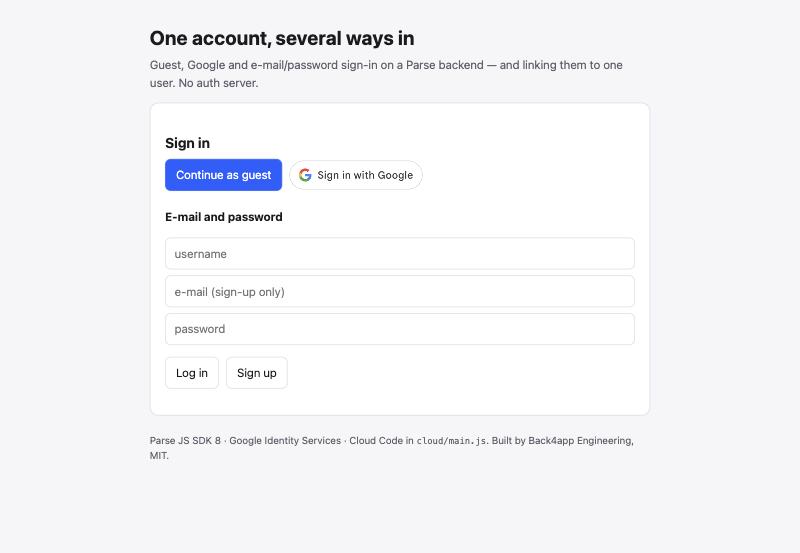
The whole thing in three requests
Before the details, here is the linking flow as the browser sends it, with the Parse JS SDK. Each call is one REST request, and nothing else is needed to go from a guest to an account with three ways in.
// 1. Start as a guest: POST /users with an anonymous id the SDK generates and keeps
const user = await Parse.AnonymousUtils.logIn();

// 2. Link e-mail and password: PUT /users/<id> with the current session.
//    The answer carries a NEW session token; every previous session of this user is revoked.
user.set('username', 'jane.doe.acme');
user.setPassword('a-long-passphrase');
user.setEmail('[email protected]');
await user.save();

// 3. Link Google: the Google Identity Services button hands you an ID token; PUT it under authData.
//    Parse Server verifies the signature and audience against the client id you configured.
await user.save({ authData: { ...(user.get('authData') || {}), google: { id: payload.sub, id_token: credential } } });

// Unlink: the same PUT with null. The hook refuses to remove the last method.
await user._unlinkFrom('anonymous');
Step 3 uses plain save() rather than the SDK’s linkWith(), and step 2 uses set('username') rather than setUsername(), for a reason the next sections measure: both helpers silently drop the guest id. Everything after this point is what happens around these calls: collisions, sessions, the rules the server lacks, and the numbers.
Who this is for
You have one provider working from a docs page, and you need the rest of the lifecycle: a second method on the same account, collisions, what expires when, and how to end sessions. You are fine with the backend owning identity and you do not want to run an OAuth server.
Two things are out of scope on purpose. The app does not try to keep “one user per person” across providers: a Google account and a password account with the same e-mail are two users unless the signed-in user links them, and the post says why below.
Roles, profile editing and SSO belong to other posts; the sign-up and password reset post covers the e-mail side.
The providers, and which ones this post runs
Back4app’s dashboard lists five social providers under Authentication: Apple, Google, Facebook, X and VK. The Parse names are apple, google, facebook, twitter and vkontakte. The demo runs Google, plus the two providers that need no console at all: anonymous guests and e-mail/password.
| Provider | In this post | Why |
|---|---|---|
| live in the demo | a free console, a Web client id, no review for basic scopes | |
| Anonymous guest | live in the demo | built into Parse Server; the browser keeps a random id |
| E-mail/password | live in the demo | built in; the earlier post covers reset e-mails |
| GitHub | not available | not offered by Back4app; authData.github answered HTTP 500 “Internal server error” on the live backend |
| Apple | documented, not run | needs a paid developer account and a verified domain |
| documented, not run | public login needs App Review; development mode allows test users only (Meta’s App Review page, read October 2026) | |
| VK | documented, not run | the adapter answered “Vk only works with enableInsecureAuth: true” to a probe, so it needs a server setting we did not pursue |
The GitHub row is worth a sentence, because the feasibility run on October 20 found it the hard way. A client that sends authData.github does not get a clean “unsupported provider” error; Parse Server’s adapter fails first, and the answer is a 500.
The repository’s beforeSave hook allow-lists the five providers plus anonymous, so a provider switched on in the dashboard by accident still cannot create a user until the list is changed on purpose.
The page, the hook and the two functions
The client is one HTML page, one stylesheet and 206 lines of JavaScript, served by a 65-line Express app whose only jobs are static files, a /config.js with the public keys and a /healthz. The Parse JS SDK and Google Identity Services are loaded from their CDNs.
Google’s button hands the page an ID token, a JWT signed by Google. The page decodes the payload to show the e-mail, then calls Parse.User.logInWith('google', { authData: { id, id_token } }). That is a POST /users; the server fetches Google’s public keys, checks the signature and the audience against the client id in the dashboard, and only then touches the database.
The Cloud Code file has one hook and two functions, and each exists for a reason the server does not cover:
beforeSave(_User)refuses identity changes by anyone but the owner or the master key, even when the row’s ACL has been widened by mistake; allow-lists providers; and maintains ahasPasswordboolean. Parse never tells a client whether a user has a password, not even with the master key, but the hook runs before hashing and sees the plaintext, so it can set the flag. A client that sendshasPassword: truegets it overwritten.linkInforeturns what the panel needs and the SDK cannot see: the flag above, the current session’screatedAtandexpiresAt, and how many sessions the account has.signOutEverywheredeletes every_Sessionrow of the caller except the calling one, with the master key, and returns the count.
The lifecycle, one recorded outcome per case
Each row below is a test in test/lifecycle.test.mjs, run against the live backend on October 23, 2026, as raw REST calls with the REST key. Nothing in the table is predicted; the suite prints the codes and texts, and these are them.
| Case | What the live backend did |
|---|---|
| New guest, then the same guest again | 201 with a new user, then 200 with the same objectId and a new session token |
| Guest links username, e-mail and password | 200; the response carried a new session token; the old token then answered 209 “Invalid session token”; authData.anonymous kept |
| A second guest session open during the link | revoked too: 209 |
| Log in with the linked password | 200, same objectId |
| Another user takes the same username | 400, code 202 “Account already exists for this username.” |
| Another user takes the same e-mail | 400, code 203 “Account already exists for this email address.” |
| Unlink the guest id from a user with a password | 200; the session stayed valid; the old guest id then created a new user |
| Unlink the last method of a password-less guest | 200 from Parse Server alone on October 23, account orphaned; 400, code 119 “Cannot remove the last sign-in method” with the hook deployed on October 27 |
| Sign out on device 2 | device 1 still valid, device 2 answers 209 |
| Change the password through a session | 200 with a fresh token; the caller’s old token and every other session answer 209 |
| Sign out everywhere | the function revoked the others and the caller kept working |
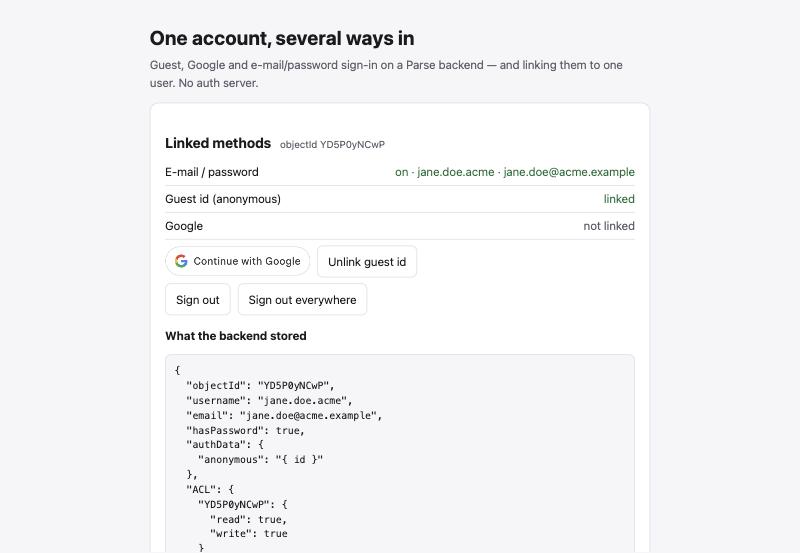
Three of those rows change how you write the client.
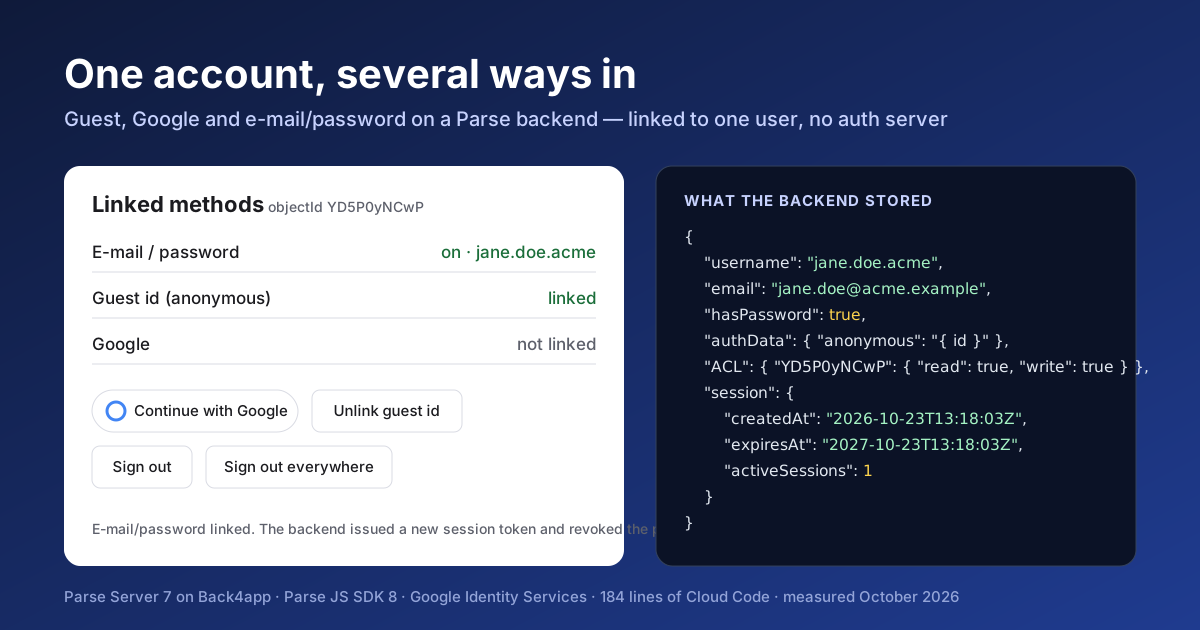
Linking a password replaces the session. The response to the PUT carries a new token, and every previous session of that user is gone, other devices included. The SDK swaps the token in the current tab; another open tab learns about it on its next request, when it gets a 209.
In the screenshot above the session’s createdAt moved from 13:17:13 to 13:18:03 on the same account. The page shows that timestamp for exactly this reason.
Collisions are the backend’s job, and it says so in words. The demo shows the backend’s own text next to the code. In the screenshot below a second guest tried to link the e-mail the first account already owns.
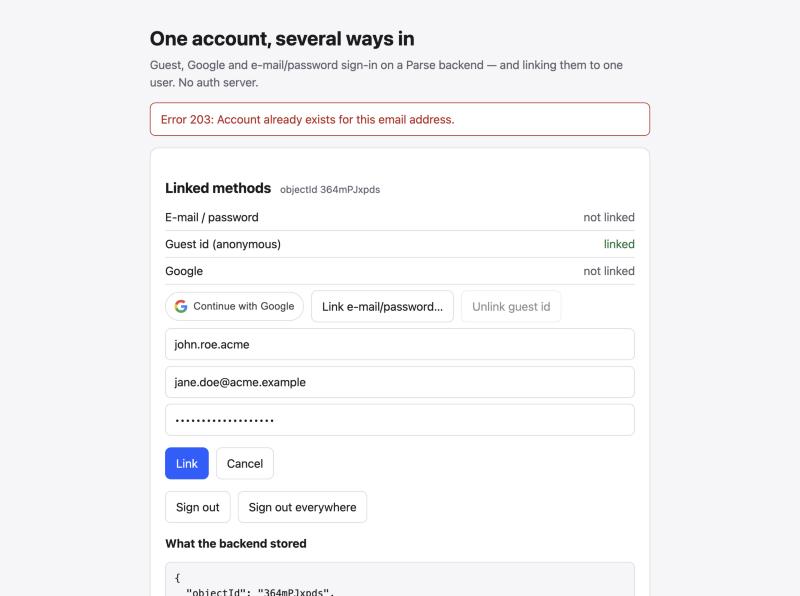
Parse Server lets you orphan an account, so the hook must not. A guest with no password who unlinks the guest id keeps a working session and an account that no credential can reach again; we recorded HTTP 200 for that request on October 23.
The first version of this post left the protection to the UI, which disables the last unlink button. A UI rule is not a rule when the same post shows direct REST calls.
The hook now refuses a non-master update that would leave no provider and no password: the same request answers 400, code 119, Cannot remove the last sign-in method: link another one first, and the session and the account are untouched. Link a password first and the unlink goes through. The test that used to document the orphan now asserts the refusal, locally and on the live backend.
Parse keeps every promise about who can change a row. Whether the row stays reachable is a rule you add, and it belongs on the server.
Why not merge accounts by e-mail
A Google sign-in whose e-mail matches an existing password account is a new user on Parse, and this post keeps it that way. Merging on e-mail would mean trusting that whoever controls that Google account also controls the password account, and the only proof of that is a sign-in to both.
That is what linking from a signed-in session is: the user proves the first account by being in it, then proves the second by signing in to it.
The practical consequence is one line of UI. When a sign-up with a password fails with 203 because a Google user already owns that e-mail, tell the user to sign in with Google and link a password from the panel. The demo shows the backend’s text; your app can show the better sentence.
Sessions: two clocks, and what ends them
A session token on this backend was issued with an expiry one year after creation: the expiresAt in the stored record is createdAt plus 365 days, on every session we created. Google’s ID token is a separate clock. It is consumed once, at sign-in or link time, and the backend keeps it in authData but never needs it again to serve a request. Expiry of that token does not sign anyone out.
What does end a session, from the table above: POST /logout for the calling session; a password set or changed through a session for all of them; and signOutEverywhere for all but the caller. Nothing else in the lifecycle touched _Session. Unlinking a provider did not.
Security tests, as raw requests
A client in the browser holds the Application ID and the JavaScript key, and both are public. The tests in test/security.test.mjs send what a hostile client would send, straight to the REST API with those keys, and the live backend answered:
| Attempt | Answer from the live backend |
|---|---|
GET /users/me without a session | 400, code 209 |
GET /users without a session | 404, code 101 “Permission denied, user needs to be authenticated.” |
GET /users with a session | 200, and the list contains only the caller’s own row |
GET /users/<other> with a session | code 101, as if the row did not exist |
PUT /users/<other> {username} with a foreign session | 400, code 206 “Insufficient auth.” |
| the same, after the victim’s ACL was widened to public write | refused by the hook: 119 “Only the account owner can change its sign-in methods.” |
PUT own user with hasPassword: true | 200, and the flag stays false |
authData.google with a token that is not a JWT | 404, code 101 “provided token does not decode as JWT” |
authData.google without id_token | 404, code 101 “id token is invalid for this user.” |
authData.google with a self-signed RS256 JWT | 404, code 101 “secret or public key must be provided”, after the server fetched Google’s keys and found no matching key id |
authData.github | 500, code 1 “Internal server error.” |
| any Cloud function without a session | 400, code 209 |
The self-signed token row is the one that proves the verification path: the server went to Google’s certificate endpoint, looked for the key id in the forged header, and refused when there was none. A forged token with a real Google key id would fail the signature check instead.
Two settings make the rest of the table true, and npm run setup applies both through a Cloud function so that no script needs the master key. New users get an owner-only ACL, and the _User class-level permissions require a session for find, get, update and delete and hide email, authData, hasPassword and emailVerified from everyone but the owner.
The protected fields matter even if you never widen an ACL: without them a signed-in user listing _User would see other users’ e-mails.
Latency, measured
npm run measure creates its own users, runs 20 warm-ups and 100 timed requests per scenario, and deletes what it created. The client was one machine outside the US; the files are in docs/evidence/.
| Scenario (live backend, October 23, 2026) | p50 | p95 | min | max | errors |
|---|---|---|---|---|---|
New guest sign-in (POST /users, new anonymous id) | 160 ms | 430 ms | 150 ms | 457 ms | 0 |
Returning guest (POST /users, known anonymous id) | 164 ms | 248 ms | 144 ms | 267 ms | 0 |
E-mail login (POST /login) | 228 ms | 288 ms | 215 ms | 313 ms | 0 |
Creating a user costs more at the tail than logging one in: the first row’s p95 is the one outlier in the set. The e-mail row is about 60 ms slower than the guest rows; the local run below points at bcrypt as the reason, though the live run cannot separate it from the server’s other work.
The Google path is missing from that table on purpose. It needs a Google-signed token for a real account, which only a browser session can produce, and a script cannot sign in to Google. The click-through at the end measures it with the browser’s own Network panel, five runs, and the CSV has a placeholder row for the result.
For scale, the same three scenarios on a local parse-server with an in-process PostgreSQL took 1.7 ms, 1.8 ms and 42.6 ms at p50. There, with no network, the 40 ms between the guest rows and the e-mail row is the password hash; the difference between local and live is the network, which is why the live numbers are the ones that matter.
What we found while building it
- The first Cloud Code deploy on a fresh backend can report success and ship nothing. The proof is a request, not the dialog:
POST /functions/linkInfowith the REST key answers 209 when the code is live and 141 “Invalid function” when it is not. - Cloud Code runs on Node 19.9 and Containers builds on Node 22. Nothing in this repository needs a newer runtime, but a hook that used a Node 20 API would fail only after deploy.
- The master key never left the dashboard. Setup, test cleanup and the ACL-widening test are Cloud functions guarded by
SETUP_ENABLEDincloud/config.js. While it is true, anyone with the app id and a client key can call them, so the last step before real users is to set it to false, upload, deploy and prove it with the curl in the README.
Three smaller things cost time and belong in a troubleshooting list rather than in the story:
- The Google button follows the browser’s language: on a German machine it read Über Google anmelden.
hl=enon the script URL andlocale: 'en'inrenderButtonpin it. - A Google button rendered inside a hidden section is 0 px wide, because Google Identity Services sizes it at render time. The page re-renders the buttons whenever a view becomes visible.
- An app created with Containers’ Upload files source cannot redeploy itself: a plan change triggered a redeploy that failed with This deployment has no uploaded code, and the edge answered 502 until Action → Redeploy latest code rebuilt it from the code the Source Code page still held.
Deploying it
-
Backend. Create an app in the Back4app dashboard and copy the Application ID, JavaScript key and REST key into
.env. LeaveMASTER_KEYempty; nothing here needs it. -
Google. In the Google Cloud console create an OAuth client of type Web application, add your origins under Authorized JavaScript origins (exact scheme and host, no path), and paste the client id into Back4app → Authentication → Google and into
.envasGOOGLE_CLIENT_ID. -
Cloud Code. Dashboard → Cloud Code → upload
cloud/main.jsandcloud/config.js, confirm the badge Files pending deploy (2), Deploy. Verify with the request above. -
Schema.
npm run setupadds thehasPasswordcolumn and the class-level permissions through thesetupSchemafunction and prints the probe:GET /userswithout a session answering 101. -
Tests and timings.
TEST_SERVER_URL=https://parseapi.back4app.com npm test, thennpm run measure. Both create their own users and delete them. -
Containers. Deploy a web app from the repository with the Node.js Buildpack, port 8080, health check
/healthz, and exactly four environment variables:APP_ID,JS_KEY,SERVER_URLandGOOGLE_CLIENT_ID. The server prints every variable it knows into/config.js, which every visitor can read, so never add a key that is not public. -
Google again. Add the deployed URL to the authorized origins. Until it propagates, the button logs The given origin is not allowed for the given client ID.
-
Before going public. Set
SETUP_ENABLED: false, uploadcloud/config.js, Deploy, and confirm thatPOST /functions/setupSchemanow answers 119.
When not to do it this way
If you need to be the identity provider for other applications, or your customers log in with their company’s SAML or OpenID Connect provider, you need an identity service, and products like Auth0, Keycloak or Ory exist for that. Parse’s authData is a per-application credential store, not an identity broker.
If “one person, one account” is a legal or billing requirement, linking from a signed-in session is necessary but not sufficient. You would also need a verified e-mail before any merge, and a support path for the person who has two accounts and remembers neither.
And note what this post did not run: the Google click-through in the browser, which needs a real Google account. The repository’s docs/manual-google-check.md is the ten-minute script for it.
It covers a fresh sign-in, a repeat sign-in, linking a password to a Google user, linking Google to a guest, the 208 collision, five timed sign-ins, unlink, sign out everywhere and a wrong client id. When it has been run on the demo, its evidence file replaces this paragraph.
The repository
github.com/templates-back4app/social-login-starter, MIT. public/ is the whole client, cloud/main.js the hook and functions, scripts/ the setup, local server and latency measurement, test/ the 16 raw REST tests that run locally against parse-server with PostgreSQL and, with one environment variable, against the live backend.
docs/notes/build-diary.md records what was observed while building, including the ten behaviours seen locally that were re-verified on Back4app, and docs/evidence/ holds the CSVs behind every number above.