You asked for an AI feature. The assistant wrote the call, it did not work, and the fix was to rename the variable with a prefix. Then it worked.
That prefix is not a safety label. It is the instruction to copy the value into the file every visitor downloads, and it is the reason the feature started working. The two facts are the same fact.
So we built the same small app twice — once with the prefix, once without — searched the files the browser actually receives, and then measured what removing the key afterwards removes.
Watch it instead
Exposed secret keys is number 4 in our countdown of the security holes that turn up most often in apps built with AI.

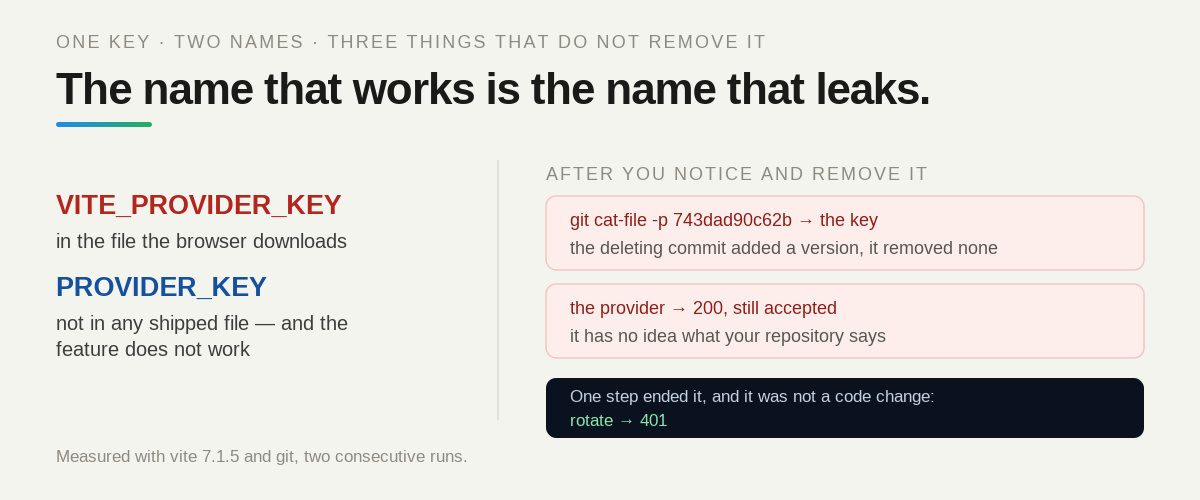
What does each step actually remove?
Only one of them removes anything that matters, and it is the one that is not a code change:
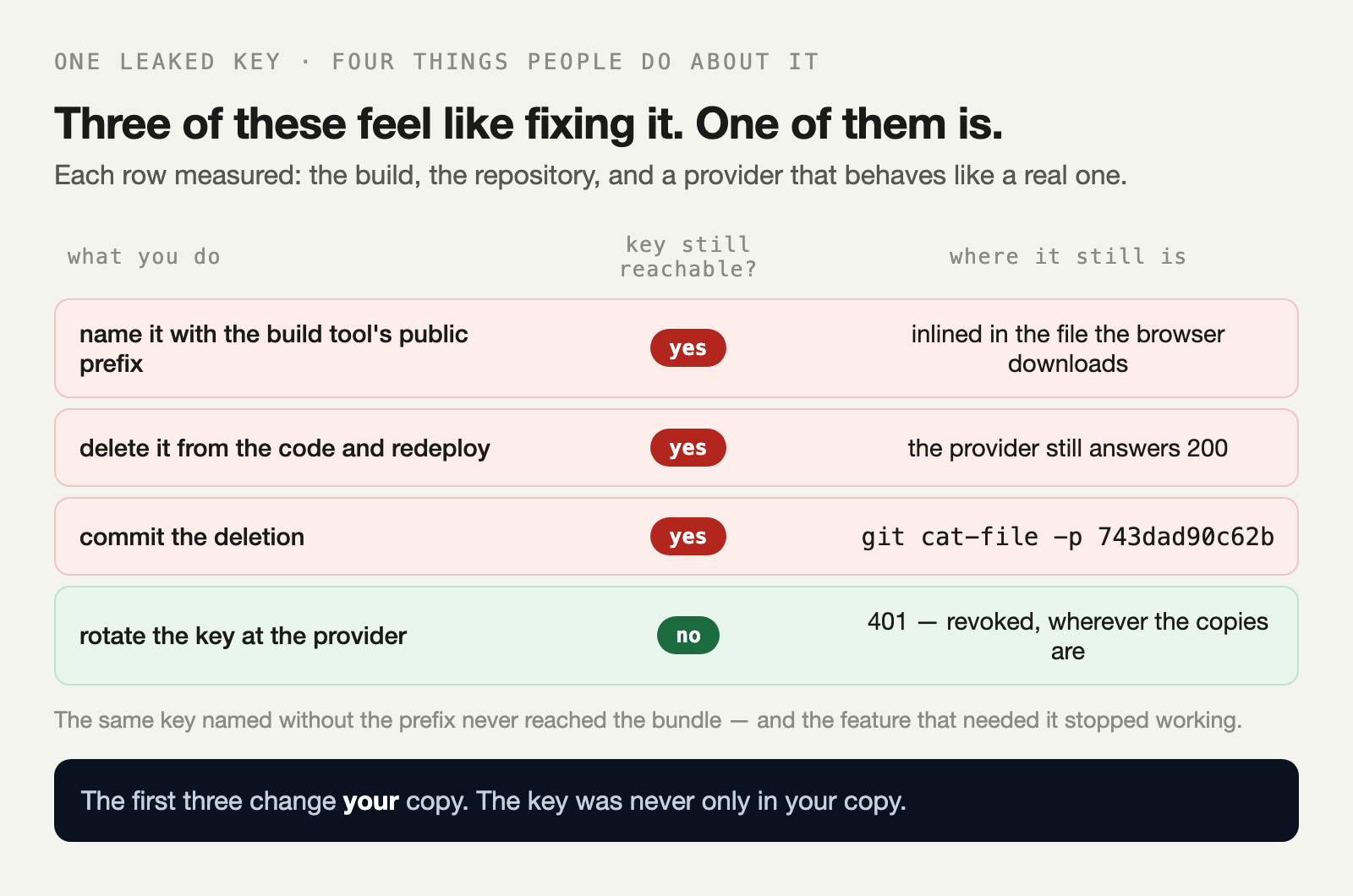
The first three change your copy of things. The key was never only in your copy — it was in a file strangers downloaded, in a repository anyone can clone, and in a provider’s records.
How we measured: a real vite 7.1.5 production build inside node:22-alpine, a throwaway git repository created and destroyed by the script, and a local provider that accepts a key until it is rotated. Identical across two clean runs — the lab is in the repo.
Which variable ends up in the bundle?
The one the app needs, and only that one. Both keys were in the same .env file, and the build treated them completely differently:
which of those files contain each secret:
  VITE_PROVIDER_KEY           assets/index-BRB5O7a8.js
  PROVIDER_KEY (no prefix)    not in any shipped file

and what the app does with each one:
  VITE_PROVIDER_KEY           the request carries the key — the feature works
  PROVIDER_KEY (no prefix)    undefined in the browser — the feature does not work
Read those four lines as a pair and the trap is obvious. The unprefixed variable is safe and useless. The prefixed one is useful and public. There is no third option, because the browser cannot use a secret it does not have.
The variable that makes the feature work is the variable that gets published. That is not a mistake in the build tool; it is what the prefix means.
A detail worth noticing in that output: the build also wrote index-BRB5O7a8.js.map. Source maps are on by default in a lot of templates, and they are served to anyone who asks.
Is the key gone once you delete the commit?
No, and this is the part people get wrong with the most confidence. We committed a key, then committed its removal, and asked three questions:
the key is in the files as they stand now:        no
the key is in the repository's history:           yes
retrievable by object id, after the deletion:     yes — git cat-file -p 743dad90c62b
A commit that deletes a line adds a new version of the file. The old version is still an object in the repository, with its own name, and one command prints it.
Does removing it stop the spending?
Not for a second, because the provider does not read your repository. We ran a provider that behaves like a real one and asked it three times:
the leaked key, before you notice:                accepted — still spending your money
you delete it from the code and redeploy:         the bundle no longer contains it
the leaked key, after that deploy:                accepted — still spending your money
you rotate the key at the provider:               the old one is revoked, a new one issued
the leaked key, after rotation:                   refused (401)
The second and third lines are the whole lesson. The deploy was real, the bundle was clean, and nothing about the exposure changed. Whoever already copied the key was unaffected by your commit.
Where should the key live instead?
On the server, with the call that uses it. Your app sends a prompt; the server adds the credential and decides whether this caller is allowed to spend anything.
That is one indirection and it changes three things at once. The browser downloads nothing worth stealing, the key is in configuration rather than in a build artefact, and you gain a place to count usage per person — which is the other half of this problem and the reason bills arrive.
Which keys are supposed to be public?
The identifiers, and knowing the difference saves you a wasted day. A public client key names your app so the backend knows which one is being addressed; it is designed to be visible and it can only do whatever your permissions already allow.
A provider secret or a master key is the opposite: its job is to prove authority and bypass checks. Finding the first in your bundle is normal. Finding the second is an incident.
The test is not where you found it but what it can do. If a key’s whole purpose is to be sent by a browser, publishing it is the design. If a key would let its holder ignore your rules, no amount of obfuscation makes it safe out there.
When is a key in the frontend acceptable?
When the credential is scoped to exactly what a visitor is allowed to do anyway, and the provider was built for that. Publishable payment keys, map tiles keyed to a domain, analytics write-only tokens: all of these are meant to be public, and treating them as leaks is noise.
What makes them safe is not secrecy, it is that the provider enforces a boundary on them — a referrer allowlist, a spend cap, a write-only scope. If your provider offers none of that, the key is not publishable no matter how the docs phrase it.
The question to ask before shipping any key is simple: if I posted this in public right now, what is the worst a stranger could do with it, and does the provider give me a way to bound that? If the answer to the second half is no, it belongs on a server.
What should you search for before your next deploy?
Build your app the way your host builds it, then grep the output directory for the last six characters of each key you use. Not the source — the build output, including the source maps.
Anything you find there is public as of your last deploy. Rotate it, then move the call behind a server function, in that order: rotation stops the bleeding, the refactor stops it recurring.