Relational Queries
Relational Query in React Native using Parse
Introduction
In this guide, you will perform relational queries in Parse and implement a React Native component using these queries. You will learn how to set up and query realistic data using Back4App and React Native.
Prerequisites
Goal
Query relational data stored on Back4App from a React Native App.
1 - Understanding the Parse.Query class
Any Parse query operation uses the Parse.Query object type, which will help you retrieve specific data from your database throughout your app. It is crucial to know that a Parse.Query will only resolve after calling a retrieve method (like Parse.Query.find or Parse.Query.first), so a query can be set up and several modifiers can be chained before actually being called.
To create a new Parse.Query, you need to pass as a parameter the desired Parse.Object subclass, which is the one that will contain your query results. An example query can be seen below, in which a fictional Book subclass is being queried.
1	// This will create your query
2	let parseQuery = new Parse.Query("Book");
3	// The query will resolve only after calling this method
4	let queryResult = await parseQuery.find();
You can read more about the Parse.Query class here at the official documentation.
2 - Save some data on Back4App
Let’s create an assortment of classes, which will be the target of our queries in this guide. The classes are: Author, Book, Publisher and BookStore, in which Book has a 1:N relation with Publisher and N:N with Author, and BookStore has an N:N relation with Book.
On Parse JS Console is possible to run JavaScript code directly, querying and updating your application database contents using the JS SDK commands. Run the code below from your JS Console and insert the data on Back4App. Here is how the JS console looks like in your dashboard:
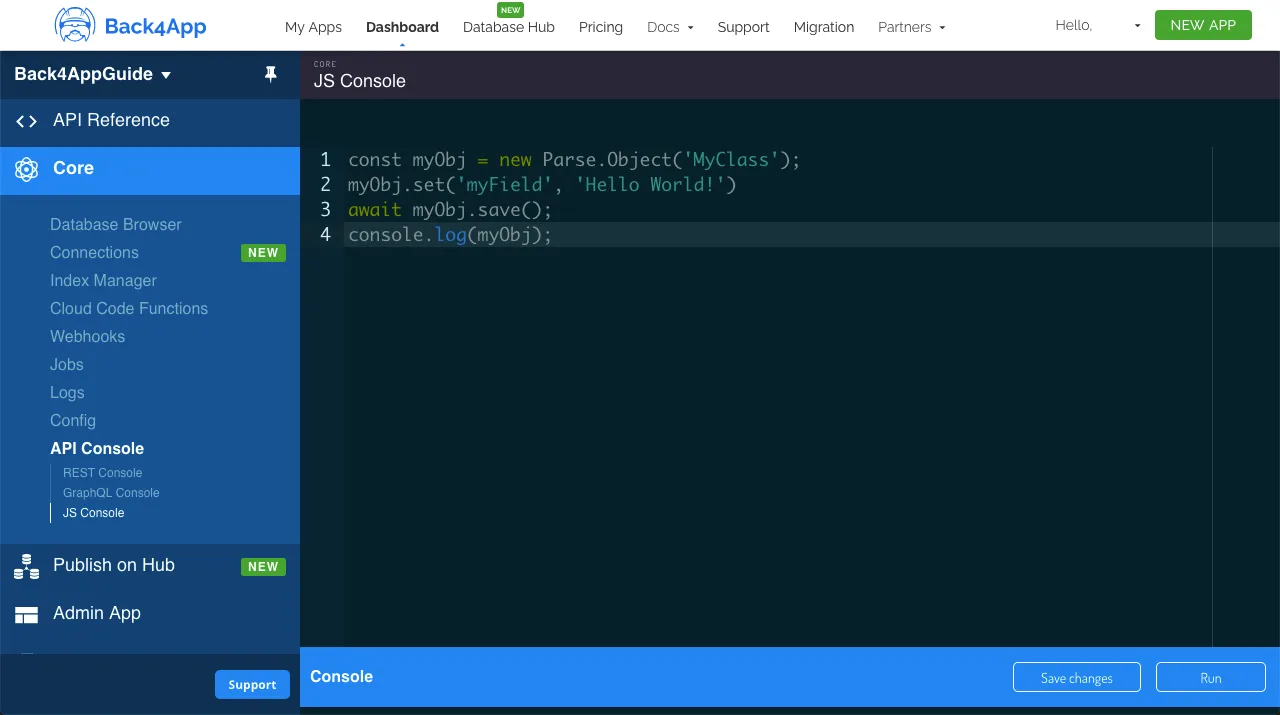
Go ahead and create the classes with the following example content:
1	// Add objects and create tables
2	// Authors
3	const AuthorA = new Parse.Object('Author');
4	AuthorA.set('name', 'Aaron Writer');
5	await AuthorA.save();
6
7	const AuthorB = new Parse.Object('Author');
8	AuthorB.set('name', 'Beatrice Novelist');
9	await AuthorB.save();
10
11	const AuthorC = new Parse.Object('Author');
12	AuthorC.set('name', 'Casey Columnist');
13	await AuthorC.save();
14
15	// Publishers
16	const PublisherA = new Parse.Object('Publisher');
17	PublisherA.set('name', 'Acacia Publishings');
18	await PublisherA.save();
19
20	const PublisherB = new Parse.Object('Publisher');
21	PublisherB.set('name', 'Birch Distributions');
22	await PublisherB.save();
23
24	// Books
25	const BookA = new Parse.Object('Book');
26	BookA.set('title', 'A Love Story');
27	BookA.set('publisher', PublisherA);
28	BookA.set('publishingDate', new Date('05/07/1998'));
29	const BookARelation = BookA.relation("authors");
30	BookARelation.add(AuthorA);
31	await BookA.save();
32
33	const BookB = new Parse.Object('Book');
34	BookB.set('title', 'Benevolent Elves');
35	BookB.set('publisher', PublisherB);
36	BookB.set('publishingDate', new Date('11/31/2008'));
37	const BookBRelation = BookB.relation("authors");
38	BookBRelation.add(AuthorB);
39	await BookB.save();
40
41	const BookC = new Parse.Object('Book');
42	BookC.set('title', 'Can You Believe It?');
43	BookC.set('publisher', PublisherB);
44	BookC.set('publishingDate', new Date('08/21/2018'));
45	const BookCRelation = BookC.relation("authors");
46	BookCRelation.add(AuthorA);
47	BookCRelation.add(AuthorC);
48	await BookC.save();
49
50	// BookStore
51	const BookStoreA = new Parse.Object('BookStore');
52	BookStoreA.set('name', 'Books of Love');
53	const BookStoreARelation = BookStoreA.relation("books");
54	BookStoreARelation.add(BookA);
55	await BookStoreA.save();
56
57	const BookStoreB = new Parse.Object('BookStore');
58	BookStoreB.set('name', 'Fantasy Books');
59	const BookStoreBRelation = BookStoreB.relation("books");
60	BookStoreBRelation.add(BookB);
61	await BookStoreB.save();
62
63	const BookStoreC = new Parse.Object('BookStore');
64	BookStoreC.set('name', 'General Books');
65	const BookStoreCRelation = BookStoreC.relation("books");
66	BookStoreCRelation.add(BookA);
67	BookStoreCRelation.add(BookC);
68	await BookStoreC.save();
69
70	console.log('Success');
3 - Query the data
Now that you have populated all the classes, we can now perform some relational queries in it. Let’s begin by filtering Book results by the publisher, searching for the ones that belong to the Publisher “Acacia Publishings” (or “Publisher A”) using the basic Parse.Query.equalTo method:
1	// Get PublisherA object
2	const PublisherAQuery = new Parse.Query('Publisher');
3	PublisherAQuery.equalTo('name', 'Acacia Publishings');
4	const PublisherA = await PublisherAQuery.first();
5
6	// Query Books with PublisherA
7	const bookQuery = new Parse.Query('Book');
8	bookQuery.equalTo('publisher', PublisherA);
9	let queryResults = await bookQuery.find();
10
11	// Let's show the results
12	for (let result of queryResults) {
13	  // You access `Parse.Objects` attributes by using `.get`
14	  console.log(result.get('title'));
15	};
Let’s now query which BookStore objects contain Book objects with publishing date greater than 01/01/2010, using an inner query with the Parse.Query.greaterThan method and then the Parse.Query.matchesQuery method:
1	// Create inner Book query
2	const bookQuery = new Parse.Query('Book');
3	bookQuery.greaterThan('publishingDate', new Date('01/01/2010'));
4
5	// Query BookStore using inner Book query
6	const bookStoreQuery = new Parse.Query('BookStore');
7	bookStoreQuery.matchesQuery('books', bookQuery);
8	let queryResults = await bookStoreQuery.find();
9
10	// Let's show the results
11	for (let result of queryResults) {
12	  // You access `Parse.Objects` attributes by using `.get`
13	  console.log(result.get('name'));
14	};
Let’s now create a more complex relational query, looking for BookStore objects that have at least one Book written by Author “Aaron Writer” (or “AuthorA”), using equalTo and matchesQuery:
1	// Get AuthorA object
2	const AuthorAQuery = new Parse.Query('Author');
3	AuthorAQuery.equalTo('name', 'Aaron Writer');
4	const AuthorA = await AuthorAQuery.first();
5
6	// Create inner Book query
7	const bookQuery = new Parse.Query('Book');
8	bookQuery.equalTo('authors', AuthorA);
9
10	// Query BookStore using inner Book query
11	const bookStoreQuery = new Parse.Query('BookStore');
12	bookStoreQuery.matchesQuery('books', bookQuery);
13	let queryResults = await bookStoreQuery.find();
14
15	// Let's show the results
16	for (let result of queryResults) {
17	  // You access `Parse.Objects` attributes by using `.get`
18	  console.log(result.get('name'));
19	};
4 - Query from a React Native component
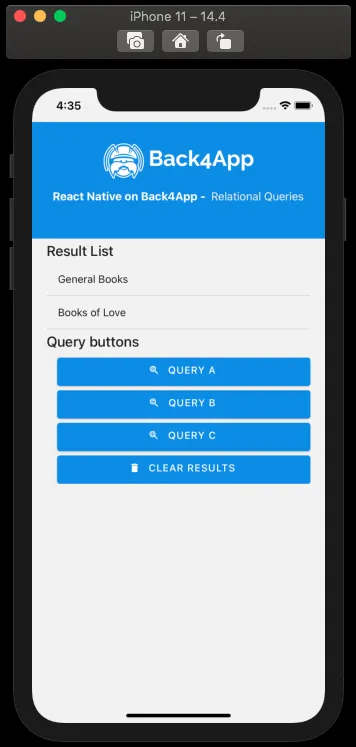
Let’s now use our example queries inside a component in React Native, with a simple interface having a list showing results and also buttons for calling the queries. This is how the component code is laid out, note the doQuery functions, containing the example code from before.
1	import React, {FC, ReactElement, useState} from 'react';
2	import {Alert, Image, View, ScrollView, StyleSheet} from 'react-native';
3	import Parse from 'parse/react-native';
4	import {
5	  List,
6	  Title,
7	  Button as PaperButton,
8	  Text as PaperText,
9	} from 'react-native-paper';
10
11	export const QueryList: FC<{}> = ({}): ReactElement => {
12	  // State variable
13	  const [queryResults, setQueryResults] = useState(null);
14
15	  const doQueryA = async function (): Promise<boolean> {
16	    // Get PublisherA object
17	    const PublisherAQuery: Parse.Query = new Parse.Query('Publisher');
18	    PublisherAQuery.equalTo('name', 'Acacia Publishings');
19	    const PublisherA: Parse.Object = await PublisherAQuery.first();
20
21	    // Query Books with PublisherA
22	    const bookQuery: Parse.Query = new Parse.Query('Book');
23	    bookQuery.equalTo('publisher', PublisherA);
24
25	    try {
26	      let results: [Parse.Object] = await bookQuery.find();
27	      setQueryResults(results);
28	      return true;
29	    } catch (error) {
30	      // Error can be caused by lack of Internet connection
31	      Alert.alert('Error!', error.message);
32	      return false;
33	    }
34	  };
35
36	  const doQueryB = async function (): Promise<boolean> {
37	    // Create inner Book query
38	    const bookQuery: Parse.Query = new Parse.Query('Book');
39	    bookQuery.greaterThan('publishingDate', new Date('01/01/2010'));
40
41	    // Query BookStore using inner Book query
42	    const bookStoreQuery: Parse.Query = new Parse.Query('BookStore');
43	    bookStoreQuery.matchesQuery('books', bookQuery);
44
45	    try {
46	      let results: [Parse.Object] = await bookStoreQuery.find();
47	      setQueryResults(results);
48	      return true;
49	    } catch (error) {
50	      // Error can be caused by lack of Internet connection
51	      Alert.alert('Error!', error.message);
52	      return false;
53	    }
54	  };
55
56	  const doQueryC = async function (): Promise<boolean> {
57	    // Get AuthorA object
58	    const AuthorAQuery: Parse.Query = new Parse.Query('Author');
59	    AuthorAQuery.equalTo('name', 'Aaron Writer');
60	    const AuthorA: Parse.Object = await AuthorAQuery.first();
61
62	    // Create inner Book query
63	    const bookQuery: Parse.Query = new Parse.Query('Book');
64	    bookQuery.equalTo('authors', AuthorA);
65
66	    // Query BookStore using inner Book query
67	    const bookStoreQuery: Parse.Query = new Parse.Query('BookStore');
68	    bookStoreQuery.matchesQuery('books', bookQuery);
69
70	    try {
71	      let results: [Parse.Object] = await bookStoreQuery.find();
72	      setQueryResults(results);
73	      return true;
74	    } catch (error) {
75	      // Error can be caused by lack of Internet connection
76	      Alert.alert('Error!', error.message);
77	      return false;
78	    }
79	  };
80
81	  const clearQueryResults = async function (): Promise<boolean> {
82	    setQueryResults(null);
83	    return true;
84	  };
85
86	  return (
87	    <>
88	      <View style={Styles.header}>
89	        <Image
90	          style={Styles.header_logo}
91	          source={ {
92	            uri:
93	              'https://blog.back4app.com/wp-content/uploads/2019/05/back4app-white-logo-500px.png',
94	          } }
95	        />
96	        <PaperText style={Styles.header_text}>
97	          <PaperText style={Styles.header_text_bold}>
98	            {'React Native on Back4App - '}
99	          </PaperText>
100	          {' Relational Queries'}
101	        </PaperText>
102	      </View>
103	      <ScrollView style={Styles.wrapper}>
104	        <View>
105	          <Title>{'Result List'}</Title>
106	          {/* Query list */}
107	          {queryResults !== null &&
108	            queryResults !== undefined &&
109	            queryResults.map((result: Parse.Object) => (
110	              <List.Item
111	                key={result.id}
112	                title={
113	                  result.get('name') !== undefined
114	                    ? result.get('name')
115	                    : result.get('title')
116	                }
117	                titleStyle={Styles.list_text}
118	                style={Styles.list_item}
119	              />
120	            ))}
121	          {queryResults === null ||
122	          queryResults === undefined ||
123	          (queryResults !== null &&
124	            queryResults !== undefined &&
125	            queryResults.length <= 0) ? (
126	            <PaperText>{'No results here!'}</PaperText>
127	          ) : null}
128	        </View>
129	        <View>
130	          <Title>{'Query buttons'}</Title>
131	          <PaperButton
132	            onPress={() => doQueryA()}
133	            mode="contained"
134	            icon="search-web"
135	            color={'#208AEC'}
136	            style={Styles.list_button}>
137	            {'Query A'}
138	          </PaperButton>
139	          <PaperButton
140	            onPress={() => doQueryB()}
141	            mode="contained"
142	            icon="search-web"
143	            color={'#208AEC'}
144	            style={Styles.list_button}>
145	            {'Query B'}
146	          </PaperButton>
147	          <PaperButton
148	            onPress={() => doQueryC()}
149	            mode="contained"
150	            icon="search-web"
151	            color={'#208AEC'}
152	            style={Styles.list_button}>
153	            {'Query C'}
154	          </PaperButton>
155	          <PaperButton
156	            onPress={() => clearQueryResults()}
157	            mode="contained"
158	            icon="delete"
159	            color={'#208AEC'}
160	            style={Styles.list_button}>
161	            {'Clear Results'}
162	          </PaperButton>
163	        </View>
164	      </ScrollView>
165	    </>
166	  );
167	};
168
169	// These define the screen component styles
170	const Styles = StyleSheet.create({
171	  header: {
172	    alignItems: 'center',
173	    paddingTop: 30,
174	    paddingBottom: 50,
175	    backgroundColor: '#208AEC',
176	  },
177	  header_logo: {
178	    height: 50,
179	    width: 220,
180	    resizeMode: 'contain',
181	  },
182	  header_text: {
183	    marginTop: 15,
184	    color: '#f0f0f0',
185	    fontSize: 16,
186	  },
187	  header_text_bold: {
188	    color: '#fff',
189	    fontWeight: 'bold',
190	  },
191	  wrapper: {
192	    width: '90%',
193	    alignSelf: 'center',
194	  },
195	  list_button: {
196	    marginTop: 6,
197	    marginLeft: 15,
198	    height: 40,
199	  },
200	  list_item: {
201	    borderBottomWidth: 1,
202	    borderBottomColor: 'rgba(0, 0, 0, 0.12)',
203	  },
204	  list_text: {
205	    fontSize: 15,
206	  },
207	});
This is how the component should look like after rendering and querying by one of the query functions:
Conclusion
At the end of this guide, you learned how relational queries work on Parse and how to perform them on Back4App from a React Native App. In the next guide, you will learn how to work with Users in Parse.