Release Notes
Release Notes (Oct 25) – Parse Server 7 Upgrade (Performance, Security & Developer Experience)
We’ve released as a defult stable version the Parse Server 7.5.2 on Back4App, bringing major improvements to app performance, security, and the developer experience. Performance Improvements
- Faster, more stable API: Core engine optimizations deliver quicker queries and more reliable performance under load.
- Improved real-time features: Fixes to LiveQuery and Cloud Code triggers make real-time apps more stable.
Security Enhancements
- Critical OAuth fix: Authentication credentials are now fully isolated per app, closing an important security gap.
- Safer defaults: User data is private by default, and risky file types (like HTML uploads) are blocked.
- Optional rate limiting: Protect your app from abusive traffic with customizable request limits.
Developer Experience
- Updated Cloud Code runtime: Node.js 18 + Parse JS SDK 4 unlock modern language features and better performance.
- New SDK compatibility: Fully supports new Parse SDKs, including Parse Swift 5.
- More configuration options: Fine-tune default query limits, session behavior, and rate-limit rules.
Breaking Changes
- httpRequest removed: Use standard libraries like Axios or Fetch in Cloud Code.
- Nested objects fixed: Objects are now properly serialized; review your structures if you rely on deeply nested data.
Your Back4App apps now run on a faster, more secure, and more modern Parse Server—no infrastructure work required.
Release Notes (Sep 25) – Faster Web Builds, One-Click MCP Web Hosting, Deep DB Insights
Web Deployment Improvements
Faster Building Times: We've improved our Web deployment platform to build projects faster. Now your app has more powerful servers to build it and that result in up to 10x faster deployments.
New process to create free Apps: Now you have a simpler flow to test our Web Deployments Platform, no credit card needed no hard processes just connect your GitHub account and start deploying.
MCP - Web Hosting
Now is not necessary anymore to configure webhosting on back4app dashboard anymore to start using the platform. Just ask MCP to create and publish your app and you will see your AI Coding Agent to do it like magic.
Database Profiler – Full Observability for App Database Ops
We’re excited to introduce the Back4App Database Profiler, a new observability feature designed to help you monitor and optimize your MongoDB-backed Parse Server applications.
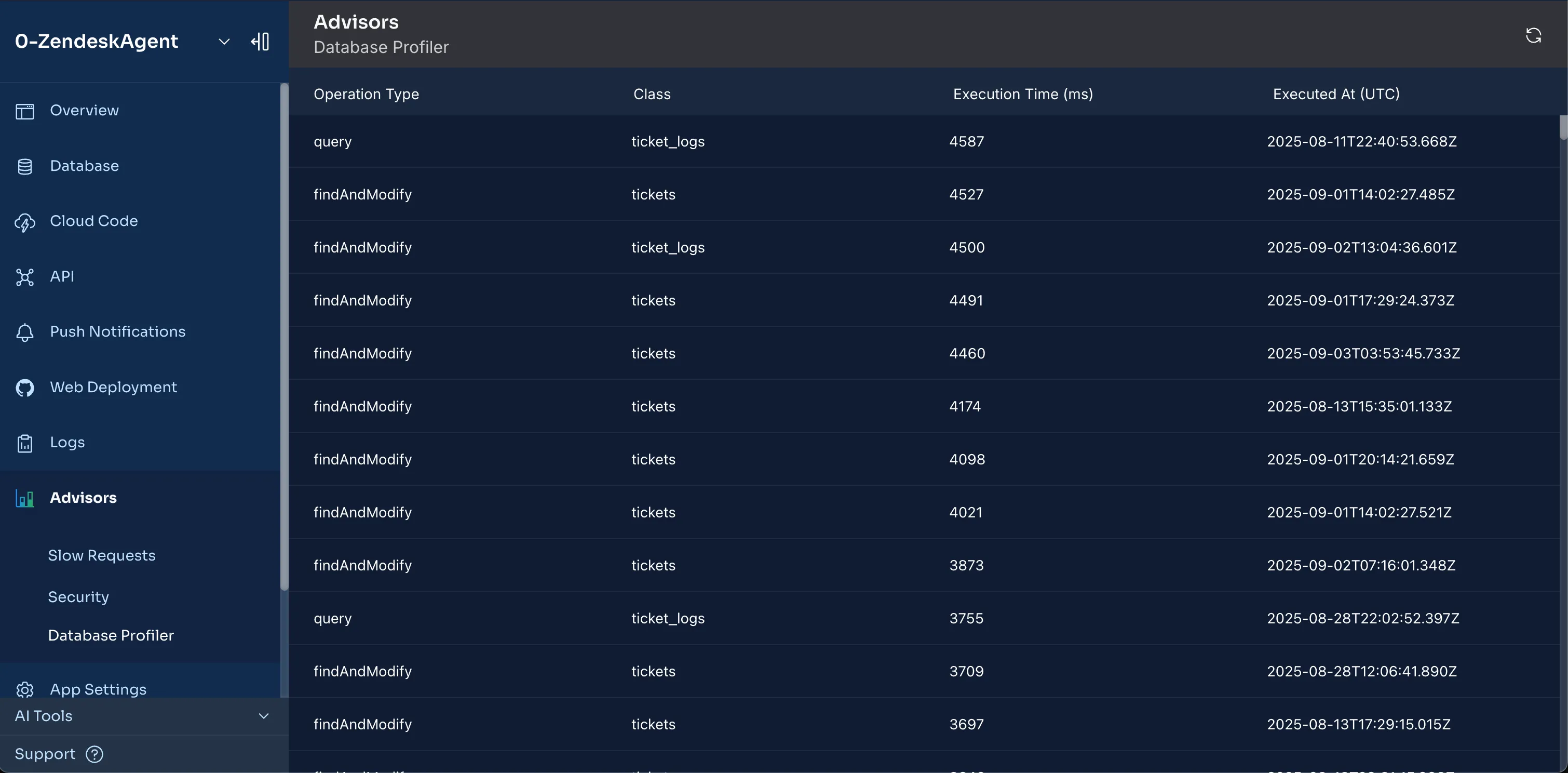
This profiler is built directly on top of the native MongoDB Database Profiler, so you get the same detailed, battle-tested insights MongoDB engineers use to track performance. Now integrated seamlessly into your Back4App environment, it gives you the visibility you need to troubleshoot and tune your database operations.
What It Does
- Captures granular operation metrics – Monitor queries, inserts, updates, deletes, and command executions across your MongoDB collections.
- Identifies slow queries – Flag operations exceeding your configured thresholds with detailed timing information.
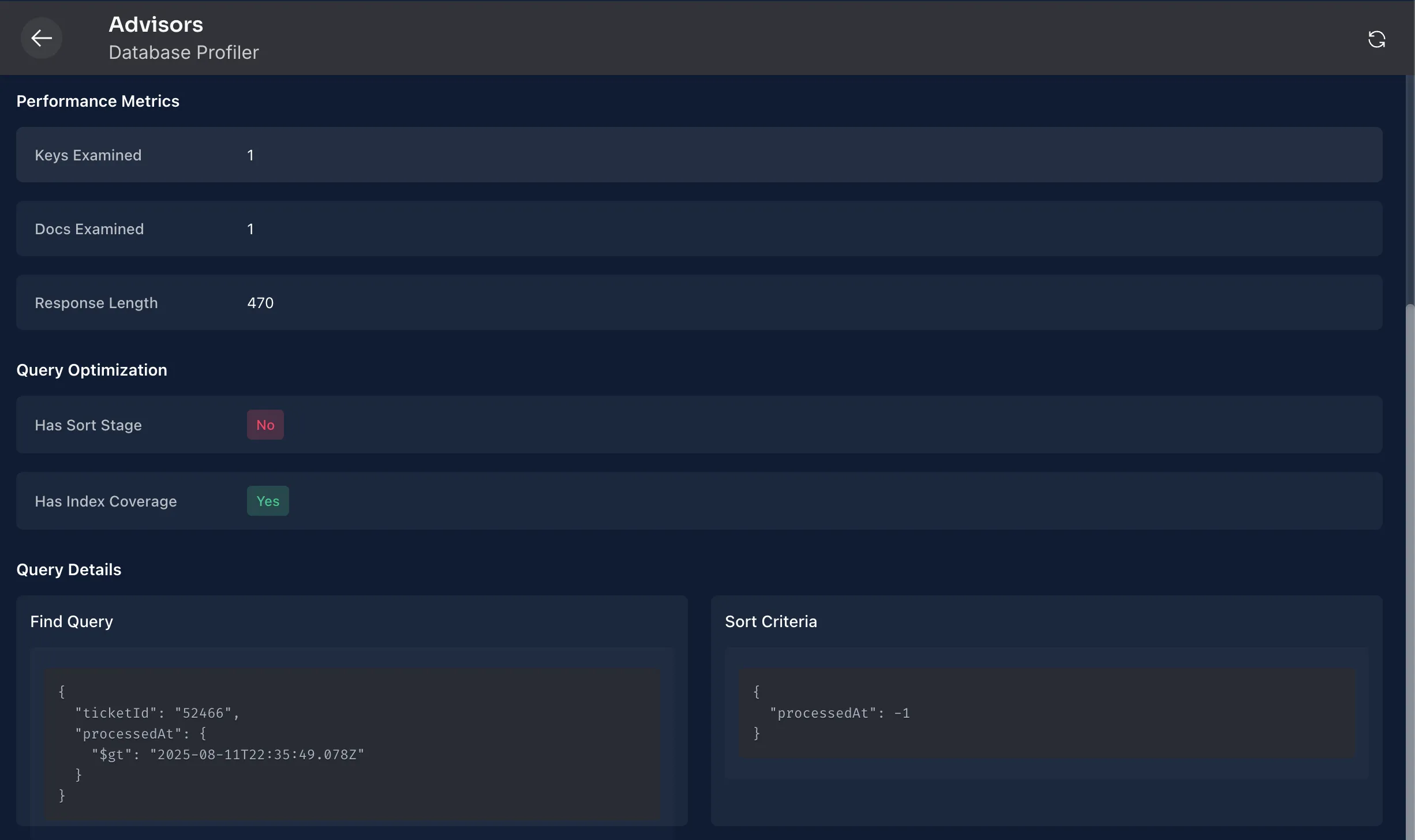
- Surfaces execution stats – See keys and documents examined, query plans, sort stages, index usage, and whether operations spilled to disk.
- Tracks concurrency & locks – Understand lock contention, yields, and waiting times that may be slowing down your workloads.
- Collects I/O metrics – Inspect how many bytes are read from and written to disk, and how much time queries spend waiting on storage.
Why It Matters
- Pinpoint bottlenecks – Quickly find inefficient queries that scan too many documents or indexes.
- Optimize indexes with confidence – Use keysExamined vs docsExamined ratios to decide when new indexes are needed.
- Boost reliability – Understand when queries are being replanned, evicted from cache, or blocked by locks.
- Improve app responsiveness – Reduce query latencies by spotting high-cost operations before they impact users.
Example Insights You’ll See
- Query execution times (millis) and CPU usage per operation.
- Index scan efficiency (keysExamined vs nreturned).
- Storage engine wait times and disk reads/writes.
- Lock acquisition patterns (r, w, IX, IS) with microsecond-level detail.
- Query shape hashes (planCacheShapeHash) to identify and group similar queries.
Why You’ll Love It
- Same engine, new visibility – Built on the MongoDB profiler, but integrated into Back4App for one-click observability.
- Actionable data – Go beyond logs: understand why a query is slow and how to fix it.
- Optimized for Parse Server – Tailored for the types of queries and workloads common in Back4App apps.
- Production-safe – Designed to help you monitor without disrupting your live systems.
Release Notes (Aug 25) – MongoDB 8.0 available on Back4app
We’ve upgraded our database servers. Now we support MongoDB 8.0! This isn’t just about moving to the newest release—it includes all the accumulated improvements from MongoDB 4.x, 5.x, 6.x, and 7.x. Your apps can now benefit from years of performance, aggregation, and security enhancements in one leap forward.
💡 Back4app runs MongoDB 8.0 on Digital Ocean Managed Database Service and MongoDB Atlas, so you’re getting the best of both worlds: enterprise-grade managed infrastructure plus the latest MongoDB features.
Increased Performance
- Faster reads
- It’s 36% faster in read workloads and 32% faster in mixed read and write workloads
- Simple lookups (e.g., by objectId) use new fast-path execution in 8.0, cutting latency without code changes.
- Faster writes under load
- Write operations can be up to 20% faster in high-concurrency scenarios, reducing tail latencies during peak traffic.
- Fewer sort-related errors on large lists
- Larger non‑indexed sorts now have more headroom (100 MB vs 32 MB). That means list queries with order on big classes are less likely to fail with “Sort exceeded memory limit” and more likely to return successfully without needing immediate index changes.
- Accelerated Index Updates
- Index changes roll out faster in the background. Your app stays responsive, and searches/lists get the speed boost sooner.
Aggregation Enhancements (Cloud Code and REST API)
Aggregation pipelines you build in Cloud Code(or calling via REST API) run faster and support the new operators(since MongoDB 4.0) including:
- Window functions ($setWindowFields) – enable advanced analytics such as running totals, moving averages, ranks, cumulative sums, percentiles, and more, directly within the database.
- Index-aware $expr comparisons – simple comparisons like $eq, $lt/$lte, and $gt/$gte can use indexes to avoid full collection scans, delivering major performance improvements for expression-based filters.
- Set operations and custom logic – use $unionWith to combine results from multiple collections, and extend the framework with custom JavaScript-based operators like $function and $accumulator for specialized logic and aggregations
- Literal and array manipulation tools – $documents allows you to inject inline documents directly into a pipeline, while $sortArray sorts array elements within documents.
- Top-N and first/last-N accumulators – operators such as $top, $bottom, $topN, $bottomN, $firstN, and $lastN make it easy to capture ranked values, leaders/laggards, or multiple first/last items per group without complex workarounds.
Security & Stability
Apps at Back4app now count with the latest security updates(acumulated improvements from MongoDB 4.0 to 8.0), including:
- Continuous CVE patches and stability fixes
- Modern TLS with OCSP and managed certificate hygiene
Key Benefits
- Faster API responses: especially for objectId lookups and list endpoints.
- More resilient large non‑indexed sorts: fewer “sort exceeded memory” errors under heavy loads.
- Richer aggregation features: new operators (e.g., window functions, union/merge, custom expressions).
- Faster, safer index maintenance: quicker index rollout with minimal impact.
- Latest security updates applied: ongoing CVE patches, modern TLS/OCSP, hardened defaults.
Release Notes (Jul 25) – HIPAA, SOC 2 Type 1 & ISO 27001 Compliance
Back4App has achieved triple compliance—HIPAA, SOC 2 Type 1, and ISO 27001—across our platform. Whether you’re on Pay-as-you-go or Dedicated, you now get enterprise-grade security, data-protection controls, and audit-ready documentation built in, so you can focus on shipping features instead of handling compliance paperwork.
HIPAA Compliance (Dedicated Only) • Encryption & Access Controls – End-to-end TLS and at-rest AES-256 encryption, role-based permissions, and detailed audit logging. • Business Associate Agreement – BAA available by default for every Dedicated cluster. • Technical Safeguards – Firewalls, intrusion detection, continuous monitoring, and regular penetration tests.
SOC 2 Type 1 Compliance (Pay-as-you-go & Dedicated) • Point-in-Time Audit – Independent validation of our security, availability, and confidentiality controls. • Designed Controls – Confirms policies and processes are correctly implemented; lays groundwork for upcoming Type 2 attestation. • Ongoing Assurance – SOC 2 reports available under NDA; regular internal reviews maintain control effectiveness.
ISO 27001 Certification (Pay-as-you-go & Dedicated) • ISMS Framework – Documented Information Security Management System covering people, processes, and technology. • Continuous Improvement – Annual surveillance audits ensure policies evolve with emerging risks. • Global Standard – Recognized benchmark for data-security best practices across industries.
Key Benefits
• Turnkey Compliance – Skip lengthy security questionnaires and vendor audits. • Risk Reduction – Mandatory administrative and technical controls lower breach exposure. • Cross-Plan Coverage – SOC 2 & ISO on both Pay-as-you-go and Dedicated; HIPAA on Dedicated. • Faster Deals – Signed BAA and audit reports accelerate procurement and enterprise sales. • Competitive Edge – Stand out in healthcare, finance, and other regulated markets.
How to Get Started
- Select your plan: Pay-as-you-go for SOC 2 & ISO, Dedicated for all three.
- Request compliance artifacts: Download SOC 2 and ISO reports (NDA) and sign the Dedicated plan’s BAA in the Dashboard.
- Map your controls: Align internal policies to Back4App’s documented safeguards for streamlined audits.
- Build with confidence: Deploy PHI-handling applications and regulated-data workloads without extra infrastructure.
Your backend now meets the highest industry standards for security and compliance—no extra work required on your end. Let us know if you have any questions!
Release Notes (Jun25) - Cloud Code and Web Hosting Deployments, MCP Server Updates
Cloud Code & Web Hosting Deployments: Rollback Support
We’re excited to introduce a highly requested feature in the Back4App dashboard: one-click rollback for both Cloud Code and Web Hosting deployments. Now you can safely revert to any previous version in seconds, minimizing downtime and streamlining your release workflow.
Rollback Anywhere, Anytime
- Instant revert – From the Cloud Code → Deployments screen, click “Rollback” next to any historical version to make it the new “Current” deployment.
- Zero-downtime safety – Your previous code snapshot becomes live immediately, so you can recover from unexpected issues without manual redeploys.
Clear Version History
- Comprehensive timeline – View every past deployment (version number, timestamp, and description) in a neat, scrollable history.
- Contextual details – Hover or expand each entry to see commit messages and notes you supplied at deploy time.
Simplified Release Workflow
- Audit-friendly – Keep track of every rollback action; audit logs record who rolled back, when, and to which version.
- Seamless integration – Rollbacks work across both serverless functions and static web assets, so your frontend and backend stay in sync.
How to Roll Back
- Navigate to Cloud Code → Deployments.
- In the History section, hover over the version you want to restore.
- Click Rollback. Confirm, and your app instantly switches to that snapshot.
Why You’ll Love It
- Faster recovery – No more manual git checkouts and deploy commands when something goes wrong in production.
- Greater confidence – Experiment freely, knowing you can undo any change with one click.
- Full visibility – Instantly see the state of any past release, including who deployed it and why.
Enjoy smoother, safer deployments! As always, we’d love your feedback—reach out via the dashboard or our support channels.
Back4App MCP Server Enhancements
In this release we’ve supercharged our MCP Server with two major improvements:
- Path-based deploys for large files
- One-step MCP installer CLI
1- Path-based Deployments for Cloud Code & Web Hosting
Gone are the days of “token too long” errors when pushing big bundles. Now you can:
- Deploy by file path – Supply local file or directory paths instead of in-lining content.
- Large files supported – Roll out huge JavaScript bundles, media assets, images, and any static chunks without worrying about size limits.
- Framework-friendly – Perfect for React JS, Next JS, Angular, Vue, and other front-end frameworks that runs with Parse Web Hosting.
- Quicker experience - Deploy in seconds to your App.
2-One-Step MCP Installer CLI
Setting up MCP across IDEs is now a breeze. Our new @back4app/mcp-installer tool will:
- Install in one command – Add Back4App MCP Server to any supported IDE with a single line.
- Multi-IDE support – Cursor, Windsurf, Cline, Claude Desktop, VS Code (workspace), Witsy, Enconvo, and more.
- Smart config – Automatically writes the right mcp.json/mcp_config.json in your home or workspace.
Quick Start:
# One-time usage with npx (any supported IDE)
npx @back4app/mcp-installer install <ide> --account-key YOUR_ACCOUNT_KEY

# Examples:

# Install for Cursor:
npx @back4app/mcp-installer install cursor --account-key YOUR_ACCOUNT_KEY

# Install for Windsurf:
npx @back4app/mcp-installer install windsurf --account-key YOUR_ACCOUNT_KEY

# Install for VS Code:
npx @back4app/mcp-installer install vscode --account-key YOUR_ACCOUNT_KEY

# Install for Cline:
npx @back4app/mcp-installer install cline --account-key YOUR_ACCOUNT_KEY

# Workspace-scoped install for VS Code (run inside your project folder):
cd /path/to/your/project
npx @back4app/mcp-installer install vscode --account-key YOUR_ACCOUNT_KEY

# Check status in any IDE:
npx @back4app/mcp-installer status

# Uninstall from an IDE:
npx @back4app/mcp-installer uninstall <ide>
Why you’ll love it
- Scale your deployments – No size constraints means confidence when shipping big apps.
- Faster setup – Get MCP running in your favorite editor in seconds.
- Consistent workflows – Same CLI and MCP actions across cloud code, web assets, and IDEs.
As always, we’re eager for your feedback—drop us a line via the Dashboard or our support channels!
Release Notes (May25) - Back4app MCP Server
The Back4App MCP Server implements the MCP protocol to expose Back4App’s backend platform as a set of tools an AI agent can use.
When an MCP-compliant AI client connects to the Back4App MCP Server, it discovers a suite of tools for creating apps, manipulating database schemas, deploying cloud code, deploying web-hosting frontend, and more. You can literally ask your AI agent to perform backend tasks using natural language, and it will invoke the appropriate MCP tool behind the scenes.
Because it uses the MCP standard, this server works with any AI agent environment that supports MCP – including Cursor IDE, Claude Desktop, and others. You’re not locked into a specific AI or plugin, which means you can integrate Back4App automation into your existing workflows.
Available MCP Tools
The Back4App MCP Server provides a comprehensive toolbox of actions:
App Management – create_parse_app: Create a new Parse app at Back4app with a simple prompt
– get_parse_apps: List all your Parse apps at Back4app
– get_parse_app: Retrieve detailed information about a specific app
– set_current_app: Establish a default app for subsequent operations
– get_current_app: Check which app you’re currently working with
Direct API Access (Parse REST API) – call_parse_api: The Swiss Army knife for backend operations:
– Design and modify your database schema
– Perform CRUD operations on your data
– Manage users and authentication
– Handle file storage and retrieval
– Invoke cloud functions and schedule jobs
– Configure security permissions and access controls
Cloud Code & Web Hosting – list_cloud_code_and_web_hosting_files: See what’s currently deployed
– get_file_content: Review specific Cloud Code and Web hosting files in your deployments
– deploy_cloud_code_files: Push serverless functions to your app
– deploy_web_hosting_files: Update your web frontend
Setting Up Back4App MCP
Getting started is straightforward:
- Generate a Back4App Account Key: Log in to your Back4App dashboard, navigate to “Account Keys”, and create a new personal access token.
- Configure your AI agent: Add the Back4App MCP Server to your MCP-compatible client. For example, in Cursor: For example, in Cursor:
{

  "mcpServers": {

    "back4app": {

      "command": "npx",

      "args": [

        "@back4app/mcp-server-back4app",

        "--account-key",

        "YOUR_ACCOUNT_KEY"

      ]

    }

  }

}
NOTE: The server runs as a Node.js package, so you’ll need Node.js installed on your system first. Also make sure the npx command is working. MCP relies on npx to execute the package without requiring a global installation
Verify the connection: Your AI agent should show the Back4App server as “active” once configured correctly.
Release Notes (Apr25) - App Overview, Parse Server 7.5
App Overview
Our brand-new App Overview Dashboard is now live—a centralized hub that brings together app information, logs, performance monitoring, insights into your application's security and relevant app management actions. With this powerful tool at your fingertips, you can:
- Centralizes Critical Data – View key app information, performance metrics, and system logs in one intuitive interface.
- Delivers Actionable Insights – Stay informed with real-time performance metrics, security warnings, and resource utilization tracking.
- Integrate with Ease: Enjoy one-click connections between your front-end and Back4App’s backend services, complete with ready-to-use code snippets for faster implementation.
Parse Server 7.5.2 – A Critical Security Update
Security is a top priority for us. With the release of Parse Server 7.5.2, we've taken another giant leap to safeguard your applications:
- Enhanced Security: This update isolates authentication credentials and addresses a key vulnerability, ensuring your app remains secure against emerging threats.
- Optimized Performance: Experience significant performance improvements and enhanced stability that keep your applications running smoothly.
- Seamless Upgrade: Easily update your Parse Server through your Back4app Dashboard. For a smooth transition, we recommend testing the new version in a cloned environment before updating your production app.
Your success is at the core of everything we do, and these updates are a testament to our commitment to delivering a secure, efficient, and innovative backend development experience.
Release Notes (Dec24) - Simplified Onboarding Flow, Improved Security and Stability, Admin App.
We’ve been hard at work refining every aspect of our platform, from onboarding to backend administration. Here are some of the key improvements we’ve made:
- Streamlined Onboarding Flow: We’ve simplified the initial setup process to help you get started faster and make your first interactions with the platform more intuitive.
- Strengthened Platform Control and Security:
- Implemented tighter controls on the number of times requests can be called, ensuring more predictable and stable application performance.
- Introduced the ability to block deployments based on their creation time, adding another layer of security and operational clarity.
- More Comprehensive Documentation: Our documentation now reflects the latest platform updates, making it easier to find the information you need and stay aligned with best practices.
- Backend Dashboard Enhancements:
- Added a dedicated admin screen to facilitate refined access management, giving you more control over who does what within your environments.
- Enhanced the user interface for file-type fields, offering clearer visuals and interactions.
- Published adjustments to the menu for better, more intuitive navigation.
- Addressed usability concerns in the JavaScript console, making debugging and troubleshooting simpler.
- Bug Fixing and Platform Stability:
- Resolved issues with handling invalid pointers and arrays, ensuring smoother data management.
- Resolved issues with handling invalid pointers and arrays, ensuring smoother data management.
- Blocked the use of reserved class names to prevent conflicts and errors.
- Resolved dashboard bugs to deal with large data volumes to ensure greater overall stability.
- Fixed import/export data functionality so you can transfer resources seamlessly.
These improvements are just part of our ongoing commitment to deliver a smooth, secure, and efficient backend development experience. Your feedback continues to guide us as we refine and evolve the platform.
Release Notes (Sep 24) - Parse Server 6 and new Onboarding AI Advisor
Parse Server 6 on Back4app Backend
Security Improvements
File upload restrictions: Back4App users benefit from enhanced security as potential phishing attacks through HTML file uploads are now blocked by default. Users who rely on HTML uploads will need to customize settings, but most users will see this as a protective measure against vulnerabilities.
Custom Rate limiting: With this new feature, Back4App users can now limit the number of requests to their apps by adjusting the rateLimit parameter, adding an extra layer of protection against DDoS attacks. This helps ensure app availability and protects against malicious traffic.
Fixes and Improvements
Fixes for LiveQuery, Cloud Code triggers, nested object encoding, and client IP issues: Back4App users will experience more stable and predictable app behavior, particularly for real-time applications using LiveQuery and Cloud Code. These fixes resolve issues with date formatting and object handling, improving data integrity and accuracy.
Breaking Changes
Nested objects stored properly: Back4App users who store complex data structures with nested objects will now see them properly serialized and saved. This improves data consistency but may require review of previous implementations to ensure no unexpected issues arise with data storage.
Removal of Parse.Cloud.httpRequest: Back4App users who relied on the httpRequest convenience method will need to switch to alternative third-party libraries for making HTTP requests. This change could require code adjustments for some users, but more flexibility is available through popular libraries like Axios or Fetch.
New Features
Cloud code using Parse SDK JS 4.0: With this update, Back4App users gain access to more powerful and feature-rich SDK capabilities, improving how they handle data and perform operations within cloud code. This update is crucial for users wanting more robust cloud functions.
New Custom Parse Options: Users can now leverage more customizable options for configuring their Parse Server setups (e.g. allowExpiredAuthDataToken, defaultLimit, rateLimit). This opens new possibilities for app-specific optimizations, offering greater control and customization.
Node 18 support: Back4App Backend now supports Node.js 18, enabling users to install and use more recent versions of Node packages in their Cloud Code. This allows for improved performance, access to the latest features, and better security for server-side code execution.