You asked for four ordinary things: let people sign in, store some data, accept an upload, send an e-mail. The assistant produced a dependency list and the list worked.
Every package you install is a set of strangers whose code runs on your machine, and the install step runs some of it before you have read anything. The number of strangers is not the number of lines in your dependency list.
So we built those four features twice — once from libraries, once against a backend that already has them — and counted what each one actually installed.
Watch it instead
Dependencies that should not be there is number 9 in our countdown of the security holes that turn up most often in apps built with AI.

How much code did each version install?
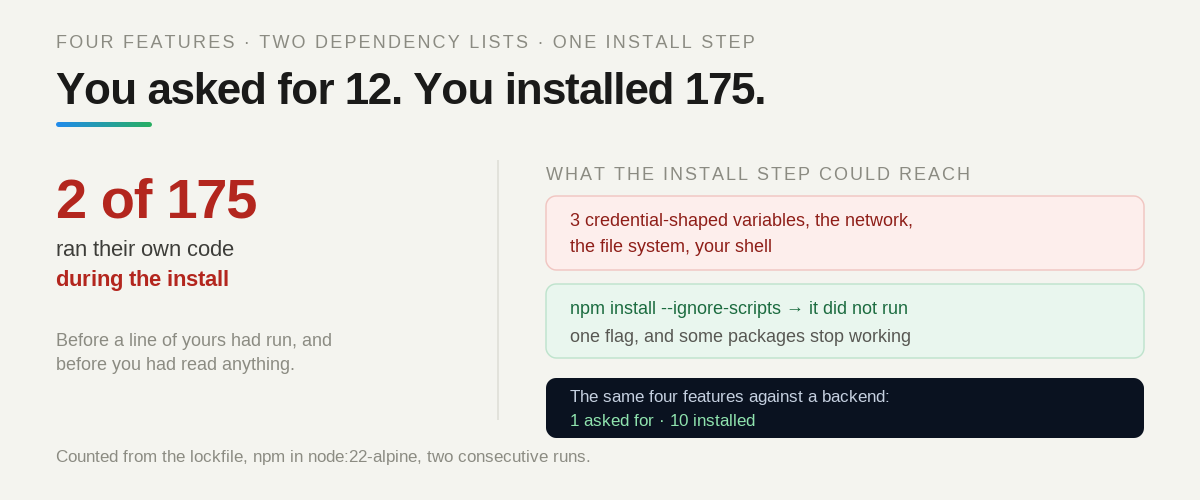
Fourteen times as much, for the same four features:
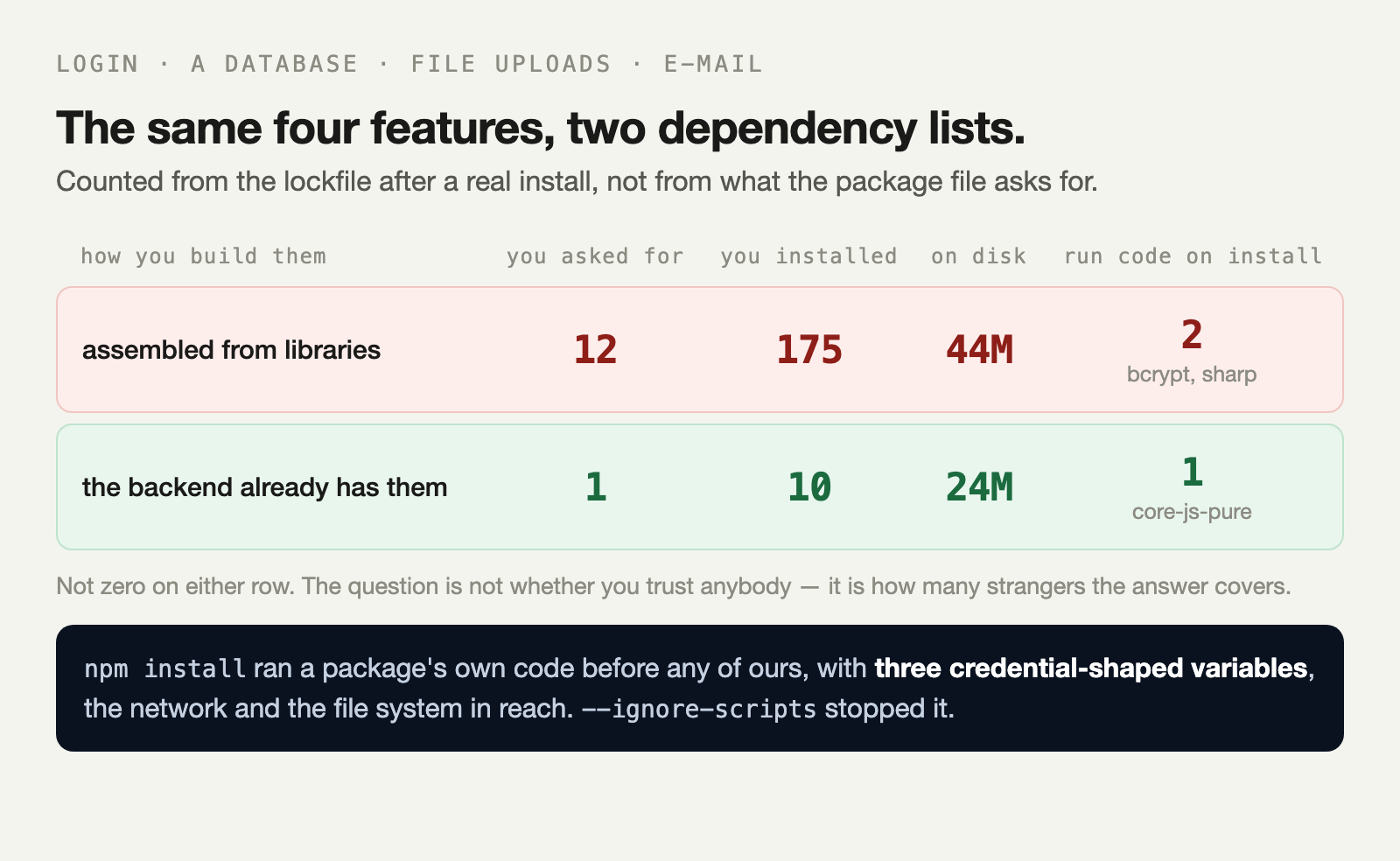
Neither row is zero on that last column, and that is deliberate. The honest claim is not that one approach is safe — it is that one of them asks you to trust a hundred and seventy-five sets of maintainers and the other asks for ten.
How we measured: npm install inside node:22-alpine, with every count read from the generated lockfile rather than the dependency list, and install scripts detected by reading each installed package’s own manifest. Identical across two clean runs — the lab is in the repo.
What can a package do while it is installing?
Anything your shell can, and this is the part most people have never watched happen. We wrote a package whose only content is an install hook:
// Stack: npm | File: package.json
{ "name": "a-package-you-did-not-read", "scripts": { "postinstall": "node postinstall.js" } }
Then installed it into an environment shaped like a real laptop or a real build:
npm install                       it ran
  it ran, before any of your own code did
  environment variables it could read that look like credentials: 3
    GITHUB_TOKEN, PROVIDER_API_KEY, DATABASE_PASSWORD
  it also had the network, the file system, and your shell
npm install --ignore-scripts      it did not run
Nothing imported that file. It ran because installing is an action, not a download.
The flag works, and it is not free. Packages that compile native code or fetch a platform binary genuinely need those scripts — bcrypt and sharp, the two in our own list, are exactly that kind — so turning it on globally means allowing those back one at a time.
Why do invented package names matter?
Because the names are available, which is the entire precondition. A USENIX Security 2025 study generated 576,000 code samples from sixteen models and collected 205,474 unique package names that do not exist — and a large share of them recurred when the same prompt was run again.
Recurrence is what turns a mistake into an attack. A name that appears once is noise; a name that appears every time is a target somebody can register and wait on.
We checked eight plausible-looking names against the live registry, constructed here by hand from the shapes that get confused with real ones — a scope added or dropped, a plural, a hyphen. These were not harvested from a model, and the lab does not claim they were:
express-session           200         exists
expresssession            404         nobody owns this name
express-sessions          200         exists
@express/session          404         nobody owns this name
node-bcrypt               200         exists
bcrypt-js                 404         nobody owns this name
mongoose-client           200         exists
nodemailer-smtp           200         exists
Three of eight are unclaimed. Each one is a name an attacker can take this afternoon and publish anything under, including the install script from the section above.
What should you check before adding a package?
Three things, in under a minute, and the order matters. Does it exist with real download numbers — not a 200, actual traffic. Does the repository it links to exist and contain the code. Does a human maintainer appear anywhere.
A hallucinated name fails the first check instantly. A squatted name usually passes the first and fails the other two, because the attacker has downloads from people who already fell for it and nothing else.
Then commit your lockfile. It is the only record of exactly which versions you reviewed, and without it the next install can resolve to something you have never seen.
When is a long dependency list the right answer?
When the alternative is writing those libraries yourself, which is almost always worse. A hand-rolled password hash, a hand-rolled image resizer and a hand-rolled e-mail sender are three ways to have a bad week, and the measurement in our login comparison shows exactly how that goes.
The argument here is not against libraries. It is that four capabilities assembled from twelve libraries and four capabilities that arrive together are different amounts of trust, and only one of those numbers is usually looked at.
There is also a real cost on the other side worth stating plainly. Depending on a backend concentrates your risk rather than removing it: one provider instead of a hundred and seventy-five maintainers is fewer strangers and a larger single point of failure, which is a trade you should make on purpose rather than by accident.
What is worth running right now?
Open your project and count the packages in your lockfile, not the ones in your dependency list. On most projects the second number is a rounding error against the first, and seeing the gap once changes how the next dependency gets added.
Then list which of them run code at install time. If that number is not zero — and it will not be — you now know how many strangers get to run something on your build machine before your tests do.