Your coding agent is good at writing code and bad at admitting what it assumed. It picks a state shape, an error convention, a boundary — silently — and you discover the choice three files later when something contradicts it.
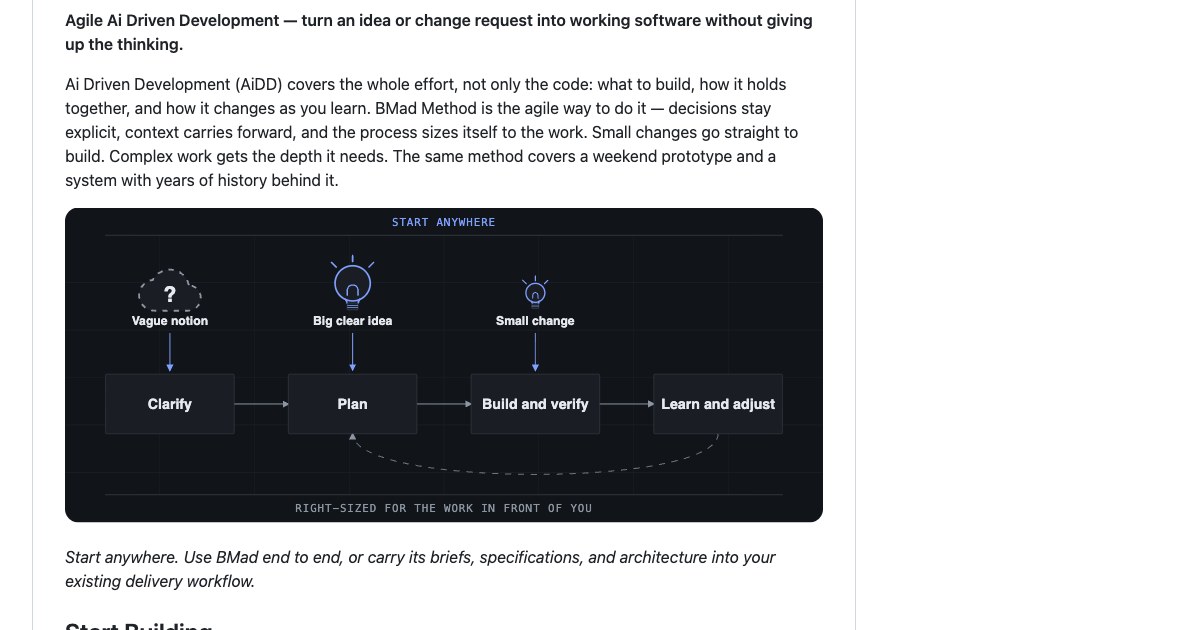
The BMAD Method attacks that by putting the decisions on disk before the code exists. It installs as a set of agent skills, gives you named personas to talk to, and writes briefs and architecture documents your next session can read instead of re-deriving.
This guide installs it from scratch, runs two planning workflows end to end, and then does the thing most write-ups skip: checks the output with the linter BMAD ships for exactly that purpose. Measured on 23 September 2026 against version 6.13.0-next.
Watch it instead
The same idea on video: what the method is, why multiple specialised personas beat one general assistant, and what it feels like to work through them.

What problem does BMAD actually solve?
It keeps the reasoning that produced your code, instead of throwing it away at the end of the chat. A coding agent is effective at implementation and indifferent to provenance: ask it for a feature and you get a feature, plus a dozen decisions nobody recorded.
BMAD’s answer is a set of skills, each one a specialised workflow, that write their output to files in your repository. A product brief is a file. An architecture document is a file. The reasoning behind each is appended to a memory log beside it.
That shape is the whole argument. The next session, the next agent, or the colleague who inherits the project reads the decision rather than guessing at it — and because the artifacts are plain Markdown, nothing is locked inside a vendor’s chat history.
What do you need before you install?
Three things, and one of them is new since the video: Node.js with npm, Git, and uv. BMAD’s workflows are driven by Python scripts, and uv is how they run — without it the skills stop and tell you to install it.
node --version   # v22.21.1
git --version    # 2.54.0
uv --version     # 0.11.6
Your editor also has to support agent skills. The skills CLI detects what you are running and installs accordingly; on this machine it found Claude Code and installed without asking a single question.
How do you install it?
One command in your project, and the skills CLI does the rest. You can browse what is on offer first — the repository publishes 32 skills, and you are not meant to take all of them.
npx skills add bmad-code-org/BMAD-METHOD --listTo install, name the skills you want. The README’s baseline is the hub plus the two module records; add the personas and workflows you expect to use.
npx skills add bmad-code-org/BMAD-METHOD \
  --skill bmad --skill bmod-core-tools --skill bmod-method \
  --skill bmad-build --skill bmad-agent-analyst \
  --skill bmad-agent-architect --skill bmad-brainstorming
Seven skills landed in 3.7 seconds. They live in .agents/skills/ at the project root, symlinked into .claude/skills/ for Claude Code and copied into a universal layout that 20 other tools read — Codex, Cursor, Copilot and the rest — so the same install serves whichever editor you open next.
How do you know what is missing?
Ask for status before you do anything else. The bmad skill is a hub: it reads the installation, reports what state it is in, and names the one command to run next.
The first status on a fresh install came back current: false with next: "bmad setup" — and, more usefully, six recommendations. Each persona declares the workflow skills it leans on, and the ones you skipped are listed with the exact command to add them.
{
  "skill": "bmad-agent-architect",
  "requires": "bmad-architecture",
  "state": "missing",
  "install": "npx skills add bmad-code-org/BMAD-METHOD --skill bmad-architecture"
}
These are recommendations, not faults — an analyst without the deep-recon skill still works, it just has less to reach for. Installing all six took another 3.3 seconds and brought the project to 13 skills.
What does setup create?
Run setup and BMAD writes a _bmad/ folder: 19 files, 288 KB, and nothing you have to fill in by hand. It is an upsert, so it is also what you run after every update.
_bmad/
  config.toml           # project name and where artifacts go
  scripts/              # shared Python the skills call
  core-tools/scripts/   # per-module copies
  method/scripts/
  custom/.gitignore     # keeps personal answers out of commits
The config is short and worth reading, because it decides where everything you produce will land — _bmad-output/planning-artifacts for planning, _bmad-output/implementation-artifacts for code work, docs for project knowledge.
Setup asks only questions the installed modules declare. In this run there were none, and the second status came back current: true, next: null, with zero problems and zero unmet requirements.
What do the planning workflows actually produce?
Files, in a run folder, with a memory log beside them. Pointed at a small product — a borrowing log for a volunteer-run community library — the brief workflow produced brief.md under a dated folder, structured as executive summary, problem, solution, who it serves, success criteria, scope and open questions.
The interesting part is the companion. Every workflow writes decisions through a shared script, so the folder accumulates a record of why separately from what:
uv run _bmad/scripts/memlog.py append --workspace "$W" \
  --type decision \
  --text "Scope fixed to loans and returns only; borrower accounts, reservations and fines explicitly out of v1."
That line is the durable-context claim made concrete. The brief says what the product is; the memlog says which alternatives were closed and when — which is the part that normally evaporates when a chat window closes.
How does the architecture skill differ from asking for a design?
It refuses to write most of what you would expect. BMAD’s architecture skill produces a spine: only the invariants that would let two independently built parts diverge. Everything else is explicitly deferred.
Each decision is a small block with three fields — what it binds, what divergence it prevents, and the enforceable rule. The format is what makes it checkable later.
### AD-1 — A loan's returned state is a timestamp, never a boolean

- **Binds:** all
- **Prevents:** two builders modelling the same fact differently — one as
  `isReturned: true`, one as `returnedAt` — making the overdue query and the
  history view disagree.
- **Rule:** the `Loan` entity carries `returnedAt` as a nullable timestamp.
  Open means `returnedAt == null`. No boolean mirror may be stored.
The skill also insists that any technology it names be version-checked against the web rather than recalled, which is why the stack table in the output carries pinned versions rather than vague names. For this spine that meant confirming React 19.3.0, Vite 8.3.0, TypeScript 7.0.2 and the Parse JS SDK 8.6.0 before binding them.
Can you verify the output, or do you have to trust it?
You can verify a real part of it, which is unusual for anything in this category. The architecture skill ships scripts/lint_spine.py, and running it on the produced spine is a single command.
uv run .agents/skills/bmad-architecture/scripts/lint_spine.py \
  --workspace "_bmad-output/planning-artifacts/architecture/architecture-bmad-demo-2026-09-23"
The spine came back clean: "ok": true, "total_findings": 0. On its own that proves little — a linter that never fires is worth nothing — so the same file was corrupted deliberately and run again.
{"ok": false, "total_findings": 3, "findings": [
  {"detail": "AD-2 missing required field(s): rule", "severity": "high"},
  {"detail": "AD-1 id reused (also at line 32)", "severity": "high"},
  {"detail": "AD-1 is non-monotonic (follows AD-4)", "severity": "high"}
]}
Three high-severity findings, each naming the line. The checks are structural rather than semantic — no tool will tell you a decision is wrong — but “every decision carries its rule, and ids never collide” is precisely the kind of drift that makes a document untrustworthy six months later.
What happens when you move to code?
The build skill compiles itself for the run rather than handing the agent one static prompt. Invoking it renders a snapshot into _bmad/render/, and the snapshot only contains the steps the chosen route needs.
Asking for the oneshot route with a quick review produced a 92 KB, 12-file snapshot — the clarify, plan and oneshot steps, the review prompts, and a manifest — while the steps belonging to the longer route were left out.
The workflow it renders carries explicit standards, including a “Ready for Development” bar that requires every task to name a file path and every acceptance criterion to be written as Given/When/Then.
What should you watch out for?
Three things, none of them dealbreakers. The first is the version gap: npx skills add pulls from the repository’s main branch, so the skills reported 6.13.0-next while npm’s bmad-method sits at 6.12.0. If you need a pinned release, install from npm or a plugin marketplace instead.
The second is permissions. Skills execute with your agent’s full rights, and the installer says so. BMAD’s own setup script is clean — no shell execution, network access limited to fetching a version manifest, writes confined to the folder you pass it — but that is a property of this project, not of skills in general.
The third is scope creep in the opposite direction from usual: with 32 skills available it is tempting to install everything. Status will tell you what your personas actually want. Take those and leave the rest.
Where does this leave your backend?
Exactly where the spine put it, which is the point. The architecture document this run produced pinned a managed backend behind a single gateway layer — one module allowed to import the SDK, returning plain objects to the domain.
That is a boundary worth writing down before any code exists, whichever platform sits behind it. It is also what makes the decision reversible: the rule names the layer, not the vendor, so swapping the data source later touches one directory instead of every component.
Planning tools do not build anything by themselves. What BMAD changes is that the reasons survive the session — and reasons on disk are the cheapest thing you will ever have when the project is six months old and the person who made the call has moved on.