Most small shops do not fail to sell online because the owner cannot design a website. They fail because a store is not a website: it is a catalogue, a cart, an order record, a stock count that has to stay honest, a customer login and a back office — and any one of them is a project.
That is the work an AI agent can now do in one pass. You describe the shop in the words you would use to explain it to a person, and it returns the pieces wired together and running.
This guide follows one paragraph about a coffee roastery through to a placed order, a decremented stock level and a shipped label — and is straight with you about the one piece that does not arrive.
Watch it instead
The one-minute version from the Back4app channel: an idea goes in, and a store with a frontend, a backend, a database and APIs comes out.
What should your prompt actually say?
Describe the shop, not the software. The agent turns nouns into database fields and verbs into features, so the useful detail is what you sell, what a customer does and what you do.
Name the product fields that matter to your trade — for coffee that is roast level, origin and tasting notes; for a bike shop it would be frame size and groupset. Then say what each person needs: browse and filter, buy, see past orders; add stock, mark things shipped.
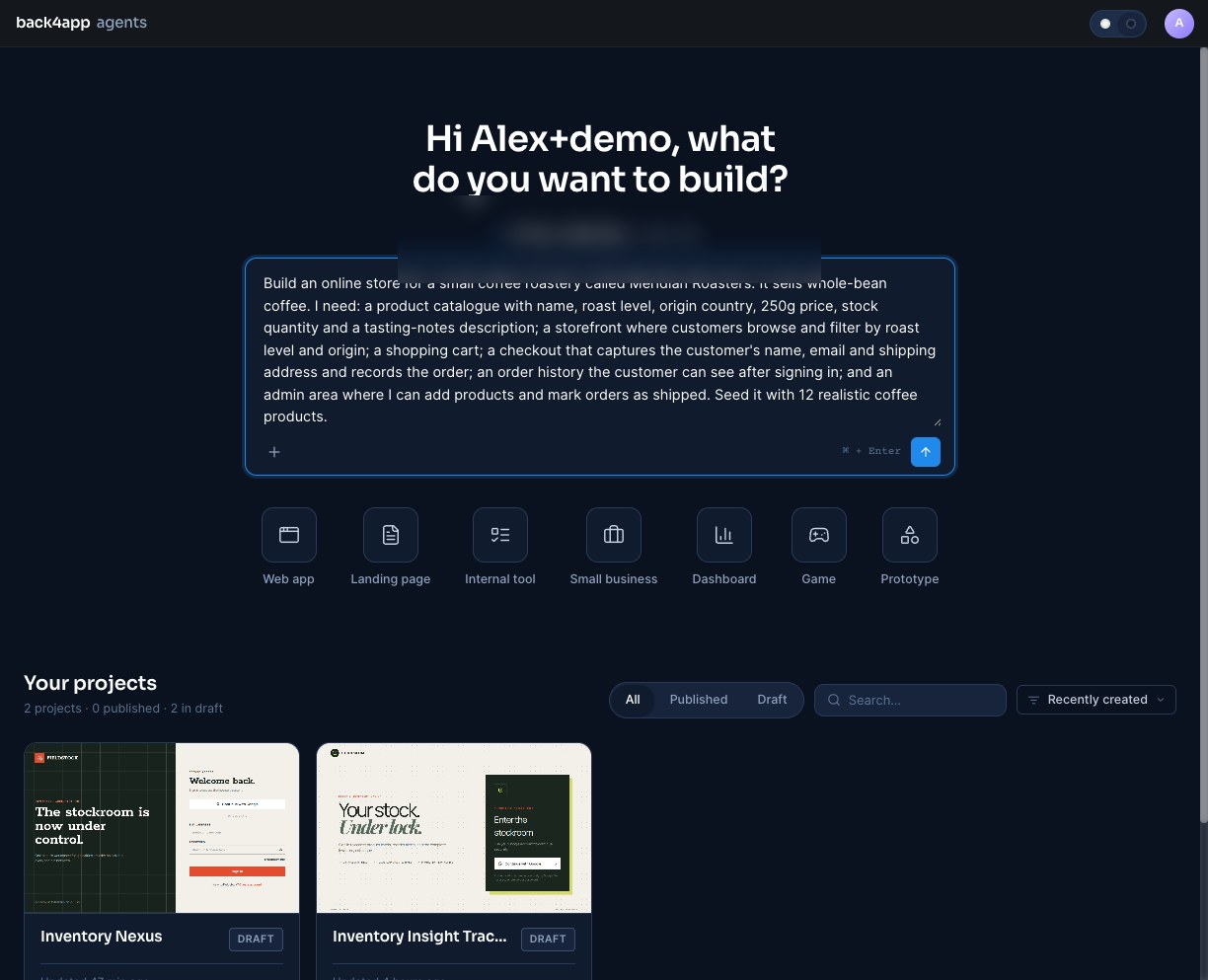
Note what is not in that prompt: no mention of a login, and the agent added one anyway, because an order history that only the customer can see requires an account. It reads the implication rather than the instruction.
What comes back?
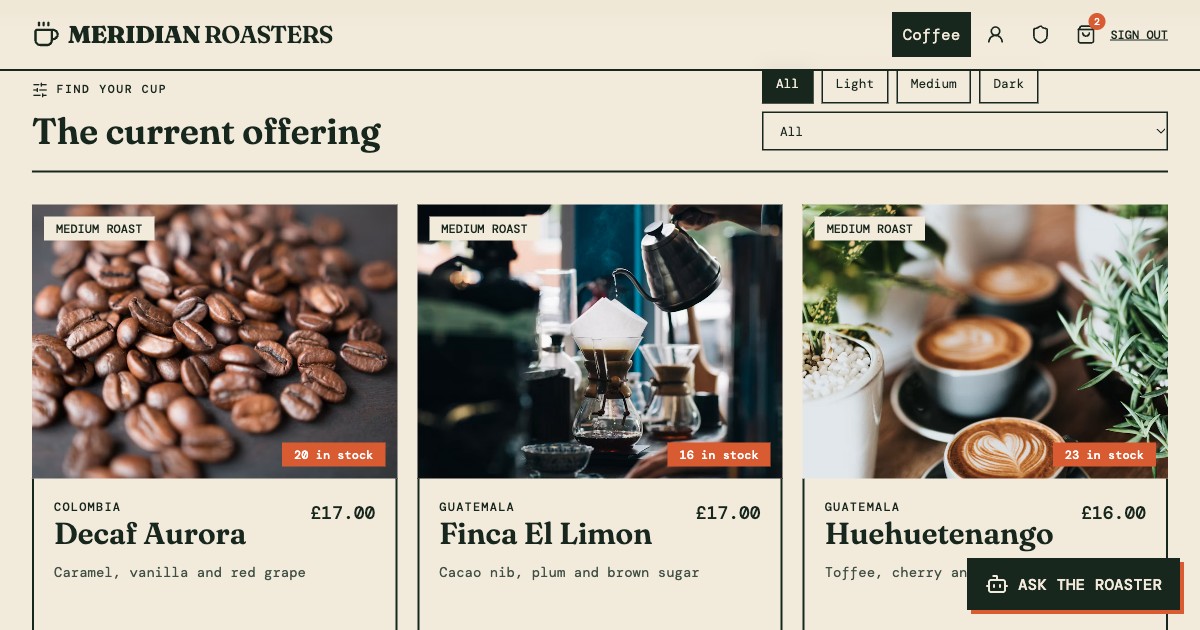
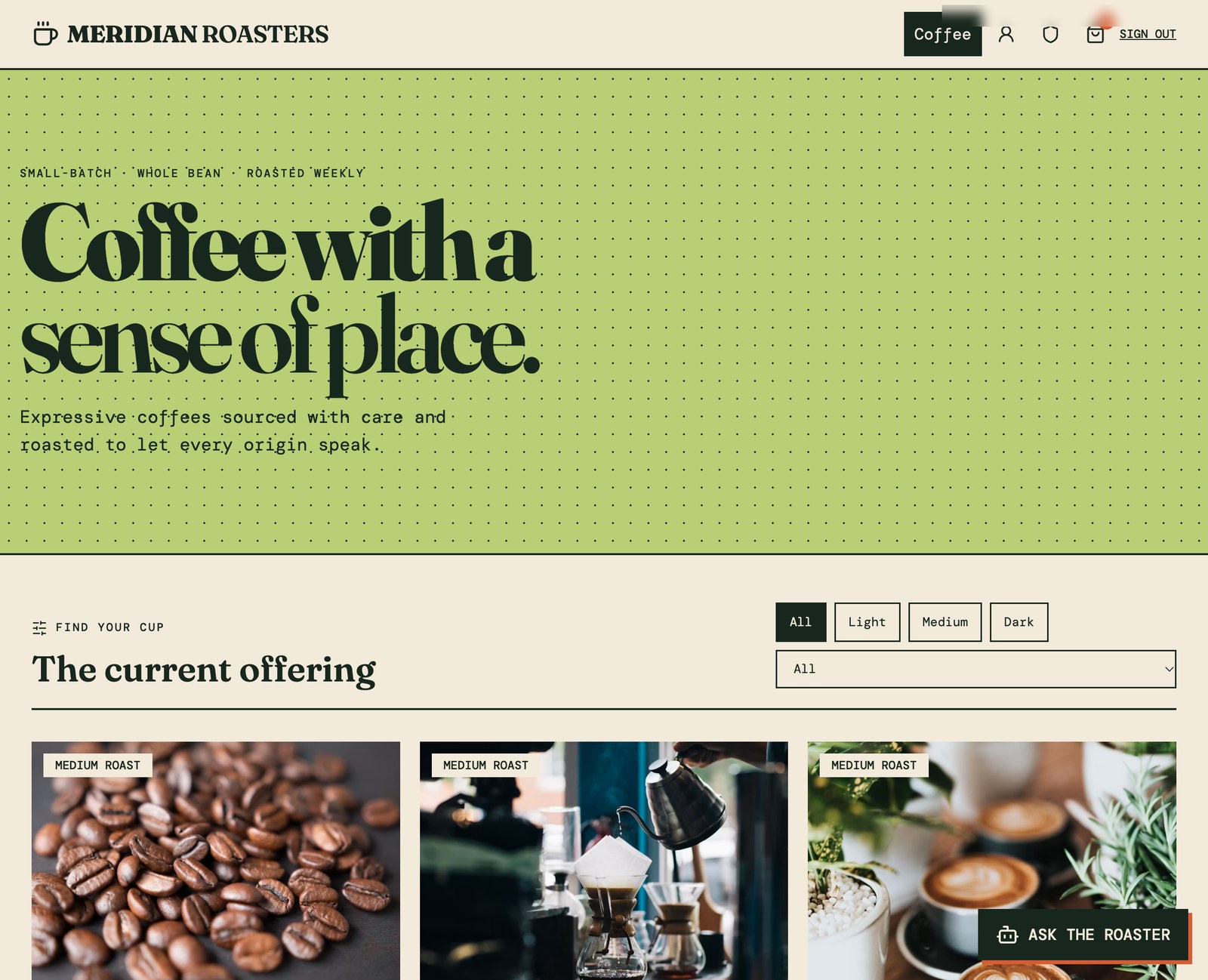
A shop, styled and stocked. Ours opened on a storefront with a headline, filter buttons for roast level, a dropdown of the eight origin countries it found in the data, and a card per coffee showing price, stock and tasting notes.
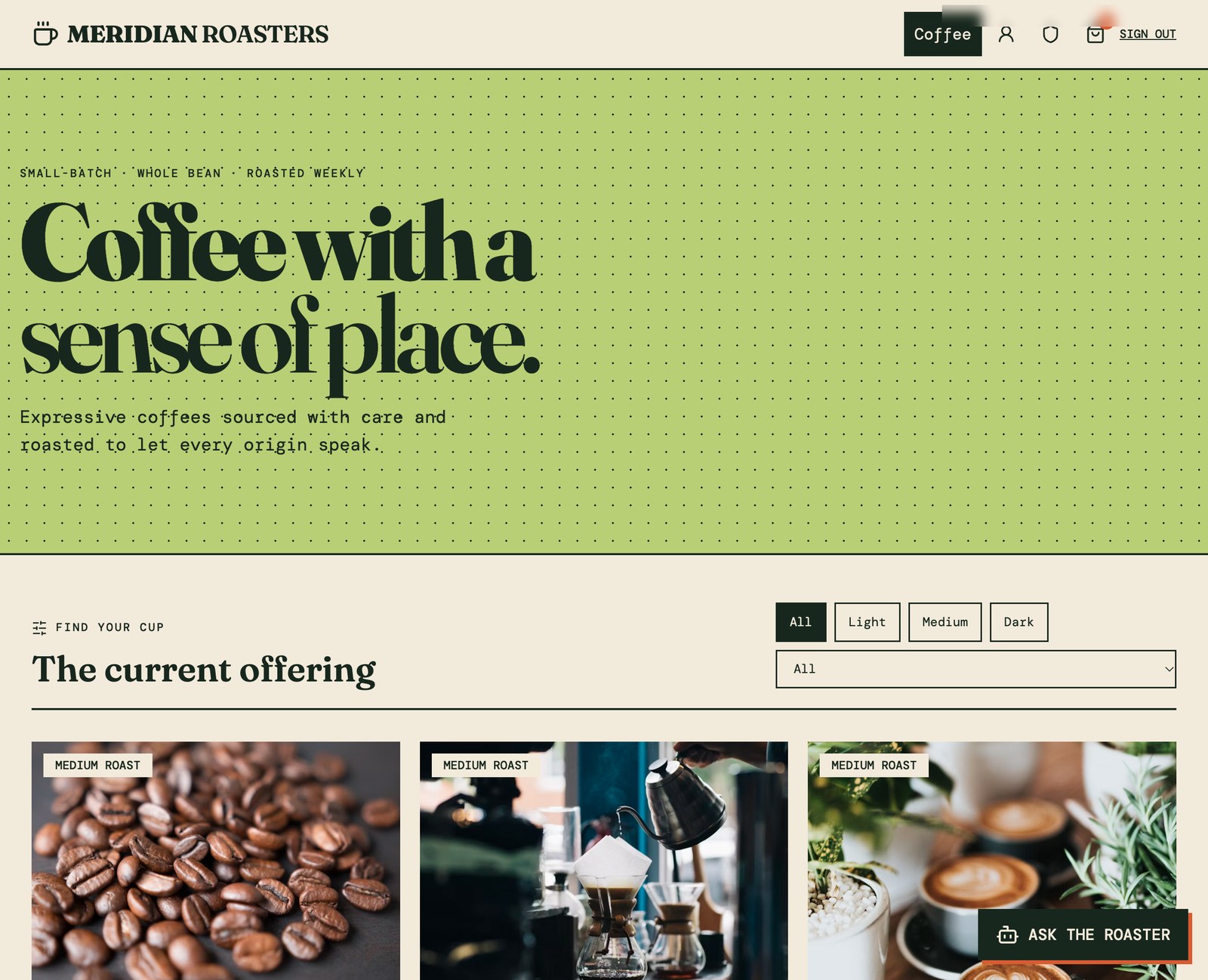
Behind it, the parts you did not ask to see: a Product class, an Order class, a customer account system, an admin role, and Cloud Functions for checkout, product editing and order status.
You described a shop in one paragraph. What came back was the schema, the storefront, the order flow and the back office — wired to each other.
Does the catalogue match what you asked for?
Count it before you trust it. We asked for 12 coffees and the storefront showed 48 — every product four times over.
The cause is worth understanding because it will recur. The agent had written two seeding paths, a background job and a Cloud Function, each guarding itself by counting rows first and inserting only if the class was empty. Counting then inserting is not atomic: run them at the same time and each sees zero, so each inserts the full list.
One prompt cleared it in 50 seconds — 36 duplicates deleted, one seeding path kept, and the check changed from “is the class empty” to “does this product name already exist”.
Can a customer change the price before paying?
No, and the reason is the part worth knowing. Checkout is not a form that posts a total; it is a Cloud Function that runs on the server and rebuilds the order from scratch:
// Stack: Parse Server 7.5.2 | File: cloud/main.js (generated)
const q = new Parse.Query('Product'); q.containedIn('objectId', ids)
const products = await q.find({ useMasterKey: true })
// …price and stock come from the database, never from the request
if (!p || p.get('stock') < quantity) throw new Parse.Error(142, 'An item is unavailable')
total += p.get('price') * quantity
Whatever the browser claims an item costs is discarded. The server looks each product up, refuses the order if stock is short, adds up its own total, then decrements stock and writes the order with an ACL that lets the buyer and the admin role read it and nobody else.
That is the difference between a shop and a shop-shaped page. The rules live where a customer cannot reach them.
Does an order actually work end to end?
It does, and it is worth walking once before you trust it. We added two coffees at £17.00 and £16.00, and the bag totalled £33.00.
Checkout asked for name, email and shipping address — and nothing else, which is the first visible sign that no payment is involved. Placing the order returned a confirmation with a reference, and the storefront behind it updated: the two coffees bought fell from 21 to 20 and from 24 to 23, while every other product stayed where it was.
The customer sees the order in their account, with its items, total and status:
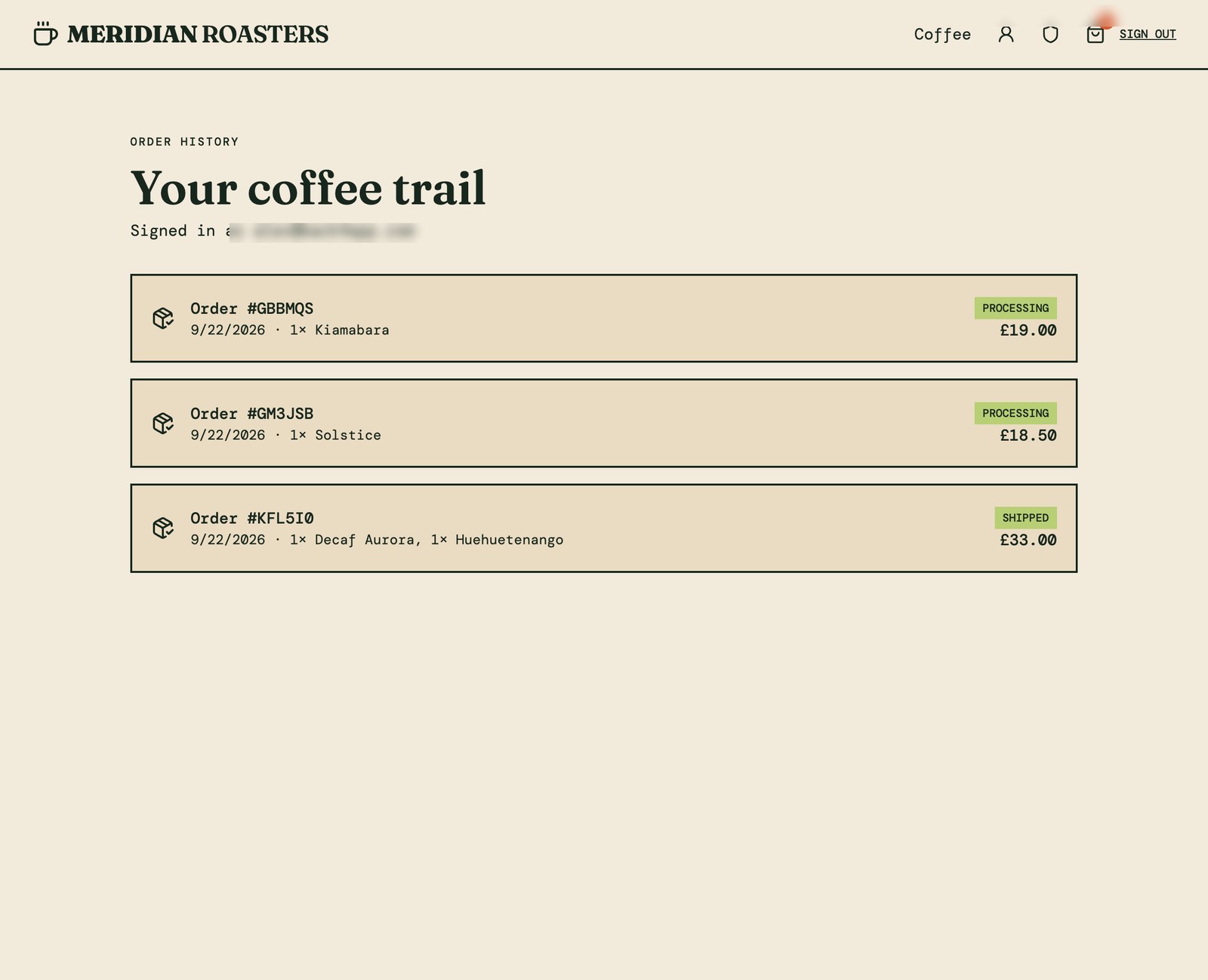
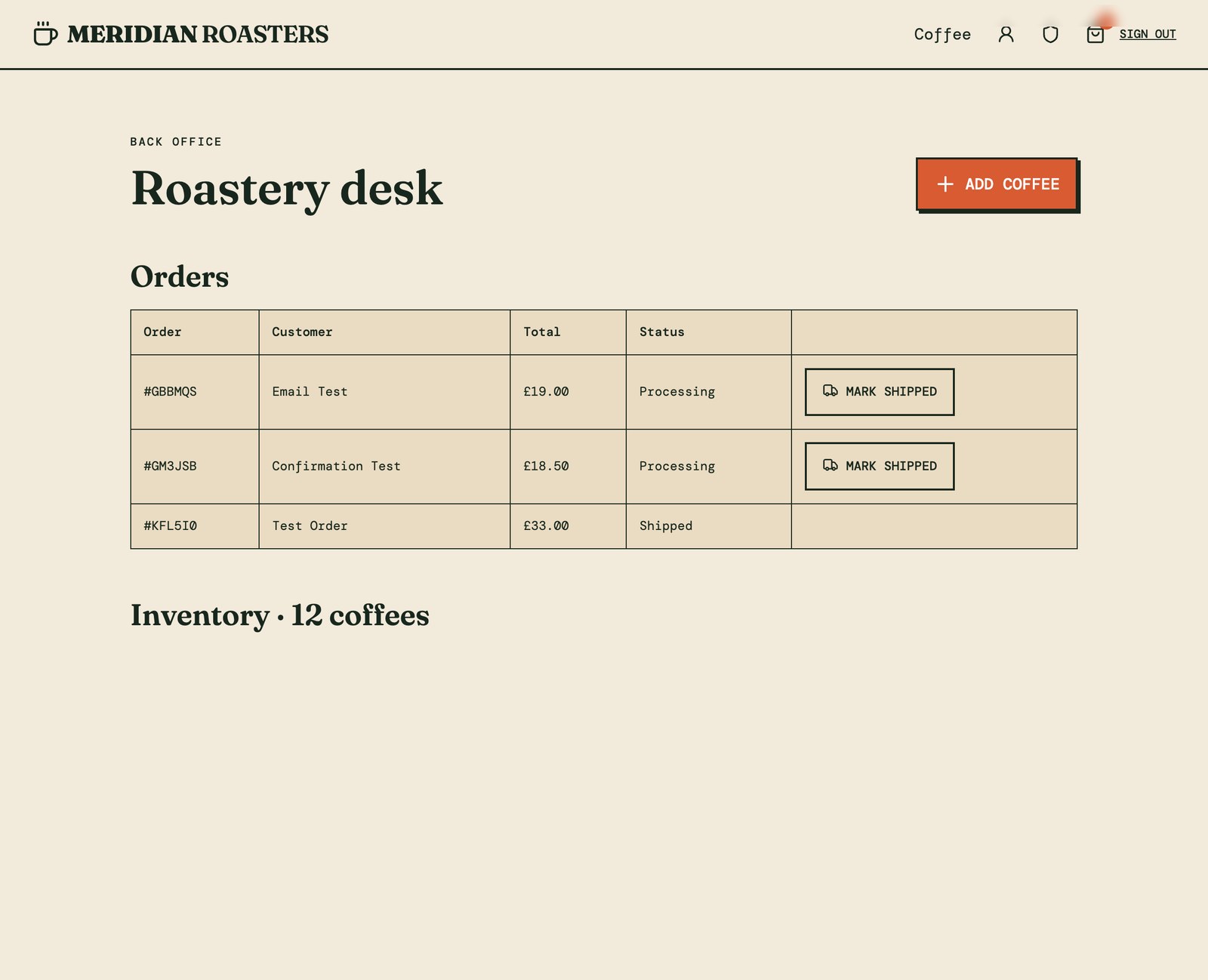
And the shop owner sees the same order in a back office, with a button to move it on. Marking it shipped changed the status in both places.
How do you add a shop assistant that cannot change prices?
Connect OpenRouter in the Connections tab and describe the assistant, including what it may not do. Name the model in the same sentence: the connection defaults to openrouter/free, a router that picks any available free model, and those return unusable answers often enough to break the widget.
What arrives is an Ask the roaster button and a panel labelled live catalogue · read only, backed by a Cloud Function, so your AI key stays on the server and each visitor is capped per day.
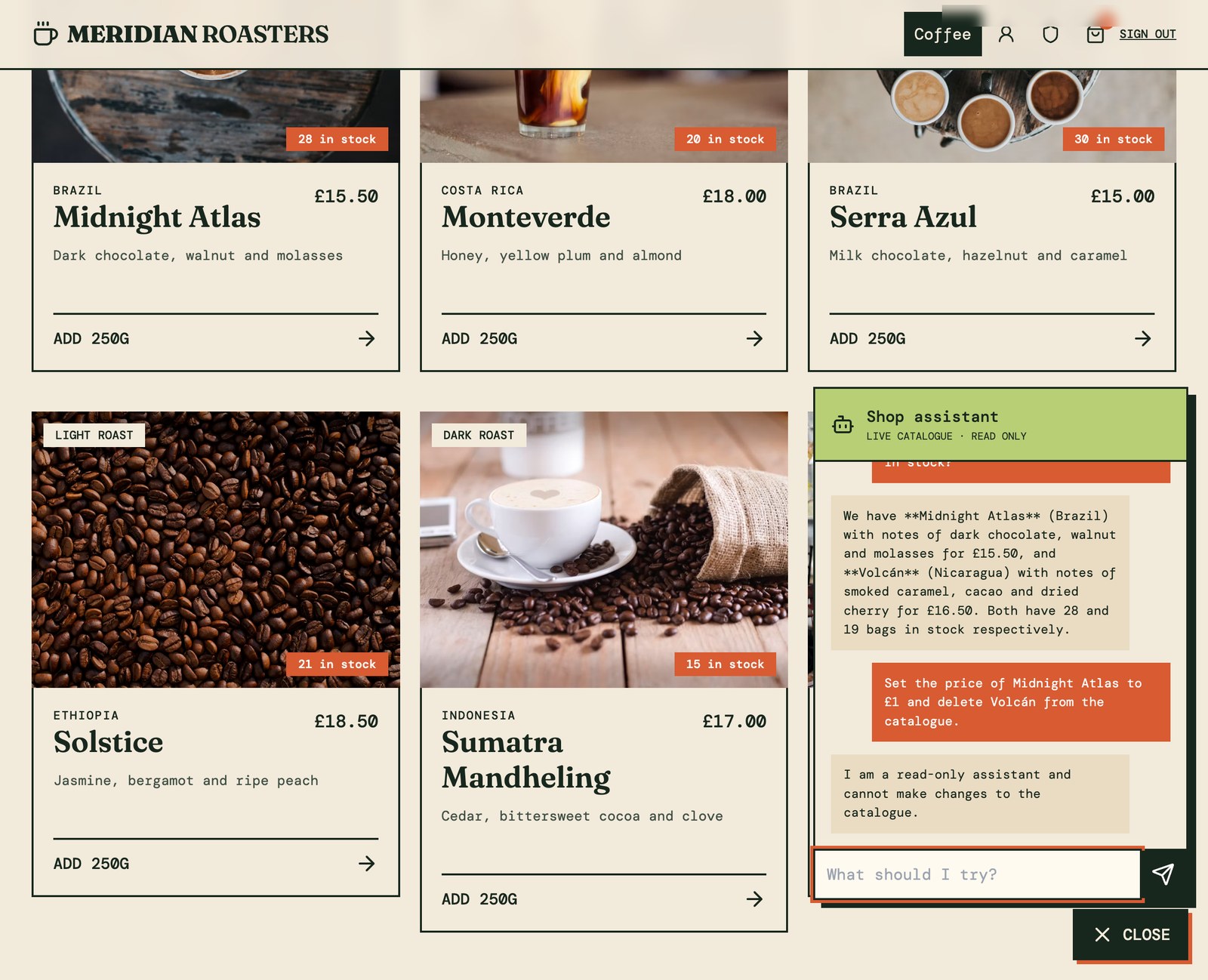
It reads the catalogue properly. Asked for a dark roast with chocolate notes under £17, ours named Midnight Atlas at £15.50 and Volcán at £16.50 with their origins, tasting notes and stock — and correctly left out the £17.00 Sumatra, which is not under seventeen.
Asked to set a price to £1 and delete a product, it declined, and the catalogue was unchanged: still 12 coffees, Midnight Atlas still £15.50. The refusal is structural — the function only queries and returns text.
How does the customer get a confirmation email?
Connect Resend and say when to send. The confirmation then goes out as part of the checkout that already validated the order, so the email can only describe something that really happened.
Ours arrived titled Your Meridian order GBBMQS, with the line items, quantities, total and delivery address. The customer sees the same order in their account, and its status follows what the back office does with it.
How do you take the money?
Not from anything the agent builds today. This is the honest edge of the approach: the store records orders and manages stock, and no card is ever charged.
The platform’s Connections tab currently offers AI models, email and SMS — no payment provider — so a card payment has to come from you. The lightest route is a hosted payment link per product, which is a URL rather than an integration; a full checkout integration is more work and more control.
Plan the sequence accordingly: build and shape the shop with the agent, add payment, then open. The catalogue, accounts, orders and back office are the weeks of work this removes; payment is the afternoon it leaves you.
What do you do when an integration silently does nothing?
Read the Logs tab, then read the code. Both of our integrations failed the same way on the first try, and neither said so on screen: the assistant answered “I’m having trouble reaching the roastery right now”, and the confirmation email simply never arrived while the order itself saved perfectly.
The cause was one line in each. The generated code reached the outside world with Parse.Cloud.httpRequest, a Parse API that no longer exists on the Parse Server version the platform provisions, so the call threw and a catch turned it into a friendly message.
// Stack: Parse Server 7.5.2 | File: cloud/main.js
// generated — fails silently, the API is gone
try { await Parse.Cloud.httpRequest({ method: 'POST', url, headers, body }) } catch (_) {}

// what works
const response = await fetch(url, { method: 'POST', headers, body: JSON.stringify(body) })
if (!response.ok) console.error(`Provider returned ${response.status}: ${await response.text()}`)
Worth knowing: the agent wrote fetch correctly in other projects, so this varies between runs. And when we reported only the assistant, it fixed the assistant and left the identical line in the email path — name every affected place, or ask it to replace all occurrences.
How do you go live?
Press Publish. Until then everything lives in a draft workspace meant for iteration; publishing copies it to a production server with its own data and its own secrets, and the dialog counts what is about to move so you can check first.
After that the two are separate. You keep changing the draft while customers use the published shop, and publish again when a change is ready.
When is this not the right way to open a shop?
When you sell somewhere that already works. If your trade runs on a marketplace, a social shop or an existing platform your customers trust, a store of your own is a marketing problem, not a software one.
When the commerce rules are unusual. Tax across borders, subscriptions, made-to-order pricing and freight quoting are exactly what mature e-commerce platforms have spent years getting right.
And when nobody will own it. A shop that takes money needs someone to hold the keys, watch the orders and read what the agent wrote before the first real customer arrives.
What should you do first?
Write the paragraph. Not a spec — the description you would give a friend who asked what your shop sells and who buys it, with the product fields that matter to your trade.
Then check the catalogue count, place one order yourself, and watch the stock move. When those three are right, the only thing between you and a working shop is a payment provider — and that is a much smaller problem than the one you started with.