Your SaaS has one customer and the backend works. The second customer signs, and the question changes shape: it is no longer “is the data protected” but “can company A ever see company B” — through a query, a pointer, an open WebSocket, a file URL.
Tenant isolation is the guarantee that every request is scoped to the organization the caller belongs to, enforced on the server — for reads, writes, real-time events and files alike. This post builds that guarantee on one shared backend, then attacks it with the keys a browser holds.
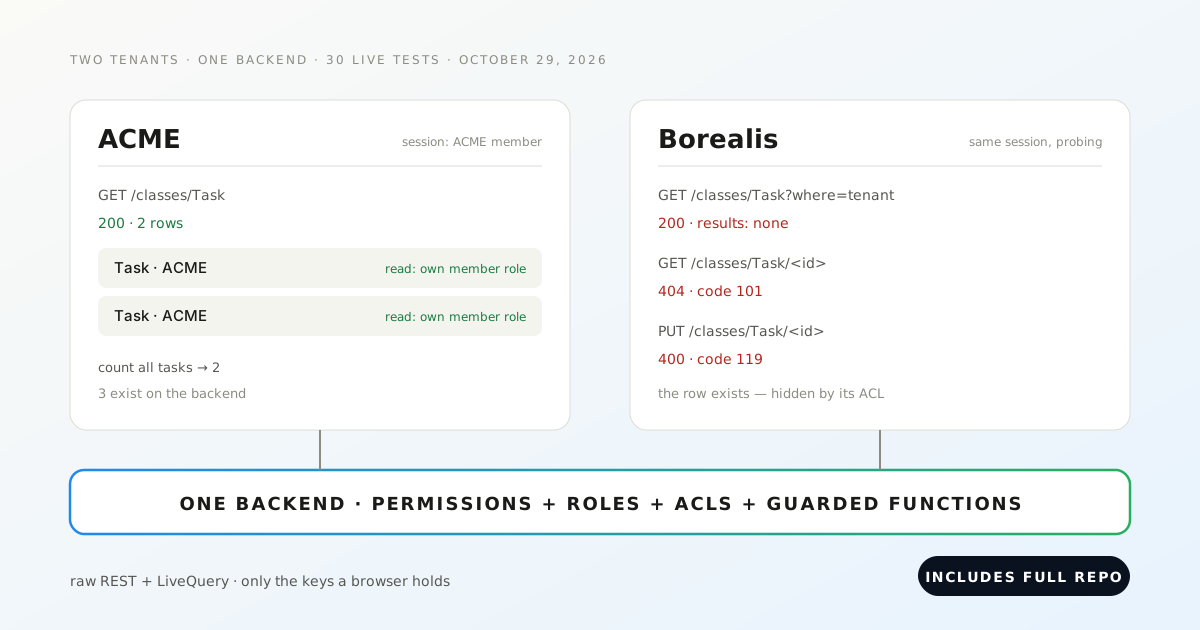
Two fictitious companies, ACME and Borealis, share one Back4app backend. On October 29, 2026 we ran 30 isolation tests against the live platform — raw REST and raw WebSockets, no SDK. The design held everywhere but one place: the raw URL of an uploaded file, which served its contents with no session at all.
Run it yourself: the lab is at github.com/templates-back4app/tenant-lab — every attack in this post is a test you can point at your own backend.
What keeps one customer from reading another’s on a shared backend?
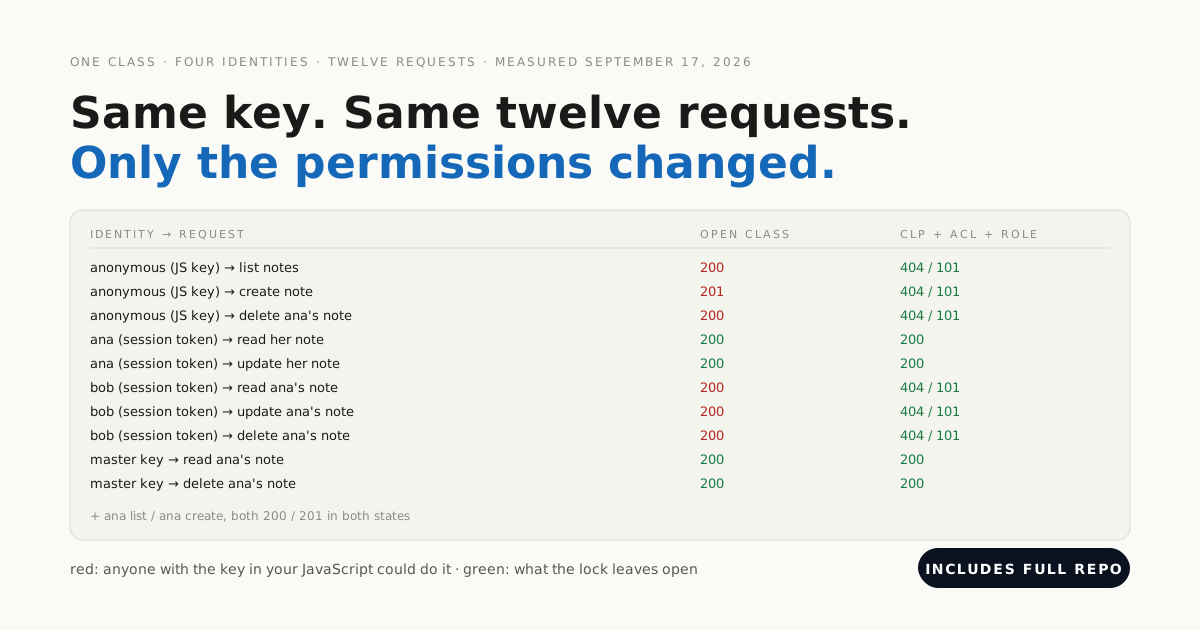
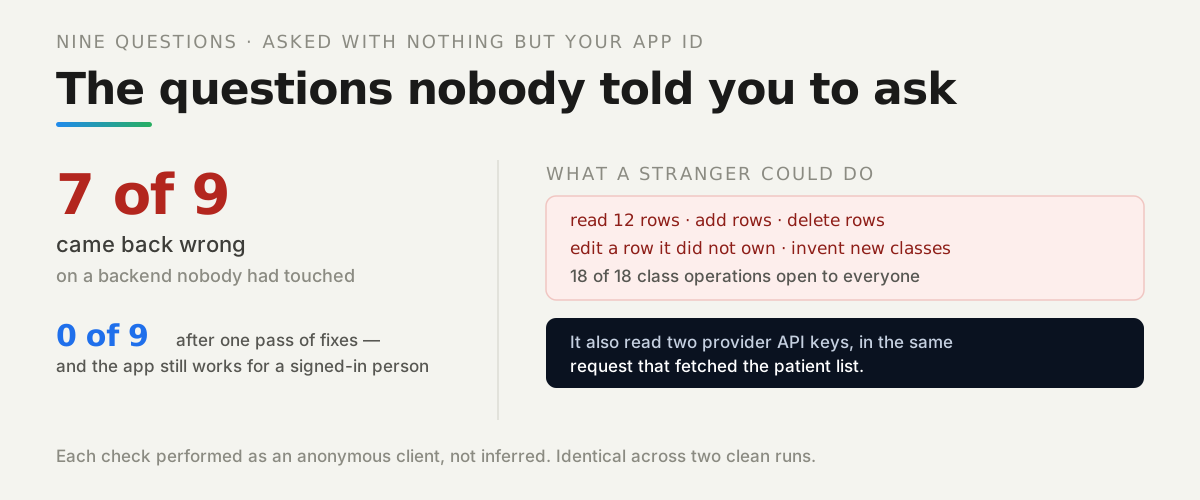
Nothing you declare once — only rules the server applies to every request. A browser ships the Application ID and a client key by design, so a competitor’s engineer holds the same credentials your app does, plus a legitimate session of their own. Isolation is whatever still refuses them.
This is the multi-tenant sequel to locking down a single-tenant backend: same platform, same keys, but now the attacker is a signed-in customer probing another customer’s rows.
For the wider picture of what a managed backend is, see the backend-as-a-service guide; this post assumes you chose one and asks what happens next.
The claim we test is precise: row-level isolation on one shared backend, enforced server-side, verified by raw requests. It is not a compliance claim, and files turn out to need their own sentence — that is the finding below.
Which four layers make up the isolation, and what does each one do?
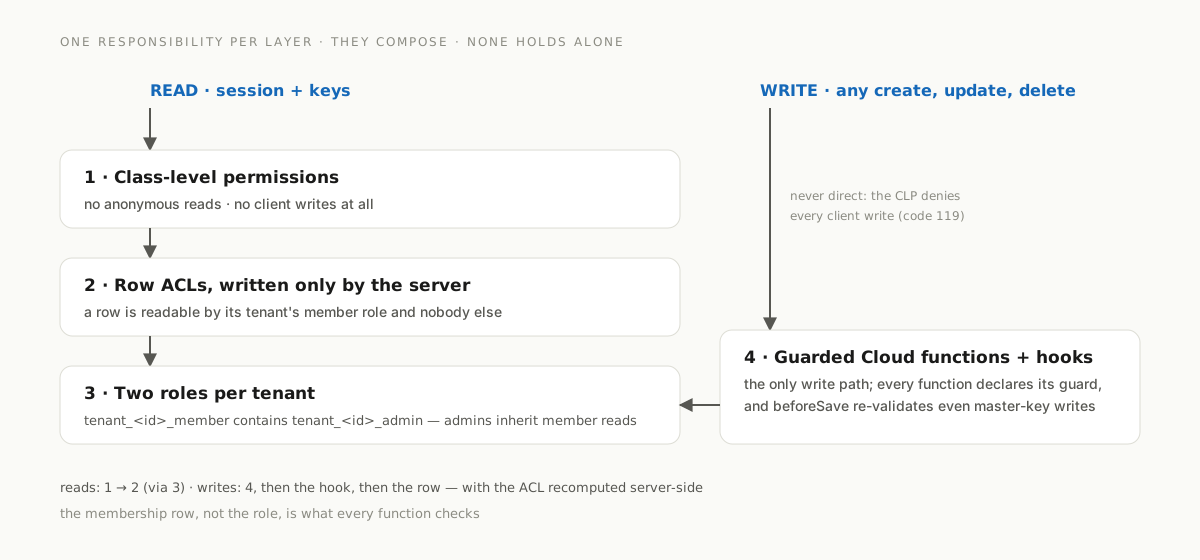
Each layer has exactly one responsibility, and they compose — none is claimed to hold alone. A read crosses the first three; a write never touches a class directly and goes through the fourth.
| Layer | One responsibility | Where it lives |
|---|---|---|
| Class-level permissions | no anonymous reads; no client writes at all | the schema (cloud/config.js) |
| Row ACLs | which signed-in users see a row — the tenant’s member role, written only by the server | beforeSave hooks |
| Two roles per tenant | tenant_<id>_member contains tenant_<id>_admin, so admins inherit member reads and members inherit nothing | created with the tenant |
| Cloud functions + hooks | the only write path; every function declares its guard, and hooks re-validate even master-key writes | cloud/main.js, cloud/guards.js |
The data model is five classes: Tenant, Membership (one row per user × tenant), Project, Task (with pointers and a file attachment — the surfaces most attacks aim at), and Invite. Invites, file metadata and _Role are readable by nobody but the server: a token is a secret and an e-mail address is personal data.
One decision does more work than any other: the membership row, not the role, is the source of truth. Every function checks it; roles only grant row reads. Grants are written membership-first, so a crash in between fails closed — the user can call functions but reads nothing until the next myTenants call repairs the role entry from the membership row.
Role names carry the tenant’s object id, never customer-identifying text. And the role hierarchy points the way reviewers expect it least: the member role contains the admin role, because containing means granting in Parse — a test asserts that a plain member gains nothing admin-only.
What does the lab cost to run, and how do you set it up?
One backend app and about fifteen minutes. The 30-test suite fits inside Back4app’s Free plan (25K requests a month, as listed on the pricing page in October 2026); the 1,000-tenant scale seeding below needs around 100K requests, which is why our measurements ran on the MVP plan — US$15 per app per month billed annually (US$25 monthly), 500K requests, same source and date.
Deploying is four steps, and one of them deserves its own warning:
- Create the backend app and copy the Application ID, JavaScript key and REST key into
.env.live. The master key stays in the dashboard — nothing in the lab needs it: schema, state read-backs and teardown all go throughSETUP_ENABLED-gated functions. - Upload Cloud Code:
cloud/main.js,cloud/config.jsandcloud/guards.jsin the Cloud Code page, confirm the badge Files pending deploy (3), Deploy. - Apply the schema:
npm run setup -- --livecreates the six classes, their permissions and indexes through thesetupSchemafunction. - Enable LiveQuery for the class
Taskunder App Settings → Server Settings → Live Query, and note thewss://subdomain.
141 Invalid function after a Deploy means the code did not ship — on a fresh backend the first Deploy can report Success while shipping nothing. Prove every deploy with a request, never with the dialog:
# Stack: curl | Target: the live Parse REST API, client keys only
curl -s -X POST https://parseapi.back4app.com/functions/myTenants \
  -H "X-Parse-Application-Id: $APP_ID" \
  -H "X-Parse-REST-API-Key: $REST_KEY" \
  -H "Content-Type: application/json" -d '{}'
Expected while deployed (the function exists and refuses anonymous callers):
{"code":209,"error":"{\"code\":\"UNAUTHENTICATED\",\"message\":\"Sign in before calling this function.\"}"}Teardown is part of the design: every suite run stamps its own random prefix on all usernames and tenant names, and testCleanup deletes only objects carrying that prefix. Before real users arrive, set SETUP_ENABLED = false in cloud/config.js, re-upload, Deploy, and confirm setupSchema answers SETUP_DISABLED.
How does the server decide which tenant a row belongs to?
Never by trusting the request. A client may name a tenant — a user can belong to several — but the server resolves the caller’s membership itself, stamps the tenant pointer, and recomputes the ACL. Whatever ACL or tenant the request carried is overwritten or refused.
The second guard is a beforeSave hook on every tenant class. It runs for every write, master key included, so a future Cloud function that forgets its check still cannot move a row across tenants:
// Stack: Parse Server 7.x, Cloud Code on Node 19 | File: cloud/main.js (condensed)
Parse.Cloud.beforeSave('Task', async (request) => {
  if (!request.master) hookFail('CLOUD_CODE_ONLY');   // clients never write, even if a CLP were widened
  const obj = request.object;
  enforceTenantField(request, 'Task');                 // tenant required on create, immutable forever after
  if (!obj.existed()) await requireActiveTenant(request); // no new rows into a deleting tenant
  const tenantId = obj.get('tenant').id;

  if (obj.dirty('project') || !obj.existed()) {        // pointers may not cross tenants
    const row = await fetchById('Project', obj.get('project').id);
    if (!row || row.get('tenant').id !== tenantId) hookFail('CROSS_TENANT_POINTER');
  }
  if (obj.dirty('assignee') && obj.get('assignee')) {  // assignee must be an active member
    if (!(await findMembership(obj.get('assignee').id, tenantId))) hookFail('CROSS_TENANT_POINTER');
  }
  if (obj.dirty('attachment') && obj.get('attachment')) { // attachment must be a file uploaded for this tenant
    const meta = await fileMetaFor(obj.get('attachment').name());
    if (!meta || meta.get('tenant').id !== tenantId) hookFail('CROSS_TENANT_POINTER');
  }
  obj.setACL(aclReadRole([roleName(tenantId, 'member')])); // the ACL is recomputed, whatever the caller sent
});
The functions in front of it carry the first guard, and a table makes forgetting it impossible. Every Cloud function must appear in a GUARDS registry naming its guard — member, admin, authenticated or setup — and the wrapper runs the membership check before the handler ever sees the request:
// Stack: Parse Server 7.x, Cloud Code on Node 19 | File: cloud/main.js (the registry)
const GUARDS = {
  createTask: 'member',  updateTask: 'member',  deleteTask: 'member',  getTask: 'member',
  invite: 'admin',  removeMember: 'admin',  deleteTenant: 'admin',
  createTenant: 'authenticated',  myTenants: 'authenticated',  acceptInvite: 'authenticated',
  // …a function missing from this table throws while Cloud Code loads:
  // a forgotten guard fails the deploy, not the tenant.
};
A unit test registers a function without an entry, with an unknown guard, and twice — the server refuses to start in all three cases. That is the honest version of “a shared helper prevents mistakes”: the helper cannot force anyone to call it, but the registry can refuse to boot without it.
What happened when ACME attacked Borealis’s data?
Every attack was refused, and — just as important — every refusal was verified beyond its status code: the suite reads the database state back and checks the rows are hidden, not missing. How we measured: one complete suite run against the live backend on October 29, 2026, MVP plan, USA East, holding only the Application ID, a client key and the attacker’s own session.
| Attack, as a signed-in ACME member unless noted | Live answer | Proof beyond the status code |
|---|---|---|
find / get Borealis tasks, where on their tenant | results empty; get by id 404 code 101 | master read-back: the row exists — hidden, not missing |
| update / delete a Borealis task by object id | direct REST 400 code 119; via function 404 code 101 | identical to a nonexistent id; title unchanged |
| create a task naming Borealis as tenant | 400 NOT_A_MEMBER; direct REST 400 code 119 | no smuggled row exists afterwards |
| create with a forged ACL granting public read | the ACL parameter is ignored | every stored ACL names only the tenant’s member role |
| count probes against Borealis values | counts answer 2 / 0 / 0 | three Task rows exist in total |
unfiltered LiveQuery subscription on Task | zero events from Borealis writes | ACME’s own sentinel event was delivered |
| dual-tenant user renames a task’s tenant | 400 TENANT_IMMUTABLE | the task’s tenant unchanged on read-back |
| invite token replayed / sent to the wrong account | INVITE_USED / INVITE_EMAIL_MISMATCH | the attacker has no membership row |
| plain member calls the four admin functions | 400 ADMIN_REQUIRED, all four | tenant, members and project intact |
| anonymous, no session | classes answer 101 or 119; functions answer 209 | never a row, never a count |
| ten parallel accepts of one invite token, five by a thief | exactly one membership created | stored useCount is 1; the thief has nothing |
Two details in that table are design, not luck. Refusals for an id you cannot see are identical to refusals for an id that does not exist (404, code 101), so object ids are not an existence oracle. And the one deliberate race — ten concurrent accepts of a single-use token — is decided by an atomic increment, which exactly one caller wins.
Five matrix rows cannot run against a live backend by design — they simulate crashes with master-key writes or corrupt a pointer below the API with SQL. They ran against a local parse-server 7.5.4 on PostgreSQL instead, and the one worth repeating held there too: a pointer corrupted in the database did not expand through include — the unreadable object was dropped from the response entirely.
The suite also runs positive controls for every persona — anonymous sign-up, member CRUD, admin lifecycle, dual-tenant reads, a removed member’s surviving session. A system that denies everything would pass most isolation tests; these prove the app still works.
Are uploaded files protected by the row’s permissions?
No — and this is the post’s lead finding. On October 29, 2026, the raw URL of a file attached to an ACL-protected task served the full contents with no App ID, no key and no session, on Back4app’s live file store. The row is invisible to outsiders; the file behind it is one GET away for anyone holding the URL.
The honest consequence: attachments are excluded from this post’s isolation claim unless you treat the URL itself as the secret. File names carry a long random prefix (guessing without it answered 404 in the local run), so the exposure is “anyone who ever obtained the URL keeps the file”, not “anyone can enumerate files”.
Whether that is acceptable is a per-product decision. For anything sensitive, store files where access is checked per request, and hand out the location only through a function that asks who is calling.
Deletion, at least, is real: after deleteTenant finished, the same attachment URL answered HTTP 403 on the live file store. That is also a local-vs-live finding — the local filesystem adapter answers 404 for the same request; the platform’s store answers 403.
How fast does removing a member actually take effect?
Define the guarantee before measuring it: fresh requests after removeMember returns must be refused; an open real-time subscription is a measured delay, never claimed instant; data already downloaded is unrecoverable by definition.
Against that model, measured over 10 live runs: the first refused read came at 0.41 s min / 0.42 s median / 0.94 s max after the call returned — and in one run of the ten, a single read still returned rows before the refusal.
How we measured: scripts/measure-revocation.mjs, 10 runs, MVP plan, USA East. The clock starts when removeMember returns; the removed member’s session then reads back-to-back until the first empty answer, while an open LiveQuery subscription is probed with fresh writes until three seconds of confirmed silence.
The mechanism explains the numbers. Removal flips the membership row first — so function calls die at once — then removes the user from both tenant roles, so row reads die as soon as the server’s role cache lets go.
The LiveQuery server caches a session’s roles (five seconds by default in Parse Server), which is the ~3.4–4.0 s tail on the open subscription. A fresh subscription opened after removal received zero events in every run.
That one-in-ten straggler read is worth its sentence: revocation on this stack is sub-second in the common case and just under one second in the worst case we observed — it is not a synchronous barrier. If a contract says “immediately”, write “within seconds” and link your measurement.
Removal is also scoped correctly: removing a dual-tenant user from ACME left their Borealis membership working, a removed admin’s calls refuse with the same envelopes as a stranger’s, and removing the last admin is refused with LAST_ADMIN — delete the tenant instead.
What does a tenant-scoped query cost at 1,000 tenants, or with a user in 50?
The honest answer as this draft circulates: the measurement is running, and the numbers below are placeholders the published version replaces. The design question is real — every tenant adds two _Role rows, and every membership adds to the role set the server resolves per request — so the lab varies one factor at a time: tenant count, then the caller’s membership count.
A tenant-scoped find of 100 tasks, as an ACME member, answered in 430.3 ms at p50 (524.3 ms at p95) with one tenant in the database, and 430.9 ms at p50 (514.1 ms at p95) with 1,000 tenants existing — 2,002 role rows and 100,000+ Task rows behind the indexes setupSchema created.
Hypothesis H3 — that tenant count costs something measurable — is unsupported at this scale: the pair is statistically the same query. A duplicated 1,000-tenant run (our own coordination mistake, kept as a free check) measured 417.6/511.1 ms, within 3% of the row we report.
| Caller is an active member of | find 100 tasks, p50 | p95 |
|---|---|---|
| 1 | 428.5 ms | 521.0 ms |
| 10 | 480.3 ms | 513.8 ms |
| 50 | 421.1 ms | 512.6 ms |
memberships counted at measure time from the caller’s own myTenants; p95 flat at ~514–521 ms across the whole column |
How we measured: scripts/measure-scale.mjs, 20 warm-ups discarded, 100 timed runs per cell, p50/p95 with the error count — 0 errors in all 740 timed calls — one factor varied per invocation, MVP plan, USA East.
Hypothesis H4 — that the caller’s membership count costs something — is likewise unsupported up to 50 memberships: the 480 ms p50 in the middle row is run-to-run noise, not a trend, with p95 flat.
Storage: the dataset behind these numbers is 1,000 seeded tenants with 1 project and 100 tasks each. After seeding, the dashboard’s Plan Usage page reported 34.59 MB of database storage (read 2026-10-30, from 0.00 MB before seeding) — about 35 KB per tenant at this fixed size, an average derived from measured usage, not a per-row accounting.
One measured footnote already: right after the plan upgrade, the Plan Usage page read 0.00 MB with Last Update: (N.A.) — it refreshes lazily, so the before/after pair has to bracket the seeding, not the upgrade.
Where do tenant leaks actually come from, if every layer held?
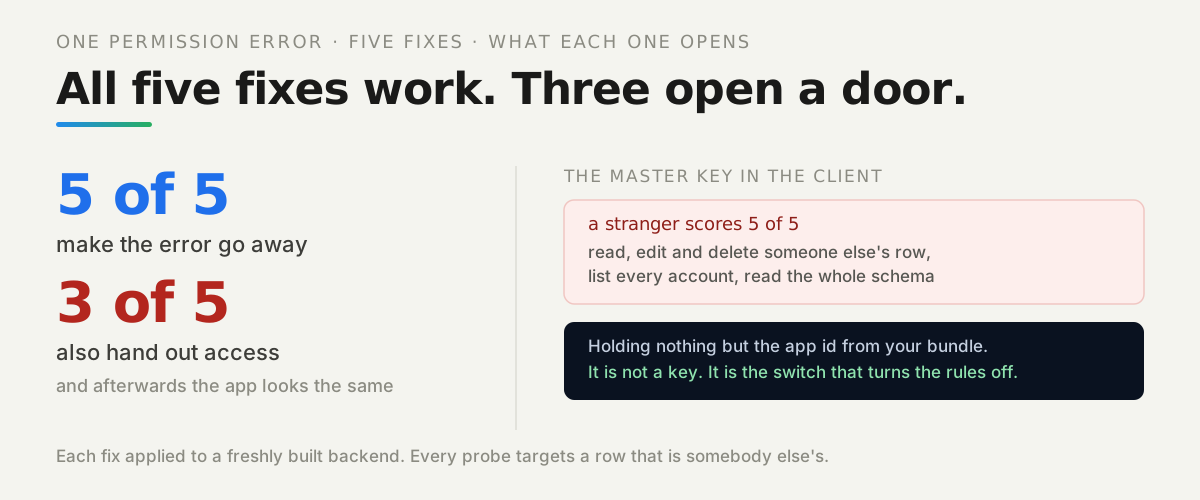
From code that runs with the master key and forgets to ask who is calling. A missing authorization check can leak tenant data straight past every layer below it — master-key reads bypass CLPs and ACLs by design. The lab ships that bug on purpose, behind a flag that is off by default, to show the shape of the failure and the fix.
demoTaskById reads any task by id with the master key and returns it after checking only that someone is signed in. Called by an ACME member with a Borealis task id in the flagged local run, it returned the full foreign task — title, assignee, attachment URL. Authentication alone does not isolate tenants.
The leak is never the ACL you wrote. It is the Cloud function you wrote afterwards, with the master key in hand and the membership check forgotten.
The fixed version, getTask, resolves the task’s tenant and requires an active membership before returning anything — and refuses a foreign id identically to a missing one. In the default deploy the vulnerable function is not merely guarded, it is not registered: calling it answers 141 Invalid function, which the live run confirmed.
The structural fix is the GUARDS registry from earlier: a function absent from the table throws while Cloud Code loads, so the forgetful version cannot reach a default deploy at all. We narrowed the claim deliberately — this prevents the forgotten check, not a wrong one. A review still has to read the guard a function declares.
How do you delete one customer completely — and what survives?
With a budgeted, resumable sweep, ordered so data dies before the records that explain it: attachment files first (while the metadata still knows their names), then file metadata, tasks, projects and invites, then the roles — at which point nobody can read anything of the tenant — then memberships, and the tenant row last.
The live test interrupted it on purpose. With a budget of 10 delete operations per call, deleteTenant answered done:false three times and finished on the fourth; writes racing the deletion were refused with TENANT_DELETING — by the hook, so even master-key writes are refused; and a repeat call after completion answered NOT_A_MEMBER, indistinguishable from a tenant that never existed.
What survived is as important as what did not: every user account, the shared user’s membership in the other tenant, and all of ACME’s rows. The deleted tenant’s attachment URL answered HTTP 403 afterwards. And the claim is bounded: it covers the live API and file store only — platform backups and logs are out of scope, which is exactly what you should tell a customer who asks.
When is row-level isolation the wrong answer?
When the customer is buying separation itself, not just correctness. A logical boundary — what this post built and measured — puts every tenant in one database and makes isolation a property of permissions and server code. Above it sit three distinct levels, and the trigger for each is contractual and operational, not a benchmark:
- A separate database per tenant buys an independent backup and restore timeline: one customer’s restore no longer rewinds anyone else. On Back4app the unit that owns a database is the app, so this level means an app per tenant; on self-hosted PostgreSQL it is a database or schema per tenant.
- A separate instance per tenant adds independent versions, quotas and failure domains — one tenant’s traffic or upgrade cannot touch another. Some platforms make this their primary model, treating the project or app as the hard boundary, with resources and access scoped inside it.
- Dedicated infrastructure is the level where a contract requires physically separate hardware or a single-tenant deployment, priced per customer accordingly.
Relational stacks draw the same first line we did with different tools: row-level security policies inside a shared database play the role our ACLs and hooks play. The pattern is the industry’s, not this stack’s.
What our data does not say: we measured correctness under attack, not crowding. Nothing in this post supports a claim about when a neighbour becomes noisy or where data-residency lines fall — if those are your constraints, they decide the level for you, before any benchmark.
What should you run against your own backend first?
The pattern this post demonstrates is transferable: name each layer’s single responsibility, write the attack for it, and verify the refusal and the database state behind it — a status code alone proves much less than it seems to.
Four attacks earn their keep on any stack: read the other tenant’s rows, write into the other tenant, open an unfiltered real-time subscription, and fetch a raw file URL with no session. The last one is where this stack — and not only this one — needs the URL treated as a secret.
The lab at github.com/templates-back4app/tenant-lab runs all of it: 30 live tests, the revocation and scale measurements, and the evidence files this article quotes, regenerated against your backend with one environment variable.
Run the isolation lab on Back4app — a free backend app is enough for the whole test matrix; the deploy steps above take about fifteen minutes.