The way most people find out their app is down is that somebody tells them. Not a monitor, not an alert — a message, usually hours later, often from the one person who bothered to mention it.
That is not because monitoring is hard. It is because the monitors an app ships with answer a question nobody asked: is the process running? The question that matters is whether a person can use the thing.
So we ran one app in four different states of broken, in a real container, and asked four monitors what they saw.
Watch it instead
Keeping the app alive is number 10 in our countdown of what actually goes wrong for people building with AI.

What did the monitors actually report?
This, and it is worse than it sounds:
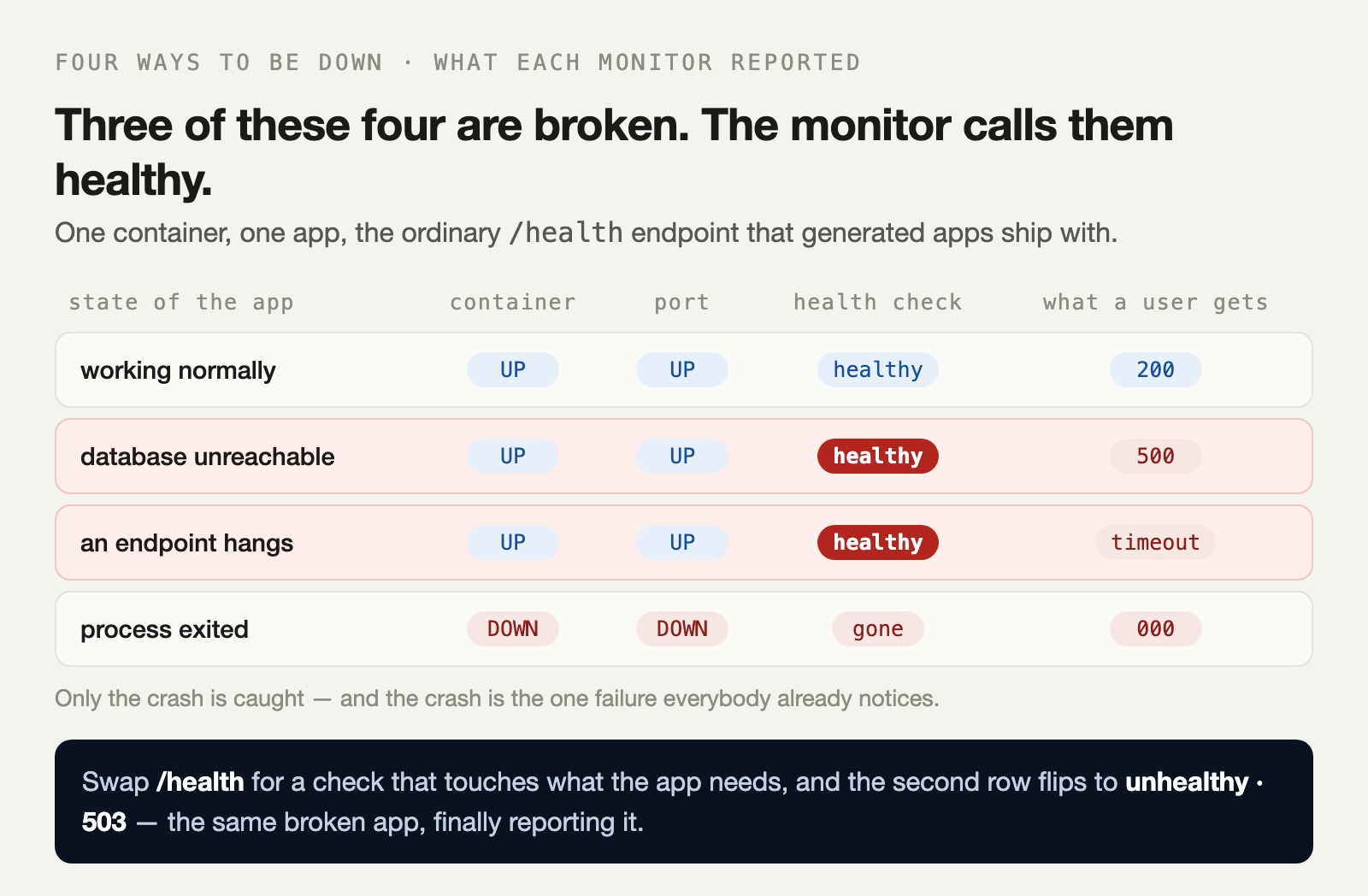
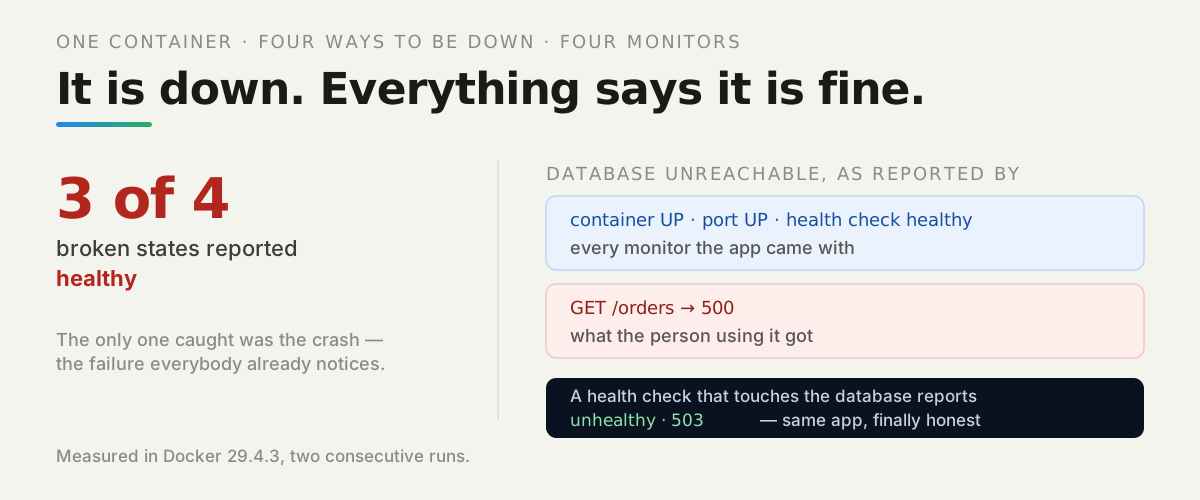
Read the second row slowly. The container is running. The port answers. The health check returns 200. The container’s own health status is healthy. And every request a person makes comes back 500.
Nothing in that row is lying, exactly. Each monitor is answering its own narrow question correctly. It is just that none of those questions is the one you need answered.
How we measured: one Node app with three switchable failure modes, built into an image and run under docker run with a --health-cmd, then probed with docker inspect, nc and curl. Stable across two consecutive runs — the lab is in the repo.
Why does the ordinary health check pass?
Because of what is in it. This is the endpoint almost every generated app ships with, and it is not wrong so much as empty:
if (req.url === '/health') return send(200, { status: 'ok' });It proves exactly one thing: this process is able to answer an HTTP request. It does not know whether the database is reachable, whether the queue is draining, or whether the thing it was built to do still works.
Each monitor is answering its own narrow question correctly. None of those questions is the one you need answered.
The failures that matter leave the process perfectly able to answer. A database that went away, a third-party API that changed, an endpoint that hangs — in all three the process is fine. It is the app that is not.
What should the health check do instead?
Touch the thing the app cannot work without, and fail when that thing is gone:
if (req.url === '/healthz') {
  const up = await dependencyUp();          // actually opens a connection
  return send(up ? 200 : 503, { status: up ? 'ok' : 'dependency unreachable' });
}
We changed nothing else — same image, same broken app, same probes:
| State | Health check | Container health | A user request |
|---|---|---|---|
| working normally | 200 | healthy | 200 |
database unreachable, /health | 200 | healthy | 500 |
database unreachable, /healthz | 503 | unhealthy | 500 |
The app was equally broken in the last two rows. The difference is entirely whether anything was willing to say so.
What about the failure that hangs?
That one is nastier, and our third row shows why. The process answers /health in a millisecond while the endpoint people actually use never returns at all.
A health check cannot catch this, because by construction the health check is the cheap path and the hang is on the expensive one. What catches it is measuring the request a person makes.
So the alert worth having is not “is it up”. It is a real request to a real endpoint, on a timeout, from outside your infrastructure — the same thing a user does, done on a schedule. Anything else is checking that the lights are on.
Where do the errors go?
Wherever you sent them, and this decides whether you can diagnose anything afterwards.
Our failing request printed one line to stdout, and we read it back out of the platform after the fact:
{"level":"error","msg":"orders failed: dependency unreachable"}That worked because it went to stdout. Had it gone to a log file inside the container, it would have been discarded the next time that container was replaced — which is every deploy, every scale event, every host migration.
What does a platform take off your list?
The part that is maintenance rather than judgement. Server updates, database patches and the infrastructure underneath are somebody else’s work, which removes the slow version of this problem — the app that degrades for months because nothing was ever updated.
Collected logs matter more than they sound, too. A dashboard that keeps what your app printed means the evidence from last Tuesday still exists, instead of having left with a container.
What no platform can do is write your health check. Only your code knows what your app cannot work without, and that is precisely the thing the check has to touch.
What should you do first?
Open your app and look at what /health returns. If it is a constant, you do not have a health check — you have a line that says 200.
Make it open a connection to your database and return 503 when it cannot. That is usually five lines, and it converts the most common outage you will ever have from invisible to alerting.
Then add one check from outside that requests a real page on a timeout. Between those two, the three failures in our table that reported healthy stop being able to.