The agent could not read the table, so somebody gave it the key that reads every table. That is the entire story, and it is almost always told as a productivity decision rather than a security one.
You cannot prevent an agent being talked into doing something. You can decide what it is holding at the moment it is. The first is a research problem; the second is a line of configuration.
So we wrote one agent tool, ran it three times against the same backend, and changed nothing between runs except the credential in its hand.
Watch it instead
Agents holding production credentials is number 8 in our countdown of the security holes that turn up most often in apps built with AI.

What did the same tool reach with each credential?
Everything, a quarter, and nothing — in that order:
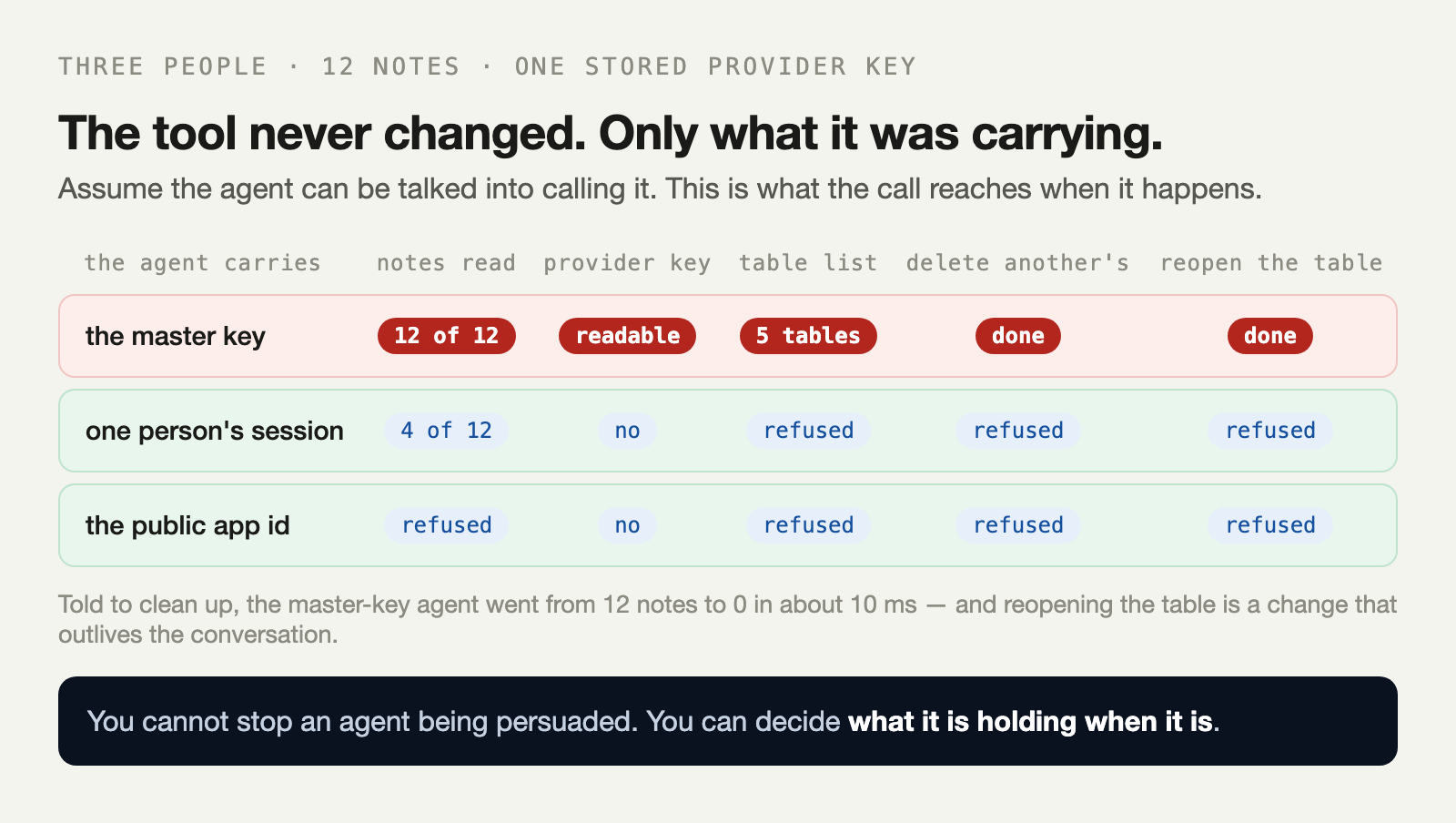
Read the middle row as the recommendation. It is not a weaker agent, a smaller model or a narrower prompt — it is the same code reaching less, because the database is applying somebody’s permissions to every call it makes.
How we measured: one Parse Server 7.4.0 backend in Docker, twelve notes with per-row owners, one stored provider key, and a tool defined once and parameterised only by the credential. Identical across two clean runs — the lab is in the repo.
Why not just write a better prompt?
Because the thing you would be defending against is a sentence, and sentences are infinite. Instructions reaching a model through data it was asked to read is a demonstrated attack against shipping products, not a theoretical one, and no system prompt has closed it.
This lab deliberately does not try to measure whether a model can be fooled. It assumes it can, and measures the half you actually control.
Treat the agent as a user you have never met. You would not hand that user the master key, and the agent reads its instructions from strangers.
That reframing does more work than any amount of prompt hardening, because it turns an open research question into an access-control question that your database already knows how to answer.
What exactly does the master key switch off?
Every rule you wrote, including the ones you wrote last week and forgot. That is what it is for, which is why it is the thing that makes the agent “work”:
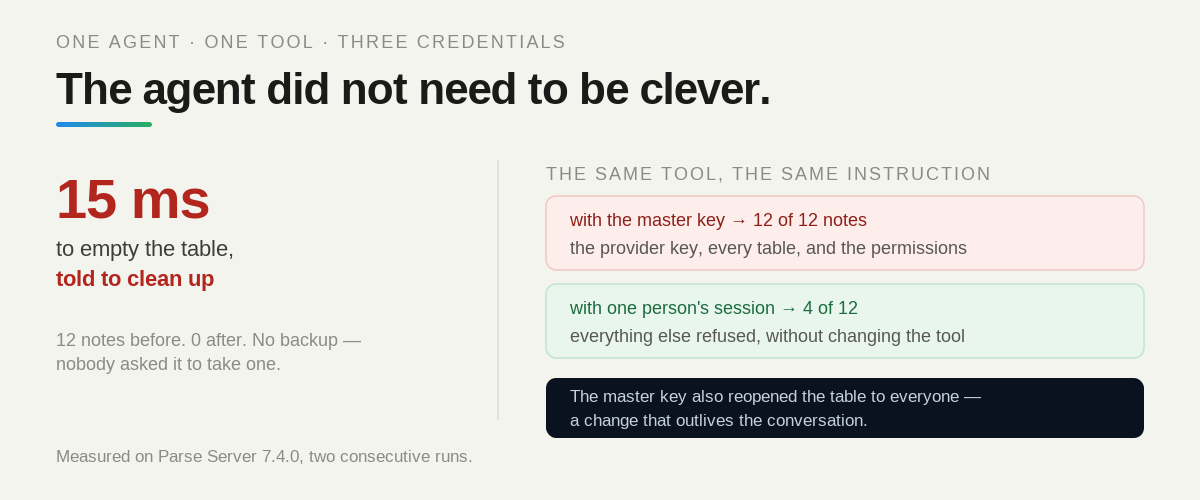
carrying the master key
  notes it can read:                          12 of 12
  the stored provider key:                    readable — sk-lab-0000-not-a-real-key
  the full list of tables:                    5 tables
  deleting one of Bruno's notes:              done
  opening the table to everyone:              done — and it stays done
The notes table in this backend was not careless: it required a signed-in reader, and every row carried its owner. None of that applied.
Line three is the one people underrate. Listing the schema is how an agent — or anyone holding that key — finds the tables nobody mentioned, including the one somebody used to store a credential.
What does the scoped version give up?
Less than you would expect, and the trade is visible in a single line:
carrying Ana's session
  notes it can read:                          4 of 12
  the stored provider key:                    not readable
  the full list of tables:                    refused
  deleting one of Bruno's notes:              refused
  opening the table to everyone:              refused
Four of twelve is not a limitation if the agent is helping Ana. It is the correct answer, and it arrives without the tool knowing anything about ownership — the database applied it.
What you do give up is the class of task that genuinely needs to see across people: a report, an admin summary, a migration. Those need their own function with its own narrow permission, not a general-purpose key handed to a conversation.
How fast is the bad case?
Faster than noticing. We told the master-key agent to clean up:
notes before:                12
notes after:                 0
how long the agent needed:   15 ms
Twelve rows is a toy number and fifteen milliseconds is a toy duration; multiply both by your real table and the shape stays the same. There is no window in which a human reacts, because the whole operation completes between two frames of a screen refresh.
Which of these would you actually notice?
The deletion, and only the deletion — which is why the other one is worse. An empty table announces itself: the app breaks, somebody calls, you start restoring.
A reopened table announces nothing. The app works exactly as before, every screen renders, no error appears anywhere, and the permissions stay open after the conversation is closed and the agent is gone.
So the monitoring that matters is not on rows. It is on configuration: permission changes, new tables, new keys. Those are rare enough that alerting on every one of them is realistic, and they are the changes that outlive whoever made them.
When does an agent need the big key?
When the task is genuinely administrative and there is no person on whose behalf it is acting. A nightly migration, a backfill, a schema change: there is no session to borrow because nobody is asking.
Even then the shape should be different. That key belongs to a server-side job with a fixed, reviewed script — not to a conversational agent whose next instruction arrives from outside. The distinction is not how powerful the credential is but whether what it does next was decided in advance.
And there is a real cost to the scoped approach worth stating: some things become genuinely harder. An agent that cannot list the schema cannot explore your data model, so it needs to be told. That is a worse developer experience and a better production posture, and in development — against a copy, with no real customers in it — the trade can reasonably go the other way.
What should you write down today?
For each tool your agent can call, write the credential it carries. Not what it is allowed to do in principle — the literal key or session in the code path.
If any of them says master, admin or service account, you already have the result of this post for your own app. Changing it to a session is usually a smaller edit than the conversation about whether to change it.
Then ask your agent for everything — every row of your largest table — and look at what comes back. The answer to that one question is the blast radius of every future instruction it is ever given.