Your FastAPI app runs on localhost:8000. It has a Dockerfile. And the moment you look for somewhere to put it, the question changes from “where does my code run?” to “where does my data live, and who is patching that Postgres?”
This post is about a Python API: FastAPI validating the shape of each request, a backend storing the rows, and the rule about what a valid task is living in exactly one place. A container platform runs uvicorn. A backend gives you the database and an API you did not write. The second one is where the servers hide.
The other three shapes have their own posts: Node.js with Docker, Next.js SSR, an always-on worker.
We built a task API — 80 lines of FastAPI, a seven-line Dockerfile — pushed it, and had it storing data behind HTTPS without a server to administer. The first deploy took 86 seconds from click to DEPLOYMENT READY. Everything below is from that run, on September 15–16, 2026, including the part Pydantic got wrong.
Get the working code: the companion repo is at github.com/templates-back4app/fastapi-tasks — main.py, Dockerfile, requirements.txt, cloud/main.js, and deploy-check.sh, which runs create, read, update, validate and delete against any deployment URL.
What does “without managing a server” include for a Python API?
Five things, and a Dockerfile only covers the first one. A platform can honestly claim the phrase only if it covers the whole list:
| What you need | Why it is not optional | Where it lives in this post |
|---|---|---|
| uvicorn running your app | The obvious part | Container, section 03 |
| HTTPS on a public URL | Clients and browsers refuse plain HTTP | Container, automatic |
| A database you don’t run | Data outlives the container | Backend, section 04 |
| Validation outside the container | The container is disposable; the rules are not | Backend, section 05 |
| Redeploy on change, without downtime | Otherwise you are back to SSH | Section 06 |
Most container hosts stop at the first two: they run the Dockerfile and give you a URL. The database is a separate, separately billed service with a connection string, and the pool, the migrations and the backups are yours.
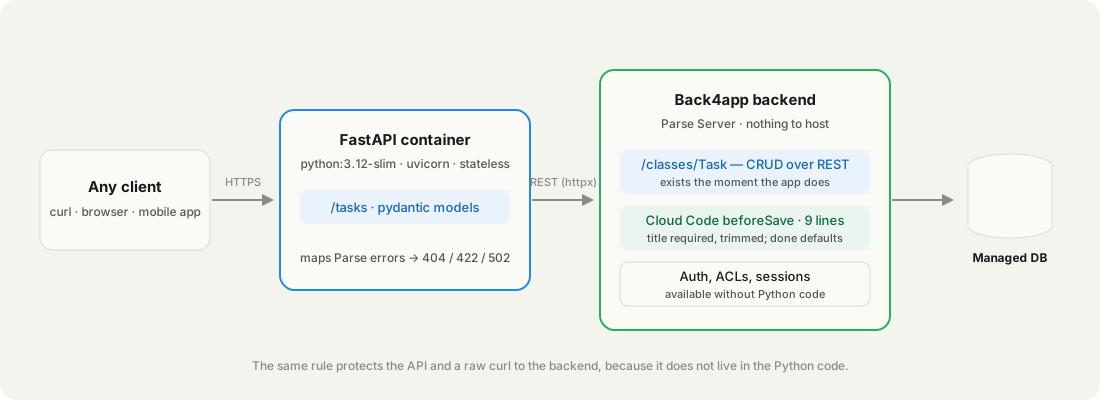
Back4app is the one we tested because the second half is a product from the same account: a backend app with a managed database and a REST API, which a container app calls over HTTPS. No driver, no pool, no connection string — two headers.
The container is the only piece you build an image for. The database is a URL and two headers.
What does the FastAPI task API contain?
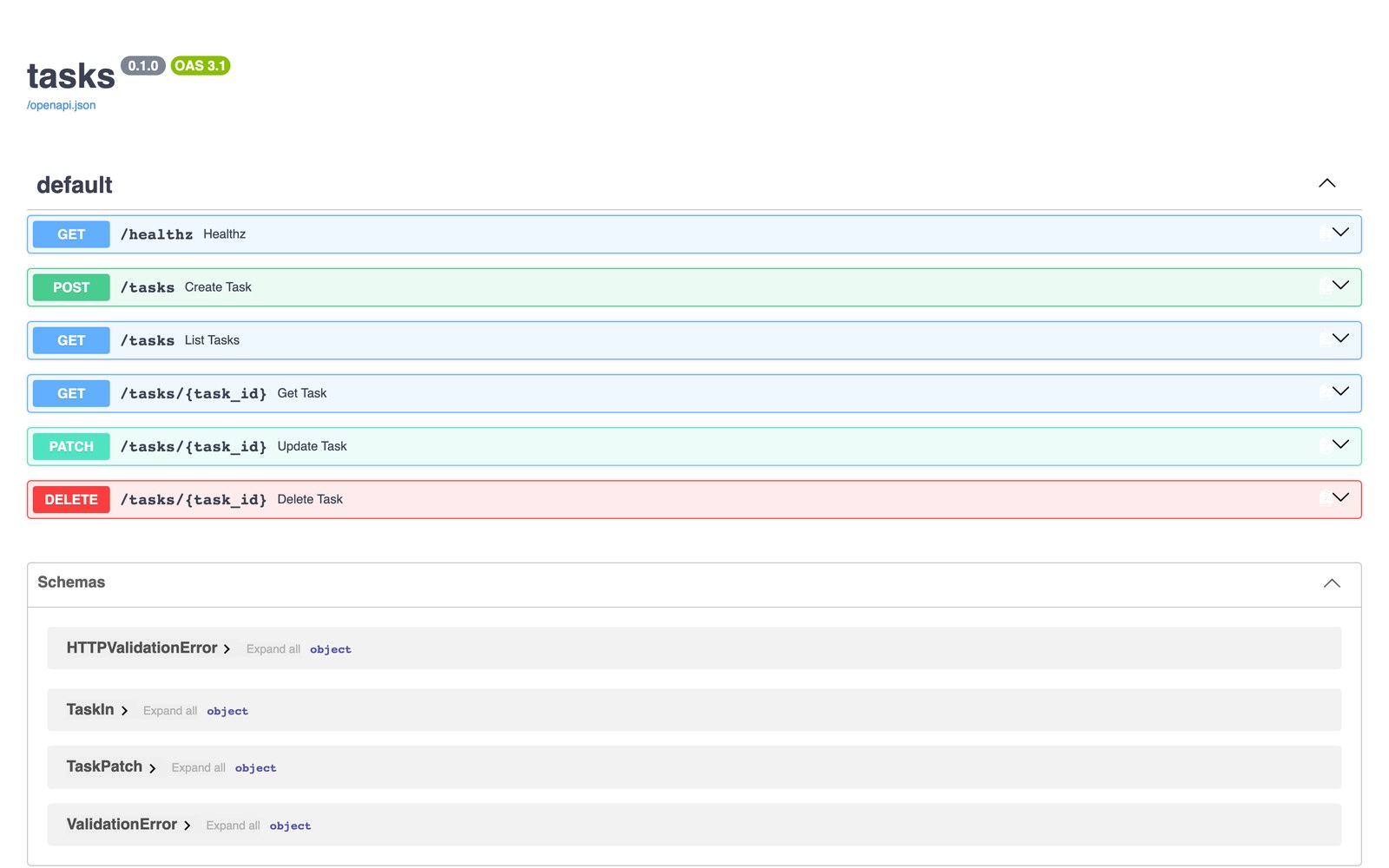
A task API — the smallest app that exercises both halves. Six routes: POST /tasks, GET /tasks (with ?done=true), GET, PATCH and DELETE on /tasks/{id}, and GET /healthz. FastAPI validates the shape, the backend stores the data and owns the rules.
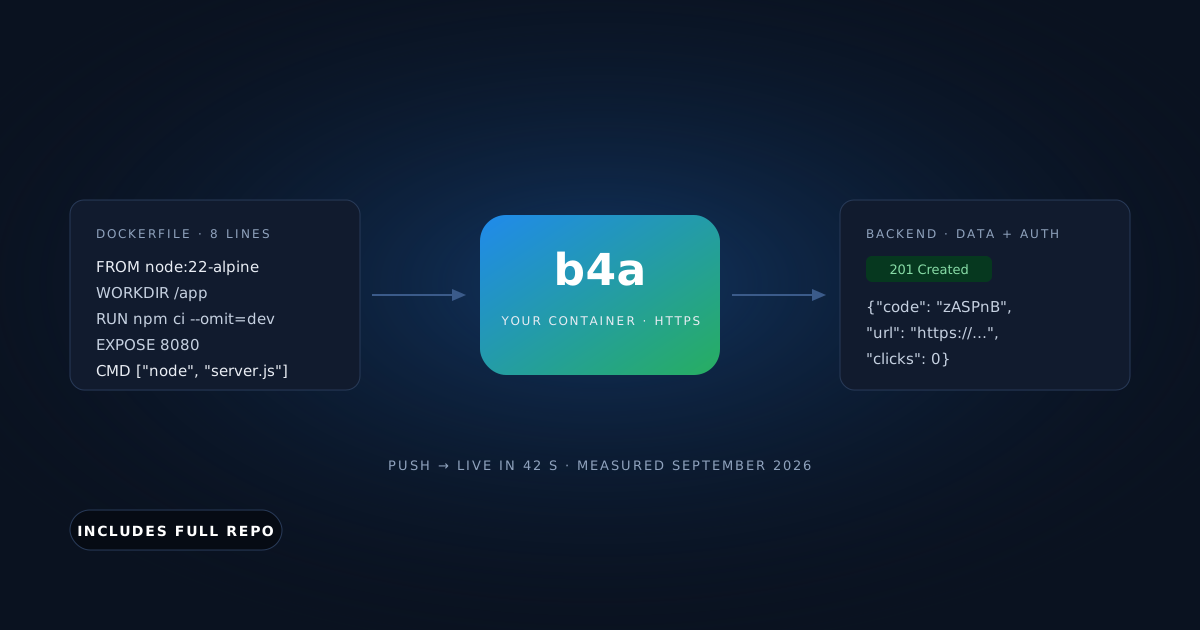
The whole Dockerfile. EXPOSE 8080 is the line the platform reads for the port:
# Stack: Docker | Python 3.12 (slim) | File: Dockerfile
FROM python:3.12-slim
WORKDIR /app
COPY requirements.txt .
RUN pip install --no-cache-dir -r requirements.txt
COPY . .
EXPOSE 8080
CMD ["uvicorn", "main:app", "--host", "0.0.0.0", "--port", "8080"]
The container reads its configuration from the environment and talks to the backend through one shared client:
# Stack: Python 3.12 | FastAPI 0.115 + httpx | File: main.py (setup)
APP_ID = os.environ["PARSE_APP_ID"]
REST_KEY = os.environ["PARSE_REST_KEY"]
BASE = os.environ.get("PARSE_SERVER_URL", "https://parseapi.back4app.com")
HEADERS = {"X-Parse-Application-Id": APP_ID, "X-Parse-REST-API-Key": REST_KEY, "Content-Type": "application/json"}

app = FastAPI(title="tasks")
backend = httpx.AsyncClient(base_url=BASE, headers=HEADERS, timeout=10)

class TaskIn(BaseModel):
    title: str = Field(min_length=1, max_length=200)
    done: bool = False
A route is a Pydantic model in, one REST call, and a status code the client understands. The backend answers with Parse error codes; parse_error maps them (101 → 404, 142 → 422, 209 → 401, anything else → 502):
# Stack: Python 3.12 | FastAPI 0.115 + httpx | File: main.py (create + read)
@app.post("/tasks", status_code=201)
async def create_task(task: TaskIn):
    r = await backend.post("/classes/Task", json=task.model_dump())
    if r.status_code != 201:
        parse_error(r)
    return {**task.model_dump(), **r.json()}

@app.get("/tasks/{task_id}")
async def get_task(task_id: str):
    r = await backend.get(f"/classes/Task/{task_id}")
    if r.status_code != 200:
        parse_error(r)
return r.json()You need a free Back4app account, a GitHub account and curl. No Docker on your machine: the platform builds the image, and this post was produced on a Mac without Docker installed. Python only for running the app locally first.
Where does the database come from?
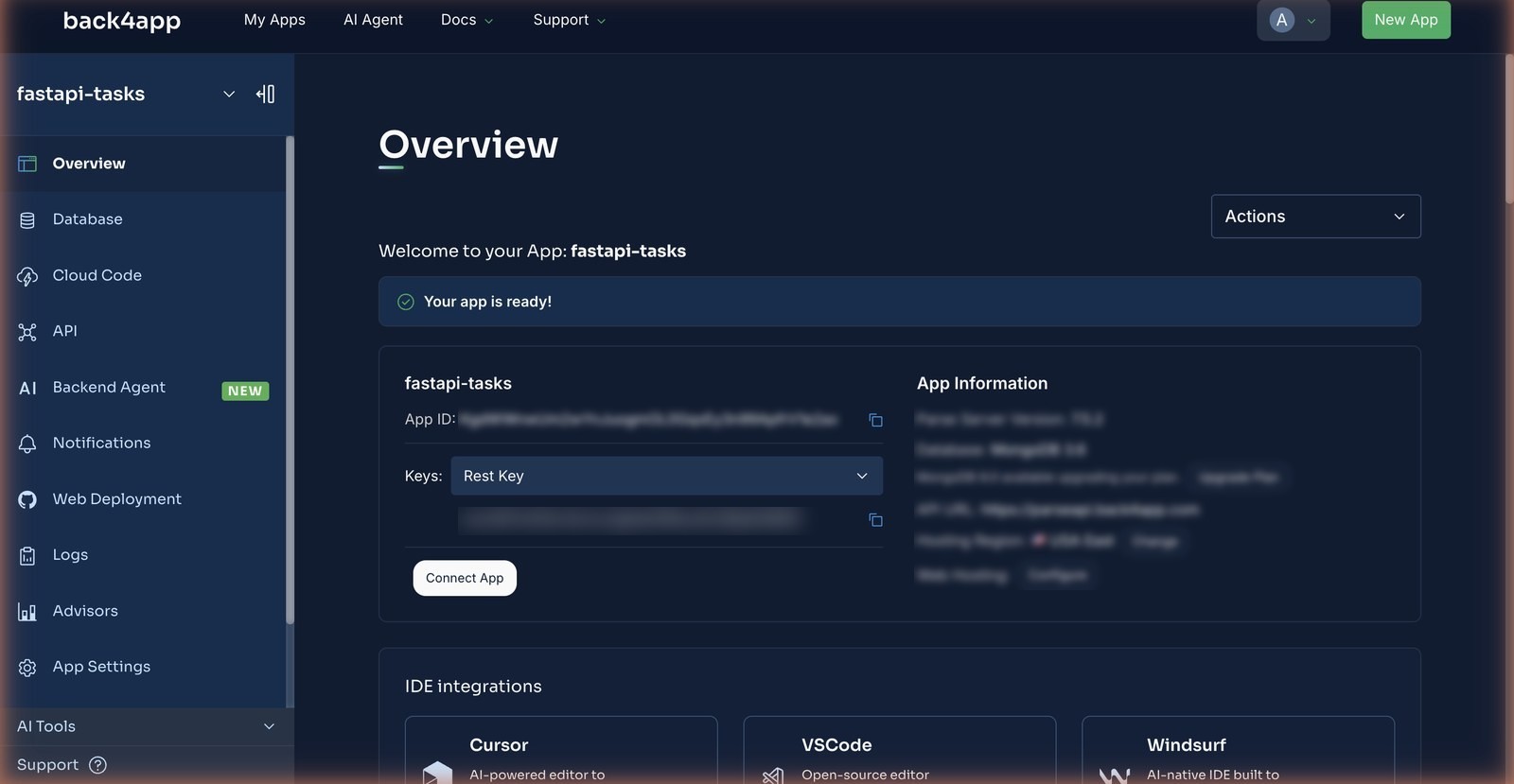
From a backend app you create in the dashboard — New App → Build your Backend, name it, Create. The Overview page shows the App ID and, under the Keys dropdown, the REST API key. Those two values are the entire database configuration of the container.
You do not define the Task class. The first POST /classes/Task created it, with title as a String and done as a Boolean inferred from the JSON (Parse Server 7.5.2, September 2026). Here is the same write two ways — the one the container makes, and the one you can make from your terminal with the same keys:
# Stack: Python 3.12 | httpx 0.28 | File: main.py (the write)
r = await backend.post("/classes/Task", json={"title": "Write the tutorial", "done": False})
r.status_code            # 201
r.json()                 # {"objectId": "OFTBmFAMs3", "createdAt": "2026-09-15T15:01:53.9Z"}
# Stack: bash | Endpoint: POST /classes/Task
curl -X POST \
-H "X-Parse-Application-Id: $APP_ID" \
-H "X-Parse-REST-API-Key: $REST_KEY" \
-H "Content-Type: application/json" \
-d '{"title": "Write the tutorial", "done": false}' \
"$BASE/classes/Task"
# {"objectId":"…","createdAt":"…"} ← HTTP 201Same write, same backend. The container adds nothing the curl does not send.
Filtering is a where parameter with JSON in it. GET /tasks?done=true in the container becomes GET /classes/Task?where={"done":true}&order=-createdAt on the backend — no query builder, no ORM, and the same URL works in a browser with the two headers:
# Stack: bash | Endpoint: GET /classes/Task with a where filter
curl -G "$BASE/classes/Task" \
  -H "X-Parse-Application-Id: $APP_ID" \
  -H "X-Parse-REST-API-Key: $REST_KEY" \
  --data-urlencode 'where={"done": true}' \
  --data-urlencode 'order=-createdAt'
Why does the validation rule live in the backend, not in Pydantic?
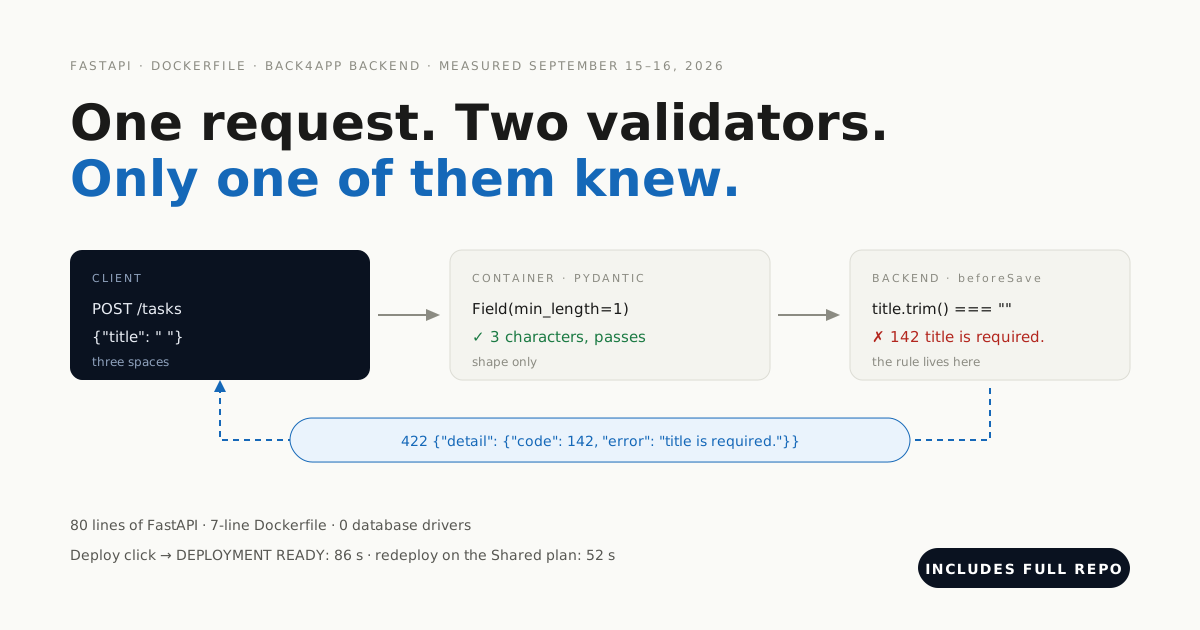
The rules about your data. Pydantic checks the shape of a request; it does not know what a valid task is, and it runs only in this one container. A rule in the backend applies to the Python app, to a curl command, and to the next container you write in another language.
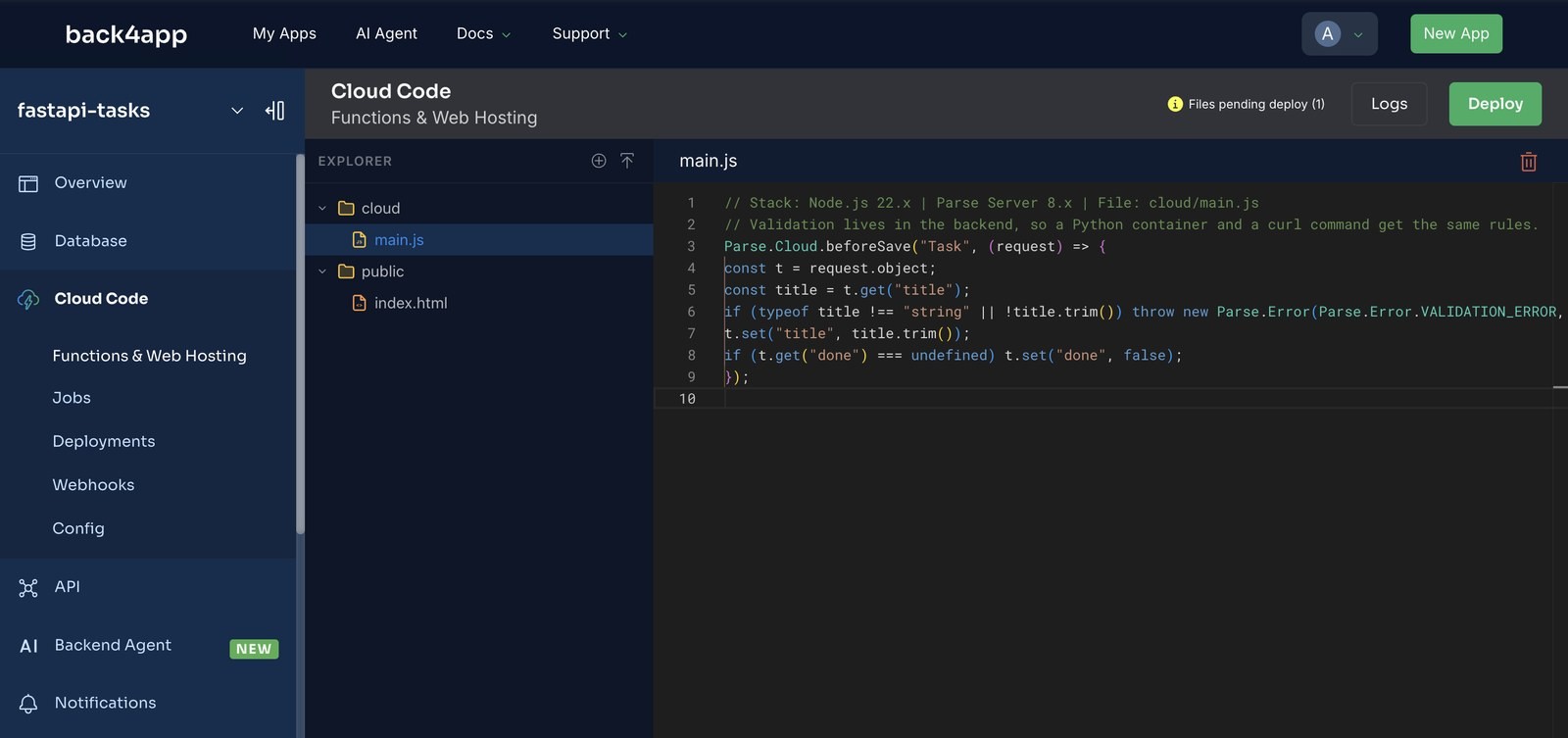
cloud/main.js runs inside the backend. It trims the title, rejects an empty one, and defaults done:
// Stack: Node.js 22.x | Parse Server 8.x | File: cloud/main.js
Parse.Cloud.beforeSave("Task", (request) => {
  const t = request.object;
  const title = t.get("title");
  if (typeof title !== "string" || !title.trim())
    throw new Parse.Error(Parse.Error.VALIDATION_ERROR, "title is required.");
  t.set("title", title.trim());
  if (t.get("done") === undefined) t.set("done", false);
});
Paste it into Cloud Code → cloud/main.js in the backend dashboard, Deploy, and prove it with a request. Ours answered 400 {"code":142,"error":"title is required."} to a title of three spaces — after the second deploy.
How do you deploy a FastAPI Dockerfile from GitHub?
Push the repo to GitHub, then New App → Deploy from GitHub on the Containers side. The first time, GitHub asks you to install the Back4app Containers app on the repositories you choose; the list in the dashboard updates the moment you finish.
Configure. Select the repo. The form detected the Dockerfile and offered a Python buildpack as the alternative — it read the language from the repository. We kept the Dockerfile, left the port on auto, and added PARSE_APP_ID and PARSE_REST_KEY.
We also changed Health check from / to /healthz. It turned out not to matter for the deploy — see the errors section — but it is the route your own monitoring should use.
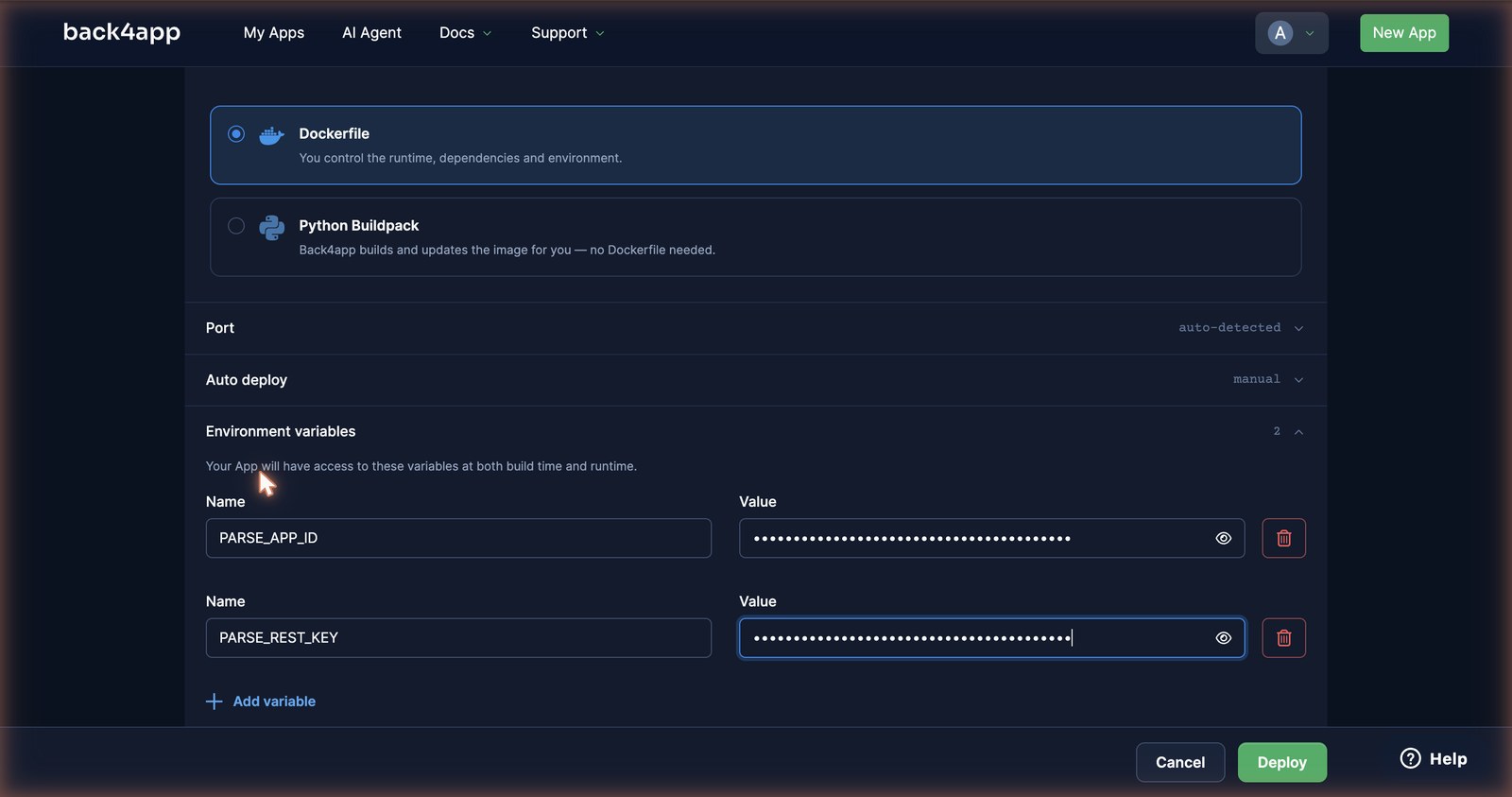
Deploy. We clicked at 15:00:16. The button read “Deploying…” for 30 seconds before the app page appeared; then PREPARING at 15:00:46, BUILDING IMAGE for 46 seconds (pip install on python:3.12-slim), LAUNCHING CONTAINER at 15:01:33, and DEPLOYMENT READY at 15:01:42.
How we measured: a stopwatch from the Deploy click to the dashboard’s DEPLOYMENT READY line, free plan, one deploy on September 15, 2026, with a loop polling the public URL every second in parallel to catch the first 200. pip install dominates, so your time moves with requirements.txt.
deploy-check.sh then did the whole round trip against the live URL: health, create (201, objectId back), read, update (PATCH {"done": true}), validate (a blank title → 422), delete (204). Twelve seconds after Ready, all six passed.
FastAPI’s own /docs page works unchanged on the URL, which is the fastest way to show someone the API without sending them a curl:
Where do the tasks end up? The backend behind the API
Three screens in the backend dashboard, and every row on them was written by the container above — no seed data, no schema defined by hand.
Overview — where the two headers come from. Dashboard → New App → Build your Backend → Create. The Overview page shows the App ID and, under the Keys dropdown, the REST API key. Those two values become PARSE_APP_ID and PARSE_REST_KEY in the container form; there is no connection string anywhere.
Cloud Code — where the rule lives. cloud/main.js open in the editor with the beforeSave("Task") hook, and the badge Files pending deploy (1) next to the Deploy button. On a fresh backend that badge is the tell: it stays after the first Deploy, which is how you know nothing shipped.
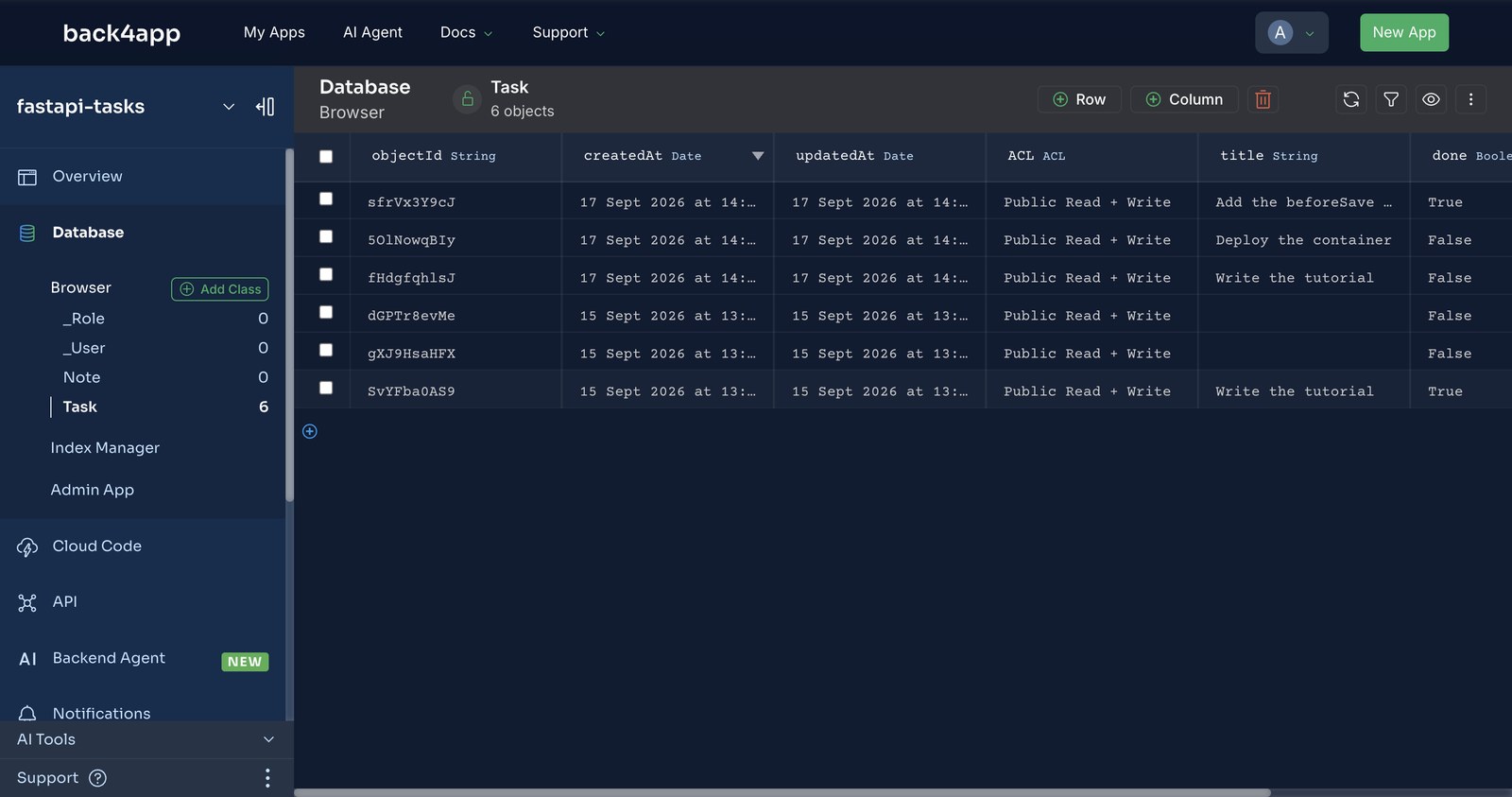
Database Browser — the Task class. Six rows. The three newest came through the container’s POST /tasks while we wrote this section; the one titled Deploy the container was sent with spaces around it and stored trimmed. The two rows with no visible title are three spaces each — written on September 15, before the hook was deployed, which is exactly the hole the hook closes.
How long does the URL last, and what does permanent cost?
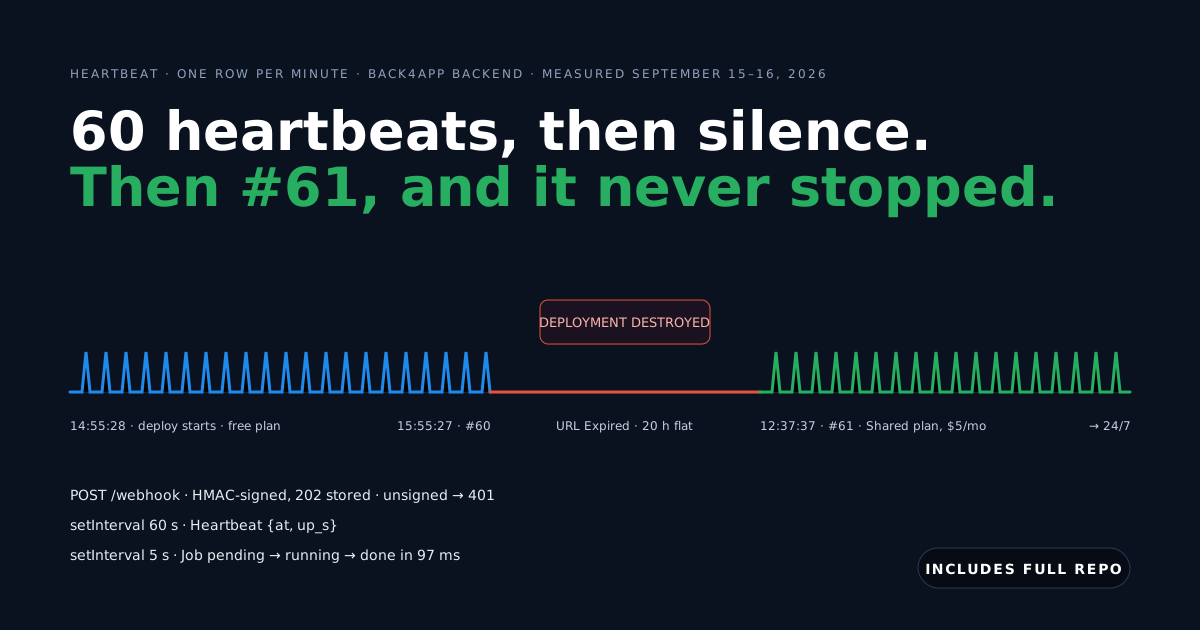
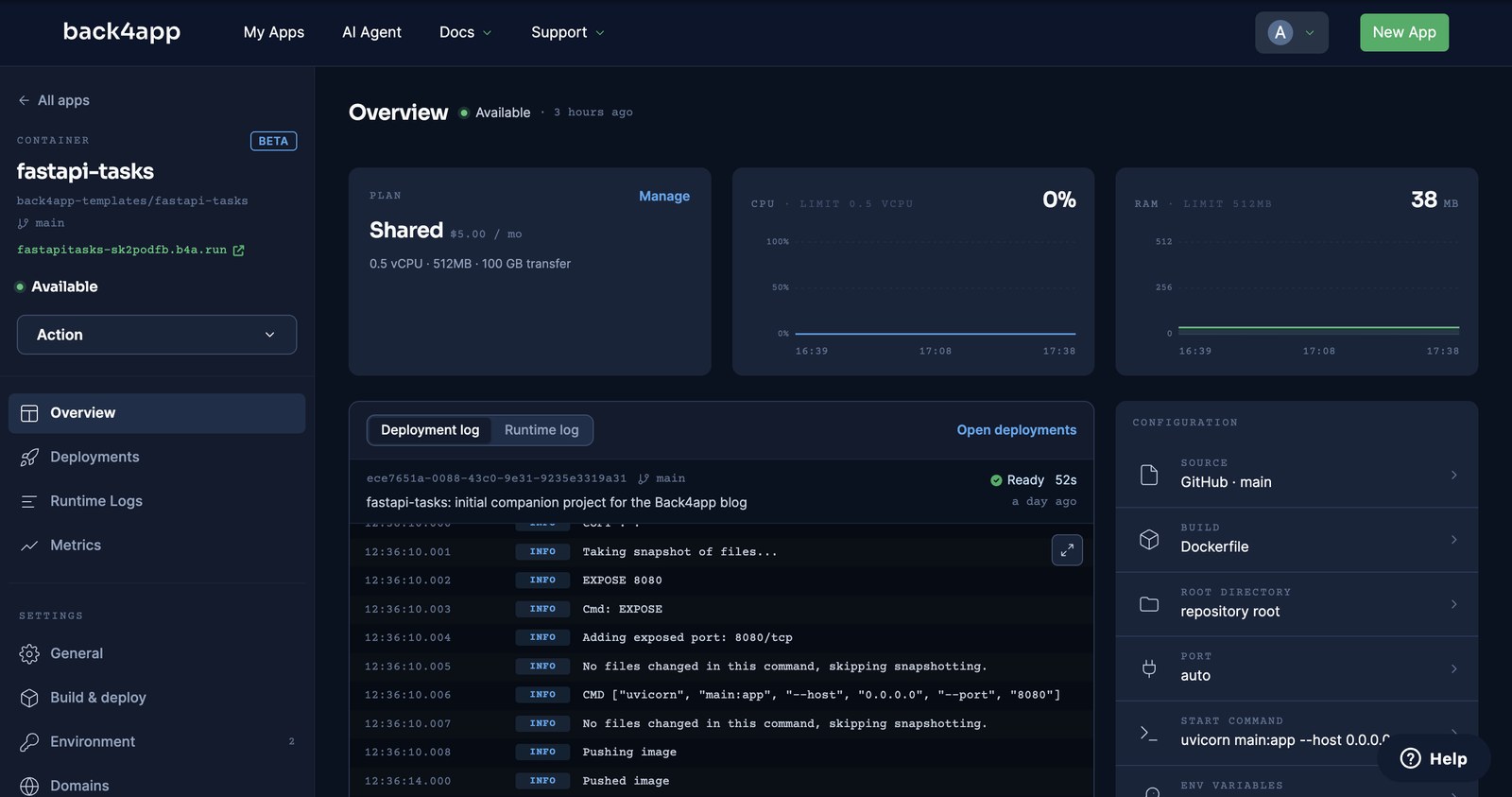
On the free plan, 60 minutes from the moment the deploy starts — then the container is destroyed and the dashboard shows URL Expired. On the Shared plan, $5/month for 0.5 vCPU and 512 MB, the URL is permanent and the plan change alone redeployed the app on the same address (all as of September 16, 2026).
The free hour is real and it is enough: every step in this post, including the mistakes, fits in one window. It is not enough to leave the API running for a client, and the platform says as much — the free card reads “Ideal for developing, learning, and prototyping”.
We measured the expiry to the minute on the worker from our always-on post: deploy started 14:55:28, URL gone at 15:55:27. This API showed the same URL Expired status the next morning.
The next morning we changed the plan. Without a click on Deploy, the log showed PREPARING DEPLOYMENT at 12:35:32 and DEPLOYMENT READY at 12:36:24 — 52 seconds — on the same b4a.run URL, and deploy-check.sh passed again.
What do 422, 404 and 502 mean in this API, and how do you fix them?
We broke the deployment on purpose, and the platform broke it once for us. Each entry starts with what you will actually see.
KeyError: 'PARSE_APP_ID' the moment uvicorn imports the app. os.environ["PARSE_APP_ID"] raises at import time when the variable is missing, so there is no process for the health check to reach. Add the two variables under Settings → Environment and deploy again; a saved variable takes effect on the next deploy, not the running one.
422 {"detail":{"code":142,"error":"title is required."}} on a title that Pydantic accepted. Working as intended: the backend hook rejected it. The shape of the 422 differs from Pydantic’s list of errors — if your client parses detail, handle both a list and an object.
404 {"detail":{"code":101,"error":"Object not found."}} on GET /tasks/{id}. The id is not a Task’s objectId; Parse answers 101 and the container maps it to 404. Ids are case-sensitive ten-character strings like OFTBmFAMs3.
502 {"detail":{"error":"{\"error\":\"unauthorized\"}"}} on every route except /healthz. A wrong PARSE_REST_KEY. The backend answers unauthorized with no Parse code, so parse_error falls through to 502 with the raw body as a string. The health check passed because /healthz does not touch the backend — and the platform’s check is a port check anyway. Make /healthz run a cheap query so deploy-check.sh and your own monitor catch a bad key.
DEPLOYMENT READY on an API whose routes all fail. The platform’s health step checks that the port answers, not the status: on our worker a path that returned 404 passed it. A wrong key or a crashed handler is therefore not caught at deploy time — run deploy-check.sh against the URL after every deploy.
404 not found on the URL, dashboard says URL Expired. The free hour is over and the container is gone. Redeploy for another hour, or change the plan — the plan change redeploys on its own.
When is this the wrong answer?
Per our own manifesto, a post where only the platform wins does not get published — so here is the other column.
- Your API is CRUD and nothing else. Then you do not need the container: the backend’s REST layer is the API, and a Python client can call it directly with the same two headers.
- You need Postgres features. Joins across many tables, window functions, PostGIS, a schema you migrate with Alembic — the backend is Parse Server on MongoDB (Postgres on paid plans), and its query language is
whereJSON, not SQL. - You need a background worker next to the API. One container is one process; a queue consumer belongs in its own container, as in our always-on post.
- You want to build images locally and push them. The image route accepts Docker Hub only.
If none of those describe you, a stateless FastAPI container in front of a managed backend is the shape we would choose again — and the Pydantic-plus-hook pair is how we would validate it.
What would you add to the task API next?
You have an API that redeploys in under a minute, a database you never provisioned, and rules that survive the container being replaced. From here:
- Give tasks owners. Parse’s
Userclass adds signup and login endpoints with no container code (measured, with password reset); a session token in the request header scopes every query once the class is locked (the twelve-request probe). - Turn on autodeploy. On a paid plan, Settings → Build & deploy → Autodeploy; we measured a push to live in 44 seconds on the worker.
- Make the health check honest. Have
/healthzrunGET /classes/Task?limit=0against the backend so a bad key shows up in your monitoring, not at the first user.
All code above is complete and tested — the companion repo includes deploy-check.sh, which runs health, create, read, update, validate and delete against any deployment URL you give it.