N:N Relationship
Many to many Relationship
Introduction
At the core of many backends, you will find the ability to store data. Using Parse, you can store data objects establishing relations between them. Data relations standardize how each data object is related or associated with other ones. That can give you extra power when building and running complex queries. There are three main relation types:
- one-to-many, where one object can be related to many other objects;
- one-to-one, establishing direct relations between two objects and only them;
- many-to-many, which can create many complex relations between many objects.
In this guide, we will focus on many-to-many relations. These relations are common in applications containing authored content, such as blogs and news feeds, because authors and category tags can be interchangeable and optimized for quick querying. Data storage backends usually will demand explicit declarations of these associations and even require that you create, on your own, relational tables for managing their joining. Parse makes it automatically for you, removing any possibility of errors while building your data relations and speeding up your application modeling process.
There are two ways to create a many-to-many relation in Parse. The first uses the Parse.Object relations, which is the fastest in creation and query time. The second is using arrays which can lead to slow query times depending on their size. Because of this performance issue, we will use only relation examples from now on.
In this guide, you will implement a React Native book registration application that contains the three main kinds of data associations. You will learn how to create and query many-to-many data relations using your Back4App and React Native.
At any time, you can access this project via our GitHub repositories to checkout the styles and complete code.
Prerequisites
To complete this tutorial, you will need:
- If you want to test/use the screen layout provided by this guide, you should set up thereact-native-paperlibrary.
Goal
To perform and demonstrate many-to-many database relations in React Native using Parse in a realistic scenario.
1 - Understanding the Book class
Since in this guide we will be using a book registration application example, you need to first understand how the object relations are laid out in this database. The main object class that you’ll be using is the Book class, which will store each book entry in the registration. These are the other four object classes:
- Publisher: book publisher name, one-to-many relation withBook
- Genre: book genre, one-to-many relation withBook. Note that for this example we will consider that a book can only have one genre;
- Author: book author, many-to-many relation withBook, since a book can have more than one author and an author can have more than one book as well;
- ISDB: book ISDB identifying number, one-to-one relation withBook, since this number is unique for each book.
Here is a visual representation of these database tables:
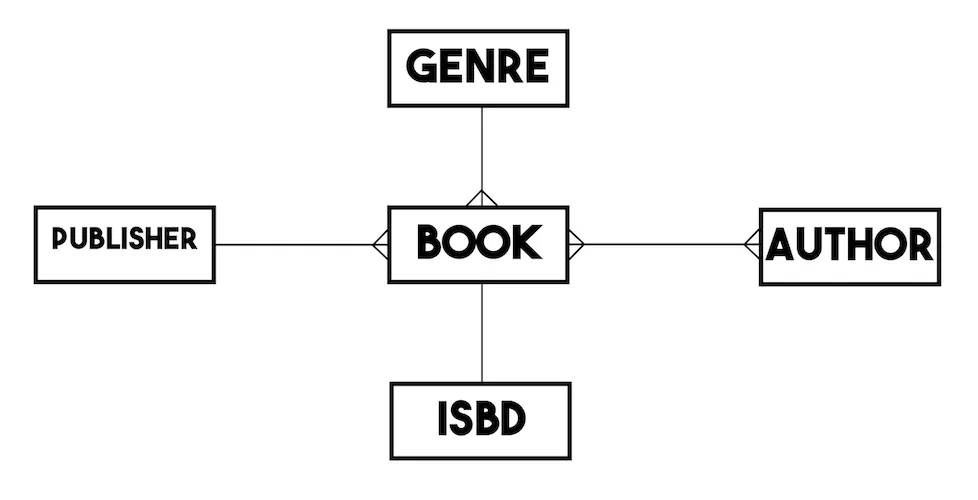
For simplicity, we will assume that each object class has only a string type name attribute (title for the Book), apart from any additional relational attribute.
2 - Creating one-to-many relations
Before going into this step we recommend you to clone and run the React Native Library app exmaple (JavaScript Example Repository, TypeScript Example Repository). This application has two main screens: one responsible for listing the registered books and the other for creating new books. In the book registration form, there are direct links to the other related objects, so when a user picks a publisher or genre option, the form fields will hold the complete Parse.Object instance.
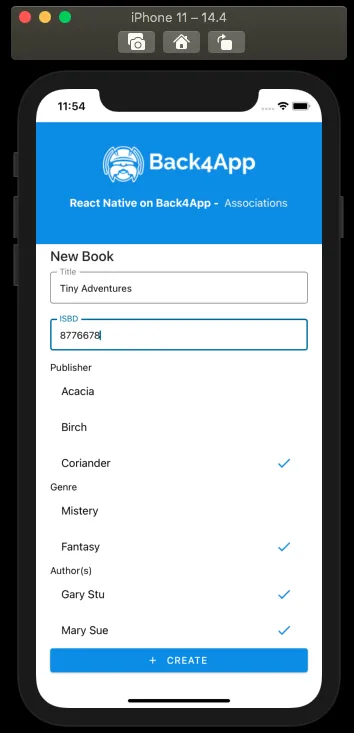
Let’s take a look at the book creation method that is called when submitting this form:
1	const createBook = async function (): Promise<boolean> {
2	  try {
3	    // These values come from state variables linked to
4	    // the screen form fields, retrieving the user choices
5	    // as a complete Parse.Object, when applicable;
6	    const bookTitleValue: string = bookTitle;
7	    const bookISBDValue: string = bookISBD;
8	    // For example, bookPublisher holds the value from
9	    // RadioButton.Group field with its options being every
10	    // Publisher parse object instance saved on server, which is
11	    // queried on screen load via useEffect
12	    const bookPublisherObject: Parse.Object = bookPublisher;
13	    const bookGenreObject: Parse.Object = bookGenre;
14	    // bookAuthors can be an array of Parse.Objects, since the book
15	    // may have more than one Author
16	    const bookAuthorsObjects: [Parse.Object] = bookAuthors;
17
18	    // Creates a new parse object instance
19	    let Book: Parse.Object = new Parse.Object('Book');
20
21	    // Set data to parse object
22	    // Simple title field
23	    Book.set('title', bookTitleValue);
24
25	    // 1:1 relation, need to check for uniqueness of value before creating a new ISBD object
26	    let isbdQuery: Parse.Query = new Parse.Query('ISBD');
27	    isbdQuery.equalTo('name', bookISBDValue);
28	    let isbdQueryResult: Parse.Object = await isbdQuery.first();
29	    if (isbdQueryResult !== null && isbdQueryResult !== undefined) {
30	      // If first returns a valid object instance, it means that there
31	      // is at least one instance of ISBD with the informed value
32	      Alert.alert(
33	        'Error!',
34	        'There is already an ISBD instance with this value!',
35	      );
36	      return false;
37	    } else {
38	      // Create a new ISBD object instance to create a one-to-one relation on saving
39	      let ISBD: Parse.Object = new Parse.Object('ISBD');
40	      ISBD.set('name', bookISBDValue);
41	      ISBD = await ISBD.save();
42	      // Set the new object to the new book object ISBD field
43	      Book.set('isbd', ISBD);
44	    }
45
46	    // One-to-many relations can be set in two ways:
47	    // add direct object to field (Parse will convert to pointer on save)
48	    Book.set('publisher', bookPublisherObject);
49	    // or add pointer to field
50	    Book.set('genre', bookGenreObject.toPointer());
51
52	    // many-to-many relation
53	    // Create a new relation so data can be added
54	    let authorsRelation = Book.relation('authors');
55	    // bookAuthorsObjects is an array of Parse.Objects,
56	    // you can add to relation by adding the whole array or object by object
57	    authorsRelation.add(bookAuthorsObjects);
58
59	    // After setting the values, save it on the server
60	    try {
61	      await Book.save();
62	      // Success
63	      Alert.alert('Success!');
64	      navigation.goBack();
65	      return true;
66	    } catch (error) {
67	      // Error can be caused by lack of Internet connection
68	      Alert.alert('Error!', error.message);
69	      return false;
70	    }
71	  } catch (error) {
72	    // Error can be caused by lack of value selection
73	    Alert.alert(
74	      'Error!',
75	      'Make sure to select valid choices in Publisher, Genre and Author fields!',
76	    );
77	    return false;
78	  }
79	};
Look how the bookAuthorsObjects are set to the new book Parse.Object instance. To create a many-to-many relation, you first need to create a new Parse.Object.relation and then add the related objects to it either one by one or by passing an array of Parse.Object using the Parse.Object.relation.add method. Parse will create a relation type column and also a relational table on your database. Parse will also create a link for easy access to this new table in the field column in the dashboard.
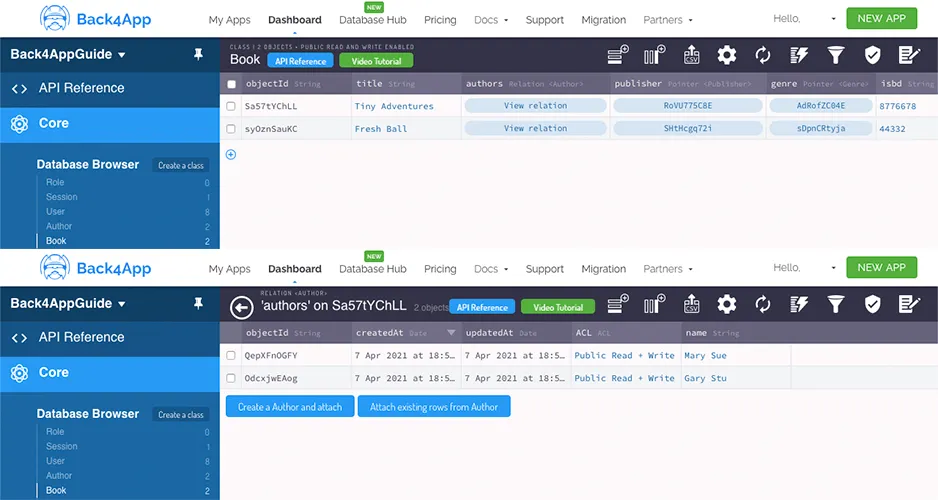
Be aware that you can also manage objects and add new ones to your relation through the dashboard once it is created, so remember this shortcut when developing your application.
3 - Querying many-to-many relations
Retrieving results from many-to-many related objects queries need some additional steps comparing to regular ones. Take a look at the query function in the book registers list screen:
1	const queryBooks = async function (): Promise<boolean> {
2	  // These values come from state variables linked to
3	  // the screen query RadioButton.Group fields, with its options being every
4	  // parse object instance saved on server from the referred class, which is
5	  // queried on screen load via useEffect; these variables retrievie the user choices
6	  // as a complete Parse.Object;
7	  const queryPublisherValue: Parse.Object = queryPublisher;
8	  const queryGenreValue: Parse.Object = queryGenre;
9	  const queryAuthorValue: Parse.Object = queryAuthor;
10	  const queryIsbdValue: Parse.Object = queryIsbd;
11
12	  // Reading parse objects is done by using Parse.Query
13	  const parseQuery: Parse.Query = new Parse.Query('Book');
14
15	  // One-to-many queries
16	  if (queryPublisherValue !== '') {
17	    parseQuery.equalTo('publisher', queryPublisherValue);
18	  }
19	  if (queryGenreValue !== '') {
20	    parseQuery.equalTo('genre', queryGenreValue);
21	  }
22
23	  // One-to-one query
24	  if (queryIsbdValue !== '') {
25	    parseQuery.equalTo('isbd', queryIsbdValue);
26	  }
27
28	  // Many-to-many query
29	  // In this case, we need to retrieve books related to the chosen author
30	  if (queryAuthorValue !== '') {
31	    parseQuery.equalTo('authors', queryAuthorValue);
32	  }
33
34	  try {
35	    let books: [Parse.Object] = await parseQuery.find();
36	    // Many-to-many objects retrieval
37	    // In this example we need to get every related author Parse.Object
38	    // and add it to our query result objects
39	    for (let book of books) {
40	      // This query is done by creating a relation and querying it
41	      let bookAuthorsRelation = book.relation('authors');
42	      book.authorsObjects = await bookAuthorsRelation.query().find();
43	    }
44	    setQueriedBooks(books);
45	    return true;
46	  } catch (error) {
47	    // Error can be caused by lack of Internet connection
48	    Alert.alert('Error!', error.message);
49	    return false;
50	  }
51	};
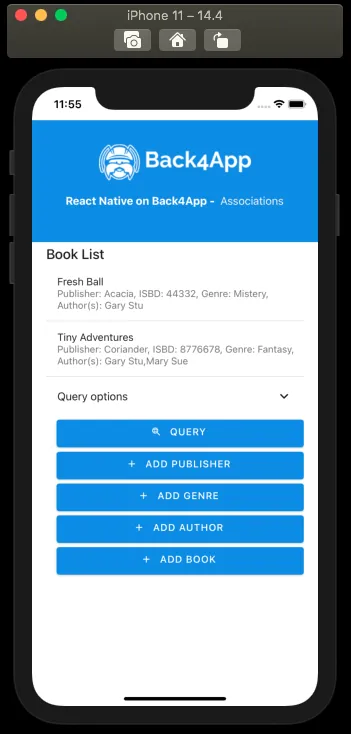
In this case, to query any books related to a specific author, you need to perform a Parse.Query.equalTo method passing the Parse.Object instance as the parameter. After querying, Parse will not store Parse.Object instances from many-to-many relational fields, only a reference to the related class name, such as {"__type": "Relation", "className": "Author"}. To retrieve and show data from these object instances, you need to create a relation and query it again, storing the results in an object array of your own. After that, you may iterate over the object array and use the Parse.Object.get method to retrieve the author’s name. Here is how the list screen looks like by using these procedures:
Conclusion
At the end of this guide, you learned how to create and query many-to-many relations in Parse on React Native. In the next guide, we will show you how to do one-to-one queries and relations.