Being trapped rarely feels like being trapped. It feels like having an app that works, on a platform you are mildly unhappy with, and no particular reason to find out what leaving would cost.
The reassuring answer — “there is an export button” — answers the wrong question. A zip file is not portability. The question is whether the copy would work.
So we built a small app on one backend, carried it to a second backend that shares nothing with the first, and asked both the same eleven questions.
Watch it instead
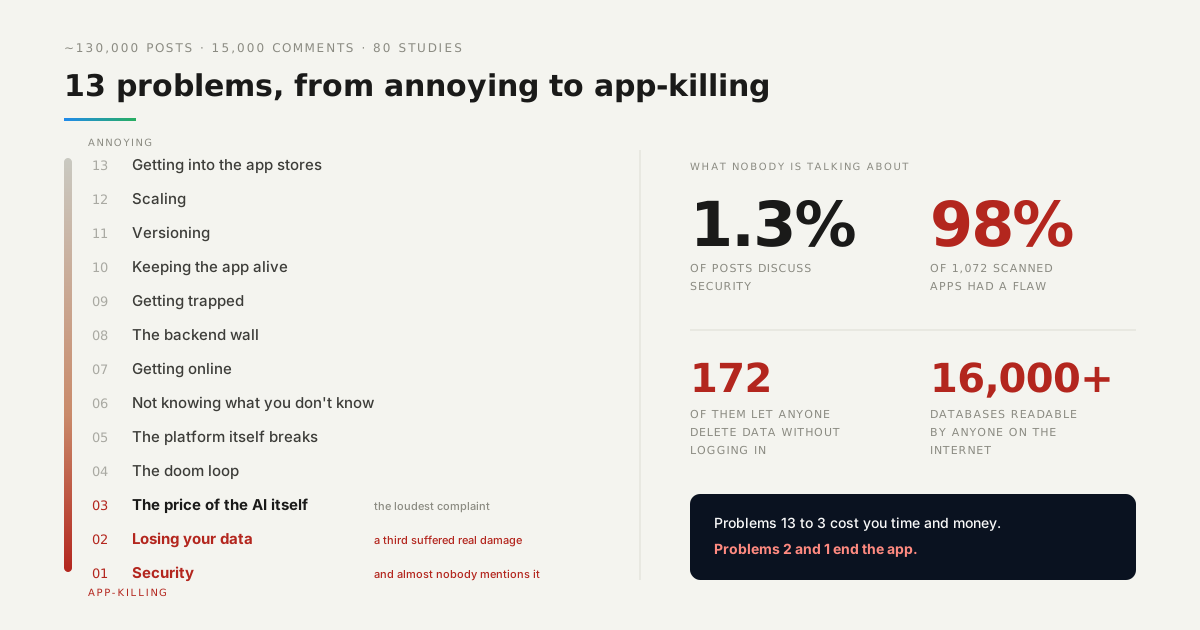
Getting trapped is number 9 in our countdown of what actually goes wrong for people building with AI.

What actually survived the move?
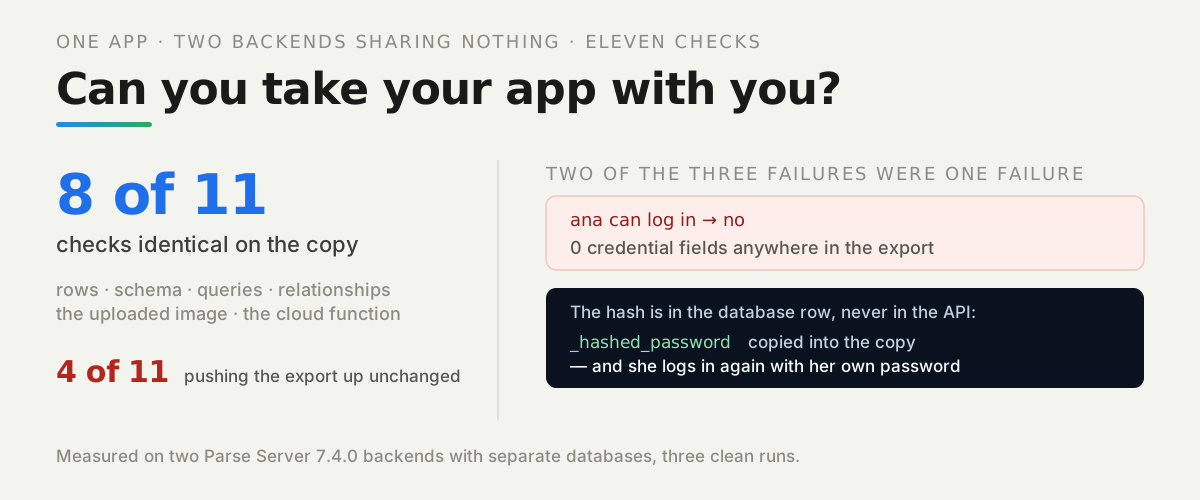
Almost all of it, and the exceptions are specific enough to plan around. Eight of the eleven checks came out identical:
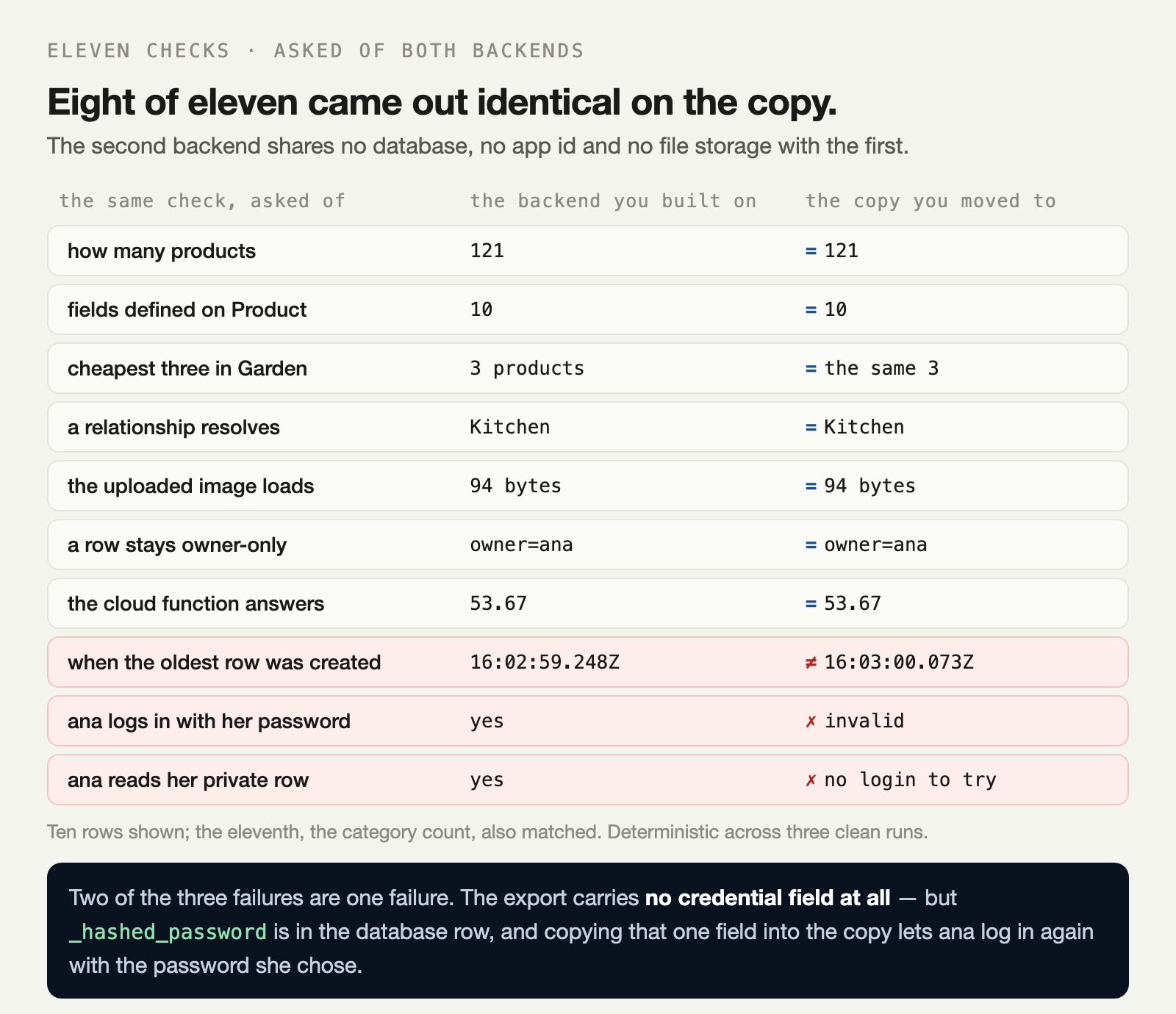
The app itself is unremarkable on purpose: two classes, 121 products pointing at 3 categories, one uploaded image, three accounts with real passwords, one row readable only by its owner, and one cloud function.
The second backend has its own database, its own app id and its own file storage. Nothing is shared. The only route from one to the other is the export.
That second column is not a straw man. Pushing the exported JSON straight up is the obvious way to do this, and it is what most migration scripts do on the first attempt. The repo runs it on demand so you can watch which parts of the app it breaks.
What does the export actually contain?
Everything you would hope, through plain HTTP calls — and two conspicuous absences. Here is the whole export, as the script reports it:
schema:     3 classes, fields {"_User":9,"Category":5,"Product":10}
rows:       _User=3 Category=3 Product=121
files:      1 downloaded (94 bytes), 0 unreachable
passwords:  0 credential field(s) present in the export
cloud code: 0 endpoint(s) returned the source of discountedPrice
sessions:   3 live on A, 0 transferable (tokens are issued per backend)
The first three lines are the good news, and they are the part people worry about most. Your schema and your rows come out through an open API, with no ticket to anyone and no proprietary format.
The last three are the ones worth planning for. We will take them in order of how much they hurt.
Why do the relationships break?
Because object ids belong to the backend that stored the row, and the new one hands out its own. We tried to keep them and were told no:
objectId preserved on import: NO
createdAt preserved:          NO
So every pointer in the exported JSON names a row that does not exist on the copy. Push the JSON up unchanged and the rows all arrive, the counts match, and the app is quietly broken: our “cheapest 3 in Garden” query returned three products on the original and nothing at all on the copy.
The counts matched. The query returned nothing. Row counts are the easiest thing to check and the last thing that tells you the move worked.
The fix is mechanical. Insert parent rows first, keep a map from each old id to its new one, and rewrite every pointer as you insert the children:
for (const [k, v] of Object.entries(body)) {
  if (v && v.__type === 'Pointer' && idMap[v.objectId]) {
    body[k] = { ...v, objectId: idMap[v.objectId] };
  }
}
The same applies to any id you stored yourself in a plain text field. Those have no __type to find them by, so nothing will rewrite them for you.
Why did the uploaded image come back 404?
Because a file field holds a URL, and the URL is not the file. This is the most deceptive result we got, so it is worth being precise about what happened.
Copy the JSON up as it is, and the new backend rewrites that file URL to point at its own storage, under a name nothing was ever uploaded to. The row looks perfect. The field is populated. The URL is on the right host. And it returns:
the uploaded image loads: HTTP 404That was measured while the original backend was still running and still serving the same image. Then we stopped the original and asked what the URL inside the exported JSON was worth:
the url written in the export: unreachable (ECONNREFUSED)So there are exactly two moments when those bytes are obtainable: before you leave, and never. Download every file during the export, while the old host still answers, and upload them again on the other side. With that one step the image loads on the copy, byte for byte.
Why can nobody log in?
Because the API does not return passwords, and it is right not to. This is what a user looks like through the API, master key and all:
{"objectId":"AxOPkCOXeG","username":"ana","email":"[email protected]",
 "createdAt":"2026-10-27T15:59:02.773Z","ACL":{"AxOPkCOXeG":{"read":true,"write":true}}}
No password. No hash. Nothing you could carry. An API that handed out credentials to anyone holding a master key would be a much worse problem than the one we are describing, so this absence is a feature.
But the hash does exist. It is in the database row, and only in the database row:
fields: _id, username, email, _hashed_password, _wperm, _rperm, _acl, _created_at, _updated_atThat _hashed_password is a standard bcrypt string, beginning $2y$10$. We wrote that single field into the copy’s database and asked ana to log in again with the password she originally chose:
ana logging in, before carrying the hash:
    on the original: yes
    on the copy:     no (HTTP 404)
after writing that one field into the copy's database:
    on the copy:     yes
So whether your users keep their passwords is not an export question at all. It is one question: can you reach the database, or only the API? An open stack on a standard database answers yes, and the move is invisible to your users. A builder that exposes neither answers no, and every account has to go through a reset email on the day you switch.
What happens to permissions?
They arrive intact and mean nothing, which is worse than arriving broken. A per-row permission is written in terms of a user’s object id, and those ids changed.
On the naive copy, the row that only ana may read came across with its permission list perfectly preserved — naming a user that does not exist on the new backend:
that row is still owner-only: yes, owner=MISSING USERNobody can read it. Not the public, not ana, not anyone. It is not a leak, it is a locked door with no key, and nothing in the import logs complains. Rewrite every permission with the same id map you used for the pointers:
for (const [who, perms] of Object.entries(row.ACL)) {
  if (who === '*' || who.startsWith('role:')) { rebuilt[who] = perms; continue; }
  if (idMap[who]) rebuilt[idMap[who]] = perms; else orphaned++;
}
Count the orphans and look at them. A permission naming a user you cannot map is a row whose access rules you have just silently changed.
Where does the server-side code live?
In your repository, or nowhere. We probed five endpoints for the source of a running cloud function and got nothing back from any of them:
cloud code: 0 endpoint(s) returned the source of discountedPriceThe function returned the same answer on both backends, and the reason is mundane: cloud/main.js is a file in the repo, mounted into both. That is the entire mechanism. Server-side logic is not something you export; it is something you keep in version control, and then it deploys anywhere.
This is also the cleanest test of whether a platform has you. If the logic your app depends on exists only inside a web editor, there is no export that will ever produce it.
What should you check before you build on something?
Four questions, in the order of how much they cost to get wrong:
-
Can you reach the database, or only the API? This one decides whether your users keep their passwords, and it is the hardest to fix afterwards.
-
Is your server-side code a file in your repository? If it lives in a web editor, it is not yours in any practical sense.
-
Can you download the bytes of your files? Not URLs pointing at them. Bytes.
-
Does an API return your schema and every row, without asking anyone? This is the one everybody checks first, and the one most platforms actually pass.
A managed backend built on an open stack answers all four, which is the real argument for one: not that you will leave, but that you could.
What should you do first?
Run the export today, on the app you have now, while nothing is wrong. Pull your schema and your rows, download your files, and keep the result somewhere that is not the platform.
Then try the other half once, on a throwaway backend: import what you exported and run your app against it. The first time you attempt this should not be the day you need it to work.
The lab is in the repo — two backends, one command, eleven checks, and a NAIVE=1 switch that shows you what the obvious approach breaks.