Query Cookbook
Parse Query Cookbook in Flutter
Introduction
We’ve already seen how a QueryBuilder with get can retrieve a single ParseObject from Back4App. There are many other ways to retrieve data with QueryBuilder - you can retrieve many objects at once, use conditions on the objects you wish to retrieve, and more.
In this guide, you will ding deep into the QueryBuilder class and see all the methods you can use to build your Queries. You will use a simple database class with some mocked data to perform the Queries using Flutter on Back4App.
Prerequisites
- An Flutter app connected to Back4app.
- Note: Follow the Install Parse SDK on Flutter project to create an Flutter Project connected to Back4App.
- A device (or virtual device) running Android or iOS.
Goal
Explore the QueryBuilder class different methods.
The QueryBuilder class
Any Parse query operation uses the QueryBuilder object type, which will help you retrieve specific data from your database throughout your app.
To create a new QueryBuilder, you need to pass as a parameter the desired ParseObject subclass, which is the one that will contain your query results.
It is crucial to know that a QueryBuilder will only resolve after calling a retrieve method query, so a query can be set up and several modifiers can be chained before actually being called.
You can read more about the QueryBuilder class here at the official documentation.
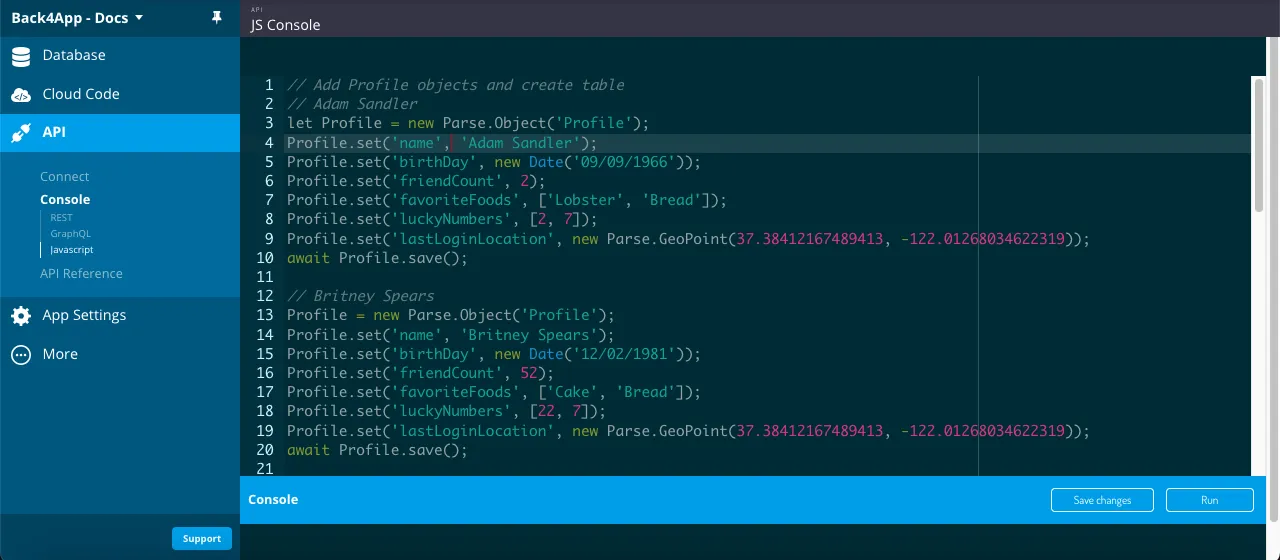
Using the JavaScript Console on Back4App
Inside your Back4App application’s dashboard, you will find a very useful API console in which you can run JavaScript code directly. In this guide you will use to store data objects in Back4App. On your App main dashboard go to Core->API Console->Javascript.
Save your Data Objects
To run the queries on this guide you’ll need first to populate your App with some data. Let’s create a sample class called Profile, which mocks a social media profile class using famous people names and the following fields:
- string type name:
- Date type birthDay:
- Number (integer) type friendCount:
- Array (string list) type favoriteFoods:
- Array (Number list) type luckyNumbers:
- GeoPoint type lastLoginLocation:
Here is the Parse.Object classes creation code, so go ahead and run it in your API console:
1   // Add Profile objects and create table
2   // Adam Sandler
3   let Profile = new Parse.Object('Profile');
4   Profile.set('name', 'Adam Sandler');
5   Profile.set('birthDay', new Date('09/09/1966'));
6   Profile.set('friendCount', 2);
7   Profile.set('favoriteFoods', ['Lobster', 'Bread']);
8   Profile.set('luckyNumbers', [2, 7]);
9   Profile.set('lastLoginLocation', new Parse.GeoPoint(37.38412167489413, -122.01268034622319));
10  await Profile.save();
11
12  // Britney Spears
13  Profile = new Parse.Object('Profile');
14  Profile.set('name', 'Britney Spears');
15  Profile.set('birthDay', new Date('12/02/1981'));
16  Profile.set('friendCount', 52);
17  Profile.set('favoriteFoods', ['Cake', 'Bread']);
18  Profile.set('luckyNumbers', [22, 7]);
19  Profile.set('lastLoginLocation', new Parse.GeoPoint(37.38412167489413, -122.01268034622319));
20  await Profile.save();
21
22  // Carson Kressley
23  Profile = new Parse.Object('Profile');
24  Profile.set('name', 'Carson Kressley');
25  Profile.set('birthDay', new Date('11/11/1969'));
26  Profile.set('friendCount', 12);
27  Profile.set('favoriteFoods', ['Fish', 'Cookies']);
28  Profile.set('luckyNumbers', [8, 2]);
29  Profile.set('lastLoginLocation', new Parse.GeoPoint(37.38412167489413, -122.01268034622319));
30  await Profile.save();
31
32  // Dan Aykroyd
33  // Creates related object Membership for this user only
34  let Membership = new Parse.Object('Membership');
35  Membership.set('name', 'Premium');
36  Membership.set('expirationDate', new Date('10/10/2030'))
37  await Membership.save();
38
39  Profile = new Parse.Object('Profile');
40   Profile.set('name', 'Dan Aykroyd');
41  Profile.set('birthDay', new Date('07/01/1952'));
42  Profile.set('friendCount', 66);
43  Profile.set('favoriteFoods', ['Jam', 'Peanut Butter']);
44  Profile.set('luckyNumbers', [22, 77]);
45  Profile.set('lastLoginLocation', new Parse.GeoPoint(37.38412167489413, -122.01268034622319));
46  Profile.set('premiumMembership', Membership);
47  await Profile.save();
48
49  // Eddie Murphy
50  Profile = new Parse.Object('Profile');
51  Profile.set('name', 'Eddie Murphy');
52  Profile.set('birthDay', new Date('04/03/1961'));
53  Profile.set('friendCount', 49);
54  Profile.set('favoriteFoods', ['Lettuce', 'Pepper']);
55  Profile.set('luckyNumbers', [6, 5]);
56  Profile.set('lastLoginLocation', new Parse.GeoPoint(-27.104919974838154, -52.61428045237739));
57  await Profile.save();
58
59  // Fergie
60  Profile = new Parse.Object('Profile');
61  Profile.set('name', 'Fergie');
62  Profile.set('birthDay', new Date('03/27/1975'));
63  Profile.set('friendCount', 55);
64  Profile.set('favoriteFoods', ['Lobster', 'Shrimp']);
65  Profile.set('luckyNumbers', [13, 7]);
66  Profile.set('lastLoginLocation', new Parse.GeoPoint(-27.104919974838154, -52.61428045237739));
67  await Profile.save();
68
69  console.log('Success!');
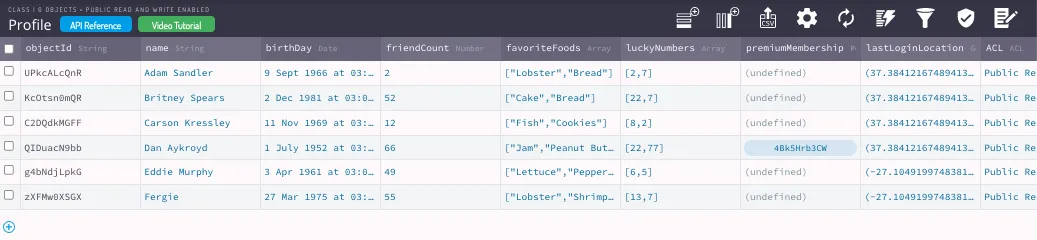
After running this code, you should now have a Profile class in your database with six objects created. Your new class should look like this:
Let’s now take a look at examples from every QueryBuilder method, along with brief explanations on what they do. Please note that some methods in this list can take options as an additional argument, but in most cases, it is only related to masterKey usage and not relevant to this guide content, so this possibility will be omitted whenever not relevant.
Query retrievers
These methods are responsible for running the query and retrieving its results, being always present in your query implementation.
//Retrieves the count of ParseObject results that meet the query criteria.
1   QueryBuilder<ParseObject> queryBuilder = QueryBuilder<ParseObject>(ParseObject('Profile'));
2   var apiResponse = await queryPlayers.count();
3   if (apiResponse.success && apiResponse.result != null) {
4     int countGames = apiResponse.count;
5   }
Query conditioners
These methods give you the possibility of applying conditional constraints to your query, which are arguably the most important operations in querying.
Remember that these operations can all be chained before the results are retrieved, so many combinations can be achieved to solve your querying needs.
//Requires that a key’s value does not match a value in an object returned by a different Parse.Query. Useful for multi-object querying.
1   final QueryBuilder<ParseObject> parseQuery = QueryBuilder<ParseObject>(ParseObject('Profile'));
2   parseQuery.whereDoesNotMatchKeyInQuery(
3     'friendCount',
4     'friendCount',
5     QueryBuilder<ParseObject>(ParseObject('Profile'))
6     ..whereLessThan('friendCount', 50));
7   parseQuery.whereGreaterThan('friendCount', 10);
8   final apiResponse = await parseQuery.query();
9
10  if (apiResponse.success && apiResponse.results != null) {
11    for (var object in apiResponse.results as List<ParseObject>) {
12      print('${object.objectId} - Name: ${object.get<String>('name')} - friendCount: ${object.get<int>('friendCount')}');
13    }
14  }
//Filters objects in which a string key value contains the provided text value. Be aware that this condition is case-sensitive.
1 final QueryBuilder<ParseObject> parseQuery = QueryBuilder<ParseObject>(ParseObject('Profile'));
2 // This can be slow in large databases
3 parseQuery.whereContains('name', 'an');
4 final apiResponse = await parseQuery.query();
5
6 if (apiResponse.success && apiResponse.results != null) {
7 for (var object in apiResponse.results as List<ParseObject>) {
8 print('${object.objectId} - ${object.get<String>('name')}');
9 }
10 }//Filters objects in which a specific key’s value is equal to the provided value.
1 final QueryBuilder<ParseObject> parseQuery = QueryBuilder<ParseObject>(ParseObject('Profile'));
2
3 parseQuery.whereEqualTo('friendCount', 2);
4 final apiResponse = await parseQuery.query();
5
6 if (apiResponse.success && apiResponse.results != null) {
7 for (var o in apiResponse.results) {
8 final object = o as ParseObject;
9 print('${object.objectId} - ${object.get<String>('name')}');
10 }
11 }//Filters objects in which a specific key’s value is lesser than the provided value.
1 final QueryBuilder<ParseObject> parseQuery = QueryBuilder<ParseObject>(ParseObject('Profile'));
2
3 parseQuery.whereLessThan('birthDay', DateTime(1980, 08, 19));
4 final apiResponse = await parseQuery.query();
5
6 if (apiResponse.success && apiResponse.results != null) {
7 for (var object in apiResponse.results as List<ParseObject>) {
8 print('${object.objectId} - ${object.get<String>('name')}');
9 }
10 }//Requires that an object contained in the given key matches another query. Useful for multi-object querying.
1 final QueryBuilder<ParseObject> innerQuery = QueryBuilder<ParseObject>(ParseObject('Membership'));
2 innerQuery.whereGreaterThan('expirationDate', DateTime.now());
3
4 final QueryBuilder<ParseObject> parseQuery = QueryBuilder<ParseObject>(ParseObject('Profile'));
5
6 parseQuery.whereValueExists('premiumMembership', true);
7 parseQuery.whereMatchesQuery('premiumMembership', innerQuery);
8
9 final apiResponse = await parseQuery.query();
10
11 if (apiResponse.success && apiResponse.results != null) {
12 for (var object in apiResponse.results as List<ParseObject>) {
13 print('${object.objectId} - Name: ${object.get<String>('name')}');
14 }
15 }Query ordering
Essential in most queries, ordering can be easily achieved in Parse and even chained between two or more ordering constraints.
//Sort the results in descending order, this can be chained without overwriting previous orderings. Multiple keys can be used to solve ordering ties.
1   final QueryBuilder<ParseObject> parseQuery = QueryBuilder<ParseObject>(ParseObject('Profile'));
2   parseQuery.orderByDescending('name');
3   final apiResponse = await parseQuery.query();
4
5   if (apiResponse.success && apiResponse.results != null) {
6     for (var object in apiResponse.results as List<ParseObject>) {
7       print('${object.objectId} - ${object.get<String>('name')}');
8     }
9   }
Field selecting
These methods affect which field values can be in your query results.
//Return all fields in the returned objects except the ones specified.
1   final QueryBuilder<ParseObject> parseQuery = QueryBuilder<ParseObject>(ParseObject('Profile'));
2   parseQuery.excludeKeys(['name']);
3   final apiResponse = await parseQuery.query();
4
5   if (apiResponse.success && apiResponse.results != null) {
6     for (var object in apiResponse.results as List<ParseObject>) {
7       //Name = null
8       print('${object.objectId} - Name: ${object.get<String>('name')} - Birthday: ${object.get<DateTime>('birthDay')}');
9     }
10  }
Geopoint querying
These are methods specific to GeoPoint querying.
//Return all fields in the returned objects except the ones specified.
1   final QueryBuilder<ParseObject> parseQuery = QueryBuilder<ParseObject>(ParseObject('Profile'));
2   parseQuery.whereNear(
3     'lastLoginLocation',
4     ParseGeoPoint(latitude: 37.38412167489413, longitude: -122.01268034622319)
5   );
6
7   final apiResponse = await parseQuery.query();
8
9   if (apiResponse.success && apiResponse.results != null) {
10    for (var object in apiResponse.results as List<ParseObject>) {
11      print('${object.objectId} - Name: ${object.get<String>('name')} - GeoPoint: ${object.get<ParseGeoPoint>('lastLoginLocation').toJson()}');
12    }
13  }
1 final QueryBuilder<ParseObject> parseQuery = QueryBuilder<ParseObject>(ParseObject('Profile'));
2 parseQuery.whereWithinKilometers(
3 'lastLoginLocation',
4 ParseGeoPoint(latitude: 37.38412167489413, longitude: -122.01268034622319),
5 100
6 );
7
8 final apiResponse = await parseQuery.query();
9
10 if (apiResponse.success && apiResponse.results != null) {
11 for (var object in apiResponse.results as List<ParseObject>) {
12 print('${object.objectId} - Name: ${object.get<String>('name')} - GeoPoint: ${object.get<ParseGeoPoint>('lastLoginLocation').toJson()}');
13 }
14 }Pagination
These methods are related to pagination utilities, useful for queries that will retrieve a large number of results.
1   final QueryBuilder<ParseObject> parseQuery = QueryBuilder<ParseObject>(ParseObject('Profile'));
2   parseQuery.setLimit(2);
3   final apiResponse = await parseQuery.query();
4
5   if (apiResponse.success && apiResponse.results != null) {
6     for (var object in apiResponse.results as List<ParseObject>) {
7       print('${object.objectId} - Name: ${object.get<String>('name')}');
8     }
9   }
Compound query
These method will create compound queries, which can combine more than one ParseQuery instance to achieve more complex results.
//Compose a compound query that is the OR of the passed queries.
1   final QueryBuilder<ParseObject> query1 = QueryBuilder<ParseObject>(ParseObject('Profile'));
2   query1.whereGreaterThan('friendCount', 10);
3
4   final QueryBuilder<ParseObject> query2 = QueryBuilder<ParseObject>(ParseObject('Profile'));
5   query2.whereLessThan('friendCount', 50);
6
7   QueryBuilder<ParseObject> mainQuery = QueryBuilder.or(
8     ParseObject("Profile"),
9     [query1, query2],
10  );
11
12  final apiResponse = await mainQuery.query();
13
14  if (apiResponse.success && apiResponse.results != null) {
15    for (var object in apiResponse.results as List<ParseObject>) {
16      print('${object.objectId} - Name: ${object.get<String>('name')}');
17    }
18  }
Conclusion
At the end of this guide, you learned how to perform every data query method in Parse. In the next guide, you will learn about complex Parse querying in Flutter.