Validators
Using Cloud Function validators in a React Native App
Introduction
In this guide, you will learn how to use the Parse Cloud Code function validators and context usage from a React Native App. You will see examples of validators implemented in cloud functions, how to use context between different functions, and also check how to implement a React Native component using these improved functions in Back4App.
Prerequisites
To complete this tutorial, you will need:
- If you want to run this guide’s example application, you should set up thereact-native-paperlibrary.
Goal
Run Parse Cloud Code functions with validators and context usage on Back4App from a React Native App.
1 - Understanding Cloud Code Functions Validators
Using Cloud Code functions in your application enables great flexibility in your code, making it possible to detach reusable methods from your app and to better control their behavior. You can check or review how to use them in our Cloud functions starter guide.
Data sent to these cloud functions must be validated to avoid unexpected errors, and Parse Cloud Code (starting from version 4.4.0) offers complete integrated validators, that can be passed as an object or even another function. These tests are called before executing any code inside your function, so you can always assume that data will be valid if the validators accept it.
Take the following cloud function as an example, in which the average of a certain movie rating is calculated. The movie name is required(movie), so you can use the following object to ensure it is passed. If the movie parameter is not passed, the function will return an error containing the message “Validation failed. Please specify data for the movie.”.
1	Parse.Cloud.define('getMovieAverageRating', async (request) => {
2	  const query = new Parse.Query("Review");
3	  query.equalTo("movie", request.params.movie);
4	  const results = await query.find();
5	  let sum = 0;
6	  for (let review of results) {
7	    sum += review.get("rate");
8	  }
9	  return {
10	    result: sum / results.length,
11	  };
12	},{
13	  fields : ['movie'],
14	});
You can also pass more advanced options to the validator, such as requiring that the user calling the function is authenticated using therequireUser flag. Another useful addition is to add a condition to validate a parameter value, such as the following, ensuring that the movie value is a string and at least 3 characters long.
1	Parse.Cloud.define('getMovieAverageRating', async (request) => {
2	  const query = new Parse.Query("Review");
3	  query.equalTo("movie", request.params.movie);
4	  const results = await query.find();
5	  let sum = 0;
6	  for (let review of results) {
7	    sum += review.get("rate");
8	  }
9	  return {
10	    result: sum / results.length,
11	  };
12	},{
13	  fields : {
14	    movie : {
15	      required: true,
16	      type: String,
17	      options: val => {
18	        return val.length >= 3;
19	      },
20	      error: 'Movie must have at least 3 characters'
21	    }
22	  },
23	});
The complete list of validation options can be seen on the Parse docs.
2 - Understanding Cloud Code Functions Context
When using Cloud Code (starting from version 4.3.0) save triggers in your application, you can pass a context dictionary in the Parse.Object.save method and also pass it from a beforeSave handler to an afterSave handler. This can be used to ensure data consistency or to perform any kind of asynchronous operation doable only after successfully saving your object.
Take the following cloud function trigger as an example, in which a Review object is saved and we want to differentiate whether the object save call was made from your application or the dashboard. This will be achieved by setting the context before saving the object in your app code like this:
1	const Review = new Parse.Object('Review');
2	Review.set('text', 'Great movie!');
3	Review.set('rate', 5);
4	Review.set('movie', 'Mission Very Possible');
5
6	const context = { fromApplication: true };
7	const savedReview = await Review.save(null, {context: context});
Here are the save trigger functions, note that the context object can be directly accessed from the request in both of them:
1	Parse.Cloud.beforeSave('Review', async (request) => {
2	  // Try to get context
3	  try {
4	    const context = request.context;
5	    if (context.fromApplication === true) {
6	      // Set a flag in the object before saving
7	      request.object.set('fromApplication', true);
8	    }
9	  } catch(error){}
10
11	  const text = request.object.get('text');
12	  if (text.length > 20) {
13	    // Truncate and add a ...
14	    request.object.set('text', text.substring(0, 17) + '...');
15	  }
16	});
17
18	Parse.Cloud.afterSave('Review', async (request) => {
19	  // Try to get context
20	  try {
21	    const context = request.context;
22	    if (context.fromApplication === true) {
23	      // Do something when coming from application, like sending a notification or email
24	      console.log('Got context fromApplication when saving Review object');
25	    }
26	  } catch(error){}
27	});
3 - Using Validated Cloud Code from a React Native component
Let’s now use the same component example from the last guide as a base and add some changes to highlight the functions now using validators and context. Remember to deploy the cloud functions shown in Steps 1 and 2 and, after that, change the “Review” object creation function to the following, with the addition of the context argument in the save method:
1	const createReview = async function () {
2	  try {
3	    // This values come from state variables linked to
4	    // the screen form fields
5	    const reviewTextValue = reviewText;
6	    const reviewRateValue = Number(reviewRate);
7
8	    // Creates a new parse object instance
9	    let Review = new Parse.Object('Review');
10
11	    // Set data to parse object
12	    // Simple title field
13	    Review.set('text', reviewTextValue);
14
15	    // Simple number field
16	    Review.set('rate', reviewRateValue);
17
18	    // Set default movie
19	    Review.set('movie', 'Mission Very Possible');
20
21	    // After setting the values, save it on the server
22	    try {
23	      // Add
24	      const context = {fromApplication: true};
25	      await Review.save(null, {context: context});
26	      // Success
27	      Alert.alert('Success!');
28	      // Updates query result list
29	      doReviewQuery();
30	      runGetMovieAverageRating();
31	      return true;
32	    } catch (error) {
33	      // Error can be caused by lack of Internet connection
34	      Alert.alert('Error!', error.message);
35	      return false;
36	    }
37	  } catch (error) {
38	    // Error can be caused by lack of field values
39	    Alert.alert('Error!', error.message);
40	    return false;
41	  }
42	};
To highlight the movie average calculation function validator, add a new function querying a movie called “Me” and add another button calling it. Remember that our validator will make the request fail because of the movie name length. Here is the new function code:
1	const createReview = async function () {
2	  try {
3	    // This values come from state variables linked to
4	    // the screen form fields
5	    const reviewTextValue = reviewText;
6	    const reviewRateValue = Number(reviewRate);
7
8	    // Creates a new parse object instance
9	    let Review = new Parse.Object('Review');
10
11	    // Set data to parse object
12	    // Simple title field
13	    Review.set('text', reviewTextValue);
14
15	    // Simple number field
16	    Review.set('rate', reviewRateValue);
17
18	    // Set default movie
19	    Review.set('movie', 'Mission Very Possible');
20
21	    // After setting the values, save it on the server
22	    try {
23	      // Add
24	      const context = {fromApplication: true};
25	      await Review.save(null, {context: context});
26	      // Success
27	      Alert.alert('Success!');
28	      // Updates query result list
29	      doReviewQuery();
30	      runGetMovieAverageRating();
31	      return true;
32	    } catch (error) {
33	      // Error can be caused by lack of Internet connection
34	      Alert.alert('Error!', error.message);
35	      return false;
36	    }
37	  } catch (error) {
38	    // Error can be caused by lack of field values
39	    Alert.alert('Error!', error.message);
40	    return false;
41	  }
42	};
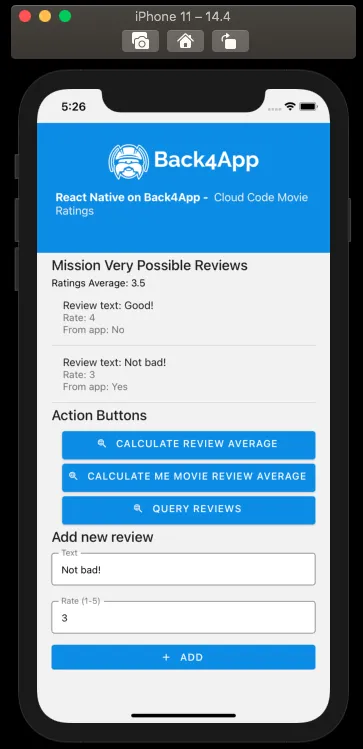
This is how the new full component code is laid out, note that there is a new line in the listing item’s title showing if the Review was created from the application or not:
1	import React, {FC, ReactElement, useState} from 'react';
2	import {Alert, Image, View, ScrollView, StyleSheet} from 'react-native';
3	import Parse from 'parse/react-native';
4	import {
5	  List,
6	  Title,
7	  TextInput as PaperTextInput,
8	  Button as PaperButton,
9	  Text as PaperText,
10	} from 'react-native-paper';
11
12	export const MovieRatings: FC<{}> = ({}): ReactElement => {
13	  // State variable
14	  const [queryResults, setQueryResults] = useState(null);
15	  const [ratingsAverage, setRatingsAverage] = useState('');
16	  const [reviewText, setReviewText] = useState('');
17	  const [reviewRate, setReviewRate] = useState('');
18
19	  const runGetMovieAverageRating = async function (): Promise<boolean> {
20	    try {
21	      const params: {movie: string} = {
22	        movie: 'Mission Very Possible',
23	      };
24	      let resultObject: {result: number} = await Parse.Cloud.run(
25	        'getMovieAverageRating',
26	        params,
27	      );
28	      // Set query results to state variable using state hook
29	      setRatingsAverage(resultObject.result.toFixed(1));
30	      return true;
31	    } catch (error) {
32	      // Error can be caused by lack of Internet connection
33	      // or by not having an valid Review object yet
34	      Alert.alert(
35	        'Error!',
36	        'Make sure that the cloud function is deployed and that the Review class table is created',
37	      );
38	      return false;
39	    }
40	  };
41
42	  const runGetMeMovieAverageRating = async function (): Promise<boolean> {
43	    try {
44	      const params: {movie: string} = {
45	        movie: 'Me',
46	      };
47	      let resultObject: object = await Parse.Cloud.run(
48	        'getMovieAverageRating',
49	        params,
50	      );
51	      return true;
52	    } catch (error) {
53	      // Error can be caused by lack of Internet connection
54	      // or by not having an valid Review object yet
55	      Alert.alert('Error!', JSON.stringify(error.message));
56	      return false;
57	    }
58	  };
59
60	  const doReviewQuery = async function (): Promise<boolean> {
61	    // Create our query
62	    let parseQuery: Parse.Query = new Parse.Query('Review');
63	    try {
64	      let results: [Parse.Object] = await parseQuery.find();
65	      // Set query results to state variable
66	      setQueryResults(results);
67	      return true;
68	    } catch (error) {
69	      // Error can be caused by lack of Internet connection
70	      Alert.alert('Error!', error.message);
71	      return false;
72	    }
73	  };
74
75	  const createReview = async function (): Promise<boolean> {
76	    try {
77	      // This values come from state variables linked to
78	      // the screen form fields
79	      const reviewTextValue: string = reviewText;
80	      const reviewRateValue: number = Number(reviewRate);
81
82	      // Creates a new parse object instance
83	      let Review: Parse.Object = new Parse.Object('Review');
84
85	      // Set data to parse object
86	      // Simple title field
87	      Review.set('text', reviewTextValue);
88
89	      // Simple number field
90	      Review.set('rate', reviewRateValue);
91
92	      // Set default movie
93	      Review.set('movie', 'Mission Very Possible');
94
95	      // After setting the values, save it on the server
96	      try {
97	        const context = {fromApplication: true};
98	        await Review.save(null, {context: context});
99	        // Success
100	        Alert.alert('Success!');
101	        // Updates query result list
102	        doReviewQuery();
103	        runGetMovieAverageRating();
104	        return true;
105	      } catch (error) {
106	        // Error can be caused by lack of Internet connection
107	        Alert.alert('Error!', error.message);
108	        return false;
109	      }
110	    } catch (error) {
111	      // Error can be caused by lack of field values
112	      Alert.alert('Error!', error.message);
113	      return false;
114	    }
115	  };
116
117	  return (
118	    <>
119	      <View style={Styles.header}>
120	        <Image
121	          style={Styles.header_logo}
122	          source={ {
123	            uri:
124	              'https://blog.back4app.com/wp-content/uploads/2019/05/back4app-white-logo-500px.png',
125	          } }
126	        />
127	        <PaperText style={Styles.header_text}>
128	          <PaperText style={Styles.header_text_bold}>
129	            {'React Native on Back4App - '}
130	          </PaperText>
131	          {' Cloud Code Movie Ratings'}
132	        </PaperText>
133	      </View>
134	      <ScrollView style={Styles.wrapper}>
135	        <View>
136	          <Title>{'Mission Very Possible Reviews'}</Title>
137	          <PaperText>{`Ratings Average: ${ratingsAverage}`}</PaperText>
138	          {/* Query list */}
139	          {queryResults !== null &&
140	            queryResults !== undefined &&
141	            queryResults.map((result: Parse.Object) => (
142	              <List.Item
143	                key={result.id}
144	                title={`Review text: ${result.get('text')}`}
145	                description={`Rate: ${result.get('rate')}\nFrom app: ${
146	                  result.get('fromApplication') !== undefined ? 'Yes' : 'No'
147	                }`}
148	                titleStyle={Styles.list_text}
149	                style={Styles.list_item}
150	              />
151	            ))}
152	          {queryResults === null ||
153	          queryResults === undefined ||
154	          (queryResults !== null &&
155	            queryResults !== undefined &&
156	            queryResults.length <= 0) ? (
157	            <PaperText>{'No results here!'}</PaperText>
158	          ) : null}
159	        </View>
160	        <View>
161	          <Title>Action Buttons</Title>
162	          <PaperButton
163	            onPress={() => runGetMovieAverageRating()}
164	            mode="contained"
165	            icon="search-web"
166	            color={'#208AEC'}
167	            style={Styles.list_button}>
168	            {'Calculate Review Average'}
169	          </PaperButton>
170	          <PaperButton
171	            onPress={() => runGetMeMovieAverageRating()}
172	            mode="contained"
173	            icon="search-web"
174	            color={'#208AEC'}
175	            style={Styles.list_button}>
176	            {'Calculate Me Movie Review Average'}
177	          </PaperButton>
178	          <PaperButton
179	            onPress={() => doReviewQuery()}
180	            mode="contained"
181	            icon="search-web"
182	            color={'#208AEC'}
183	            style={Styles.list_button}>
184	            {'Query Reviews'}
185	          </PaperButton>
186	        </View>
187	        <View>
188	          <Title>Add new review</Title>
189	          <PaperTextInput
190	            value={reviewText}
191	            onChangeText={text => setReviewText(text)}
192	            label="Text"
193	            mode="outlined"
194	            style={Styles.form_input}
195	          />
196	          <PaperTextInput
197	            value={reviewRate}
198	            onChangeText={text => setReviewRate(text)}
199	            keyboardType={'number-pad'}
200	            label="Rate (1-5)"
201	            mode="outlined"
202	            style={Styles.form_input}
203	          />
204	          <PaperButton
205	            onPress={() => createReview()}
206	            mode="contained"
207	            icon="plus"
208	            style={Styles.submit_button}>
209	            {'Add'}
210	          </PaperButton>
211	        </View>
212	      </ScrollView>
213	    </>
214	  );
215	};
216
217	// These define the screen component styles
218	const Styles = StyleSheet.create({
219	  header: {
220	    alignItems: 'center',
221	    paddingTop: 30,
222	    paddingBottom: 50,
223	    backgroundColor: '#208AEC',
224	  },
225	  header_logo: {
226	    height: 50,
227	    width: 220,
228	    resizeMode: 'contain',
229	  },
230	  header_text: {
231	    marginTop: 15,
232	    color: '#f0f0f0',
233	    fontSize: 16,
234	  },
235	  header_text_bold: {
236	    color: '#fff',
237	    fontWeight: 'bold',
238	  },
239	  wrapper: {
240	    width: '90%',
241	    alignSelf: 'center',
242	  },
243	  list_button: {
244	    marginTop: 6,
245	    marginLeft: 15,
246	    height: 40,
247	  },
248	  list_item: {
249	    borderBottomWidth: 1,
250	    borderBottomColor: 'rgba(0, 0, 0, 0.12)',
251	  },
252	  list_text: {
253	    fontSize: 15,
254	  },
255	  form_input: {
256	    height: 44,
257	    marginBottom: 16,
258	    backgroundColor: '#FFF',
259	    fontSize: 14,
260	  },
261	  submit_button: {
262	    width: '100%',
263	    maxHeight: 50,
264	    alignSelf: 'center',
265	    backgroundColor: '#208AEC',
266	  },
267	});
This is how the component should look like after rendering and querying by one of the query functions:
Conclusion
At the end of this guide, you learned how to use Parse Cloud Code function validators and context. In the next guide, you will learn how to work with Users in Parse.