Encrypted Chat
How to make a GDPR compliant chat app
Introduction
Ahoy Back4app community!
This is a guest tutorial from the team at Virgil Security, Inc.: we’re the crypto tech behind Twilio’s End-to-End Encrypted Messaging. Our friends @ Back4app asked us to show you how to build an End-to-End Encrypted chat app on top of Back4app.
In this post, we’ll walk you through the steps to make a simple Back4App Android Messenger app End-to-End Encrypted! Are you ready? PS: If you don’t care about the details, simply skip to the end of the post and download the final product.
What is End-to-End Encryption?
First, let’s start with a quick refresher of what E2EE (End-to-End Encryption) is and how it works. E2EE is simple: when you type in a chat message, it gets encrypted on your mobile device (or in your browser) and gets decrypted only when your chat partner receives it and wants to display it in chat window.

The message remains encrypted while it travels over Wi-Fi and the Internet, through the cloud / web server, into a database, and on the way back to your chat partner. In other words, none of the networks or servers have a clue of what the two of you are chatting about.

What’s difficult in End-to-End Encryption is the task of managing the encryption keys in a way that only the users involved in the chat can access them and nobody else. And when I write “nobody else”, I really mean it: even insiders of your cloud provider or even you, the developer, are out; no accidental mistakes or legally enforced peeking are possible. Writing crypto, especially for multiple platforms is hard: generating true random numbers, picking the right algorithms, and choosing the right encryption modes are just a few examples that make most developers wave their hands in the air and end up just NOT doing it.
This blog post will show you how to ignore all these annoying details and quickly and simply End-to-End Encrypt using Virgil’s SDK.
For an intro, this is how we’ll upgrade Back4app’s messenger app to be End-to-End Encrypted:
- During sign-up: we’ll generate the individual private & public keys for new users (remember: the recipient’s public key encrypts messages and the matching recipient’s private key decrypts them).
- Before sending messages, you’ll encrypt chat messages with the recipient’s public key.
- After receiving messages, you’ll decrypt chat messages with the recipient’s private key.
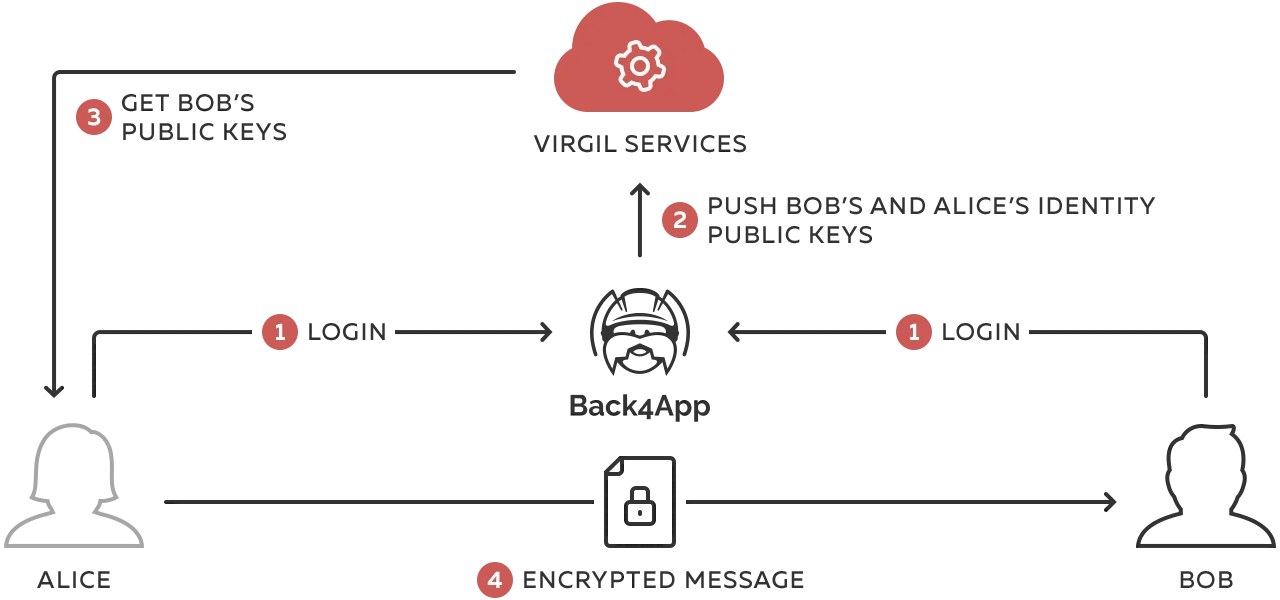
We’ll publish the users’ public keys to Virgil’s Cards Service so that chat users are able to look up each other and able to encrypt messages for each other. The private keys will stay on the user devices.
Keep it simple
This is the simplest possible implementation of E2EE chat and it works perfectly for simple chat apps between 2 users where conversations are short-lived and it’s okay to lose the message history if a device is lost with the private key on it.
OK, enough talking! Let’s get down to coding.
- We’ll start by guiding you through the Android app’s setup,
- Then, we’ll add some code to make the app end-to-end encrypted.
Prerequisites
To complete this tutorial, you need:
- Android Studio.
- An app created at Back4App.
Let’s set up the “clean” Back4app messenger app
1: Set up your App Server
Let’s start with deploying the cloud function. For this, you will need to:
- Find main.js and package.json in scripts directory;
- Open main.js with your favorite editor.
1.1) Get Back4App credentials
- Open Dashboard of your app > App Settings > Security & Keys:
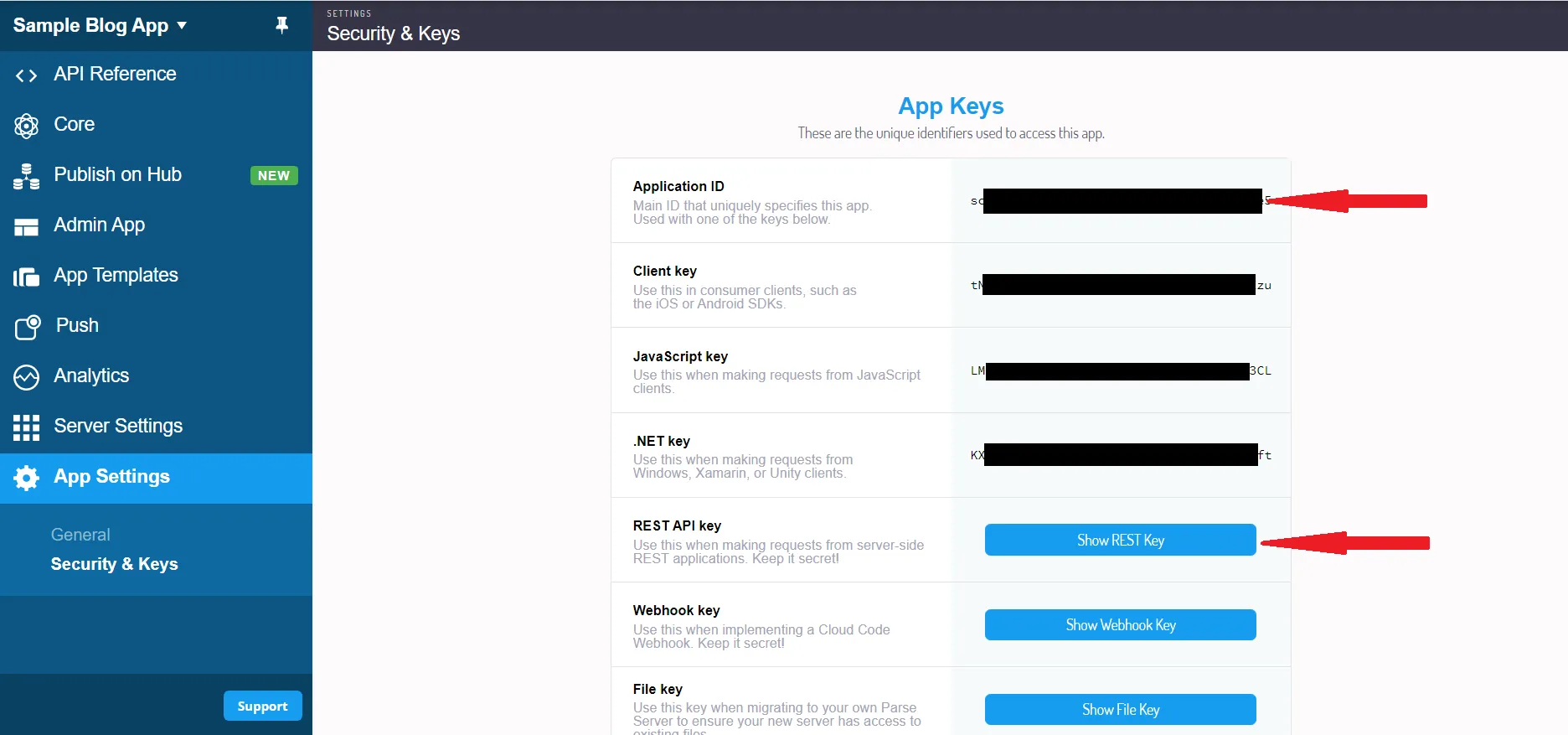
- In main.js, replace PARSE_APP_ID with your Application ID and PARSE_REST_API_KEY with your REST API key:
1.2) Get Virgil credentials
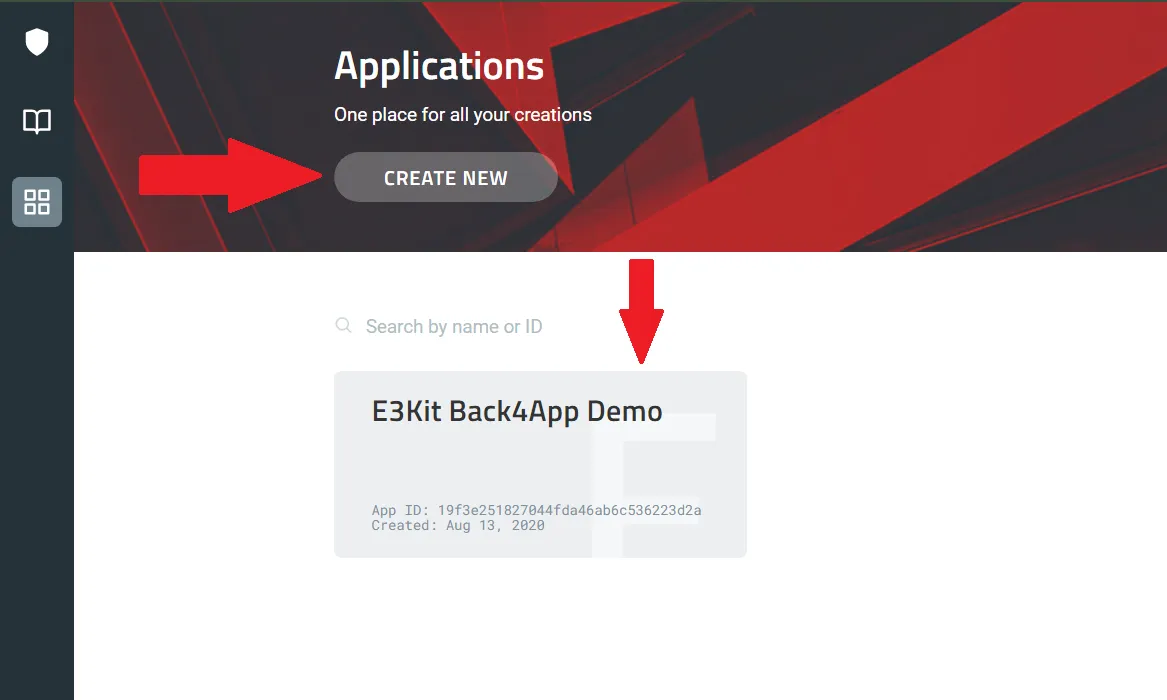
- Open your new Virgil application, navigate to E3Kit section and and generate a .env file under the E3Kit section in the left side bar
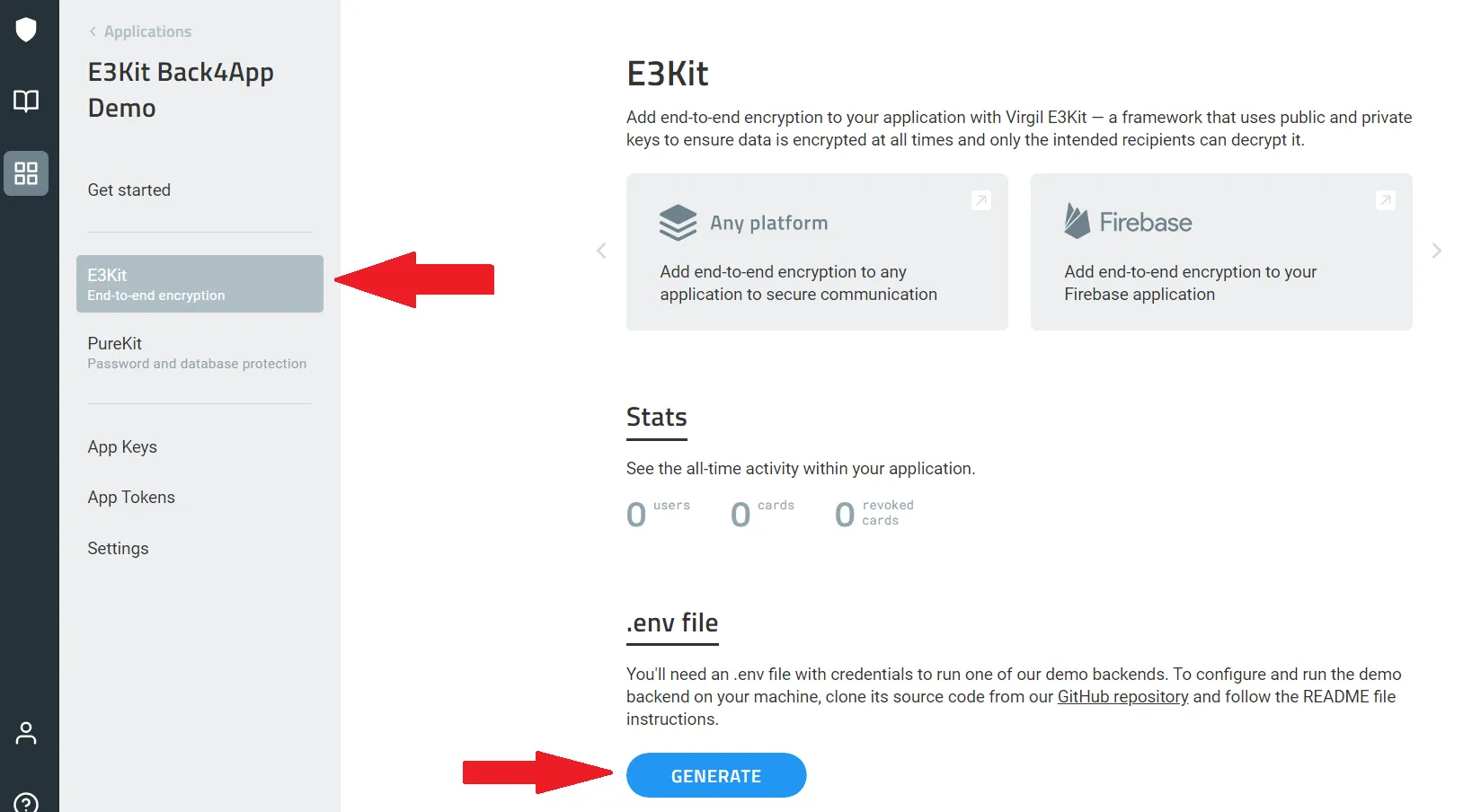
- Copy the values of APP_ID, APP_KEY, and APP_KEY_ID from the .env file
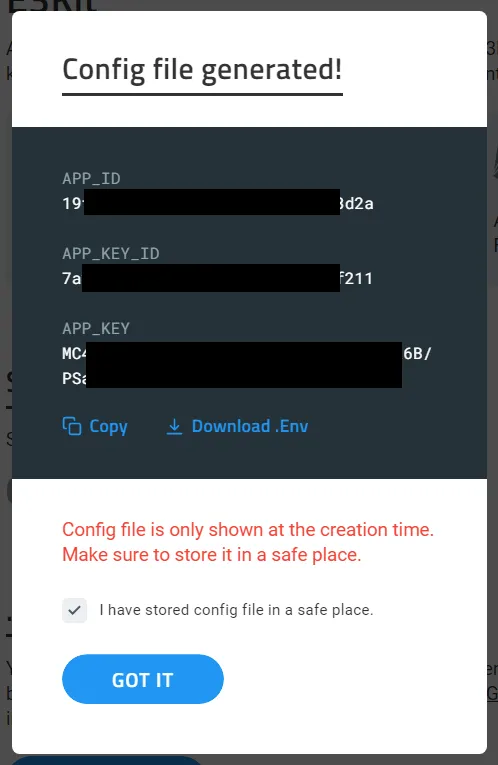
- Replace the copied values in your main.js file in the corresponding fields (main.js of scripts directory):
1.3) Deploy cloud code function
- Open Back4App “Dashboard” of your app -> “Core” -> Cloud code functions;
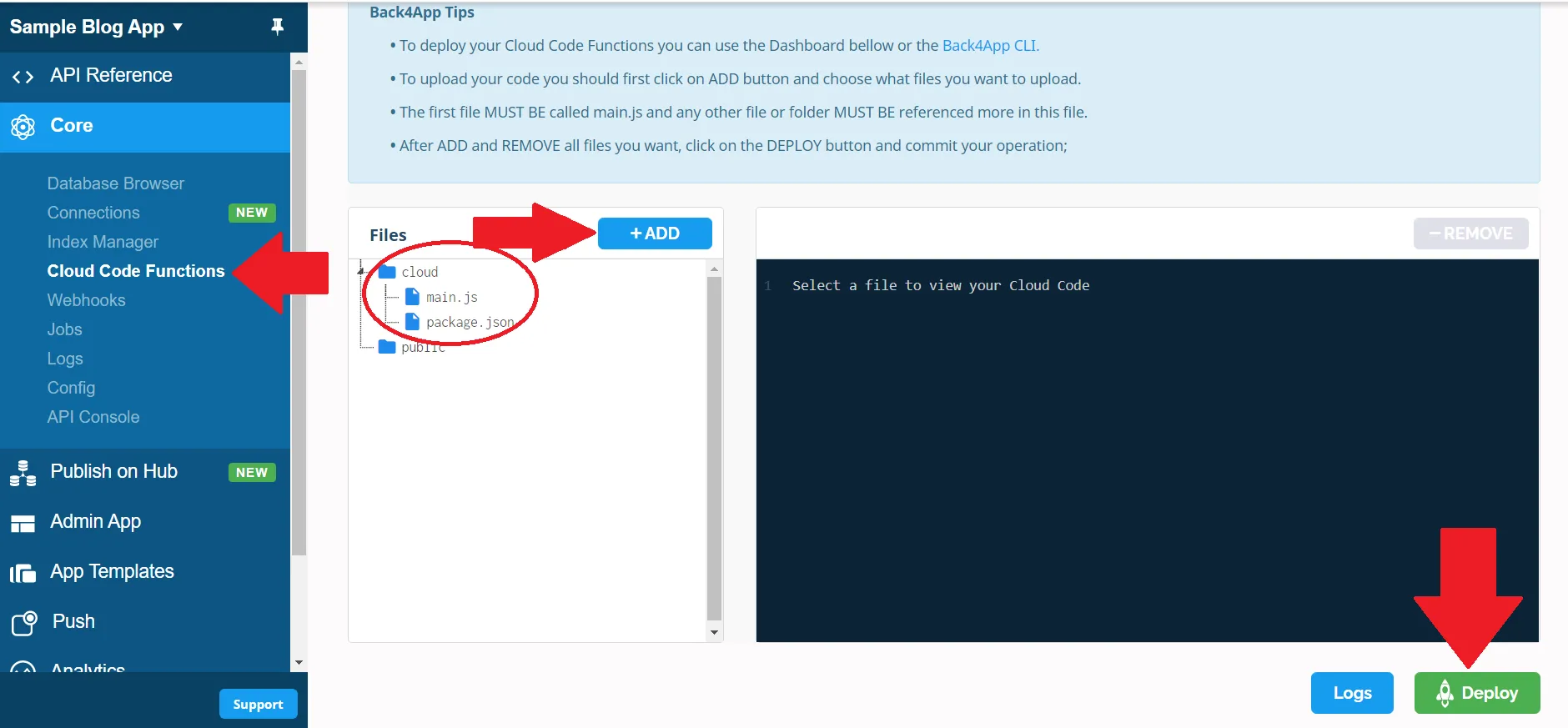
- Click +ADD and select your main.js and package.json (from scripts directory), after that move both of them to the cloud folder;
- Click DEPLOY.
2: Start clean Back4app Kotlin Demo app
Don’t forget to set up Back4App cloud code function first. It is a mandatory part of this demo. After this, go through the following steps:
2.1) Import Project in Android Studio
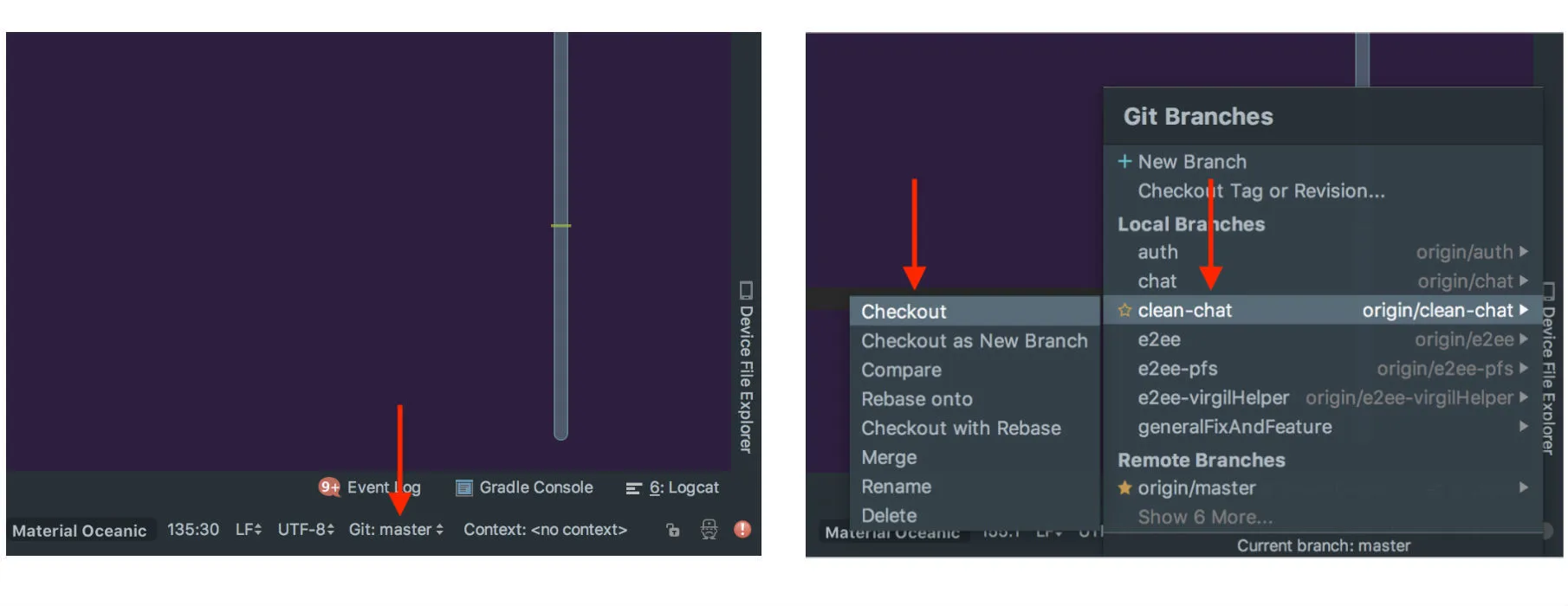
- Open Android Studio -> File > New > Project from Version Control > Git
- Git Repository URL: https://github.com/VirgilSecurity/chat-back4app-android
- Check out the clean-chat-kt branch
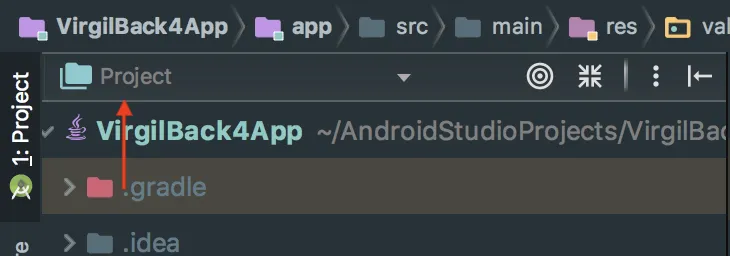
Important!
Select “Project” type of file tree. It will be used all-through the tutorial:
2.2) Setup Back4App credentials in project
- Open Back4App “Dashboard” of your app -> “App Settings” -> “Security & Keys”;
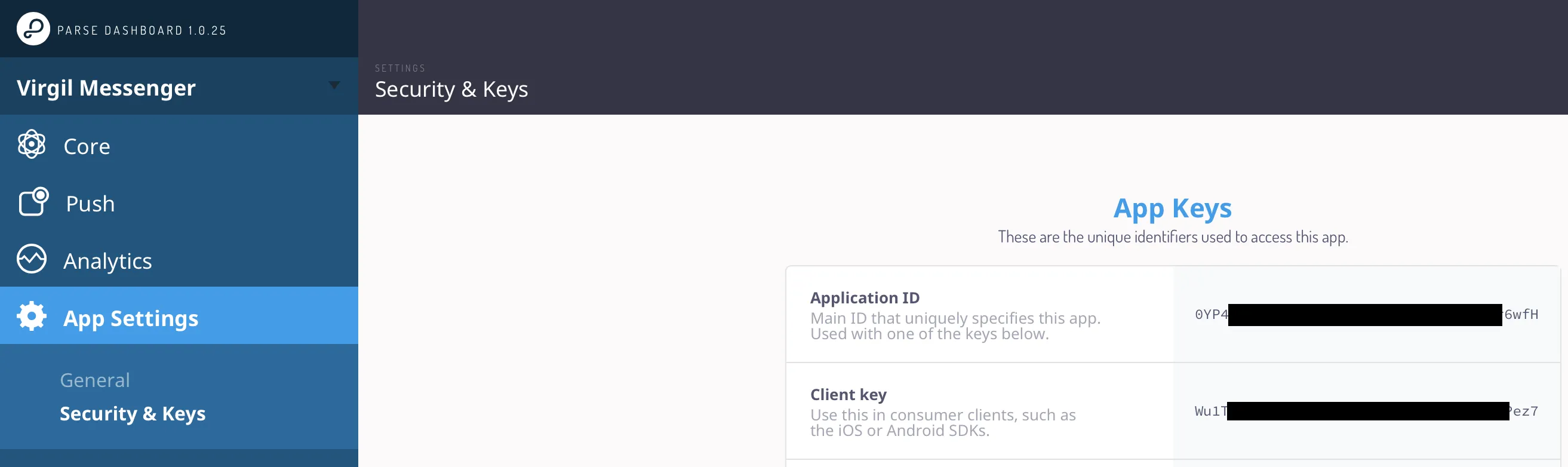
Go to /app/src/main/res/values/strings.xml file in your android project and replace your_back4app_app_id with your Application ID and your_back4app_client_key with your Client Key:
2.3) Setup DB
- Open Back4App “Dashboard” -> “Core” -> “Database Browser” -> “Create a class” and create classes of Custom type named Message and ChatThread;
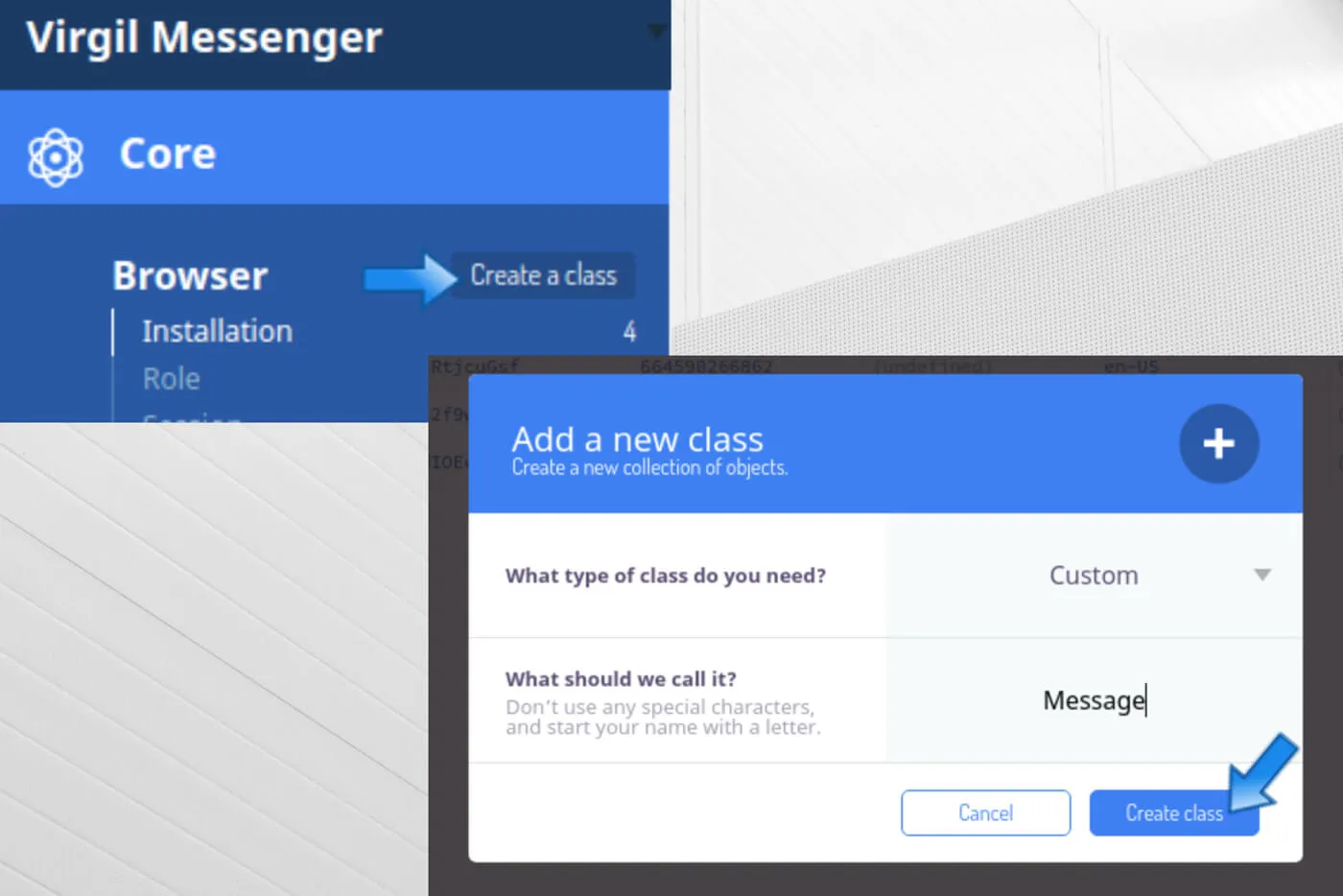
2.4) Setup live query
- Press the Server Settings button on your Application
- Find the “Web Hosting and Live Query” block
- Open the Live Query Settings and check the Activate Hosting option.
- Choose a name for your subdomain to activate Live Query for the 2 classes you created: Message and ChatThread.
- Copy your new subdomain name and click the SAVE button:
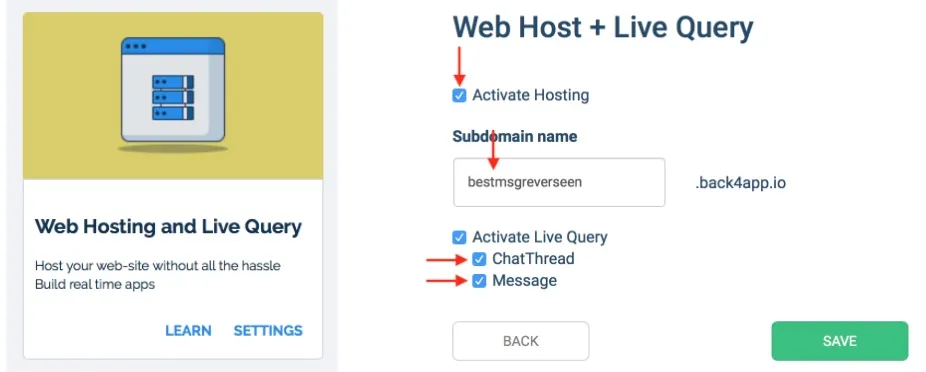
Return to /app/src/main/res/values/strings.xml and paste “Subdomain name” you have entered above into the back4app_live_query_url instead of “yourSubdomainName”:
After these steps you will be able to hit the Run button in Android Studio and get the sample to work. Use emulator or real device to test it out.
3: Run the clean demo
To see the result of running the clean version of the demo, you’ll need to:
- Sign up 2 users;
- Start a conversation between them and send a couple of messages;
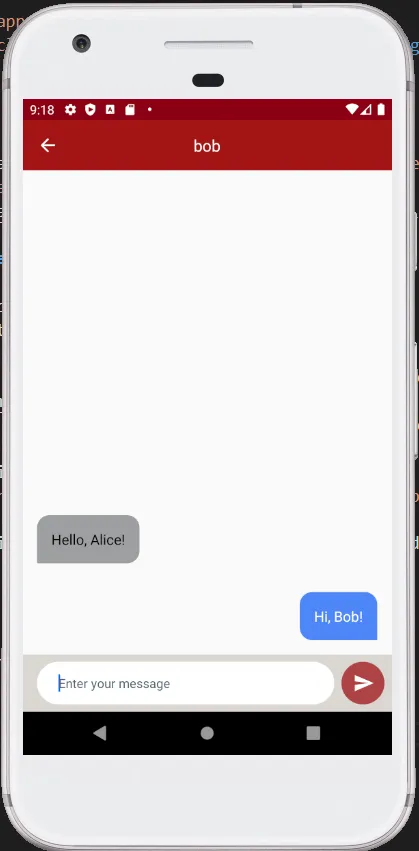
3. Open Back4App “Dashboard” -> “Core” -> “Database Browser” -> “Message”.
If it all worked out, you should see the chat messenger app popping up. Register two users and send a few messages to each other: you should see new data showing up in the Message class.
Note that you can see on the server what your users are chatting about:
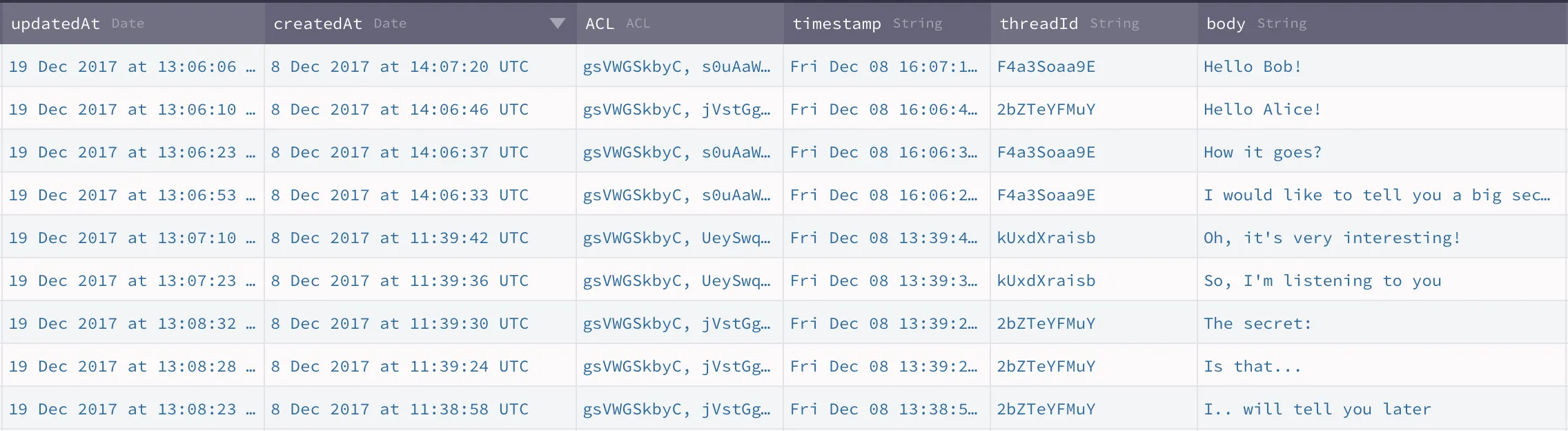
Next: Close your chat interface and move on to the next step – adding E2EE encryption.
Now, let’s End-to-End Encrypt those messages!
By the end of this part, this is how your chat messages will look like on the server: can you spot the difference?
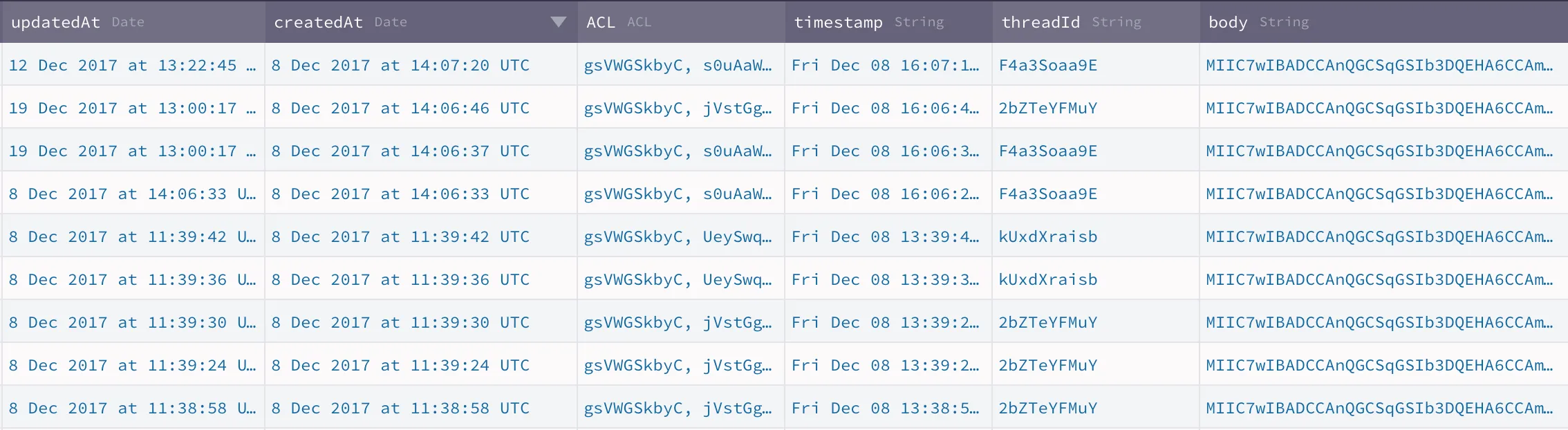
How do we get there? Obviously, we need to implement end-to-end encryption, which means that our app needs to:
- Generate the private & public key pair as part of signup
- Store the private key in the key storage on user’s device
- Publish the public key in Virgil’s Card Service as a “Virgil Card” for other users to download & encrypt messages with it
- Encrypt messages with public key and sign with private key; decrypt messages with private key and verify with public key
For this, we will need to add E3Kit to our clean demo application and some more code to implement all that was described above.
But before we begin, let’s clear two important terms for you: what’s a Virgil Card and a private key?
- Virgil Card - Virgil Сards carry the users’ private keys. Virgil Cards are published to Virgil’s Cards Service (imagine this service is like a telephone book) for other users to retrieve them: Alice needs to retrieve Bob’s public key in order to encrypt a message for Bob using that key.
- Private key - a private part of the encryption key. Remember, private keys can decrypt data that was encrypted using the matching public key.
1: Add E3Kit to the clean E3Kit Back4App Kotlin Demo
- In the app-level (Module: app) gradle at /app/build.gradle add (but don’t sync gradle scripts just yet):
- Add the following to the end of your project-level /build.gradle (Project: chat-back4app-android):
- Now you can synchronize gradle scripts;
- Update your AppVirgil class by adding new fields:
- Press Alt+ Enter to import the necessary libraries into the class.
2: Authenticate users with Back4App Cloud Code
- In ../virgilsecurity/virgilback4app/model/ directory, create data classes AuthenticateResponse and VirgilJwtResponse that represent responses from Cloud Code functions:
- In ../virgilsecurity/virgilback4app/util/ create AuthRx object that implements calls to Cloud Code functions (don’t forget to import all the necessary libraries afterwards):
1   object AuthRx {
2
3       /**
4        * You can call it only after successful [authenticate]
5        */
6       fun virgilJwt(sessionToken: String) = Single.create<String> { emitter ->
7           val requestParams = mutableMapOf<String, String>().apply {
8               put("sessionToken", sessionToken)
9           }
10
11          ParseCloud.callFunctionInBackground<Map<String, Any>>(
12              KEY_VIRGIL_JWT,
13              requestParams
14          ) { virgilJwt, exception ->
15              if (exception == null)
16                  emitter.onSuccess(virgilJwt[KEY_TOKEN].toString())
17              else
18                  emitter.onError(exception)
19
20          }
21      }
22
23      private const val KEY_VIRGIL_JWT = "virgil-jwt"
24      private const val KEY_TOKEN = "token"
25  }
3: Store Virgil JWT locally
Virgil token received from Cloud Code functions needs to be stored locally. Let’s update Preferences class in ../virgilsecurity/virgilback4app/util/:
- Define constant:
- Add functions setVirgilToken, virgilToken and clearVirgilToken:
~~~kotlin
fun setVirgilToken(virgilToken: String) { with(sharedPreferences.edit()) { putString(KEY_VIRGIL_TOKEN, virgilToken) apply() } }
fun virgilToken(): String? { with(sharedPreferences) { return getString(KEY_VIRGIL_TOKEN, null) } }
fun clearVirgilToken() { with(sharedPreferences.edit()) { remove(KEY_VIRGIL_TOKEN) apply() } }
1   Virgil token should be reset on logout. Let's add `Preferences.instance(this).clearVirgilToken()` line into `initDrawer` function of `ThreadsListActivity` class  (in `../virgilsecurity/virgilback4app/chat/contactsList/`):
2   ~~~kotlin
3   private fun initDrawer() {
4       ...
5       nvNavigation.setNavigationItemSelectedListener { item ->
6           R.id.itemLogOut -> {
7               dlDrawer.closeDrawer(GravityCompat.START)
8               presenter.disposeAll()
9               showBaseLoading(true)
10              // New code >>
11              Preferences.instance(this).clearVirgilToken()
12              // << New code
13              ...
14          }
15      }
16  }
4: Modify user registration
E3Kit takes care about your private and public keys. To generate them during the registering process, we’ll need to do the following:
- In ../virgilsecurity/virgilback4app/util/create RxEthree class:
- Now, add initEthree function that initializes E3Kit instance in RxEthree class:
1      import com.virgilsecurity.android.common.model.EThreeParams
2      import com.virgilsecurity.android.ethree.interaction.EThree
3
4
5      fun initEthree(identity: String, verifyPrivateKey: Boolean = false): 6Single<EThree> = Single.create { e ->
6       val params = EThreeParams(identity, {preferences.virgilToken()!!}, context)
7       val ethree = EThree(params)
8       if (verifyPrivateKey) {
9           if (ethree.hasLocalPrivateKey()) {
10              e.onSuccess(ethree)
11          } else {
12              e.onError(KeyEntryNotFoundException())
13          }
14      } else {
15          e.onSuccess(ethree)
16      }
17 }- Add registerEthree function that registers a new user to RxEthree class. E3Kit generates a key pair during a sign up. The generated private key then is stored in local storage, and public key is published to Virgil Services as a Virgil Card.
1   import com.android.virgilsecurity.virgilback4app.AppVirgil
2   import com.virgilsecurity.common.callback.OnCompleteListener
3   import io.reactivex.Completable
4
5
6   fun registerEthree(): Completable = Completable.create { e ->
7       AppVirgil.eThree.register().addCallback(object : OnCompleteListener {
8           override fun onError(throwable: Throwable) {
9               e.onError(throwable)
10          }
11
12          override fun onSuccess() {
13              e.onComplete()
14          }
15
16      })
17 }- Let’s make some updates to LogInPresenter class (in ../virgilsecurity/virgilback4app/auth/).
- Add rxEthree field:
1 private val rxEthree = RxEthree(context)Update the requestSignUp function to run registration with E3Kit
1   fun requestSignUp(identity: String, onSuccess: () -> Unit, onError: (Throwable) -> Unit) {
2     val password = generatePassword(identity.toByteArray())
3
4     val disposable = RxParse.signUp(identity, password)
5             .subscribeOn(Schedulers.io())
6             .observeOn(Schedulers.io())
7             // New code >>
8             .toSingle { ParseUser.getCurrentUser() }
9             .flatMap { AuthRx.virgilJwt(it.sessionToken) }
10            .map { preferences.setVirgilToken(it) }
11            .flatMap { rxEthree.initEthree(identity) }
12            .map { AppVirgil.eThree = it }
13            .flatMap { rxEthree.registerEthree().toSingle { Unit } }
14            // << New code
15            .observeOn(AndroidSchedulers.mainThread())
16            // Updated code >>
17            .subscribeBy(
18                onSuccess = {
19                    onSuccess()
20                },
21                onError = {
22                    onError(it)
23                }
24            )
25            // << Updated code
26
27    compositeDisposable += disposable
28  }
5: Modify sign in functions
Now, let’s make changes to requestSignIn method of LogInPresenter class (in ../virgilsecurity/virgilback4app/auth/):
1      fun requestSignIn(identity: String,
2                     onSuccess: () -> Unit,
3                     onError: (Throwable) -> Unit) {
4
5       val password = generatePassword(identity.toByteArray())
6
7       val disposable = RxParse.logIn(identity, password)
8               .subscribeOn(Schedulers.io())
9               .observeOn(Schedulers.io())
10              // New code >>
11              .flatMap { AuthRx.virgilJwt(it.sessionToken) }
12              .map { preferences.setVirgilToken(it) }
13              .flatMap { rxEthree.initEthree(identity, true) }
14              .map { AppVirgil.eThree = it }
15              // << New code
16              .observeOn(AndroidSchedulers.mainThread())
17              // Updated code >>
18              .subscribeBy(
19                  onSuccess = {
20                      onSuccess()
21                  },
22                  onError = {
23                      onError(it)
24                  }
25              )
26              // << Updated code
27
28      compositeDisposable += disposable
29  }
6: Get the list of existing chat
Next, add functions that handle E3Kit initialization into ThreadsListFragment class (in ../virgilsecurity/virgilback4app/chat/contactsList/):
1   private fun onInitEthreeSuccess() {
2       presenter.requestThreads(ParseUser.getCurrentUser(),
3                                20,
4                                page,
5                                Const.TableNames.CREATED_AT_CRITERIA,
6                                ::onGetThreadsSuccess,
7                                ::onGetThreadsError)
8   }
9
10  private fun onInitEthreeError(throwable: Throwable) {
11      showProgress(false)
12      if (adapter.itemCount == 0)
13          tvError.visibility = View.VISIBLE
14
15      Utils.toast(activity, Utils.resolveError(throwable))
16  }
Update postCreateInit function to initialize E3Kit:
1   override fun postCreateInit() {
2       ...
3       presenter = ThreadsListFragmentPresenter(activity)
4
5       showProgress(true)
6       // Updated code >>
7       if (AppVirgil.isEthreeInitialized()) {
8           presenter.requestThreads(ParseUser.getCurrentUser(),
9                                    20,
10                                   page,
11                                   Const.TableNames.CREATED_AT_CRITERIA,
12                                   ::onGetThreadsSuccess,
13                                   ::onGetThreadsError)
14      } else {
15          presenter.requestEthreeInit(ParseUser.getCurrentUser(), ::onInitEthreeSuccess, ::onInitEthreeError)
16      }
17      // << Updated code
18  }
And add the following code into ThreadsListFragmentPresenter class in virgilsecurity.virgilback4app.chat.contactsList/:
- Add field:
1 private val rxEthree = RxEthree(context)- and function
1   fun requestEthreeInit(currentUser: ParseUser, onSuccess: () -> Unit, onError: (Throwable) -> Unit) {
2     val disposable = rxEthree.initEthree(currentUser.username)
3             .subscribeOn(Schedulers.io())
4             .observeOn(AndroidSchedulers.mainThread())
5             .subscribeBy(
6                 onSuccess = {
7                     AppVirgil.eThree = it
8                     onSuccess()
9                 },
10                onError = {
11                    onError(it)
12                }
13            )
14
15    compositeDisposable += disposable
16  }
At this point we are able to Sign up/Sign in a user and create a new chat with other user.
Now let’s add encryption for our messages.
7: Message encryption and decryption
Let’s add findCard function to RxEthree class (in ../virgilsecurity/virgilback4app/util/) that will help us to get the latest Virgil Card by user name:
1   fun findCard(identity: String): Single<Card> = Single.create { e ->
2       AppVirgil.eThree.findUser(identity).addCallback(object : OnResultListener<Card> {
3           override fun onError(throwable: Throwable) {
4                e.onError(throwable)
5           }
6
7           override fun onSuccess(result: Card) {
8               e.onSuccess(result)
9           }
10
11      })
12  }
When a chat is opened, we should obtain Virgil Card of the recipient. Edit postCreateInit of ChatThreadFragment class (in ../virgilsecurity/virgilback4app/chat/thread/) by replacing
1   presenter.requestMessages(thread,
2                             50,
3                             page,
4                             Const.TableNames.CREATED_AT_CRITERIA,
5                             ::onGetMessagesSuccess,
6                             ::onGetMessagesError)
code with a new one
1   presenter.requestCard(recipientId,
2                                      ::onGetCardSuccess,
3                                      ::onGetCardError)
And add two functions:
1   private fun onGetCardSuccess(card: Card) {
2       showProgress(false)
3       adapter.interlocutorCard = card
4       presenter.requestMessages(thread,
5                                 50,
6                                 page,
7                                 Const.TableNames.CREATED_AT_CRITERIA,
8                                 ::onGetMessagesSuccess,
9                                 ::onGetMessagesError)
10  }
11
12  private fun onGetCardError(t: Throwable) {
13      if (t is VirgilCardIsNotFoundException || t is VirgilCardServiceException) {
14          Utils.toast(this,
15                      "Virgil Card is not found.\nYou can not chat with user without Virgil Card")
16          activity.onBackPressed()
17      }
18      showProgress(false)
19      srlRefresh.isRefreshing = false
20      lockSendUi(lock = false, lockInput = false)
21
22      Utils.toast(this, Utils.resolveError(t))
23  }
Now let’s change ChatThreadPresenter:
- Add fields:
1   private val eThree = AppVirgil.eThree
2   private lateinit var userCard: Card
3 private val rxEthree = RxEthree(context)- Add a function that obtains a Virgil Card of the recipient:
1   fun requestCard(identity: String,
2                 onSuccess: (Card) -> Unit,
3                 onError: (Throwable) -> Unit) {
4
5     val disposable = rxEthree.findCard(identity)
6             .subscribeOn(Schedulers.io())
7             .observeOn(AndroidSchedulers.mainThread())
8             .subscribeBy(
9                 onSuccess = {
10                    userCard = it
11                    onSuccess(it)
12                },
13                onError = {
14                    onError(it)
15                }
16            )
17
18    compositeDisposable += disposable
19 }- Add encryption of outcoming messages in requestSendMessage function:
1   fun requestSendMessage(text: String,
2                        thread: ChatThread,
3                        onSuccess: () -> Unit,
4                        onError: (Throwable) -> Unit) {
5
6     val encryptedText = eThree.authEncrypt(text, userCard)
7     val disposable = RxParse.sendMessage(encryptedText, thread)
8     ...
9   }
Add decryption of all the incoming messages into ChatThreadRVAdapter class (in ../virgilsecurity/virgilback4app/chat/thread/):
- Add fields:
1   private var eThree: EThree = AppVirgil.eThree
2 lateinit var interlocutorCard: Card- Implement message decryption in onBindViewHolder function
1   override fun onBindViewHolder(viewHolder: RecyclerView.ViewHolder, position: Int) {
2     when (viewHolder) {
3         is HolderMessageMe -> {
4             val decryptedText = eThree.authDecrypt(items[position].body)
5             viewHolder.bind(decryptedText)
6         }
7         is HolderMessageYou -> {
8             val decryptedText = eThree.authDecrypt(items[position].body, interlocutorCard)
9             viewHolder.bind(decryptedText)
10        }
11    }
12  }
8: Run the complete end-to-end encrypted demo
Now to see the result of our fully end-to-end encrypted demo, go through these steps again:
- Log out the previous user
- Sign up 2 new users;
- Start a conversation between them and send a couple of messages;
- Open Back4App “Dashboard” -> “Core” -> “Database Browser” -> “Message”.
Important! You have to Log Out the current user and register two new users, after that you can start E2EE chat with those two new users. The reason is that your first two users have no Virgil Card’s, so you can not use encrypt\decrypt for them.{: .blockquote-tip}
Done! Now you can see that users’ messages are encrypted and can only be accessed in app by users themselves.
HIPAA & GDPR compliance:
End-to-End Encryption is a way to meet the technical requirements for HIPAA (the United States’ Health Insurance Portability and Accountability Act of 1996) & GDPR (the European Union’s General Data Protection Regulation). If you need more details, sign up for a free Virgil account, join our Slack community and ping us there: we’re happy to discuss your own privacy circumstances and help you understand what’s required to meet the technical HIPAA & GDPR requirements.
Where to go from here?
Final project. If you missed pieces from the puzzle, open the E2EE project branch. You can insert your application credentials in this code (as you did during the article) and build the project.
You can find more information about what you can build with Virgil Security here.