1:1 Relationship
일대일 관계
소개
많은 백엔드의 핵심에는 데이터를 저장할 수 있는 기능이 있습니다. Parse를 사용하면 데이터 객체를 저장하고 그들 간의 관계를 설정할 수 있습니다. 데이터 관계는 각 데이터 객체가 다른 객체와 어떻게 관련되거나 연관되는지를 표준화합니다. 이는 복잡한 쿼리를 구축하고 실행할 때 추가적인 힘을 줄 수 있습니다. 세 가지 주요 관계 유형이 있습니다:
- 일대다, 하나의 객체가 여러 다른 객체와 관련될 수 있는 경우;
- 일대일, 두 객체 간의 직접적인 관계를 설정하고 오직 그들만의 관계를 형성하는 경우;
- 다대다, 여러 객체 간에 많은 복잡한 관계를 생성할 수 있는 경우.
이 가이드에서는 일대일 관계에 초점을 맞출 것입니다. 이러한 관계는 고유한 필드가 필요하고 이를 강제해야 하는 민감한 데이터 및 사용자 관리와 관련된 애플리케이션에서 일반적입니다. 예를 들어 ID 번호 및 전화번호와 같은 필드가 있습니다. 데이터 저장 백엔드는 일반적으로 이러한 연관성에 대한 명시적인 선언을 요구하며, Parse는 이러한 연관성을 달성하기 위한 자동 솔루션을 제공하지 않습니다.
그러나 서버에서 Parse.Cloud 함수를 사용하여 Parse에서 1:1 관계를 구현할 수 있는 방법이 있습니다. 이는 데이터 저장 전에 테이블 관계가 고유하게 유지되도록 강제합니다. 이는 관련 클래스 모두에서 beforeSave 함수를 생성하고, 부모 클래스가 자식 클래스에 이미 하나의 인스턴스를 소유하고 있는 경우 저장을 방지하며, 그 반대의 경우도 마찬가지입니다.
애플리케이션 Parse 코드에서 이러한 경우를 처리할 수도 있으며, 저장하기 전에 서버를 쿼리하여 해당 관계를 보장할 수 있습니다. 이 가이드에서 보여줄 방법이지만, 클라우드 함수를 사용하는 것이 훨씬 깔끔하고 권장됩니다.
이 가이드에서는 세 가지 주요 데이터 연관성을 포함하는 React Native 도서 등록 애플리케이션을 구현할 것입니다. Back4App과 React Native를 사용하여 일대일 데이터 관계를 생성하고 쿼리하는 방법을 배우게 됩니다.
언제든지 GitHub 리포지토리를 통해 이 프로젝트에 접근하여 스타일과 전체 코드를 확인할 수 있습니다.
전제 조건
목표
현실적인 시나리오에서 Parse를 사용하여 React Native에서 일대일 데이터베이스 관계를 수행하고 시연합니다.
1 - Book 클래스 이해하기
이 가이드에서는 도서 등록 애플리케이션 예제를 사용할 것이므로, 먼저 이 데이터베이스에서 객체 관계가 어떻게 구성되어 있는지 이해해야 합니다. 사용하게 될 주요 객체 클래스는 Book 클래스이며, 이 클래스는 등록된 각 도서 항목을 저장합니다. 다음은 다른 네 개의 객체 클래스입니다:
- Publisher: 도서 출판사 이름, Book, 일대다 관계
- Genre: 도서 장르, Book, 일대다 관계. 이 예제에서는 도서가 하나의 장르만 가질 수 있다고 가정합니다;
- Author: 도서 저자, Book, 다대다 관계; 도서는 여러 저자를 가질 수 있고 저자도 여러 도서를 가질 수 있습니다;
- ISDB: 도서 ISDB 식별 번호, Book, 일대일 관계; 이 번호는 각 도서에 대해 고유합니다.
다음은 이러한 데이터베이스 테이블의 시각적 표현입니다:
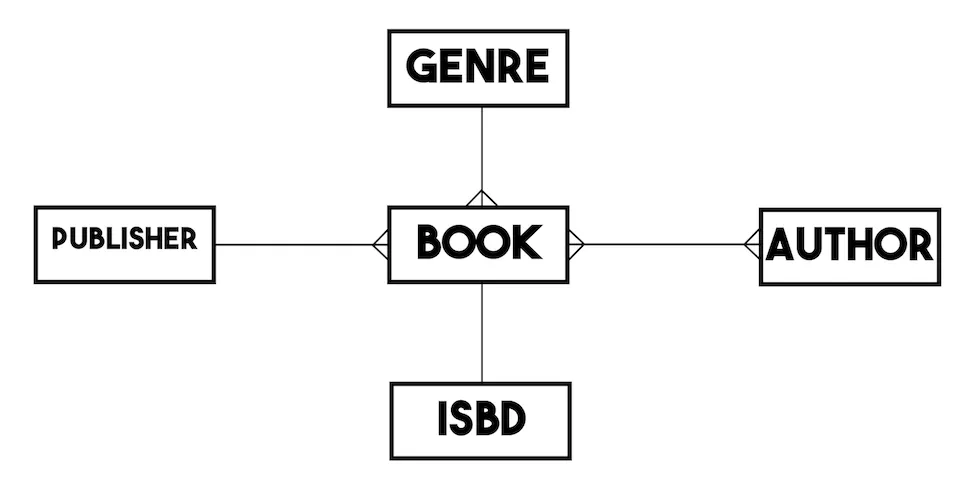
간단히 하기 위해 각 객체 클래스가 문자열 유형의 이름 속성(제목)을 가지고 있다고 가정하겠습니다. 책과 같은 추가적인 관계 속성은 제외합니다.
2 - 일대다 관계 생성
이 단계로 들어가기 전에 React Native Library 앱 예제를 클론하고 실행할 것을 권장합니다 (JavaScript 예제 저장소, TypeScript 예제 저장소). 이 애플리케이션은 등록된 책을 나열하는 화면과 새로운 책을 생성하는 화면의 두 가지 주요 화면이 있습니다. 책 등록 양식에는 다른 관련 객체에 대한 직접 링크와 책의 ISBD 값에 할당된 텍스트 입력 필드가 있어 일대일 관계를 생성하는 데 사용됩니다.
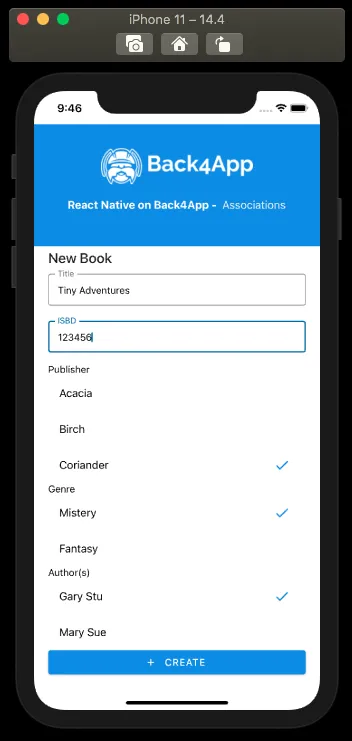
이 양식을 제출할 때 호출되는 책 생성 방법을 살펴보겠습니다:
1	const createBook = async function () {
2	  try {
3	    // These values come from state variables linked to
4	    // the screen form fields, retrieving the user choices
5	    // as a complete Parse.Object, when applicable;
6	    const bookTitleValue = bookTitle;
7	    const bookISBDValue = bookISBD;
8	    // For example, bookPublisher holds the value from
9	    // RadioButton.Group field with its options being every
10	    // Publisher parse object instance saved on server, which is
11	    // queried on screen load via useEffect
12	    const bookPublisherObject = bookPublisher;
13	    const bookGenreObject = bookGenre;
14	    // bookAuthors can be an array of Parse.Objects, since the book
15	    // may have more than one Author
16	    const bookAuthorsObjects = bookAuthors;
17
18	    // Creates a new parse object instance
19	    let Book = new Parse.Object('Book');
20
21	    // Set data to parse object
22	    // Simple title field
23	    Book.set('title', bookTitleValue);
24
25	    // 1:1 relation, need to check for uniqueness of value before creating a new ISBD object
26	    let isbdQuery = new Parse.Query('ISBD');
27	    isbdQuery.equalTo('name', bookISBDValue);
28	    let isbdQueryResult = await isbdQuery.first();
29	    if (isbdQueryResult !== null && isbdQueryResult !== undefined) {
30	      // If first returns a valid object instance, it means that there
31	      // is at least one instance of ISBD with the informed value
32	      Alert.alert(
33	        'Error!',
34	        'There is already an ISBD instance with this value!',
35	      );
36	      return false;
37	    } else {
38	      // Create a new ISBD object instance to create a one-to-one relation on saving
39	      let ISBD = new Parse.Object('ISBD');
40	      ISBD.set('name', bookISBDValue);
41	      ISBD = await ISBD.save();
42	      // Set the new object to the new book object ISBD field
43	      Book.set('isbd', ISBD);
44	    }
45
46	    // One-to-many relations can be set in two ways:
47	    // add direct object to field (Parse will convert to pointer on save)
48	    Book.set('publisher', bookPublisherObject);
49	    // or add pointer to field
50	    Book.set('genre', bookGenreObject.toPointer());
51
52	    // many-to-many relation
53	    // Create a new relation so data can be added
54	    let authorsRelation = Book.relation('authors');
55	    // bookAuthorsObjects is an array of Parse.Objects,
56	    // you can add to relation by adding the whole array or object by object
57	    authorsRelation.add(bookAuthorsObjects);
58
59	    // After setting the values, save it on the server
60	    try {
61	      await Book.save();
62	      // Success
63	      Alert.alert('Success!');
64	      navigation.goBack();
65	      return true;
66	    } catch (error) {
67	      // Error can be caused by lack of Internet connection
68	      Alert.alert('Error!', error.message);
69	      return false;
70	    }
71	  } catch (error) {
72	    // Error can be caused by lack of value selection
73	    Alert.alert(
74	      'Error!',
75	      'Make sure to select valid choices in Publisher, Genre and Author fields!',
76	    );
77	    return false;
78	  }
79	};
새 책 bookISBDValue가 설정된 방법을 보세요. Parse.Object 인스턴스를 생성하고 저장하는 것은 일대일 및 일대다 관계를 만드는 유사한 과정입니다. 이 과정에서는 Parse.Object 인스턴스를 인수로 전달합니다. Parse.Object.set 메서드를 사용하여 두 개의 인수를 받습니다: 필드 이름과 설정할 값입니다.
여기서 주의할 점은, 저장하기 전에 데이터베이스에 알려진 ISBD ID 문자열 값을 포함하는 ISBD 객체가 없고, 또한 이미 관련된 Book 객체가 없다는 것을 보장해야 한다는 것입니다. 두 번째 부분은 항상 참이 될 것입니다. 왜냐하면 매번 새로운 Book 객체를 생성하고 있기 때문입니다. ISBD의 고유성을 보장하는 것은 다음과 같은 강조된 쿼리를 사용하여 달성할 수 있습니다:
1	let isbdQuery = new Parse.Query('ISBD');
2	isbdQuery.equalTo('name', bookISBDValue);
3	let isbdQueryResult = await isbdQuery.first();
4	if (isbdQueryResult !== null && isbdQueryResult !== undefined) {
5	  // If first returns a valid object instance, it means that there
6	  // is at least one instance of ISBD with the informed value
7	  Alert.alert(
8	    'Error!',
9	    'There is already an ISBD instance with this value!',
10	  );
11	  return false;
12	}
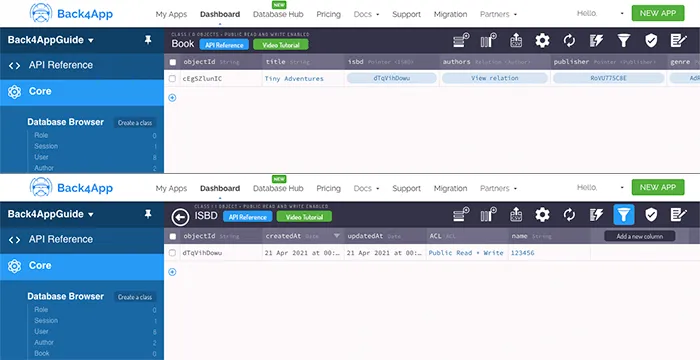
객체를 성공적으로 저장한 후, Parse는 포인터 데이터 유형 열을 생성하고 대시보드에 직접 링크를 만들어 내부에서 빠르게 접근할 수 있도록 합니다.
3 - 일대일 관계 쿼리하기
일대일 관련 객체를 쿼리하는 것은 Parse에서 대부분 처리되기 때문에 매우 간단합니다. 책 등록 목록 화면의 쿼리 기능을 살펴보세요:
1	const queryBooks = async function (): Promise<boolean> {
2	  // These values come from state variables linked to
3	  // the screen query RadioButton.Group fields, with its options being every
4	  // parse object instance saved on server from the referred class, which is
5	  // queried on screen load via useEffect; these variables retrievie the user choices
6	  // as a complete Parse.Object;
7	  const queryPublisherValue: Parse.Object = queryPublisher;
8	  const queryGenreValue: Parse.Object = queryGenre;
9	  const queryAuthorValue: Parse.Object = queryAuthor;
10	  const queryIsbdValue: Parse.Object = queryIsbd;
11
12	  // Reading parse objects is done by using Parse.Query
13	  const parseQuery: Parse.Query = new Parse.Query('Book');
14
15	  // One-to-many queries
16	  if (queryPublisherValue !== '') {
17	    parseQuery.equalTo('publisher', queryPublisherValue);
18	  }
19	  if (queryGenreValue !== '') {
20	    parseQuery.equalTo('genre', queryGenreValue);
21	  }
22
23	  // One-to-one query
24	  if (queryIsbdValue !== '') {
25	    parseQuery.equalTo('isbd', queryIsbdValue);
26	  }
27
28	  // Many-to-many query
29	  // In this case, we need to retrieve books related to the chosen author
30	  if (queryAuthorValue !== '') {
31	    parseQuery.equalTo('authors', queryAuthorValue);
32	  }
33
34	  try {
35	    let books: [Parse.Object] = await parseQuery.find();
36	    // Many-to-many objects retrieval
37	    // In this example we need to get every related author Parse.Object
38	    // and add it to our query result objects
39	    for (let book of books) {
40	      // This query is done by creating a relation and querying it
41	      let bookAuthorsRelation = book.relation('authors');
42	      book.authorsObjects = await bookAuthorsRelation.query().find();
43	    }
44	    setQueriedBooks(books);
45	    return true;
46	  } catch (error) {
47	    // Error can be caused by lack of Internet connection
48	    Alert.alert('Error!', error.message);
49	    return false;
50	  }
51	};
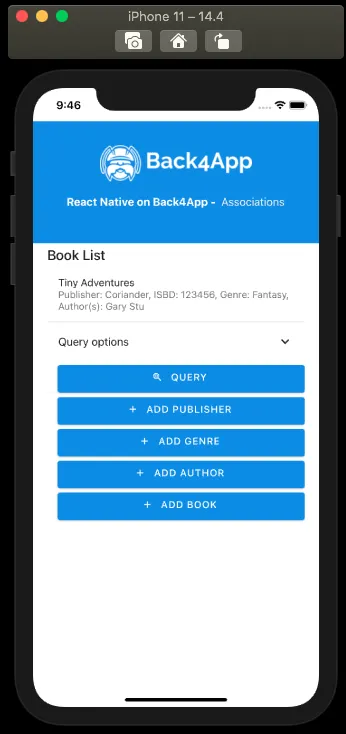
이 경우, 특정 ISBD와 관련된 책을 쿼리하려면 Parse.Query.equalTo 메서드를 호출하고 Parse.Object 인스턴스를 매개변수로 전달하면 됩니다. 쿼리 후, Parse는 결과 객체 내부에 모든 일대일 관계 필드의 완전한 인스턴스를 저장합니다. 이러한 객체 인스턴스에서 데이터를 검색하고 표시하려면 다음과 같이 Parse.Object.get 메서드를 체이닝할 수 있습니다: bookParseObject.get(('isbd').get('name'). 다음은 이러한 getter를 사용하여 목록 항목에서 ISBD 이름을 검색하는 목록 화면의 모습입니다:
결론
이 가이드의 끝에서, React Native에서 Parse의 일대일 관계를 생성하고 쿼리하는 방법을 배웠습니다. 다음 가이드에서는 사용자를 등록하는 방법을 보여드리겠습니다.