N:N Relationship
다대다 관계
소개
많은 백엔드의 핵심에는 데이터를 저장할 수 있는 기능이 있습니다. Parse를 사용하면 데이터 객체를 저장하고 그들 간의 관계를 설정할 수 있습니다. 데이터 관계는 각 데이터 객체가 다른 객체와 어떻게 관련되거나 연관되는지를 표준화합니다. 이는 복잡한 쿼리를 구축하고 실행할 때 추가적인 힘을 줄 수 있습니다. 주요 관계 유형은 세 가지입니다:
- 일대다, 하나의 객체가 여러 다른 객체와 관련될 수 있는 경우;
- 일대일, 두 객체 간의 직접적인 관계를 설정하는 경우;
- 다대다, 여러 객체 간에 많은 복잡한 관계를 생성할 수 있는 경우.
이 가이드에서는 다대다 관계에 초점을 맞출 것입니다. 이러한 관계는 블로그 및 뉴스 피드와 같은 저자 콘텐츠가 포함된 애플리케이션에서 일반적입니다. 저자와 카테고리 태그는 서로 교환 가능하며 빠른 쿼리를 위해 최적화될 수 있습니다. 데이터 저장 백엔드는 일반적으로 이러한 연관성에 대한 명시적인 선언을 요구하며, 심지어는 관계 테이블을 직접 생성하여 관리해야 할 수도 있습니다. Parse는 이를 자동으로 처리하여 데이터 관계를 구축하는 동안 오류의 가능성을 제거하고 애플리케이션 모델링 프로세스를 가속화합니다.
Parse에서 다대다 관계를 생성하는 두 가지 방법이 있습니다. 첫 번째는 Parse.Object 관계를 사용하는 것으로, 생성 및 쿼리 시간에서 가장 빠릅니다. 두 번째는 배열을 사용하는 것으로, 크기에 따라 쿼리 시간이 느려질 수 있습니다. 이러한 성능 문제로 인해, 이제부터는 관계 예제만 사용할 것입니다.
이 가이드에서는 세 가지 주요 데이터 연관을 포함하는 React Native 도서 등록 애플리케이션을 구현할 것입니다. Back4App과 React Native를 사용하여 다대다 데이터 관계를 생성하고 쿼리하는 방법을 배울 것입니다.
언제든지 이 프로젝트에 대한 스타일과 전체 코드를 확인하기 위해 우리의 GitHub 리포지토리를 통해 접근할 수 있습니다.
전제 조건
이 튜토리얼을 완료하려면 다음이 필요합니다:
목표
현실적인 시나리오에서 Parse를 사용하여 React Native에서 다대다 데이터베이스 관계를 수행하고 시연합니다.
1 - Book 클래스 이해하기
이 가이드에서는 도서 등록 애플리케이션 예제를 사용할 것이므로, 먼저 이 데이터베이스에서 객체 관계가 어떻게 구성되어 있는지 이해해야 합니다. 사용하게 될 주요 객체 클래스는 Book 클래스이며, 이 클래스는 등록된 각 도서 항목을 저장합니다. 다음은 다른 네 개의 객체 클래스입니다:
- Publisher: 도서 출판사 이름, Book, 일대다 관계
- Genre: 도서 장르, Book, 일대다 관계. 이 예제에서는 도서가 하나의 장르만 가질 수 있다고 가정합니다;
- Author: 도서 저자, Book, 다대다 관계, 도서는 여러 저자를 가질 수 있고 저자도 여러 도서를 가질 수 있습니다;
- ISDB: 도서 ISDB 식별 번호, Book, 일대일 관계, 이 번호는 각 도서에 대해 고유합니다.
다음은 이러한 데이터베이스 테이블의 시각적 표현입니다:
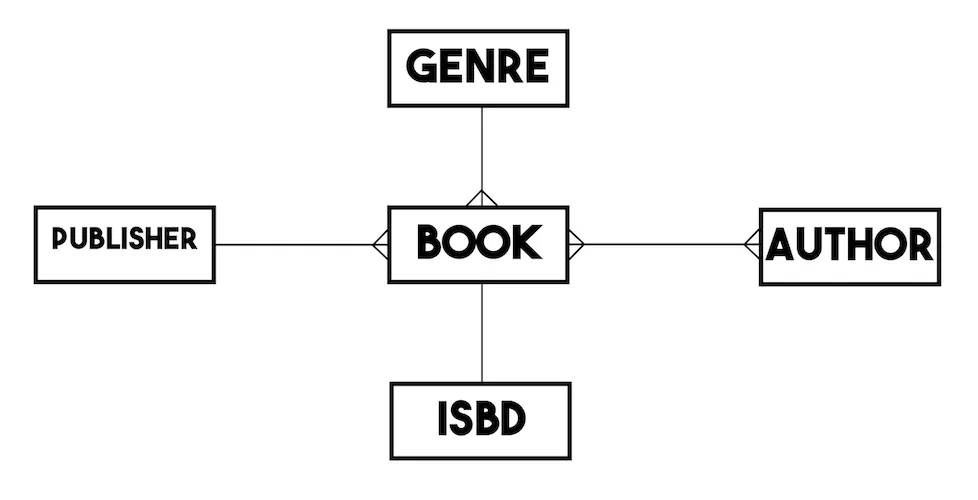
간단히 하기 위해 각 객체 클래스가 문자열 유형의 이름 속성(제목)을 가지고 있다고 가정하겠습니다. 책과 같은 추가적인 관계 속성은 제외합니다.
2 - 일대다 관계 생성
이 단계로 들어가기 전에 React Native Library 앱 예제를 클론하고 실행할 것을 권장합니다 (JavaScript 예제 저장소, TypeScript 예제 저장소). 이 애플리케이션은 등록된 책을 나열하는 화면과 새로운 책을 생성하는 화면의 두 가지 주요 화면을 가지고 있습니다. 책 등록 양식에는 다른 관련 객체에 대한 직접 링크가 있어 사용자가 출판사 또는 장르 옵션을 선택하면 양식 필드가 전체 Parse.Object 인스턴스를 보유하게 됩니다.
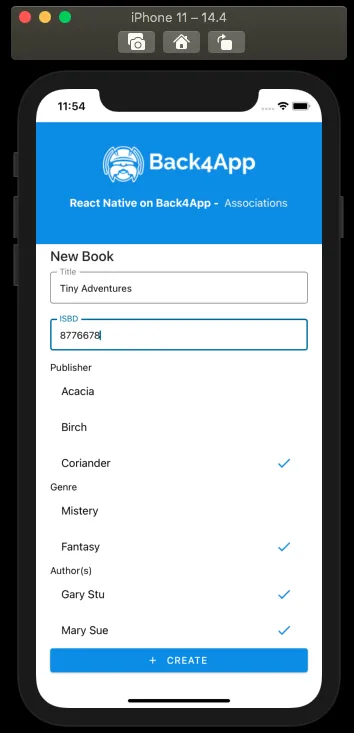
이 양식을 제출할 때 호출되는 책 생성 방법을 살펴보겠습니다:
1	const createBook = async function (): Promise<boolean> {
2	  try {
3	    // These values come from state variables linked to
4	    // the screen form fields, retrieving the user choices
5	    // as a complete Parse.Object, when applicable;
6	    const bookTitleValue: string = bookTitle;
7	    const bookISBDValue: string = bookISBD;
8	    // For example, bookPublisher holds the value from
9	    // RadioButton.Group field with its options being every
10	    // Publisher parse object instance saved on server, which is
11	    // queried on screen load via useEffect
12	    const bookPublisherObject: Parse.Object = bookPublisher;
13	    const bookGenreObject: Parse.Object = bookGenre;
14	    // bookAuthors can be an array of Parse.Objects, since the book
15	    // may have more than one Author
16	    const bookAuthorsObjects: [Parse.Object] = bookAuthors;
17
18	    // Creates a new parse object instance
19	    let Book: Parse.Object = new Parse.Object('Book');
20
21	    // Set data to parse object
22	    // Simple title field
23	    Book.set('title', bookTitleValue);
24
25	    // 1:1 relation, need to check for uniqueness of value before creating a new ISBD object
26	    let isbdQuery: Parse.Query = new Parse.Query('ISBD');
27	    isbdQuery.equalTo('name', bookISBDValue);
28	    let isbdQueryResult: Parse.Object = await isbdQuery.first();
29	    if (isbdQueryResult !== null && isbdQueryResult !== undefined) {
30	      // If first returns a valid object instance, it means that there
31	      // is at least one instance of ISBD with the informed value
32	      Alert.alert(
33	        'Error!',
34	        'There is already an ISBD instance with this value!',
35	      );
36	      return false;
37	    } else {
38	      // Create a new ISBD object instance to create a one-to-one relation on saving
39	      let ISBD: Parse.Object = new Parse.Object('ISBD');
40	      ISBD.set('name', bookISBDValue);
41	      ISBD = await ISBD.save();
42	      // Set the new object to the new book object ISBD field
43	      Book.set('isbd', ISBD);
44	    }
45
46	    // One-to-many relations can be set in two ways:
47	    // add direct object to field (Parse will convert to pointer on save)
48	    Book.set('publisher', bookPublisherObject);
49	    // or add pointer to field
50	    Book.set('genre', bookGenreObject.toPointer());
51
52	    // many-to-many relation
53	    // Create a new relation so data can be added
54	    let authorsRelation = Book.relation('authors');
55	    // bookAuthorsObjects is an array of Parse.Objects,
56	    // you can add to relation by adding the whole array or object by object
57	    authorsRelation.add(bookAuthorsObjects);
58
59	    // After setting the values, save it on the server
60	    try {
61	      await Book.save();
62	      // Success
63	      Alert.alert('Success!');
64	      navigation.goBack();
65	      return true;
66	    } catch (error) {
67	      // Error can be caused by lack of Internet connection
68	      Alert.alert('Error!', error.message);
69	      return false;
70	    }
71	  } catch (error) {
72	    // Error can be caused by lack of value selection
73	    Alert.alert(
74	      'Error!',
75	      'Make sure to select valid choices in Publisher, Genre and Author fields!',
76	    );
77	    return false;
78	  }
79	};
새 책 bookAuthorsObjects가 어떻게 설정되어 있는지 보세요. 다대다 관계를 만들기 위해서는 먼저 새로운 Parse.Object 인스턴스를 생성해야 합니다. 그런 다음 Parse.Object.relation을 생성하고 관련 객체를 하나씩 추가하거나 Parse.Object의 배열을 전달하여 추가할 수 있습니다. Parse.Object.relation.add 메서드를 사용하여. Parse는 관계 유형 열과 데이터베이스에 관계형 테이블을 생성합니다. 또한 Parse는 대시보드의 필드 열에서 이 새로운 테이블에 쉽게 접근할 수 있는 링크를 생성합니다.
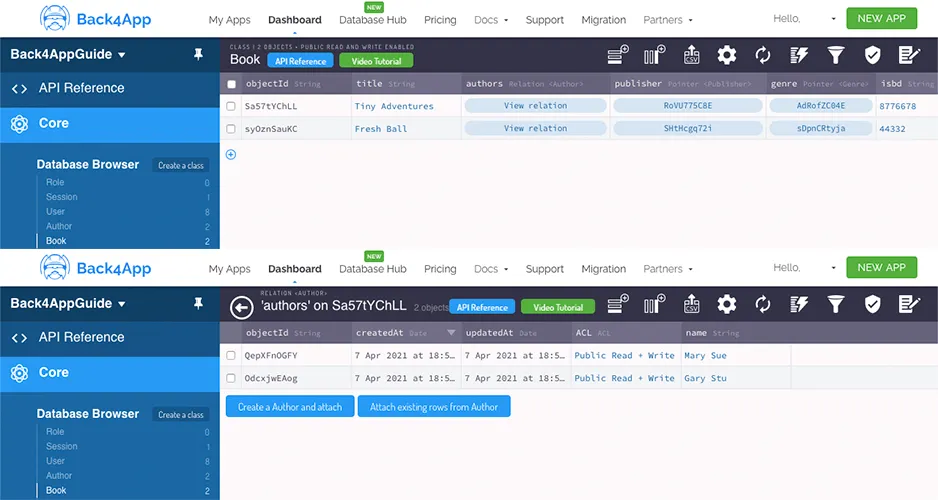
대시보드에서 관계가 생성된 후 객체를 관리하고 새 객체를 추가할 수 있다는 점을 유의하세요. 애플리케이션을 개발할 때 이 단축키를 기억하세요.
3 - 다대다 관계 쿼리하기
다대다 관련 객체 쿼리에서 결과를 검색하는 것은 일반 쿼리와 비교하여 몇 가지 추가 단계가 필요합니다. 책 등록 목록 화면의 쿼리 기능을 살펴보세요:
1	const queryBooks = async function (): Promise<boolean> {
2	  // These values come from state variables linked to
3	  // the screen query RadioButton.Group fields, with its options being every
4	  // parse object instance saved on server from the referred class, which is
5	  // queried on screen load via useEffect; these variables retrievie the user choices
6	  // as a complete Parse.Object;
7	  const queryPublisherValue: Parse.Object = queryPublisher;
8	  const queryGenreValue: Parse.Object = queryGenre;
9	  const queryAuthorValue: Parse.Object = queryAuthor;
10	  const queryIsbdValue: Parse.Object = queryIsbd;
11
12	  // Reading parse objects is done by using Parse.Query
13	  const parseQuery: Parse.Query = new Parse.Query('Book');
14
15	  // One-to-many queries
16	  if (queryPublisherValue !== '') {
17	    parseQuery.equalTo('publisher', queryPublisherValue);
18	  }
19	  if (queryGenreValue !== '') {
20	    parseQuery.equalTo('genre', queryGenreValue);
21	  }
22
23	  // One-to-one query
24	  if (queryIsbdValue !== '') {
25	    parseQuery.equalTo('isbd', queryIsbdValue);
26	  }
27
28	  // Many-to-many query
29	  // In this case, we need to retrieve books related to the chosen author
30	  if (queryAuthorValue !== '') {
31	    parseQuery.equalTo('authors', queryAuthorValue);
32	  }
33
34	  try {
35	    let books: [Parse.Object] = await parseQuery.find();
36	    // Many-to-many objects retrieval
37	    // In this example we need to get every related author Parse.Object
38	    // and add it to our query result objects
39	    for (let book of books) {
40	      // This query is done by creating a relation and querying it
41	      let bookAuthorsRelation = book.relation('authors');
42	      book.authorsObjects = await bookAuthorsRelation.query().find();
43	    }
44	    setQueriedBooks(books);
45	    return true;
46	  } catch (error) {
47	    // Error can be caused by lack of Internet connection
48	    Alert.alert('Error!', error.message);
49	    return false;
50	  }
51	};
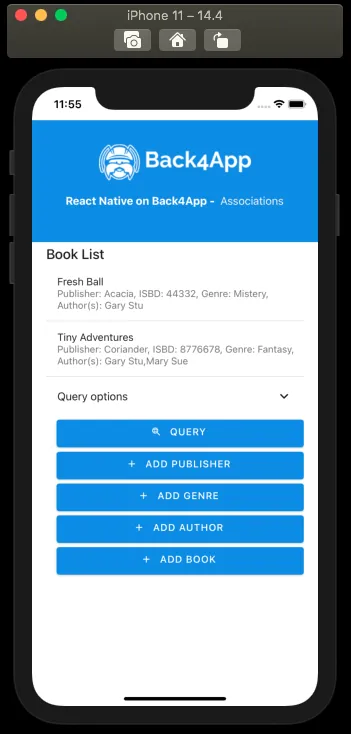
이 경우, 특정 저자와 관련된 책을 쿼리하려면 Parse.Query.equalTo 메서드를 사용하여 Parse.Object 인스턴스를 매개변수로 전달해야 합니다. 쿼리 후, Parse는 Parse.Object 인스턴스를 다대다 관계 필드에서 저장하지 않고, 관련 클래스 이름에 대한 참조만 저장합니다. 예를 들어 {"__type": "Relation", "className": "Author"}. 이러한 객체 인스턴스에서 데이터를 검색하고 표시하려면 관계를 생성하고 다시 쿼리하여 결과를 자신의 객체 배열에 저장해야 합니다. 그 후, 객체 배열을 반복하고 Parse.Object.get 메서드를 사용하여 저자의 이름을 검색할 수 있습니다. 다음은 이러한 절차를 사용하여 목록 화면이 어떻게 보이는지입니다:
결론
이 가이드의 끝에서, React Native에서 Parse의 다대다 관계를 생성하고 쿼리하는 방법을 배웠습니다. 다음 가이드에서는 일대일 쿼리 및 관계를 수행하는 방법을 보여드리겠습니다.