Basic Data Operations
This guide demonstrates how to manage Parse Objects on Back4App using the Flutter plugin for Parse Server. You'll learn the basic CRUD operations: Create, Read, Update, and Delete. This tutorial uses a simple ToDo app to illustrate these operations.
Back4app Backend data storage revolves around the ParseObject, which holds key-value pairs of JSON-compatible data. The Back4App Data Storage accommodates a wide range of common data types, including strings, numbers, booleans, DateTime, GeoPoints, Pointers, Relations, as well as lists and objects. Essentially, it supports any data that can be encoded in JSON format, providing a flexible and robust solution for various data storage needs.
Prerequisites
To complete this tutorial, you will need:
- Flutter version 3.x.x or later
- An Flutter app connected to Back4app.
- Note: Follow the Install Parse SDK on Flutter project to create an Flutter Project connected to Back4App.
- A device (or virtual device) running Android or iOS.
1. Create Object
The saveTodo function creates a new task with a title and a done status set to false. Here’s how it works:
- Initialize Parse Object setting its Attributes: Create an instance of ParseObject for your class (e.g., 'Todo'). Use the set method to define the key-value pairs.
- Save the Object: Call the save method to store the object in the database.
Future<void> saveTodo(String title) async {
  final todo = ParseObject('Todo')
    ..set('title', title)
    ..set('done', false);
  await todo.save();
}
2. Read Object
The getTodo function queries the database and returns a list of tasks. Here’s how it works:
- Initialize the Query: Create an instance of QueryBuilder for your class.
- Execute the Query: Use the query method to retrieve data.
- Handle the Response: Check if the query was successful and process the results.
Future<List<ParseObject>> getTodo() async {
  QueryBuilder<ParseObject> queryTodo =
      QueryBuilder<ParseObject>(ParseObject('Todo'));
  final ParseResponse apiResponse = await queryTodo.query();

  if (apiResponse.success && apiResponse.results != null) {
    return apiResponse.results as List<ParseObject>;
  } else {
    return [];
  }
}
Update the ListView.builder function to extract and display Parse object values:
// Get Parse Object Values
final varTodo = snapshot.data![index];
final varTitle = varTodo.get<String>('title')!;
final varDone = varTodo.get<bool>('done')!;
3. Update Object
The updateTodo function updates the status of an existing task. Here’s how it works:
- Initialize the Parse Object and Set Attributes: Create an instance of ParseObject and set its objectId. Use the set method to update key-value pairs.
- Save the Object: Call the save method to update the object in the database.
Future<void> updateTodo(String id, bool done) async {
  var todo = ParseObject('Todo')
    ..objectId = id
    ..set('done', done);
  await todo.save();
}
4. Delete Object
The deleteTodo function removes an existing task from the database. Here’s how it works:
- Initialize the Parse Object: Create an instance of ParseObject and set its objectId.
- Delete the Object: Call the delete method to remove the object from the database.
Future<void> deleteTodo(String id) async {
  var todo = ParseObject('Todo')..objectId = id;
  await todo.delete();
}
Full Example Code
Here’s the complete code for a simple ToDo app integrated with Back4app Backend.
import 'package:flutter/material.dart';
import 'package:parse_server_sdk_flutter/parse_server_sdk_flutter.dart';

void main() async {
  WidgetsFlutterBinding.ensureInitialized();
  const keyApplicationId = 'YOUR_APP_ID_HERE';
  const keyClientKey = 'YOUR_CLIENT_KEY_HERE';
  const keyParseServerUrl = 'https://parseapi.back4app.com';

  await Parse().initialize(keyApplicationId, keyParseServerUrl,
      clientKey: keyClientKey, autoSendSessionId: true);

  runApp(const MaterialApp(home: TodoApp()));
}

class TodoApp extends StatefulWidget {
  const TodoApp({super.key});

  @override
  // ignore: library_private_types_in_public_api
  _TodoAppState createState() => _TodoAppState();
}

class _TodoAppState extends State<TodoApp> {
  List<ParseObject> tasks = [];
  TextEditingController taskController = TextEditingController();

  @override
  void initState() {
    super.initState();
    getTodo();
  }

  @override
  Widget build(BuildContext context) {
    return MaterialApp(
      debugShowCheckedModeBanner: false,
      theme: ThemeData(
          primaryColor: Colors.white,
          hintColor: Colors.black,
          scaffoldBackgroundColor: Colors.white,
          appBarTheme:
              AppBarTheme(backgroundColor: Color.fromARGB(255, 68, 122, 246))),
      home: Scaffold(
        appBar: AppBar(
          title: const Text('Todo List'),
        ),
        body: Container(
          decoration: BoxDecoration(
            border: Border.all(color: Colors.black),
          ),
          child: Column(
            children: [
              const SizedBox(height: 20),
              _buildTaskInput(),
              const SizedBox(height: 20),
              Expanded(child: _buildTaskList()),
            ],
          ),
        ),
      ),
    );
  }

  Widget _buildTaskInput() {
    return Padding(
      padding: const EdgeInsets.symmetric(horizontal: 20),
      child: Row(
        children: [
          Expanded(
            child: TextField(
              controller: taskController,
              decoration: InputDecoration(
                hintText: 'Enter tasks',
                filled: true,
                fillColor: Colors.grey[200],
                border: OutlineInputBorder(
                  borderRadius: BorderRadius.circular(8),
                  borderSide: BorderSide.none,
                ),
              ),
            ),
          ),
          const SizedBox(width: 10),
          ElevatedButton(
            onPressed: addTodo,
            style: ButtonStyle(
                foregroundColor:
                    MaterialStateProperty.all<Color>(Colors.black)),
            child: const Text('Add'),
          ),
        ],
      ),
    );
  }

  Widget _buildTaskList() {
    return ListView.builder(
      itemCount: tasks.length,
      itemBuilder: (context, index) {
        final varTodo = tasks[index];
        final varTitle = varTodo.get<String>('title') ?? '';
        bool done = varTodo.get<bool>('done') ?? false;

        return ListTile(
          title: Row(
            children: [
              Checkbox(
                value: done,
                onChanged: (newValue) {
                  updateTodo(index, newValue!);
                },
              ),
              Expanded(child: Text(varTitle)),
            ],
          ),
          trailing: IconButton(
            icon: const Icon(Icons.delete),
            onPressed: () {
              deleteTodo(index, varTodo.objectId!);
            },
          ),
        );
      },
    );
  }

  Future<void> addTodo() async {
    String task = taskController.text.trim();
    if (task.isNotEmpty) {
      var todo = ParseObject('Todo')
        ..set('title', task)
        ..set('done', false);

      var response = await todo.save();

      if (response.success) {
        setState(() {
          tasks.add(todo);
        });
        taskController.clear();
      } else {
        // Handle error
      }
    }
  }

  Future<void> updateTodo(int index, bool done) async {
    final varTodo = tasks[index];
    final String id = varTodo.objectId.toString();

    var todo = ParseObject('Todo')
      ..objectId = id
      ..set('done', done);

    var response = await todo.save();

    if (response.success) {
      setState(() {
        tasks[index] = todo;
      });
    } else {
      // Handle error
    }
  }

  Future<void> getTodo() async {
    var queryBuilder = QueryBuilder<ParseObject>(ParseObject('Todo'));
    var apiResponse = await queryBuilder.query();

    if (apiResponse.success && apiResponse.results != null) {
      setState(() {
        tasks = apiResponse.results as List<ParseObject>;
      });
    } else {
      // Handle error
    }
  }

  Future<void> deleteTodo(int index, String id) async {
    var todo = ParseObject('Todo')..objectId = id;
    var response = await todo.delete();

    if (response.success) {
      setState(() {
        tasks.removeAt(index);
      });
    } else {
      // Handle error
    }
  }
}
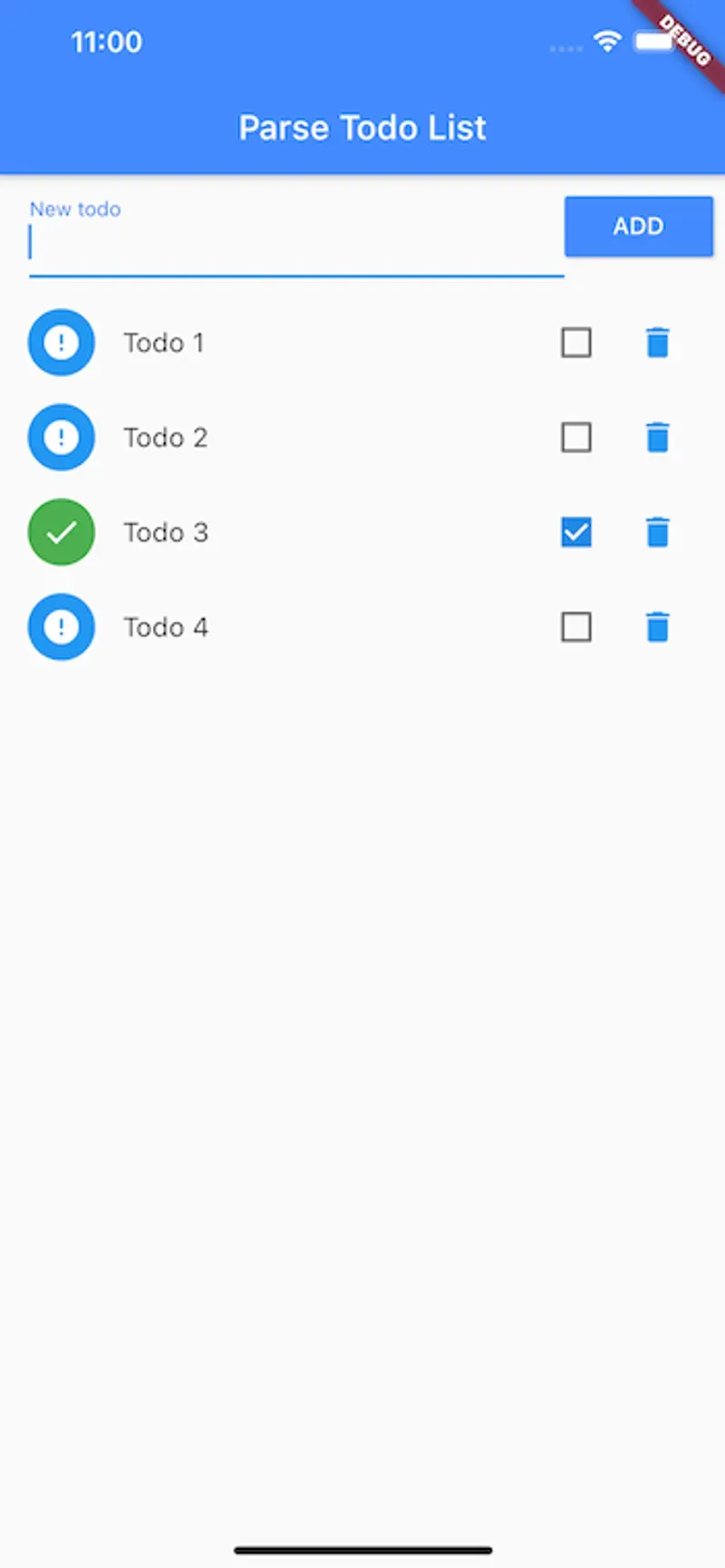
Your App should look like this:
Conclusion
You have now implemented the basic CRUD operations in a Flutter app using Parse on Back4App. This tutorial demonstrated how to add, retrieve, update, and delete tasks in a ToDo app.