User registration - login
Login and User registration tutorial
Introduction
In this section we will take a look to how to create an app with a simple user registration using Parse Server core features through Back4App.
This tutorial uses a basic app created in Android Studio 4.1.1 with buildToolsVersion=30.0.2 , Compile SDK Version = 30.0.2 and targetSdkVersion 30
At any time, you can access the complete Android Project built with this tutorial at our Github repositories
Goal
We will learn how to log in and register using Parse.
Here is a preview of what we are gonna achive :

Prerequisites
To complete this tutorial, we need:
- An app created on Back4App.
- An android app connected to Back4App.
- Note: Follow the Install Parse SDK tutorial to create an Android Studio Project connected to Back4App.
1 - Import Library
In this step we will import the libraries which we are gonna use in our project:
- We will add following Parse Classes to our Activities.
2. We will use lambda functions frequently in our project because of that we need to add Java 1.8 to our project via build.gradle(Module:App)
2 - Sign Up
Signing up basically creates a new Parse.User Object in User Class, shown as “User” in your app Dashboard. We need to set at least two properties when creating a new user => ParseUser.setUsername() and ParseUser.setPassword().
The method used for saving the new user on Android is ParseUser.signUpInBackground(), which may come together with a callback function.
Note: Objects of this special class are not saved on the Dashboard with ParseObject.save() method.
To make SignUpActivity work, follow these steps:
- Import
into your SignUpActivity, in addition to the dependencies imported in Step 1.
2. To implement user registration, simply use the following code in theonCreate() method:
1   ParseUser user = new ParseUser();
2        // Set the user's username and password, which can be obtained by a forms
3        user.setUsername( "<Your username here>");
4        user.setPassword( "<Your password here>");
5        user.signUpInBackground(new SignUpCallback() {
6            @Override
7            public void done(ParseException e) {
8                if (e == null) {
9                    showAlert("Successful Sign Up!", "Welcome" + "<Your username here>" +"!");
10               } else {
11                   ParseUser.logOut();
12                   Toast.makeText(SignUpActivity.this, e.getMessage(), Toast.LENGTH_LONG).show();
13               }
14           }
15       });
In the example project, this code is placed inside a SIGN UP button callback. Also, username and password are caught using Edit Texts.
3. It’s interesting to add an additional method to display Alert Dialogs and make the process look more professional. The method below do this:
1   private void showAlert(String title,String message){
2        AlertDialog.Builder builder = new AlertDialog.Builder(SignUpActivity.this)
3                .setTitle(title)
4                .setMessage(message)
5                .setPositiveButton("OK", new DialogInterface.OnClickListener() {
6                    @Override
7                    public void onClick(DialogInterface dialog, int which) {
8                        dialog.cancel();
9                        // don't forget to change the line below with the names of your Activities
10                       Intent intent = new Intent(SignUpActivity.this, LogoutActivity.class);
11                       intent.addFlags(Intent.FLAG_ACTIVITY_CLEAR_TASK | Intent.FLAG_ACTIVITY_NEW_TASK);
12                       startActivity(intent);
13                   }
14               });
15       AlertDialog ok = builder.create();
16       ok.show();
17   }
3 - Log in
Logging in creates a Session object, which points to the User logged in. If login is successful, ParseUser.getCurrentUser() returns a User object, and a Session object which created in the Dashboard. Otherwise, if the target username does not exist, or the password is wrong, it returns null.
The method used to perform the login action is ParseUser.logInInBackground(), which requires as many arguments as the strings of username and password, and may call a callback function.
Note: After signing up, login is performed automatically.
To make LoginActivity work, follow these steps:
- Import into yourLoginActivity, in addition to the dependencies imported in the Step 1:
2. To implement user login function, simply use the code:
1   private void login(String username, String password) {
2        progressDialog.show();
3        ParseUser.logInInBackground(username, password, (parseUser, e) -> {
4            progressDialog.dismiss();
5            if (parseUser != null) {
6                showAlert("Successful Login", "Welcome back " + username + " !");
7            } else {
8                ParseUser.logOut();
9                Toast.makeText(LoginActivity.this, e.getMessage(), Toast.LENGTH_LONG).show();
10           }
11       });
12   }
In the example project, this code is placed inside a LOG IN button callback. Also, username and password are caught using Edit Texts.
The method showAlert is the same that you added in the SignUpActivity, don’t forget to change its Intent arguments though.
4 - Log Out
Logging out deletes the active Session object for the logged User. The method used to perform log out is ParseUser.logOutInBackground().
To implement user log out, simply use the code below, in the LogoutActivity:
1       ParseUser.logOutInBackground(e -> {
2               progressDialog.dismiss();
3               if (e == null)
4                   showAlert("So, you're going...", "Ok...Bye-bye then");
5       });
In the example project, this code is placed inside a LOG OUT button callback.
The method showAlert is the same that you added in the loginActivityandSignUpActivity, don’t forget to change its Intent arguments though.
5 - Test your app
- Run your app and create a couple of users, also try logging in again after registering them.
- Find your app and click on Dashboard>Core>Browser>User.
At this point, you should see your users as displayed below:
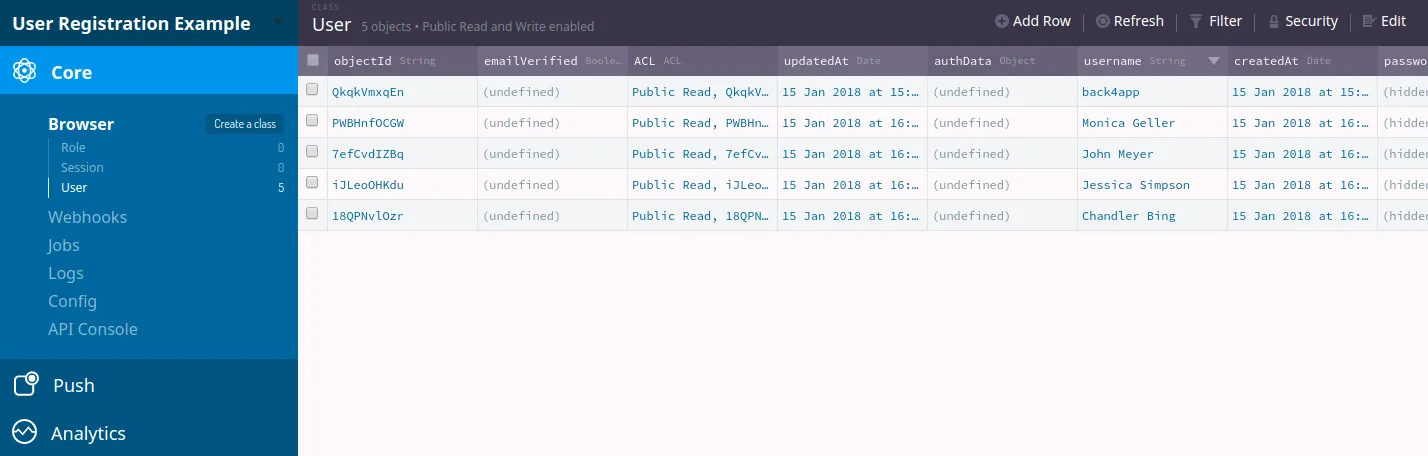
Note: Using the codes displayed above, every time you log in with a user, a Session is opened in your Dashboard, but when the user logs out that particular Session ends. Also, whenever an unsuccessful login or sign up attempt occurs, the Session opened in Parse Server Dashboard is deleted.
It’s done!
Congrats ! Now you can log in, register or log out of your app using Parse Server core features through Back4App!