Relational Queries
파스(PARSE)를 이용한 리액트 네이티브의 관계형 쿼리
소개
이 가이드에서는 파스에서 관계형 쿼리를 수행하고 이러한 쿼리를 사용하여 리액트 네이티브 컴포넌트를 구현합니다. Back4App과 리액트 네이티브를 사용하여 현실적인 데이터를 설정하고 쿼리하는 방법을 배웁니다.
전제 조건
목표
리액트 네이티브 앱에서 Back4App에 저장된 관계형 데이터를 쿼리합니다.
1 - Parse.Query 클래스 이해하기
모든 Parse 쿼리 작업은 Parse.Query 객체 유형을 사용하며, 이는 앱 전반에 걸쳐 데이터베이스에서 특정 데이터를 검색하는 데 도움이 됩니다. Parse.Query는 검색 메서드(예: Parse.Query.find 또는 Parse.Query.first 호출 후에만 해결된다는 것을 아는 것이 중요합니다. 따라서 쿼리를 설정하고 실제로 호출되기 전에 여러 수정자를 연결할 수 있습니다.
새로운 Parse.Query, 생성하려면 원하는 Parse.Object 하위 클래스를 매개변수로 전달해야 하며, 이는 쿼리 결과를 포함할 것입니다. 아래에서 볼 수 있는 예제 쿼리에서는 가상의 Book 하위 클래스가 쿼리되고 있습니다.
1	// This will create your query
2	let parseQuery = new Parse.Query("Book");
3	// The query will resolve only after calling this method
4	let queryResult = await parseQuery.find();
다음에 대한 자세한 내용을 읽을 수 있습니다 Parse.Query 클래스는 공식 문서에서 여기.
2 - Back4App에 데이터 저장하기
이 가이드에서 쿼리의 대상이 될 다양한 클래스를 생성해 보겠습니다. 클래스는 다음과 같습니다: 저자, 책, 출판사 및 서점, 여기서 책은 출판사와 1:N 관계를 가지며 저자와 N:N 관계를 가집니다. 그리고 서점은 책과 N:N 관계를 가집니다.
Parse JS 콘솔에서는 JavaScript 코드를 직접 실행하여 JS SDK 명령을 사용하여 애플리케이션 데이터베이스 내용을 쿼리하고 업데이트할 수 있습니다. 아래 코드를 JS 콘솔에서 실행하고 Back4App에 데이터를 삽입하세요. 대시보드에서 JS 콘솔은 다음과 같이 보입니다:
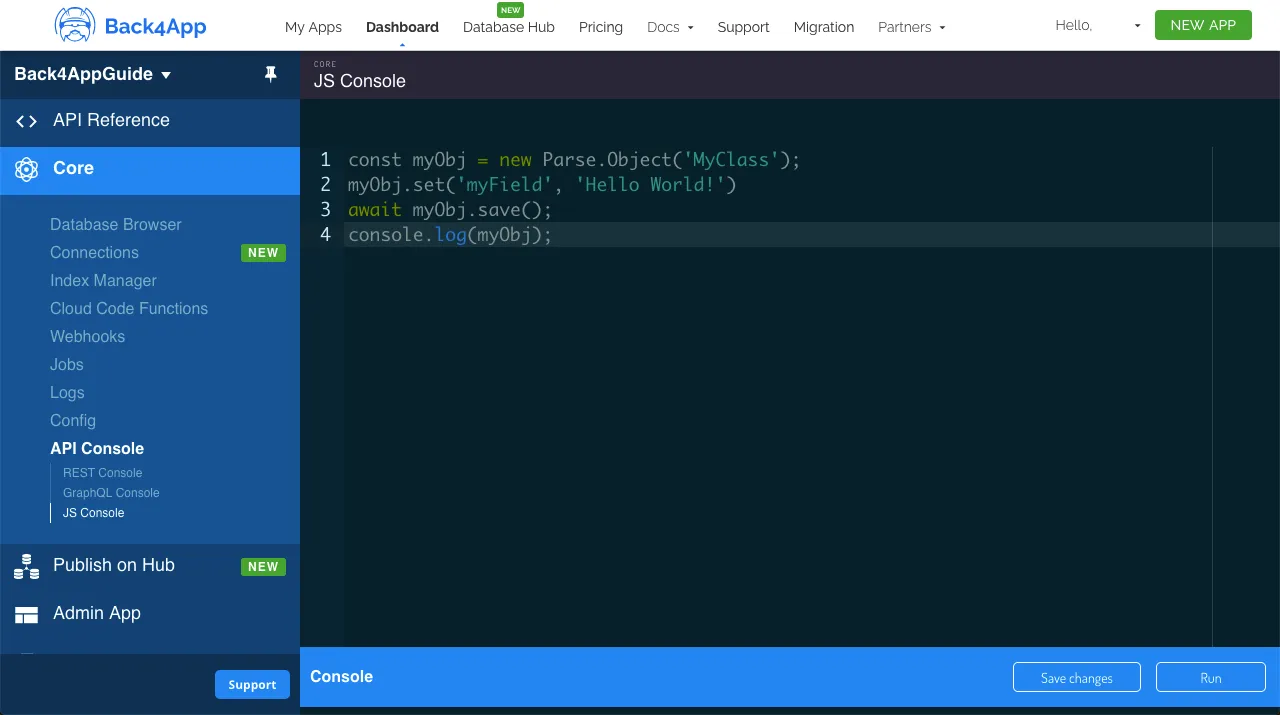
계속 진행하여 다음 예제 내용을 사용하여 클래스를 생성하세요:
1	// Add objects and create tables
2	// Authors
3	const AuthorA = new Parse.Object('Author');
4	AuthorA.set('name', 'Aaron Writer');
5	await AuthorA.save();
6
7	const AuthorB = new Parse.Object('Author');
8	AuthorB.set('name', 'Beatrice Novelist');
9	await AuthorB.save();
10
11	const AuthorC = new Parse.Object('Author');
12	AuthorC.set('name', 'Casey Columnist');
13	await AuthorC.save();
14
15	// Publishers
16	const PublisherA = new Parse.Object('Publisher');
17	PublisherA.set('name', 'Acacia Publishings');
18	await PublisherA.save();
19
20	const PublisherB = new Parse.Object('Publisher');
21	PublisherB.set('name', 'Birch Distributions');
22	await PublisherB.save();
23
24	// Books
25	const BookA = new Parse.Object('Book');
26	BookA.set('title', 'A Love Story');
27	BookA.set('publisher', PublisherA);
28	BookA.set('publishingDate', new Date('05/07/1998'));
29	const BookARelation = BookA.relation("authors");
30	BookARelation.add(AuthorA);
31	await BookA.save();
32
33	const BookB = new Parse.Object('Book');
34	BookB.set('title', 'Benevolent Elves');
35	BookB.set('publisher', PublisherB);
36	BookB.set('publishingDate', new Date('11/31/2008'));
37	const BookBRelation = BookB.relation("authors");
38	BookBRelation.add(AuthorB);
39	await BookB.save();
40
41	const BookC = new Parse.Object('Book');
42	BookC.set('title', 'Can You Believe It?');
43	BookC.set('publisher', PublisherB);
44	BookC.set('publishingDate', new Date('08/21/2018'));
45	const BookCRelation = BookC.relation("authors");
46	BookCRelation.add(AuthorA);
47	BookCRelation.add(AuthorC);
48	await BookC.save();
49
50	// BookStore
51	const BookStoreA = new Parse.Object('BookStore');
52	BookStoreA.set('name', 'Books of Love');
53	const BookStoreARelation = BookStoreA.relation("books");
54	BookStoreARelation.add(BookA);
55	await BookStoreA.save();
56
57	const BookStoreB = new Parse.Object('BookStore');
58	BookStoreB.set('name', 'Fantasy Books');
59	const BookStoreBRelation = BookStoreB.relation("books");
60	BookStoreBRelation.add(BookB);
61	await BookStoreB.save();
62
63	const BookStoreC = new Parse.Object('BookStore');
64	BookStoreC.set('name', 'General Books');
65	const BookStoreCRelation = BookStoreC.relation("books");
66	BookStoreCRelation.add(BookA);
67	BookStoreCRelation.add(BookC);
68	await BookStoreC.save();
69
70	console.log('Success');
3 - 데이터 쿼리
모든 클래스를 채웠으니, 이제 그 안에서 몇 가지 관계형 쿼리를 수행할 수 있습니다. 출판사로 결과를 필터링하는 것부터 시작해 보겠습니다. 책의 결과를 찾고, 출판사 “Acacia Publishings” (또는 “출판사 A”)에 속하는 것을 찾기 위해 기본 Parse.Query.equalTo 메서드를 사용합니다:
1	// Get PublisherA object
2	const PublisherAQuery = new Parse.Query('Publisher');
3	PublisherAQuery.equalTo('name', 'Acacia Publishings');
4	const PublisherA = await PublisherAQuery.first();
5
6	// Query Books with PublisherA
7	const bookQuery = new Parse.Query('Book');
8	bookQuery.equalTo('publisher', PublisherA);
9	let queryResults = await bookQuery.find();
10
11	// Let's show the results
12	for (let result of queryResults) {
13	  // You access `Parse.Objects` attributes by using `.get`
14	  console.log(result.get('title'));
15	};
이제 BookStore 객체가 Book 객체를 포함하고 있는지 쿼리해 보겠습니다. 출판 날짜가 2010년 1월 1일 이후인 객체를 찾기 위해 Parse.Query.greaterThan 메서드와 Parse.Query.matchesQuery 메서드를 사용합니다:
1	// Create inner Book query
2	const bookQuery = new Parse.Query('Book');
3	bookQuery.greaterThan('publishingDate', new Date('01/01/2010'));
4
5	// Query BookStore using inner Book query
6	const bookStoreQuery = new Parse.Query('BookStore');
7	bookStoreQuery.matchesQuery('books', bookQuery);
8	let queryResults = await bookStoreQuery.find();
9
10	// Let's show the results
11	for (let result of queryResults) {
12	  // You access `Parse.Objects` attributes by using `.get`
13	  console.log(result.get('name'));
14	};
이제 BookStore 객체를 더 복잡한 관계 쿼리로 생성해 보겠습니다. Book 객체가 최소한 하나의 Author “Aaron Writer” (또는 “AuthorA”)에 의해 작성된 객체를 찾기 위해 equalTo 및 matchesQuery:
1	// Get AuthorA object
2	const AuthorAQuery = new Parse.Query('Author');
3	AuthorAQuery.equalTo('name', 'Aaron Writer');
4	const AuthorA = await AuthorAQuery.first();
5
6	// Create inner Book query
7	const bookQuery = new Parse.Query('Book');
8	bookQuery.equalTo('authors', AuthorA);
9
10	// Query BookStore using inner Book query
11	const bookStoreQuery = new Parse.Query('BookStore');
12	bookStoreQuery.matchesQuery('books', bookQuery);
13	let queryResults = await bookStoreQuery.find();
14
15	// Let's show the results
16	for (let result of queryResults) {
17	  // You access `Parse.Objects` attributes by using `.get`
18	  console.log(result.get('name'));
19	};
4 - 리액트 네이티브 컴포넌트에서 쿼리하기
이제 React Native의 구성 요소 내에서 예제 쿼리를 사용해 보겠습니다. 결과를 보여주는 목록과 쿼리를 호출하는 버튼이 있는 간단한 인터페이스를 가지고 있습니다. 구성 요소 코드는 다음과 같이 배치되어 있으며, doQuery 함수가 포함되어 있습니다. 이전의 예제 코드가 포함되어 있습니다.
1	import React, {FC, ReactElement, useState} from 'react';
2	import {Alert, Image, View, ScrollView, StyleSheet} from 'react-native';
3	import Parse from 'parse/react-native';
4	import {
5	  List,
6	  Title,
7	  Button as PaperButton,
8	  Text as PaperText,
9	} from 'react-native-paper';
10
11	export const QueryList: FC<{}> = ({}): ReactElement => {
12	  // State variable
13	  const [queryResults, setQueryResults] = useState(null);
14
15	  const doQueryA = async function (): Promise<boolean> {
16	    // Get PublisherA object
17	    const PublisherAQuery: Parse.Query = new Parse.Query('Publisher');
18	    PublisherAQuery.equalTo('name', 'Acacia Publishings');
19	    const PublisherA: Parse.Object = await PublisherAQuery.first();
20
21	    // Query Books with PublisherA
22	    const bookQuery: Parse.Query = new Parse.Query('Book');
23	    bookQuery.equalTo('publisher', PublisherA);
24
25	    try {
26	      let results: [Parse.Object] = await bookQuery.find();
27	      setQueryResults(results);
28	      return true;
29	    } catch (error) {
30	      // Error can be caused by lack of Internet connection
31	      Alert.alert('Error!', error.message);
32	      return false;
33	    }
34	  };
35
36	  const doQueryB = async function (): Promise<boolean> {
37	    // Create inner Book query
38	    const bookQuery: Parse.Query = new Parse.Query('Book');
39	    bookQuery.greaterThan('publishingDate', new Date('01/01/2010'));
40
41	    // Query BookStore using inner Book query
42	    const bookStoreQuery: Parse.Query = new Parse.Query('BookStore');
43	    bookStoreQuery.matchesQuery('books', bookQuery);
44
45	    try {
46	      let results: [Parse.Object] = await bookStoreQuery.find();
47	      setQueryResults(results);
48	      return true;
49	    } catch (error) {
50	      // Error can be caused by lack of Internet connection
51	      Alert.alert('Error!', error.message);
52	      return false;
53	    }
54	  };
55
56	  const doQueryC = async function (): Promise<boolean> {
57	    // Get AuthorA object
58	    const AuthorAQuery: Parse.Query = new Parse.Query('Author');
59	    AuthorAQuery.equalTo('name', 'Aaron Writer');
60	    const AuthorA: Parse.Object = await AuthorAQuery.first();
61
62	    // Create inner Book query
63	    const bookQuery: Parse.Query = new Parse.Query('Book');
64	    bookQuery.equalTo('authors', AuthorA);
65
66	    // Query BookStore using inner Book query
67	    const bookStoreQuery: Parse.Query = new Parse.Query('BookStore');
68	    bookStoreQuery.matchesQuery('books', bookQuery);
69
70	    try {
71	      let results: [Parse.Object] = await bookStoreQuery.find();
72	      setQueryResults(results);
73	      return true;
74	    } catch (error) {
75	      // Error can be caused by lack of Internet connection
76	      Alert.alert('Error!', error.message);
77	      return false;
78	    }
79	  };
80
81	  const clearQueryResults = async function (): Promise<boolean> {
82	    setQueryResults(null);
83	    return true;
84	  };
85
86	  return (
87	    <>
88	      <View style={Styles.header}>
89	        <Image
90	          style={Styles.header_logo}
91	          source={ {
92	            uri:
93	              'https://blog.back4app.com/wp-content/uploads/2019/05/back4app-white-logo-500px.png',
94	          } }
95	        />
96	        <PaperText style={Styles.header_text}>
97	          <PaperText style={Styles.header_text_bold}>
98	            {'React Native on Back4App - '}
99	          </PaperText>
100	          {' Relational Queries'}
101	        </PaperText>
102	      </View>
103	      <ScrollView style={Styles.wrapper}>
104	        <View>
105	          <Title>{'Result List'}</Title>
106	          {/* Query list */}
107	          {queryResults !== null &&
108	            queryResults !== undefined &&
109	            queryResults.map((result: Parse.Object) => (
110	              <List.Item
111	                key={result.id}
112	                title={
113	                  result.get('name') !== undefined
114	                    ? result.get('name')
115	                    : result.get('title')
116	                }
117	                titleStyle={Styles.list_text}
118	                style={Styles.list_item}
119	              />
120	            ))}
121	          {queryResults === null ||
122	          queryResults === undefined ||
123	          (queryResults !== null &&
124	            queryResults !== undefined &&
125	            queryResults.length <= 0) ? (
126	            <PaperText>{'No results here!'}</PaperText>
127	          ) : null}
128	        </View>
129	        <View>
130	          <Title>{'Query buttons'}</Title>
131	          <PaperButton
132	            onPress={() => doQueryA()}
133	            mode="contained"
134	            icon="search-web"
135	            color={'#208AEC'}
136	            style={Styles.list_button}>
137	            {'Query A'}
138	          </PaperButton>
139	          <PaperButton
140	            onPress={() => doQueryB()}
141	            mode="contained"
142	            icon="search-web"
143	            color={'#208AEC'}
144	            style={Styles.list_button}>
145	            {'Query B'}
146	          </PaperButton>
147	          <PaperButton
148	            onPress={() => doQueryC()}
149	            mode="contained"
150	            icon="search-web"
151	            color={'#208AEC'}
152	            style={Styles.list_button}>
153	            {'Query C'}
154	          </PaperButton>
155	          <PaperButton
156	            onPress={() => clearQueryResults()}
157	            mode="contained"
158	            icon="delete"
159	            color={'#208AEC'}
160	            style={Styles.list_button}>
161	            {'Clear Results'}
162	          </PaperButton>
163	        </View>
164	      </ScrollView>
165	    </>
166	  );
167	};
168
169	// These define the screen component styles
170	const Styles = StyleSheet.create({
171	  header: {
172	    alignItems: 'center',
173	    paddingTop: 30,
174	    paddingBottom: 50,
175	    backgroundColor: '#208AEC',
176	  },
177	  header_logo: {
178	    height: 50,
179	    width: 220,
180	    resizeMode: 'contain',
181	  },
182	  header_text: {
183	    marginTop: 15,
184	    color: '#f0f0f0',
185	    fontSize: 16,
186	  },
187	  header_text_bold: {
188	    color: '#fff',
189	    fontWeight: 'bold',
190	  },
191	  wrapper: {
192	    width: '90%',
193	    alignSelf: 'center',
194	  },
195	  list_button: {
196	    marginTop: 6,
197	    marginLeft: 15,
198	    height: 40,
199	  },
200	  list_item: {
201	    borderBottomWidth: 1,
202	    borderBottomColor: 'rgba(0, 0, 0, 0.12)',
203	  },
204	  list_text: {
205	    fontSize: 15,
206	  },
207	});
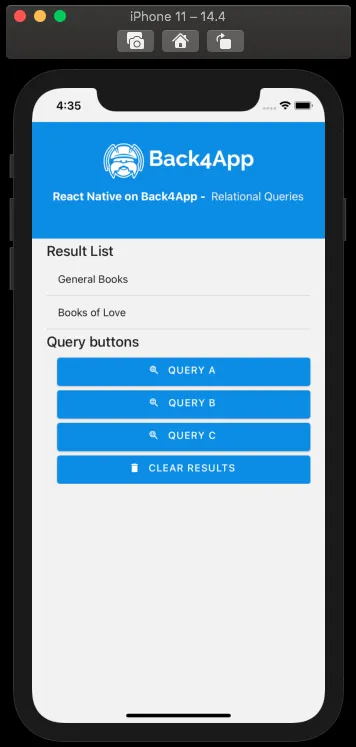
렌더링 및 쿼리 함수 중 하나로 쿼리한 후 컴포넌트가 어떻게 보여야 하는지입니다:
결론
이 가이드를 마치면서, Parse에서 관계형 쿼리가 어떻게 작동하는지와 React Native 앱에서 Back4App으로 이를 수행하는 방법을 배웠습니다. 다음 가이드에서는 Parse에서 사용자와 작업하는 방법을 배울 것입니다.