플러터 백엔드 통합을 위한 Parse 클라우드 코드 활용법
플러터 앱에서 클라우드 함수 사용하기
소개
복잡한 앱의 경우, 때때로 모바일 장치에서 실행되지 않는 약간의 로직이 필요합니다. 클라우드 코드는 이를 가능하게 합니다.
클라우드 코드는 수천 개의 앱을 지원하는 동일한 Parse JavaScript SDK를 기반으로 구축되었기 때문에 사용하기 쉽습니다. 유일한 차이점은 이 코드가 사용자의 모바일 장치에서 실행되는 것이 아니라 Parse 서버에서 실행된다는 것입니다.
클라우드 코드를 사용하여 처리 작업을 Parse 서버로 오프로드하여 앱의 인식 성능을 높일 수 있습니다. 객체가 저장되거나 삭제될 때마다 실행되는 후크를 생성할 수 있습니다. 이는 데이터를 검증하거나 정리하고 싶을 때 유용합니다. 또한 클라우드 코드를 사용하여 관련 객체를 수정하거나 푸시 알림 전송과 같은 다른 프로세스를 시작할 수 있습니다.
클라우드 코드를 업데이트하면 모든 모바일 환경에서 즉시 사용할 수 있습니다. 애플리케이션의 새로운 릴리스를 기다릴 필요가 없습니다. 이를 통해 앱 동작을 즉시 변경하고 새로운 기능을 더 빠르게 추가할 수 있습니다.
이 섹션에서는 클라우드 코드를 생성하고 배포하는 방법을 설명한 후, Back4App을 통해 플러터 프로젝트에서 클라우드 함수를 호출하는 방법을 설명합니다.
이 가이드에서는 플러터를 통해 클라우드 함수 사용을 시연하는 데 중점을 두고 있습니다. Parse 공식 클라우드 코드 문서에서 더 심층적인 정보를 찾을 수 있습니다.
필수 조건
이 튜토리얼을 완료하려면 다음이 필요합니다:
- Back4app에 연결된 Flutter 앱.
- Android 또는 iOS를 실행하는 장치(또는 가상 장치).
목표
Flutter 앱에서 Back4App의 Parse Cloud Code 실행하기.
1 - Cloud Code 파일 만들기
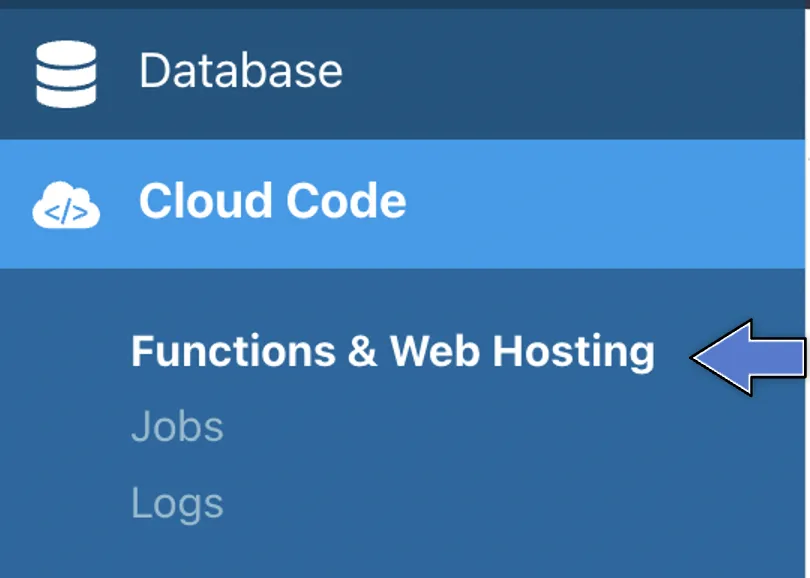
- Cloud Code를 찾아서 함수 및 웹 호스팅을 클릭하세요. 이렇게 생겼습니다:
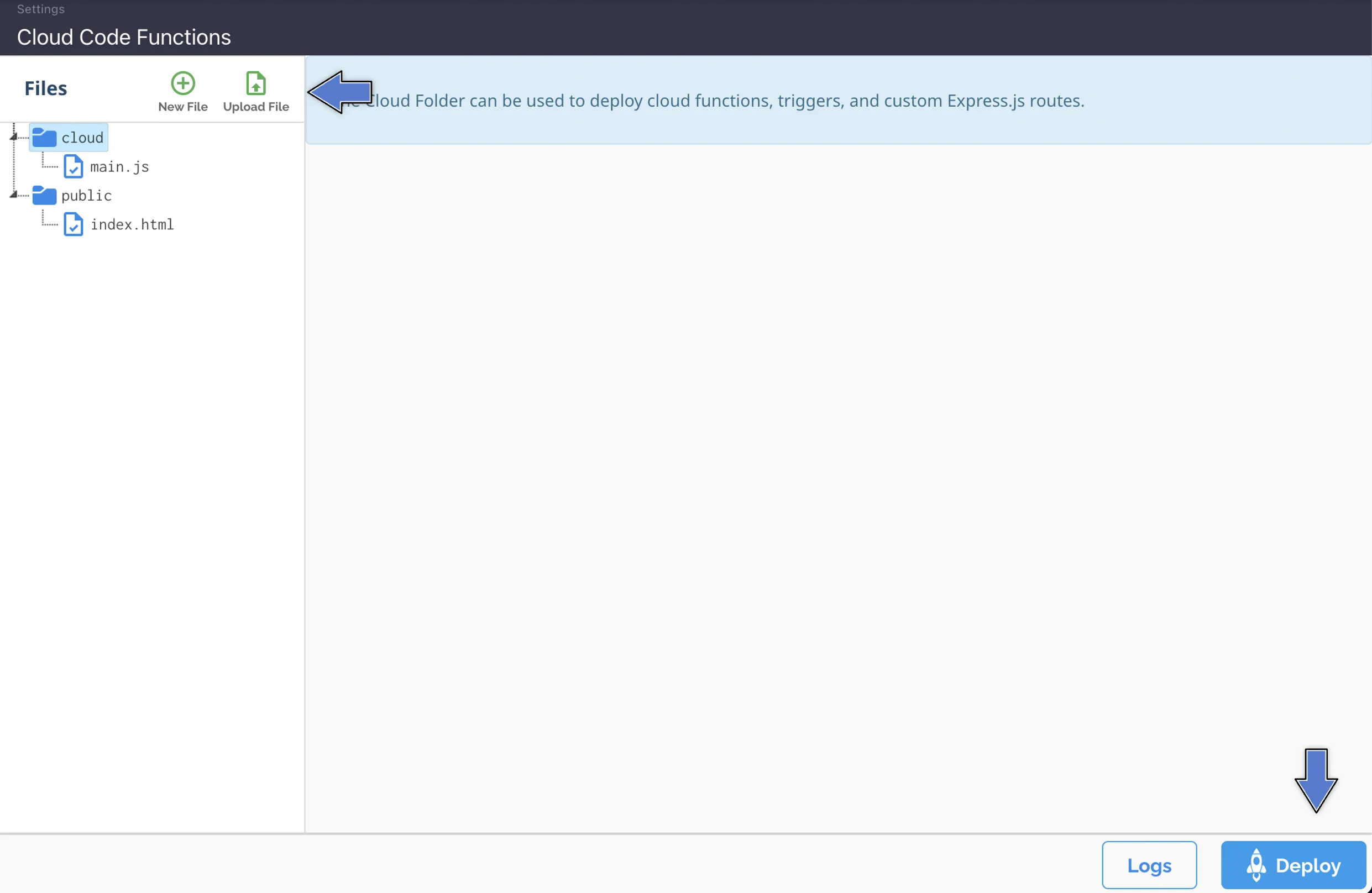
3. 파일을 업로드하거나 새 파일을 생성합니다 (현재main.js 파일을 브라우저에서 직접 편집할 수 있습니다). 그런 다음, 여기에서처럼 배포를 클릭합니다:
당신의main.js 파일은 다음과 같아야 합니다:
1   Parse.Cloud.define("hello", async (request) => {
2       console.log("Hello from Cloud Code!");
3       return "Hello from Cloud Code!";
4   });
5
6   Parse.Cloud.define("sumNumbers", async (request) => {
7       return (request.params.number1 + request.params.number2);
8   });
9
10  Parse.Cloud.define("createToDo", async (request) => {
11      const title = request.params.title;
12      const done = request.params.done;
13
14      const Todo = Parse.Object.extend('ToDo');
15      const todo = new Todo();
16      todo.set('title', title);
17      todo.set('done', done);
18
19      try {
20          await todo.save();
21          return todo;
22        } catch (error) {
23          console.log('ToDo create - Error - ' + error.code + ' ' + error.message);
24        }
25  });
26
27  Parse.Cloud.define("getListToDo", async (request) => {
28      let query = new Parse.Query("ToDo");
29      query.descending("done");
30      return await query.find();
31  });
Flutter 앱에서 Cloud 함수에 매개변수를 전달하고 request.params 객체 내에서 접근합니다.
2 - ParseCloudFunction 클래스 이해하기
이 ParseCloudFunction 클래스는 Parse Cloud Functions와 상호작용하기 위한 메서드를 정의합니다.
Cloud Function은 다음과 같이 호출할 수 있습니다. ParseCloudFunction.execute({parameters: params}) 이 메서드는 맵 객체를 반환하거나 ParseCloudFunction.executeObjectFunction<>({parameters: params}) 이 메서드는 ParseObject를 반환합니다.
매개변수는 선택 사항이며 맵 객체가 예상됩니다.
3 - Parse Cloud 함수 호출하기
이제 Cloud Functions를 배포했으므로 Flutter를 사용하여 함수를 호출할 수 있습니다.
예제 1 - Cloud Function 호출 및 반환값 받기
1       //Executes a cloud function with no parameters that returns a Map object
2       final ParseCloudFunction function = ParseCloudFunction('hello');
3       final ParseResponse parseResponse = await function.execute();
4       if (parseResponse.success && parseResponse.result != null) {
5         print(parseResponse.result);
6       }
콘솔에 표시된 결과는 다음과 같습니다:
예제 2 - 매개변수로 클라우드 함수를 호출하고 반환값을 받기
1       //Executes a cloud function with parameters that returns a Map object
2       final ParseCloudFunction function = ParseCloudFunction('sumNumbers');
3       final Map<String, dynamic> params = <String, dynamic>{
4         'number1': 10,
5         'number2': 20
6       };
7       final ParseResponse parseResponse =
8           await function.execute(parameters: params);
9       if (parseResponse.success) {
10        print(parseResponse.result);
11      }
콘솔에 표시된 결과는 다음과 같습니다:
예제 2.1 - 매개변수로 클라우드 함수를 호출하고 반환값을 받기
1       //Executes a cloud function with parameters that returns a Map object
2       final ParseCloudFunction function = ParseCloudFunction('sumNumbers');
3       final Map<String, dynamic> params = <String, dynamic>{
4         'number1': 10,
5         'number2': 20
6       };
7       final ParseResponse parseResponse =
8           await function.execute(parameters: params);
9       if (parseResponse.success) {
10        print(parseResponse.result);
11 }예제 3 - 매개변수를 사용하여 클라우드 함수를 호출하고 ParseObject를 반환받기
1       //Executes a cloud function that returns a ParseObject type
2       final ParseCloudFunction function = ParseCloudFunction('createToDo');
3       final Map<String, dynamic> params = <String, dynamic>{
4         'title': 'Task 1',
5         'done': false
6       };
7       final ParseResponse parseResponse =
8           await function.executeObjectFunction<ParseObject>(parameters: params);
9       if (parseResponse.success && parseResponse.result != null) {
10        if (parseResponse.result['result'] is ParseObject) {
11          //Transforms the return into a ParseObject
12          final ParseObject parseObject = parseResponse.result['result'];
13          print(parseObject.objectId);
14        }
15      }
콘솔에 표시된 결과는 다음과 같습니다:
예제 4 - ParseObject로 변환할 수 있는 맵 목록을 반환하는 클라우드 함수를 호출하기
1       //Executes a cloud function with parameters that returns a Map object
2       final ParseCloudFunction function = ParseCloudFunction('getListToDo');
3       final ParseResponse parseResponse = await function.execute();
4       if (parseResponse.success) {
5         if (parseResponse.result != null) {
6           for (final todo in parseResponse.result) {
7             //Use fromJson method to convert map in ParseObject
8             print(ParseObject('ToDo').fromJson(todo));
9           }
10        }
11      }
콘솔에 표시된 결과는 다음과 같습니다:
1    flutter: {"className":"ToDo","objectId":"cR3G4RccT1","createdAt":"2021-06-23T03:20:34.933Z","updatedAt":"2021-06-23T03:20:34.933Z","title":"Task 1","done":false}
2    flutter: {"className":"ToDo","objectId":"6BARcICPKe","createdAt":"2021-06-23T03:20:54.294Z","updatedAt":"2021-06-23T03:20:54.294Z","title":"Task 1","done":false}
3    flutter: {"className":"ToDo","objectId":"tYZA74l89Q","createdAt":"2021-06-23T03:39:42.049Z","updatedAt":"2021-06-23T03:39:42.049Z","title":"Task 1","done":false}
4    flutter: {"className":"ToDo","objectId":"ArjM8Q7H8D","createdAt":"2021-06-24T03:33:27.925Z","updatedAt":"2021-06-24T03:33:27.925Z","title":"Task 1","done":false}
5 - Flutter에서 클라우드 함수 호출하기
이제 Flutter 앱에서 간단한 인터페이스로 클라우드 함수를 호출하는 예제를 사용해 보겠습니다.
Flutter 프로젝트를 열고, main.dart 파일로 가서, 모든 코드를 정리하고 다음으로 교체하세요:
1   import 'package:flutter/cupertino.dart';
2   import 'package:flutter/material.dart';
3   import 'package:parse_server_sdk_flutter/parse_server_sdk.dart';
4
5   void main() async {
6     WidgetsFlutterBinding.ensureInitialized();
7
8     final keyApplicationId = 'YOUR_APP_ID_HERE';
9     final keyClientKey = 'YOUR_CLIENT_KEY_HERE';
10
11    final keyParseServerUrl = 'https://parseapi.back4app.com';
12
13    await Parse().initialize(keyApplicationId, keyParseServerUrl,
14        clientKey: keyClientKey, debug: true);
15
16    runApp(MaterialApp(
17      title: 'Flutter - GeoPoint',
18      debugShowCheckedModeBanner: false,
19      home: HomePage(),
20    ));
21  }
22
23  class HomePage extends StatefulWidget {
24    @override
25    _HomePageState createState() => _HomePageState();
26  }
27
28  class _HomePageState extends State<HomePage> {
29
30    void doCallCloudCodeHello() async {
31      //Executes a cloud function with no parameters that returns a Map object
32      final ParseCloudFunction function = ParseCloudFunction('hello');
33      final ParseResponse parseResponse = await function.execute();
34      if (parseResponse.success && parseResponse.result != null) {
35        print(parseResponse.result);
36      }
37    }
38
39    void doCallCloudCodeSumNumbers() async {
40      //Executes a cloud function with parameters that returns a Map object
41      final ParseCloudFunction function = ParseCloudFunction('sumNumbers');
42      final Map<String, dynamic> params = <String, dynamic>{
43        'number1': 10,
44        'number2': 20
45      };
46      final ParseResponse parseResponse =
47          await function.execute(parameters: params);
48      if (parseResponse.success) {
49        print(parseResponse.result);
50      }
51    }
52
53    void doCallCloudCodeCreateToDo() async {
54      //Executes a cloud function that returns a ParseObject type
55      final ParseCloudFunction function = ParseCloudFunction('createToDo');
56      final Map<String, dynamic> params = <String, dynamic>{
57        'title': 'Task 1',
58        'done': false
59      };
60      final ParseResponse parseResponse =
61          await function.executeObjectFunction<ParseObject>(parameters: params);
62      if (parseResponse.success && parseResponse.result != null) {
63        if (parseResponse.result['result'] is ParseObject) {
64          //Transforms the return into a ParseObject
65          final ParseObject parseObject = parseResponse.result['result'];
66          print(parseObject.toString());
67        }
68      }
69    }
70
71    void doCallCloudCodeGetListTodo() async {
72      //Executes a cloud function with parameters that returns a Map object
73      final ParseCloudFunction function = ParseCloudFunction('getListToDo');
74      final ParseResponse parseResponse = await function.execute();
75      if (parseResponse.success) {
76        if (parseResponse.result != null) {
77          for (final todo in parseResponse.result) {
78            //Use fromJson method to convert map in ParseObject
79            print(ParseObject('ToDo').fromJson(todo));
80          }
81        }
82      }
83    }
84
85    @override
86    Widget build(BuildContext context) {
87      return Scaffold(
88          body: Padding(
89        padding: const EdgeInsets.all(16.0),
90        child: Column(
91          crossAxisAlignment: CrossAxisAlignment.stretch,
92          children: [
93            Container(
94              height: 200,
95              child: Image.network(
96                  'https://blog.back4app.com/wp-content/uploads/2017/11/logo-b4a-1-768x175-1.png'),
97            ),
98            Center(
99              child: const Text('Flutter on Back4app - Call Clode Code',
100                 style: TextStyle(fontSize: 18, fontWeight: FontWeight.bold)),
101           ),
102           SizedBox(
103             height: 8,
104           ),
105           Container(
106             height: 50,
107             child: ElevatedButton(
108                 onPressed: doCallCloudCodeHello,
109                 child: Text('Cloud Code - Hello'),
110                 style: ElevatedButton.styleFrom(primary: Colors.blue)),
111           ),
112           SizedBox(
113             height: 8,
114           ),
115           Container(
116             height: 50,
117             child: ElevatedButton(
118                 onPressed: doCallCloudCodeSumNumbers,
119                 child: Text('Cloud Code - sumNumber'),
120                 style: ElevatedButton.styleFrom(primary: Colors.blue)),
121           ),
122           SizedBox(
123             height: 8,
124           ),
125           Container(
126             height: 50,
127             child: ElevatedButton(
128                 onPressed: doCallCloudCodeCreateToDo,
129                 child: Text('Cloud Code - createToDo'),
130                 style: ElevatedButton.styleFrom(primary: Colors.blue)),
131           ),
132           SizedBox(
133             height: 8,
134           ),
135           Container(
136             height: 50,
137             child: ElevatedButton(
138                 onPressed: doCallCloudCodeGetListTodo,
139                 child: Text('Cloud Code - getListToDo'),
140                 style: ElevatedButton.styleFrom(primary: Colors.blue)),
141           ),
142         ],
143       ),
144     ));
145   }
146 }
애플리케이션 ID와 클라이언트 키 자격 증명을 찾으려면 Back4App 웹사이트로 이동하세요.
코드를 main.dart에서 Back4app의 애플리케이션 ID와 클라이언트 키 값으로 업데이트하세요.
- keyApplicationId = 앱 ID
- keyClientKey = 클라이언트 키
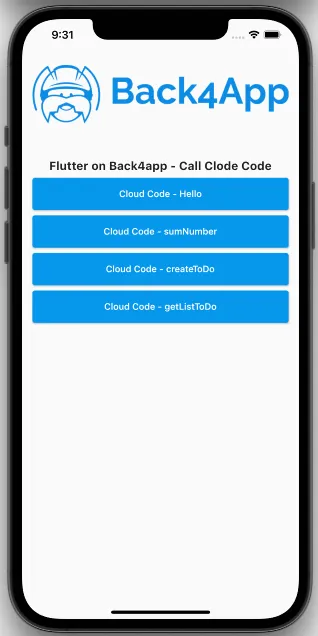
프로젝트를 실행하면 앱이 이미지와 같이 로드됩니다.
결론
이 단계에서, Back4App을 통해 Parse Server Core 기능을 사용하여 Flutter 앱에서 자신의 클라우드 코드를 코딩하고 호출할 수 있습니다!