안드로이드 Parse Query 메서드: 고급 사용 가이드
안드로이드에서 Parse Query 요리책
소개
우리는 이미 ParseQuery를 사용하여 get을 통해 Back4App에서 단일 ParseQuery를 검색하는 방법을 보았습니다. ParseQuery를 사용하여 여러 객체를 한 번에 검색하고, 검색하려는 객체에 조건을 적용하는 등 데이터 검색 방법은 다양합니다.
이 가이드에서는 ParseQuery 클래스에 대해 깊이 파고들고, 쿼리를 작성하는 데 사용할 수 있는 모든 메서드를 살펴볼 것입니다. Back4App의 자바스크립트 콘솔을 사용하여 쿼리를 수행하기 위해 일부 모의 데이터가 포함된 간단한 데이터베이스 클래스를 사용할 것입니다.
Back4App의 자바스크립트 콘솔을 사용하여 쉽게 모의 데이터를 생성할 수 있으며, 이 가이드를 따라 자신의 안드로이드 앱으로 데이터를 생성할 수도 있습니다.
이 튜토리얼은 buildToolsVersion=30.0.2 , Compile SDK Version = 30.0.2 및 targetSdkVersion=30
언제든지 이 튜토리얼로 구축된 전체 Android 프로젝트에 접근할 수 있습니다. GitHub 저장소에서 확인하세요.
전제 조건
이 튜토리얼을 완료하려면 다음이 필요합니다:
- Back4App에서 생성된 앱.
- Back4App에 연결된 안드로이드 앱.
목표
다양한 메서드와 함께 ParseQuery 클래스를 탐색하고 Android에서 생성할 수 있는 쿼리 유형을 배웁니다.
ParseQuery 클래스
Parse에서의 모든 쿼리 작업은 ParseQuery 객체 유형을 사용하며, 이는 앱 전반에 걸쳐 Back4App에서 특정 데이터를 검색하는 데 도움이 됩니다. 새로운 ParseQuery를 생성하려면 원하는 ParseQuery 서브클래스를 매개변수로 전달해야 하며, 이는 쿼리 결과를 포함할 것입니다.
쿼리 ParseQuery는 retrieve 메서드(예: ParseQuery.find 또는 ParseQuery.get 호출 후에만 해결된다는 것을 아는 것이 중요합니다. 따라서 쿼리를 설정하고 실제로 호출되기 전에 여러 수정자를 연결할 수 있습니다.
더 많은 정보를 원하시면 ParseQuery 클래스에 대해 공식 문서에서 여기를 참조하세요.
Back4App에서 JS 콘솔 사용하기
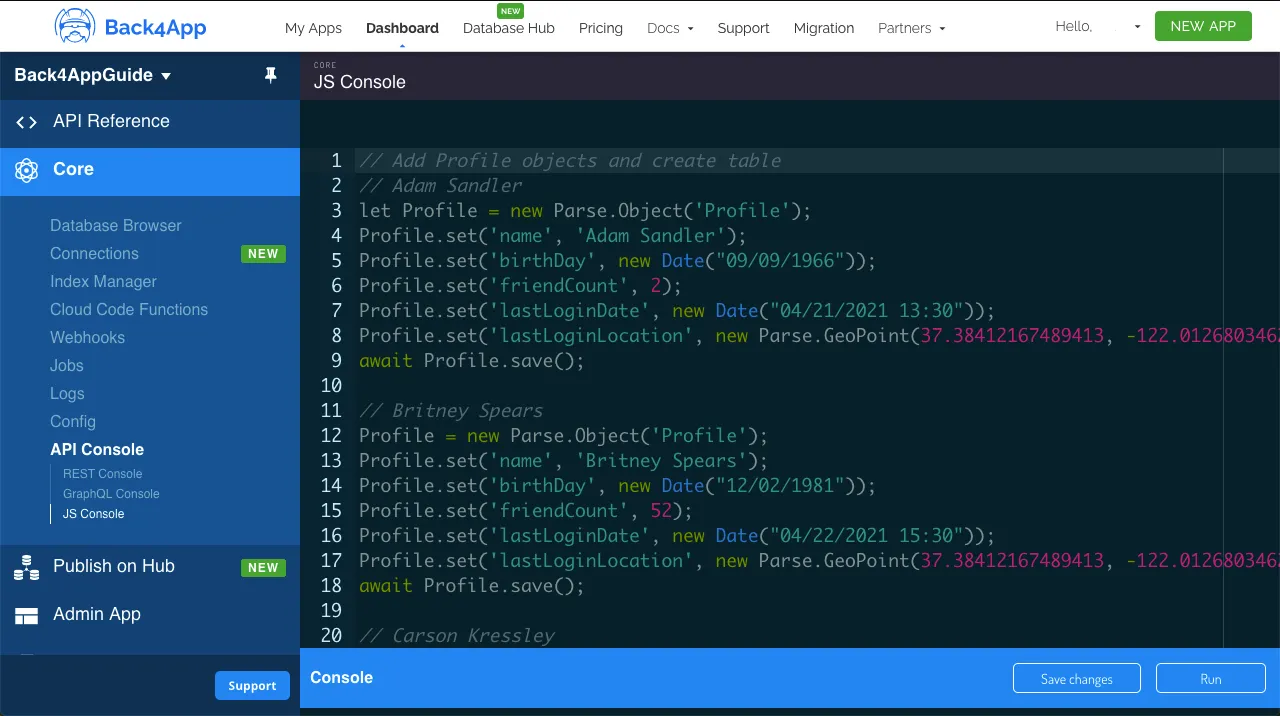
Back4App 애플리케이션 대시보드 내에서 JavaScript 코드를 직접 실행할 수 있는 매우 유용한 API 콘솔을 찾을 수 있습니다. 이 가이드를 사용하여 Back4App에서 데이터 객체를 저장하고 쿼리할 것입니다. 앱의 주요 대시보드에서 Core->API Console->JS Console.
데이터 객체 저장하기
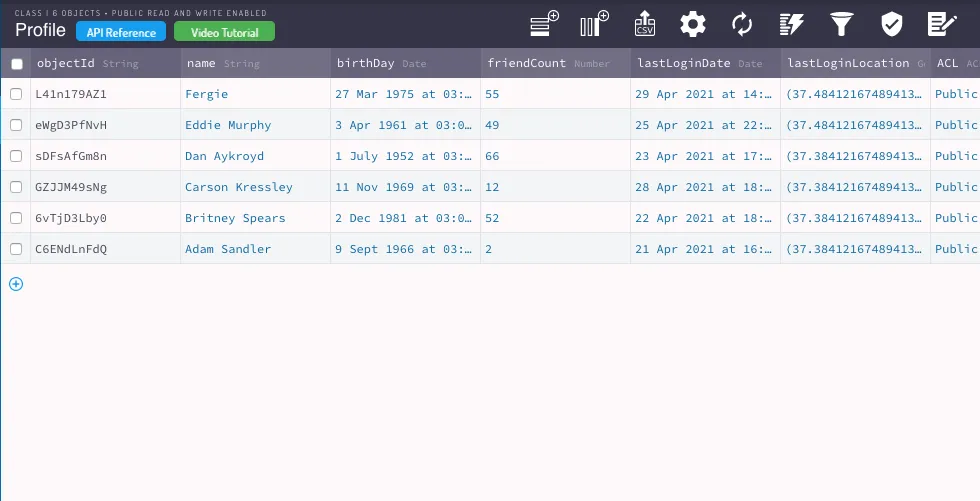
이 가이드에서 쿼리를 실행하려면 먼저 앱에 일부 데이터를 채워야 합니다. 유명인 이름과 다음 필드를 사용하여 소셜 미디어 프로필 클래스를 모방한 샘플 클래스를 Profile이라고 생성해 보겠습니다.
- 문자열 유형
- 날짜 유형
- 숫자 (정수) 유형
- 배열 (문자열 배열) 유형
- 배열 (숫자 배열) 유형
- GeoPoint 유형
- 널 가능 포인터 유형
여기 Parse.Object 클래스 생성 코드가 있으니, API 콘솔에서 실행해 보세요:
1   // Add Profile objects and create table
2   // Adam Sandler
3   let Profile = new Parse.Object('Profile');
4   Profile.set('name', 'Adam Sandler');
5   Profile.set('birthDay', new Date('09/09/1966'));
6   Profile.set('friendCount', 2);
7   Profile.set('favoriteFoods', ['Lobster', 'Bread']);
8   Profile.set('luckyNumbers', [2, 7]);
9   Profile.set('lastLoginLocation', new Parse.GeoPoint(37.38412167489413, -122.01268034622319));
10  await Profile.save();
11
12  // Britney Spears
13  Profile = new Parse.Object('Profile');
14  Profile.set('name', 'Britney Spears');
15  Profile.set('birthDay', new Date('12/02/1981'));
16  Profile.set('friendCount', 52);
17  Profile.set('favoriteFoods', ['Cake', 'Bread']);
18  Profile.set('luckyNumbers', [22, 7]);
19  Profile.set('lastLoginLocation', new Parse.GeoPoint(37.38412167489413, -122.01268034622319));
20  await Profile.save();
21
22  // Carson Kressley
23  Profile = new Parse.Object('Profile');
24  Profile.set('name', 'Carson Kressley');
25  Profile.set('birthDay', new Date('11/11/1969'));
26  Profile.set('friendCount', 12);
27  Profile.set('favoriteFoods', ['Fish', 'Cookies']);
28  Profile.set('luckyNumbers', [8, 2]);
29  Profile.set('lastLoginLocation', new Parse.GeoPoint(37.38412167489413, -122.01268034622319));
30  await Profile.save();
31
32  // Dan Aykroyd
33  // Creates related object Membership for this user only
34  let Membership = new Parse.Object('Membership');
35  Membership.set('name', 'Premium');
36  Membership.set('expirationDate', new Date('10/10/2030'))
37  await Membership.save();
38  Profile = new Parse.Object('Profile');
39  Profile.set('name', 'Dan Aykroyd');
40  Profile.set('birthDay', new Date('07/01/1952'));
41  Profile.set('friendCount', 66);
42  Profile.set('favoriteFoods', ['Jam', 'Peanut Butter']);
43  Profile.set('luckyNumbers', [22, 77]);
44  Profile.set('lastLoginLocation', new Parse.GeoPoint(37.38412167489413, -122.01268034622319));
45  Profile.set('premiumMembership', Membership);
46  await Profile.save();
47
48  // Eddie Murphy
49  Profile = new Parse.Object('Profile');
50  Profile.set('name', 'Eddie Murphy');
51  Profile.set('birthDay', new Date('04/03/1961'));
52  Profile.set('friendCount', 49);
53  Profile.set('favoriteFoods', ['Lettuce', 'Pepper']);
54  Profile.set('luckyNumbers', [6, 5]);
55  Profile.set('lastLoginLocation', new Parse.GeoPoint(-27.104919974838154, -52.61428045237739));
56  await Profile.save();
57
58  // Fergie
59  Profile = new Parse.Object('Profile');
60  Profile.set('name', 'Fergie');
61  Profile.set('birthDay', new Date('03/27/1975'));
62  Profile.set('friendCount', 55);
63  Profile.set('favoriteFoods', ['Lobster', 'Shrimp']);
64  Profile.set('luckyNumbers', [13, 7]);
65  Profile.set('lastLoginLocation', new Parse.GeoPoint(-27.104919974838154, -52.61428045237739));
66  await Profile.save();
67
68  console.log('Success!');
이 코드를 실행한 후, 데이터베이스에 여섯 개의 객체가 생성된 프로필 클래스가 있어야 합니다. 새 클래스는 다음과 같아야 합니다:
이제 모든 ParseQuery 메서드의 예를 살펴보고, 그들이 하는 일에 대한 간단한 설명을 추가하겠습니다. 이 목록의 일부 메서드는 옵션을 추가 인수로 받을 수 있지만, 대부분의 경우 이는 masterKey 사용과 관련이 있으며 이 가이드 내용과는 관련이 없으므로, 관련이 없는 경우 이 가능성은 생략됩니다.
쿼리 검색기
이 방법들은 쿼리를 실행하고 그 결과를 검색하는 책임이 있으며, 항상 쿼리 구현에 존재합니다.
이것은 java 메서드입니다:
//Cancels the current network request.
1   ParseQuery<ParseObject> query = new ParseQuery<>("Profile");
2   query.findInBackground();
3   query.cancel();
이것은 kotlin 메서드입니다:
//Cancels the current network request.
1   val query = ParseQuery<ParseObject>("Profile")
2   query.findInBackground()
3   query.cancel()
쿼리 조건자
이 메서드는 쿼리에 조건부 제약을 적용할 수 있는 가능성을 제공합니다. 이는 쿼리에서 가장 중요한 작업이라고 할 수 있습니다. 이러한 작업은 결과가 검색되기 전에 모두 연결할 수 있으므로 쿼리 요구 사항을 해결하기 위해 많은 조합을 달성할 수 있습니다.
이것들은 Java 메서드입니다
//Filters objects in which a key value is contained in the provided array of values.
1     ParseQuery<ParseObject> query = new ParseQuery<>("Profile");
2     query.whereContainedIn("luckyNumbers", List.of(2, 7));
3     query.findInBackground((objects, e) -> {
4         if (e == null) {
5             Log.d(TAG, "Objects: " + objects);
6         } else {
7             Log.e(TAG, "Parse Error: ", e);
8         }
9
10    });
이것들은 Kotlin 메서드입니다
//Filters objects in which a key value is contained in the provided array of values.
1     val query = ParseQuery<ParseObject>("Profile")
2     query.whereContainedIn("luckyNumbers", java.util.List.of(2, 7))
3     query.findInBackground { objects: List<ParseObject>, e: ParseException? ->
4         if (e == null) {
5             Log.d(Companion.TAG, "Objects: $objects")
6         } else {
7             Log.e(Companion.TAG, "Parse Error: ", e)
8         }
9     }
이것들은 Java 메서드입니다
//Requires that a key’s value does not match a value in an object returned by a different ParseQuery. Useful for multi-object querying.
1   ParseQuery<ParseObject> query = new ParseQuery<>("Profile");
2   ParseQuery<ParseObject> innerQuery = new ParseQuery<>("Profile");
3   innerQuery.whereLessThan("friendCount", 50);
4   query.whereDoesNotMatchKeyInQuery("friendCount", "friendCount", innerQuery);
5   query.whereGreaterThan("friendCount", 10);
6   query.findInBackground((objects, e) -> {
7       if (e == null) {
8           Log.d(TAG, "Objects: " + objects);
9       } else {
10          Log.e(TAG, "Parse Error: ", e);
11      }
12  });
//Filters objects in which a specific key’s value is greater than or equal to the provided value.
1 ParseQuery<ParseObject> query = new ParseQuery<>("Profile");
2 query.whereGreaterThanOrEqualTo("friendCount", 49);
3 query.findInBackground((objects, e) -> {
4 if (e == null) {
5 Log.d(TAG, "Objects: " + objects);
6 } else {
7 Log.e(TAG, "Parse Error: ", e);
8 }
9 });이것들은 Kotlin 메서드입니다
//Filters objects in which a specific key’s value is equal to the provided value.
1   val query = ParseQuery<ParseObject>("Profile")
2   query.whereEqualTo("friendCount", 2)
3   query.findInBackground { objects: List<ParseObject>, e: ParseException? ->
4       if (e == null) {
5           Log.d(Companion.TAG, "Objects: $objects")
6       } else {
7           Log.e(Companion.TAG, "Parse Error: ", e)
8       }
9   }
//Filters objects in which a key value is set.
1 val query = ParseQuery<ParseObject>("Profile")
2 query.whereExists("premiumMembership")
3 query.findInBackground { objects: List<ParseObject>, e: ParseException? ->
4 if (e == null) {
5 Log.d(Companion.TAG, "Objects: $objects")
6 } else {
7 Log.e(Companion.TAG, "Parse Error: ", e)
8 }
9 }이것들은 자바 메서드입니다
//Filters objects in which a string key’s value starts with the provided text value.
1   ParseQuery<ParseObject> query = new ParseQuery<>("Profile");
2   query.whereStartsWith("name", "Brit");
3   query.findInBackground((objects, e) -> {
4       if (e == null) {
5           Log.d(TAG, "Objects: " + objects);
6       } else {
7           Log.e(TAG, "Parse Error: ", e);
8       }
9   });
이것들은 Kotlin 메서드입니다
//Filters objects in which a string key’s value starts with the provided text value.
1   val query = ParseQuery<ParseObject>("Profile")
2   query.whereStartsWith("name", "Brit")
3   query.findInBackground { objects: List<ParseObject>, e: ParseException? ->
4       if (e == null) {
5           Log.d(Companion.TAG, "Objects: $objects")
6       } else {
7           Log.e(Companion.TAG, "Parse Error: ", e)
8       }
9   }
쿼리 정렬
대부분의 쿼리에서 필수적인 정렬은 Parse에서 쉽게 수행할 수 있으며, 두 개 이상의 정렬 제약 조건 간에 연결할 수도 있습니다.
이것들은 Java 메서드입니다
//Sort the results in descending order, this can be chained without overwriting previous orderings. Multiple keys can be used to solve ordering ties.
1   ParseQuery<ParseObject> query = new ParseQuery<>("Profile");
2   query.orderByDescending("friendCount");
3   query.findInBackground((objects, e) -> {
4       if (e == null) {
5           Log.d(TAG, "Objects: " + objects);
6       } else {
7           Log.e(TAG, "Parse Error: ", e);
8       }
9
10  });
이것들은 Kotlin 메서드입니다
//Sort the results in ascending order, overwrites previous orderings. Multiple keys can be used to solve ordering ties.
1   val query = ParseQuery<ParseObject>("Profile")
2   query.addAscendingOrder("friendCount")
3   query.findInBackground { objects: List<ParseObject>, e: ParseException? ->
4       if (e == null) {
5           Log.d(Companion.TAG, "Objects: $objects")
6       } else {
7           Log.e(Companion.TAG, "Parse Error: ", e)
8       }
9   }
필드 선택
이 메서드는 쿼리 결과에 포함될 수 있는 필드 값을 결정합니다.
이것들은 Java 메서드입니다
//Return all fields in the returned objects except the ones specified.
1   ParseQuery<ParseObject> query = new ParseQuery<>("Profile");
2   query.whereExists("premiumMembership");
3   query.include("premiumMembership");
4   query.findInBackground((objects, e) -> {
5       if (e == null) {
6           Log.d(TAG, "Objects: " + objects);
7           Log.d(TAG, "Object Premium Membership: " + objects.get(0).get("premiumMembership"));
8       } else {
9           Log.e(TAG, "Parse Error: ", e);
10      }
11
12  });
이것들은 Kotlin 메서드입니다.
//Return all fields in the returned objects except the ones specified.
1   val query = ParseQuery<ParseObject>("Profile")
2   query.whereExists("premiumMembership")
3   query.include("premiumMembership")
4   query.findInBackground { objects: List<ParseObject>, e: ParseException? ->
5       if (e == null) {
6           Log.d(Companion.TAG, "Objects: $objects")
7           Log.d(
8               Companion.TAG,
9               "Object Premium Membership: " + objects[0]["premiumMembership"]
10          )
11      } else {
12          Log.e(Companion.TAG, "Parse Error: ", e)
13      }
14  }
지오포인트 쿼리
이것들은 GeoPoint 쿼리에 특정한 메서드입니다.
이것들은 Java 메서드입니다
//Order objects by how near the key value is from the given GeoPoint.
1   ParseQuery<ParseObject> query = new ParseQuery<>("Profile");
2   query.whereNear("lastLoginLocation", new ParseGeoPoint(37.38412167489413, -122.01268034622319));
3   query.findInBackground((objects, e) -> {
4       if (e == null) {
5           Log.d(TAG, "Objects: " + objects);
6       } else {
7           Log.e(TAG, "Parse Error: ", e);
8       }
9
10  });
//Find objects whose key value is near the given GeoPoint and within the maxDistance value. The sorted boolean value determines if the results should be sorted by distance ascending.
1 ParseQuery<ParseObject> query = new ParseQuery<>("Profile");
2 query.whereWithinMiles("lastLoginLocation", new ParseGeoPoint(37.38412167489413, -122.01268034622319), 100);
3 query.findInBackground((objects, e) -> {
4 if (e == null) {
5 Log.d(TAG, "Objects: " + objects);
6 } else {
7 Log.e(TAG, "Parse Error: ", e);
8 }
9
10 });이것들은 Kotlin 메서드입니다
//Order objects by how near the key value is from the given GeoPoint.
1   val query = ParseQuery<ParseObject>("Profile")
2   query.whereNear("lastLoginLocation", ParseGeoPoint(37.38412167489413, -122.01268034622319))
3   query.findInBackground { objects: List<ParseObject>, e: ParseException? ->
4       if (e == null) {
5           Log.d(Companion.TAG, "Objects: $objects")
6       } else {
7           Log.e(Companion.TAG, "Parse Error: ", e)
8       }
9   }
//Find objects whose key value is near the given GeoPoint and within the maxDistance value. The sorted boolean value determines if the results should be sorted by distance ascending.
1 val query = ParseQuery<ParseObject>("Profile")
2 query.whereWithinMiles(
3 "lastLoginLocation",
4 ParseGeoPoint(37.38412167489413, -122.01268034622319),
5 100.0
6 )
7 query.findInBackground { objects: List<ParseObject>, e: ParseException? ->
8 if (e == null) {
9 Log.d(Companion.TAG, "Objects: $objects")
10 } else {
11 Log.e(Companion.TAG, "Parse Error: ", e)
12 }
13 }페이지 매김
이 메서드는 많은 결과를 검색할 쿼리에 유용한 페이지 매김 유틸리티와 관련이 있습니다.
이것들은 Java 메서드입니다
//Sets the maximum value of returned results, the default value is 100.
1   ParseQuery<ParseObject> query = new ParseQuery<>("Profile");
2   query.setLimit(2);
3   query.findInBackground((objects, e) -> {
4       if (e == null) {
5           Log.d(TAG, "Objects: " + objects);
6       } else {
7           Log.e(TAG, "Parse Error: ", e);
8       }
9
10  });
이들은 Kotlin 메서드입니다
//Sets the maximum value of returned results, the default value is 100.
1   val query = ParseQuery<ParseObject>("Profile")
2   query.limit = 2
3   query.findInBackground { objects: List<ParseObject>, e: ParseException? ->
4       if (e == null) {
5           Log.d(Companion.TAG, "Objects: $objects")
6       } else {
7           Log.e(Companion.TAG, "Parse Error: ", e)
8       }
9   }
로컬 데이터 저장소
이 메서드는 쿼리의 소스를 선택하고 로컬 데이터 저장소를 사용하는 기능을 제공합니다.
이들은 Java 메서드입니다
//Changes the source of this query to a specific group of pinned objects.
1   ParseQuery<ParseObject> query = new ParseQuery<>("Profile");
2   query.fromPin("pinnedObjects");
3   query.findInBackground((objects, e) -> {
4      if (e == null) {
5           Log.d(TAG, "Objects: " + objects);
6       } else {
7           Log.e(TAG, "Parse Error: ", e);
8       }
9   });
이것들은 Kotlin 메서드입니다.
//Changes the source of this query to a specific group of pinned objects.
1   val query = ParseQuery<ParseObject>("Profile")
2   query.fromPin("pinnedObjects")
3   query.findInBackground { objects: List<ParseObject>, e: ParseException? ->
4       if (e == null) {
5           Log.d(Companion.TAG, "Objects: $objects")
6       } else {
7           Log.e(Companion.TAG, "Parse Error: ", e)
8       }
9   }
결론
이 가이드를 마치면서, Android에서 다양한 쿼리 유형을 사용하는 방법을 배웠습니다.