使用Parse React创建Slack实时聊天应用教程
React Slack 克隆应用
介绍
在本指南中,我们将通过创建一个 Slack 克隆应用继续探索 Parse React hook 在有用的情况下。该应用将具有基本功能,如注册/登录、频道和实时聊天。此外,React 组件突显了使用实时查询、用户管理功能和执行查询(关系型)的灵活性来实现实时通知的实用性。
您可以随时快速在 Vercel 上部署一个 Slack 克隆应用:
先决条件
要完成本教程,您需要:
- 通过我们的 GitHub 仓库克隆或下载此项目,以便您可以与指南一起运行它。确保按照 README 文件中的说明在本地环境中成功设置它:
目标
使用 @parse/react hook 构建一个 Slack 克隆应用程序。
1 - 从模板创建您的 Parse 应用
该应用包含两个数据库类: 频道 和 消息, 包含指向 Parse 用户类的指针。我们不需要从头开始创建应用和数据库类,而是可以在 Back4App 数据库中心. 点击“克隆数据库”按钮,然后登录并创建您的应用。有关如何克隆的更多详细信息,请查看 克隆应用指南.
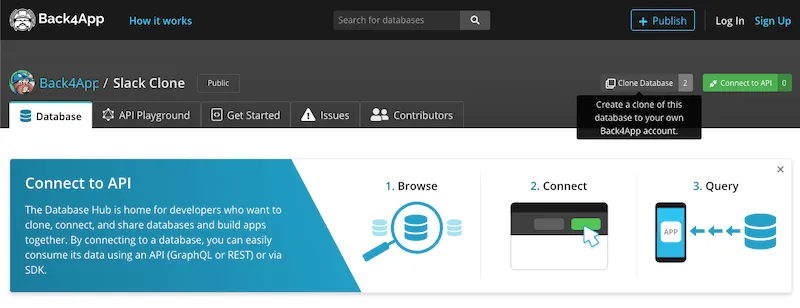
现在您的应用已经具备在 Back4App 上创建 Slack 克隆所需的完整后端结构。
2 - 启用实时查询
现在您已经创建了应用和类,您需要启用实时查询(实时)。前往您的 Back4App 控制面板,导航到 应用设置 > 服务器设置 > 服务器 URL 和实时查询. 激活您的 Back4App 子域后,您可以通过选择类 消息 和 频道 来激活实时查询。之后,保存更改。
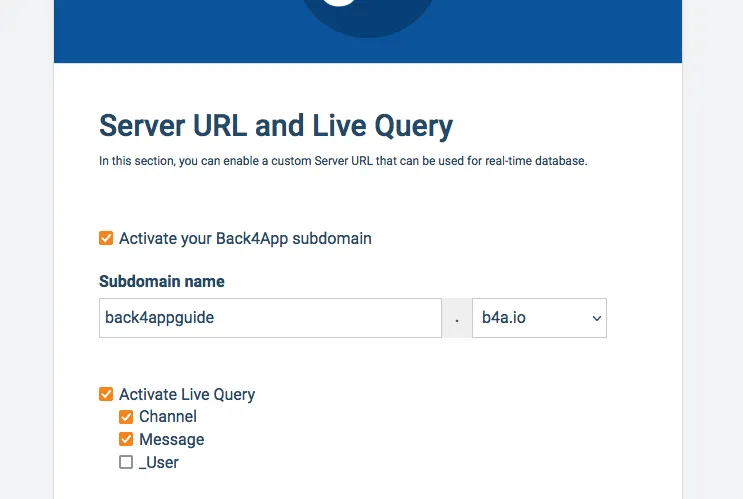
上面的 URL 是您的 实时查询 URL,请确保复制它以正确初始化 Parse 钩子。
现在让我们深入了解核心的 React 组件:频道列表, 消息列表, 和 主页.
3 - 列表组件
该 ChannelList 和 MessageList 组件使用 @parse/react 钩子通过实时查询检索用户数据。它们的模式结构与 React LiveChat 指南 相同。它们使用初始参数(通过 props 对象检索,这些参数动态组合它们的实时查询。看看它们的查询以及类之间的关系:
1	// Note that Parse.Object coming from props need to be changed into pointers
2	// to be able to be used by Parse, since React changes the object structure
3	// when passing down parameters to child components
4
5	// channelList.js
6
7	const ownerQuery = new Parse.Query("Channel");
8	ownerQuery.equalTo("owner", props.currentUser.toPointer());
9	const membersQuery = new Parse.Query("Channel");
10	membersQuery.containedIn("members", [props.currentUser.toPointer()]);
11	// Creates the OR query
12	const parseQuery = Parse.Query.or(ownerQuery, membersQuery);
13	// Set results ordering
14	parseQuery.ascending("name");
15	// Include all pointer fields
16	parseQuery.includeAll();
17
18	// messageList.js
19
20	const parseQuery = new Parse.Query("Message");
21	// Get messages that involve both nicknames
22	parseQuery.equalTo("channel", props.currentChannel.toPointer());
23	// Set results ordering
24	parseQuery.ascending("createdAt");
25	// Include nickname fields, to enable name getting on list
26	parseQuery.includeAll();
这些查询将在每次类数据发生变化时运行,因此如果频道中的其他用户发送消息,您将看到它实时出现。
4 - 主页组件
该 主页 组件作为主应用程序屏幕,其中列表组件在需要时有条件地呈现和实例化。您可以在下面找到组件代码。查看创建频道和邀请用户的函数。
1	import React, { useEffect, useState } from "react";
2	import "./App.css";
3	import { Modal } from "antd";
4	import { useHistory } from "react-router-dom";
5	import Parse from "parse";
6	import { ChannelList } from "./ChannelList";
7	import { MessageList } from "./MessageList";
8	import { MemberList } from "./MemberList";
9
10	export const Home = () => {
11	  const history = useHistory();
12
13	  // State variables holding input values and flags
14	  const [currentUser, setCurrentUser] = useState(null);
15	  const [isCreateChannelModalVisible, setIsCreateChannelModalVisible] =
16	    useState(false);
17	  const [createChannelInput, setCreateChannelInput] = useState("");
18	  const [currentChannel, setCurrentChannel] = useState(null);
19
20	  // This effect hook runs at every render and checks if there is a
21	  // logged in user, redirecting to Login screen if needed
22	  useEffect(() => {
23	    const checkCurrentUser = async () => {
24	      try {
25	        const user = await Parse.User.currentAsync();
26	        if (user === null || user === undefined) {
27	          history.push("/");
28	        } else {
29	          if (currentUser === null) {
30	            setCurrentUser(user);
31	          }
32	        }
33	        return true;
34	      } catch (_error) {}
35	      return false;
36	    };
37	    checkCurrentUser();
38	  });
39
40	  // Logout function
41	  const doLogout = async () => {
42	    // Logout
43	    try {
44	      await Parse.User.logOut();
45	      // Force useEffect execution to redirect back to Login
46	      setCurrentUser(null);
47	      return true;
48	    } catch (error) {
49	      alert(error);
50	      return false;
51	    }
52	  };
53
54	  // Makes modal visible
55	  const showCreateChannelModal = () => {
56	    setIsCreateChannelModalVisible(true);
57	  };
58
59	  // Clear input and hide modal on cancel
60	  const handleCreateChannelModalCancel = () => {
61	    setCreateChannelInput("");
62	    setIsCreateChannelModalVisible(false);
63	  };
64
65	  // Creates a channel based on input from modal
66	  const doCreateChannel = async () => {
67	    const channelName = createChannelInput;
68
69	    if (channelName === "") {
70	      alert("Please inform your new channel name!");
71	      return false;
72	    }
73
74	    // Creates a new Parse.Object instance and set parameters
75	    const Channel = new Parse.Object("Channel");
76	    Channel.set("name", channelName);
77	    Channel.set("owner", currentUser);
78	    // Members is an array of Parse.User objects, so .add() should be used to
79	    // concatenate the value inside the array
80	    Channel.add("members", currentUser);
81
82	    // Clears input value and hide modal
83	    setCreateChannelInput("");
84	    setIsCreateChannelModalVisible(false);
85
86	    try {
87	      // Save object on Parse server
88	      const saveResult = await Channel.save();
89	      // Set the created channel as the active channel,
90	      // showing the message list for this channel
91	      setCurrentChannel(saveResult);
92	      alert(`Success on creating channel ${channelName}`);
93	      return true;
94	    } catch (error) {
95	      alert(error);
96	      return false;
97	    }
98	  };
99
100	  // Changes the active channel and shows the message list for it
101	  // This is called using a callback in the ChannelList component
102	  const doSelectChannel = (channel) => {
103	    setCurrentChannel(null);
104	    setCurrentChannel(channel);
105	  };
106
107	  // Settings current channel to null hides the message list component
108	  // This is called using a callback in the MessageList component
109	  const doClearCurrentChannel = () => {
110	    setCurrentChannel(null);
111	  };
112
113	  return (
114	    <div className="grid">
115	      <div className="organizations">
116	        <div className="organization">
117	          <picture className="organization__picture">
118	            <img
119	              className="organization__img"
120	              src="https://scontent.fsqx1-1.fna.fbcdn.net/v/t1.6435-9/29136314_969639596535770_8356900498426560512_n.png?_nc_cat=103&ccb=1-5&_nc_sid=973b4a&_nc_ohc=D9actPSB8DUAX-zaA7F&_nc_ht=scontent.fsqx1-1.fna&oh=96679a09c5c4524f0a6c86110de697b6&oe=618525F9"
121	              alt=""
122	            />
123	          </picture>
124	          <p className="organization__title">Back4App</p>
125	        </div>
126	        <button className="button-inline" onClick={doLogout}>
127	          <svg
128	            className="button-inline__icon"
129	            xmlns="http://www.w3.org/2000/svg"
130	            width="24"
131	            height="24"
132	            viewBox="0 0 24 24"
133	            fill="none"
134	            stroke="currentColor"
135	            strokeWidth="2"
136	            strokeLinecap="round"
137	            strokeLinejoin="round"
138	          >
139	            <polyline points="9 10 4 15 9 20"></polyline>
140	            <path d="M20 4v7a4 4 0 0 1-4 4H4"></path>
141	          </svg>
142	          <span className="button-inline__label">Log out</span>
143	        </button>
144	      </div>
145	      <div className="channels">
146	        {/* Action buttons (new channel and logout) */}
147	        <div>
148	          <Modal
149	            title="Create new channel"
150	            visible={isCreateChannelModalVisible}
151	            onOk={doCreateChannel}
152	            onCancel={handleCreateChannelModalCancel}
153	            okText={"Create"}
154	          >
155	            <>
156	              <label>{"Channel Name"}</label>
157	              <input
158	                type={"text"}
159	                value={createChannelInput}
160	                placeholder={"New Channel Name"}
161	                onChange={(event) => setCreateChannelInput(event.target.value)}
162	              ></input>
163	            </>
164	          </Modal>
165	        </div>
166	        <div className="channels-header" onClick={showCreateChannelModal}>
167	          <p className="channels-header__label">Channels</p>
168	          <svg
169	            className="channels-header__icon"
170	            xmlns="http://www.w3.org/2000/svg"
171	            height="24px"
172	            viewBox="0 0 24 24"
173	            width="24px"
174	            fill="#000000"
175	          >
176	            <path d="M0 0h24v24H0z" fill="none" />
177	            <path d="M19 13h-6v6h-2v-6H5v-2h6V5h2v6h6v2z" />
178	          </svg>
179	        </div>
180	        {/* Channel list component, instantiated only when the user is successfully fetched */}
181	        {currentUser !== null && (
182	          <ChannelList
183	            currentUser={currentUser}
184	            selectChannelCallback={doSelectChannel}
185	          />
186	        )}
187	      </div>
188	      <div className="messages">
189	        {/* Message list component, instantiated only when there is a selected channel */}
190	        {currentUser !== null && currentChannel !== null && (
191	          <MessageList
192	            currentUser={currentUser}
193	            currentChannel={currentChannel}
194	            closeChannelCallback={doClearCurrentChannel}
195	          />
196	        )}
197	      </div>
198	      <div className="info">
199	        {/* Member list component, instantiated only when there is a selected channel */}
200	        {currentUser !== null && currentChannel !== null && (
201	          <MemberList
202	            currentUser={currentUser}
203	            currentChannel={currentChannel}
204	            closeChannelCallback={doClearCurrentChannel}
205	          />
206	        )}
207	      </div>
208	    </div>
209	  );
210	};
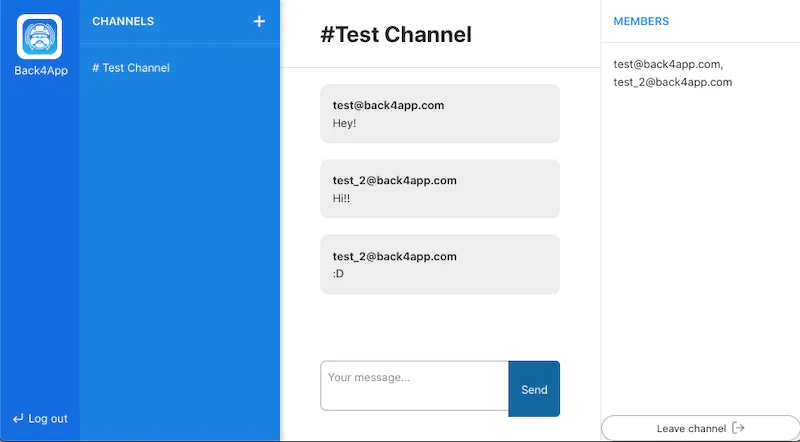
这种动态实例化实时查询组件的方法使我们能够在用户更改活动频道、创建新频道、发送消息等时重用它们。以下是完整应用程序的外观。
5 - 在 Vercel 上部署
您可以随时通过点击下面的链接在 Vercel 上部署应用程序:
确保您拥有您的 应用程序 ID, 客户端密钥 和 实时查询 URL. 对于密钥,您可以前往 应用设置 -> 安全性与密钥 然后复制。对于 实时查询 URL,您可以转到第 2 步并复制它。
结论
在本指南的最后,您了解了如何在 Parse 中使用 Parse React 钩子进行实时查询,以及如何使用 Back4App 的数据库中心。