React 애플리케이션에서 Parse 쿼리 메서드 사용법
Parse를 위한 React Query 요리책
소개
우리는 이미 Parse.Query를 사용하여 get를 통해 단일 Parse.Object를 Back4App에서 검색하는 방법을 보았습니다. Parse.Query를 사용하여 데이터를 검색하는 다른 많은 방법이 있습니다 - 여러 객체를 한 번에 검색하거나, 검색하려는 객체에 조건을 사용할 수 있습니다.
이 가이드에서는 Parse.Query 클래스에 대해 깊이 파고들고, 쿼리를 구축하는 데 사용할 수 있는 모든 메서드를 살펴볼 것입니다. Back4App의 Javascript Console을 사용하여 쿼리를 수행하기 위해 일부 모의 데이터가 포함된 간단한 데이터베이스 클래스를 사용할 것입니다.
전제 조건
이 튜토리얼을 완료하려면 다음이 필요합니다:
목표
다양한 메서드를 가진 Parse.Query 클래스를 탐색합니다.
Parse.Query 클래스
Parse에서의 모든 쿼리 작업은 Parse.Query 객체 유형을 사용하며, 이는 앱 전반에 걸쳐 Back4App에서 특정 데이터를 검색하는 데 도움이 됩니다. 새로운 Parse.Query를 생성하려면 원하는 Parse.Object 하위 클래스를 매개변수로 전달해야 하며, 이는 쿼리 결과를 포함할 것입니다.
쿼리는 Parse.Query를 호출한 후에만 해결된다는 것을 아는 것이 중요합니다 (예: Parse.Query.find 또는 Parse.Query.get), 따라서 쿼리를 설정하고 실제로 호출되기 전에 여러 수정자를 연결할 수 있습니다.
더 많은 정보는 Parse.Query 클래스에 대해 공식 문서에서 여기에서 확인할 수 있습니다.
Back4App에서 JS 콘솔 사용하기
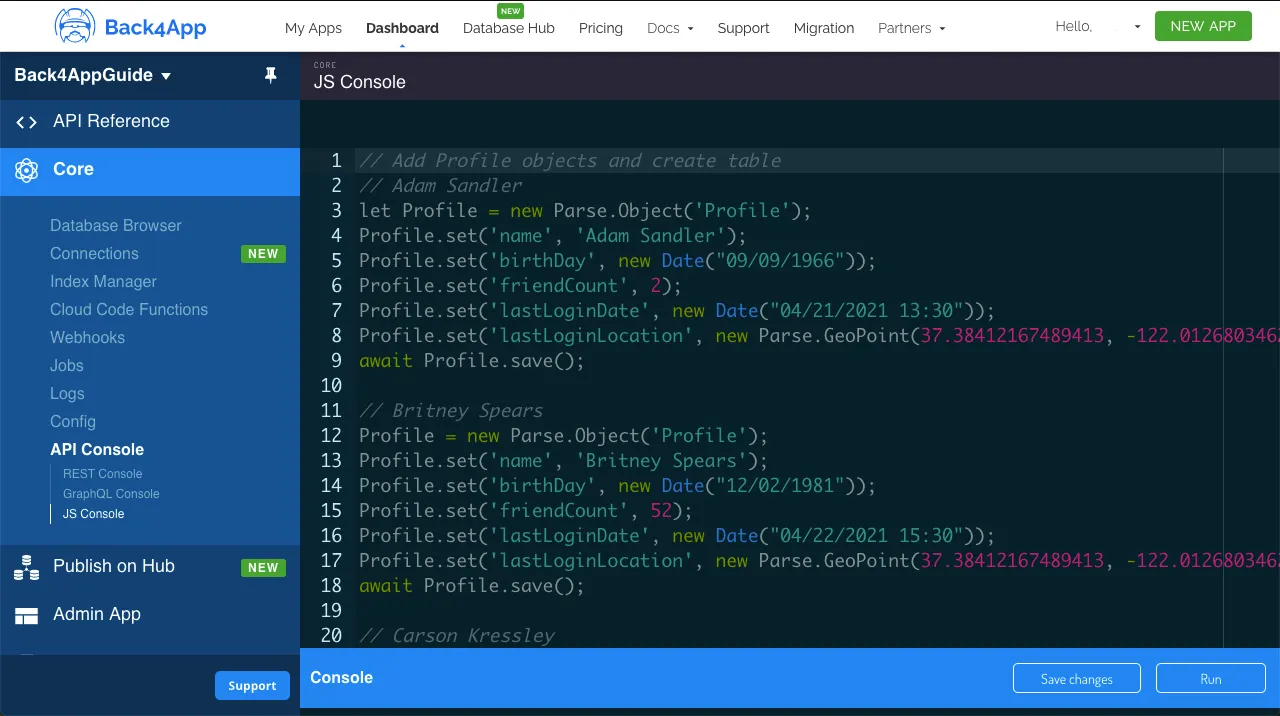
Back4App 애플리케이션 대시보드 내에서 JavaScript 코드를 직접 실행할 수 있는 매우 유용한 API 콘솔을 찾을 수 있습니다. 이 가이드를 사용하여 Back4App에서 데이터 객체를 저장하고 쿼리할 것입니다. 앱의 주요 대시보드에서 Core->API Console->JS Console으로 이동하세요.
데이터 객체 저장하기
이 가이드에서 쿼리를 실행하려면 먼저 앱에 데이터를 채워야 합니다. 유명인 이름과 다음 필드를 사용하여 소셜 미디어 프로필 클래스를 모방하는 샘플 클래스를 만들어 보겠습니다.프로필, 다음과 같은 필드가 포함됩니다:
- 문자열 유형 이름;
- 날짜 유형 생일;
- 숫자(정수) 유형 친구 수;
- 배열(문자열 배열) 유형 좋아하는 음식;
- 배열(숫자 배열) 유형 행운의 숫자;
- GeoPoint 유형 마지막 로그인 위치;
- Nullable 포인터 유형 프리미엄 멤버십, 관련된 멤버십 클래스는 문자열 이름과 날짜 만료 날짜 필드를 포함합니다.
여기 Parse.Object 클래스 생성 코드가 있으니, API 콘솔에서 실행해 보세요:
1	// Add Profile objects and create table
2	// Adam Sandler
3	let Profile = new Parse.Object('Profile');
4	Profile.set('name', 'Adam Sandler');
5	Profile.set('birthDay', new Date('09/09/1966'));
6	Profile.set('friendCount', 2);
7	Profile.set('favoriteFoods', ['Lobster', 'Bread']);
8	Profile.set('luckyNumbers', [2, 7]);
9	Profile.set('lastLoginLocation', new Parse.GeoPoint(37.38412167489413, -122.01268034622319));
10	await Profile.save();
11
12	// Britney Spears
13	Profile = new Parse.Object('Profile');
14	Profile.set('name', 'Britney Spears');
15	Profile.set('birthDay', new Date('12/02/1981'));
16	Profile.set('friendCount', 52);
17	Profile.set('favoriteFoods', ['Cake', 'Bread']);
18	Profile.set('luckyNumbers', [22, 7]);
19	Profile.set('lastLoginLocation', new Parse.GeoPoint(37.38412167489413, -122.01268034622319));
20	await Profile.save();
21
22	// Carson Kressley
23	Profile = new Parse.Object('Profile');
24	Profile.set('name', 'Carson Kressley');
25	Profile.set('birthDay', new Date('11/11/1969'));
26	Profile.set('friendCount', 12);
27	Profile.set('favoriteFoods', ['Fish', 'Cookies']);
28	Profile.set('luckyNumbers', [8, 2]);
29	Profile.set('lastLoginLocation', new Parse.GeoPoint(37.38412167489413, -122.01268034622319));
30	await Profile.save();
31
32	// Dan Aykroyd
33	// Creates related object Membership for this user only
34	let Membership = new Parse.Object('Membership');
35	Membership.set('name', 'Premium');
36	Membership.set('expirationDate', new Date('10/10/2030'))
37	await Membership.save();
38	Profile = new Parse.Object('Profile');
39	Profile.set('name', 'Dan Aykroyd');
40	Profile.set('birthDay', new Date('07/01/1952'));
41	Profile.set('friendCount', 66);
42	Profile.set('favoriteFoods', ['Jam', 'Peanut Butter']);
43	Profile.set('luckyNumbers', [22, 77]);
44	Profile.set('lastLoginLocation', new Parse.GeoPoint(37.38412167489413, -122.01268034622319));
45	Profile.set('premiumMembership', Membership);
46	await Profile.save();
47
48	// Eddie Murphy
49	Profile = new Parse.Object('Profile');
50	Profile.set('name', 'Eddie Murphy');
51	Profile.set('birthDay', new Date('04/03/1961'));
52	Profile.set('friendCount', 49);
53	Profile.set('favoriteFoods', ['Lettuce', 'Pepper']);
54	Profile.set('luckyNumbers', [6, 5]);
55	Profile.set('lastLoginLocation', new Parse.GeoPoint(-27.104919974838154, -52.61428045237739));
56	await Profile.save();
57
58	// Fergie
59	Profile = new Parse.Object('Profile');
60	Profile.set('name', 'Fergie');
61	Profile.set('birthDay', new Date('03/27/1975'));
62	Profile.set('friendCount', 55);
63	Profile.set('favoriteFoods', ['Lobster', 'Shrimp']);
64	Profile.set('luckyNumbers', [13, 7]);
65	Profile.set('lastLoginLocation', new Parse.GeoPoint(-27.104919974838154, -52.61428045237739));
66	await Profile.save();
67
68	console.log('Success!');
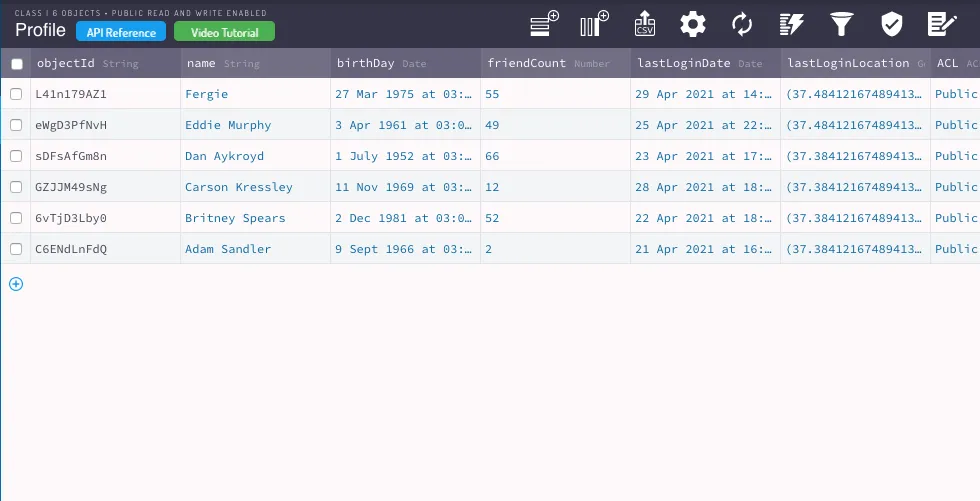
이 코드를 실행한 후, 데이터베이스에 여섯 개의 객체가 생성된 프로필 클래스가 있어야 합니다. 새 클래스는 다음과 같아야 합니다:
이제 모든 Parse.Query 메서드의 예를 살펴보고, 그들이 하는 일에 대한 간단한 설명을 추가하겠습니다. 이 목록의 일부 메서드는 옵션 을 추가 인수로 받을 수 있지만, 대부분의 경우 이는 masterKey 사용과 관련이 있으며, 이 가이드 내용과는 관련이 없으므로 관련이 없는 경우 이 가능성은 생략됩니다.
쿼리 검색기
이 방법들은 쿼리를 실행하고 그 결과를 검색하는 책임이 있으며, 항상 쿼리 구현에 존재합니다.
// This quick method is used to retrieve a single Parse.Object instance when you know its objectId.
1	let query = new Parse.Query('Profile');
2	// Since objectId is randomly set in your database, make sure to inform a
3	// valid one when testing this method
4	let queryResult = await query.get('C6ENdLnFdQ');
5	console.log(queryResult);
쿼리 조건자
이 방법들은 쿼리에 조건부 제약을 적용할 수 있는 가능성을 제공합니다. 이는 쿼리에서 가장 중요한 작업이라고 할 수 있습니다. 이러한 작업은 결과가 검색되기 전에 모두 연결할 수 있으므로, 쿼리 요구 사항을 해결하기 위해 많은 조합을 달성할 수 있습니다.
// Filters objects in which a key value is contained in the provided array of values.
1	let query = new Parse.Query('Profile');
2	// containedIn can be used on any data type such as numbers and strings
3	query.containedIn('luckyNumbers', [2, 7]);
4	let queryResult = await query.find();
5	console.log(queryResult);
// Filters objects in which a key value is not set.
1 let query = new Parse.Query('Profile');
2 query.doesNotExist('premiumMembership');
3 let queryResult = await query.find();
4 console.log(queryResult);// Filters objects in which a specific key’s value is equal to the provided value.
1 let query = new Parse.Query('Profile');
2 // equalTo can be used in any data type
3 query.equalTo('friendCount', 2);
4 let queryResult = await query.find();
5 console.log(queryResult);// Filters objects in which a specific key’s value is greater than or equal to the provided value.
1 let query = new Parse.Query('Profile');
2 // greaterThanOrEqualTo can be used on numbers and dates
3 query.greaterThanOrEqualTo('friendCount', 49);
4 let queryResult = await query.find();
5 console.log(queryResult);// Requires that a key’s value matches a value in an object returned by a different Parse.Query. Useful for multi-object querying.
1 let query = new Parse.Query('Profile');
2 // Multiple queries can be combined using this, useful when there are more objects
3 // related, not our example case
4 query.matchesKeyInQuery('friendCount', 'friendCount', new Parse.Query('Profile').lessThan('friendCount', 50));
5 query.greaterThan('friendCount', 10);
6 let queryResult = await query.find();
7 console.log(queryResult);// Filters objects in which a string key’s value starts with the provided text value.
1 let query = new Parse.Query('Profile');
2 // This is faster than other string searches by using backend index
3 query.startsWith('name', 'Brit');
4 let queryResult = await query.find();
5 console.log(queryResult);쿼리 정렬
대부분의 쿼리에서 필수적이며, Parse에서 정렬을 쉽게 수행할 수 있으며 두 개 이상의 정렬 제약 조건 간에 체인할 수도 있습니다.
// Sort the results in ascending order, this can be chained without overwriting previous orderings. Multiple keys can be used to solve ordering ties.
1	let query = new Parse.Query('Profile');
2	query.ascending('friendCount');
3	let queryResult = await query.find();
4	console.log(queryResult);
필드 선택
이 메서드는 쿼리 결과에 포함될 수 있는 필드 값을 결정합니다.
// Return only the specified fields in the returned objects.
1	let query = new Parse.Query('Profile');
2	query.select('name');
3	let queryResult = await query.find();
4	console.log(queryResult[0].get('birthDay') === undefined);
5	console.log(queryResult[0].get('name'));
지오포인트 쿼리
이것은 지오포인트 쿼리에 특정한 방법입니다.
// Find objects whose key value is near the given GeoPoint and within the maxDistance value. The sorted boolean value determines if the results should be sorted by distance ascending.
1	let query = new Parse.Query('Profile');
2	query.withinKilometers('lastLoginLocation', new Parse.GeoPoint(37.38412167489413, -122.01268034622319), 100, true);
3	let queryResult = await query.find();
4	console.log(queryResult);
// Find objects whose key value is near the given GeoPoint and within the maxDistance value. The sorted boolean value determines if the results should be sorted by distance ascending.
1 let query = new Parse.Query('Profile');
2 query.withinRadians('lastLoginLocation', new Parse.GeoPoint(37.38412167489413, -122.01268034622319), 1.5, true);
3 let queryResult = await query.find();
4 console.log(queryResult);페이지 매김
이 방법들은 많은 결과를 검색하는 쿼리에 유용한 페이지 매김 유틸리티와 관련이 있습니다.
// Sets a flag that will wrap or not the query response in an object containing results, holding the array of Parse.Object and count integer holding the total number of results.
1	let query = new Parse.Query('Profile');
2	query.withCount(true);
3	let queryResult = await query.find();
4	console.log(queryResult);
응답 처리
이 방법들은 쿼리 응답을 처리하기 위한 도우미로, 쿼리가 해결된 후 호출될 콜백을 큐에 추가할 수 있게 해줍니다. 이들은 또한 find 와 first와 같은 쿼리 해결자로 작용합니다.
// Iterates over each result from the query and calls a callback for each one, in an unspecified order. Note that execution will halt on a rejected promise, so make sure to handle this case if using promises. Differs from each for passing more parameters down on callback execution and by allowing direct accumulator handling.
// The initialValue is the value to use as the first argument to the first call of the callback. If no initialValue is supplied, the first object in the query will be used and skipped.
1	let query = new Parse.Query('Profile');
2	let queryResult = await query.reduce((accumulator, currentObject, index) => console.log(`${index} - ${currentObject} - ${accumulator}`));
3	console.log(queryResult);
복합 쿼리
이 방법들은 복합 쿼리를 생성하며, 이는 하나 이상의 Parse.Query 인스턴스를 결합하여 더 복잡한 결과를 얻을 수 있습니다.
// Compose a compound query that is the OR of the passed queries.
1	let query1 = new Parse.Query('Profile');
2	query1.greaterThan('friendCount', 10);
3	let query2 = new Parse.Query('Profile');
4	query1.lessThan('friendCount', 50);
5	let query = Parse.Query.or(query1, query2);
6	let queryResult = await query.find();
7	console.log(queryResult);
데이터베이스 관련
이 방법들은 데이터베이스 설정 및 작업과 관련이 있습니다.
// Executes an aggregate query, retrieving objects over a set of input values. Please refer to MongoDB documentation on aggregate(https://docs.mongodb.com/v3.2/reference/operator/aggregation/)for better understanding.
1	let query = new Parse.Query('Profile');
2	let queryResult = await query.aggregate({ limit: 5 });
3	console.log(queryResult);
로컬 데이터 저장소
이 방법은 쿼리의 소스를 선택하고 로컬 데이터 저장소를 사용할 수 있게 합니다.
// Changes the source of this query to a specific group of pinned objects.
1	let query = new Parse.Query('Profile');
2	query.fromPinWithName('pinnedObjects');
3	let queryResult = await query.find();
4	console.log(queryResult);
JSON 세부사항
쿼리를 JSON으로 표현하고 검색할 수 있는 메소드입니다.
// Returns a JSON representation of this query operations.
1	let query = new Parse.Query('Profile');
2	query.greaterThan('friendCount', 10);
3	let queryJSON = await query.toJSON();
4	console.log(queryJSON);
결론
이 가이드의 끝에서, Parse에서 모든 데이터 쿼리 메소드를 수행하는 방법을 배웠습니다. 다음 가이드에서는 React에서의 관계형 Parse 쿼리에 대해 배울 것입니다.