Parse에서 JS로 SQL 조인 쿼리 구현하기
파스를 사용한 조인 쿼리
소개
이 가이드에서는 데이터베이스를 사용하여 SQL JOIN 쿼리의 동작을 모방한 관계형 쿼리를 Parse에서 수행합니다.
전제 조건
이 튜토리얼을 완료하려면 다음이 필요합니다:
목표
SQL JOIN 쿼리 방식으로 Back4App에 저장된 관계형 데이터를 쿼리합니다.
1 - Parse.Query 클래스 이해하기
모든 Parse 쿼리 작업은 Parse.Query 객체 유형을 사용하며, 이는 앱 전반에 걸쳐 데이터베이스에서 특정 데이터를 검색하는 데 도움이 됩니다. Parse.Query는 검색 메서드(예: Parse.Query.find 또는 Parse.Query.get 호출 후에만 해결됩니다. 따라서 쿼리를 설정하고 실제로 호출되기 전에 여러 수정자를 연결할 수 있습니다.
새로운 Parse.Query를 생성하려면 원하는 Parse.Object 하위 클래스를 매개변수로 전달해야 하며, 이는 쿼리 결과를 포함할 것입니다. 아래에서 볼 수 있는 예제 쿼리는 가상의 Profile 하위 클래스에 대한 쿼리입니다.
1	// This will create your query
2	let parseQuery = new Parse.Query("Profile");
3	// The query will resolve only after calling this method
4	let queryResult = await parseQuery.find();
자세한 내용은 Parse.Query 클래스에 대해 공식 문서에서 여기를 참조하십시오.
2 - Back4App에 데이터 저장하기
예제 클래스를 두 개 생성해 보겠습니다. TableA 와 TableB, 이 두 클래스는 이 가이드에서 쿼리의 대상이 될 것입니다. Parse JS 콘솔에서는 JavaScript 코드를 직접 실행하여 JS SDK 명령을 사용하여 애플리케이션 데이터베이스 내용을 쿼리하고 업데이트할 수 있습니다. 아래 코드를 JS 콘솔에서 실행하고 Back4App에 데이터를 삽입하십시오.
대시보드에서 JS 콘솔의 모습은 다음과 같습니다:
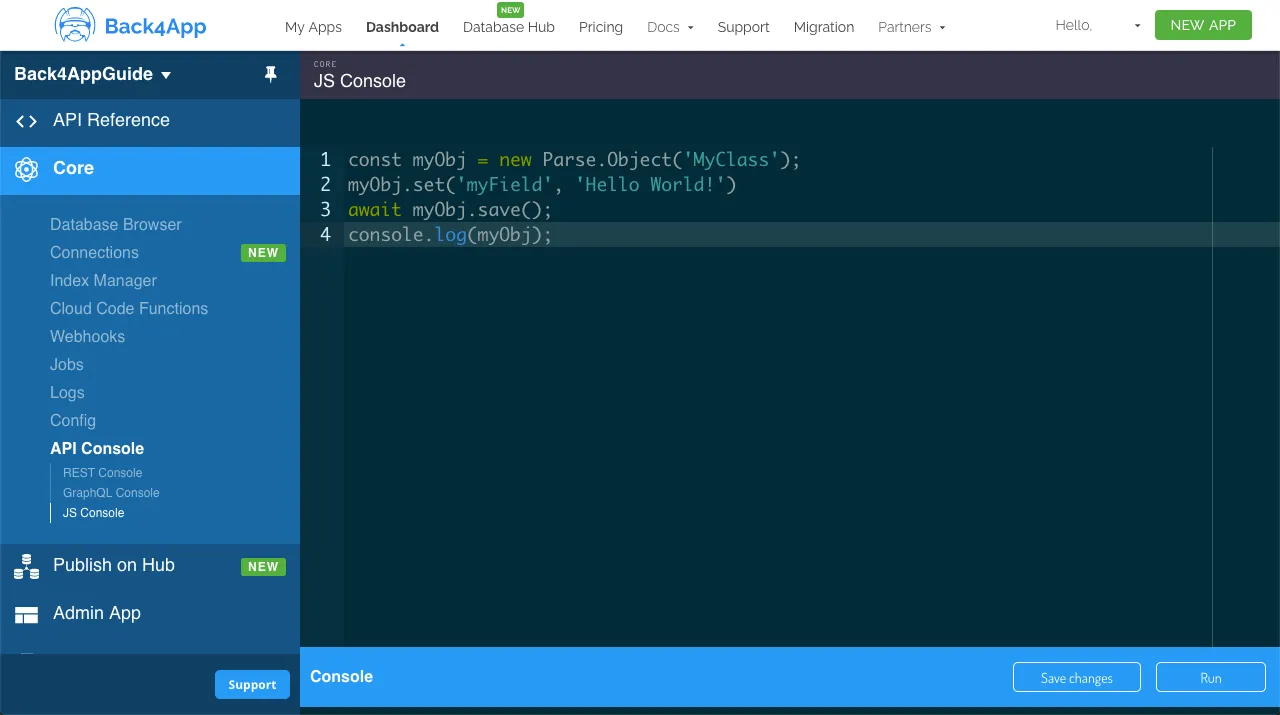
다음 내용을 사용하여 클래스를 생성하세요:
1	// Create TableA and its records
2	let TableARecord1 = new Parse.Object('TableA');
3	TableARecord1.set('FieldA', 'Value A 1');
4	TableARecord1 = await TableARecord1.save();
5
6	let TableARecord2 = new Parse.Object('TableA');
7	TableARecord2.set('FieldA', 'Value A 2');
8	TableARecord2 = await TableARecord2.save();
9
10	let TableARecord3 = new Parse.Object('TableA');
11	TableARecord3.set('FieldA', 'Value A 3');
12	TableARecord3 = await TableARecord3.save();
13
14	// Create TableB and its records, some of them linked to TableA
15	let TableBRecord1 = new Parse.Object('TableB');
16	TableBRecord1.set('FieldB', 'Value B 1');
17	TableBRecord1.set('link', TableARecord1);
18	TableBRecord1 = await TableBRecord1.save();
19
20	let TableBRecord2 = new Parse.Object('TableB');
21	TableBRecord2.set('FieldB', 'Value B 2');
22	TableBRecord2.set('link', TableARecord1);
23	TableBRecord2 = await TableBRecord2.save();
24
25	let TableBRecord3 = new Parse.Object('TableB');
26	TableBRecord3.set('FieldB', 'Value B 3');
27	TableBRecord3.set('link', TableARecord3);
28	TableBRecord3 = await TableBRecord3.save();
29
30	let TableBRecord4 = new Parse.Object('TableB');
31	TableBRecord4.set('FieldB', 'Value B 4');
32	TableBRecord4 = await TableBRecord4.save();
33
34	console.log('Success!');
3 - 데이터 쿼리하기
클래스를 채웠으니 이제 그 안에서 관계형 쿼리를 수행할 수 있습니다. 먼저 INNER JOIN, 모든 예제에서 사용할 조인 관계형 쿼리를 소개하겠습니다. 이 쿼리는 테이블 A와 B 간의 두 개의 결합된 쿼리 결과를 나타내며, Parse.Query.matchesQuery 메서드를 사용하여 특정 조건에 의해 관련된 모든 레코드를 반환합니다.
1	// JOIN query, get all records in TableA that have matching records in TableB
2	let innerQueryTableA = new Parse.Query("TableA");
3	// Limit to 10 results only for example so we don't fetch too much data
4	innerQueryTableA.limit(10);
5	let joinQueryTableB = new Parse.Query("TableB");
6	// Match the TableA query by the "link" property
7	joinQueryTableB.matchesQuery("link", innerQueryTableA);
8	// Include the "link" property so we have the content of TableA as well
9	joinQueryTableB.include("link");
10	let joinQueryResults = await joinQueryTableB.find();
11
12	// INNER JOIN, get only the records in TableA that have matching records in TableB
13	console.log("INNER JOIN");
14	console.log("TABLE A ID | FIELD A | FIELD B");
15	for (let joinResult of joinQueryResults) {
16	  console.log(
17	    `${joinResult.get("link").id} | ${joinResult
18	      .get("link")
19	      .get("FieldA")} | ${joinResult.get("FieldB")}`
20	  );
21	}
INNER JOIN SQL 쿼리 동작은 우리의 일반적인 조인 관계형 쿼리에서 달성된 것과 정확히 동일하므로, 결과를 콘솔에 출력해야 합니다. Parse.Object를 사용하면 열 이름을 사용하여 데이터를 검색하기 위해 get 메서드를 사용할 수 있습니다.
이제 LEFT OUTER JOIN을 수행하여 TableA 의 모든 레코드를 가져오고, 가능할 경우 TableB의 관계형 데이터를 보여줍니다:
1	// JOIN query, get all records in TableA that have matching records in TableB
2	let innerQueryTableA = new Parse.Query("TableA");
3	// Limit to 10 results only for example so we don't fetch too much data
4	innerQueryTableA.limit(10);
5	let joinQueryTableB = new Parse.Query("TableB");
6	// Match the TableA query by the "link" property
7	joinQueryTableB.matchesQuery("link", innerQueryTableA);
8	// Include the "link" property so we have the content of TableA as well
9	joinQueryTableB.include("link");
10	let joinQueryResults = await joinQueryTableB.find();
11
12	// LEFT OUTER JOIN, get records in TableA that have matching records in TableB and also every
13	// other TableA record
14	let queryTableA = new Parse.Query("TableA");
15	queryTableA.limit(10);
16	let queryTableAResults = await queryTableA.find();
17	console.log("LEFT JOIN");
18	console.log("TABLE A ID | FIELD A | FIELD B");
19	for (let result of queryTableAResults) {
20	  // Get all entries from JOIN query that have a link to this TableA entry
21	  let joinQueryResultsFiltered = joinQueryResults.filter(
22	    (joinQueryResult) =>
23	      joinQueryResult.get("link") !== undefined &&
24	      joinQueryResult.get("link").id == result.id
25	  );
26	  if (joinQueryResultsFiltered.length > 0) {
27	    for (let joinResult of joinQueryResultsFiltered) {
28	      let fieldBValue = joinResult.get("FieldB");
29	      console.log(`${result.id} | ${result.get("FieldA")} | ${fieldBValue}`);
30	    }
31	  } else {
32	    console.log(`${result.id} | ${result.get("FieldA")} | `);
33	  }
34	}
The RIGHT OUTER JOIN은 왼쪽의 반대이며, TableB에서 레코드를 가져옵니다.
1	// JOIN query, get all records in TableA that have matching records in TableB
2	let innerQueryTableA = new Parse.Query("TableA");
3	// Limit to 10 results only for example so we don't fetch too much data
4	innerQueryTableA.limit(10);
5	let joinQueryTableB = new Parse.Query("TableB");
6	// Match the TableA query by the "link" property
7	joinQueryTableB.matchesQuery("link", innerQueryTableA);
8	// Include the "link" property so we have the content of TableA as well
9	joinQueryTableB.include("link");
10	let joinQueryResults = await joinQueryTableB.find();
11
12	// RIGHT OUTER JOIN, get records in TableA that have matching records in TableB and also every
13	// other TableB record
14	let queryTableB = new Parse.Query("TableB");
15	queryTableB.limit(10);
16	let queryTableBResults = await queryTableB.find();
17	console.log("RIGHT JOIN");
18	console.log("TABLE B ID | FIELD A | FIELD B");
19	for (let result of queryTableBResults) {
20	  // Get all entries from JOIN query that matches this TableB entry
21	  let joinQueryResultsFiltered = joinQueryResults.filter(
22	    (joinQueryResult) => joinQueryResult.id == result.id
23	  );
24	  if (joinQueryResultsFiltered.length > 0) {
25	    for (let joinResult of joinQueryResultsFiltered) {
26	      let fieldAValue = "";
27	      if (joinResult.get("link") !== undefined) {
28	        fieldAValue = joinResult.get("link").get("FieldA");
29	      }
30	      console.log(
31	        `${result.id} | ${fieldAValue} | ${joinResult.get("FieldB")}`
32	      );
33	    }
34	  } else {
35	    console.log(`${result.id} | | ${result.get("FieldB")}`);
36	  }
37	}
마지막으로, 우리는 FULL OUTER JOIN 이 왼쪽 및 오른쪽 내부 조인의 조합입니다:
1	// JOIN query, get all records in TableA that have matching records in TableB
2	let innerQueryTableA = new Parse.Query("TableA");
3	// Limit to 10 results only for example so we don't fetch too much data
4	innerQueryTableA.limit(10);
5	let joinQueryTableB = new Parse.Query("TableB");
6	// Match the TableA query by the "link" property
7	joinQueryTableB.matchesQuery("link", innerQueryTableA);
8	// Include the "link" property so we have the content of TableA as well
9	joinQueryTableB.include("link");
10	let joinQueryResults = await joinQueryTableB.find();
11
12	// FULL OUTER JOIN, combining LEFT and RIGHT OUTER JOIN results
13	console.log("FULL JOIN");
14	console.log("TABLE ID | FIELD A | FIELD B");
15	// First print all INNER JOIN results
16	for (let joinResult of joinQueryResults) {
17	  console.log(
18	    `${joinResult.get("link").id} | ${joinResult
19	      .get("link")
20	      .get("FieldA")} | ${joinResult.get("FieldB")}`
21	  );
22	}
23	// Print LEFT JOIN leftovers
24	let outerQueryTableA = new Parse.Query("TableA");
25	outerQueryTableA.limit(10);
26	let outerQueryTableAResults = await outerQueryTableA.find();
27	// Get all entries from query that doesn't match the JOIN query results
28	let filteredOuterQueryTableAResults = outerQueryTableAResults.filter(
29	  (outerQueryTableAResult) =>
30	    joinQueryResults.find(
31	      (joinQueryResult) =>
32	        joinQueryResult.get("link") !== undefined &&
33	        joinQueryResult.get("link").id === outerQueryTableAResult.id
34	    ) === undefined
35	);
36	for (let result of filteredOuterQueryTableAResults) {
37	  console.log(`${result.id} | ${result.get("FieldA")} | `);
38	}
39	// Print RIGHT JOIN leftovers
40	let outerQueryTableB = new Parse.Query("TableB");
41	outerQueryTableB.limit(10);
42	let outerQueryTableBResults = await outerQueryTableB.find();
43	// Get all entries from query that doesn't match the JOIN query results
44	let filteredOuterQueryTableBResults = outerQueryTableBResults.filter(
45	  (outerQueryTableBResult) =>
46	    joinQueryResults.find(
47	      (joinQueryResult) => joinQueryResult.id === outerQueryTableBResult.id
48	    ) === undefined
49	);
50	for (let result of filteredOuterQueryTableBResults) {
51	  console.log(`${result.id} | | ${result.get("FieldB")}`);
52	}
결론
이 가이드의 끝에서, Back4App에서 Parse를 사용하여 관계형 쿼리를 수행하는 방법과 NoSQL 데이터베이스에서 가장 일반적인 SQL JOIN 쿼리를 에뮬레이션하는 방법을 배웠습니다.