# How to Upload and Serve Images From an App Without S3 [Full Repo]
A web page uploads a photo with one POST, gets back a public CDN URL, and references it from a row with an owner. We measured every size from 10 KB to 50 MB and found that the row's permissions guard the row, not the bytes.
URL: https://www.back4app.com/blog/upload-and-serve-images-without-s3
Published: 2026-10-05 · Tested: 2026-09-24
Tested on: Backend: Back4app, free plan, USA East · Web: one HTML page + vanilla JavaScript · Terminal: curl on macOS · Browser runs: headless Chrome 154
Publisher: Back4app Engineering
Your app needs a profile picture, or a photo on every listing, and the first search result says: create a bucket, write an IAM policy, generate a presigned URL from a server, then upload from the browser to the bucket and write the key back to your database. Four moving parts for one `` with a `Content-Type`, and the answer is a public URL served through a CDN; a row in your database references the file by name. No bucket, no policy, no signed URL, no upload service of your own, and nothing to run without managing a server.
We built it as one HTML page with 120 lines of JavaScript, plus a `curl` script that measures everything the page cannot tell you: how big, how fast, who may upload, who may read, and what happens to the bytes when the row goes. Everything below was measured on September 24, 2026, including the deleted file the CDN kept serving.
**Get the working code:** the companion repo is at [github.com/templates-back4app/image-upload-starter](https://github.com/templates-back4app/image-upload-starter) — `web/`, `cloud/main.js`, `upload-check.sh`, `hook-check.sh` and `web-check.mjs`. Run the script against your backend and you get every table in this post for your own numbers.
## What is a file upload on a managed backend, and what does the URL look like?
A file upload is one HTTP request: `POST /files/` with the file's bytes as the body, its MIME type in `Content-Type`, and the same two app headers every other call carries, plus the user's session token. The backend stores the bytes in an object store behind a CDN and answers `201` with two things, a `name` and a `url`.
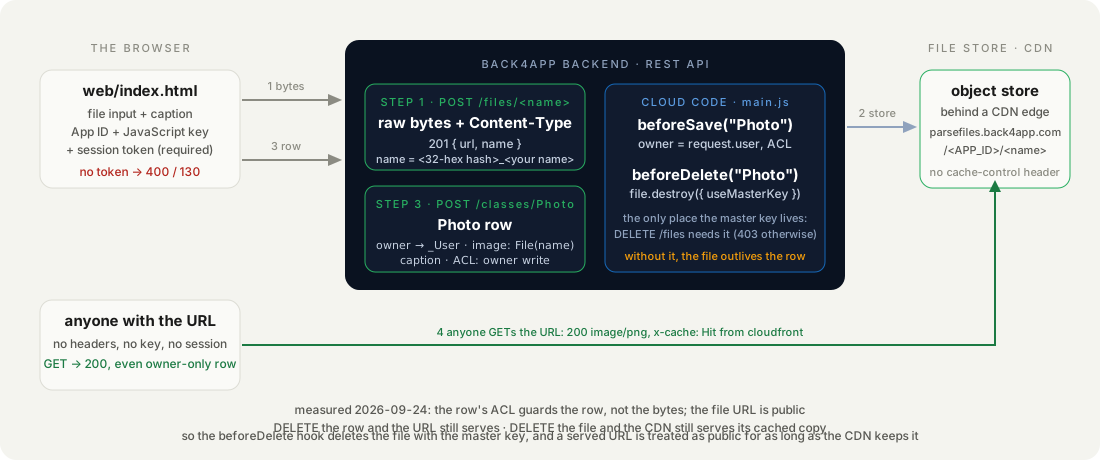
This is the whole exchange, from `upload-check.sh`, with the App ID replaced:
```bash
# Stack: bash + curl | File: upload-check.sh (step 1)
curl -s -w ' %{http_code}\n' -H "X-Parse-Application-Id: $APP_ID" -H "X-Parse-JavaScript-Key: $JS_KEY" \
-H "X-Parse-Session-Token: $SESSION_TOKEN" -H "Content-Type: image/png" \
-X POST "https://parseapi.back4app.com/files/user.png" --data-binary @user.png
```
```text
{"url":"https://parsefiles.back4app.com//70294a8c55322f2b8fa059066317d0a3_user.png","name":"70294a8c55322f2b8fa059066317d0a3_user.png"} 201
```
Three things to read off that line. The `name` is your file name behind a 32-character hash, so two users uploading `avatar.png` never collide and nobody can guess a URL from a name. The `url` is on a different host from the API, `parsefiles.back4app.com`, and its first path segment is the App ID, which is a client key and ships in your page anyway.
And there is no expiry, no signature, no token in it: whoever has the URL has the file.
We fetched a 1 MB upload with no headers at all. `200`, `content-type: image/png`, `content-length: 999762`, `server: AmazonS3`, `via: … cloudfront.net`, `x-cache: Miss from cloudfront` on the first two requests from different edge nodes and `Hit from cloudfront` from the third on.
With an `Origin` header the answer added `access-control-allow-origin: *`, so `fetch()` and `` work cross-origin, and a `Range: bytes=0-99` request got `206`. No `cache-control` header at all, which matters later.
{/* screenshot: database-files-view.jpg (if it exists) — Database → Files in the dashboard listing the stored objects by hashed name and size */}
## How do you upload an image from a web page in vanilla JavaScript?
With `fetch`, sending the `File` object itself as the body. The browser sets the length; you set `Content-Type` from `file.type`. There is no SDK in the page and no form encoding: the body is the bytes. Here is the helper and the upload function from `web/app.js`:
```javascript
// Stack: vanilla JavaScript (browser) | File: web/app.js
const BASE = window.BACKEND_URL ?? "https://parseapi.back4app.com";
const HEADERS = {
"X-Parse-Application-Id": window.APP_ID,
"X-Parse-JavaScript-Key": window.JS_KEY, // a client key: identifies the app, not the user
"X-Parse-Revocable-Session": "1",
};
// One helper for every call. `body` is a plain object (sent as JSON) or a File/Blob (sent as raw bytes with its type).
async function api(method, path, body) {
const headers = { ...HEADERS };
const token = session.get(); // sessionStorage; uploads without it get code 130
if (token) headers["X-Parse-Session-Token"] = token;
let payload;
if (body instanceof Blob) { headers["Content-Type"] = body.type || "application/octet-stream"; payload = body; }
else if (body) { headers["Content-Type"] = "application/json"; payload = JSON.stringify(body); }
const r = await fetch(BASE + path, { method, headers, body: payload });
const data = await r.json().catch(() => ({}));
if (!r.ok) throw Object.assign(new Error(data.error ?? r.statusText), { code: data.code, status: r.status });
return data;
}
// Step 1: the bytes. POST /files/ answers 201 {url, name}.
async function uploadFile(file) {
const safeName = file.name.replace(/[^\w.]+/g, "-"); // the path segment; the served name gets a hash prefix
return api("POST", `/files/${encodeURIComponent(safeName)}`, file);
}
```
The page has a signup/login form above the file input for a reason we did not plan: the first upload we tried, with only the App ID and the JavaScript key, was refused. `400`, code `130`, *File upload by public is disabled.* The same bytes with a session token: `201`. With the master key: `201`. So the page logs the user in, keeps the token in `sessionStorage`, and only then shows the input.
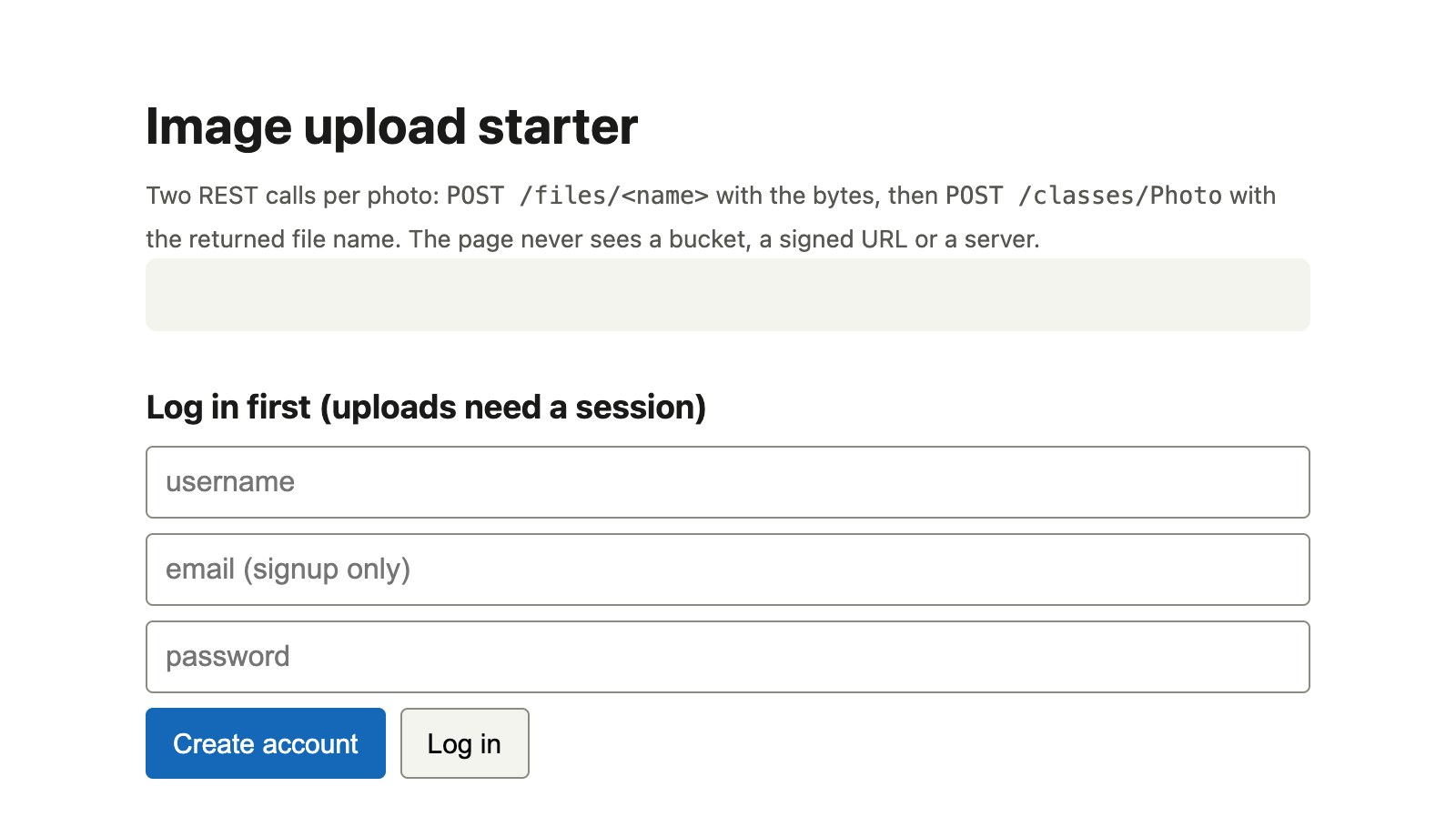
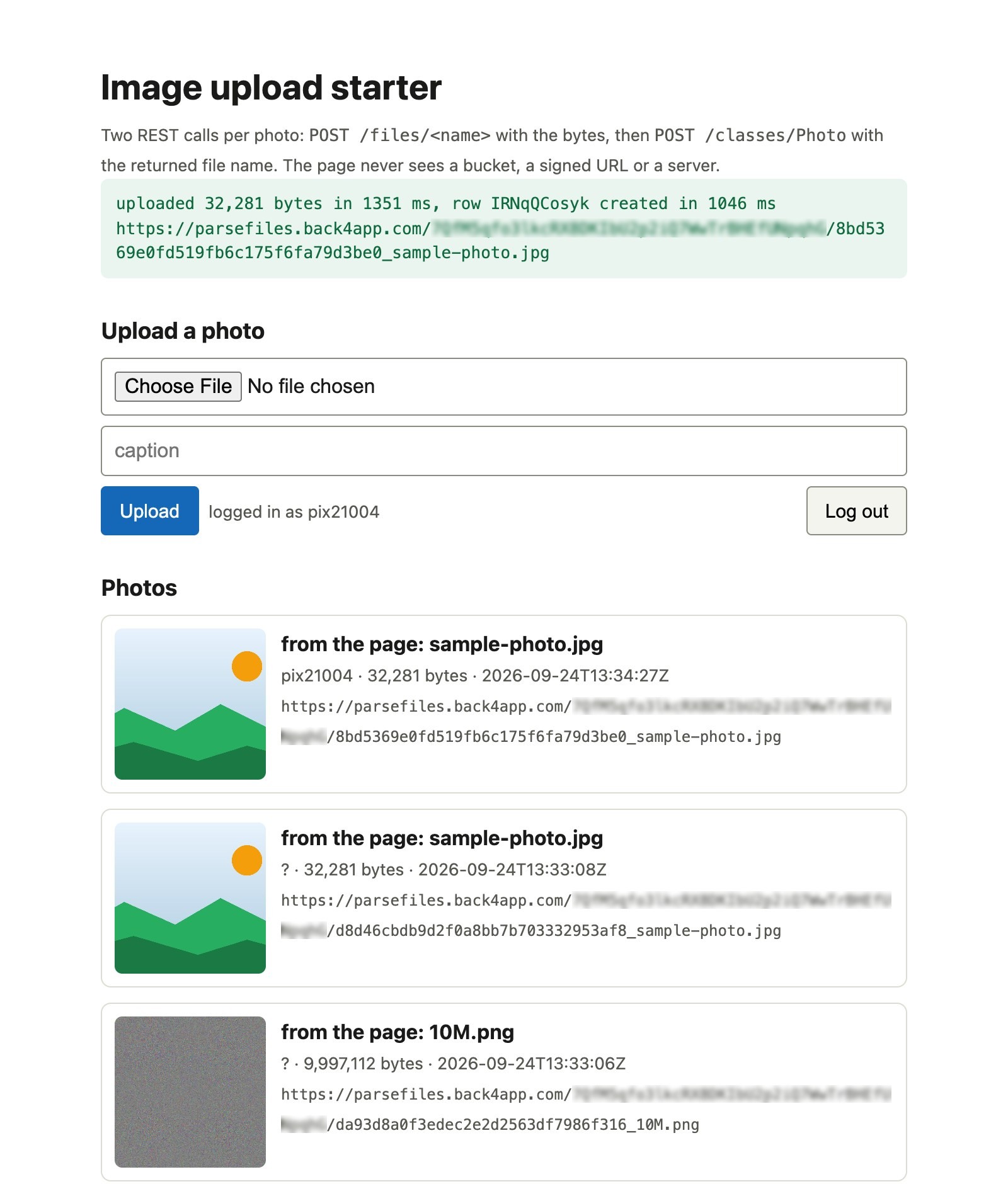
The submit handler wraps the two calls in `performance.now()` and prints both timings in the status bar, which is where the browser numbers in this post come from:
```javascript
// Stack: vanilla JavaScript (browser) | File: web/app.js (upload handler)
$("#upload").addEventListener("submit", async (e) => {
e.preventDefault();
const file = e.target.file.files[0];
const caption = e.target.caption.value.trim();
if (!file) return;
try {
status(`uploading ${file.name} (${fmt(file.size)} bytes)…`);
const t0 = performance.now();
const stored = await uploadFile(file); // 201 {url, name}
const t1 = performance.now();
const photo = await createPhoto(stored, caption, file); // 201 {objectId, createdAt}
const t2 = performance.now();
status(`uploaded ${fmt(file.size)} bytes in ${Math.round(t1 - t0)} ms, row ${photo.objectId} created in ${Math.round(t2 - t1)} ms\n${stored.url}`, "ok");
e.target.reset(); await listPhotos();
} catch (err) { status(`${err.code ?? err.status} ${err.message}`, "err"); }
});
```
We drove the page in headless Chrome with `web-check.mjs`, which signs up, puts a real file into the input through the DevTools protocol and clicks the button, so the timings are the page's own.
The page's numbers track `curl`'s within a second at every size: 1.21 s for 10 KB, 1.68 s for 100 KB, 6.84 s for 1 MB, 28.6 s for 5 MB and 54.8 s for 10 MB, with the row `POST` afterwards between 0.7 s and 2.2 s. The status bar prints both and the full URL.
## How do you link the file to a Photo row and to its owner?
With a second `POST`, to `/classes/Photo`, whose `image` field is a **File** value: `{ "__type": "File", "name": "", "url": "" }`. The backend resolves the name to the URL whenever you read the row back; the `url` in the request is there because the backend needs it once a trigger runs on the class, as measured below.
`owner` is a pointer to the logged-in user, and the ACL says who may change the row:
```javascript
// Stack: vanilla JavaScript (browser) | File: web/app.js (the row)
// Step 2: the row. A File field references the stored file by name. Send the url from step 1 as well (see the finding
// in the deletion section: with a trigger on the class, name alone answered 502).
async function createPhoto({ name, url }, caption, file) {
return api("POST", "/classes/Photo", {
caption,
image: { __type: "File", name, url },
contentType: file.type,
size: file.size,
owner: { __type: "Pointer", className: "_User", objectId: me.objectId },
ACL: { "*": { read: true }, [me.objectId]: { read: true, write: true } },
});
}
```
Listing is one `GET /classes/Photo?order=-createdAt&include=owner`, and each result carries `image: { __type: "File", name, url }`. The page puts `url` in an `` | `200 image/png 999762 bytes` |
The row hides. The file does not, because the request for the file never reaches the backend: it goes to the CDN, which knows nothing about `_User`, sessions or ACLs. Nothing in that path can be told to check anything.
That also decides what goes in the file. We uploaded a `.txt`, a `.svg`, a `.js` and a nameless blob with no `Content-Type` at all; all four came back `201`, and each URL served with exactly the type we sent. A PNG uploaded as `image/jpeg` was served as `image/jpeg`. Nothing sniffed the bytes.
The one refusal was `.html`: `130 File upload of extension html is disabled.`, which is the backend keeping a page with your App ID in its URL from hosting someone else's script.
## What happens to the file when you delete the row?
Nothing. That is the finding that shaped the rest of the repo. The owner deleted the `Photo` row, `200 {}`, and two seconds later the file URL still answered `200 image/png 999762 bytes`. The row and the file are two objects with two lifetimes, and the `File` field is a reference, not ownership.
So we tried to delete the file. `DELETE /files/` with the session token: `403 {"error":"unauthorized: master key is required"}`. With the JavaScript key: the same `403`. With the master key: `200`. Then the URL again, two seconds later: `200`, the whole file. Ten seconds later: `200`.
The origin path on the API host, `GET /files//`, said `404`; the public URL said `x-cache: Hit from cloudfront` and an `age` that kept climbing. We kept polling every two minutes. At 13:44 UTC, 32 minutes after the delete, the URL still returned `200` with `age: 1953`, and it was still doing so when we stopped watching.
| Step | Answer |
|---|---|
| owner → `DELETE /classes/Photo/` | `200 {}` |
| `GET ` 2 s later | `200 image/png`, all bytes |
| session token → `DELETE /files/` | `403 unauthorized: master key is required` |
| JavaScript key → `DELETE /files/` | `403 unauthorized: master key is required` |
| master key → `DELETE /files/` | `200` |
| `GET /files//` on the API host | `404` |
| `GET ` (CDN), 2 s / 10 s / 32 min later | `200`, `x-cache: Hit from cloudfront`, `age` rising |
| `GET ?v=2` | `200`, same cached copy |
How we measured: `upload-check.sh` steps 7 and 8, one run at 13:12 UTC on September 24, 2026, then a poller fetching the deleted URL every two minutes and logging the status, `x-cache` and `age` headers, from one laptop through one CDN edge (the `x-amz-cf-pop` header read `MIA50`).
Two consequences. A client cannot delete a file, so "remove my photo" has to run on the backend. And "deleted" means the origin forgot the object while the edge keeps serving it, with no `cache-control` header to shorten that and no query string to bust it: the `?v=2` request was a hit on the same copy.
If the file was uploaded by mistake, count on it being reachable from that edge for a while after you delete it.
## How do you make a deleted row take its file with it?
With a `beforeDelete` hook on `Photo` in Cloud Code, which is the one place that may hold the master key. It runs on the backend for every delete, whichever client asked, reads the `image` field and destroys the file before the row goes:
```javascript
// Stack: Node.js 22.x | Parse Server 7.x (Cloud Code) | File: cloud/main.js
// Rule 1: a Photo belongs to whoever uploaded it, whatever the client claimed. Anyone may read the row; only the owner
// may change or delete it. Set here, on the backend, so a curl command cannot skip it.
Parse.Cloud.beforeSave("Photo", (request) => {
const photo = request.object;
if (!photo.isNew()) return;
const owner = request.user;
if (!owner) throw new Parse.Error(Parse.Error.SESSION_MISSING, "log in to upload a photo.");
if (!photo.get("image")) throw new Parse.Error(Parse.Error.VALIDATION_ERROR, "a Photo needs an image.");
photo.set("owner", owner);
const acl = new Parse.ACL();
acl.setPublicReadAccess(true);
acl.setWriteAccess(owner, true);
photo.setACL(acl);
});
// Rule 2: deleting the row deletes the file. DELETE /files/ needs the master key, which lives here and nowhere else.
Parse.Cloud.beforeDelete("Photo", async (request) => {
const file = request.object.get("image");
if (!file) return;
try {
await file.destroy({ useMasterKey: true });
} catch (err) {
// A file that is already gone must not block the row delete; anything else should.
if (err.code !== Parse.Error.FILE_DELETE_ERROR && err.code !== Parse.Error.OBJECT_NOT_FOUND) throw err;
}
});
```
`file.destroy({ useMasterKey: true })` is the same `DELETE /files/` we sent from the terminal, issued from inside the backend with the key the client never had. The `beforeSave` above it is the other half: `owner` and the ACL come from `request.user`, so the page's own values are overwritten and a `curl` command cannot claim someone else's account.
Cloud Code deploys from the dashboard (Cloud Code → main.js → Deploy, twice on a fresh backend: the first deploy ships nothing, a behaviour we have seen on seven backends before this one). The repo's `hook-check.sh` is the proof: two users, an upload, a row created with the wrong `owner` and an open ACL on purpose, then the owner's delete and a `GET` of the file's origin path, which must be `404`.
This is the run, at 14:38 UTC on September 24, 2026, with the file deployed. `ana` uploaded, then created a row that claimed `owner` = `bob` and a public-write ACL. The row came back with `owner` = `ana` and `ACL {"*":{"read":true},"":{"write":true}}`: the client's claim was overwritten. Then she deleted it, holding nothing but her session token:
| Step | Answer |
|---|---|
| anonymous → `POST /classes/Photo` with an image | `400 {"code":206,"error":"log in to upload a photo."}` |
| ana → `POST /classes/Photo`, body claims `owner: bob`, `ACL: {"*": read+write}` | `201`, stored `owner: ana`, `ACL {"*":{"read":true},"ana":{"write":true}}` |
| bob → `PUT` / `DELETE` that row | `404 / 101 Object not found.` / `Object not found for delete.` |
| ana → `POST /classes/Photo` without an image | `400 / 142 a Photo needs an image.` |
| before the delete: origin path / CDN URL | `200` / `200 image/png` |
| ana → `DELETE /classes/Photo/sSo3LhjDmY` | `200 {}` |
| 2 s and 12 s later: origin path `GET /files//` | `404` |
| 2 s and 12 s later: CDN URL | `403`, `x-cache: Error from cloudfront` |
How we measured: `hook-check.sh`, one run at 14:38:05–14:38:39 UTC on September 24, 2026, two fresh users, `curl` from a laptop; then one master-key delete at 14:39 of a row the page had created before the hook existed, which also returned `200` and left the origin path at `404`.
The CDN line differs from the earlier finding, and the difference is instructive. This file had been fetched once through the CDN before the delete (`x-cache: Miss`), and after the delete the edge answered `403` at once.
The 1 MB file from the morning had been fetched several times (`Hit`), and its cached copy kept serving for 32 minutes after its delete. What the edge already holds, it keeps; what it has not stored, it goes back to the origin for.
The same request with the `url` from the upload response answered `400 / 206` or `201` as it should, and so did a body with no `image` at all.
Before the trigger existed, `name` alone had worked all morning: the page and the script created every row that way. Send both `name` and `url`, exactly as the upload answered; the page and both scripts now do.
The finding explains an ugly stretch we have to own. For about ten minutes after the Cloud Code deploy (14:11–14:24 UTC) the app restarted repeatedly and every Photo write answered `502`, while the dashboard's System log showed the restarts and the Error log showed nothing but our own `142` entries.
Our first proof script sent `name` alone, thirty times, and each attempt restarted the app; whether the deploy started it or our retries did, we cannot say.
## Which upload errors will you hit, and what do their bodies say?
Every refusal we met on September 24, 2026 came as an HTTP status plus a JSON body; branch on the `code`, and on the `error` text for the two that share `130`:
| What you did | HTTP | `code` | `error` |
|---|---|---|---|
| `POST /files/` with only the App ID and a client key | 400 | 130 | `File upload by public is disabled.` |
| `POST /files/probe.html` (session token) | 400 | 130 | `File upload of extension html is disabled.` |
| `DELETE /files/` with a session token or client key | 403 | – | `unauthorized: master key is required` |
| `GET /classes/Photo/` for a row your ACL cannot read | 404 | 101 | `Object not found.` |
| `GET /files//` on the API host after the file was deleted | 404 | – | `Not Found` (plain text) |
| `GET /files` with the master key (there is no listing endpoint) | 404 | – | `{"message":"Not Found","error":{}}` |
| `POST /classes/Photo` with `image: {"__type":"File","name":…}` and no `url`, once a trigger exists on the class | 502 | – | `Bad Gateway` (plain text), then `/health` 502 for a second |
| `POST /classes/Photo` without a session, hook deployed | 400 | 206 | `log in to upload a photo.` |
| `POST /classes/Photo` without an `image`, hook deployed | 400 | 142 | `a Photo needs an image.` |
**`130 File upload by public is disabled.`** is the one your form will hit first. The fix is a session, not a key: sign the user up or log them in, send `X-Parse-Session-Token` with the `POST`, and keep the master key out of the page. The starter shows the file input only after `GET /users/me` has accepted the token.
**`130 File upload of extension html is disabled.`** is by name, not by type: the same bytes as `probe.txt` with `Content-Type: text/html` were accepted. Rename or refuse in the page, and do not expect the backend to reject a script by content: `probe.js` went through as `text/javascript`.
**`502 Bad Gateway`** on a Photo save, with the app briefly unhealthy after it, is the File-without-`url` case from the deletion section. Send `{"__type":"File","name","url"}` exactly as the upload answered, and never retry a `502` in a loop: each one restarts the app.
**A `201` with the wrong `Content-Type`** is the error you will not see. The URL serves whatever type you sent, so read `file.type` from the `File` object and refuse anything that is not `image/*` in the page before you upload, which is what the `accept="image/*"` on the input does for a human and a two-line check does for a script.
## When do you want object storage after all?
When the file is the product, or the URL must expire. Three cases where a bucket you administer, or a dedicated file service, beats the files endpoint:
- **Very large files.** Our 25 MB upload took 130 s in one request on a slow link, with no resume, and 50 MB never got an answer. Video, raw photos and exports want multipart, resumable uploads with progress per part, which a bucket's API and a browser client library give you and a single `POST` does not.
- **Signed, expiring URLs.** A file here is public until deleted, and cached beyond that. Paid downloads, medical images, contracts, anything where the URL must stop working at a time you choose, need signed URLs with an expiry, which means an object store and a server or function that signs.
- **Transforms on the fly.** Thumbnails, resizing, format conversion, watermarks: an image CDN does that from a URL parameter. Here you upload the sizes you need (the page can resize on a `` before the `POST`) and reference each from the row.
For avatars, listing photos, attachments and anything a user is happy to have on a public URL, the two calls above are the whole feature, and the part you own is 32 lines of Cloud Code.
## What would you add to the image upload starter next?
- **Resize in the browser.** Draw the picture on a `` at 1600 px, `toBlob("image/webp", 0.85)`, and upload that: our 5 MB phone photo becomes a 300 KB upload, and the time table above shrinks with it.
- **Progress.** `fetch` cannot report upload progress; `XMLHttpRequest` can. Swap `uploadFile` for an `xhr.upload.onprogress` version and show a bar, which the 57 s for 10 MB earns.
- **A cleanup job.** Files uploaded whose row creation failed (the second `POST` can fail after the first succeeded) are orphans nobody references. A scheduled Cloud Job that lists `Photo` rows and deletes unreferenced files with the master key keeps the 1 GB honest.
- **Private files.** A `Document` class with an owner-only ACL and a Cloud Function `download(id)` that checks `request.user` and returns the bytes with the master key: the pattern from the counter-case, on this backend.
- **Users first, permissions next.** The page needs accounts because uploads need a session: that is [the auth post](https://www.back4app.com/blog/add-signup-login-password-reset-without-an-auth-server). Who may read and write the `Photo` rows, with a probe you can rerun, is [the lockdown post](https://www.back4app.com/blog/lock-down-a-backend-your-frontend-talks-to).