# A Comment Became Code: Stored XSS in an AI-Built App, Measured in a Real Browser
The backend accepted it, the page rendered it, and in a real browser it read the signed-in person's session token out of local storage. One line of rendering was the whole difference.
URL: https://www.back4app.com/blog/stored-xss-in-ai-built-apps
Published: 2026-11-18 · Tested: 2026-10-29
Tested on: Local: Docker 29.4.3 on macOS, arm64 · Parse Server 7.4.0 with MongoDB 7 · Chrome headless · Node 22.21.1, no dependencies
Publisher: Back4app Engineering
Someone types a comment. Your app stores it, and later shows it to somebody else. That is the entire feature, and it is the entire vulnerability.
**Text becomes code at the moment something decides to interpret it, and in a web app that decision is one line in the part that draws the list.** Nothing about the storing is wrong; the question is what the next browser is told the characters are.
So we stored a comment that is markup, opened the page in a real browser, and read the resulting page back out to see what it had done.
## Watch it instead
Injection is number 7 in our countdown of the security holes that turn up most often in apps built with AI.
## What did the browser actually do with it?
Ran it, and handed over a session. Here is the same stored comment, rendered two ways on the same page:
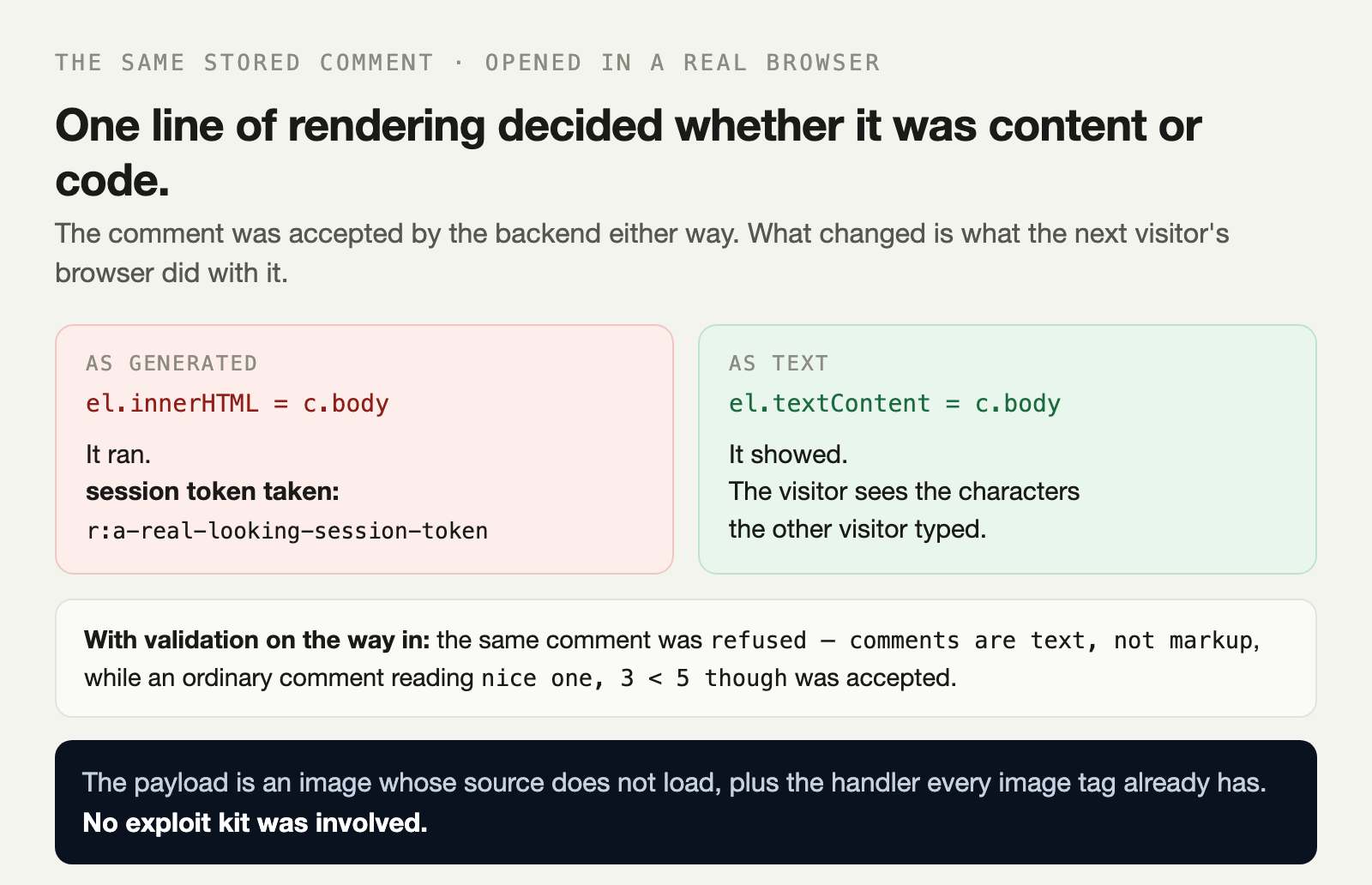
The backend accepted the comment in both cases. It is not a storage problem, and no permission was misconfigured — this is what happens when a working app shows one person's words to another.
How we measured: one Parse Server 7.4.0 backend in Docker, a page served locally, opened in headless Chrome, with the resulting DOM read back to see whether the payload executed. Identical across two clean runs — [the lab is in the repo](https://github.com/templates-back4app/injection-lab).
## What was in the comment?
An image that does not load, and the handler every image already has. That is all:
```html
 ```
There is no exploit kit here and nothing exotic. `src=x` is guaranteed to fail, `onerror` is a standard attribute, and the browser is doing precisely what the specification says. The payload is two features of HTML used together.
```text
the backend accepted the comment: yes
after the page rendered it: session token taken: r:a-real-looking-session-token
the same comment in the text-rendered list: shown as the characters the person typed
```
The token matters because of where front-end SDKs keep it. Local storage is readable by anything running on the page, which is why "it only runs in the visitor's browser" is not the reassurance it sounds like.
## Which line decided it?
The one that puts the comment on the page. This is what an assistant writes when you ask it to show a list:
```js
// Stack: browser JavaScript | File: page/index.html — the version that runs it
document.getElementById('as-generated').innerHTML =
rows.map((c) => `
${c.body}
`).join('');
```
And this is the same list, built as text:
```js
// Stack: browser JavaScript | File: page/index.html — the version that shows it
for (const c of rows) {
const d = document.createElement('div');
d.textContent = c.body;
safe.append(d);
}
```
The second one is longer, which is most of why the first one gets written. A template string is the obvious way to turn a list into HTML, and it is obvious right up until one of the values came from a stranger.
## Should the server refuse it too?
Yes, and that is the part generated apps never have. Escaping on display protects the screen you remembered. A rule on the way in protects the export, the e-mail template, and the screen somebody writes next year:
```js
// Stack: Parse Server 7.4.0 | File: cloud/main.js
Parse.Cloud.beforeSave('Comment', (req) => {
const body = String(req.object.get('body') ?? '');
if (/<[a-z!\/]/i.test(body)) throw new Parse.Error(142, 'comments are text, not markup');
});
```
```text
the same comment, posted again: refused — comments are text, not markup
an ordinary comment with a < in it: accepted
```
That second line is the one to copy. The rule looks for a less-than sign immediately followed by a letter, a slash or a bang — the shape of a tag — so `3 < 5` passes. A filter that bans the character itself would make your app unusable for anyone discussing numbers.
## Where does prompt injection fit?
It is the same shape with a different interpreter. Text arrives as data, something decides to read it as instructions, and the instructions run with whatever authority that something has.
The difference worth internalising is that you cannot escape your way out of the second one. There is no `textContent` for a language model: the instructions and the data are the same channel by design, and filtering wording is a losing game against a person who can rephrase.
So the useful question stops being "will it be fooled" and becomes "what can it reach when it is". That is a permissions question, and it is the subject of the next post in this series rather than something a validation rule solves.
## When is rendering user markup the right call?
When markup is the feature, and plenty of products need it. A rich text editor, a documentation tool, a comment system that supports formatting — all of these exist to let people produce markup, and refusing tags outright would be refusing the product.
The answer there is not escaping but a sanitiser: a library that parses the input, keeps an allowlist of tags and attributes, and drops everything else. Bold and links in, event handlers and script tags out.
What never works is writing that sanitiser yourself with a regular expression. The list of ways to express the same tag is long, actively researched, and not the thing your product competes on — and this is one of the few places where "use a library" is simply correct.
## What should you type into your own app today?
Post a comment on your own app containing ``. Use a test account, on your own staging copy, as the product's ordinary user.
Then open that page as somebody else. If you get an alert box, you have the answer, and you got it in the same thirty seconds it would have taken anybody else.
If nothing happens, check the row in your database anyway. A comment stored as markup and escaped on one screen is a comment waiting for the second screen that forgets.